2016 SKODA KODIAQ bulb
[x] Cancel search: bulbPage 6 of 344

Do-it-yourself
Emergency equipment and self-help290
Emergency equipment
290
Changing a wheel
291
Puncture repair kit
295
Jump-starting
297
Towing the vehicle
298
Remote control and removable light -
replacing the battery/batteries
300
Emergency unlocking / locking of doors
302
Replacing windscreen wiper blades
303
Fuses and light bulbs
305
Fuses
305
Bulbs
308
Technical data
Technical data
313
Basic vehicle data
313
Vehicle-specific details per engine type
318
Index
4Table of Contents
Page 40 of 344

Other incidents
The illumination of the warning light can have the following reasons.
▶ The vehicle is loaded on one side. Distribute the load evenly.
▶ The wheels of one axle are loaded more heavily (e.g. when towing a trailer or
when driving uphill or downhill).
▶ Snow chains are mounted.
▶ A wheel has been changed.
CAUTION
Under certain circumstances (e.g. sporty style of driving, wintry or unpaved
roads) the warning light can be delayed or does not light up at all.
Brake linings
Read and observe
on page 34 first.
illuminates - the brake pads are worn.
▶ You can drive on, exercising appropriate caution. Seek assistance from a spe-
cialist garage immediately.
Fuel reserve
Read and observe
on page 34 first.
illuminates – the fuel level in the fuel tank is at the reserve level (approxi-
mately 6 litres).
An audible signal sounds as a warning. ▶ Please refuel » page 275.
Note
The text in the display goes out after refuelling and driving a short distance.
Lane Departure Warning (Lane Assist)
Read and observe
on page 34 first.
The warning lights
indicates the state of the Lane Assist system.
More information about the Lane Assist System » page 254.
Turn signal system
Read and observe
on page 34 first.
flashes – the left turn signal is turned on.
flashes – the right turn signal is turned on.
If there is a fault in the turn signal system, the warning light flashes at twice
its normal rate (does not apply when towing).
When the hazard warning light system is switched on, this will cause all of the turn signal lights as well as both warning lights to flash.
Trailer turn signal lights
Read and observe
on page 34 first.
flashes – the trailer turn signal lights are switched on.
If a trailer is hitched and the warning light is not flashing, one of the trailer
turn signal lights has failed.
▶ Check the trailer bulbs.
Fog lights
Read and observe
on page 34 first.
illuminates – the fog lights are switched on.
Speed regulating system / speed limiter
Read and observe
on page 34 first.
illuminates - the vehicle speed is limited by the speed regulating system or
the adaptive cruise control or by the speed limiter.
flashes – the speed set with the speed limiter has been exceeded.
Brake pedal (automatic gearbox)
Read and observe
on page 34 first.
lights up – apply the brake.
38Operation
Page 100 of 344
›To
use , fold up the cover of the socket in the direction of arrow » Fig. 118 and
plug the electrical appliance plug into the socket.
An automatic deactivation of the socket can take place, for example, for the
following reasons. ▶ Excessive current.
▶ Low state of charge of the battery.
▶ High outlet temperature.
If disabling reasons no longer exist, the automatic activation of the socket can
be done.
Should no automatic activation of the socket take place, the connected devi-
ces must be disconnected from the power outlet and reconnect after a short
time.WARNING■ Make sure that no liquid or moisture enters into the socket - it can be fa-
tal! If fluid does manage to get into the power socket, completely dry out
the socket before reuse.■
The child lock on the power socket is unlocked when using adapters and
extension cables which carry volts – risk of injury!
■
Do no insert any objects (e.g. knitting needles) into the contacts of the
power socket – risk of death!
CAUTION
■ The power socket can only be used for connecting approved electrical acces-
sories with a two-pin 230V plug, with a total power uptake of up to 150 watt.■
The plug of the electrical appliance must be plugged in up to the stop, other-
wise the child safety lock can be unlocked and the socket may be activated but
the electric appliance is still not receiving power.
■
Do not connect bulbs with neon tubes in the socket - there is a risk of dam-
aging the lamp.
■
For appliances with an independent power source (e.g. such as notebooks),
first connect the power source itself and only after that connect the appliance.
Ashtray and cigarette lighter
Introduction
This chapter contains information on the following subjects:
Ashtray
98
Cigarette lighter
99
The ashtray can be used for disposing of ash, cigarettes, cigars and the like etc
WARNINGNever place hot or flammable objects in the ashtray – risk of fire!
Ashtray
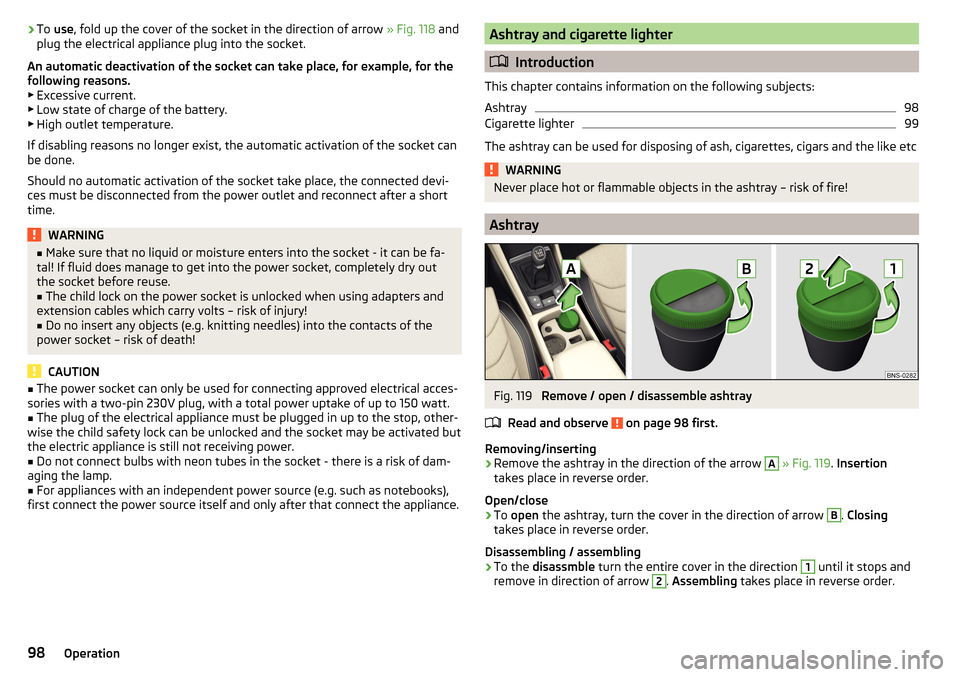
Fig. 119
Remove / open / disassemble ashtray
Read and observe
on page 98 first.
Removing/inserting
›
Remove the ashtray in the direction of the arrow
A
» Fig. 119 . Insertion
takes place in reverse order.
Open/close
›
To open the ashtray, turn the cover in the direction of arrow
B
. Closing
takes place in reverse order.
Disassembling / assembling
›
To the disassmble turn the entire cover in the direction
1
until it stops and
remove in direction of arrow
2
. Assembling takes place in reverse order.
98Operation
Page 307 of 344

Fuses and light bulbs
Fuses
Introduction
Fig. 367
Blown fuse
This chapter contains information on the following subjects:
Fuses in the dashboard - LHD
305
Fuses in the dashboard - RHD
306
Fuse assignment in the dashboard
306
Fuses in the engine compartment
307
Fuse assignment in engine compartment
308
Individual electrical circuits are protected by fuses. A blown fuse is recognisa-
ble by the molten metal strip » Fig. 367.
WARNINGAlways read and observe the warnings before completing any work in the
engine compartment » page 278.
CAUTION
■
Replace the faulty fuse with a new one of the same amperage.■If a newly inserted fuse blows after a short time, then seek the assistance of
a specialist garage.■
Do “not repair” the fuses and do not replace them with stronger ones - it can
cause a fire and could damage parts of the electrical system.
Note
■ We recommend always carrying replacement fuses in the vehicle.■There can be several power consuming devices for one fuse. Multiple fuses
may exist for a single power consuming device.Fuses in the dashboard - LHDFig. 368
Storage compartment on the driver's side
Read and observe
and on page 305 first.
In left-hand drive, the fuse box is located on the driver side behind the storage compartment.
Replacing fuses
›
Remove the ignition key, turn off the lights and all electrical consumers.
›
Open the storage box on the driver's side.
›
Press the latch
A
in direction of arrow
1
» Fig. 368 open the compartment
in the direction of arrow
2
.
›
Remove the plastic clip under the cover of the fuse box in the engine com-
partment » Fig. 371 on page 307 .
›
Use the clip to pull out the faulty fuse and then insert a new fuse.
›
Stow the clip back in the original position.
›
Close the compartment by pressing in arrow direction
3
until you hear it
click.
305Fuses and light bulbs
Page 309 of 344

No.Consumer19KESSY20SCR21All-wheel drive22Towing hitch23Panoramic slide / tilt sunroof24Light - right25Central locking- front and rear door left, power window - left, exte-
rior mirrors left - heating, fold-in function, setting the mirror surface26Heated front seats27Interior lighting28Trailer device - electrical outlet29Not assigned30Shock absorber setting31Not assigned32Parking aid (Park Assist)33airbag34Air conditioning, reversing light switch, mirror with automatic dim-
ming, seat heating, parking brake, light switches, bar with switches,
electric auxiliary heating35Diagnostic connector, camera, radar36AFS headlights - right37AFS headlights - left38Trailer device - electrical outlet39Central locking- front and rear door right, power window - right, ex-
terior mirrors right - heating, fold-in function, setting the mirror sur-
face4012-volt power outlets41Right side belt tensioner42Luggage compartment cover lock, headlight washers, front and rear
window washer43Music amplifier44Trailer device - electrical outlet45Electrical operation of driver's seatNo.Consumer46230-Volt power socket47Rear window wiper48“Blind spot” detection49Engine starting, clutch pedal switch50Opening the boot lid51Heating of the rear seats52Heated front seats53Heated rear window
Fuses in the engine compartment
Fig. 371
Fuse box cover: Removing cover / plastic clips for fuses
Read and observe
and on page 305 first.
Replacing fuses
›
Remove the ignition key, turn off the lights and all electrical consumers.
›
Press together the lock buttons of the cover simultaneously in the direction
of arrow
1
and remove the cover in the direction of arrow
2
» Fig. 371 .
›
Remove the cover in the direction of the arrow
3
.
›
Remove the plastic clip under the cover of the fuse box » Fig. 371.
›
Use the clip to pull the fuse out, then insert a new fuse.
›
Replace the clamp in the original position.
›
Replace the cover, push the lock buttons of the cover together and lock.
CAUTION
The cover of the fuse box in the engine compartment must always be used
correctly, otherwise water may penetrate into the fuse box – there is a danger
of damage to the vehicle!307Fuses and light bulbs
Page 310 of 344

Fuse assignment in engine compartmentFig. 372
Fuses
Read and observe and on page 305 first.
No.Consumer1ESC, parking brake2ESC3Engine control system4Radiator fan, control valve for fuel pressure, electric auxiliary heat-
ing, engine components5Ignition, fuel pump, oil level and oil temperature sensor, engine
components6Brake sensor7Coolant pump, exhaust flap, engine components8Lambda probe9Coolant pump, ignition, preheating unit, air flow meter, engine com-
ponents10Fuel pump11Additional electrical heating, heated windscreen12Electrical auxiliary heating system13Automatic gearbox14Not assigned15Horn16Ignition17ESC, engine control unit, main relay coil18Databus, battery data moduleNo.Consumer19Windscreen wipers20Anti-theft alarm21Not assigned22Engine control system23Starter24Electrical auxiliary heating system31Not assigned32Not assigned33SCR34Not assigned35Not assigned36Not assigned37Aux. heating38Not assigned
Bulbs
Introduction
This chapter contains information on the following subjects:
Bulb arrangement in the headlights
309
Change bulb for low beam (halogen headlight)
309
Bulb for turn signal switch (halogen headlight)
310
Replace bulb for main beam and side light switch (halogen headlight)
310
Replace bulb for fog lights (halogen headlight)
311
Removing/installing tail light
311
Replace bulb for indicator light in the rear light
312
For this reason, we recommend having bulbs replaced by a specialist garage or
seeking other expert help in the event of any uncertainties.
▶ Switch off the ignition and all of the lights before replacing a bulb.
▶ Faulty bulbs must only be replaced with the same type of bulbs. The designa-
tion is located on the light socket or the glass bulb.
We recommend having the headlight settings checked by a specialist garage
after replacing a bulb in the low, high or fog beam.
308Do-it-yourself
Page 311 of 344

In the case of failure of an LED lamp or an LED, visit a specialist garage.WARNING■Always read and observe the warnings before completing any work in the
engine compartment » page 278.■
Accidents can be caused if the road in front of the vehicle is not suffi-
ciently illuminated and the vehicle cannot or can only be seen with difficul-
ty by other road users.
■
H7 and H8 bulbs are pressurised and may burst when changing the bulb -
risk of injury! We therefore recommended wearing gloves and safety
glasses when changing a bulb.
CAUTION
■ Do not take hold of the glass bulb with naked fingers (even the smallest
amount of dirt reduces the working life of the light bulb). Use a clean cloth,
napkin, or similar.■
The cap of the filament bulb must always be seated correctly in the head-
light, otherwise this may allow water and debris to enter the headlight - risk of
damage to the headlights.
Note
■ This Owner's Manual only describes the replacement of bulbs where it is pos-
sible to replace the bulbs on your own without any complications arising. Other
bulbs must be replaced by a specialist garage.■
We recommend that a box of replacement bulbs always be carried in the ve-
hicle.
Bulb arrangement in the headlights
Fig. 373
Left headlight
Read and observe and on page 309 first.
The vehicle is equipped with headlights with halogen bulbs or LED light sour-
ces.
Bulb arrangement » Fig. 373
Low beams with halogen bulb / LED light sources
Flashing
Main beam and side lights
Fog lights
Change bulb for low beam (halogen headlight)
Fig. 374
Changing the bulb for the low beam
Read and observe
and on page 309 first.
›
Remove the protective cap
A
» Fig. 373 on page 309 .
›
Turn the holder with the bulb in the direction of arrow
1
» Fig. 374 .
›
Remove the holder with the bulb in the direction of arrow
2
.
›
Remove the bulb from the holder in the direction of the arrow
3
.
›
Insert a new bulb into the connector so that the lug
A
on the connector
snaps into the groove on the bulb.
›
Insert the connector with the new bulb into the headlight in the opposite di-
rection to the arrow
2
.
›
Turn the connector with the new bulb in the opposite direction to the arrow
1
until it stops.
›
Fit the protective cap
A
» Fig. 373 on page 309 .
ABCD309Fuses and light bulbs
Page 312 of 344
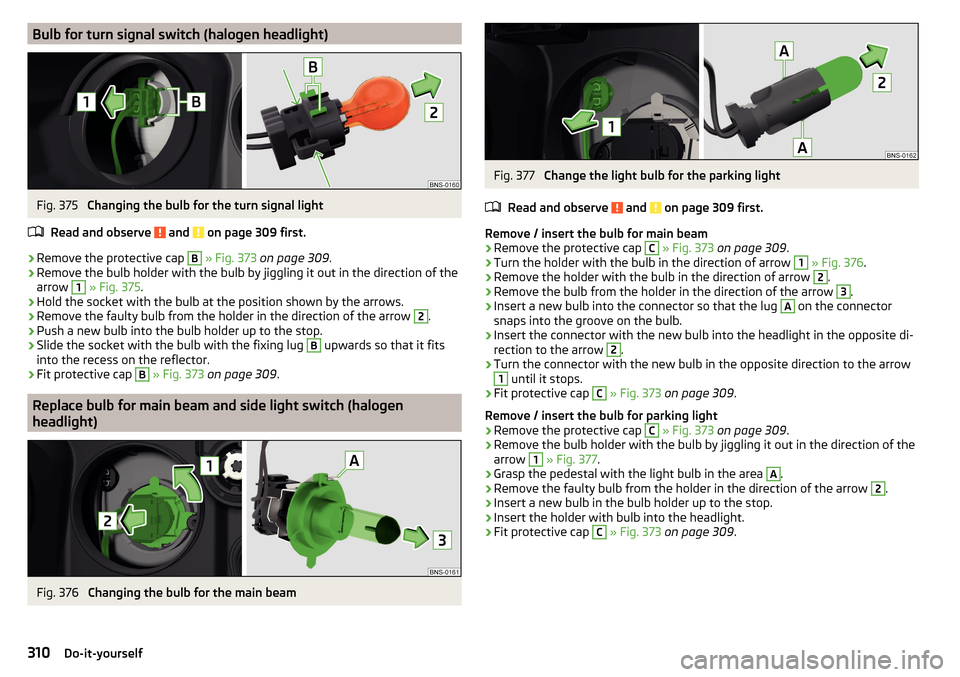
Bulb for turn signal switch (halogen headlight)Fig. 375
Changing the bulb for the turn signal light
Read and observe
and on page 309 first.
›
Remove the protective cap
B
» Fig. 373 on page 309 .
›
Remove the bulb holder with the bulb by jiggling it out in the direction of the
arrow
1
» Fig. 375 .
›
Hold the socket with the bulb at the position shown by the arrows.
›
Remove the faulty bulb from the holder in the direction of the arrow
2
.
›
Push a new bulb into the bulb holder up to the stop.
›
Slide the socket with the bulb with the fixing lug
B
upwards so that it fits
into the recess on the reflector.
›
Fit protective cap
B
» Fig. 373 on page 309 .
Replace bulb for main beam and side light switch (halogen
headlight)
Fig. 376
Changing the bulb for the main beam
Fig. 377
Change the light bulb for the parking light
Read and observe
and on page 309 first.
Remove / insert the bulb for main beam
›
Remove the protective cap
C
» Fig. 373 on page 309 .
›
Turn the holder with the bulb in the direction of arrow
1
» Fig. 376 .
›
Remove the holder with the bulb in the direction of arrow
2
.
›
Remove the bulb from the holder in the direction of the arrow
3
.
›
Insert a new bulb into the connector so that the lug
A
on the connector
snaps into the groove on the bulb.
›
Insert the connector with the new bulb into the headlight in the opposite di-
rection to the arrow
2
.
›
Turn the connector with the new bulb in the opposite direction to the arrow
1
until it stops.
›
Fit protective cap
C
» Fig. 373 on page 309 .
Remove / insert the bulb for parking light
›
Remove the protective cap
C
» Fig. 373 on page 309 .
›
Remove the bulb holder with the bulb by jiggling it out in the direction of the
arrow
1
» Fig. 377 .
›
Grasp the pedestal with the light bulb in the area
A
.
›
Remove the faulty bulb from the holder in the direction of the arrow
2
.
›
Insert a new bulb in the bulb holder up to the stop.
›
Insert the holder with bulb into the headlight.
›
Fit protective cap
C
» Fig. 373 on page 309 .
310Do-it-yourself