2016 SKODA KODIAQ bulb
[x] Cancel search: bulbPage 313 of 344

Replace bulb for fog lights (halogen headlight)Fig. 378
Remove plastic cover
Fig. 379
Changing light bulbs for fog lights
Read and observe
and on page 309 first.
To replace the bulb for the fog lists, remove the cover of the front wheel arch.
Remove the cover
›
Set the front wheels so that the respective cover in the front wheel arch is
accessible » Fig. 378.
›
Insert the clamp for removing the full wheel covers into the recess in the
cover.
›
Remove the cover by pulling the hook in the direction of arrow
1
.
Replacing the light bulb
›
Remove the protective cap
D
» Fig. 373 on page 309 .
›
Turn the socket with the bulb to the stop in the direction of the arrow
2
» Fig. 379.
›
Remove the socket with the bulb in the direction of arrow
3
.
›
Press the latches on the connector in the direction of arrow
4
.
›
Remove the key in the direction of the arrow
5
.
›Insert the connector on the new base with the bulb.›Insert the new bulb into the headlight and turn counter to the direction of
arrow 2
as far as the stop.
Fit protective cap
D
» Fig. 373 on page 309 .
Insert cover
›
Insert and push the cover into the corresponding opening » Fig. 378.
The cover must engage securely.
Removing/installing tail light
Fig. 380
Remove light / pull out connector
Read and observe
and on page 309 first.
Removing
›
Open the boot lid.
›
Remove the respective grille
A
in direction of arrow
1
» Fig. 380 .
›
Unscrew bolt
B
in the direction of arrow
2
.
›
Hold the light and carefully remove in the direction of arrow
3
.
›
Press the latch
C
on the holder in the direction of the arrow
4
.
311Fuses and light bulbs
Page 314 of 344
›Press the latch in the direction of arrow 5 and pull out the holder in the di-
rection of arrow 6.
Fitting›
Slide the plug into the light in the opposite direction of arrow
6
. The lock on
the plug must be inserted securely.
›
Insert the light with the openings
E
onto the studs
F
» Fig. 381 on
page 312 in the body and carefully press in the light » .
›
Screw in bolt
B
in the opposite direction to arrow
2
» Fig. 380 .
›
Insert the grille
A
in the associated opening in the lower area and press in
against the direction of arrow
1
.
CAUTION
■ When re-inserting the light, ensure that the wiring harness between the
body and the light is not jammed and the seal D » Fig. 381 on page 312 is cor-
rectly inserted - otherwise there is a risk of water ingress and damage to the
electrical installation.■
Ensure that the vehicle paintwork and the tail lamp are not damaged when
removing and installing the lamp.
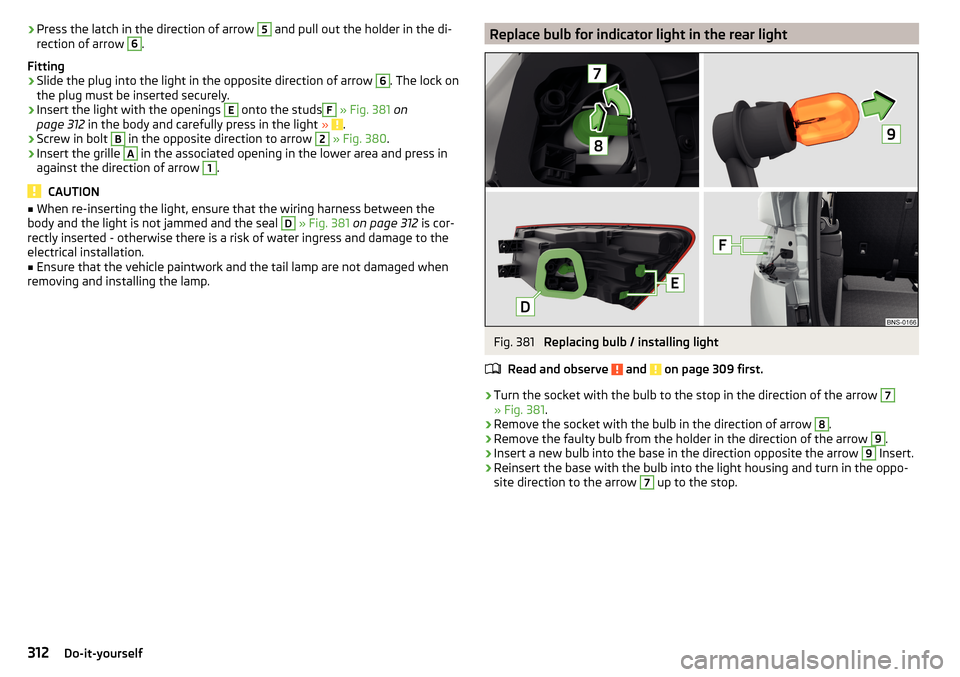
Replace bulb for indicator light in the rear lightFig. 381
Replacing bulb / installing light
Read and observe
and on page 309 first.
›
Turn the socket with the bulb to the stop in the direction of the arrow
7
» Fig. 381 .
›
Remove the socket with the bulb in the direction of arrow
8
.
›
Remove the faulty bulb from the holder in the direction of the arrow
9
.
›
Insert a new bulb into the base in the direction opposite the arrow
9
Insert.
›
Reinsert the base with the bulb into the light housing and turn in the oppo-
site direction to the arrow
7
up to the stop.
312Do-it-yourself
Page 324 of 344

Manual shifting on the multifunction steeringwheel211
Selector lever lock210
Start and drive211
Tiptronic211
Warning light39
Automatic switch-off of Infotainment125
Automatic transmission209
Selector lever emergency release303
AUX90, 148
Settings134
Auxiliary heating (auxiliary heating and ventila- tion)
114
In infotainment115
set to115
Auxiliary heating (heating and ventilation) Radio remote control
116
Avoiding damage to your vehicle213
B
Basstöner
130
Battery Changing batteries for the removable light
302
Changing in key300, 301
Replace the battery in the remote control in the auxiliary heating
301
Belts15
Belt tensioners18
reversible18
Blanket96
Bluetooth A2DP / AVRCP
132
Name132
on / off132
Paired external devices132
Profile160
rSAP163
Set139
set to132, 134
Set to132
Switch on/off139
Update129, 133
Updates139
Visibility132, 139
Bluetooth Player149
Bluetooth® update160
bolero external module
123
infotainment Description122
Bonnet279
Boot Class N1 vehicles
106
Boot lid59
Automatic locking59
Contactless open/close61
Open/close58, 60
See boot lid58
Boot lid contactless open/close61
Brake Assist (HBA)217
Brake booster206
Brake fluid282
Check282
specification282
Brake linings Warning light
38
Brake pads new
206
Brake pedal (automatic gearbox) Warning light
38
Brakes Brake booster
206
Brake fluid282
Braking and stabilisation systems215
Information on braking206
Parking brake206
Run in212
Warning light35
Brake system215
breakdown call118
Breakdown call164
Broadcasting141, 142
Bulbs Replacing
308
Buttons on the driver door Electric windows
62
C
Call list Call list
166
CAR201
Car battery Automatic consumer shutdown
283
Check condition284
Cover284
Disconnecting and reconnecting285
Replacing285
Winter operation284
Car care Exterior
273
Interior273
Car cleaning Exterior
273
Windscreens273
Car computer see multifunction display
46
Care and maintenance266
Care Connect118
breakdown call118
emergency call118
information call118
Cargo element105
Carrier108
Carstick171
CD147
cellphone Disclaimer
120
Central locking52
Problems57
Central locking button54
322Index
Page 329 of 344

L
L-band
134
Lamp failure41
Lamps Warning light
41
Lane Assist38, 254
Malfunctions256
Settings in Infotainment254
Lane Departure Warning Activation / deactivation
232, 256
Operation255
Lane recommendation193
Language characters131
Last destinations184
Latitude178
LEAVING HOME69
LED headlights68
Lever ACC
245
Cruise control240
Front Assist250
Operation of the information system45
Speed limiter with ACC243
Speed limiter with CCS242
Speed limiter with GRA242
Turn signal/main beam67
Windscreen wipers74, 75
Liability for defects5
Light65
Cockpit71
COMING HOME / LEAVING HOME69
Daytime running lights66
Flash67
Fog lights/rear fog light69
Fog lights with CORNER function69
Hazard warning light system70
Headlight cleaning system75
LED headlights68
Light Assist68
Parking light70
Replacing bulbs308
Turn signal/main beam67
Light Assist68
See Light Assist68
Lighting Ambient lighting
72
Entry space70
Interior lighting71
Luggage compartment100
Lights Automatic driving light control
67
Dipped beam66
Driving abroad70
Headlight range control66
Parking lights66
Switching on and off66
Warning lights33
List of available stations
142
of telephone contacts165
With folder / track list146
Liste gekoppelter externer Geräte160
List of traffic reports199
Load314
Lock Individual settings
54
KESSY53
Locking Central locking button
54
in case of emergency303
Remote control52
Lock steering lock202
Longitude178
Luggage compartment100
Cargo Elements105
Fastening elements101
Fastening the flooring103
Fixing nets101
Floor covering on both sides103
foldable hook102
Lighting100
Net partition104
Removable light106
Side pockets105
unlock manually303
Unlock the boot lid303
Variable loading floor106
Luggage compartment cover103
Luggage Storage Roll-up cover
103
M
Main beam
67
Warning light39
main menu Android car
174
Apple carplay174
Images151
infotainment online119
MirrorLink®175
radio141
Video DVD153
WIRELESS INTERNET ACCESS170
Main menu Media
144
Media Command154
Navigation179
SmartLink173
SMS168
Waypoint mode197
Make up mirror73
Manage favourites140
Manage Favourites134
Manage memory137
Management of online services ŠKODA Connect 133, 139
Managing saved routes
196
Manoeuvre Graphical driving recommendations
193
Nav. announcements194
327Index
Page 333 of 344

Radio station143
Preset buttons143
Radio station logos143
Update133
radio stations Select channels and search
142
Raising the vehicle295
Rear fog light69
Warning light36
Rear seats80
Rear traffic alert224
Rear Traffic Alert Activation / deactivation
226
Malfunctions226
Operation225
Rear View Camera227
Rear view mirror75
Rear window - heating72
Record waypoints197
Refill Windscreen washer fluid
280
refilling AdBlue
277
Refilling Coolant
282
Engine oil281
Reflective vest290
Refuelling275
Fuel275
Register online services ŠKODA Connect133, 139
Regulation Headlight beam
66
Remote control Changing battery
300
Synchronisation process57
Unlocking/locking52
Remote transfer of SIM data163
Removable light106
Changing batteries302
Removable through-loading bag95
Repairs and technical alterations266
Replace Battery
301
Replacing Bulbs
308
Fuses305
Windscreen wiper blades304
Reset counter for distance driven (trip)43
restaurant184
Reversible belt tensioners18
Rims285
Road Signs infotainment display
191
Roller blind See luggage compartment cover
103
Roof Load
108
Roof racks108
route new route
196
Online Route Import196
route list196
Route192
Store route194
Route calculation192
Trailer towing193
Route details194
Route information194
route list196
Route options136
rSAP163
Data Connection171
Run-in Engine
212
Running in Brake pads
206
Tyres285
S
SafeLock
54
Safe removal of the data source132, 139
Safety12
Airbag19
Child safety23
Child seats23
Correct seated position12
Headrests83
I-Size28
ISOFIX27
TOP TETHER28
SAFE, SAFELOCK See SafeLock
54
Save radio Save channel
143
Saving electrical energy212
Saving fuel212
Screen see Infotainment screen
123
Screen display124
SD card148
Safe removal139
search aim
182
Gas station184
Online goals182
parking spot184
restaurant184
Seat belt height adjustment
16
Warning light35, 39
Seat belts15
Belt tensioners18
fastening and unfastening17
Inertia reels18
Seat electrical adjustment78
331Index