2016 SKODA CITIGO High brake light
[x] Cancel search: High brake lightPage 15 of 172

WARNING■The front seats and all head restraints must be adjusted to match the
body size at all times and the seat belt must always be fastened properly to
provide the most effective levels of protection to the passengers.■
Each occupant must correctly fasten the seat belt belonging to the seat.
Children must be fastened » page 21, Transporting children safely with a
suitable restraint system.
■
The seat backrests must not be tilted too far back when driving, as this
will impair the function of the seat belts and of the airbag system – risk of
injury!
WARNINGBy sitting incorrectly, the occupant is risking life-threatening injuries.
The correct seating position for the driver
Fig. 2
Correct seated position for the driver/correct steering wheel posi-
tion
Read and observe
on page 13 first.
For your own safety and to reduce the risk of injury in the event of an accident,
the following instructions must be observed.
Adjust the driver's seat so that the pedals can be fully depressed with
slightly bent legs and the distance between the steering wheel and your
chest is at least 25 cm » Fig. 2 -
A
.
Adjust the seat backrest so that the highest point of the steering wheel
can be reached with your arms at a slight angle.
Correctly fasten the seat belt » page 16.
WARNING■
A distance of least 25 cm to the steering wheel should be maintained,
otherwise the airbag system will not be able to protect you - hazard!■
When driving, hold the steering wheel with both hands firmly on the out-
er edge in the “9 o'clock” and “3 o'clock” position » Fig. 2. Never hold the
steering wheel in the “12 o'clock” position or in any other way (e.g. in the
middle, inner edge of the steering wheel or similar). Otherwise, you could
sustain serious injury to the arms, hands and head if the airbag is activated.
■
Ensure there are no objects in the driver's footwell as they may get be-
hind the pedals while driving. You would then no longer be able to operate
the clutch, brake or acceleration pedals.
Adjusting the steering wheel position
Fig. 3
Adjusting the steering wheel position
Read and observe
on page 13 first.
The height of the steering wheel can be adjusted.
›
Turn the safety lever beneath the steering wheel towards the arrow
1
» Fig. 3 .
›
Adjust the steering wheel to the desired position. The steering wheel can be
adjusted in line with the arrow
2
.
›
Press the safety lever down until it clicks into the direction of the arrow
3
.
WARNING■ Never adjust the steering wheel when the vehicle is moving only when
the vehicle is stationary!■
The safety lever must always be locked so that the steering wheel cannot
accidentally change position – risk of accident!
13Passive Safety
Page 31 of 172

Using the system
cockpit
OverviewElectric windows
47
Door opening lever
45
Electric exterior mirror adjustment
55
Central locking system
44
Air outlet nozzles
74
Parking ticket holder
60
Operating lever (depending on equipment):
▶ Direction and high beam
50
▶Speed regulating system
106
Steering wheel with horn / with driver's front airbag
17
Instrument cluster
30
Operating lever (depending on equipment):
▶ Windscreen wipers and washers
53
▶Multifunction display
39
Buttons (depending on the specification):
▶ START STOP
96
▶
Rear window heater
53
▶
Seat heater on the front left seat
58
Depending on equipment fitted:
▶ Controls for heating / air conditioning
72
Radio
75
Interior mirror
55
Buttons / warning lights (depending on the specification):
▶ Hazard lights
52
▶
Warning light for the front seat passenger
airbag
20
▶ Seat heating for the front right seat
58
Fold-down hooks
65
Front passenger airbag
17
Storage compartment on the front passenger side
64
Electric window in the front passenger door
47
Storage compartment
601234567891011121314151617181920Light switch49
Bonnet release lever
120
Regulator for headlight beam adjustment
49
Steering wheel locking lever
13
Ignition lock
96
Cup holder
61
Buttons (depending on the specification):
▶ City Safe Drive
107
▶
Tyre pressure monitoring
108
Handbrake lever
98
Depending on equipment fitted:
▶ Gear shift lever (manual gearbox)
99
▶Selector lever (automated gearbox)
100
Depending on specification:
▶ 12 volt power socket
63
▶Cigarette lighter
62
▶USB input
87
Storage compartment
61
Note
The layout of the controls on right-hand drive vehicles differs partially from
that shown in this layout » Fig. 15.212223242526272829303129cockpit
Page 98 of 172

Ignition on / offFig. 117
Positions of the vehicle key in the ignition lock
Read and observe and on page 95 first.
Positions of the vehicle key in the ignition lock » Fig. 117
Ignition switched off, engine switched off
Ignition switched on
Starting engine
Starting / Stopping the engine
Read and observe
and on page 95 first.
Before starting the engine
›
Firmly apply the handbrake.
›
For vehicles with manual transmission , shift gear stick to neutral, depress
the clutch pedal and hold it there until the engine starts.
›
On vehicles with automatic gearbox , place the selector lever in position N
and depress the brake pedal until the engine starts.
Starting the engine
›
Turn the key to position
3
» Fig. 117 on page 96 , the start-up process will
begin. Then release the key, the engine will start automatically.
If the engine does not start within 10 seconds, turn the key to position
1
. Re-
peat the start-up process after 30 s.
Switching the engine off
›
Stop the vehicle.
›
Turn key to position
1
» Fig. 117 on page 96 .
123Do not switch the engine off immediately at the end of your journey if the en-
gine has been working at high revs over a prolonged period, but leave it to run
at an idling speed for about 1 minute. This prevents any possible accumulation
of heat when the engine is switched off.
Note
After switching off the ignition, the radiator fan may (also intermittently) con-
tinue to operate for approx. 10 minutes.
START-STOPsystem
Introduction
This chapter contains information on the following subjects:
Operation
97
Manually deactivating/activating the system
97
The START-STOPsystem (hereinafter referred to as: the system) reduces CO 2emissions and harmful emissions, and saves fuel.
If the system determine that the engine is not needed when the vehicle stops
(e.g. at the traffic lights), it turns off the engine and starts it again when mov-
ing off.
The system function depends on many factors. Some of them are down to the
driver, the others are systemic and can neither be influenced nor identified.
Therefore the system may react differently in situations which seem identi-
cal from the driver's perspective.
The system is automatically activated every time the ignition is switched on
(even where this has previously been manually deactivated with the button
).
Note
If the engine has stopped due to the system, the ignition remains on.96Driving
Page 99 of 172
OperationFig. 118
Display
Vehicles with manual transmission
The engine is automatically switched offas soon as the vehicle comes to a halt,
the shift lever is moved into neutral and the clutch pedal is released.
The engine is automatically startedas soon as the clutch pedal is depressed.
Vehicles with automatic transmission
The engine is automatically switched offas soon as the vehicle comes to a
standstill and the brake pedal is operated.
The engine is automatically startedas soon as the brake pedal is released.
Requirements for the system to function correctly
The following conditions must be met for the system to function correctly.
The driver's door is closed.
The driver has fastened the seat belt.
The bonnet is closed.
The driving speed was higher than 4 km/h after the last stop.
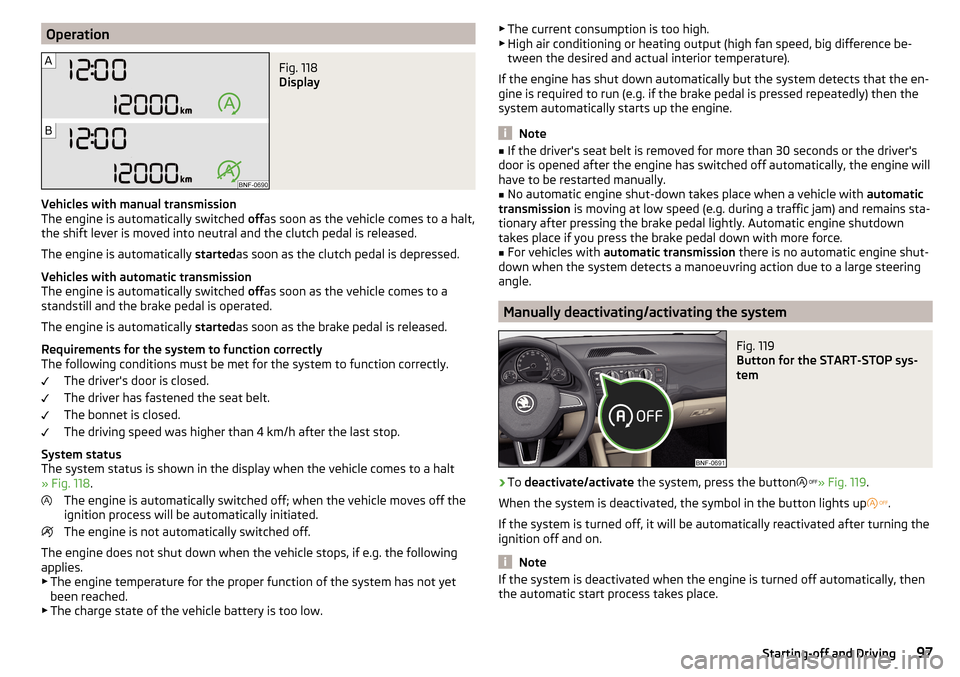
System status
The system status is shown in the display when the vehicle comes to a halt
» Fig. 118 .
The engine is automatically switched off; when the vehicle moves off the
ignition process will be automatically initiated.
The engine is not automatically switched off.
The engine does not shut down when the vehicle stops, if e.g. the following
applies.
▶ The engine temperature for the proper function of the system has not yet
been reached.
▶ The charge state of the vehicle battery is too low.
▶
The current consumption is too high.
▶ High air conditioning or heating output (high fan speed, big difference be-
tween the desired and actual interior temperature).
If the engine has shut down automatically but the system detects that the en-
gine is required to run (e.g. if the brake pedal is pressed repeatedly) then the
system automatically starts up the engine.
Note
■ If the driver's seat belt is removed for more than 30 seconds or the driver's
door is opened after the engine has switched off automatically, the engine will
have to be restarted manually.■
No automatic engine shut-down takes place when a vehicle with automatic
transmission is moving at low speed (e.g. during a traffic jam) and remains sta-
tionary after pressing the brake pedal lightly. Automatic engine shutdown
takes place if you press the brake pedal down with more force.
■
For vehicles with automatic transmission there is no automatic engine shut-
down when the system detects a manoeuvring action due to a large steering
angle.
Manually deactivating/activating the system
Fig. 119
Button for the START-STOP sys-
tem
›
To deactivate/activate the system, press the button
» Fig. 119 .
When the system is deactivated, the symbol in the button lights up
.
If the system is turned off, it will be automatically reactivated after turning the
ignition off and on.
Note
If the system is deactivated when the engine is turned off automatically, then
the automatic start process takes place.97Starting-off and Driving
Page 109 of 172
BTake control againa)
/ Increase speedCLaunch control / reduce speeda)
If no speed is set the current speed is adopted.
Once the controls are activated, the CCS maintains the vehicle at the set
speed; the indicator light
lights up in the instrument cluster.
After the interruption in control, the stored speed can be resumed by pressing
the
B
button.
Controls are automatically interrupted if any of the following occur.
▶ By pressing the brake or clutch pedal.
▶ When one of the brake assist systems (e.g. ESC) intervenes.
▶ Through an airbag deployment.
WARNING■ Always deactivate the cruise control system after use to prevent the sys-
tem being switched on unintentionally.■
Control may only be resumed if the set speed is not too high for the cur-
rent traffic conditions.
Note
During control, speed can be increased by pressing the accelerator pedal. Re-
leasing the accelerator pedal will cause the speed to drop again to the set
speed.
City Safe Drive
Introduction
This chapter contains information on the following subjects:
Operation
107
Disable / Enable
108
City Safe Drive (hereinafter referred to as: the system) monitors the traffic sit-
uation ahead of the vehicle. If the system detects a risk of collision with an ob-
stacle ahead of the vehicle, then automatic braking is applied. The risk of a col-
lision is thus reduced and the consequences of an impact are minimized.
WARNING■ The general information relating to the use of assistance systems must
be observed » page 103, in section Introduction .■
The system does not respond to crossing or oncoming objects.
CAUTION
The system can slow down the vehicle to a standstill. If the vehicle continues
to roll forward after stopping, then it should be stopped with the footbrake.
Operation
Fig. 128
Laser sensor/detection range
Read and observe
and on page 107 first.
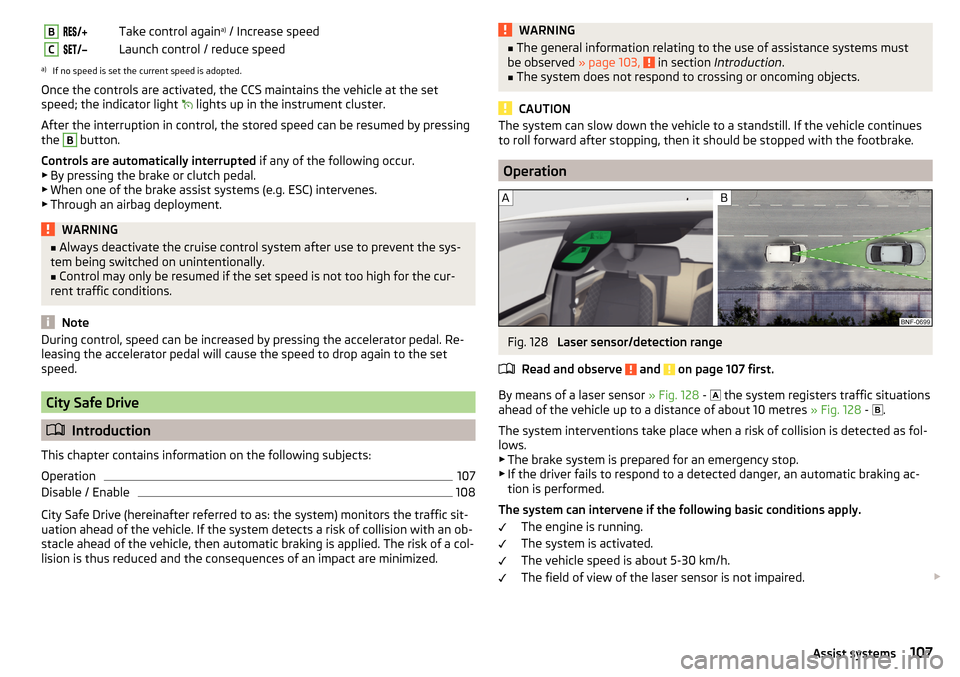
By means of a laser sensor » Fig. 128 -
the system registers traffic situations
ahead of the vehicle up to a distance of about 10 metres » Fig. 128 -
.
The system interventions take place when a risk of collision is detected as fol- lows.
▶ The brake system is prepared for an emergency stop.
▶ If the driver fails to respond to a detected danger, an automatic braking ac-
tion is performed.
The system can intervene if the following basic conditions apply. The engine is running.
The system is activated.
The vehicle speed is about 5-30 km/h.
The field of view of the laser sensor is not impaired.
107Assist systems
Page 128 of 172

Specification - The brake fluid must comply with the standard VW 501 14 (this
standard meets the requirements of FMVSS 116 DOT4).WARNING■ The following instructions must be followed at all times when working on
the engine compartment » page 120.■
If the fluid level drops significantly within a short time or if it drops below
the “MIN” » Fig. 141mark, this may be an indication of a leak in the brake
system.
Stop driving - There is a risk of an accident! Seek help from a
specialist garage.
Note
■ The brake fluid is changed as part of a compulsory inspection service.■A low brake fluid level is indicated by the warning light in the instrument
cluster » page 32 ,
Braking system . We still recommend inspecting the brake
fluid level in the reservoir from time to time.
Vehicle battery
Introduction
This chapter contains information on the following subjects:
Checking the battery condition
127
Charging
127
Disconnect/reconnect and change
127
The vehicle battery represents a power source for the motor to start and for
the supply of electrical consumers in the car.
Automatic shutdown of consumers - vehicle battery discharge protection
The on-board power supply system tries to prevent the vehicle battery from
discharging in the following ways when it is subject to heavy loading. ▶ By increasing the engine idle speed.
▶ Through the power limitation of certain consumers.
▶ By switching off some consumers (heated seats, heated rear window) for as
long as necessary.
Warning symbols on the vehicle batterySymbolImportanceAlways wear eye protection.Battery acid is severely caustic. Always wear gloves and eye pro-
tection.Keep fire, sparks, open flames and lit cigarettes well clear of the
vehicle battery.When charging the vehicle battery, a highly explosive gas mixture
is produced.Keep children away from the vehicle battery.WARNINGBattery acid is highly corrosive - it can cause injury, chemical burns or poi-
soning! Corrosive vapours in the air irritate and damage the respiratory
tract and the eyes. The following guidelines must be observed.■
Always wear protective gloves, eye and skin protection when handling
the vehicle battery.
■
If your eyes or skin come into contact with the electrolytic fluid, immedi-
ately wash the affected area for a few minutes with a lot of water. Get
medical assistance without delay.
■
Keep the vehicle battery away from people who are not completely inde-
pendent (e.g. children).
■
Do not tilt the battery otherwise battery electrolyte may flow out of the
battery vent openings.
WARNINGWorking on the car battery may cause explosion, fire, injury or chemical
burn! The following guidelines must be observed.■
Do not smoke, use open flames or light or transmitting devices.
■
A discharged vehicle battery may freeze slightly. Never charge up a fro-
zen or thawed vehicle battery. Replace a frozen vehicle battery.
■
Never use a damaged vehicle battery.
■
Do not connect the battery terminals, bridging the two poles will cause a
short circuit.
126General Maintenance