2016 Seat Toledo ignition
[x] Cancel search: ignitionPage 161 of 248

Driving
more than 2 seconds) to position D or R at
s peed
s
of less than 5 km/h (3 mph) and
when the vehicle is stationary, press down on
the brake pedal.
D – Drive (forwards)
In thi s
po
sition, the gearbox automatically
changes to a lower or higher gear, depending
on engine requirements, the driving speed
and the gear shift programme.
To move the selector lever to position D from
position N at speeds of less than 5 km/h (3
mph) and when the vehicle is stationary,
press down on the brake pedal.
In some situations (e.g. on mountain roads or
when towing a trailer or caravan), it can be
advantageous to switch temporarily to the
manual shift programme ››› page 159 so that
the gear ratios can be selected manually to
suit driving conditions.
S – Sports driving position
Shif tin
g up l
ater than usual makes full use of
the engine power. This shifts down earlier in
relation to position D.
To move the selector lever to position S from
position D, press the interlock button on the
selector lever knob. Tiptronic
Fig. 179
Selector lever: Tiptronic. The Tiptronic gearbox allows the driver to
c
h
an
ge gears manually using the selector
lever.
Activating the manual gearbox
– From position D, push the sel
ector lever to
the right. The selected position of the se-
lector lever is shown on the general instru-
ment panel display together with the gear
engaged 1
› ›
› Fig. 178
.
Shifting up – Push the selector lever gently forwards + ›››
Fig. 179.
Shiftin g do
wn
– Push the selector lever gently backwards
-
› ›
› Fig. 179
. The manual gearbox can be activated when
the vehic
le is either moving or stationary.
When accelerating, the gearbox automatical-
ly shifts up shortly before the maximum en-
gine speed is reached.
On shifting up, the gear is only engaged
when there is no risk of engine damage.
When the accelerator pedal is pressed down
to the kick-down zone, the gearbox will shift
down in line with the road speed and engine
speed. Note
The kick-down function is also available in
manua l
shift mode. Selector lever lock
Automatic selector lever lock
The sel ect
or l
ever is locked in the positions P
and N when the ignition is on. Press down on
the brake to unlock it. Remember, if the se-
lector lever is in positions P and N, the warn-
ing lamp will light up on the general in-
strument panel.
When the selector lever merely moves
through position N (e.g. when moved from R
to D), the lever lock is not applied. This
makes it possible, for example, to rock a
stuck vehicle backwards and forwards. The »
159
Technical data
Advice
Operation
Emergencies
Safety
Page 162 of 248

Operation
lock is only applied if the brake is not press-
ed and the sel ect
or l
ever is moved to position
N for more than 2 seconds.
The selector lever only locks when the is vehi-
cle stationary or driving at a speed lower
than 5 km/h (3 mph). At a higher speed, it
automatically disconnects in the N position.
Interlock button
The interlock button on the selector lever
knob prevents the driver from inadvertently
engaging a gear. Press the button to unlock
the selector lever.
Safety interlock for ignition key 1)
After switching off the ignition, you can only
remove the ignition key if the selector lever is
in position P. When the ignition key is re-
moved, the selector lever is locked in posi-
tion P.
Driving programmes Your vehicle is equipped with an electronical-
ly
-c
ontr
olled automatic gearbox. Shifting up
or down depends on the programme selec-
ted.
For a calm driving style, the gearbox uses the
most economic programme. The gearbox shifts up as quickly as possible and shifts
down as
late as possible, thus increasing
driving economy.
With a sporty driving style , characterised by
sudden acceleration, heavy acceleration,
speeds that often increase and decrease and
maximum speed, the gearbox adapts to this
driving style when the accelerator is pressed
down fully (kick-down) by shifting down as
quickly as possible and can even shift down
by several gears at once.
Selecting the best driving programmes is an
endless job. Regardless of this, the driver can
also make the gearbox switch to a more dy-
namic gear shift programme by pressing the
accelerator quickly. This makes the automatic
gearbox shift down into a lower gear than the
one that would normally apply to the current
speed, allowing for more rapid acceleration
(e.g. to overtake another vehicle) without
having to press the accelerator until the kick-
down position. On shifting up in a corre-
sponding driving style, the gearbox returns to
the original programme.
When driving along mountain roads, the
gearbox adapts to the gradients. This avoids
having to frequently change gears when driv-
ing uphill. In Tiptronic mode, it is possible to
shift down manually when driving downhill to
use the braking effect of the engine. Backup programme A back-up programme exists in case of faults.
In the event
of
a fault in the gearbox electron-
ics, it will continue to work in one of the cor-
responding back-up programmes. All seg-
ments of the screen are lit up or switched off.
The fault can be seen as follows:
● The gearbox only engages certain gears
● Reverse gear R cannot be en
gaged
● The manual gearbox switches off in the
bac k
-up programme Note
If the gearbox switches to the back-up pro-
gramme, v
isit an Authorised Service as soon
as possible to solve the problem. Gearbox malfunctions
Gearbox: Fault! Stop the ve-
hicle and place the lever in the
position P.
There i s
a fault in the gearbox. Stop the vehi-
cle in a safe place and do not continue driv-
ing. Seek specialist assistance. 1)
Valid only for certain countries.
160
Page 166 of 248

Operation
●
It i s
recommended that you close the win-
dows when driving at more than 60 km/h
(37 mph)
● Do not drive with your foot resting on the
clutc
h pedal,, as the pressure can make the
plate spin, more fuel will be used and it can
burn the clutch plate lining, causing a serious
fault.
● Do not hold the vehicle on a hill with the
clutc
h, use the foot brake or hand brake, us-
ing the latter to start. The fuel consumption
will be lower and you will prevent the clutch
plate from being damaged.
● On descents, use the engine brake, chang-
ing to the g
ear that is more suitable for the
slope. Fuel consumption will be “zero” and
the brakes will not suffer. Engine management and ex-
h
au
s
t gas purification system
Introduction WARNING
● Bec au
se of the high temperatures which
can occur in the exhaust purification system
(catalytic converter or diesel particulate fil-
ter), do not park the vehicle where the ex-
haust can come into contact with flammable
materials under the car (e.g. on grass or at
the forest edge). Fire hazard! ●
Do not ap p
ly wax underneath the vehicle
around the area of the exhaust system: Fire
hazard! Note
While the control lamps , , or r
e-
m ain lit, ther
e may be engine problems, fuel
consumption may increase and the engine
may lose power. Catalytic converter
An exhaust gas emission control system (cat-
alytic
c
on
verter) that functions perfectly is vi-
tally important for vehicle operation that re-
spects the environment.
Please observe the following indications:
● Refuel only using unleaded petrol in petrol
engine v
ehicles ››› page 200.
● Do not add too much oil to the engine
›››
page 207, Checking engine oil level .
● Do not switch off the ignition while driving.
If y
ou are required to drive in a country where
unleaded fuel is not available, when return-
ing to a country where using a catalytic con-
verter is obligatory, the catalytic converter
must be replaced. CAUTION
● Never c omp
letely empty the tank! An irreg-
ular fuel supply can cause ignition faults,
which can result in damage to a substantial
amount of engine parts and the exhaust sys-
tem.
● Refuelling just once with leaded petrol dis-
able
s the exhaust system! Particulate filter (diesel
en
gines) The diesel engine particulate filter eliminates
mo
s
t
of the soot from the exhaust gas sys-
tem. Under normal driving conditions, the fil-
ter cleans itself. The diesel particulate filter is
cleaned automatically without need for indi-
cation by the warning lamp . This may be
noticed because the engine idle speed in-
creases and an odour may be detected.
If automatic filter purification cannot be car-
ried out (because only short trips are taken,
for example), soot will accumulate on the fil-
ter and the Diesel particulate filter warning
lamp will switch on.
Facilitate the automatic filter cleaning proc-
ess by driving in the following manner: drive
for approximately 15 minutes at a minimum
speed of 60 km/h (37 mph) in 4th or 5th gear
(automatic gearbox: gear S). Maintain the en-
gine speed at approximately 2,000 rpm. The
164
Page 167 of 248

Driving
rise in temperature causes the soot on the fil-
t er t
o b
urn. On completion of the cleaning
the warning lamp will switch off.
If the lamp does not turn off, or the three
lamps turn on (particulate filter , fault in
the emission control system and glow
plugs ), drive the vehicle to a specialised
workshop and have the fault repaired at the
earliest opportunity. WARNING
● Alw a
ys drive according to the road weather
conditions, the terrain and traffic.
● The particulate filter attains very high tem-
peratur
es. Therefore, do not park the vehicle
in places where the exhaust pipe could come
into contact with dry grass or with highly-
flammable materials. Risk of fire! CAUTION
While the warning lamp is lit
up, the fuel
consumption is high, and in certain condi-
tions, the engine power is reduced. Note
● In order f or the p
articulate filter to burn off
soot in a correct manner, avoid carrying out
frequent short journeys.
● Using diesel fuel with a high sulphur count
can con
siderably reduce the useful life of the
particulate filter. The specialised service pro- vides information about the countries where
fuel
w
ith a high sulphur content is used. Engine management*
This warning lamp monitors the engine man-
agement
sy
stem for petrol engines.
The warning lamp (Electronic Power Con-
trol) lights up when the ignition is switched
on while system operation is being verified. It
should go out once the engine is started.
If there is a fault in the electronic engine
management system while you are driving,
this warning lamp will light up. Take the vehi-
cle to a specialised workshop as soon as
possible and have the engine checked.
Emission control system* Control lamp
fla
she
s:
When there is misfiring that can damage the
catalytic converter. Reduce speed and drive
carefully to the nearest specialised workshop
to have the engine checked.
The control lamp lights up:
If a fault has developed during driving which
has reduced the quality of the exhaust gas
(e.g. lambda probe fault). Reduce speed and drive carefully to the nearest specialised
workshop t
o have the engine checked.
Engine pre-heating/fault system* The warning lamp lights up to show that the
glow p
lug
s are preheating the diesel engine.
The control lamp lights up
If the control lamp lights up when the en-
gine is started it means that the glow plugs
are preheating. The engine can be started
straight away when the lamp switches off.
Control lamp flashes
If a fault develops in the engine management
system while you are driving, the glow plug
system lamp will flash . Take the vehicle to
a specialised workshop as soon as possible
and have the engine checked.
165
Technical data
Advice
Operation
Emergencies
Safety
Page 172 of 248

Operation
be displayed and the segments will be
sho wn on the l
ef
t side of the screen
››› Fig. 183.
Automatic activation occurs when slowly ap-
proaching an obstacle located in front of the
vehicle. It only operates every time the speed
is reduced below approximately 10 km/h (6
mph) for the first time.
If the parking aid is switched off using the
button, the following actions must be carried
out in order for it to automatically switch on:
● Switch off the ignition and switch it on
again.
● OR: ac
celerate above 10 km/h (6 mph) be-
for
e reducing speed below this number
again.
● OR: place the selector lever in position P
and then mov
e it from this position.
● OR: switch on and off the automatic activa-
tion in the Ea
sy Connect system menu.
The automatic activation with parking aid
miniature indication can be switched on and
off from the Easy Connect system menu
››› page 21:
● Switch the ignition on.
● Select: CAR button > Settings
> Parking
and manoeuvring .
● Select the Automatic activation op-
tion. When the f
u
nction button check box is
activated , the function is on. If the system has been activated automatical-
ly, an audibl
e sound warning will only be giv-
en when obstacles in front are at a distance
of less than 50 cm. CAUTION
The automatic connection of the Parking Aid
only w
orks when you are driving slowly. If
driving style is not adapted to the circum-
stances, an accident and serious injury or
damage may be caused. Segments of the visual indication
Fig. 184
Parking Aid display on the Easy Con-
nect sy
s
tem screen. The distance of separation from the obstacle
c
an be e
s
timated using the segments around
the vehicle.
The optical indication of the segments works
as follows: a white segment is dis-
pla
yed when the obstacle is not within
the vehicle's trajectory or the direction
of travel is in the opposite direction to
its location.
obstacles located in the
vehicle's trajectory and which are more
than 30 cm away from the vehicle are
displayed in yellow.
obstacles that are less than
30 cm away from the vehicle are dis-
played in red.
Moreover, with the SEAT Media System
Plus/Navi System radios, a yellow trail indi-
cates the vehicle's expected journey based
on the steering wheel angle.
Whenever the obstacle is located in the vehi-
cle’s direction of travel, the corresponding
audible warning will sound.
As the vehicle approaches an obstacle, the
segments are displayed closer to the vehicle.
When the penultimate segment is displayed,
this means that the vehicle has reached the
collision zone. In the collision zone, the ob-
stacles are represented in red, including
those out of the path. Do not continue to
move forward (or backward) ››› in General
inf orm
ation on p
age 167, ››› in General in-
f orm
ation on p
age 167 !
White segments:
Yellow segments:
Red segments:
170
Page 175 of 248
Driver assistance systems
● Sw it
c
h the ignition on.
● If necessary, switch on the Infotainment
syst
em.
● Engage reverse gear or turn the selector
lever t
o position R.
● Press the --- function button displayed on
the right of the im
age.
● Make the desired adjustments on the menu
by pr
essing the –/+ function buttons or by
moving the corresponding scroll button.
Necessary conditions for parking and ma-
noeuvring with the rear assist
The system should not be used in the follow-
ing cases:
● If the image displayed is not very reliable or
is di
storted, for example low visibility or dirty
lens.
● If the area behind the vehicle is not dis-
pla
yed very clearly or is incomplete.
● If the vehicle is heavily loaded at the rear.
● If the position and installation angle of the
camera h
ave been changed, e.g. after a rear-
end collision. Have the system checked by a
specialised workshop.
Familiarising yourself with the system
To familiarise yourself with the system, the
orientation lines and their function, SEAT rec-
ommends practising parking and manoeu-
vring with the rear assist in a place without too much traffic or in a car park when there
are good w
eather and visibility conditions.
Cleaning the camera lens
Keep the camera lens clean and clear of snow
and ice:
● Moisten the lens using a normal alcohol-
based gl
ass cleaning product and clean the
lens with a dry cloth.
● Remove snow using a small brush.
● Use de-icing spray to remove any ice. CAUTION
● Never u se abr
asive cleaning products to
clean the camera lens.
● Do not use hot or warm water to remove ice
or snow fr
om the camera lens. Doing so could
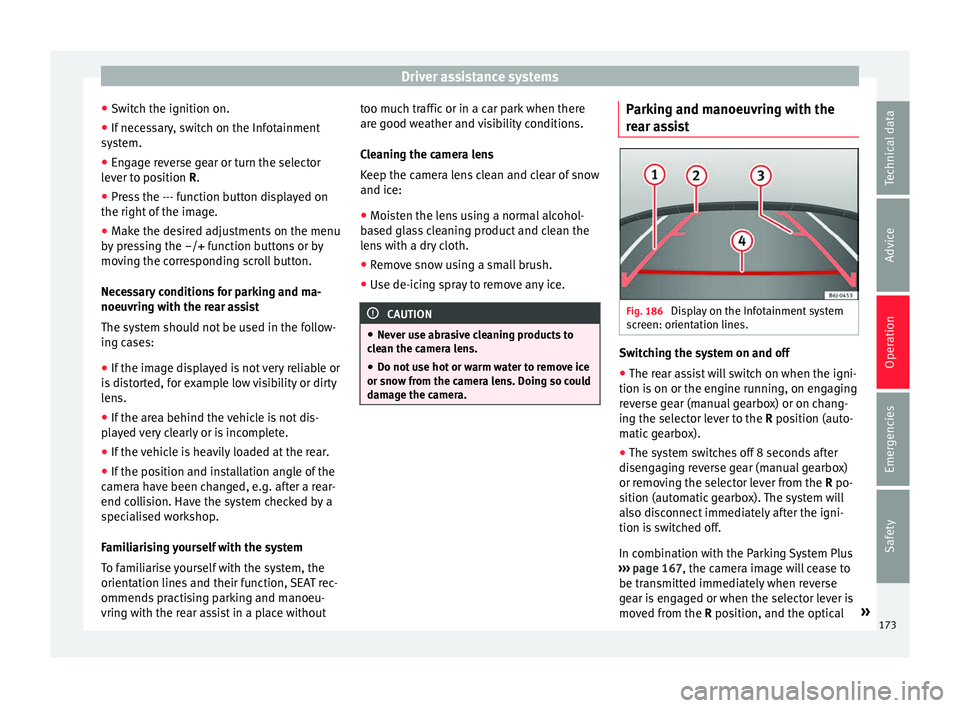
damage the camera. Parking and manoeuvring with the
r
e
ar a
ssist Fig. 186
Display on the Infotainment system
s c
r
een: orientation lines. Switching the system on and off
●
The rear assist will switch on when the igni-
tion i s
on or the en
gine running, on engaging
reverse gear (manual gearbox) or on chang-
ing the selector lever to the R position (auto-
matic gearbox).
● The system switches off 8 seconds after
diseng
aging reverse gear (manual gearbox)
or removing the selector lever from the R po-
sition (automatic gearbox). The system will
also disconnect immediately after the igni-
tion is switched off.
In combination with the Parking System Plus
››› page 167, the camera image will cease to
be transmitted immediately when reverse
gear is engaged or when the selector lever is
moved from the R position, and the optical »
173
Technical data
Advice
Operation
Emergencies
Safety
Page 180 of 248

Operation
Front Assist operation may be affected by a
s tr
on
g radar reverse reflection. This may oc-
cur, for example, in a closed car park or due
to the presence of metallic objects (e.g. rails
on the road or sheets used in road works).
The area in front of and around the radar sen-
sor should not be covered with adhesives,
additional or similar headlights, as this may
negatively affect Front Assist operation.
If structural modifications are made to the ve-
hicle, for example, if the suspension is low-
ered or the front spoiler is modified, Front As-
sist operation may be affected. So structural
modifications should only be made by speci-
alised workshops. SEAT recommends visiting
a SEAT dealership for this purpose.
If work is done incorrectly on the front of the
vehicle, the radar sensor could be damaged
or lose its settings, and Front Assist opera-
tion may be affected. So repair work should
only be made by specialised workshops.
SEAT recommends visiting a SEAT dealership
for this purpose. CAUTION
If you have the sensation that the radar sen-
sor is d
amaged or has lost its settings, dis-
connect the Front Assist. This will avoid pos-
sible damage. If this occurs have it adjusted.
● The sensor may become damaged or lose
its settin
gs when knocked, for example, dur- ing a parking manoeuvre. This may compro-
mise the sy
s
tem's efficacy or disconnect it.
● Repairs to the radar sensor require special-
ist
knowledge and special tools. SEAT recom-
mends visiting a SEAT dealership for this pur-
pose.
● Clean away the snow with a brush and the
ice pref
erably with a solvent-free de-icer
spray. Operating the Front Assist monitoring
sys
t
em Fig. 190
On the instrument panel display:
Fr ont
As
sist switched off message. Fig. 191
On the turn signal and main beam
hea dlight
lever: button for the driver assis-
tance systems The Front Assist monitoring system is active
whenev
er the ignition i
s
switched on.
When the Front Assist is switched off, so too
are the advance warning function (pre warn-
ing) and the distance warning.
SEAT recommends leaving the Front Assist al-
ways switched on. Exceptions ››› page 179,
Switching the Front Assist Monitoring Sys-
tem off in the following situations .
Switching the Front Assist monitoring sys-
tem on and off
With the ignition switched on, the Front As-
sist can be switched on and off as follows:
● Select the corresponding menu option us-
ing the butt
on for the driver assistance sys-
tems ››› Fig. 191.
178
Page 181 of 248

Driver assistance systems
● OR: sw it
c
h the system on or off in the Easy
Connect system with the button and the
f u
nction b
uttons and
Driv
er As
s ist›››
p
age 21.
When the Fr ont
Assist monitoring system is
switched off, the instrument panel will inform
that it has been switched off with the follow-
ing indicator ››› Fig. 190.
Switching the advance warning function on
or off
The pre-warning function can be switched on
or off in the Easy Connect system with the
button and the function buttons
and
Driv er As
s
ist
› ›
›
page 21.
The system will store the setting for the next
time the ignition is switched on.
SEAT recommends keeping the advance
warning function switched on at all times.
Switching distance warning on and off
If the safe distance with regard to the vehicle
in front is exceeded, the relevant warning will
appear on the instrument panel display
. In this case, increase the safe dis-
tance.
The distance warning function can be activa-
ted or deactivated in the Easy Connect sys-
tem with the button and the function but-
t on
s
and
Driv
er As
s ist
› ›
›
page 21. The system will store the setting for the next
time the ignition is sw
itched on.
SEAT recommends keeping the distance
warning switched on at all times.
Switching the Front Assist Monitoring
Sys
tem off in the following situations In the following situations the Front Assist
Monitorin
g
System should be deactivated
due to the system's limitations ››› :
● When the vehicle is to be towed.
● If the vehicle is on a test bed.
● When the radar sensor is damaged.
● If the radar sensor takes a heavy knock, for
e xamp
le in a rear collision.
● If it intervenes several times unnecessarily.
● If the radar sensor is covered temporarily
with some kind of
accessory, such as an ad-
ditional headlight or the like.
● When the vehicle is to be loaded on a lorry,
ferry
or train. WARNING
If the Front Assist is not switched off in the
sit uation
s described, serious accidents and
injuries may occur.
● Switch off the Front Assist in critical situa-
tions. System limitations
The Front Assist Monitoring System has cer-
tain ph
y
sical limitations inherent in the sys-
tem. Thus, in certain circumstances some of
the system's reactions may be inopportune
or be delayed from the driver's standpoint.
So pay attention in order to intervene if nec-
essary.
The following conditions may cause the Front
Assist Monitoring System not to react or do
so too late:
● On taking tight bends.
● Pressing the accelerator all the way down.
● If the Front Assist is switched off or dam-
aged.
● If the ASR h
as been manually disconnec-
ted.
● If the E
SC is controlling.
● If several brake lights of the vehicle or elec-
trically
connected trailer are damaged.
● If the radar sensor is dirty or covered.
● If there are metal objects, e.g. rails on the
roa
d or sheets used in road works.
● If the vehicle is reversing.
● If the vehicle over-accelerates.
● In case of snow or heavy rain.
● In case of narrow vehicles, such as motor-
bike
s. »
179
Technical data
Advice
Operation
Emergencies
Safety