2016 Seat Mii battery
[x] Cancel search: batteryPage 94 of 232
Operation
Opening and closing V ehic
l
e key set
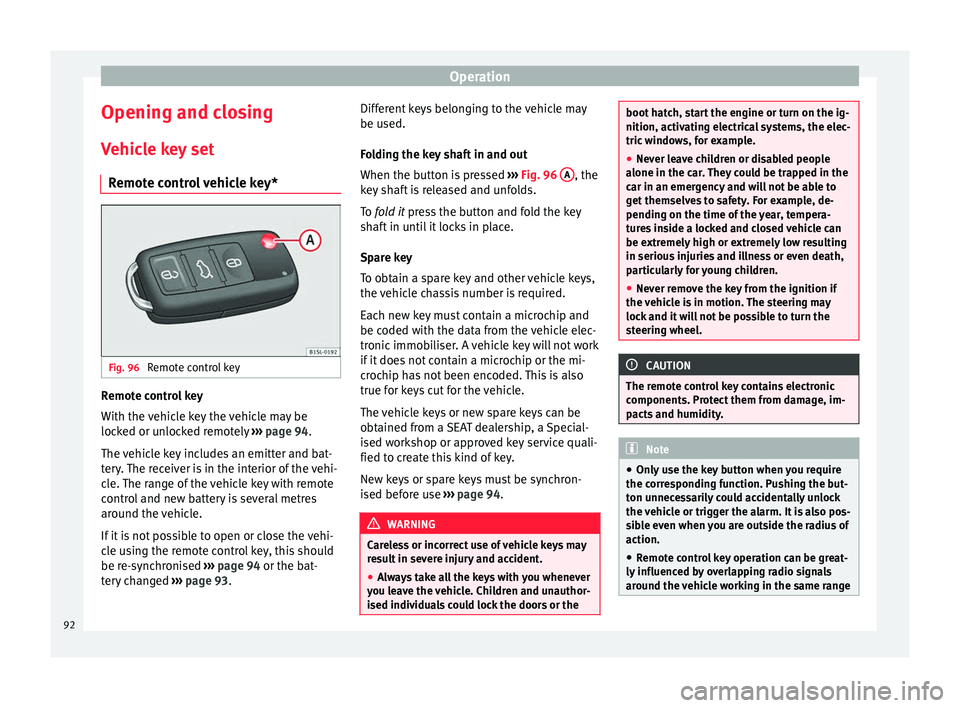
Remote control vehicle key* Fig. 96
Remote control key Remote control key
W
ith the
v
ehicle key the vehicle may be
locked or unlocked remotely ››› page 94.
The vehicle key includes an emitter and bat-
tery. The receiver is in the interior of the vehi-
cle. The range of the vehicle key with remote
control and new battery is several metres
around the vehicle.
If it is not possible to open or close the vehi-
cle using the remote control key, this should
be re-synchronised ››› page 94 or the bat-
tery changed ››› page 93. Different keys belonging to the vehicle may
be used.
Fo
lding the key shaft in and out
When the button is pressed ››› Fig. 96 A , the
k ey
sh
aft is released and unfolds.
To fold it press the button and fold the key
shaft in until it locks in place.
Spare key
To obtain a spare key and other vehicle keys,
the vehicle chassis number is required.
Each new key must contain a microchip and
be coded with the data from the vehicle elec-
tronic immobiliser. A vehicle key will not work
if it does not contain a microchip or the mi-
crochip has not been encoded. This is also
true for keys cut for the vehicle.
The vehicle keys or new spare keys can be
obtained from a SEAT dealership, a Special-
ised workshop or approved key service quali-
fied to create this kind of key.
New keys or spare keys must be synchron-
ised before use ››› page 94. WARNING
Careless or incorrect use of vehicle keys may
re s
ult in severe injury and accident.
● Always take all the keys with you whenever
you le
ave the vehicle. Children and unauthor-
ised individuals could lock the doors or the boot hatch, start the engine or turn on the ig-
nition, activatin
g el
ectrical systems, the elec-
tric windows, for example.
● Never leave children or disabled people
alone in the car
. They could be trapped in the
car in an emergency and will not be able to
get themselves to safety. For example, de-
pending on the time of the year, tempera-
tures inside a locked and closed vehicle can
be extremely high or extremely low resulting
in serious injuries and illness or even death,
particularly for young children.
● Never remove the key from the ignition if
the vehic
le is in motion. The steering may
lock and it will not be possible to turn the
steering wheel. CAUTION
The remote control key contains electronic
component s. Pr
otect them from damage, im-
pacts and humidity. Note
● Only u
se the key button when you require
the corresponding function. Pushing the but-
ton unnecessarily could accidentally unlock
the vehicle or trigger the alarm. It is also pos-
sible even when you are outside the radius of
action.
● Remote control key operation can be great-
ly influenced b
y overlapping radio signals
around the vehicle working in the same range 92
Page 95 of 232

Opening and closing
of frequencies (for example, radio
tran
smitt
ers, mobile telephones).
● Obstacles between the remote control and
the vehic
le, bad weather conditions and
draining batteries can considerably reduce
the range of the remote control.
● If the buttons of the vehicle key are press-
ed ›››
Fig. 96 or one of the central locking but-
tons ››› page 94 is pressed repeatedly in
quick succession, the central locking briefly
disconnects as protection against overload-
ing. The vehicle is then unlocked. Lock it if necessary. Mechanical vehicle key
Fig. 97
Vehicle mechanical key The vehicle key set may include a mechanical
k
ey
›
›› Fig. 97. Duplicate keys
To obt
ain a spare key and other vehicle keys,
the vehicle chassis number is required.
Each new key must contain a microchip and
be coded with the data from the vehicle elec-
tronic immobiliser. A vehicle key will not work
if it does not contain a microchip or the mi-
crochip has not been encoded. This is also
true for keys cut for the vehicle.
The vehicle keys or new spare keys can be
obtained from a SEAT dealership, a special-
ised workshop or an approved locksmith
qualified to create them.
Control lamp on the vehicle key Fig. 98
Control lamp on the vehicle key When a button on the vehicle key is pressed,
the c
ontr
o
l lamp flashes ››› Fig. 98 (arrow)
once briefly. If the button is pressed and
held, the indicator blinks several times, for example: for the convenience opening func-
tion.
When the contro
l lamp does not light upon
pushing a button, the vehicle key batteries
must be changed ››› page 93.
Replacing the battery Fig. 99
Vehicle key: battery compartment cov-
er Fig. 100
Vehicle key: removing the battery » 93
Technical data
Advice
Operation
Emergencies
Safety
Page 96 of 232

Operation
SEAT recommend having the batteries
c h
an
ged in a specialised workshop.
The battery is located to the rear of the vehi-
cle key, under a cover.
Changing the battery
● Unfold the vehicle key blade ›››
page 92.
● Remove the cover from the back of the ve-
hicle k
ey ››› Fig. 99 in the direction of the ar-
row ››› .
● Extract the battery from the compartment
u s
in
g a suitable thin object ››› Fig. 100.
● Place the new battery in the compartment,
pres
sing in the direction of the arrow as
shown ››› Fig. 100 ››› .
● Fit the battery compartment cover, pressing
in the dir ection of
the arr
ow as shown
››› Fig. 99 until it clicks into place. CAUTION
● If the b att
ery is not changed correctly, the
vehicle key may be damaged.
● Use of unsuitable batteries may damage
the vehic
le key. For this reason, always re-
place the dead battery with another of the
same voltage, size and specifications.
● When fitting the battery, check that the po-
larity i
s correct. For the sake of the environment
Please dispose of your used batteries correct-
ly and w ith r
espect for the environment. Synchronising the vehicle key
If the button
is pressed frequently outside
of the v
ehicle range, it is possible that the ve-
hicle can no longer be locked or unlocked us-
ing the key. In this case, the vehicle key must
be synchronised once more as follows:
● Unfold the vehicle key blade ››
›
page 92.
● Press the button on the vehicle key. For
thi s, it
mu
st remain with the vehicle.
● Open the vehicle within one minute using
the key sh
aft.
● Turn on the ignition using the vehicle key.
The key h
as been synchronised.
● If necessary, fit the cap.
Central locking* and locking
syst
em
Introduction Read the additional information carefully
› ›
›
page 8 Central locking functions correctly when all
the doors and the r
ear lid are correctly shut.
If the driver door is open, the vehicle cannot
be locked with the key.
The battery of an unlocked vehicle parked for
a long period (e.g. in a private garage) may
run down and fail to start the motor. WARNING
The incorrect use of the central locking sys-
tem m a
y cause serious injuries.
● The central locking system will lock all
doors. A v
ehicle locked from the inside can
prevent any non-authorised individual from
opening the doors and accessing the vehicle.
Nevertheless, in case of emergency or acci-
dent, locked doors will complicate access to
the vehicle interior to help the passengers.
● Never leave children or disabled people
alone in the v
ehicle. The central locking but-
ton can be used to lock all the doors from
within. Therefore, passengers will be locked
inside the vehicle. Individuals locked in the
vehicle can be exposed to very high or very
low temperatures.
● Depending on the time of the year, temper-
ature
s inside a locked and closed vehicle can
be extremely high or extremely low resulting
in serious injuries and illness or even death,
particularly for young children.
● Never leave individuals locked in a closed
and locked
vehicle. In case of emergency,
they may not be able to exit the vehicle by
themselves or get help. 94
Page 98 of 232

OperationFunctionHandling the buttons on the
vehicle
››› Fig. 101
Lock the vehi-
cle.Press button .
Unlocking the
rear lid.Press button .
Locking the rear
lid.Press button .
FunctionHandling the vehicle key
››› Fig. 101 in the lock cylinder
or with the vehicle mechanical
key ››› Fig. 102.
Unlocking the
vehicle.Insert the vehicle key into the lock
cylinder of the driver door and turn
the key in an anticlockwise direc-
tion.
Lock the vehicle.Insert the vehicle key into the lock
cylinder of the driver door and turn
the key in a clockwise direction.
Unlocking the
rear lid.Insert the vehicle key into the lock
cylinder of the driver door and turn
the key in an anticlockwise direc-
tion.
Locking the rear
lid.Insert the vehicle key into the lock
cylinder of the driver door and turn
the key in a clockwise direction. Please note: dependin
g on the oper
ation of
the c
entral locking feature set by a special-
ised workshop, in order to unlock all the doors and the rear lid, press the button
twice.
The
v
ehic
le key only locks and unlocks the
vehicle if it is within range of the vehicle and
if the battery has enough power.
● Upon locking the vehicle, all turn signals
wil
l flash once in confirmation.
● Upon unlocking the vehicle, all turn signals
wil
l flash twice in confirmation.
If the turn signals do not flash in confirma-
tion, at least one of the doors or the rear lid
has been left unlocked.
If the driver door is open, the vehicle cannot
be locked with the key. If you unlock the vehi-
cle without opening any doors or the rear lid,
it will lock again automatically after a few
seconds. This function prevents the vehicle
from remaining unlocked if the unlocking
button is pressed by mistake. Mechanical locking
FunctionUsing the vehicle's mechani-
cal key
››› Fig. 102 in the lock
cylinder
Locking the driv-
er door manually.
To unlock, insert the vehicle key in-
to the lock cylinder of the driver
door and turn the key in an anti-
clockwise direction.
To lock, insert the vehicle key into
the lock cylinder of the driver door
and turn the key in a clockwise di-
rection.
Locking and un-
locking the rear
lid.
To unlock, insert the vehicle key in-
to the lock cylinder of the driver
door and turn the key in an anti-
clockwise direction.
To lock, insert the vehicle key into
the lock cylinder of the driver door
and turn the key in a clockwise di-
rection. If the driver's door is open, it cannot be
loc
k
ed w
ith the vehicle key.
96
Page 108 of 232

Operation
●
The main beam he adligh
ts can only be
switched on if the dipped beam headlights
are already on. Hazard warning lights
Fig. 110
Dash panel: Button for switching the
h az
ar
d lights warning system on and off. Read the additional information carefully
› ›
›
page 21
Always fulfil legal requirements for securing a
broken down vehicle. In a number of coun-
tries it is now obligatory, for example, to turn
on the hazard warning lights and use a re-
flective safety vest ››› page 70.
If your vehicle breaks down:
Park the vehicle a safe distance from
traffic and on suitable ground ››› .
T urn on the h
az
ard warning lights with
the button
› ›
› Fig. 110
.
1.
2. Apply the handbrake firmly
›››
page 137.
Put the gearbox lever in neutral or the
selector lever in position N ››› page 143.
Switch off the engine and remove the
key from the ignition.
Have all occupants leave the vehicle and
move to safety, for example behind a
guard rail.
When leaving the vehicle, take all keys
with you.
Place an emergency warning triangle to
indicate the position of your vehicle to
other road users.
Allow the engine to cool and check if a
specialist is required.
When being towed with the hazard warning
lights on, a change in direction or traffic lane
can be indicated as usual using the turn sig-
nal lever. The hazard lights will be interrup-
ted temporarily.
If the hazard warning lights are not working,
you must use an alternative method of draw-
ing attention to your vehicle. This method
must comply with traffic legislation. WARNING
A faulty vehicle in traffic represents a risk of
acc ident
for the driver and for other road
users. 3.
4.
5.
6.
7.
8.
9.
●
Stop the v
ehicle safely as soon as possible.
Park the vehicle a safe distance from sur-
rounding traffic to lock all the doors in case of
an emergency. Turn on the hazard warning
lights to warn other road users.
● Never leave children or disabled people
alone in the v
ehicle if the doors are to be
locked. In case of an emergency, passengers
will be trapped inside the vehicle. Individuals
locked in the vehicle can be exposed to very
high or very low temperatures. WARNING
The components of the exhaust system reach
ver y
high temperatures. This could cause a
fire and considerable damage.
● Always park your vehicle so that no part of
the exhau
st system can come in contact with
flammable materials (such as dried grass or
fuel). Note
● The v ehic
le battery will discharge and run
down if the hazard warning lights remain on
for too long (even with the ignition turned
off).
● In some vehicles, the brake lights will flash
when brakin
g abruptly at speeds of approxi-
mately 80 km/h (50 mph) to warn vehicles
travelling behind. If braking continues, the
hazard warning lights system will automati-
cally be turned on at a speed of less than ap-
proximately 10 km/h (6 mph). The brake 106
Page 123 of 232

Transport and practical equipment
WARNING
Undue use of the cigarette lighter may cause
a fire or b urn
s and other serious injuries.
● The cigarette lighter must only be used to
light cig
arettes or similar.
● Never leave children unsupervised in the
vehicl
e. The cigarette lighter can be used
when the ignition is switched on. Note
The cigarette lighter can also be used with
the 12 V o
lt socket. Power socket*
Fig. 133
Front centre console: 12 Volt socket
in the s t
or
age compartment Electrical equipment can be connected to the
soc
k
et
in the vehicle. All connected appliances should be in per-
fect w
orking order without any faults.
Maximum power consumption
Power sock-
etMaximum power consumption
12 Volts120 Watts The maximum capacity of the socket must
not be e
x
ceeded. The power consumption is
indicated on the rating plate of each appli-
ance.
Where 2 or more appliances are connected at
the same time, the total rating of all the con-
nected devices must never exceed 190 Watts
››› .
12 v o
lt
power socket
The 12 volt socket is found in the storage
compartment at the front of the centre con-
sole ›››
Fig. 133 and only functions when the
ignition is switched on.
Using electrical appliances with the engine
stopped and the ignition switched on will
drain the battery. Therefore, electrical devi-
ces connected to the power socket can only
be used when the engine is running.
To prevent voltage variations from causing
damage, switch off the electrical device con-
nected to the 12 Volt power socket before switching the ignition on or off and before
star
ting the engine. WARNING
Improper use of the socket or electrical devi-
ce s
could lead to a fire and cause serious in-
juries.
● Never leave children unsupervised in the
vehicl
e. The socket and equipment connected
to it can be used when the ignition is switch-
ed on.
● Should a connected electrical device over-
heat, swit
ch it off and unplug it immediately. CAUTION
● Alw a
ys follow the operating instructions for
the appliances to be connected!
● Never exceed the maximum power rating as
this c
ould damage the vehicle's general elec-
trical system.
● 12 volt power socket:
– Only u
se accessories with approved elec-
tromagnetic compatibility according to
current regulations.
– Never power the socket. CAUTION
● To av oid d
amage to the vehicle's electrical
system, never connect equipment that gener-
ates electrical current, such as solar panels
or battery chargers, to the 12 volt power » 121
Technical data
Advice
Operation
Emergencies
Safety
Page 140 of 232

Operation
CAUTION
● Spec i
al care should be taken when parking
in areas with high kerbs or fixed barriers.
Objects protruding from the ground may
damage the bumper or other parts of the ve-
hicle during manoeuvres. To avoid damage,
stop before the wheels touch the barrier or
kerb.
● Special attention is required when driving
through entranc
es, over ramps, kerbs or oth-
er objects. The vehicle underbody, bumpers,
mudguards and running gear, and the engine
and exhaust system could be damaged as
you drive over these objects. Control and warning lamps
It lights up
›››
Handbrake applied.››› page 141.
It lights up
›››
Fault in the brake
system Do not drive on!
Seek professional advice
››› page 142.
Brake fluid level in-
adequate. Do not drive on!
Check brake fluid level
››› page 194.
Together with the
ABS control lamp
: ABS and EBV do
not function.
Do not drive on!
Seek professional advice
››› page 142.
It lights up
›››
ESC* disconnected
by system.Switching the ignition on and off
If necessary, drive for a short dis-
tance.
Fault in ESC*.Contact a specialised workshop.
Together with the
ABS control lamp
: Fault in the ABS.
Contact a specialised workshop.
The vehicle can be braked with-
out ABS.
The battery has
been reconnected.››› page 196.
It lights up
›››
Traction Control*
faulty or switched
off by the system.Contact a specialised workshop.
It lights up
›››
Together with the
ESC* control lamp
: Fault in the ABS.
Contact a specialised workshop.
The vehicle can be braked with-
out ABS.
Together with the
warning lamp :
ABS and EBV do not
function. Do not drive on!
Seek professional advice
››› page 142.
Flashes
ESC* or ASR regulat-
ing.Take your foot off the accelera-
tor. Adjust your driving style to
the road conditions.
Flashes
Traction Control*
regulator operating.Take your foot off the accelera-
tor. Adjust your driving style to
the road conditions. Several warning and control lamps light up
for a f
ew sec
onds when the ignition is switch-
ed on, signalling that the function is being
verified. They will switch off after a few sec-
onds. WARNING
If the warning lamps are ignored, the vehicle
ma y
stall in traffic, or may cause accidents
and severe injuries.
● Never ignore the warning lamps.
● Stop the vehicle safely as soon as possible. WARNING
Driving with brakes in bad condition could re-
su lt
in a serious accident.
● If the brake warning lamp does not
go
out, or if it lights up when driving, the brake
fluid level in the reservoir is too low or there
is a fault in the brake system. Obtain profes-
sional assistance immediately ››› page 194,
Checking the brake fluid level.
● If the brake warning lamp lights up t
o-
gether with the ABS warning lamp , the
regulation function of the ABS could be mal-
functioning. As a result, the rear wheels can
lock relatively easily when braking. If the rear 138
Page 164 of 232
Operation
Vehicles with an automatic gearbox
● When the vehicle is at a standstill, depress
the br ak
e or k
eep it pressed down. The en-
gine switches off.
● The engine will start again as soon as you
rele
ase the brake pedal.
● With the selector lever set to position N,
the engine wi
ll not start until a range of gears
is selected or the accelerator pedal is de-
pressed.
Important conditions for the engine to stop
automatically
● The driver's seat belt must be fastened.
● The driver door must be closed.
● The bonnet must be closed.
● The engine must have reached a minimum
temperat
ure.
● The vehicle must have moved since the last
time the engine wa
s stopped.
● The vehicle's battery must be sufficiently
char
ged.
● The battery temperature must not be too
low or too high.
● The
vehicle must not be on a very steep
slope. Condition
s for the engine to restart automat-
ical
ly
The engine can be automatically restarted in
the following cases:
● If the vehicle starts to moves.
● If the battery voltage drops.
Conditions
requiring engine start-up using
the key
The engine has to be manually started in the
following cases:
● If the driver unbuckles his/her seat belt.
● If the driver door is opened.
● If the bonnet is opened.
Switc
hing the Start-Stop system on and off
● Press the button situat
ed in the centre
console ››› Fig. 158.
● The button will light up when the Start-Stop
syst
em is switched off.
The engine will start immediately if the vehi-
cle is in Stop mode when the system is
switched off by hand. WARNING
The smart technology included in the hill
hol d c
annot change the laws of physics. Do
not let the extra convenience afforded by the hill hold tempt you into taking any risks
when drivin
g.
● An
y accidental movement of the vehicle
coul
d result in serious injury.
● The hill hold is not a replacement for driver
awar
eness.
● Adjust your speed and driving style to visi-
bility
, weather, road and traffic conditions.
● The hill hold cannot always keep the vehi-
cle at
a standstill on a slope or brake suffi-
ciently when travelling downhill (e.g. on slip-
pery or frozen surfaces). WARNING
The brake servo and the electromechanical
st eerin
g do not work when the engine is
switched off.
● The vehicle must never be allowed to move
with the engine sw
itched off.
● Disconnect the Start-Stop system before
workin
g in the engine compartment. CAUTION
The vehicle's battery could be damaged if the
vehic l
e is used for long periods at very high
outside temperatures. Note
In some cases, it may be necessary to start
the engine b y
hand using the key. Refer to162