2016 Seat Ibiza ST warning
[x] Cancel search: warningPage 102 of 252

Operation
●
Additiona l
lights and other accessories in
front of the air inlet reduce the cooling effect
of the coolant. At high outside temperatures
and high engine loads, there is a risk of the
engine overheating.
● The front spoiler also ensures proper distri-
bution of the coo
ling air when the vehicle is
moving. If the spoiler is damaged this can re-
duce the cooling effect, which could cause
the engine to overheat. Seek specialist assis-
tance. Fuel level
Fig. 123
Fuel gauge. The display
6
› ›
› Fig. 121 on
ly works when
the ignition is switched on. When the display
reaches the reserve mark, the lower diode
lights up in red and the control lamp ap-
pears ››› page 96. When the fuel level is very
low, the lower diode flashes in red. The distance to empty fuel level is displayed
on the instrument p
anel 3
› ››
Fig. 121
.
Y ou c
an consult the tank capacity of your ve-
hicle in the ›››
page 40 section. CAUTION
Never run the fuel tank completely dry. An ir-
regu l
ar fuel supply could cause misfiring. In
this way the unburned fuel can reach the ex-
haust system, which could cause the catalytic
converter to overheat resulting in damage. Warning and control lamps
W arnin
g symbo l
s Read the additional information carefully
› ›
›
p
age 35
There are red warning symbols (priority 1)
and yellow warning symbols (priority 2).
Warning messages, Priority 1 (red)
If one of these faults occurs, the warning
lamp will light up or flash and will be accom-
panied by three audible warnings. This is a
danger warning. Stop the vehicle and switch
off the engine. Check the fault and correct it.
Obtain professional assistance if necessary.
If several priority 1 faults are detected at the
same time, the symbols will be displayed one after the other for about 2 seconds at a time
and will
continue until the fault is corrected.
No menus will be shown in the display for the
duration of a priority 1 warning message.
Examples of priority 1 warning messages
(red)
● Brake system symbol with the warning
me
ssage STOP BRAKE FLUID INSTRUC-
TION MANUAL or STOP BRAKE FAULT IN-
STRUCTION MANUAL .
● Coolant symbol with the warning me
s-
sage STOP SEE COOLANT INSTRUCTION
MANUAL .
● Engine oil pressure symbol with the
warning me
ssage STOP ENGINE OIL
PRESSURE LOW! INSTRUCTION MANUAL .
Warning messages, Priority 2 (yellow)
If one of these faults occurs, the correspond-
ing warning lamp lights up and is accompa-
nied by an audible warning. Check the corre-
sponding function as soon as possible al-
though the vehicle may be used without risk.
If several priority 2 warning messages are de-
tected at the same time, the symbols are dis-
played one after the other for about 2 sec-
onds at a time. After a set time, the informa-
tion text will disappear and the symbol will
be shown as a reminder at the side of the
display.
100
Page 103 of 252

Introduction to the Easy Connect system*
Priority 2 warning messages will not be
sho wn u nti
l all Priority 1 warning messages
have been dealt with!
Examples of priority 2 warning reports (yel-
low):*
● Fuel warning light with the information text
PLEASE REFUEL .WARNING
If the warning lamps and messages are ignor-
ed, the vehic l
e may stall in traffic, or may
cause accidents and severe injuries.
● Never ignore the warning lamps or text
messag
es.
● Stop the vehicle safely as soon as possible.
● Park the vehicle away from traffic and en-
sure that
there are no highly flammable ma-
terials under the vehicle that could come into
contact with the exhaust system (e.g. dry
grass, fuel).
● A faulty vehicle represents a risk of acci-
dent for the driver and f
or other road users. If
necessary, switch on the hazard warning
lamps and put out the warning triangle to ad-
vise other drivers.
● Before opening the bonnet, switch off the
engine and allo
w it to cool.
● In any vehicle, the engine compartment is a
hazardou
s area and could cause severe inju-
ries ››› page 201. CAUTION
Failure to heed the control lamps and text
mess ag
es when they appear may result in
faults in the vehicle. Introduction to the Easy
C
onnect
sys
tem*
System settings (CAR)* CAR menu (Setup) Read the additional information carefully
›››
p
age 24
To select the settings menus, press the Easy
Connect button and the
Set
up function
b utt
on.
The act ual
number of menus available and
the name of the various options in these me-
nus will depend on the vehicle’s electronics
and equipment.
Pressing the menu button will always take
you to the last menu used.
When the function button check box is activa-
ted , the function is active.
Pressing the menu button will always take
y ou t
o the l a
st menu used.
Any changes made using the settings menus
are automatically saved on closing those me-
nus. »
101
Technical data
Advice
Operation
Emergencies
Safety
Page 104 of 252

OperationFunction buttons in the
vehicle settings
menuPage
ESC system››› page 155
Tyres››› page 216
Driver assistance››› table on page 24
Parking and manoeuvring››› page 175
Vehicle lights››› table on page 24
Mirrors and windscreen wipers››› table on page 24
Opening and closing››› table on page 24
Multifunction display››› table on page 24
Date and time››› table on page 24
Units››› table on page 24
Service››› page 97
Factory settings››› table on page 24 WARNING
Any distraction may lead to an accident, with
the risk of injur
y. Operating the Easy Connect
system while driving could distract you from
traffic. 102
Page 109 of 252
Opening and closing
Multimedia USB/A UX
-IN inp ut Fig. 126
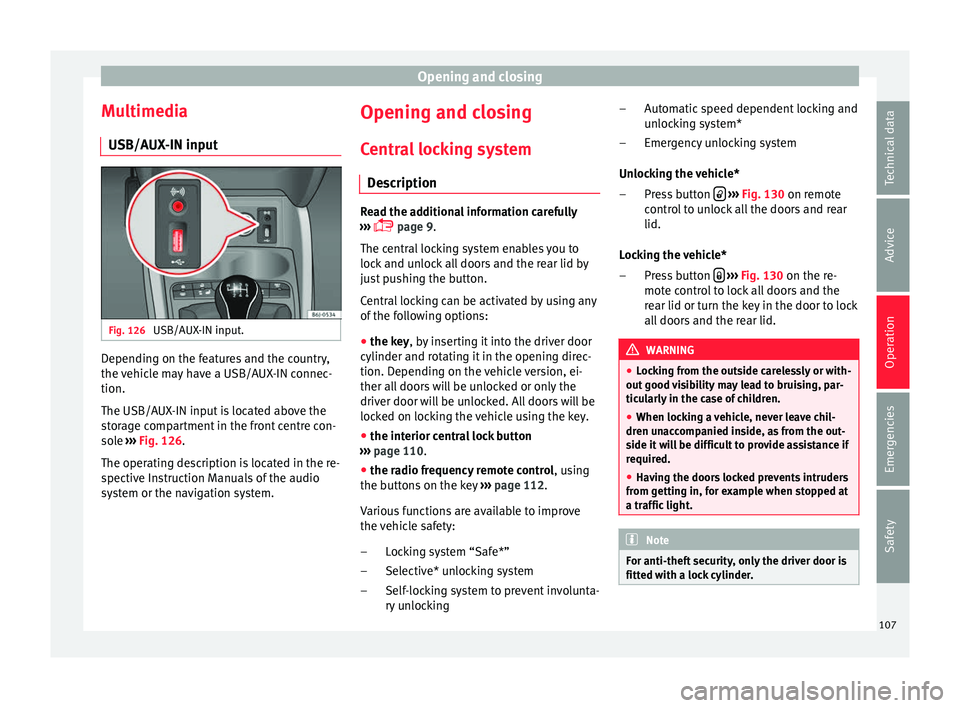
USB/AUX-IN input. Depending on the features and the country,
the
v
ehic l
e may have a USB/AUX-IN connec-
tion.
The USB/AUX-IN input is located above the
storage compartment in the front centre con-
sole ››› Fig. 126.
The operating description is located in the re-
spective Instruction Manuals of the audio
system or the navigation system. Opening and closing
C entr
al
locking system
Description Read the additional information carefully
›››
p
age 9.
The central locking system enables you to
lock and unlock all doors and the rear lid by
just pushing the button.
Central locking can be activated by using any
of the following options:
● the key, by inserting it into the driver door
cylinder and rot atin
g it in the opening direc-
tion. Depending on the vehicle version, ei-
ther all doors will be unlocked or only the
driver door will be unlocked. All doors will be
locked on locking the vehicle using the key.
● the interior central lock button
››› p
age 110.
● the radio frequency remote control , using
the b
uttons on the key ›››
page 112.
Various functions are available to improve
the vehicle safety: Locking system “Safe*”
Selective* unlocking system
Self-locking system to prevent involunta-
ry unlocking
–
–
– Automatic speed dependent locking and
unlock
ing system*
Emergency unlocking system
Unlocking the vehicle* Press button
› ››
Fig. 130
on remot
e
control to unlock all the doors and rear
lid.
Locking the vehicle* Press button
› ››
Fig. 130
on the r e-
mot
e control to lock all doors and the
rear lid or turn the key in the door to lock
all doors and the rear lid. WARNING
● Lock in
g from the outside carelessly or with-
out good visibility may lead to bruising, par-
ticularly in the case of children.
● When locking a vehicle, never leave chil-
dren unac
companied inside, as from the out-
side it will be difficult to provide assistance if
required.
● Having the doors locked prevents intruders
from getting in, f
or example when stopped at
a traffic light. Note
For anti-theft security, only the driver door is
fitted with a loc k
cylinder. –
–
–
–
107
Technical data
Advice
Operation
Emergencies
Safety
Page 110 of 252

Operation
“Safe” security system** This is an anti-theft device which consists of
a double loc
k
for the door locks and a deacti-
vation function for the boot in order to pre-
vent forced entry.
Activation
The “safe” system is activated when the vehi-
cle is locked using the key or the remote con-
trol.
To activate it with the key, rotate once it is in-
serted in the door lock cylinder in the locking
direction.
To activate the system using the remote con-
trol, press the lock button once on the re-
mot e.
Onc e thi s
system is activated, opening doors
from the outside and the inside is not possi-
ble. The rear lid can not be opened. The cen-
tral lock button does not work.
When the ignition is switched off, the instru-
ment panel display indicates that the “Safe”
system is on.
Deactivation
Rotate the key inserted in the lock cylinder
twice towards the locking direction.
To activate the system using the remote con-
trol, press the lock button on the remote
twice in less than five seconds. On deactivating the “Safe” system, the alarm
v
o
lumetric sen
sor is also deactivated.
With the “Safe” switched off, doors can be
opened from the interior but not from the ex-
terior.
See “Selective unlocking system*”
“Safe” status
On the driver door, there is warning lamp visi-
ble from outside the vehicle through the win-
dow which shows the “Safe” system status.
We will know that “Safe” system is activated
by the flashing warning lamp. The indicator
will flash on all vehicles, fitted and nor fitted
with an alarm, until they unlock.
Remember:
Safe activated with or without an alarm:
warning lamp flashes continuously.
Safe deactivated without an alarm: the warn-
ing lamp stays off.
Safe deactivated with an alarm: the warning
lamp stays off. WARNING
No one should remain inside the vehicle if the
“Safe” sys t
em is activated because opening
the doors will not be possible in the event of
an emergency neither from the inside nor the
outside and help from the outside is made difficult. Danger of death. Passengers could
become trap
ped in
side in case of emergency. Selective unlocking system*
This system allows to unlock either just the
driver door or all
the
vehicle.
Driver door unlock button
Unlock once. Use either the key or the remote
control.
Once the key is inserted in the lock cylinder,
rotate once in the unlock direction. The driver
door will remain without “Safe” and un-
locked. In vehicles fitted with an alarm, see
the Anti-theft Alarm section ››› page 113.
Using the remote control, press the unlock
button on the remote once. The “Safe”
sy s
tem f
or all the vehicle is deactivated, only
the driver door is unlocked and both the
alarm and the warning lamp are also turned
off.
Unlocking all doors and the luggage com-
partment
The unlock button on the remote control
must be pressed twice so that all doors
and the lug g
ag e c
ompartment can be
opened.
Press twice within 5 seconds to deactivate
the “Safe” system for all vehicle, to unlock all
108
Page 111 of 252

Opening and closing
doors and to use the luggage compartment.
The w arnin
g lamp and the al
arm (only vehi-
cles fitted with one) are turned off.
Unlocking the luggage compartment
See ›››
page 9.
Activating the selective unlocking system*
With the door open, insert a key into the start
cylinder and start the ignition. Insert the oth-
er key into the driver door lock and turn in the
opening direction for at least 3 seconds. The
turn signals will flash twice.
Deactivating the selective unlocking system*
With the door open, insert a key into the start
cylinder and start the ignition. Insert the oth-
er key into the driver door lock and turn in the
locking direction for at least 3 seconds. The
turn signals will flash once.
Self-locking system to prevent invol-
untary
unlocking It is an anti-theft system and prevents the un-
int
ention
al u
nlocking of the vehicle.
If the vehicle is unlocked and none of the
doors (including the boot) are opened within
30 seconds, it re-locks automatically. Automatic speed-dependent locking
and unlock
ing system* This is a safety system which prevents access
to the v
ehic
le from the outside when it is run-
ning (e.g. when stopped at a traffic light).
Locking
The doors will lock automatically if the speed
of 15 km/h (9 mph) is exceeded. The rear lid
will lock automatically if the speed of 6 km/h
(4 mph) is exceeded.
If the vehicle is stopped and any of its doors
open, when starting again and exceeding the
mentioned speed, all doors will lock again.
Unlocking
On withdrawing the ignition key, the vehicle
will returns to its status prior to self-locking.
Each door can be unlocked and opened inde-
pendently from the inside (for example, when
a passenger gets out). To do it, simply oper-
ate the lever inside the door.
Activating the system*
With the ignition on, press the locking key on
the central locking system within 3 to 10 sec-
onds. Deactivating the system*
With the ignition on, pre
s
s the unlocking key
on the central locking system within 3 to 10
seconds.
In both cases, if the operation has been car-
ried out correctly, the locking lamp will flash
› ››
Fig. 127
. WARNING
The door handles must not be operated when
the vehic l
e is running: the door would open. Note
If the airbags are triggered during an acci-
dent, the vehic l
e is unlocked, except for the
luggage compartment. It is possible to lock
the vehicle from inside with the central lock-
ing, after turning the ignition off and back on
again. 109
Technical data
Advice
Operation
Emergencies
Safety
Page 112 of 252

Operation
Central lock button* Fig. 127
Central lock button. Read the additional information carefully
› ›
›
p
age 9
The central lock button allows you to lock and
unlock the vehicle from the inside.
The central lock button also works with the
ignition switched off, except when the “safe”
system is activated.
Please note the following if you lock your ve-
hicle with the central lock button:
● Locking the doors and rear lid prevents ac-
cess
from the outside (for safety reasons, e.g.
when stopped at a traffic light).
● The driver door cannot be locked while it is
open. This av
oids the user from forgetting his
key inside the vehicle. ●
All door
s can be unlocked separately from
inside the vehicle. Do this by pulling the door
release lever once. WARNING
● If the v ehic
le is locked, children and disa-
bled people may be trapped inside it.
● Repeated operation of central locking will
prevent the c
entral lock button from working
for a few seconds. Then, it can only be un-
locked in case it has been previously locked.
After few seconds, the central locking be-
comes operative again.
● The central lock button is not operative
when the vehicl
e is locked from the outside
(with the remote control or the key). Note
● Vehicl e loc
ked, button.
● Vehicle unlocked, button. Childproof lock
3 Valid for vehicles: 5-door versions
Fig. 128
Childproof lock on the left hand side
door . The childproof lock prevents the rear doors
fr
om bein
g opened fr om the in
side. This sys-
tem prevents minors from opening a door ac-
cidentally while the vehicle is running.
This function is independent of the vehicle
electronic opening and locking systems. It
only affects rear doors. It can only be activa-
ted and deactivated manually, as described
below:
Activating the childproof lock
– Unlock the vehicle and open the door in
which you w
ish to activate the childproof
lock.
– With the door open, rotate the groove in
the door using the ignition k
ey, anti-clock-
wise for the left-hand side doors ››› Fig. 128
110
Page 113 of 252

Opening and closing
and clockwise for the right-hand side
door s.
D eactiv
ating the childproof lock
– Unlock the vehicle and open the door
whose chil
dproof lock you want to deacti-
vate.
– With the door open, rotate the groove in
the door using the ignition k
ey, anti-clock-
wise for the right-hand side doors, and
clockwise for the left-hand side doors
››› Fig. 128.
Once the childproof lock is activated, the
door can only be opened from the outside.
The childproof lock can be activated or deac-
tivated by inserting the key in the groove
when the door is open, as described above. Keys
Set of key
s Fig. 129
Set of keys. The set of keys may consists of the following,
dependin
g on the
ver
sion of your vehicle:
● a remote control key ››› Fig. 129
A ●
a key without remote control B ,
● a plastic key tab* C .
or
● two keys without remote control B ●
a plastic key tab* C .
D up
licat
e keys
If you need a replacement key, go to a Techni-
cal Service with your vehicle identification
number. WARNING
● An incorrect u
se of the keys can cause seri-
ous injuries.
● Never leave children or disabled persons in
the vehicl
e. In case of emergency, they may
not be able to leave the vehicle or manage on
their own.
● An uncontrolled use of the key could start
the engine or activate an
y electric equipment
(e.g. electric windows), causing risk of acci-
dent. The doors can be locked using the re-
mote control key. This could become an ob-
stacle for assistance in an emergency situa-
tion.
● Never forget the keys inside the vehicle. An
unauthorised u
se of your vehicle could result
in injury, damage or theft. Therefore always
take the key with you when you leave the ve-
hicle.
● Never remove the key from the ignition if
the vehicl
e is in motion. Otherwise, the steer-
ing could suddenly block and it would be im-
possible to steer the vehicle. CAUTION
There are electronic components in the re-
mote contr o
l key. Avoid wetting and hitting
the keys. 111
Technical data
Advice
Operation
Emergencies
Safety