Opening and closing
Multimedia USB/A UX
-IN inp ut Fig. 126
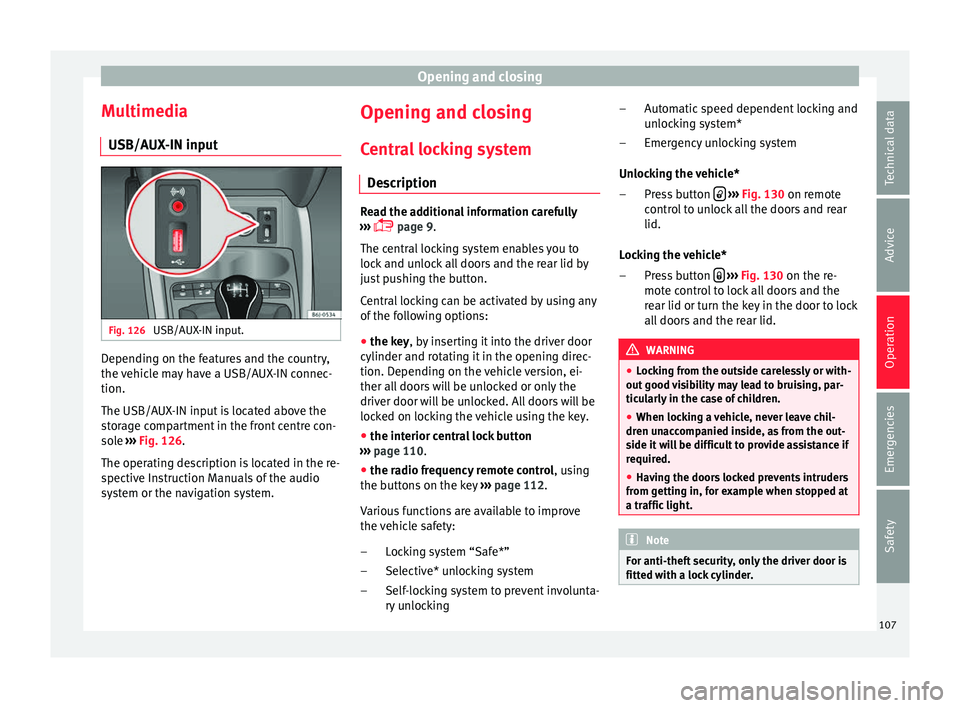
USB/AUX-IN input. Depending on the features and the country,
the
v
ehic l
e may have a USB/AUX-IN connec-
tion.
The USB/AUX-IN input is located above the
storage compartment in the front centre con-
sole ››› Fig. 126.
The operating description is located in the re-
spective Instruction Manuals of the audio
system or the navigation system. Opening and closing
C entr
al
locking system
Description Read the additional information carefully
›››
p
age 9.
The central locking system enables you to
lock and unlock all doors and the rear lid by
just pushing the button.
Central locking can be activated by using any
of the following options:
● the key, by inserting it into the driver door
cylinder and rot atin
g it in the opening direc-
tion. Depending on the vehicle version, ei-
ther all doors will be unlocked or only the
driver door will be unlocked. All doors will be
locked on locking the vehicle using the key.
● the interior central lock button
››› p
age 110.
● the radio frequency remote control , using
the b
uttons on the key ›››
page 112.
Various functions are available to improve
the vehicle safety: Locking system “Safe*”
Selective* unlocking system
Self-locking system to prevent involunta-
ry unlocking
–
–
– Automatic speed dependent locking and
unlock
ing system*
Emergency unlocking system
Unlocking the vehicle* Press button
› ››
Fig. 130
on remot
e
control to unlock all the doors and rear
lid.
Locking the vehicle* Press button
› ››
Fig. 130
on the r e-
mot
e control to lock all doors and the
rear lid or turn the key in the door to lock
all doors and the rear lid. WARNING
● Lock in
g from the outside carelessly or with-
out good visibility may lead to bruising, par-
ticularly in the case of children.
● When locking a vehicle, never leave chil-
dren unac
companied inside, as from the out-
side it will be difficult to provide assistance if
required.
● Having the doors locked prevents intruders
from getting in, f
or example when stopped at
a traffic light. Note
For anti-theft security, only the driver door is
fitted with a loc k
cylinder. –
–
–
–
107
Technical data
Advice
Operation
Emergencies
Safety
Driver assistance systems
vehicle of the luggage compartment is carry-
ing a heavy
lo
ad.
● In the following situations, the objects or
other vehicl
es shown in the navigation sys-
tem display appear to be further away or
closer than they really are: Pay special atten-
tion:
– On moving from a horizontal plane to a
slope.
– On moving from a slope to a horizontal
plane.
– If the vehicle is heavily loaded at the
rear.
– When the vehicle approaches objects
that are not on the ground surface or are
jutting out from it. These objects may al-
so be outside the camera's angle of vi-
sion when reversing. Note
● It is impor
tant to take great care and pay
special attention if you are not yet familiar
with the system.
● Rear assist will not be available if the vehi-
cle's r
ear lid is open. Instructions for use
Fig. 180
On the rear bumper: location of the
r e
ar a s
sist camera
››› t
able on page 2
A camera on the rear bumper aids the driver
during reverse parking or manoeuvring
››› Fig. 180. The camera image is viewed to-
gether with orientation lines projected by the
system on the Infotainment system screen.
The bottom of the screen displays part of the
bumper corresponding to the number plate
area that will be used as reference by the
driver.
Rear assist settings:
Rear assist offers the user the possibility to
change the image's brightness, contrast and
colour settings.
To change these settings:
● Park the vehicle in a safe place. ●
Apply the p
arking brake.
● Switch the ignition on.
● If necessary, switch on the Infotainment
system.
● En
gage reverse gear or turn the selector
lever to po
sition R.
● Press the function butt
on displayed on
the right of the image.
● Make the desired adjustments on the menu
by pre
ssing the –/+ function buttons or by
moving the corresponding scroll button.
Necessary conditions for parking and ma-
noeuvring with the
The system should not be used in the follow-
ing cases:
● If the image displayed is not very reliable or
is dis
torted, for example low visibility or dirty
lens.
● If the area behind the vehicle is not dis-
play
ed very clearly or is incomplete.
● If the vehicle is heavily loaded at the rear.
● If the position and installation angle of the
camera hav
e been changed, e.g. after a rear-
end collision. Have the system checked by a
specialised workshop. »
181
Technical data
Advice
Operation
Emergencies
Safety