Page 131 of 216

3.9
AIR CONDITIONING: programming (1/4)
Adjusting the programming
With the vehicle connected to a power
source, this function enables:
– a comfortable temperature prior to using the vehicle;
– optimisation of the vehicle range.
The programmable air-conditioning
is triggered the hour before the pro-
grammed hour in order to reach a com-
fortable temperature.
1
Driver’s responsibility
when parking or stopping
the vehicle
Never leave an animal,
child or adult who is not self-suffi-
cient alone on your vehicle, even for
a short time.
In hot and/or sunny weather, please
remember that the temperature
inside the passenger compartment
increases very quickly.
RISK OF DEATH OR SERIOUS
INJURY.
Operating conditions
– the ignition must be switched off;
– the vehicle must be locked;
– the traction battery charge level must be greater than 45% for the function
to be triggered;
– the vehicle has to be plugged into the mains;
– programming should be done at least one hour prior to departure;
and
– air-conditioning programming must be activated.
Depending on the vehicle, the pro- gramming is done from:
– the multimedia display;
or
– the vehicle settings customisation menu.
The integrated warning light in
button 1 and warning light
come on.
Page 134 of 216

3.12
Stopping the programmed air
conditioning
The air conditioning stops automati-
cally around ten minutes after the set
end time.
However, the function can be deacti-
vated if:
– the charging socket is disconnected;
– the “Remote Activation” function is activated – please see the informa-
tion on “Air conditioning: remote acti-
vation” in Section 2;
– the traction battery charging level is lower than 30%.Driver’s responsibility
when parking or stopping
the vehicle
Never leave an animal,
child or adult who is not self-suffi-
cient alone on your vehicle, even for
a short time.
In hot and/or sunny weather, please
remember that the temperature
inside the passenger compartment
increases very quickly.
RISK OF DEATH OR SERIOUS
INJURY.
AIR CONDITIONING: programming (4/4)
Connected services
The air conditioning can also be acti-
vated using the connected services.
For more information regarding the op-
erating conditions, please contact an
authorised dealer.
“Programme” activation
– With the ignition switched on and the air-conditioning operating (please
refer to the information on “Automatic
air-conditioning” in Section 3);
– press the button 1.
The function is triggered one hour prior
to the programmed time to reach a
comfortable temperature.
The warning lights integrated in the
button 1, the AUTO button 2 and the
warning light
on the instrument
panel are lit up.
12
Page 137 of 216

3.15
AIR CONDITIONING: information and advice on use
Do not open the refriger-
ant fluid circuit. The fluid
may damage eyes or skin.
Advice on use
In some situations, (air conditioning
off, air recirculation activated, ventila-
tion speed at zero or low, etc.) you may
notice that condensation starts to form
on the windows and windscreen.
If there is condensation, use the “Clear
View” function to remove it, then use
the air conditioning in automatic mode
to stop it forming again.
Maintenance
Refer to the Maintenance Document
for your vehicle for the inspection fre-
quency.
Range
It is normal to notice an increase in
energy usage when the air conditioning
is operating.
Recommendations to limit energy
consumption and maintain the
range of the vehicle:
Drive with the air vents open and the
windows closed.
If the vehicle has been parked in the
sun, open the doors for a few moments
to let the hot air escape before starting
the engine.
Favour:
– before departure, the use of the air- conditioning programming or remote
activation. Please refer to the infor-
mation on “Air-conditioning: pro-
gramming” and “Air-conditioning:
remote activation” in Section 2);
– during your journeys, using ECO mode. Please see information about
“ECO mode function” in Section 2.
Operating faults
As a general rule, contact your ap-
proved dealer in the event of an oper-
ating fault.
– Reduction in de-icing, demisting
or air conditioning performance.
This may be caused by the passen-
ger compartment filter cartridge be-
coming clogged.
– No hot or cold air is being pro-
duced. Check that the controls are
set correctly and that the fuses are
sound. Otherwise, switch off the
system.
Presence of water under the
vehicle.
After prolonged use of the air condi-
tioning system, it is normal for water
to be present under the vehicle. This is
caused by condensation.
Page 140 of 216
3.18
INTERIOR LIGHTING/SUN VISOR
When the doors or luggage com-
partment are unlocked and opened
the courtesy and footwell lights
come on temporarily.
123
Courtesy light
Tilt switch 2 to move it to the position
for:
– permanent lighting;
– lighting controlled by opening one of the doors. This switches off after
a time delay, once the doors con-
cerned have been closed correctly;
– immediate switching off.
Map reading lights
Move switches 1 or 3.
4
Luggage compartment light
Light 4 comes on when the boot is
opened.
6
Sun visor
Lower the sun visor 5 over the wind-
screen or unclip it and turn it over the
side window.
Courtesy mirrors
Depending on the vehicle, lift or slide
the cover 6.
5
When driving, ensure the
courtesy mirror cover is
closed. Risk of injury.
Page 141 of 216
3.19
Front door storage
compartments 1
PASSENGER COMPARTMENT STORAGE, FITTINGS (1/3)
1
No object should be placed
on the floor (in front of the
driver). Such objects may
slide under the pedals
during sudden braking manoeuvres
and obstruct their use.
When turning corners,
accelerating or braking,
ensure that the recepta-
cle being held by the cup
holder is not dislodged.
There is a risk of burning if hot liquid
escapes.
2
3
Cup holder 2 and 4 Centre console storage
compartment 3
4
Page 142 of 216
3.20
PASSENGER COMPARTMENT STORAGE, FITTINGS (2/3)
5
Ensure that no hard, heavy
or pointed objects are
placed in the “open” storage
compartments in such a
way that they may fall onto passen-
gers during sudden turning, braking
or in the event of an accident.
Rear door storage
compartment 7
7
Dashboard storage
compartment 5
Glove box
Pull handle 6 to open it.
It can hold A4 size documents, a large
bottle of water, etc.
6
Grab handle 8
This offers support and can be held
when the vehicle is being driven.
Do not use it for getting into or out of
the vehicle.
8
Page 143 of 216
3.21
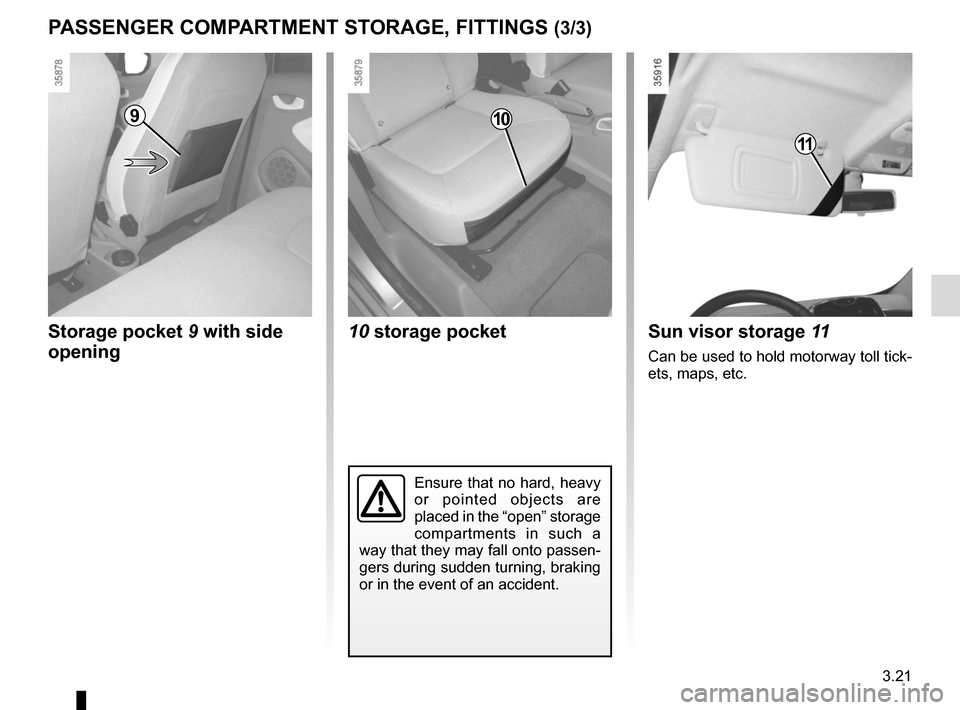
PASSENGER COMPARTMENT STORAGE, FITTINGS (3/3)
Storage pocket 9 with side opening
910
10 storage pocketSun visor storage 11
Can be used to hold motorway toll tick-
ets, maps, etc.
11
Ensure that no hard, heavy
or pointed objects are
placed in the “open” storage
compartments in such a
way that they may fall onto passen-
gers during sudden turning, braking
or in the event of an accident.
Page 148 of 216
3.26
The luggage compartment cover con-
sists of a rigid section A and a folding
section B.
The luggage cover is in the unfolded
position . The luggage compartment cover is
removed.
To remove it: with the cover in the folded
position and holding it horizontally:
– pull one side of the luggage compart- ment cover towards you, pivoting it
slightly;
– then pull the other side of the lug- gage compartment cover to com-
pletely detach it from its housing.
LUGGAGE COMPARTMENT COVER: utility versions
Do not place any objects,
especially heavy or solid
objects on the luggage
compartment cover. These
may pose a risk to the vehicle occu-
pants if the driver has to brake sud-
denly or if the vehicle is involved in
an accident.
The luggage compartment cover is
in the folded position .
To fold it:
– lift shelf A slightly and pull it towards
you to remove;
– then fold section B back on itself.
AB