2016 RENAULT TALISMAN seats
[x] Cancel search: seatsPage 7 of 328

1.1
Section 1: Getting to know your vehicle
Key, radio frequency remote control: general information, use . . . . . . . . . . . . . . . . . . . . . . . . . . . . . 1.2
The RENAULT card: general information and use . . . . . . . . . . . . . . . . . . . . . . . . . . . . . . . . . . . .\
. . 1.5
Locking/unlocking the doors . . . . . . . . . . . . . . . . . . . . . . . . . . . . . . . . . . . .\
. . . . . . . . . . . . . . . . . . . 1.12
Opening and closing the doors . . . . . . . . . . . . . . . . . . . . . . . . . . . . . . . . . . . .\
. . . . . . . . . . . . . . . . . 1.15
Automatic locking when driving . . . . . . . . . . . . . . . . . . . . . . . . . . . . . . . . . . . . \
. . . . . . . . . . . . . . . . . 1.18
Headrests - Seats . . . . . . . . . . . . . . . . . . . . . . . . . . . . . . . . . . . .\
. . . . . . . . . . . . . . . . . . . . . . . . . . . 1.19
Seat belts. . . . . . . . . . . . . . . . . . . . . . . . . . . . . . . \
. . . . . . . . . . . . . . . . . . . . . . . . . . . . . . . . . . . . . . . 1.27
Additional methods of restraint: . . . . . . . . . . . . . . . . . . . . . . . . . . . . . . . . . . . . \
. . . . . . . . . . . . . . . . . 1.31in addition to the front seat belts . . . . . . . . . . . . . . . . . . . . . . . . . . . . . . . . . . . .\
. . . . . . . . . . 1.31
to the rear seat belts . . . . . . . . . . . . . . . . . . . . . . . . . . . . . . . . . . . .\
. . . . . . . . . . . . . . . . . . . 1.35
side protection . . . . . . . . . . . . . . . . . . . . . . . . . . . . . . . . . . . .\
. . . . . . . . . . . . . . . . . . . . . . . . 1.36
Child safety: General information . . . . . . . . . . . . . . . . . . . . . . . . . . . . . . . . . . . .\
. . . . . . . . . . . . . . . 1.38 choosing a child seat mounting . . . . . . . . . . . . . . . . . . . . . . . . . . . . . . . . . . . .\
. . . . . . . . . . . 1.41
Fitting a child seat, general information . . . . . . . . . . . . . . . . . . . . . . . . . . . . . . . . . . . . \
. . . . . 1.43
Child seats: attachment by seat belt or by Isofix system . . . . . . . . . . . . . . . . . . . . . . . . . . . . . . . . . . 1.45
Deactivating/activating the front passenger airbag . . . . . . . . . . . . . . . . . . . . . . . . . . . . . . . . . . . . \
. . 1.51
Driving position . . . . . . . . . . . . . . . . . . . . . . . . . . . . . . . . . . . .\
. . . . . . . . . . . . . . . . . . . . . . . . . . . . . 1.54
Instrument panel . . . . . . . . . . . . . . . . . . . . . . . . . . . . . . . . . . . .\
. . . . . . . . . . . . . . . . . . . . . . . . . . . . 1.56 trip computer and warning system . . . . . . . . . . . . . . . . . . . . . . . . . . . . . . . . . . . . \
. . . . . . . . . 1.66
vehicle settings customisation menu . . . . . . . . . . . . . . . . . . . . . . . . . . . . . . . . . . . .\
. . . . . . . 1.76
Clock and exterior temperature . . . . . . . . . . . . . . . . . . . . . . . . . . . . . . . . . . . . \
. . . . . . . . . . . . . . . . . 1.78
Steering wheel . . . . . . . . . . . . . . . . . . . . . . . . . . . . . . . . . . . . \
. . . . . . . . . . . . . . . . . . . . . . . . . . . . . . 1.79
Rear view mirrors . . . . . . . . . . . . . . . . . . . . . . . . . . . . . . . . . . . .\
. . . . . . . . . . . . . . . . . . . . . . . . . . . 1.81
Audible and visual signals . . . . . . . . . . . . . . . . . . . . . . . . . . . . . . . . . . . . \
. . . . . . . . . . . . . . . . . . . . . 1.84
Exterior lighting and signals. . . . . . . . . . . . . . . . . . . . . .\
. . . . . . . . . . . . . . . . . . . . . . . . . . . . . . . . . . 1.85
Headlight beam adjustment . . . . . . . . . . . . . . . . . . . . . . . . . . . . . . . . . . . . \
. . . . . . . . . . . . . . . . . . . . 1.90
Windscreen washer/wiper . . . . . . . . . . . . . . . . . . . . . . . . . . . . . . . . . . . . \
. . . . . . . . . . . . . . . . . . . . . 1.91
Fuel tank (filling with fuel) . . . . . . . . . . . . . . . . . . . . . . . . . . . . . . . . . . . .\
. . . . . . . . . . . . . . . . . . . . . 1.99
Page 26 of 328
1.20
FRONT SEATS WITH MANUAL CONTROL (1/2)
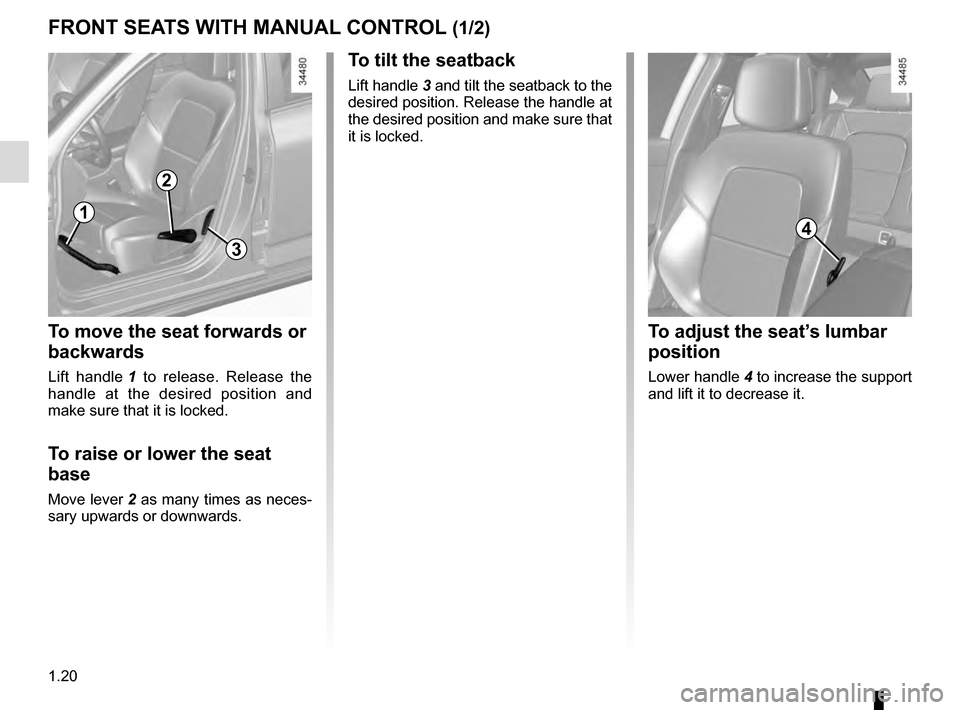
To move the seat forwards or
backwards
Lift handle 1 to release. Release the
handle at the desired position and
make sure that it is locked.
To raise or lower the seat
base
Move lever 2 as many times as neces-
sary upwards or downwards.
To tilt the seatback
Lift handle 3 and tilt the seatback to the
desired position. Release the handle at
the desired position and make sure that
it is locked.
1
2
3
4
To adjust the seat’s lumbar
position
Lower handle 4 to increase the support
and lift it to decrease it.
Page 27 of 328
1.21
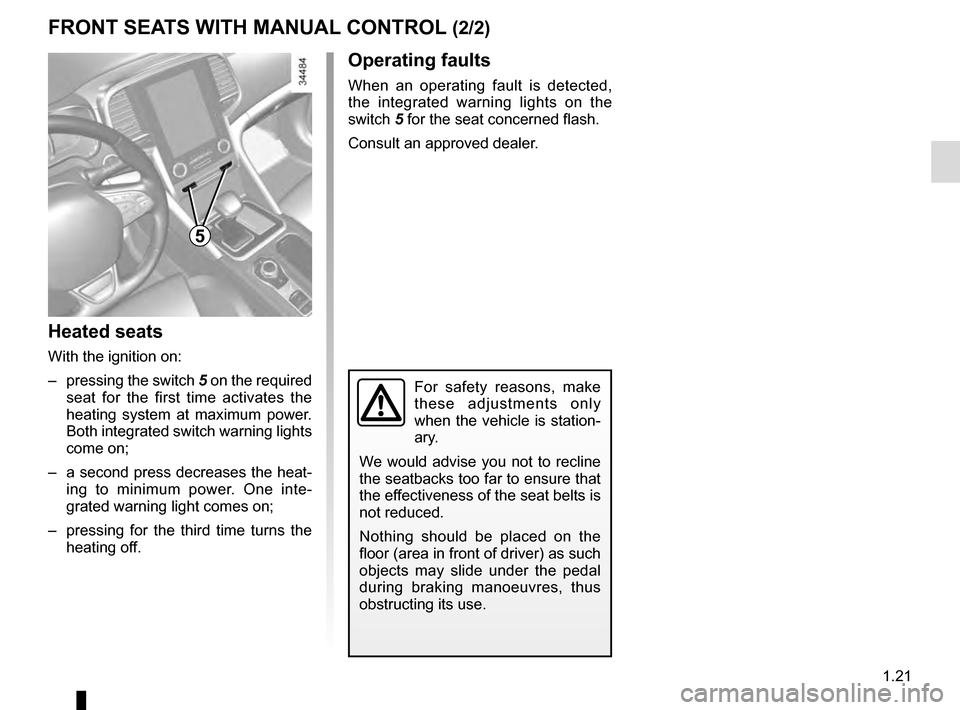
Heated seats
With the ignition on:
– pressing the switch 5 on the required
seat for the first time activates the
heating system at maximum power.
Both integrated switch warning lights
come on;
– a second press decreases the heat- ing to minimum power. One inte-
grated warning light comes on;
– pressing for the third time turns the heating off.
FRONT SEATS WITH MANUAL CONTROL (2/2)
5
For safety reasons, make
these adjustments only
when the vehicle is station-
ary.
We would advise you not to recline
the seatbacks too far to ensure that
the effectiveness of the seat belts is
not reduced.
Nothing should be placed on the
floor (area in front of driver) as such
objects may slide under the pedal
during braking manoeuvres, thus
obstructing its use.
Operating faults
When an operating fault is detected,
the integrated warning lights on the
switch 5 for the seat concerned flash.
Consult an approved dealer.
Page 28 of 328
1.22
FRONT SEATS WITH ELECTRIC CONTROLS (1/2)
For safety reasons, carry
out any adjustments when
the vehicle is not being
driven.
Make sure that the seatbacks are
correctly locked in place.
We would advise you not to recline
the seatbacks too far to ensure that
the effectiveness of the seat belts is
not reduced.
No object should be placed on the
floor (in front of the driver). such
objects may slide under the pedals
during sudden braking manoeuvres
and obstruct their use.
12
3
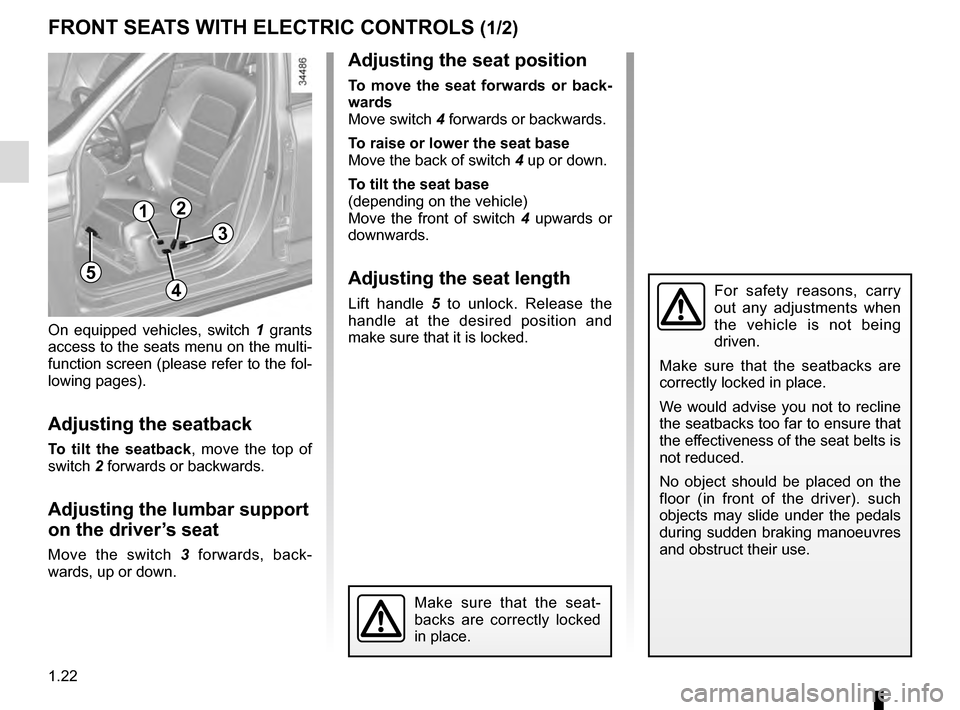
On equipped vehicles, switch 1 grants
access to the seats menu on the multi-
function screen (please refer to the fol-
lowing pages).
Adjusting the seatback
To tilt the seatback, move the top of
switch 2 forwards or backwards.
Adjusting the lumbar support
on the driver’s seat
Move the switch 3 forwards, back-
wards, up or down.
Make sure that the seat-
backs are correctly locked
in place.
4
5
Adjusting the seat position
To move the seat forwards or back-
wards
Move switch 4 forwards or backwards.
To raise or lower the seat base
Move the back of switch 4 up or down.
To tilt the seat base
(depending on the vehicle)
Move the front of switch 4 upwards or
downwards.
Adjusting the seat length
Lift handle 5 to unlock. Release the
handle at the desired position and
make sure that it is locked.
Page 29 of 328
1.23
FRONT SEATS WITH ELECTRIC CONTROLS (2/2)
6
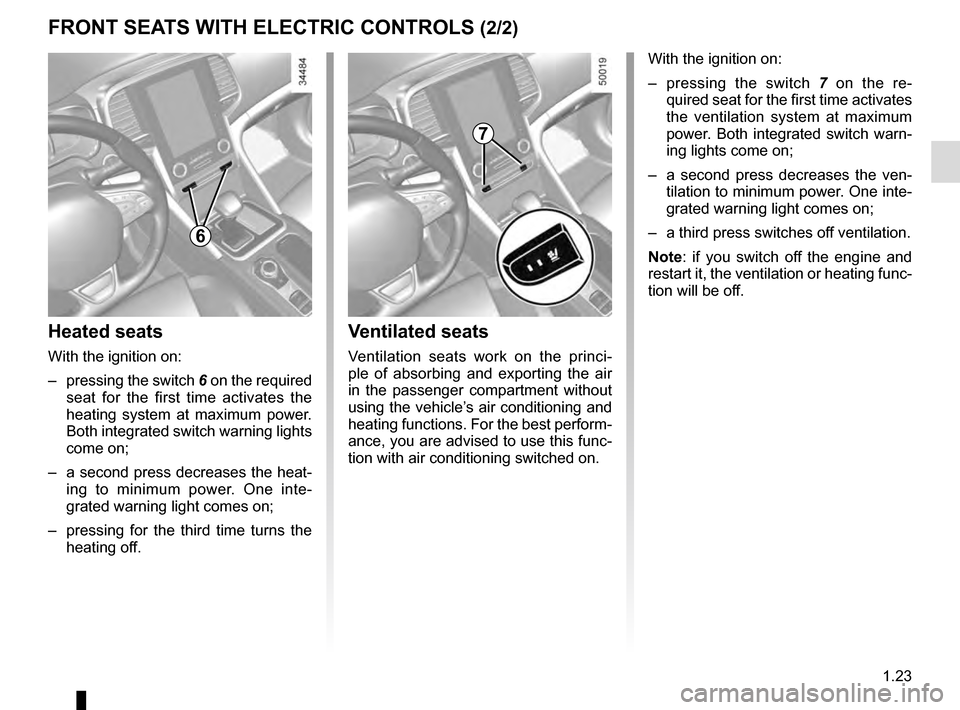
Heated seats
With the ignition on:
– pressing the switch 6 on the required
seat for the first time activates the
heating system at maximum power.
Both integrated switch warning lights
come on;
– a second press decreases the heat- ing to minimum power. One inte-
grated warning light comes on;
– pressing for the third time turns the heating off.
Ventilated seats
Ventilation seats work on the princi-
ple of absorbing and exporting the air
in the passenger compartment without
using the vehicle’s air conditioning and
heating functions. For the best perform-
ance, you are advised to use this func-
tion with air conditioning switched on. With the ignition on:
– pressing the switch
7 on the re-
quired seat for the first time activates
the ventilation system at maximum
power. Both integrated switch warn-
ing lights come on;
– a second press decreases the ven- tilation to minimum power. One inte-
grated warning light comes on;
– a third press switches off ventilation.
Note: if you switch off the engine and
restart it, the ventilation or heating func-
tion will be off.
7
Page 30 of 328

1.24
FRONT SEATS: Functions (1/3)Massage
You can activate the driver and front
passenger seat massage function.
Using the multifunction screen,
select menu “Vehicle”, “Seats” then
“Massage”. Browse menu “Driver” or “Passenger”
to:
– select the type of massage (Tonic,
Relaxing or Lumbar);
– adjust the intensity (+ or -);
– adjust the speed (+ or -);
– reset the selected settings. Press 2
then “Reset”;
– activate/deactivate the massage seat (ON or OFF).
Note: the mode selected in the “Multi-
Sense” menu may affect the massage
configuration (please refer to the infor-
mation in “Multi-Sense” in Section 3).
2
Using the multifunction screen, de-
pending on the vehicle you can access
a number of seat functions.
On equipped vehicles, switch 1 grants
direct access to the seat menu on the
multifunction screen.
Please refer to the multimedia equip-
ment instructions for further informa-
tion.
1
Massage
Passenger
Driver
Massage ON
Tonic Relaxing Lumbar Intensity
Speed
Page 31 of 328
1.25
FRONT SEATS: Functions (2/3)
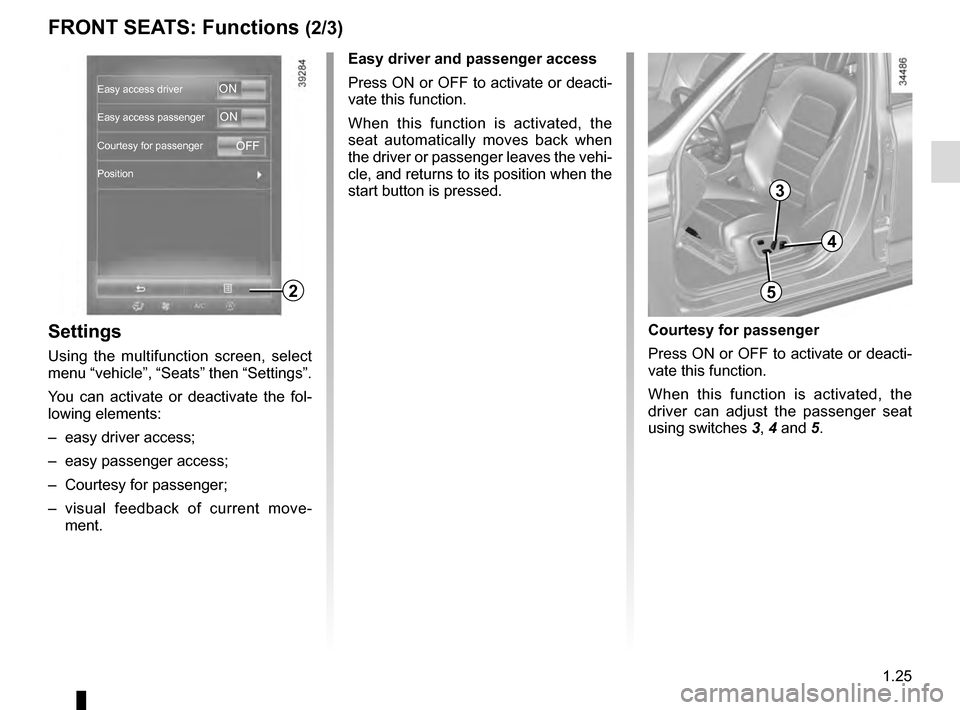
Settings
Using the multifunction screen, select
menu “vehicle”, “Seats” then “Settings”.
You can activate or deactivate the fol-
lowing elements:
– easy driver access;
– easy passenger access;
– Courtesy for passenger;
– visual feedback of current move- ment. Easy driver and passenger access
Press ON or OFF to activate or deacti-
vate this function.
When this function is activated, the
seat automatically moves back when
the driver or passenger leaves the vehi-
cle, and returns to its position when the
start button is pressed.
Courtesy for passenger
Press ON or OFF to activate or deacti-
vate this function.
When this function is activated, the
driver can adjust the passenger seat
using switches
3, 4 and 5.
2
3
4
5
Easy access driver
Easy access passenger
Courtesy for passenger
PositionON
ON
OFF
Page 32 of 328
1.26
FRONT SEATS: Functions (3/3)
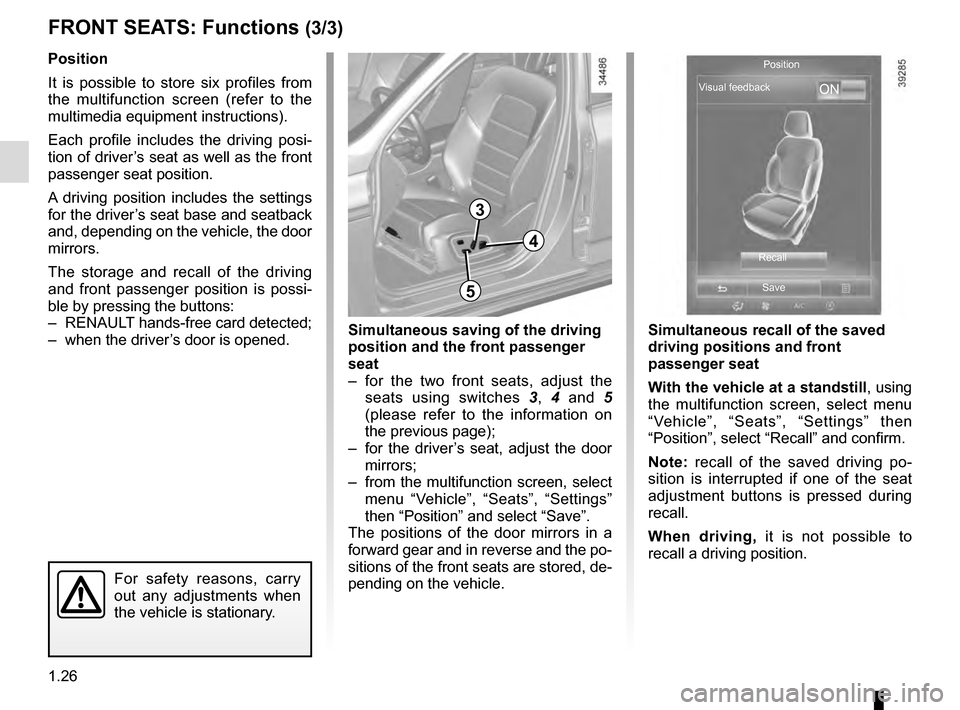
Position
It is possible to store six profiles from
the multifunction screen (refer to the
multimedia equipment instructions).
Each profile includes the driving posi-
tion of driver’s seat as well as the front
passenger seat position.
A driving position includes the settings
for the driver’s seat base and seatback
and, depending on the vehicle, the door
mirrors.
The storage and recall of the driving
and front passenger position is possi-
ble by pressing the buttons:
– RENAULT hands-free card detected;
– when the driver’s door is opened.
3
3
Simultaneous recall of the saved
driving positions and front
passenger seat
With the vehicle at a standstill, using
the multifunction screen, select menu
“Vehicle”, “Seats”, “Settings” then
“Position”, select “Recall” and confirm.
Note: recall of the saved driving po-
sition is interrupted if one of the seat
adjustment buttons is pressed during
recall.
When driving, it is not possible to
recall a driving position.
4
5
For safety reasons, carry
out any adjustments when
the vehicle is stationary.
Simultaneous saving of the driving
position and the front passenger
seat
– for the two front seats, adjust the seats using switches 3, 4 and 5
(please refer to the information on
the previous page);
– for the driver’s seat, adjust the door mirrors;
– from the multifunction screen, select menu “Vehicle”, “Seats”, “Settings”
then “Position” and select “Save”.
The positions of the door mirrors in a
forward gear and in reverse and the po-
sitions of the front seats are stored, de-
pending on the vehicle.
ON
Position
Visual feedback
RecallSave