2016 RENAULT TALISMAN air conditioning
[x] Cancel search: air conditioningPage 29 of 328
1.23
FRONT SEATS WITH ELECTRIC CONTROLS (2/2)
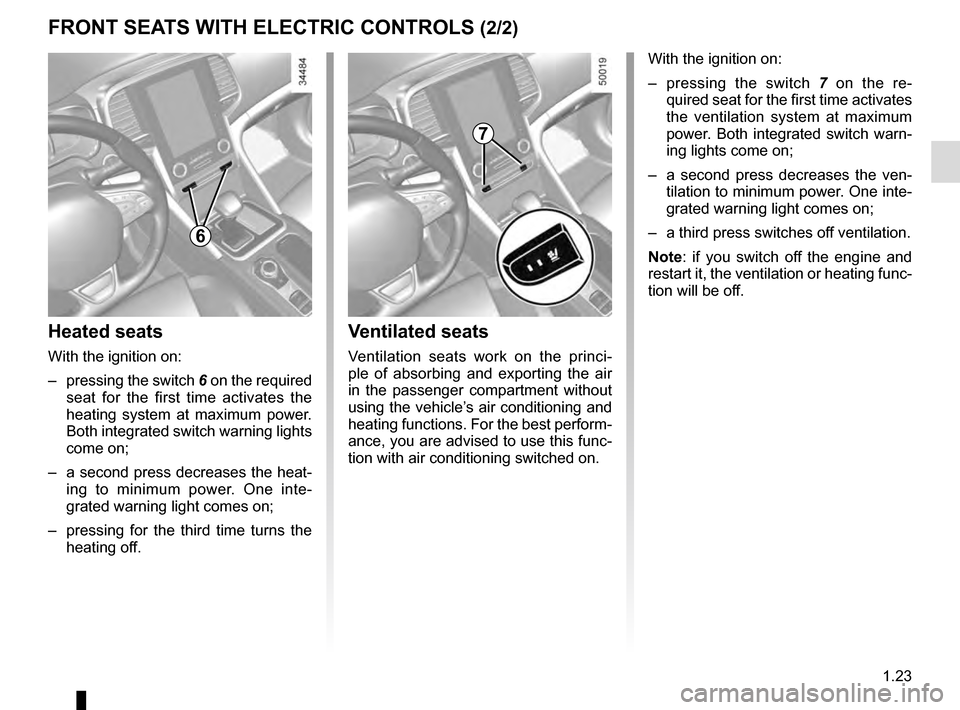
6
Heated seats
With the ignition on:
– pressing the switch 6 on the required
seat for the first time activates the
heating system at maximum power.
Both integrated switch warning lights
come on;
– a second press decreases the heat- ing to minimum power. One inte-
grated warning light comes on;
– pressing for the third time turns the heating off.
Ventilated seats
Ventilation seats work on the princi-
ple of absorbing and exporting the air
in the passenger compartment without
using the vehicle’s air conditioning and
heating functions. For the best perform-
ance, you are advised to use this func-
tion with air conditioning switched on. With the ignition on:
– pressing the switch
7 on the re-
quired seat for the first time activates
the ventilation system at maximum
power. Both integrated switch warn-
ing lights come on;
– a second press decreases the ven- tilation to minimum power. One inte-
grated warning light comes on;
– a third press switches off ventilation.
Note: if you switch off the engine and
restart it, the ventilation or heating func-
tion will be off.
7
Page 61 of 328

1.55
DRIVING POSITION (2/2)
The equipment fitted, described below, DEPENDS ON THE VERSION AND COUNTRY.
1 Side air vent.
2 Demister outlet.
3 Stalk for:
– direction indicator lights;
– exterior lights;
– fog lights.
4 Driver Airbag and horn location.
5 Instrument panel.
6 Head-up display.
7 Controls for:
– on-board computer information
read-out and vehicle settings cus-
tomisation menu,
– remote radio and navigation
system.
8 Steering column stalk for winds-
creen and rear screen wash/wiper.
9 Centre air vents.
10 Windscreen demister outlet.
11 Multimedia touchscreen.
12 Multifunction screen controls:
– screen activation/deactivation;
– volume;
– welcome menu;
– driving aids menu;
– settings.
13 Switches for:
– hazard warning lights,
– electric door locking.
14 Heating or air conditioning con-
trols.
15 Passenger Airbag location.
16 Glovebox.
17 Storage compartment.
18 Accessories and multimedia
socket
19 Cup holders
20 Controls for:
– electronic parking brake.
– cruise control/speed limiter.
21 Central multifunction and Multi-
Sense control.
22 Gearstick.
23 Controls for:
– heated front seats,
– ventilated front seats,
– activation/deactivation of ECO
mode,
– activation/deactivation of assisted
parking,
– activation/deactivation of the Stop
and Start function.
24 Engine start/stop button (vehicles
with RENAULT
card).
25 Ignition switch (vehicles with key).
26 Control for adjusting steering
wheel height and reach.
27 Cruise control/speed limiter and
adaptive cruise control controls.
28 Bonnet release control.
29 Controls for:
– electric headlight beam adjust-
ment,
– instrument panel lighting dimmer,
– lane departure warning,
– ESP and traction control system,
– heated steering wheel.
Page 87 of 328
1.81
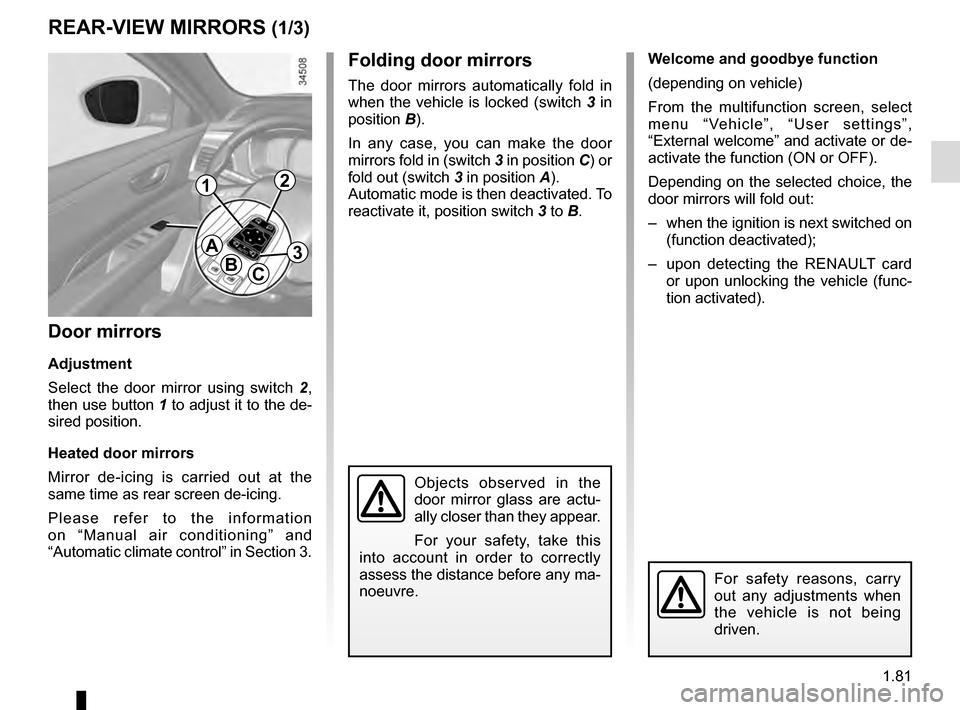
Folding door mirrors
The door mirrors automatically fold in
when the vehicle is locked (switch 3 in
position B).
In any case, you can make the door
mirrors fold in (switch 3 in position C) or
fold out (switch 3 in position A).
Automatic mode is then deactivated. To
reactivate it, position switch 3 to B.
REAR-VIEW MIRRORS (1/3)
Door mirrors
Adjustment
Select the door mirror using switch 2 ,
then use button 1 to adjust it to the de-
sired position.
Heated door mirrors
Mirror de-icing is carried out at the
same time as rear screen de-icing.
Please refer to the information
on “Manual air conditioning” and
“Automatic climate control” in Section 3.
For safety reasons, carry
out any adjustments when
the vehicle is not being
driven.
A
BC
12
3
Objects observed in the
door mirror glass are actu-
ally closer than they appear.
For your safety, take this
into account in order to correctly
assess the distance before any ma-
noeuvre.
Welcome and goodbye function
(depending on vehicle)
From the multifunction screen, select
menu “Vehicle”, “User settings”,
“External welcome” and activate or de-
activate the function (ON or OFF).
Depending on the selected choice, the
door mirrors will fold out:
– when the ignition is next switched on (function deactivated);
– upon detecting the RENAULT card or upon unlocking the vehicle (func-
tion activated).
Page 128 of 328

2.20
DRIVING ADVICE, ECO-DRIVING (3/5)
4
5
ECO mode
ECO mode is a function which opti-
mises fuel consumption. This acts on
all power consuming elements (engine
power, switching gears for vehicles
fitted with an automatic gearbox, heat-
ing and/or air conditioning, etc.).
Limiting acceleration enables low fuel
consumption in urban and surrounding
areas. The air conditioning and heating
limiter enables you to save fuel without
affecting your heating comfort.
Activating the function
The function can be activated:
– by pressing switch 4;
– using the central control 5 (please
refer to the information on “Multi-
Sense” in Section 3);
– Depending on the vehicle, from the navigation menu on the multimedia
screen (please refer to the multime-
dia instructions).
The warning light
comes on on
the instrument panel to confirm activa-
tion. Disabling the function
Press switch 4.
The warning light
goes out on
the instrument panel to confirm deac-
tivation.
While driving, it is possible to leave the
ECO mode temporarily in order to im-
prove engine performance.
To do this, press the accelerator pedal
firmly and fully.
ECO mode is reactivated when you
take pressure off the accelerator pedal.
Page 130 of 328

2.22
DRIVING ADVICE, ECO-DRIVING (5/5)
– In vehicles fitted with air conditio-
ning, it is normal to observe an in-
crease in fuel consumption (espe-
cially in urban conditions) when it is
used. For vehicles fitted with manual
air conditioning, switch off the system
when it is not required.
Recommendations for reducing
consumption and therefore help-
ing to preserve the environment:
If the vehicle has been parked in the
sun, open the doors for a few mo-
ments to let the hot air escape before
starting the engine.
– Do not leave an empty roof rack fitted to the vehicle.
– It is better to fit a trailer for bulky ob- jects.
– When towing a caravan, fit a wind deflector and adjust it carefully.
– Avoid using the car for door-to-door calls (short journeys with long waits
in between) because the engine
never reaches its normal operating
temperature.
Tyres
– An underinflated tyre increases fuel consumption.
– Opt for the highest speed pressure or the pressure recommended to op-
timise fuel consumption indicated
on edge of the driver’s door (please
refer to the information on “Tyre infla-
tion pressure” in Section 4).
– The use of non-recommended tyres can increase fuel consumption. Advice on use
– Favour the ECO mode.
– Electricity is fuel; switch off all the
electrical components which are
not really needed. However (safety
first), keep your lights on when the
visibility is bad (“see and be seen”).
– Use the air vents. Driving with the windows open at 60 mph (100 km/h)
will increase fuel consumption by
4%.
– Never fill the fuel tank right to the brim to avoid overflow.
Page 191 of 328

3.1
Section 3: Your comfort
Multi-Sense . . . . . . . . . . . . . . . . . . . . . . . . . . . . . . \
. . . . . . . . . . . . . . . . . . . . . . . . . . . . . . . . . . . . . . 3.2
Air Vents . . . . . . . . . . . . . . . . . . . . . . . . . . . . . . . . . . . .\
. . . . . . . . . . . . . . . . . . . . . . . . . . . . . . . . . . 3.4
Automatic climate control . . . . . . . . . . . . . . . . . . . . . . . . . . . . . . . . . . . .\
. . . . . . . . . . . . . . . . . . . . . 3.6
Air conditioning: information and advice on use . . . . . . . . . . . . . . . . . . . . . . . . . . . . . . . . . . . .\
. . . . 3.16
Electric windows . . . . . . . . . . . . . . . . . . . . . . . . . . . . . . . . . . . .\
. . . . . . . . . . . . . . . . . . . . . . . . . . . . 3.17
Electric sunroof . . . . . . . . . . . . . . . . . . . . . . . . . . . . . . . . . . . .\
. . . . . . . . . . . . . . . . . . . . . . . . . . . . . 3.19
Interior lighting . . . . . . . . . . . . . . . . . . . . . . . . . . . . . . . . . . . . \
. . . . . . . . . . . . . . . . . . . . . . . . . . . . . . 3.22
Sun visor . . . . . . . . . . . . . . . . . . . . . . . . . . . . . . . \
. . . . . . . . . . . . . . . . . . . . . . . . . . . . . . . . . . . . . . . 3.24
Passenger compartment storage/fittings . . . . . . . . . . . . . . . . . . . . . . . . . . . . . . . . . . . . \
. . . . . . . . . . 3.25
Accessories socket . . . . . . . . . . . . . . . . . . . . . . . . . . . . . . . . . . . .\
. . . . . . . . . . . . . . . . . . . . . . . . . . 3.28
Ashtray . . . . . . . . . . . . . . . . . . . . . . . . . . . . . . . . . . . .\
. . . . . . . . . . . . . . . . . . . . . . . . . . . . . . . . . . . 3.28
Cigarette lighter . . . . . . . . . . . . . . . . . . . . . . . . . . . . . . . . . . . . \
. . . . . . . . . . . . . . . . . . . . . . . . . . . . . 3.28
Headrests - Rear seats . . . . . . . . . . . . . . . . . . . . . . . . .\
. . . . . . . . . . . . . . . . . . . . . . . . . . . . . . . . . . 3.29
Rear bench seat . . . . . . . . . . . . . . . . . . . . . . . . . . . . . . . . . . . .\
. . . . . . . . . . . . . . . . . . . . . . . . . . . . 3.30
Luggage compartment. . . . . . . . . . . . . . . . . . . . . . . . . . .\
. . . . . . . . . . . . . . . . . . . . . . . . . . . . . . . . . 3.32
Automatic tailgate . . . . . . . . . . . . . . . . . . . . . . . . . . . . . . . . . . . .\
. . . . . . . . . . . . . . . . . . . . . . . . . . . 3.37
Luggage cover . . . . . . . . . . . . . . . . . . . . . . . . . . . . . . . . . . . . \
. . . . . . . . . . . . . . . . . . . . . . . . . . . . . . 3.42
Luggage net. . . . . . . . . . . . . . . . . . . . . . . . . . . . . . .\
. . . . . . . . . . . . . . . . . . . . . . . . . . . . . . . . . . . . . 3.43
Luggage compartment storage . . . . . . . . . . . . . . . . . . . . . . . . . . . . . . . . . . . .\
. . . . . . . . . . . . . . . . . 3.45
Transporting objects in the luggage compartment . . . . . . . . . . . . . . . . . . . . . . . . . . . . . . . . . . . .\
. . 3.47
Transporting objects: . . . . . . . . . . . . . . . . . . . . . . . . . . . . . . . . . . . . \
. . . . . . . . . . . . . . . . . . . . . . . . . 3.48 equipment . . . . . . . . . . . . . . . . . . . . . . . . . . . . . . . . . . . .\
. . . . . . . . . . . . . . . . . . . . . . . . . . . 3.48
Roof bars . . . . . . . . . . . . . . . . . . . . . . . . . . . . . . . . . . . . \
. . . . . . . . . . . . . . . . . . . . . . . . . . . . . . . . . . 3.49
Multimedia equipment . . . . . . . . . . . . . . . . . . . . . . . . . . . . . . . . . . . . \
. . . . . . . . . . . . . . . . . . . . . . . . 3.50
Page 192 of 328
3.2
MULTI-SENSE (1/2)
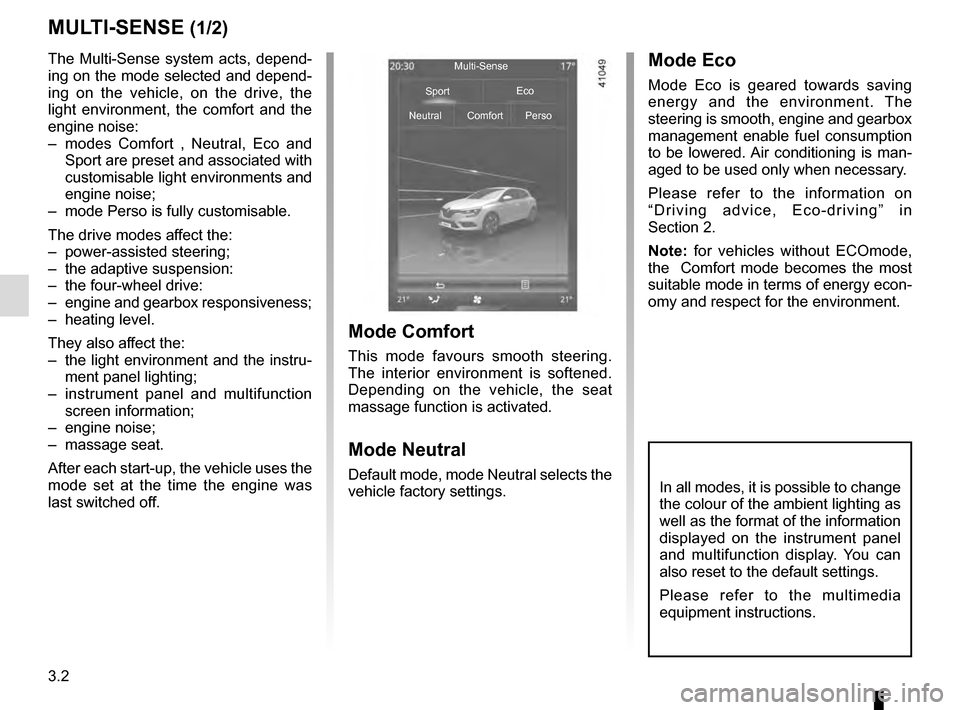
The Multi-Sense system acts, depend-
ing on the mode selected and depend-
ing on the vehicle, on the drive, the
light environment, the comfort and the
engine noise:
– modes Comfort , Neutral, Eco and Sport are preset and associated with
customisable light environments and
engine noise;
– mode Perso is fully customisable.
The drive modes affect the:
– power-assisted steering;
– the adaptive suspension:
– the four-wheel drive:
– engine and gearbox responsiveness;
– heating level.
They also affect the:
– the light environment and the instru- ment panel lighting;
– instrument panel and multifunction screen information;
– engine noise;
– massage seat.
After each start-up, the vehicle uses the
mode set at the time the engine was
last switched off.
Mode Comfort
This mode favours smooth steering.
The interior environment is softened.
Depending on the vehicle, the seat
massage function is activated.
Mode Neutral
Default mode, mode Neutral selects the
vehicle factory settings.
Mode Eco
Mode Eco is geared towards saving
energy and the environment. The
steering is smooth, engine and gearbox
management enable fuel consumption
to be lowered. Air conditioning is man-
aged to be used only when necessary.
Please refer to the information on
“Driving advice, Eco-driving” in
Section 2.
Note: for vehicles without ECOmode,
the Comfort mode becomes the most
suitable mode in terms of energy econ-
omy and respect for the environment.
Multi-Sense
Sport Eco
Neutral Comfort Perso
In all modes, it is possible to change
the colour of the ambient lighting as
well as the format of the information
displayed on the instrument panel
and multifunction display. You can
also reset to the default settings.
Please refer to the multimedia
equipment instructions.
Page 196 of 328

3.6
10
AUTOMATIC CLIMATE CONTROL: Controls A (1/5)
15
6543
9
1216
17
18
19
11
Controls A
Press zone 14 to access the multifunc-
tion screen controls 1. The presence of
the controls detailed below will depend
on the vehicle model.
2 and 7 Left and right temperature indi-
cation adjustment.
3 De-icing/demisting of the rear screen and, depending on the vehicle, the
door mirrors.
4, 8, 9 and 10 automatic modes
5 Air recirculation.
6 “Clear View” function. 11
and 18 Ventilation speeds.
12 Distribution of air in the passenger compartment.
13 Right and left temperature display.
14 Zone displaying air conditioning set- tings.
15 “DUAL” function.
16 “Automatic recirculation” function.
17 Air conditioning.
19 Stopping the system.
8
14
13
72
13
1
Some buttons have a warning light
indicating their operative state.
AAutomatic mode
The automatic climate control system
guarantees comfort in the passen-
ger compartment and good visibility
(except in the event of extreme condi-
tions), while optimising consumption.
The system controls the ventilation
speed, air distribution, air recirculation,
and starting and stopping the air condi-
tioning and air temperature.
This mode consists of a choice of three
programmes:
NORMAL : allows the selected comfort
level to be best attained, depending on
the exterior conditions. Press button 4
or key 9.
SOFT: reaches the desired comfort
level more gently and silently. Press
button 8.
FAST: increases the flow of air in the
passenger compartment. This mode
is recommended in particular to opti-
mise comfort in the rear seats. Press
button 10.