Page 197 of 328
3.7
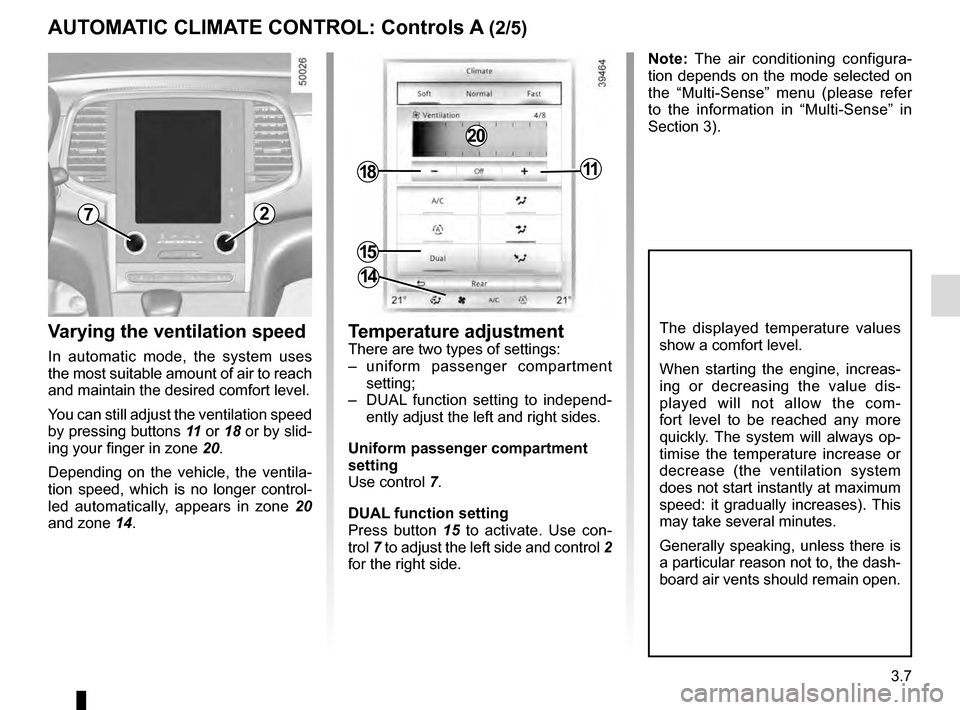
Varying the ventilation speed
In automatic mode, the system uses
the most suitable amount of air to reach
and maintain the desired comfort level.
You can still adjust the ventilation speed
by pressing buttons 11 or 18 or by slid-
ing your finger in zone 20.
Depending on the vehicle, the ventila-
tion speed, which is no longer control-
led automatically, appears in zone 20
and zone 14.
AUTOMATIC CLIMATE CONTROL: Controls A (2/5)
Temperature adjustment
There are two types of settings:
– uniform passenger compartment setting;
– DUAL function setting to independ- ently adjust the left and right sides.
Uniform passenger compartment
setting
Use control 7.
DUAL function setting
Press button 15 to activate. Use con-
trol 7 to adjust the left side and control 2
for the right side.
The displayed temperature values
show a comfort level.
When starting the engine, increas-
ing or decreasing the value dis-
played will not allow the com-
fort level to be reached any more
quickly. The system will always op-
timise the temperature increase or
decrease (the ventilation system
does not start instantly at maximum
speed: it gradually increases). This
may take several minutes.
Generally speaking, unless there is
a particular reason not to, the dash-
board air vents should remain open.
72
15
1811
14
Note: The air conditioning configura-
tion depends on the mode selected on
the “Multi-Sense” menu (please refer
to the information in “Multi-Sense” in
Section 3).
20
Page 198 of 328
3.8
AUTOMATIC CLIMATE CONTROL: Controls A (3/5)
Clear View function
This function quickly demists and de-
ices the windscreen, the rear screen,
the front side windows, and the door
mirrors (depending on the vehicle). It
imposes automatic operation of the
air conditioning and rear screen de-ic-
ing and, depending on the vehicle, the
windscreen electric de-icer.
643
109
1811
8
20
To exit this function, press either:
– button 4;
– again button 6;
– on button 8, 9 or 10.
Press button 6 – the integrated indica-
tor light comes on.
Press button 3 to stop the heated rear
screen operating, and the integrated in-
dicator goes out.
To adjust the ventilation speed: press
buttons 11 or 18 or slide your finger in
zone 20.
Page 199 of 328

3.9
AUTOMATIC CLIMATE CONTROL: Controls A (4/5)
Switching air conditioning on
or off
In automatic mode, the system switches
the air conditioning system on or off,
depending on the climate conditions.
Press button 17 to:
– activate the air conditioning (a warn- ing light in zone 14 comes on).
– deactivate the air conditioning (the warning light in zone 14 goes out)
4
17
19
14
Stopping the system
Press button 19 to activate or deacti-
vate the system (the operating warn-
ing light on button 19 notifies you of the
system status).
It is preferable to use one of the automatic programmes NORMAL, SOFT or
FAST.
In automatic mode (4 warning light is lit), all air conditioning functions are control-
led by the system.
You can still change the system selection. In this case, the warning ligh\
t on the
button 4 will go out and the changed function, which is no longer controlled by \
the
system, will be shown on the display.
To return to automatic mode, press one of programmes NORMAL, SOFT, or
FAST , or button 4.
Rear screen de-icing/
demisting
Press button 3 – the integrated indica-
tor light comes on. This function en-
ables rapid demisting or de-icing of the
rear screen and de-icing of the door
mirrors (on equipped vehicles).
To exit this function, press button 3
again. Demisting automatically stops.
3
Page 201 of 328

3.11
AUTOMATIC CLIMATE CONTROL: Controls B and C (1/5)
Indicators
The following indicators are displayed
on the screen 3:
1 Active mode, ventilation speed and air distribution in the passenger com-
partment (temporary display after
pressing the associated controls).
2 Outside air temperature.
4 Air temperature, left and right.
Automatic mode
The automatic climate control system
guarantees comfort in the passen-
ger compartment and good visibility
(except in the event of extreme condi-
tions), whilst optimising consumption.
The system controls the ventilation
speed, air distribution, air recirculation,
and starting and stopping the air condi-
tioning and air temperature.
This mode consists of a choice of three
programmes:
AUTO: allows the selected comfort
level to be best attained, depending
on the exterior conditions. Press the
button 15.
SOFT: reaches the desired comfort
level more gently and silently. Press the
button 14.
FAST: increases the flow of air in the
passenger compartment. This mode is
recommended in particular to optimise
comfort in the rear seats. Press the
button 16.
10
Some buttons have a warning light
indicating their operative state.
1113141512
89
6
Controls Band C
5 and 11 Left and right temperature in-
dication adjustment.
6 De-icing/demisting of the rear screen and, depending on the vehicle, the
door mirrors.
7 Distribution of air in the passenger compartment.
8 “Automatic recirculation” function.
9 Air recirculation.
10 “Clear View” function.
12 and 18 Ventilation speeds.
13 “DUAL" function.
14, 15, and 16 Automatic modes.
17 Air conditioning.
7
1851716
1
44
2
10
1113141512
89
6
7
1851716
1
44
2
BC
33
Page 202 of 328

3.12
Varying the ventilation speed
In automatic mode, the system uses
the most suitable amount of air to reach
and maintain the desired comfort level.
You can still adjust the ventilation
speed by pressing buttons 12 or 18 or,
depending on the vehicle, by sliding
your finger in zone 19.
Temperature adjustmentThere are two types of settings:
– uniform passenger compartment
setting;
– DUAL function setting to independ- ently adjust the left and right sides.
Uniform passenger compartment
setting
Use control 11 .
DUAL function setting
Press button 13 to activate. Use con-
trol 11 to adjust the left side and con-
trol 5 for the right side.
The displayed temperature values
show a comfort level.
When starting the engine, increas-
ing or decreasing the value dis-
played will not allow the com-
fort level to be reached any more
quickly. The system will always op-
timise the temperature increase or
decrease (the ventilation system
does not start instantly at maximum
speed: it gradually increases). This
may take several minutes.
Generally speaking, unless there is
a particular reason not to, the dash-
board air vents should remain open.
Note: The air conditioning configura-
tion depends on the mode selected in
the “Multi-Sense” menu (please refer to
the information on “Multi-Sense” in sec-
tion 3).
111312185
111312185
19
AUTOMATIC CLIMATE CONTROL: Controls B and C (2/5)
Page 203 of 328
3.13
Press button 10 – the integrated indica-
tor light comes on.
Press button 6 to stop the heated rear
screen operating, and the integrated in-
dicator goes out.
To adjust the ventilation speed: press
buttons 12 or 18or slide your finger in
zone 19.Clear View function
This function quickly demists and de-
ices the windscreen, the rear screen,
the front side windows, and the door
mirrors (depending on the vehicle). It
imposes automatic operation of the
air conditioning and rear screen de-ic-
ing and, depending on the vehicle, the
windscreen electric de-icer. To exit this function,
press either:
– again button 10;
– one of the buttons 14, 15 or 16.
141512
6
1816
1910
10
141512
6
1816
AUTOMATIC CLIMATE CONTROL: Controls B and C (3/5)
Page 204 of 328

3.14
Switching air conditioning on
or off
In automatic mode, the system switches
the air conditioning system on or off,
depending on the climate conditions.
Press button 17 to:
– activate the air conditioning (a warn-ing light in zone 1 comes on).
– deactivate the air conditioning (the warning light in zone 1 goes out)
Rear screen de-icing/
demisting
Press button 6 – the integrated indica-
tor light comes on. This function en-
ables rapid demisting or de-icing of the
rear screen and de-icing of the door
mirrors (on equipped vehicles).
To exit this function, press button 6
again. Demisting automatically stops.
It is preferable to use one of the automatic programmes AUTO, SOFT or
FAST.
In automatic mode (indicator light on button 14, 15 or 16 lit), all air conditioning
functions are controlled by the system.
You can still modify the system’s choice; in this case, the indicator light on the
button 14, 15 or 16 goes out.
To return to automatic mode, press one of programmes AUTO 15, SOFT 14 or
FAST 16.
15
6
1715
6
1714161416
1
1
Stopping the system
To switch the system off, press
button 12 repeatedly until the message
OFF appears in zone 1.
1212
AUTOMATIC CLIMATE CONTROL: Controls B and C (4/5)
Page 206 of 328

3.16
AIR CONDITIONING: information and advice on use
Do not add anything to the
vehicle’s ventilation circuit
(for example, to remove
bad odours).
There is a risk of damage or of
fire.
Do not open the refriger-
ant fluid circuit. The fluid
may damage eyes or skin.
Fuel consumption
You will normally notice an increase in
fuel consumption (especially in town)
when the air conditioning is operating.
For vehicles fitted with air conditioning
with no automatic mode, switch off the
system when it is not required.
Advice for reducing consumption
and helping to preserve the environ-
ment
Drive with the air vents open and the
windows closed.
If the vehicle has been parked in the
sun, open the doors for a few moments
to let the hot air escape before starting
the engine.
Maintenance
Refer to the Maintenance Document
for your vehicle for the inspection fre-
quency.
Operating faults
As a general rule, contact your ap-
proved dealer in the event of an oper-
ating fault.
– Reduction in de-icing, demisting or air conditioning performance.
This may be caused by the passen-
ger compartment filter cartridge be-
coming clogged.
– No cold air is being produced .
Check that the controls are set cor-
rectly and that the fuses are sound.
Otherwise, switch off the system.
Presence of water under the
vehicle
After prolonged use of the air condi-
tioning system, it is normal for water
to be present under the vehicle. This is
caused by condensation.
Advice on use
In some situations, (air conditioning
off, air recirculation activated, ventila-
tion speed at zero or low, etc.) you may
notice that condensation starts to form
on the windows and windscreen.
If there is condensation, use the “Clear
View” function to remove it, then use
the air conditioning in automatic mode
to stop it forming again.
Vehicles equipped with the
ECO mode: once activated, ECO
mode can reduce the perform-
ance of the automatic air condition-
ing. Please refer to the information
on “Driving advice, Eco-driving” in
Section 2.

