2016 RENAULT TALISMAN instrument panel
[x] Cancel search: instrument panelPage 160 of 328

2.52
OVERSPEED ALERT (1/3)
The overspeed alert with signage panel
recognition notifies the driver that they
are exceeding the speed limit for the
section of road on which they are cur-
rently travelling.Special situations
– If the vehicle is travelling in a coun-
try where the speed units differ from
those of the vehicle, the system dis-
plays the speed limit sign in the unit
of the country, alongside the speed
limit converted to the unit used by the
vehicle’s instrument panel.
– For countries where the speed limit is reduced during rainy weather on
some types of roads, the system can
modify the limited speed after a few
seconds of wiping the windscreen.
– The system does not take into ac- count exceptional speed limit meas-
ures, such as peak pollution days.
On equipped vehicles, some infor-
mation is given on the head-up dis-
play.
1Operating principle
The system detects speed limit signs
on the side of the road and displays the
speed limit.
It mainly uses information taken from
the camera 1 , attached to the wind-
screen behind the rear-view mirror.
Note: Make sure the windscreen is not
obstructed (dirt, ice, snow, etc.).
For vehicles which are equipped with it,
the system also uses information from
the navigation system.
Once the speed limiter is activated, you
can adjust the speed limiter indication
displayed by the system.
In the event of exceeding the speed
limit, the sign display is modified (the
characters change to red or the circle
around the sign flashes) no notify you.
Page 164 of 328

2.56
CRUISE CONTROL/SPEED LIMITER: cruise control function (2/4)
Driving
Once a cruising speed is memorised
and the cruise control function is active,
you may lift your foot off the accelera-
tor pedal.
Please note that you are
strongly advised to keep
your feet close to the pedals
in order to react in an emer-
gency.
Switching on
Press switch 1 on side .
Indicator light
comes on, lit green,
and the message “Cruise Control”
appears on the instrument panel,
accompanied by dashes to indicate that
the cruise control function is activated
and waiting to store a cruising speed.
1
2
a
Activating cruise control
At a steady speed (above approxi-
mately 18.6 mph (30 km/h)) press
switch 2 side a (+): the function is acti-
vated and the current speed is memo-
rised.
The cruising speed replaces the dashes
and cruise control is confirmed by dis-
playing of the cruising speed, the mes-
sage “Cruise control” and depending on
the vehicle the indicator light
, in ad-
dition to the indicator light
or .
If you try to activate the function below
20 mph (30 km/h), the message “Invalid
speed” will be displayed and the func-
tion will remain inactive.
Page 165 of 328
2.57
CRUISE CONTROL/SPEED LIMITER: cruise control function (3/4)
Exceeding the cruising speed
The cruising speed may be exceeded
at any time by depressing the accelera-
tor pedal. While overtaking, the cruis-
ing speed flashes red on the instrument
panel.
Then, release the accelerator: after a
few seconds, the vehicle will automati-
cally return to its set cruising speed.
Cruising speed cannot be
maintained
If driving up or down a steep gradi-
ent, the system is unable to maintain
the cruising speed: the stored speed is
flashes red on the instrument panel to
inform you of this situation.
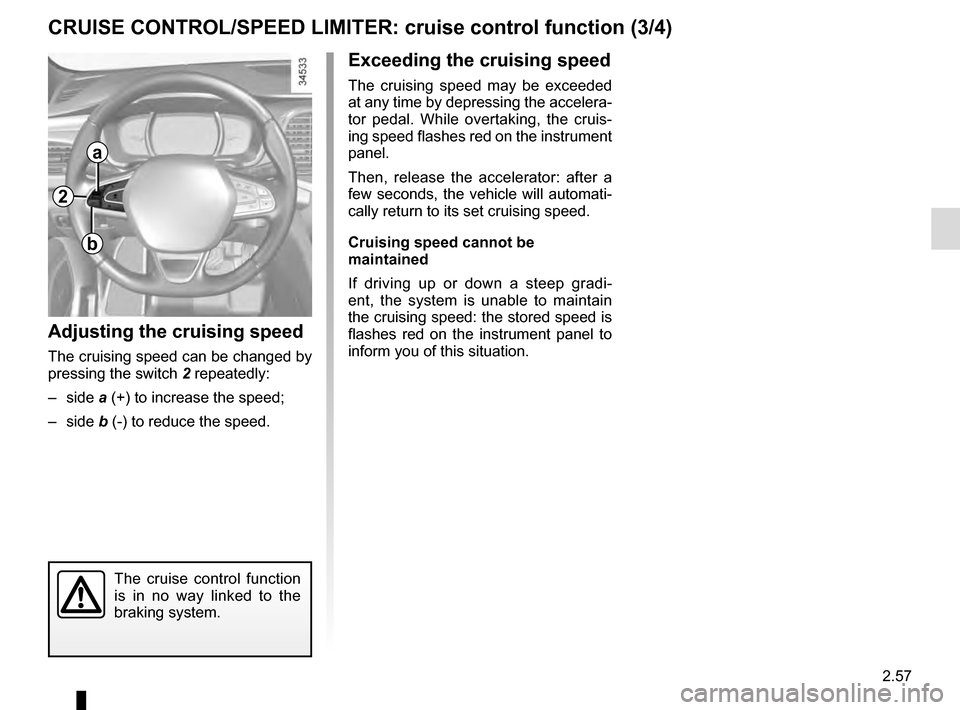
Adjusting the cruising speed
The cruising speed can be changed by
pressing the switch 2 repeatedly:
– side a (+) to increase the speed;
– side b (-) to reduce the speed.
The cruise control function
is in no way linked to the
braking system.
2
a
b
Page 166 of 328

2.58
CRUISE CONTROL/SPEED LIMITER: cruise control function (4/4)
Putting the function on
standby
The function is set to standby if you:
– use the switch 5 (O);
– the brake pedal;
– depress the clutch pedal or the shift into neutral if the vehicle has an au-
tomatic gearbox.
In these three cases, the cruising
speed remains stored and the mes-
sage “Memorised” accompanied by this
speed appears on the instrument panel.
Standby is confirmed by the display of
the cruising speed in grey and the mes-
sage “Memorised”.
Putting the cruise control
on standby or switching it
off does not cause a rapid
reduction in speed: you
must brake by depressing the brake
pedal.
1
2
a3
5
Returning to the cruising speed
If a speed is stored, it can be recalled,
once you are sure that the road con-
ditions are suitable (traffic, road sur-
face, weather conditions, etc.). Press
switch 3 (R) if the vehicle speed is
above 20 mph (30 km/h).
When the stored speed is recalled,
activation of the cruise control is con-
firmed by the illumination of the cruis-
ing speed in green, along with the mes-
sage “Cruise control”.
NB: if the speed previously stored is
much higher than the current speed,
the vehicle will accelerate more rapidly
to reach this threshold.
When the cruise control is set to
standby, pressing on the side a (+)
of the switch 2 reactivates the cruise
control function without taking into
account the stored speed: it is the
speed at which the vehicle is moving
that is taken into account.
Switching off the functionThe cruise control function is deacti-
vated if you press switch 1: in this case
a speed is no longer stored. Depending
on the vehicle, the green
warning
light and message on the instrument
panel go out to confirm that the function
is deactivated.
Page 168 of 328

2.60
Controls
5 Main “On/Off” switch.
2 Controls for:
a cruising speed activation, storage
and increase (+) ;
b decreasing cruising speed (-).
3 Activation with recall of saved cruis- ing speed (R).
4 Switch the function to standby (with cruising speed saved) (O).
6 Adjusting following distance.
ADAPTIVE CRUISE CONTROL (2/7)
6
5
2
a
b
3
4
Switching onPress switch 5 . Indicator light
comes on, lit green, and the message
“Adaptive cruise ctrl” appears on the
instrument panel, accompanied by
dashes to indicate that the cruise con-
trol function is activated and waiting to
store a cruising speed.
Activating cruise controlAt a steady speed (above approxi-
mately 31 mph (50 km/h)), press
switch 2 side a (+): the function is acti-
vated and the current speed is memo-
rised. The cruising speed replaces the dashes
and cruise control is confirmed by the
appearance of the message “Adaptive
cruise ctrl” and the indicator light
.
If you try to activate the function below
31 mph (50 km/h) or above 86.8 mph
(140 km/h), the message “Invalid
speed” is displayed and the function will
remain inactive.
Adjusting the following
distance
Pressing switch 6 multiple times ad-
justs the following distance.
Page 169 of 328
2.61
Driving
Once a cruising speed is memorised
and the cruise control function is active,
you may lift your foot off the accelera-
tor pedal.
If a following distance is stored and a
vehicle travelling slower than yours is
detected by the system in your lane,
your vehicle will brake (with the brake
lights on) and adapt its speed to that of
the vehicle in front, respecting the fol-
lowing distance selected previously.
Overtaking
If your speed is lower than the cruise
control and you wish to perform an
overtaking manoeuvre, activating the
direction indicator will provide acceler-
ation enabling the overtaking manoeu-
vre.
Please note that you are
strongly advised to keep
your feet close to the pedals
in order to react in an emer-
gency.
ADAPTIVE CRUISE CONTROL (3/7)
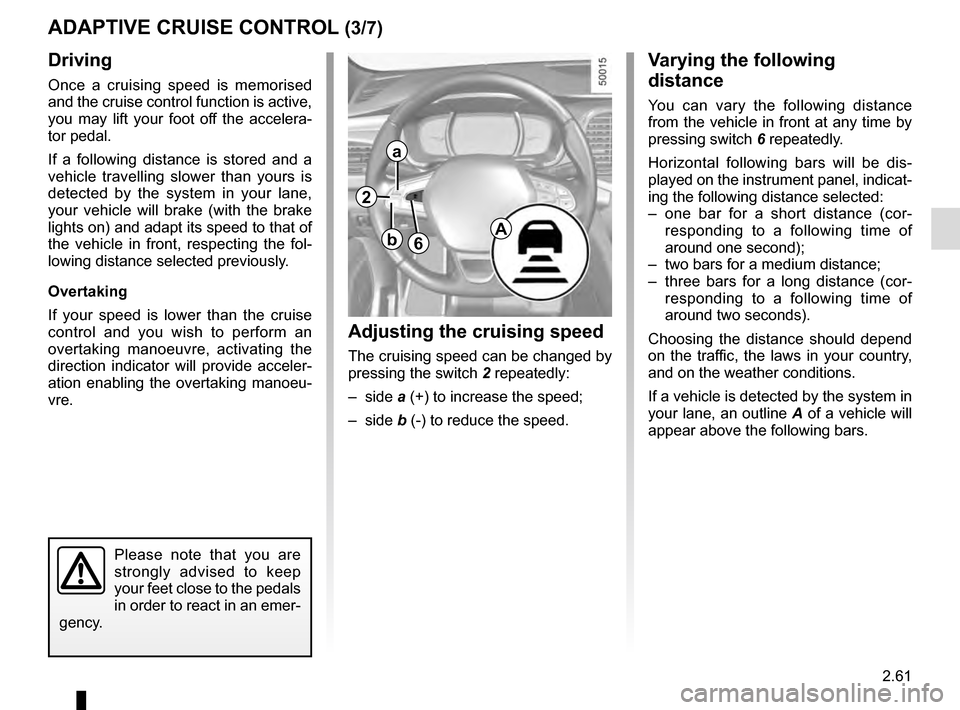
Adjusting the cruising speed
The cruising speed can be changed by
pressing the switch 2 repeatedly:
– side a (+) to increase the speed;
– side b (-) to reduce the speed.
Varying the following
distance
You can vary the following distance
from the vehicle in front at any time by
pressing switch 6 repeatedly.
Horizontal following bars will be dis-
played on the instrument panel, indicat-
ing the following distance selected:
– one bar for a short distance (cor- responding to a following time of
around one second);
– two bars for a medium distance;
– three bars for a long distance (cor- responding to a following time of
around two seconds).
Choosing the distance should depend
on the traffic, the laws in your country,
and on the weather conditions.
If a vehicle is detected by the system in
your lane, an outline A of a vehicle will
appear above the following bars.
6A
2
a
b
Page 170 of 328

2.62
ADAPTIVE CRUISE CONTROL (4/7)
Exceeding the cruising speed
The cruising speed may be exceeded
at any time by depressing the accelera-
tor pedal.
When exceeding this speed, the cruis-
ing speed and the following bars show
red and the cruising speed flashes on
the instrument panel: the distance con-
trol function is no longer activated.
Then, release the accelerator: cruise
and distance control will automatically
reactivate unless the function has been
set to standby.
2
a3
4
Putting the function on
standby
The function is set to standby if:
– you press switch 4 (O);
– you depress the brake pedal;
– you depress the clutch pedal;
– you use the gear lever;
– the vehicle speed is lower than 31 mph (50 km/h) or over 86.8 mph
(140 km/h);
– the engine speed is too low or too high;
– certain driver correction devices and aids are triggered (ABS, ESC, etc.)
In the latter three cases, the message
“Adaptive cruise Adaptive cruise” is dis-
played on the instrument panel when
the function is set to standby.
Standby is confirmed by the display of
the cruising speed in grey and the mes-
sage “Adaptive cruise ctrl”. Returning to the cruising speed
If a speed is stored, it can be recalled,
once you are sure that the road con-
ditions are suitable (traffic, road sur-
face, weather conditions, etc.). Press
switch
3 (R) if the vehicle speed is
above around 30 mph (50 km/h).
When the stored speed is recalled,
activation of the cruise control is con-
firmed by the illumination of the cruis-
ing speed in green, along with the mes-
sage “Adaptive cruise ctrl”.
When the cruise control is set to
standby, pressing switch 2, side a (+),
reactivates the cruise control function
without taking into account the stored
speed: it is the speed at which the vehi-
cle is moving that is taken into account.
Page 171 of 328
2.63
ADAPTIVE CRUISE CONTROL (5/7)
Putting the cruise control
on standby or switching it
off does not cause a rapid
reduction in speed: you
must brake by depressing the brake
pedal.
Please note that you are
strongly advised to keep
your feet close to the pedals
in order to react in an emer-
gency.
Note: if the speed previously stored is
much higher than the current speed,
the vehicle will accelerate to reach this
threshold.
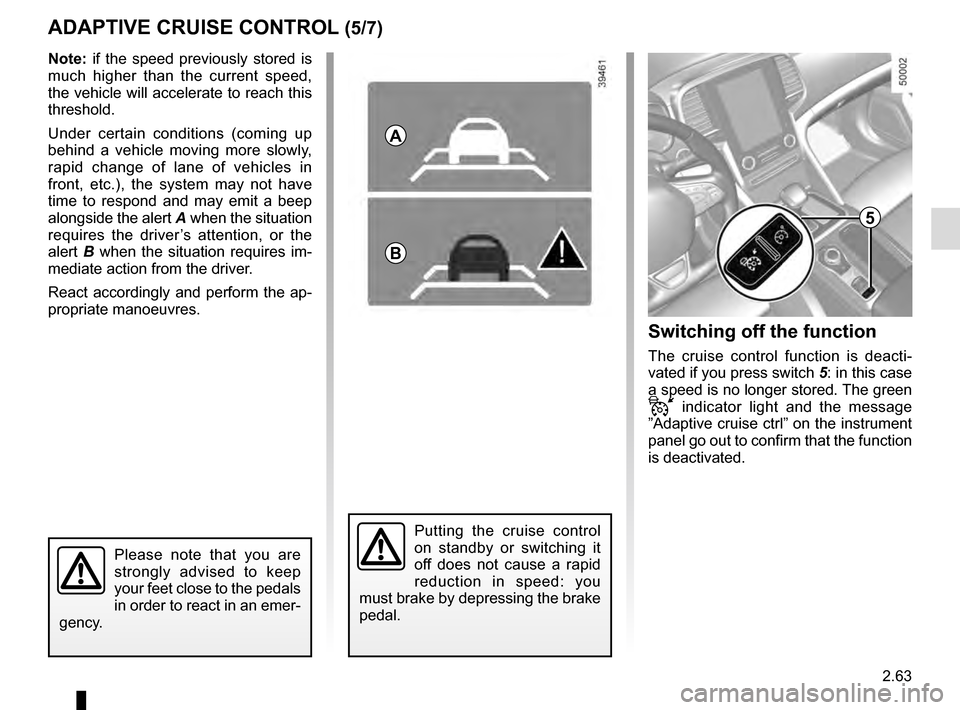
Under certain conditions (coming up
behind a vehicle moving more slowly,
rapid change of lane of vehicles in
front, etc.), the system may not have
time to respond and may emit a beep
alongside the alert A when the situation
requires the driver’s attention, or the
alert B when the situation requires im-
mediate action from the driver.
React accordingly and perform the ap-
propriate manoeuvres.
A
B
5
Switching off the function
The cruise control function is deacti-
vated if you press switch 5: in this case
a speed is no longer stored. The green
indicator light and the message
”Adaptive cruise ctrl” on the instrument
panel go out to confirm that the function
is deactivated.