2016 RENAULT TALISMAN air condition
[x] Cancel search: air conditionPage 154 of 328

2.46
Operating faults
If the system detects a fault, the mes-
sage “Check blind spot alert” is dis-
played on the instrument panel. Call an
approved Dealer.
Note: when the engine is started, the
indicator light 6, display B , flashes
three times. It is normal.
– The system’s detection
range operates according
to a standard lane width. If
you are driving in wide traf-
fic lanes, the system might not
be able to detect a vehicle in the
blind spot.
– The system might be disrupted momentarily if it is exposed to
strong electromagnetic waves
(as beneath high-tension power
lines) or to very poor weather
conditions (heavy rain, snow
etc.). Remain aware of driving
conditions.
There is a risk of accidents.
Because sensors have
been installed in the bum-
pers, any work (repairs, re-
placements, touching up of
paintwork) must be carried out by a
qualified professional.
6
B
C
D
Conditions for non-function
– If the object is not moving;
– if traffic is heavy;
– the road is winding;
– if front and rear sensors both detect objects at the same time (e.g. when
passing an articulated lorry).
– ...
BLIND SPOT WARNING (4/4)
Page 156 of 328

2.48
SAFE DISTANCE ALERT (2/2)
The measurement is dis-
played for information
purposes: the system does
not carry out any action on
the vehicle.
This function is not designed for use
in urban conditions or for a dynamic
driving style (sudden cornering, ac-
celeration, braking etc.).
The function does not interact with
the braking system.
The sensor area should be kept
clean and free of any modifications
to ensure the proper operation of
the system.
Any work in the area where the
radar is located (repairs, replace-
ments, touching up of paintwork)
must be carried out by a qualified
professional.
– C (orange): the time interval falls
between around 1 and 2 seconds (in-
sufficient distance between the two
vehicles);
– D (red): the time interval is less than
or equal to around one second (very
insufficient distance between the two
vehicles).
If the interval between the two vehicles
is less than around 0.5 seconds, war-
ning light 4 will flash on the instrument
panel. Under certain conditions, the
time interval may not be displayed:
– while cornering;
– when changing lane;
– if the vehicle in front is sufficiently far or outside the range of the sensor.
On equipped vehicles, some infor-
mation is given on the head-up dis-
play.
4A
B
C
D
Operation
Upon activating the function, indicator 4
notifies the driver of the distance sepa-
rating them from the vehicle in front.
– A (grey): function not operational;
– A (green): no vehicle detected;
– B (green): the time interval is greater
than or equal to around two seconds
(distance between the two vehicles
adapted to your speed);
This function is essential if adaptive
cruise control is activated.
Page 172 of 328
2.64
ADAPTIVE CRUISE CONTROL (6/7)
This function is an additional driving aid. However, this function is not under any circumstances intended to replace the
due care and attention of the driver, who should at all times be in control of the vehicle.
The driver should always adapt their speed to the traffic conditions, regardless of the system indications.
The system should under no circumstances be taken to be an obstacle dete\
ctor or an anti-collision system.
System servicing/repairs
– In the event of an impact, the sensor alignment may become changed, and \
its operation will consequently be affected. Deactivate the function, then consult an authorised dealer.
– Any work in the area where the radar is located (repairs, replacements,\
touching up of paintwork) must be carried out by a qualified professional.
System disturbance
In a complex environment (metal bridge, etc.), the system may be affected.
Risk of inadvertent braking.
Page 191 of 328

3.1
Section 3: Your comfort
Multi-Sense . . . . . . . . . . . . . . . . . . . . . . . . . . . . . . \
. . . . . . . . . . . . . . . . . . . . . . . . . . . . . . . . . . . . . . 3.2
Air Vents . . . . . . . . . . . . . . . . . . . . . . . . . . . . . . . . . . . .\
. . . . . . . . . . . . . . . . . . . . . . . . . . . . . . . . . . 3.4
Automatic climate control . . . . . . . . . . . . . . . . . . . . . . . . . . . . . . . . . . . .\
. . . . . . . . . . . . . . . . . . . . . 3.6
Air conditioning: information and advice on use . . . . . . . . . . . . . . . . . . . . . . . . . . . . . . . . . . . .\
. . . . 3.16
Electric windows . . . . . . . . . . . . . . . . . . . . . . . . . . . . . . . . . . . .\
. . . . . . . . . . . . . . . . . . . . . . . . . . . . 3.17
Electric sunroof . . . . . . . . . . . . . . . . . . . . . . . . . . . . . . . . . . . .\
. . . . . . . . . . . . . . . . . . . . . . . . . . . . . 3.19
Interior lighting . . . . . . . . . . . . . . . . . . . . . . . . . . . . . . . . . . . . \
. . . . . . . . . . . . . . . . . . . . . . . . . . . . . . 3.22
Sun visor . . . . . . . . . . . . . . . . . . . . . . . . . . . . . . . \
. . . . . . . . . . . . . . . . . . . . . . . . . . . . . . . . . . . . . . . 3.24
Passenger compartment storage/fittings . . . . . . . . . . . . . . . . . . . . . . . . . . . . . . . . . . . . \
. . . . . . . . . . 3.25
Accessories socket . . . . . . . . . . . . . . . . . . . . . . . . . . . . . . . . . . . .\
. . . . . . . . . . . . . . . . . . . . . . . . . . 3.28
Ashtray . . . . . . . . . . . . . . . . . . . . . . . . . . . . . . . . . . . .\
. . . . . . . . . . . . . . . . . . . . . . . . . . . . . . . . . . . 3.28
Cigarette lighter . . . . . . . . . . . . . . . . . . . . . . . . . . . . . . . . . . . . \
. . . . . . . . . . . . . . . . . . . . . . . . . . . . . 3.28
Headrests - Rear seats . . . . . . . . . . . . . . . . . . . . . . . . .\
. . . . . . . . . . . . . . . . . . . . . . . . . . . . . . . . . . 3.29
Rear bench seat . . . . . . . . . . . . . . . . . . . . . . . . . . . . . . . . . . . .\
. . . . . . . . . . . . . . . . . . . . . . . . . . . . 3.30
Luggage compartment. . . . . . . . . . . . . . . . . . . . . . . . . . .\
. . . . . . . . . . . . . . . . . . . . . . . . . . . . . . . . . 3.32
Automatic tailgate . . . . . . . . . . . . . . . . . . . . . . . . . . . . . . . . . . . .\
. . . . . . . . . . . . . . . . . . . . . . . . . . . 3.37
Luggage cover . . . . . . . . . . . . . . . . . . . . . . . . . . . . . . . . . . . . \
. . . . . . . . . . . . . . . . . . . . . . . . . . . . . . 3.42
Luggage net. . . . . . . . . . . . . . . . . . . . . . . . . . . . . . .\
. . . . . . . . . . . . . . . . . . . . . . . . . . . . . . . . . . . . . 3.43
Luggage compartment storage . . . . . . . . . . . . . . . . . . . . . . . . . . . . . . . . . . . .\
. . . . . . . . . . . . . . . . . 3.45
Transporting objects in the luggage compartment . . . . . . . . . . . . . . . . . . . . . . . . . . . . . . . . . . . .\
. . 3.47
Transporting objects: . . . . . . . . . . . . . . . . . . . . . . . . . . . . . . . . . . . . \
. . . . . . . . . . . . . . . . . . . . . . . . . 3.48 equipment . . . . . . . . . . . . . . . . . . . . . . . . . . . . . . . . . . . .\
. . . . . . . . . . . . . . . . . . . . . . . . . . . 3.48
Roof bars . . . . . . . . . . . . . . . . . . . . . . . . . . . . . . . . . . . . \
. . . . . . . . . . . . . . . . . . . . . . . . . . . . . . . . . . 3.49
Multimedia equipment . . . . . . . . . . . . . . . . . . . . . . . . . . . . . . . . . . . . \
. . . . . . . . . . . . . . . . . . . . . . . . 3.50
Page 192 of 328
3.2
MULTI-SENSE (1/2)
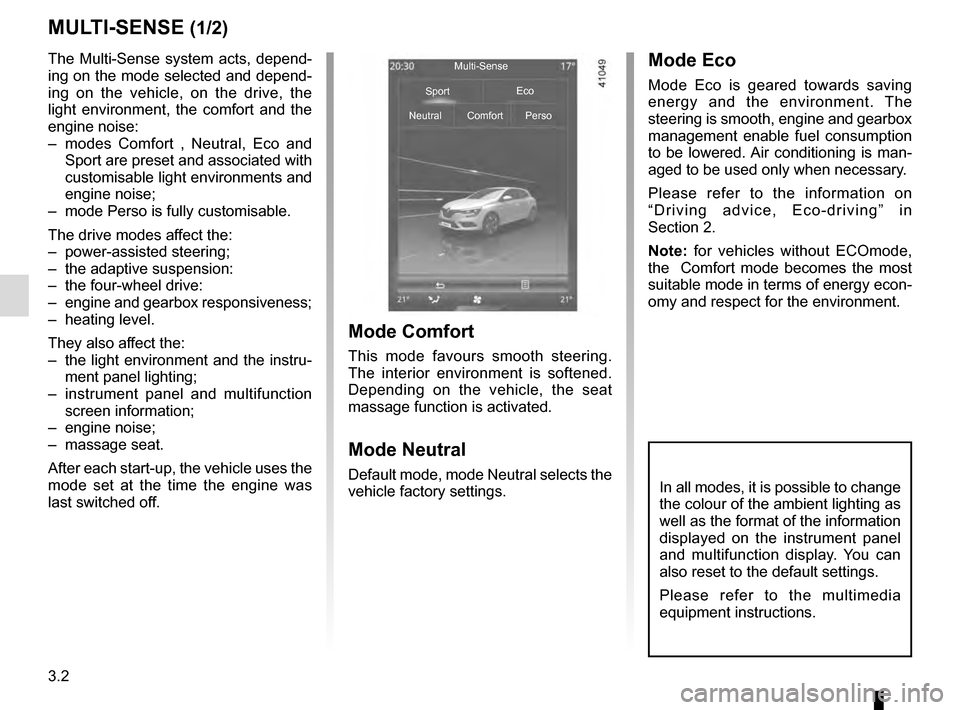
The Multi-Sense system acts, depend-
ing on the mode selected and depend-
ing on the vehicle, on the drive, the
light environment, the comfort and the
engine noise:
– modes Comfort , Neutral, Eco and Sport are preset and associated with
customisable light environments and
engine noise;
– mode Perso is fully customisable.
The drive modes affect the:
– power-assisted steering;
– the adaptive suspension:
– the four-wheel drive:
– engine and gearbox responsiveness;
– heating level.
They also affect the:
– the light environment and the instru- ment panel lighting;
– instrument panel and multifunction screen information;
– engine noise;
– massage seat.
After each start-up, the vehicle uses the
mode set at the time the engine was
last switched off.
Mode Comfort
This mode favours smooth steering.
The interior environment is softened.
Depending on the vehicle, the seat
massage function is activated.
Mode Neutral
Default mode, mode Neutral selects the
vehicle factory settings.
Mode Eco
Mode Eco is geared towards saving
energy and the environment. The
steering is smooth, engine and gearbox
management enable fuel consumption
to be lowered. Air conditioning is man-
aged to be used only when necessary.
Please refer to the information on
“Driving advice, Eco-driving” in
Section 2.
Note: for vehicles without ECOmode,
the Comfort mode becomes the most
suitable mode in terms of energy econ-
omy and respect for the environment.
Multi-Sense
Sport Eco
Neutral Comfort Perso
In all modes, it is possible to change
the colour of the ambient lighting as
well as the format of the information
displayed on the instrument panel
and multifunction display. You can
also reset to the default settings.
Please refer to the multimedia
equipment instructions.
Page 196 of 328

3.6
10
AUTOMATIC CLIMATE CONTROL: Controls A (1/5)
15
6543
9
1216
17
18
19
11
Controls A
Press zone 14 to access the multifunc-
tion screen controls 1. The presence of
the controls detailed below will depend
on the vehicle model.
2 and 7 Left and right temperature indi-
cation adjustment.
3 De-icing/demisting of the rear screen and, depending on the vehicle, the
door mirrors.
4, 8, 9 and 10 automatic modes
5 Air recirculation.
6 “Clear View” function. 11
and 18 Ventilation speeds.
12 Distribution of air in the passenger compartment.
13 Right and left temperature display.
14 Zone displaying air conditioning set- tings.
15 “DUAL” function.
16 “Automatic recirculation” function.
17 Air conditioning.
19 Stopping the system.
8
14
13
72
13
1
Some buttons have a warning light
indicating their operative state.
AAutomatic mode
The automatic climate control system
guarantees comfort in the passen-
ger compartment and good visibility
(except in the event of extreme condi-
tions), while optimising consumption.
The system controls the ventilation
speed, air distribution, air recirculation,
and starting and stopping the air condi-
tioning and air temperature.
This mode consists of a choice of three
programmes:
NORMAL : allows the selected comfort
level to be best attained, depending on
the exterior conditions. Press button 4
or key 9.
SOFT: reaches the desired comfort
level more gently and silently. Press
button 8.
FAST: increases the flow of air in the
passenger compartment. This mode
is recommended in particular to opti-
mise comfort in the rear seats. Press
button 10.
Page 197 of 328
3.7
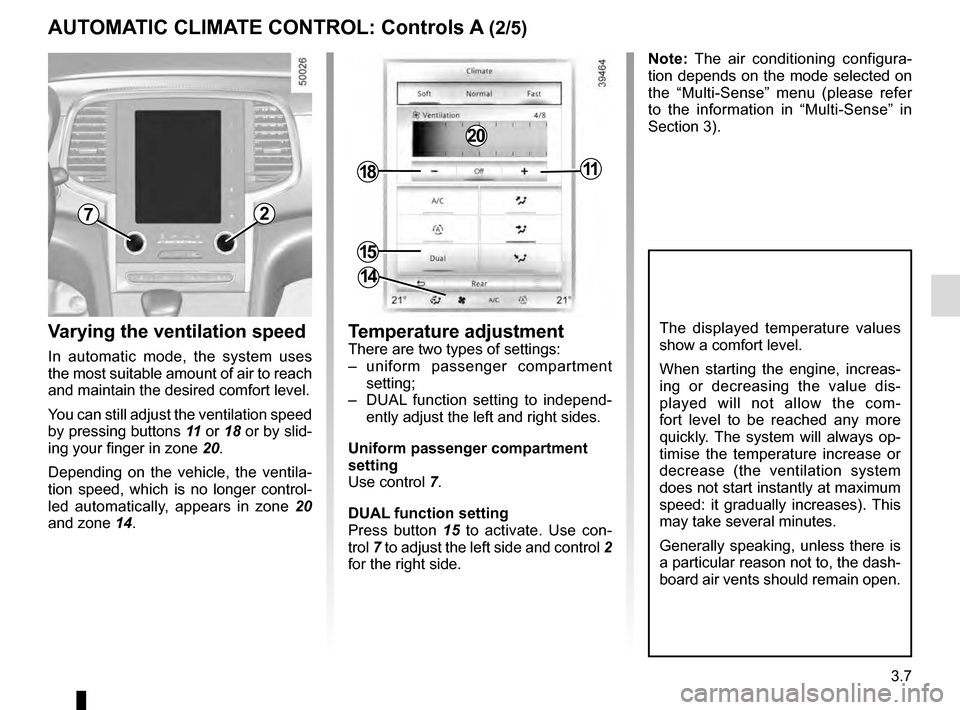
Varying the ventilation speed
In automatic mode, the system uses
the most suitable amount of air to reach
and maintain the desired comfort level.
You can still adjust the ventilation speed
by pressing buttons 11 or 18 or by slid-
ing your finger in zone 20.
Depending on the vehicle, the ventila-
tion speed, which is no longer control-
led automatically, appears in zone 20
and zone 14.
AUTOMATIC CLIMATE CONTROL: Controls A (2/5)
Temperature adjustment
There are two types of settings:
– uniform passenger compartment setting;
– DUAL function setting to independ- ently adjust the left and right sides.
Uniform passenger compartment
setting
Use control 7.
DUAL function setting
Press button 15 to activate. Use con-
trol 7 to adjust the left side and control 2
for the right side.
The displayed temperature values
show a comfort level.
When starting the engine, increas-
ing or decreasing the value dis-
played will not allow the com-
fort level to be reached any more
quickly. The system will always op-
timise the temperature increase or
decrease (the ventilation system
does not start instantly at maximum
speed: it gradually increases). This
may take several minutes.
Generally speaking, unless there is
a particular reason not to, the dash-
board air vents should remain open.
72
15
1811
14
Note: The air conditioning configura-
tion depends on the mode selected on
the “Multi-Sense” menu (please refer
to the information in “Multi-Sense” in
Section 3).
20
Page 198 of 328

3.8
AUTOMATIC CLIMATE CONTROL: Controls A (3/5)
Clear View function
This function quickly demists and de-
ices the windscreen, the rear screen,
the front side windows, and the door
mirrors (depending on the vehicle). It
imposes automatic operation of the
air conditioning and rear screen de-ic-
ing and, depending on the vehicle, the
windscreen electric de-icer.
643
109
1811
8
20
To exit this function, press either:
– button 4;
– again button 6;
– on button 8, 9 or 10.
Press button 6 – the integrated indica-
tor light comes on.
Press button 3 to stop the heated rear
screen operating, and the integrated in-
dicator goes out.
To adjust the ventilation speed: press
buttons 11 or 18 or slide your finger in
zone 20.