Page 262 of 328

5.2
PUNCTURE, EMERGENCY SPARE WHEEL
If the vehicle is parked on
the hard shoulder, you must
warn other road users of
your vehicle’s presence
with a warning triangle or with other
devices as per the legislation apply-
ing to the country you are in.
Special note
The Tyre Pressure Monitor function
does not check the emergency spare
wheel (the wheel replaced by the emer-
gency spare wheel disappears from the
instrument panel display).
Refer to the information on the “Tyre
pressure monitoring system” in
Section 2.Emergency spare wheel
This is located in the luggage compart-
ment.
To access it:
– open the trunk lid.
– lift the boot carpet A . Depending on
the vehicle, remove the carpet.
– unscrew the central mounting located, depending on the vehicle, under the
jack, in an anti-clockwise direction.
– remove the tool kit.
– remove emergency spare wheel.
If the emergency spare wheel has been stored for several years, have it \
checked by your Dealer to ensure that it is safe to use.
Vehicles fitted with an emergency spare wheel smaller than the
four other wheels:
– Never fit more than one emergency spare wheel to the same vehicle.
– As the punctured wheel is wider than the emergency spare wheel, the vehi\
cle’s ground clearance is reduced.
– Replace the emergency spare wheel as soon as possible with a wheel with \
the same dimensions as the original.
– When this is fitted to the vehicle, which must only be a temporary measu\
re, the driving speed must not exceed the speed indicated on the label on the wh\
eel.
– Fitting an emergency spare wheel may alter the way the vehicle usually r\
uns. Avoid sudden acceleration or deceleration and reduce your speed when cor-\
nering.
– If you need to use snow chains, fit the emergency spare wheel to the rea\
r axle and check the tyre pressure.
A
In case of puncture
Depending on the vehicle, a tyre infla-
tion kit or emergency spare wheel is
provided (refer to the following pages).
Page 268 of 328
5.8
TOOLS (2/2)/WHEEL TRIM
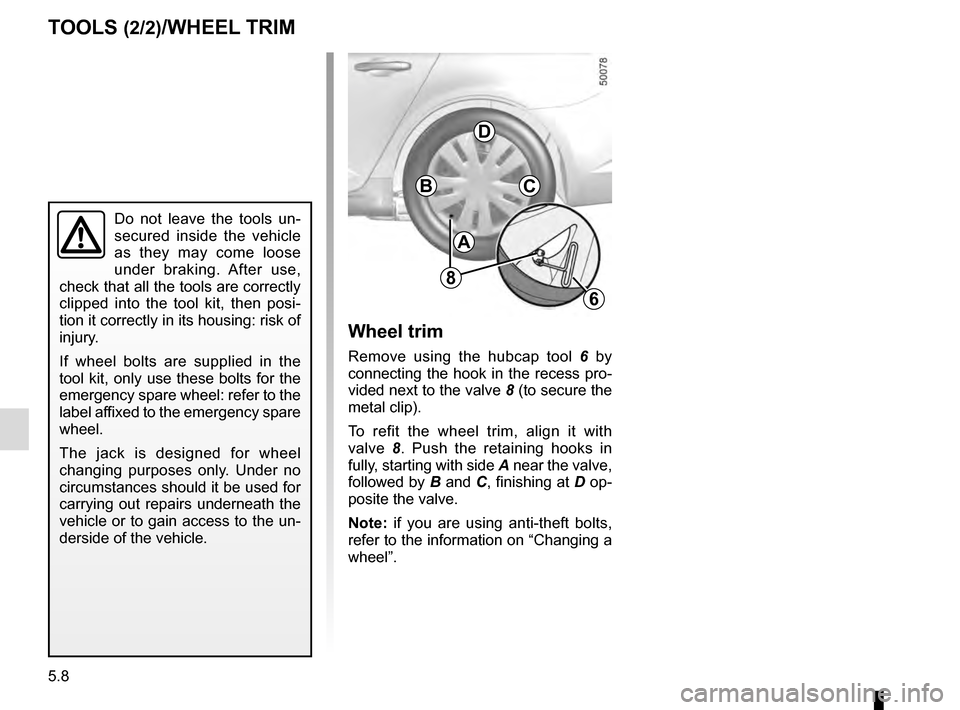
A
BC
D
Wheel trim
Remove using the hubcap tool 6 by
connecting the hook in the recess pro-
vided next to the valve 8 (to secure the
metal clip).
To refit the wheel trim, align it with
valve 8. Push the retaining hooks in
fully, starting with side A near the valve,
followed by B and C, finishing at D op-
posite the valve.
Note: if you are using anti-theft bolts,
refer to the information on “Changing a
wheel”.
Do not leave the tools un-
secured inside the vehicle
as they may come loose
under braking. After use,
check that all the tools are correctly
clipped into the tool kit, then posi-
tion it correctly in its housing: risk of
injury.
If wheel bolts are supplied in the
tool kit, only use these bolts for the
emergency spare wheel: refer to the
label affixed to the emergency spare
wheel.
The jack is designed for wheel
changing purposes only. Under no
circumstances should it be used for
carrying out repairs underneath the
vehicle or to gain access to the un-
derside of the vehicle.
6
8
Page 270 of 328
5.10
Undo the bolts and take off the wheel.
Fit the emergency spare wheel onto
the hub and rotate it until the mounting
holes in the wheel coincide with those
of the hub.
If bolts are supplied with the emergency
spare wheel, only use these bolts for
the emergency spare wheel. Tighten
the bolts, checking that the wheel is
correctly positioned on its hub and un-
screw the jack.
With the wheel on the ground, tighten
the bolts fully and have the tightness of
the bolts checked and the emergency
spare wheel pressure checked as soon
as possible.
Anti-theft bolt
If you use anti-theft bolts, fit these
nearest the valve (wheel embel-
lisher may not be able to fit).
If you have a puncture, re-
place the wheel as soon as
possible.
A tyre which has been punc-
tured should always be inspected
(and repaired, where possible) by a
specialist.
CHANGING A WHEEL (2/2)
Page 290 of 328

5.30
ACCESSORIES
Electrical and electronic accessories
Before installing this type of accessory (particularly for transmitters\
/receivers: frequency bandwidth, power level, po-
sition of the aerial, etc.), make sure it is compatible with your vehic\
le. You can get advice from an authorised dealer.
Connect accessories with a maximum power of 120 Watts only. Fire hazard. When several accessory sockets are
used at the same time, the total power of the connected accessories must\
not exceed 180 watts.
No work may be carried out on the vehicle’s electrical or radio circuits, except by authorised dealers: an incorre\
ctly connecte d
system may result in damage being caused to the electrical equipment and\
/or the components connected to it.
If the vehicle is fitted with any aftermarket electrical equipment, make\
sure that the installation is correctly protected by a fuse.
Establish the rating and position of this fuse.
Using the diagnostic socket
The use of electronic accessories on the diagnostic socket may cause ser\
ious disturbance to the vehicle’s electronic systems.
For your safety we recommend that you use only electronic accessories ap\
proved by the manufacturer, consult an Approved
Dealer. Serious accident risk.
Use of transmitting/receiving devices (telephones, CB equipment etc.).\
Telephones and CB equipment with integrated aerials may cause interferenc\
e to the electronic systems originally fitted to the
vehicle: it is advisable only to use equipment with an external aerial. \
Furthermore, we remind you of the need to conform
to the legislation in force concerning the use of such equipment.
Fitting aftermarket accessories
If you wish to install accessories on the vehicle: please contact an aut\
horised dealer. Also, to ensure the correct operation o f
your vehicle, and to avoid any risk to your safety, we recommend that you use only accessories specifically designed for y\
our
vehicle, which are the only accessories for which the manufacturer will \
provide a warranty.
If you are using an anti-theft device, only attach it to the brake pedal\
.
Obstructions to the driver
On the driver’s side, only use mats suitable for the vehicle, attached with the pre-fi\
tted components, and check the fitting re gu-
larly. Do not lay one mat on top of another. There is a risk of wedging the pedals.
Page 301 of 328

6.1
Section 6: Technical specifications
Vehicle identification plates . . . . . . . . . . . . . . . . . . . . . . . . . . . . . . . . . . . . \
. . . . . . . . . . . . . . . . . . . . 6.2
Engine identification plates . . . . . . . . . . . . . . . . . . . . . . . . . . . . . . . . . . . .\
. . . . . . . . . . . . . . . . . . . . 6.3
Dimensions . . . . . . . . . . . . . . . . . . . . . . . . . . . . . . . . . . . .\
. . . . . . . . . . . . . . . . . . . . . . . . . . . . . . . . 6.4
Engine specifications . . . . . . . . . . . . . . . . . . . . . . . . . . . . . . . . . . . . \
. . . . . . . . . . . . . . . . . . . . . . . . . 6.6
Weights . . . . . . . . . . . . . . . . . . . . . . . . . . . . . . . . . . . .\
. . . . . . . . . . . . . . . . . . . . . . . . . . . . . . . . . . . 6.7
Towing weights . . . . . . . . . . . . . . . . . . . . . . . . . . . . . . . . . . . .\
. . . . . . . . . . . . . . . . . . . . . . . . . . . . . 6.7
Replacement parts and repairs . . . . . . . . . . . . . . . . . . . . . . . . . . . . . . . . . . . . \
. . . . . . . . . . . . . . . . . 6.8
Service sheets . . . . . . . . . . . . . . . . . . . . . . . . . . . . . . . . . . . . \
. . . . . . . . . . . . . . . . . . . . . . . . . . . . . . 6.9
Anti-corrosion check . . . . . . . . . . . . . . . . . . . . . . . . . . . . . . . . . . . .\
. . . . . . . . . . . . . . . . . . . . . . . . . 6.15
Page 309 of 328
6.9
Date: Miles (Km): \
Invoice number:Comments/miscellaneous
Type of operation: Stamp
Service □
....................................... □
Anti-corrosion check:
OK □ Not OK* □
*See specific page
Date: Miles (Km): \
Invoice number: Comments/miscellaneous
Type of operation: Stamp
Service □
....................................... □
Anti-corrosion check:
OK □ Not OK* □
*See specific page
Date: Miles (Km): \
Invoice number: Comments/miscellaneous
Type of operation: Stamp
Service □
....................................... □
Anti-corrosion check:
OK □ Not OK* □
*See specific page
VIN: .......................................................................\
...........
SERVICE SHEETS (1/6)
Page 310 of 328
6.10
SERVICE SHEETS (2/6)
VIN: .......................................................................\
...........
Date: Miles (Km): \
Invoice number:Comments/miscellaneous
Type of operation: Stamp
Service □
....................................... □
Anti-corrosion check:
OK □ Not OK* □
*See specific page
Date: Miles (Km): \
Invoice number: Comments/miscellaneous
Type of operation: Stamp
Service □
....................................... □
Anti-corrosion check:
OK □ Not OK* □
*See specific page
Date: Miles (Km): \
Invoice number: Comments/miscellaneous
Type of operation: Stamp
Service □
....................................... □
Anti-corrosion check:
OK □ Not OK* □
*See specific page
Page 311 of 328
6.11
SERVICE SHEETS (3/6)
VIN: .......................................................................\
...........
Date: Miles (Km): \
Invoice number:Comments/miscellaneous
Type of operation: Stamp
Service □
....................................... □
Anti-corrosion check:
OK □ Not OK* □
*See specific page
Date: Miles (Km): \
Invoice number: Comments/miscellaneous
Type of operation: Stamp
Service □
....................................... □
Anti-corrosion check:
OK □ Not OK* □
*See specific page
Date: Miles (Km): \
Invoice number: Comments/miscellaneous
Type of operation: Stamp
Service □
....................................... □
Anti-corrosion check:
OK □ Not OK* □
*See specific page
: \
Invoice number:Comments/miscellaneous
Type of operation: Stamp
Service □
...........")

VIN: .......................................................................\
...........
Date: Miles (Km): \
Invoic")

VIN: .......................................................................\
...........
Date: Miles (Km): \
Invoic")