Page 224 of 274
5.22
REAR LIGHTS AND INDICATOR LIGHTS: changing bulbs (5/6)
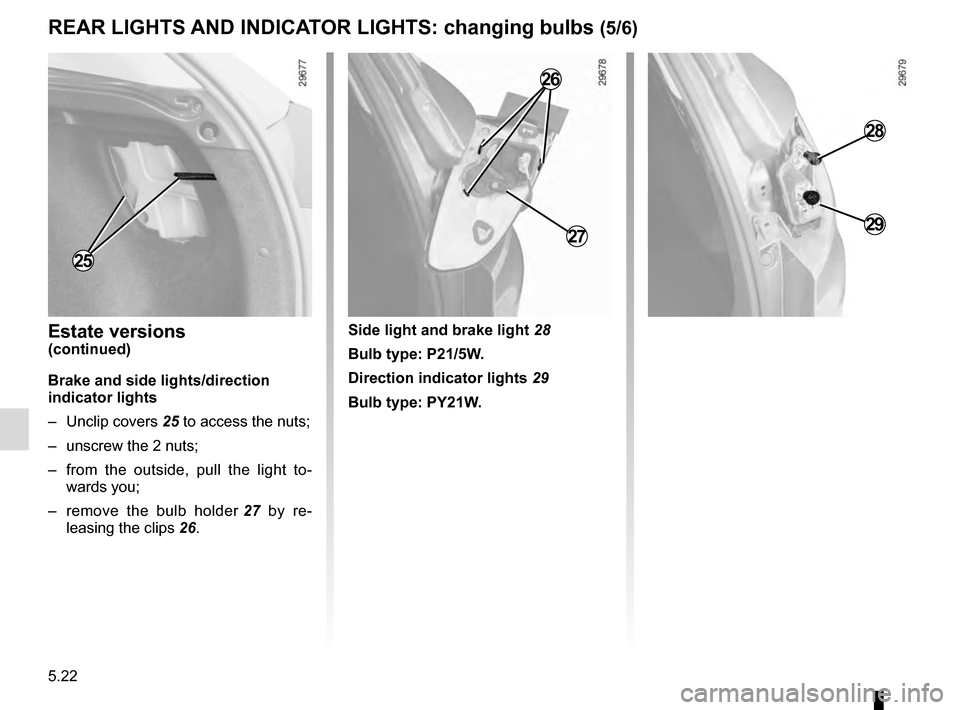
28
29
Side light and brake light 28
Bulb type: P21/5W.
Direction indicator lights 29
Bulb type: PY21W.Estate versions(continued)
Brake and side lights/direction
indicator lights
– Unclip covers 25 to access the nuts;
– unscrew the 2 nuts;
– from the outside, pull the light to- wards you;
– remove the bulb holder 27 by re-
leasing the clips 26.
25
27
26
Page 225 of 274
5.23
REAR LIGHTS AND INDICATOR LIGHTS: changing bulbs (6/6)
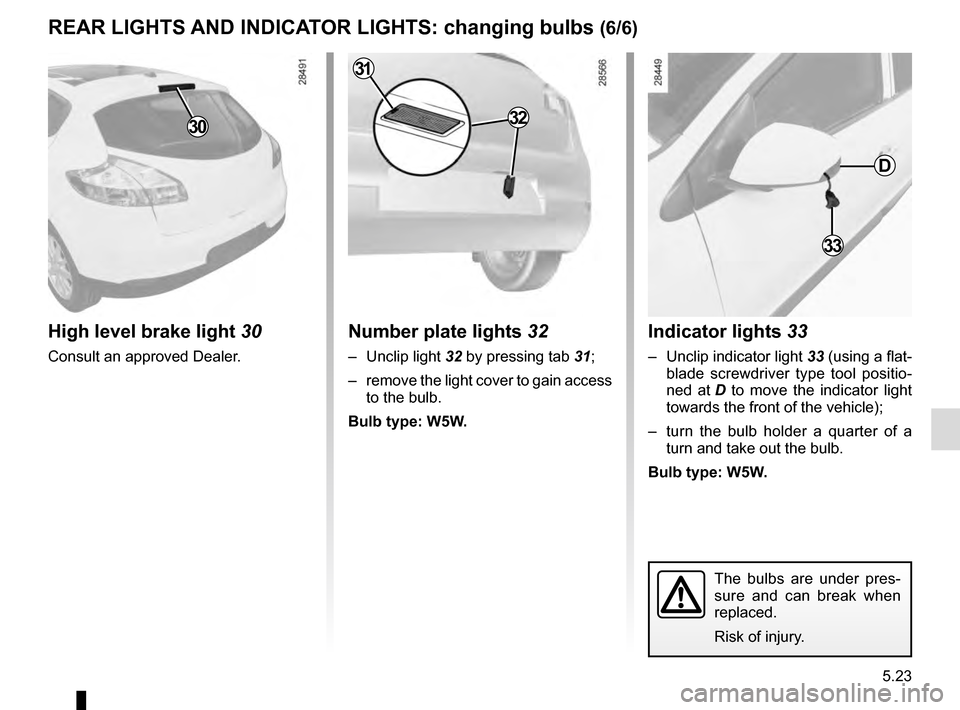
Indicator lights 33
– Unclip indicator light 33 (using a flat-
blade screwdriver type tool positio-
ned at D to move the indicator light
towards the front of the vehicle);
– turn the bulb holder a quarter of a turn and take out the bulb.
Bulb type: W5W.
Number plate lights 32
– Unclip light 32 by pressing tab 31;
– remove the light cover to gain access to the bulb.
Bulb type: W5W.
High level brake light 30
Consult an approved Dealer.
30
22
2333
D
32
31
The bulbs are under pres-
sure and can break when
replaced.
Risk of injury.
Page 226 of 274
5.24
The bulbs are under pres-
sure and can break when
replaced.
Risk of injury.
INTERIOR LIGHTING: changing bulbs (1/2)
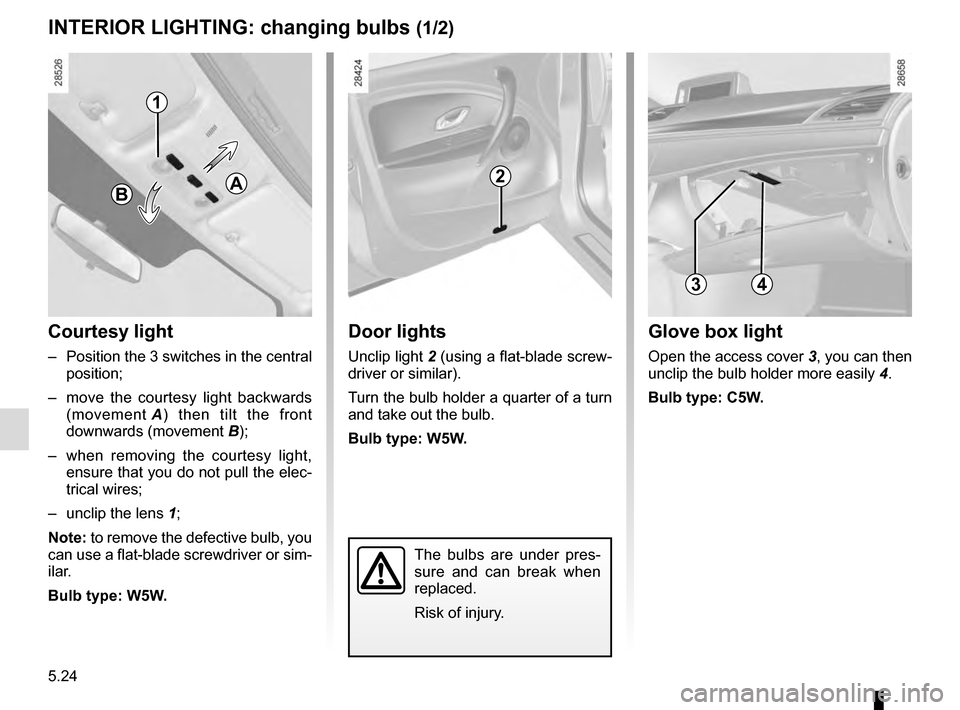
Courtesy light
– Position the 3 switches in the central position;
– move the courtesy light backwards (movement A) then tilt the front
downwards (movement B);
– when removing the courtesy light, ensure that you do not pull the elec-
trical wires;
– unclip the lens 1;
Note: to remove the defective bulb, you
can use a flat-blade screwdriver or sim-
ilar.
Bulb type: W5W.
Glove box light
Open the access cover 3, you can then
unclip the bulb holder more easily 4.
Bulb type: C5W.
Door lights
Unclip light 2 (using a flat-blade screw-
driver or similar).
Turn the bulb holder a quarter of a turn
and take out the bulb.
Bulb type: W5W.
2
4
BA
3
1
Page 229 of 274
5.27
FUSES (2/2)
Some accessories are protected by
fuses located in the engine compart-
ment in fuse box C.
However, because of their reduced ac-
cessibility, we advise you to have your
fuses replaced by an approved Dealer.Allocation of fuses(the presence of certain fuses depends
on the vehicle equipment level)
1 Electronic parking brake;
2 Brake lights;
3 Automatic door locking;
4 Driver’s electric window;
5 Passenger compartment unit;
6 Direction indicator lights;
7 Navigation system;8 Interior rear-view mirror;
9 Rear screen wiper;
10 and 11
Rear electric windows;
12 ABS/ESC ;
13 Passenger electric window;
14 Windscreen washer;
15 Heated door mirrors;
16 Radio;
17 Luggage compartment accessories
socket;
18 Rear seat accessories socket;
19 Cigarette lighter.
C
1
2
3
4
5
6
7
8
9
10
11
12
13
14
15
16
17
18
19
Page 230 of 274

5.28
BATTERY: troubleshooting (1/2)
To avoid all risk of sparks:
– Ensure that any electrical consumers (courtesy lights, etc.) are switched
off before disconnecting or recon-
necting the battery.
– When charging, stop the charger before connecting or disconnecting
the battery.
– Do not place metal objects on the battery to avoid creating a short cir-
cuit between the terminals.
– Always wait at least one minute after the engine has been switched off
before disconnecting a battery.
– Make sure that you reconnect the battery terminals after refitting.
Connecting a battery charger
The battery charger must be com-
patible with a battery with nominal
voltage of 12 volts.
Do not disconnect the battery when the
engine is running. Follow the instruc-
tions given by the manufacturer of
the battery charger you are using.
Special procedures may be
required to charge some
batteries. Contact your ap-
proved dealer.
Avoid all risk of sparks which may
cause an immediate explosion, and
charge the battery in a well-venti-
lated area. Risk of serious injury.
Handle the battery with care
as it contains sulphuric acid,
which must not come into
contact with eyes or skin. If
it does, wash the affected area with
plenty of cold water. If necessary,
consult a doctor.
Ensure that naked flames, red hot
objects and sparks do not come into
contact with the battery as there is a
risk of explosion.
The engine may be hot when car-
rying out operations in close prox-
imity. In addition, the engine cooling
fan can come on at any moment.
Risk of injury.
Before performing any
action in the engine com-
partment, the ignition must
be switched off by pressing
the engine stop button (please see
the information on “Starting, stop-
ping the engine” in Section 2).
Page 236 of 274
5.34
TOWING: breakdown (1/2)
Before towing, unlock the steering
column: with the clutch depressed,
engage first gear (lever in position N
or R for vehicles with automatic trans-
missions), insert the RENAULT card in
the card reader then press the engine
start button for two seconds.
Reposition the lever to neutral (position
N for vehicles fitted with an automatic
gearbox).
The steering column unlocks, the ve-
hicle’s accessory functions are pow-
ered, and you can use the vehicle lights
(brake lights, hazard warning lights,
etc.). At night, the vehicle must be lit.
Once you have finished towing, press
the engine start button twice (risk of
running down the battery). The speed specified by current legis-
lation for towing must always be ob-
served. If your vehicle is the towing
vehicle, do not exceed the maximum
towing weight for your vehicle (refer to
the information on “Weights” in Section
6).
Towing a vehicle with an
automatic gearbox
With the engine switched off, the trans-
mission is no longer lubricated. It is
preferable to tow this type of vehicle on
a trailer or tow it with the front wheels
off the ground.
Under exceptional circumstances,
you may tow the vehicle with all four
wheels on the ground, only going for-
ward, with the gear lever in the N posi-
tion, and for a distance not exceeding
50 miles (80 km).
1
2
Do not remove the
RENAULT card from the
reader when the vehicle is
being towed.
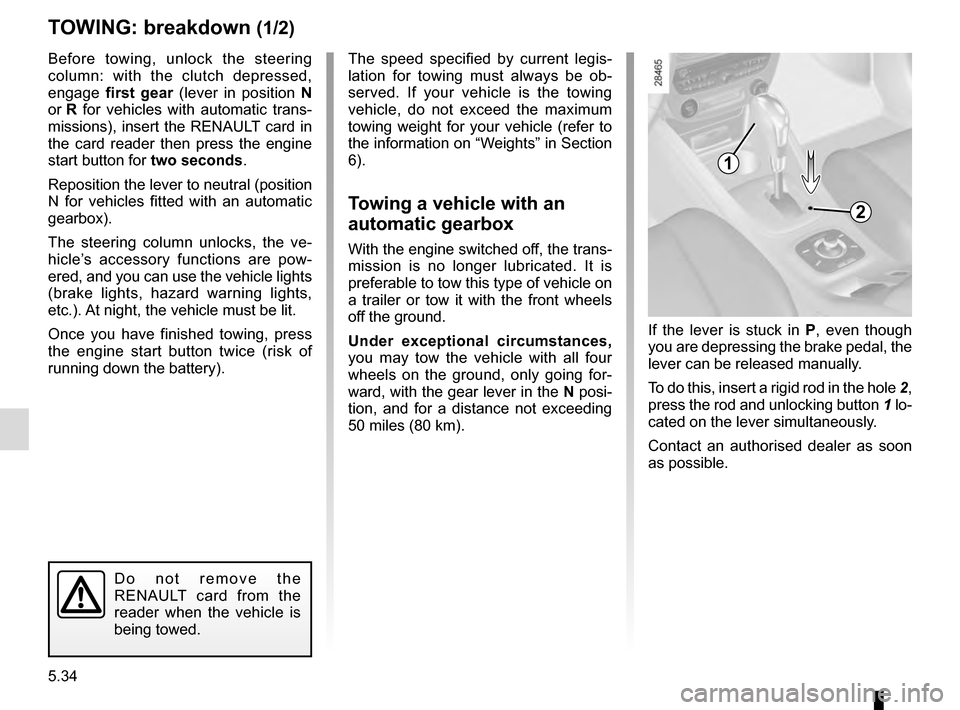
If the lever is stuck in P , even though
you are depressing the brake pedal, the
lever can be released manually.
To do this, insert a rigid rod in the hole 2,
press the rod and unlocking button 1 lo-
cated on the lever simultaneously.
Contact an authorised dealer as soon
as possible.
Page 239 of 274

5.37
OPERATING FAULTS (2/6)
The starter is activatedPOSSIBLE CAUSESWHAT TO DO
The instrument panel indicator lights
are weak or fail to light up and the
starter does not turn. Battery terminals not tight, bat-
tery terminals disconnected or
oxidised.Retighten or reconnect the terminals, or clean them
if they are oxidised.
Discharged battery or not opera-
tional. Connect another battery to the faulty battery. Refer to
information on “Battery: troubleshooting” in Section
5 or replace the battery if necessary.
Do not push the vehicle if the steering column is
locked.
Faulty circuit. Consult an approved dealer.
The engine will not start. Starting conditions are not ful-
filled.Please refer to the information on “Starting, stopping
the engine” in Section 2.
The RENAULT “hands-free” card
does not work. Insert the card in the card reader in order to start
the engine.
Please refer to the information on “Starting, stopping
the engine” in Section 2.
The engine cannot be switched off. Card not detected. Insert the card in card reader.
Electronic fault. Press the starter button quickly five times. The
engine can be restarted by pressing on the clutch
pedal if the Stop and Start function is activated.
The steering column remains locked. Steering wheel locked. Move the steering wheel while pressing the engine
start button (please refer to Section 2 “Starting, stop-
ping the engine”).
Faulty circuit. Consult an approved dealer.
Page 242 of 274
5.40
OPERATING FAULTS (5/6)
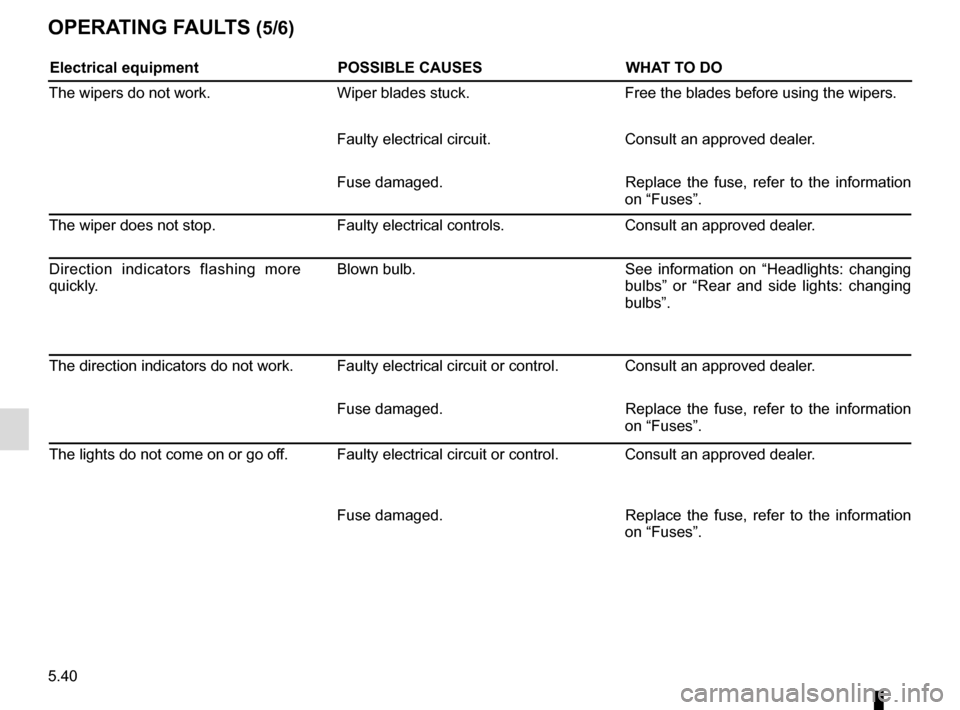
Electrical equipmentPOSSIBLE CAUSESWHAT TO DO
The wipers do not work. Wiper blades stuck.Free the blades before using the wipers.
Faulty electrical circuit. Consult an approved dealer.
Fuse damaged. Replace the fuse, refer to the information
on “Fuses”.
The wiper does not stop. Faulty electrical controls.Consult an approved dealer.
Direction indicators flashing more
quickly. Blown bulb.
See information on “Headlights: changing
bulbs” or “Rear and side lights: changing
bulbs”.
The direction indicators do not work. Faulty electrical circuit or control. Consult an approved dealer. Fuse damaged. Replace the fuse, refer to the information
on “Fuses”.
The lights do not come on or go off. Faulty electrical circuit or control. Consult an approved dealer.
Fuse damaged. Replace the fuse, refer to the information
on “Fuses”.