2016 RENAULT MEGANE COUPE lights
[x] Cancel search: lightsPage 96 of 274

1.90
Filling with fuelWith the ignition off, insert the nozzle to
open valve A and insert it fully before
turning it on to fill the fuel tank (risk of
splashing).
Keep the nozzle in this position through-
out the entire filling operation.
When the pump cuts out automatically
at the end of the filling procedure, a
maximum of two further filling attempts
may be made, as there must be suffi-
cient space in the fuel tank to allow for
expansion.
Make sure that no water enters the fuel
tank during filling. The valve A and its
surround must remain clean.
Petrol versions
Using leaded petrol will damage the
antipollution system and may lead to a
loss of warranty.
To ensure that the fuel tank is not filled
with leaded petrol, the fuel tank filler
neck contains a restrictor fitted with a
foolproof system which only allows
the nozzle for unleaded petrol to be
used (at the pump).
FUEL TANK (2/3)
Persistent smell of
fuel
If you notice a persistent
smell of fuel you should:
– stop the vehicle as soon as traf- fic conditions allow and switch off
the ignition;
– switch on the hazard warning lights and ask your passengers
to leave the vehicle and to keep
away from traffic;
– contact an approved Dealer.
Vehicle fitted with the Stop and
Start function
To fill up with fuel, the engine must
be stopped (and not on standby):
stop the engine by pressing the
engine stop button 1 (please refer
to the information on “Starting and
stopping the engine” in Section 2).
1
Page 104 of 274

2.6
Preventing the engine from
standing by
In certain situations, such as negotiat-
ing a crossroads for instance, it is pos-
sible to keep the engine running so as
to be ready to move off quickly.
For vehicles equipped with manual
gearboxes:
Keep the clutch pedal pressed right
down
FUNCTION STOP AND START (1/3)
This system enables a reduced fuel
consumption and lower greenhouse
gas emissions. The system is activated
automatically when the vehicle is star-
ted.
While driving, the system stops the
engine (standby) when the vehicle is
at a standstill (traffic jam, traffic lights,
etc).
Conditions for engine
standby
The vehicle has set off from where it
was parked;
For vehicles equipped with manual
gearboxes:
– the gearbox is in neutral;
and
– the vehicle speed is less than ap-proximately 7 mph (3 km/h).
In all vehicles, the message «Auto
Stop» on the instrument panel appears
when the engine is on standby.
The vehicle equipment remain opera-
tional while the engine is stopped.
Engine on standby - braking
assistance is no longer ope-
rational.
Before getting out of the
vehicle, you must switch
off the ignition by pressing
the engine stop (please see
“Starting, stopping the engine”).
Do not drive off when the
engine is on standby (the
message “Auto Stop” is dis-
played on the instrument
panel).
Special feature of vehi-
cles equipped with an
electronic parking brake
If the engine is put on
standby (the message “Auto Stop”
is displayed on the instrument
panel), the electronic parking brake
is not applied automatically.
If the engine stalls while the system
is in operation, pressing the clutch
pedal right down will start it again.
Conditions for coming out of
engine standby
For vehicles equipped with manual
gearboxes:
– the gearbox is in neutral and the clutch pedal is slightly depressed;
or
– the engine is in gear and the clutch pedal is pressed right down.
Page 105 of 274

2.7
FUNCTION STOP AND START (2/3)
To fill up with fuel, the engine must
be stopped (and not on standby):
always stop the engine by pressing
the engine stop button (please see
“Starting, stopping the engine)”.
Conditions preventing the
standby of the engine
Certain conditions prevent the system
from using the engine standby function,
including when:
– reverse gear is engaged;
– the bonnet is not locked;
– the driver’s door is not closed;
– the driver’s seatbelt is not fastened;
– the outdoor temperature is too low or too high (less than around 0 °C or
higher than around 30 °C);
– the battery is not sufficiently char- ged;
– the difference between the vehicle interior temperature and the automa-
tic climate control instruction is too
high;
– the “Clear View” function is activa- ted (please see “Automatic Climate
Control” in Section 3); – the engine temperature is too low;
– the anti-pollution system is required;
or
– ...
The message “Auto Stop Unavailable”
on the instrument panel indicates that
the engine is on standby.
Special cases
With the engine on standby (traffic jam,
traffic lights, etc.), if the driver unfastens
their seat belt, opens the driver’s door
or gets out of their seat, the ignition will
be switched off.
To restart and reactivate the Stop and
Start system, press the start button
(please see “Starting, stopping the
engine” in Section 2).
Page 106 of 274

2.8
Deactivating, activating the
function
Press switch 1 to deactivate the func-
tion. The message “Stop & Start deac-
tivated” will appear on the instrument
panel and the integrated warning light 2
on the switch will light up.
Pressing again will reactivate the
system. The message “Stop & Start ac-
tivated” will appear on the instrument
panel and the integrated warning light 2
on the switch 1 will go out.
FUNCTION STOP AND START (3/3)
Deactivate the Stop and
Start function when perfor-
ming any operations in the
engine compartment.
Special feature of the automatic
engine re-start
Under certain conditions, the engine
can restart on its own in order to gua-
rantee your safety and comfort.
This can occur especially when:
– the outdoor temperature is too low or too high (less than around 0 °C or
higher than around 30 °C);
– the “Clear View” function is activated (please see “Automatic Climate
Control” in Section 3);
– the battery is not sufficiently char- ged;
– the vehicle speed is above 4.34 mph (7 km/h) (downhill slope etc.) ;
– repeated pressing on the brake pedal or braking system require-
ment;
– ...
Before getting out of the
vehicle, you must switch
off the ignition by pressing
the engine stop (please see
“Starting, stopping the engine”).
1
2
Note: With the engine on standby,
press switch 1 to automatically re-
start the engine.
The system reactivates automati-
cally each time the vehicle is started
using the start button (please refer
to “Starting, stopping the engine” in
Section 2).
Operating faults
When the message “Check Stop &
Start” appears on the instrument panel
and the integrated warning light 2 lights
up on the switch 1, the system is deac-
tivated.
Please consult an authorised dealer.
In the event of an emer-
gency, the engine can be
restarted by pressing on the
clutch pedal if the Stop and
Start function is activated.
Page 108 of 274

2.10
SPECIAL FEATURES OF DIESEL VERSIONS
Diesel engine speed
Diesel engines are fitted with injection
equipment which prevents the engine
speed being exceeded irrespective of
the gear selected.
If the message “Check anti-pollution
system” is displayed along with warn-
ing lights
Ä and ©, consult an
authorised dealer immediately.
When driving, depending on the fuel
grade used, it is possible that white
smoke may be emitted.
This is due to the exhaust particle filter
being cleaned automatically, and does
not affect the way the vehicle runs.
Running out of fuel
If the tank has been completely
drained, the system must be reprimed
after the tank is refilled: see information
on the “fuel tank” in section 1 before re-
starting the engine.
Do not park the vehicle or
run the engine in locations
where combustible sub-
stances or materials such
as grass or leaves can come into
contact with the hot exhaust system.
Precautions to be taken in
winter
To avoid any faults in icy weather:
– ensure that the battery is always fully charged,
– always keep the diesel tank rela- tively full to avoid water vapour con-
densing in it and accumulating at the
bottom of the tank.
Page 109 of 274
2.11
GEAR LEVER/HANDBRAKE
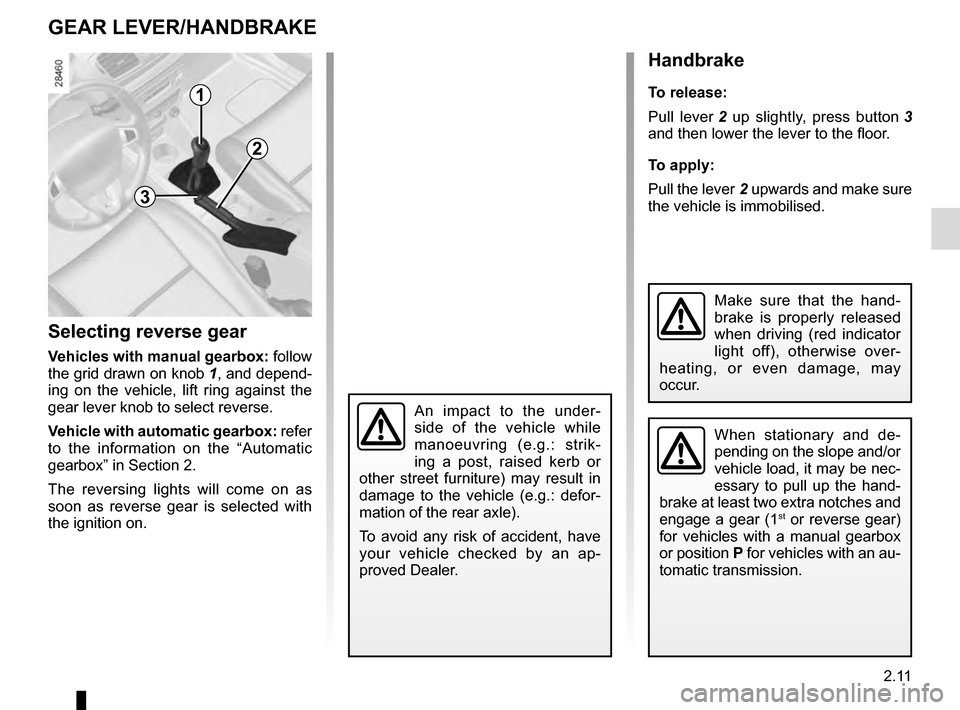
Selecting reverse gear
Vehicles with manual gearbox: follow
the grid drawn on knob 1, and depend-
ing on the vehicle, lift ring against the
gear lever knob to select reverse.
Vehicle with automatic gearbox: refer
to the information on the “Automatic
gearbox” in Section 2.
The reversing lights will come on as
soon as reverse gear is selected with
the ignition on.
1
Handbrake
To release:
Pull lever 2 up slightly, press button 3
and then lower the lever to the floor.
To apply:
Pull the lever 2 upwards and make sure
the vehicle is immobilised.
When stationary and de-
pending on the slope and/or
vehicle load, it may be nec-
essary to pull up the hand-
brake at least two extra notches and
engage a gear (1
st or reverse gear)
for vehicles with a manual gearbox
or position P for vehicles with an au-
tomatic transmission.
3
2
An impact to the under-
side of the vehicle while
manoeuvring (e.g.: strik-
ing a post, raised kerb or
other street furniture) may result in
damage to the vehicle (e.g.: defor-
mation of the rear axle).
To avoid any risk of accident, have
your vehicle checked by an ap-
proved Dealer.
Make sure that the hand-
brake is properly released
when driving (red indicator
light off), otherwise over-
heating, or even damage, may
occur.
Page 111 of 274

2.13
Special cases
When parking on a slope or towing a
trailer, pull switch 3 for a few seconds
to obtain the maximum braking effect.
To park the vehicle without applying the
electronic parking brake (if there is a
risk of freezing, for example):
– with the engine running and RENAULT card in reader 4, switch
off the engine by pressing engine
Start/Stop button 1;
– remove the RENAULTcard from the Reader 4 and insert it again in the
reader;
– select a gear (manual gearbox) or position P (automatic gearbox);
– depress the brake pedal and press switch 3 at the same time;
– remove the RENAULT card from the card reader.
Brief stopTo manually activate the electronic par-
king brake, (when stopping at a red
light, or stopping when the engine is
running, etc.): pull and release switch 3.
The brake is released as soon as the
vehicle is started up again.
ELECTRONIC PARKING BRAKE (2/3)
4
1
3
Manual operationYou can control the electronic parking
brake manually.
Applying the electronic parking
brake
Pull switch 3. Indicator lights 2 and
} light up on the instrument panel.
Releasing the electronic parking
brake
With the ignition on, depress the brake
pedal then press button 3: indicator
lights 2 and
} go out.
2
Page 112 of 274

2.14
– If there is an electronic parking brake fault, warning lights
® light up
accompanied by the “Parking brake
fault” message, a beep and, in cer-
tain cases, warning light
}.
This means that you must stop as
soon as traffic conditions allow.
Operating faults
– If there is a fault, the © warning
light illuminates on the instrument
panel accompanied by the “Check
parking brake” message and, in
some cases, the
} warning
light.
Contact an approved Dealer as soon
as possible.
ELECTRONIC PARKING BRAKE (3/3)
It is therefore essential to
immobilise the vehicle by
engaging first gear (manual
gearbox) or position P (au-
tomatic gearbox). If the slope re-
quires it, chock the vehicle.
Versions with an automatic
gearbox
For safety reasons, automatic release
is deactivated when the driver’s door
is open or not shut properly and the
engine is running (in order to prevent
the vehicle from moving without the
driver). The “Release parking brake
manually” message appears on the
instrument panel when the driver de-
presses the accelerator.
Never leave your vehicle
without moving the selec-
tor lever to position P or N.
This is because when the
vehicle is stationary with the engine
running and a gear engaged, the
vehicle may begin to move if you
accelerate.
There is a risk of accidents.If no lights or sounds are
apparent, this indicates
a fault in the instrument
panel. This indicates that
it is essential to stop immediately
(as soon as traffic conditions allow).
Ensure that the vehicle is correctly
immobilised and contact an appro-
ved Dealer.