2016 RENAULT KADJAR Automatic
[x] Cancel search: AutomaticPage 118 of 300

2.14
Gear lever
Vehicles with manual gearbox: refer
to the grid on the gear lever knob 1.
Vehicles with an automatic gear-
box: refer to the information on the
“Automatic gearbox” in Section 2.
GEAR LEVER
An impact to the under-
side of the vehicle while
manoeuvring (e.g.: strik-
ing a post, raised kerb or
other street furniture) may result in
damage to the vehicle (e.g.: defor-
mation of an axle).
To avoid any risk of accident, have
your vehicle checked by an ap-
proved Dealer.
Selecting reverse gear
The ring 2 has to be lifted up to the gear
lever knob to select reverse gear.
The reversing lights will come on as
soon as reverse gear is selected with
the ignition on.
1
2
Page 120 of 300
2.16
ELECTRONIC PARKING BRAKE (1/3)
Note:
To indicate that the electronic parking
brake is released, a beep sounds and
the message “Apply parking brake” ap-
pears on the instrument panel:
– with the engine running: when the driver’s door is opened;
– with the engine switched off (eg. when the engine stalls): when a front
door is opened.
In this case, pull and release switch 1 to
apply the assisted parking brake.
Assisted release of the parking
brake
The brake will be released as soon as
the vehicle starts and accelerates.Assisted operation
The assisted parking brake immobilises
the vehicle when stopping the engine
(and not when the engine is on
standby for vehicles fitted with the
Stop and Start function). Please refer
to “Starting, stopping the engine” and
“Stop and Start function” in Section 2.
In all other instances, e.g. engine stal-
ling, the electronic parking brake is not
applied automatically. Manual mode
must be used.
For certain country-specific model ver-
sions, the assisted brake application
function is not activated. Refer to the
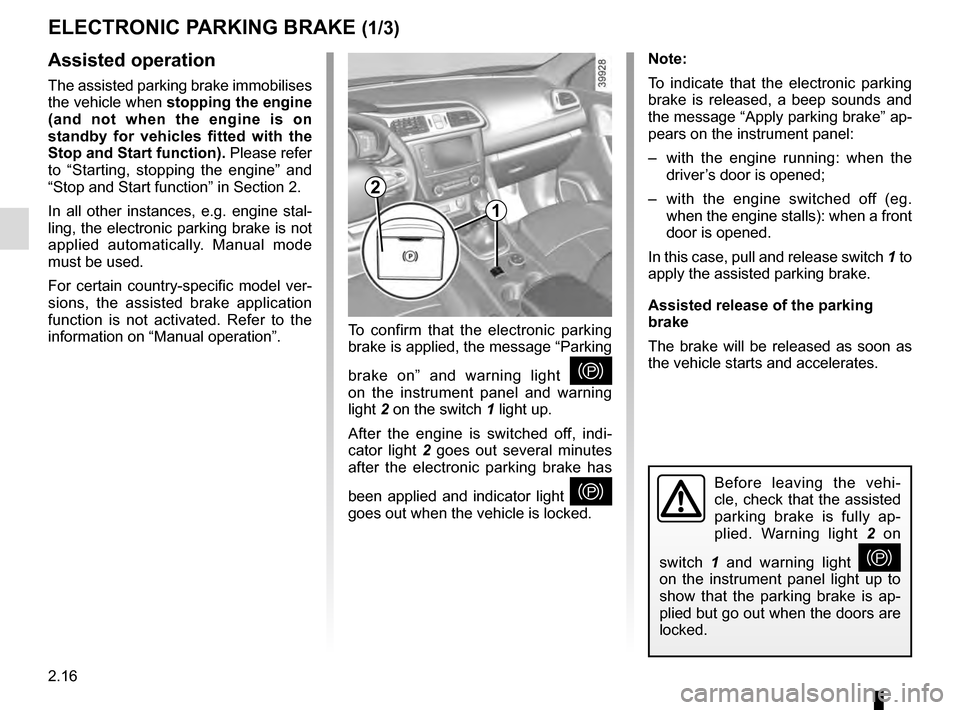
information on “Manual operation”. To confirm that the electronic parking
brake is applied, the message “Parking
brake on” and warning light
}
on the instrument panel and warning
light 2 on the switch 1 light up.
After the engine is switched off, indi-
cator light 2 goes out several minutes
after the electronic parking brake has
been applied and indicator light
}
goes out when the vehicle is locked.Before leaving the vehi-
cle, check that the assisted
parking brake is fully ap-
plied. Warning light 2 on
switch 1 and warning light
}
on the instrument panel light up to
show that the parking brake is ap-
plied but go out when the doors are
locked.
2
1
Page 122 of 300
2.18
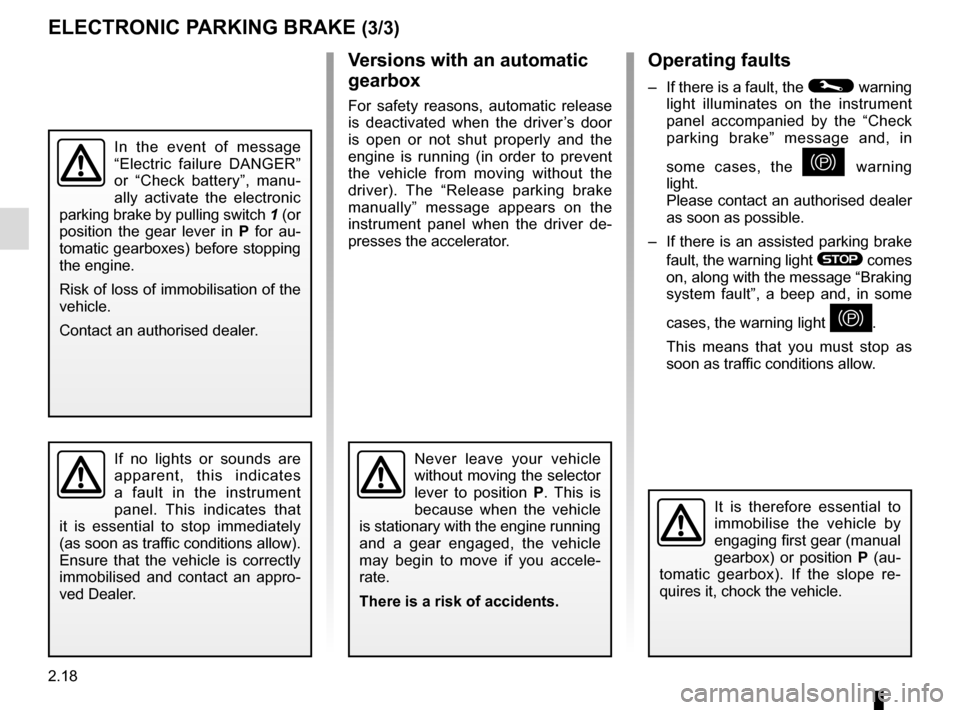
Operating faults
– If there is a fault, the © warning
light illuminates on the instrument
panel accompanied by the “Check
parking brake” message and, in
some cases, the
} warning
light.
Please contact an authorised dealer
as soon as possible.
– If there is an assisted parking brake fault, the warning light
® comes
on, along with the message “Braking
system fault”, a beep and, in some
cases, the warning light
}.
This means that you must stop as
soon as traffic conditions allow.
Versions with an automatic
gearbox
For safety reasons, automatic release
is deactivated when the driver’s door
is open or not shut properly and the
engine is running (in order to prevent
the vehicle from moving without the
driver). The “Release parking brake
manually” message appears on the
instrument panel when the driver de-
presses the accelerator.
ELECTRONIC PARKING BRAKE (3/3)
It is therefore essential to
immobilise the vehicle by
engaging first gear (manual
gearbox) or position P (au-
tomatic gearbox). If the slope re-
quires it, chock the vehicle.
Never leave your vehicle
without moving the selector
lever to position P. This is
because when the vehicle
is stationary with the engine running
and a gear engaged, the vehicle
may begin to move if you accele-
rate.
There is a risk of accidents.If no lights or sounds are
apparent, this indicates
a fault in the instrument
panel. This indicates that
it is essential to stop immediately
(as soon as traffic conditions allow).
Ensure that the vehicle is correctly
immobilised and contact an appro-
ved Dealer.
In the event of message
“Electric failure DANGER”
or “Check battery”, manu-
ally activate the electronic
parking brake by pulling switch 1 (or
position the gear lever in P for au-
tomatic gearboxes) before stopping
the engine.
Risk of loss of immobilisation of the
vehicle.
Contact an authorised dealer.
Page 125 of 300
2.21
DRIVING ADVICE, ECO-DRIVING (3/5)
ECO mode
ECO mode is a function which opti-
mises fuel consumption. This acts on
all power consuming elements (engine
power, switching gears for vehicles
fitted with an automatic gearbox, heat-
ing and/or air conditioning, etc.).
Limiting acceleration enables low fuel
consumption in urban and surrounding
areas. The air conditioning and heating
limiter enables you to save fuel without
affecting your heating comfort.
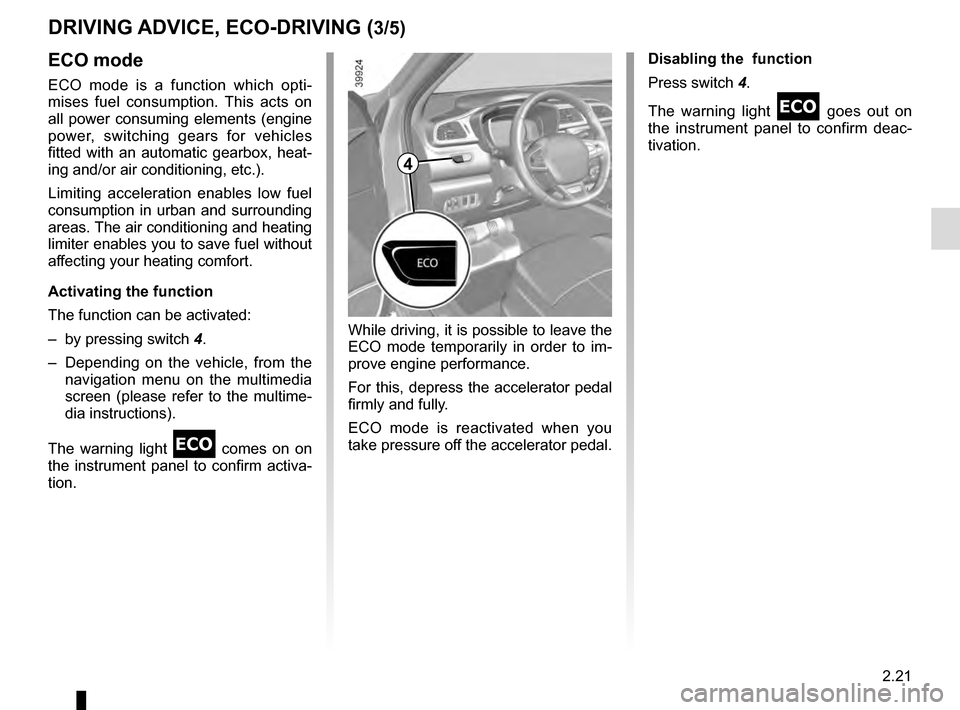
Activating the function
The function can be activated:
– by pressing switch 4.
– Depending on the vehicle, from the navigation menu on the multimedia
screen (please refer to the multime-
dia instructions).
The warning light
comes on on
the instrument panel to confirm activa-
tion. Disabling the function
Press switch 4.
The warning light
goes out on
the instrument panel to confirm deac-
tivation.
While driving, it is possible to leave the
ECO mode temporarily in order to im-
prove engine performance.
For this, depress the accelerator pedal
firmly and fully.
ECO mode is reactivated when you
take pressure off the accelerator pedal.
4
Page 137 of 300
2.33
Advanced traction control
If fitted on the vehicle, grip control
makes it easier to control the vehicle on
low grip surfaces (soft ground, etc.).
DRIVING CORRECTION DEVICES AND AIDS (5/10)
For your safety, please re-
spect the speed limit.
When they need to be re-
placed, only tyres of the
same make, size, type and profile
should be used on a single axle.
They must: either have a load ca-
pacity and speed rating at least
equal to those of the original
tyres, or conform to those recom-
mended by an authorised dealer.
Failure to heed these instructions
could endanger your safety and
affect your vehicle’s roadworthi-
ness.
Risk of loss of control of the ve-
hicle.
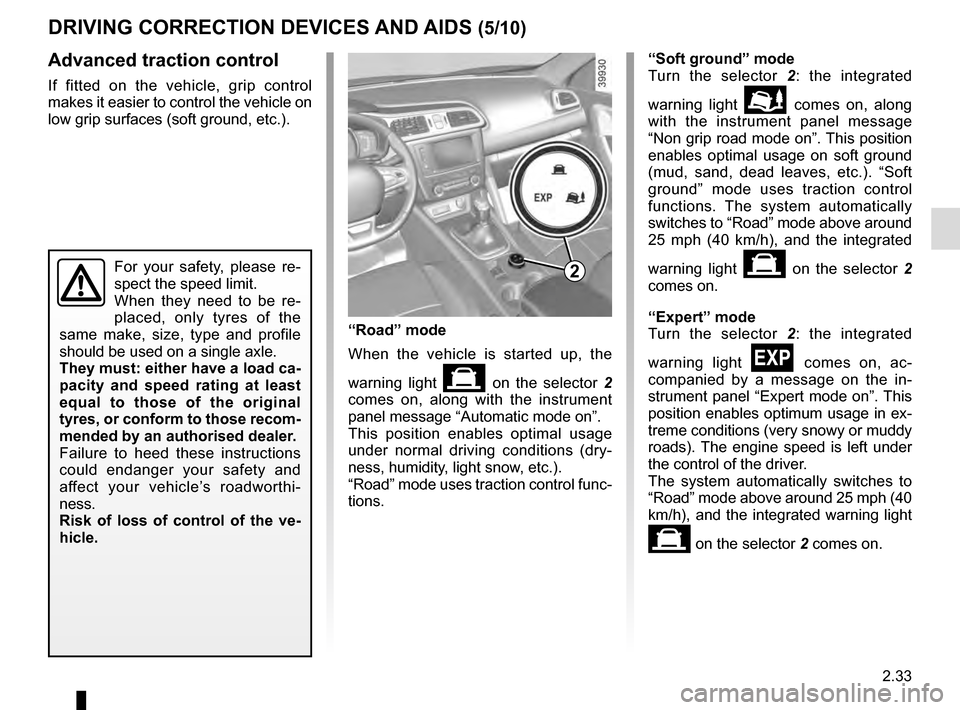
“Road” mode
When the vehicle is started up, the
warning light
on the selector 2
comes on, along with the instrument
panel message “Automatic mode on”.
This position enables optimal usage
under normal driving conditions (dry-
ness, humidity, light snow, etc.).
“Road” mode uses traction control func-
tions. “Soft ground” mode
Turn the selector 2
: the integrated
warning light
\b comes on, along
with the instrument panel message
“Non grip road mode on”. This position
enables optimal usage on soft ground
(mud, sand, dead leaves, etc.). “Soft
ground” mode uses traction control
functions. The system automatically
switches to “Road” mode above around
25 mph (40 km/h), and the integrated
warning light
on the selector 2
comes on.
“Expert” mode
Turn the selector 2 : the integrated
warning light
comes on, ac-
companied by a message on the in-
strument panel “Expert mode on”. This
position enables optimum usage in ex-
treme conditions (very snowy or muddy
roads). The engine speed is left under
the control of the driver.
The system automatically switches to
“Road” mode above around 25 mph (40
km/h), and the integrated warning light
on the selector 2 comes on.
2
Page 142 of 300
2.38
DRIVING CORRECTION DEVICES AND AIDS (10/10)
Hill start assistance
Depending on the gradient of the in-
cline, this system assists the driver
when starting on a hill. It prevents the
vehicle from rolling backwards by au-
tomatically applying the brakes when
the driver lifts his/her foot off the brake
pedal to depress the accelerator pedal.
System operation
It only operates when the gear lever is
in a position other than neutral (other
than N or P for automatic transmis-
sions) and the vehicle is completely
stationary (brake pedal depressed)
The system holds the vehicle for ap-
proximately 2 seconds. The brakes are
then released (the vehicle will move ac-
cording to the slope).
The hill start assistance
system cannot completely
prevent the vehicle from
rolling backwards in all sit-
uations (extremely steep gradients,
etc.).
In all cases, the driver may depress
the brake pedal to prevent the vehi-
cle from rolling backwards.
The hill start assistance function
should not be used for prolonged
stops: use the brake pedal.
This function is not designed to im-
mobilise the vehicle permanently.
If necessary, use the brake pedal to
stop the vehicle.
The driver must remain particularly
vigilant when driving on slippery or
low-grip surfaces and/or on hills.
Risk of serious injury.
Page 143 of 300

2.39
Mode selector
Depending on the road conditions, turn-
ing the selector 1 enables the following
modes to be selected:
– AUTO ;
– 2WD ;
– 4WD Lock.
“AUTO" mode
To activate this mode, turn selector 1 to
the “AUTO” position.
Operating principle
“AUTO” mode automatically distributes
the engine torque between the front and
rear axles according to the road condi-
tions and the vehicle speed. This po-
sition optimises roadholding. Use this
mode on any type of road (dry, snow-
covered, slippery, etc.) or when towing
(trailer or caravan).
The warning light
\f on the instru-
ment panel will come on.
TRANSMISSION: 4-wheel drive (4WD) (1/4)
“2WD" mode
To activate this mode, turn the selec-
tor 1 to the “2WD” position. The warn-
ing light
‘ on the instrument panel
will come on.
Operating principle
The “2WD” mode uses the front wheels
only. Use this mode on dry roads with
good grip.
To deactivate this mode, turn the selec-
tor 1 to the “AUTO” position. Warning
light
‘ goes out on the instrument
panel.
Remember that driving a vehicle off-
road is very different to driving it on
the road.
To make the most of your vehicle
in an off-road situation, we recom-
mend that you are trained to drive a
4x4 (4WD) vehicle.
The safety of both you and your
passengers is your responsibility,
and depends on your skill and the
care you take when driving off-road.
1
Page 144 of 300

2.40
TRANSMISSION: 4-wheel drive (4WD) (2/4)
This problem may be resolved by
changing the tyres. Always use four
identical tyres (same brand, profile,
etc.) and with similar wear.
In the event of excessive wheelspin, the
mechanical components may overheat.
If this happens:
– at first, the
’ warning light
comes on. “4WD Lock” mode is still
active – however, we recommend
that you stop as soon as possible to
allow the system to cool down (until
the warning light goes out);
– if the wheels still spin, the system au- tomatically switches to “2WD” mode
to protect the mechanical compo-
nents.
The message “4WD overheating” is
displayed on the instrument panel.
The mode cannot be changed while
the message is displayed.
Note: If the vehicle speed exceeds
approximately 24.8 mph (40 km/h) in
“4WD Lock” mode, the system auto-
matically switches back to “AUTO”
mode.
The
’ warning light goes out and
the
\f warning light comes on.
Special features of the
4-wheel drive transmission
The vehicle may make more noise when
the “AUTO" or "4WD Lock" modes are
activated. This is normal. If the system
detects a difference in the dimensions
of the front and rear wheels (eg. un-
derinflation, severe wear on an axle),
the system automatically switches to
"2WD" mode.
The message “4WD unavailable unsuit-
able tyres” is displayed on the instru-
ment panel. Drive as soon as possible
at a moderate speed to an approved
dealer.
“4WD Lock" mode
To activate this mode, turn selector 1 to
the “4WD Lock” position. The selector
the returns to the “AUTO” position. The
’ indicator light will light up on the
instrument panel.
Operating principle
“4WD Lock” mode distributes the
engine torque between the front and
rear axles in order to optimise the per-
formance capacity of the vehicle in off-
road situations. This mode should only
be used in extreme driving conditions
(mud, steep slopes, sand).
To deactivate this mode, turn selector 1
to the “4WD Lock” position again. The
warning light goes out on the instru-
ment panel.