2016 RENAULT KADJAR Condition
[x] Cancel search: ConditionPage 86 of 300
1.80
Automatic main beam
headlights
Depending on the vehicle, this system
switches the main beam headlights on
and off automatically. The function uses
a camera located behind the interior
rear-view mirror to detect vehicles that
are following and coming in the oppo-
site direction.
The main beam headlights come on au-
tomatically if:
– exterior light is weak;
– no other vehicles or lighting are de-tected;
– the vehicle speed is above approxi- mately 30 mph (45 km/h).
If any of the above conditions are not
fulfilled, the system switches to dipped
beam headlights.
The “automatic main beam
headlights” system should
under no circumstances be
used to replace driver atten-
tion and responsibility with regard
to vehicle lighting and adapting to
light, visibility and traffic conditions.Using the portable naviga-
tion system at night in the
windscreen area below the
camera may disturb the op-
eration of the “automatic main beam
headlights” system (risk of reflection
on the windscreen).
1
3
2
The system may encounter difficul-
ties under certain conditions, inclu-
ding :
– extreme weather conditions (rain, snow, fog, etc.);
– obstruction in front of the wind- screen or camera;
– when a following or oncoming ve- hicle has weak or hidden lighting;
– incorrect settings for the front headlights;
– reflective systems;
– ...
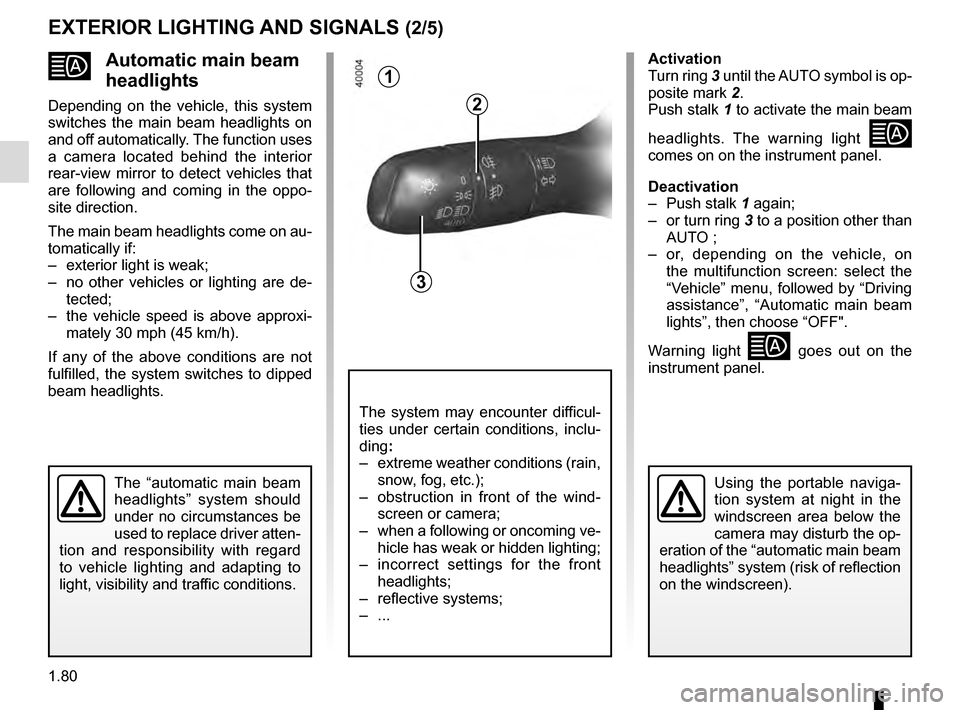
Activation
Turn ring 3 until the AUTO symbol is op-
posite mark 2.
Push stalk 1 to activate the main beam
headlights. The warning light
comes on on the instrument panel.
Deactivation
– Push stalk 1 again;
– or turn ring 3 to a position other than AUTO ;
– or, depending on the vehicle, on the multifunction screen: select the
“Vehicle” menu, followed by “Driving
assistance”, “Automatic main beam
lights”, then choose “OFF".
Warning light
goes out on the
instrument panel.
EXTERIOR LIGHTING AND SIGNALS (2/5)
Page 90 of 300
1.84
AUDIBLE AND VISUAL SIGNALS
Horn
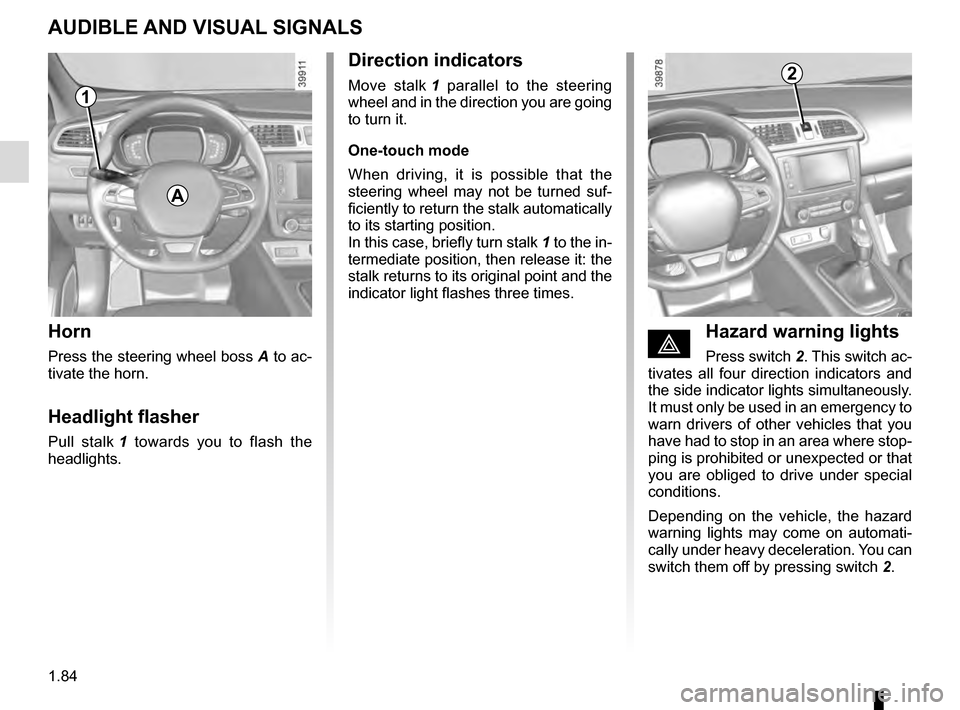
Press the steering wheel boss A to ac-
tivate the horn.
Headlight flasher
Pull stalk 1 towards you to flash the
headlights.
éHazard warning lights
Press switch 2. This switch ac-
tivates all four direction indicators and
the side indicator lights simultaneously.
It must only be used in an emergency to
warn drivers of other vehicles that you
have had to stop in an area where stop-
ping is prohibited or unexpected or that
you are obliged to drive under special
conditions.
Depending on the vehicle, the hazard
warning lights may come on automati-
cally under heavy deceleration. You can
switch them off by pressing switch 2.
Direction indicators
Move stalk 1 parallel to the steering
wheel and in the direction you are going
to turn it.
One-touch mode
When driving, it is possible that the
steering wheel may not be turned suf-
ficiently to return the stalk automatically
to its starting position.
In this case, briefly turn stalk 1 to the in-
termediate position, then release it: the
stalk returns to its original point and the
indicator light flashes three times.2
A
1
Page 93 of 300
1.87
Special note
When driving the vehicle, the wiping
speed slows down whenever the ve-
hicle stops. For example, fast wiping
speed will slow to normal wiping speed.
As soon as the vehicle moves off,
wiping will return to the speed originally
selected.
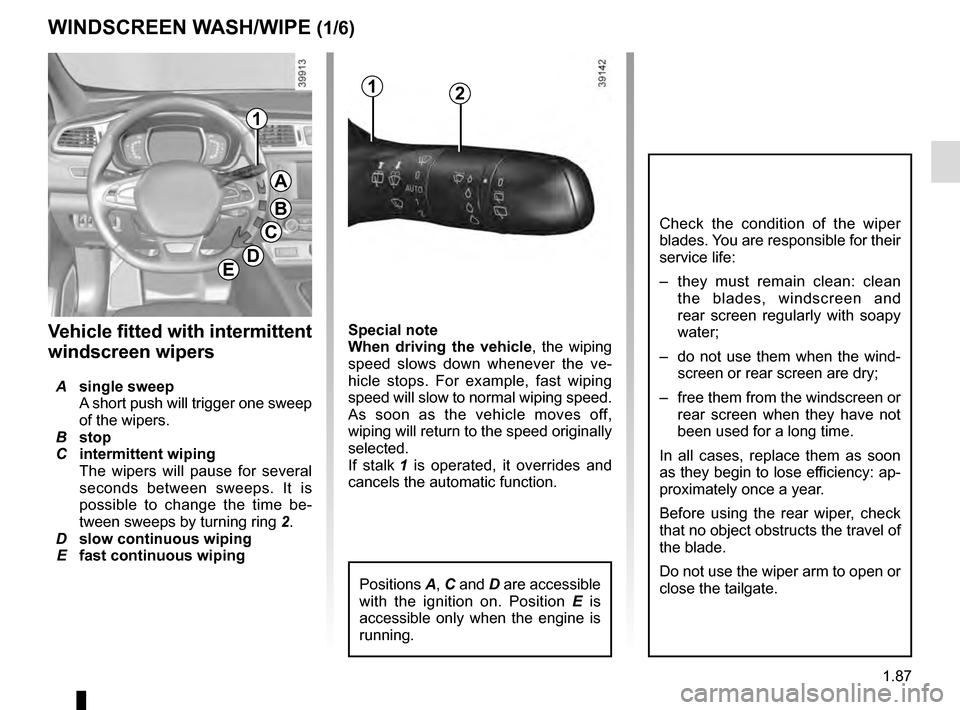
If stalk 1 is operated, it overrides and
cancels the automatic function.Vehicle fitted with intermittent
windscreen wipers
A single sweep
A short push will trigger one sweep
of the wipers.
B stop
C intermittent wiping
The wipers will pause for several
seconds between sweeps. It is
possible to change the time be-
tween sweeps by turning ring 2.
D slow continuous wiping
E fast continuous wiping
Positions A, C and D are accessible
with the ignition on. Position E is
accessible only when the engine is
running.
1
A
B
C
D
WINDSCREEN WASH/WIPE (1/6)
E
Check the condition of the wiper
blades. You are responsible for their
service life:
– they must remain clean: clean the blades, windscreen and
rear screen regularly with soapy
water;
– do not use them when the wind- screen or rear screen are dry;
– free them from the windscreen or rear screen when they have not
been used for a long time.
In all cases, replace them as soon
as they begin to lose efficiency: ap-
proximately once a year.
Before using the rear wiper, check
that no object obstructs the travel of
the blade.
Do not use the wiper arm to open or
close the tailgate.
12
Page 99 of 300
1.93
REAR SCREEN WASH/WIPE (1/2)
1
3
Check the condition of the wiper
blades. You are responsible for their
service life:
– they must remain clean: clean the blades, windscreen and
rear screen regularly with soapy
water;
– do not use them when the wind- screen or rear screen are dry;
– free them from the windscreen or rear screen when they have not
been used for a long time.
In all cases, replace them as soon
as they begin to lose efficiency: ap-
proximately once a year.
Before using the rear wiper, check
that no object obstructs the travel of
the blade.
Do not use the wiper arm to open or
close the tailgate.
YRear screen wiper
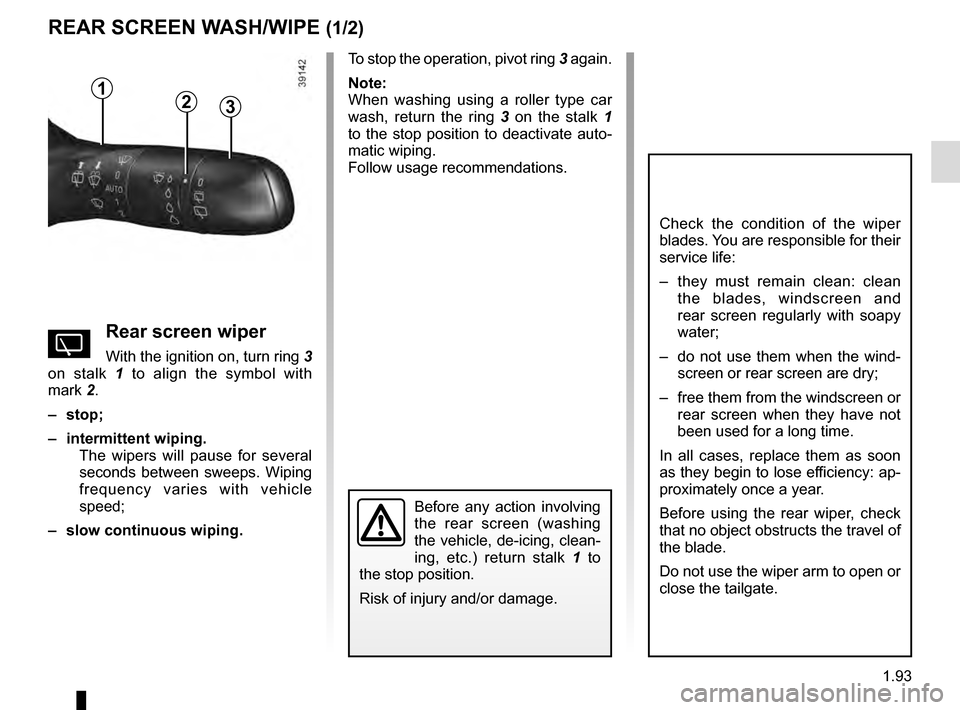
With the ignition on, turn ring 3
on stalk 1 to align the symbol with
mark 2.
– stop;
– intermittent wiping. The wipers will pause for several
seconds between sweeps. Wiping
frequency varies with vehicle
speed;
– slow continuous wiping. To stop the operation, pivot ring
3 again.
Note:
When washing using a roller type car
wash, return the ring 3 on the stalk 1
to the stop position to deactivate auto-
matic wiping.
Follow usage recommendations.
Before any action involving
the rear screen (washing
the vehicle, de-icing, clean-
ing, etc.) return stalk 1 to
the stop position.
Risk of injury and/or damage.
2
Page 103 of 300
1.97
FUEL TANK (3/3)
Persistent fuel odour
If you notice a persistent
fuel odour you should:
– stop the vehicle as soon as traf- fic conditions allow and switch off
the ignition;
– switch on the hazard warning lights and ask your passengers to
leave the vehicle and stay clear
of the traffic;
– contact an approved Dealer.
No modifications what-
soever are permitted on
any part of the fuel supply
system (electronic units,
wiring, fuel circuit, injectors, pro-
tective covers, etc.) as this may be
dangerous (unless undertaken by
qualified Network personnel).Running out of fuel on diesel
versions
Vehicles with key/remote control
– Put the ignition key in “On” posi- tion M (please see the information
on the “Ignition switch” in Section
2) and wait for a few minutes before
starting, to enable the fuel circuit to
be primed;
– turn the key to position D . If the
engine does not start, repeat the pro-
cedure.
– If the engine does not start after sev- eral attempts, please contact an au-
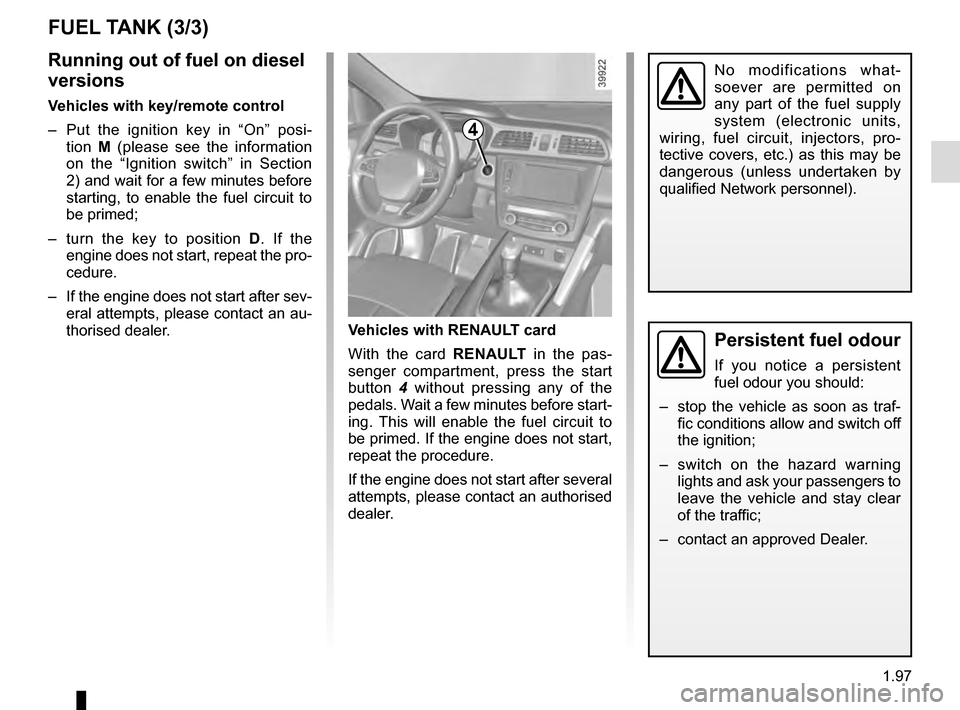
thorised dealer. Vehicles with RENAULT card
With the card RENAULT
in the pas-
senger compartment, press the start
button 4 without pressing any of the
pedals. Wait a few minutes before start-
ing. This will enable the fuel circuit to
be primed. If the engine does not start,
repeat the procedure.
If the engine does not start after several
attempts, please contact an authorised
dealer.
4
Page 109 of 300
2.5
STARTING, STOPPING THE ENGINE: vehicle with RENAULT CARD (1/3)
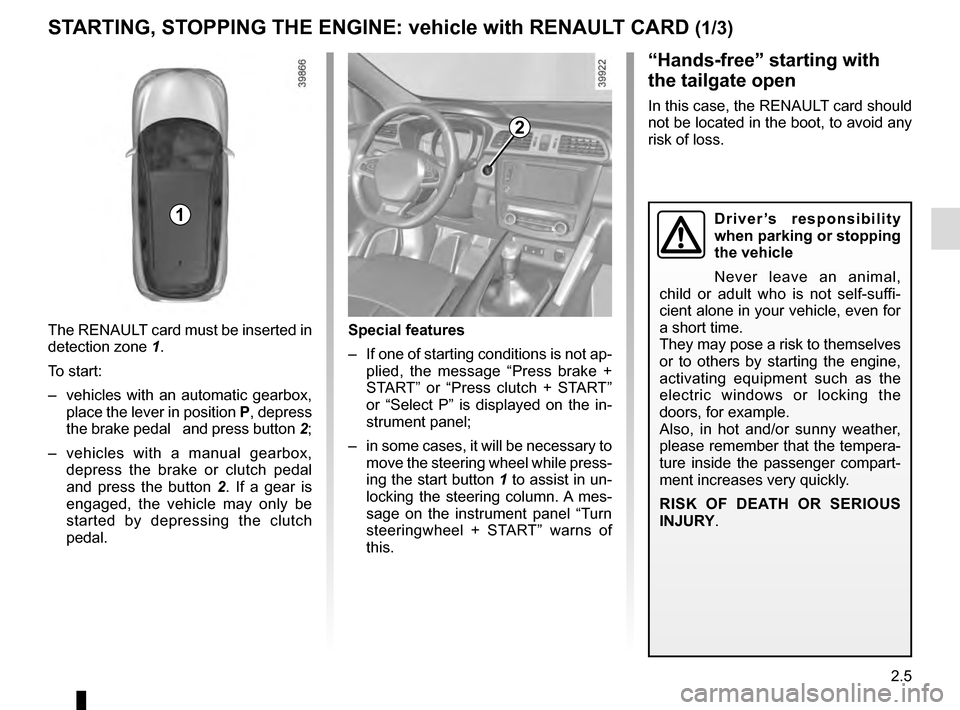
The RENAULT card must be inserted in
detection zone 1.
To start:
– vehicles with an automatic gearbox, place the lever in position P, depress
the brake pedal and press button 2;
– vehicles with a manual gearbox, depress the brake or clutch pedal
and press the button 2 . If a gear is
engaged, the vehicle may only be
started by depressing the clutch
pedal.
“Hands-free” starting with
the tailgate open
In this case, the RENAULT card should
not be located in the boot, to avoid any
risk of loss.
2
1
Special features
– If one of starting conditions is not ap- plied, the message “Press brake +
START” or “Press clutch + START”
or “Select P” is displayed on the in-
strument panel;
– in some cases, it will be necessary to move the steering wheel while press-
ing the start button 1 to assist in un-
locking the steering column. A mes-
sage on the instrument panel “Turn
steeringwheel + START” warns of
this.
Driver’s responsibility
when parking or stopping
the vehicle
Never leave an animal,
child or adult who is not self-suffi-
cient alone in your vehicle, even for
a short time.
They may pose a risk to themselves
or to others by starting the engine,
activating equipment such as the
electric windows or locking the
doors, for example.
Also, in hot and/or sunny weather,
please remember that the tempera-
ture inside the passenger compart-
ment increases very quickly.
RISK OF DEATH OR SERIOUS
INJURY.
Page 111 of 300

2.7
STARTING, STOPPING THE ENGINE: vehicle with RENAULT CARD (3/3)
If the RENAULT card is no longer in the
passenger compartment or if the card
battery is low when you try to switch
the engine off, the message “No key-
card Press and hold” appears on the in-
strument panel: press the button 2 for
longer than two seconds. If the card is
no longer in the passenger compart-
ment, make sure you can retrieve it
before pressing and holding the button.
Without the RENAULT card, you will
not be able to restart the vehicle.
With the engine switched off, any ac-
cessories being used (radio, etc.) will
continue to function for approximately
10 minutes.
When the driver’s door is opened, the
accessories stop working.
Conditions for stopping the
engine
The vehicle must stationary, with the
lever positioned in N or P for vehicles
with an automatic transmission.
With the RENAULT card in the vehicle,
press the 2 button: the engine will stop.
The steering column is locked when the
driver’s door is opened or the vehicle
is locked.
When you leave your vehi-
cle, especially if you have
your RENAULT card with
you, check that the engine
is completely switched off.
2
Driver’s responsibility
when parking or stopping
the vehicle
Never leave an animal,
child or adult who is not self-suffi-
cient alone in your vehicle, even for
a short time.
They may pose a risk to themselves
or to others by starting the engine,
activating equipment such as the
electric windows or locking the
doors, for example.
Also, in hot and/or sunny weather,
please remember that the tempera-
ture inside the passenger compart-
ment increases very quickly.
RISK OF DEATH OR SERIOUS
INJURY.
Never switch off the igni-
tion before the vehicle has
stopped completely. Once
the engine has stopped, the
brake servo, power-assisted steer-
ing, etc. and the passive safety de-
vices such as air bags and preten-
sioners will no longer operate.
Page 112 of 300
2.8
For manual gearboxes:
– the gearbox is in neutral;
and
– the clutch pedal is released. If the warning light
flashes, this
means that the clutch pedal is not
sufficiently released;
and
– the vehicle speed is less than ap- proximately 7 mph (3 km/h).
For all vehicles:
Warning light
on the instru-
ment panel is lit when the engine is on
standby.
The vehicle equipment remain opera-
tional while the engine is stopped.
STOP AND START FUNCTION (1/4)
This system enables a reduced fuel
consumption and lower greenhouse
gas emissions.
The system is activated automatically
when the vehicle is started.
While driving, the system stops the
engine (standby) when the vehicle is
at a standstill (traffic jam, traffic lights,
etc).
Conditions for engine
standby
The vehicle has set off from where it
was parked;
For automatic gearboxes:
– the gearbox is in position D, M or N;
and
– the brake pedal is depressed (suffi- ciently hard);
and
– the accelerator pedal is not de- pressed;
and
– the speed is zero for around 1 second.
The engine remains on standby if posi-
tion P is selected, or if position N is se-
lected with the handbrake engaged and
the brake pedal released.
If the engine is put in
standby, the electronic par-
king brake (depending on
the vehicle) is not applied
automatically.
Engine on standby - braking
assistance is no longer ope-
rational.
If the engine stalls while the system
is in operation, pressing the clutch
pedal right down will start it again.
Keep your vehicle station-
ary when the engine is
on standby (shown by the
warning light
on the
instrument panel).
Before getting out of the
vehicle, you must switch
off the ignition (please see
section on “Starting, stop-
ping the engine”).