Page 179 of 318

2.71
ASSISTED PARKING (3/4)
Your speed should not exceed around
4 mph (7 km/h).
Once in position to exit the space, the
system will notify you of the end of the
manoeuvre.
Once the warning light
on the
instrument panel goes off and a beep
sounds, the manoeuvre has been com-
pleted.
Suspending the manoeuvreThe manoeuvre is suspended in the fol-
lowing circumstances:
– you take control of the wheel;
– a door or the boot is opened;
– the vehicle is at a standstill for too long;
– an obstacle in the direction of move- ment prevents the manoeuvre from
being completed;
– the engine will stop.
Once the warning light
on the
instrument panel goes off and a beep
sounds, the manoeuvre has been sus-
pended. Then to resume the manoeu-
vre, press and hold the system activa-
tion switch. In this case, the reason for suspending
the manoeuvre will be displayed on the
multifunction screen.
Make sure:
– you have released the steering wheel
and;
– that all doors and the boot are closed, and;
– that no obstacles are in the way of the direction of movement, and;
– that the engine is started.
Cancelling the manoeuvre
The manoeuvre can be stopped in the
following cases:
– by pressing the system activation switch;
– the vehicle speed has exceeded 4 mph (7 km/h);
– You have performed more than ten forwards/backwards movements in
one manoeuvre;
– the parking distance control sensors are dirty or blocked;
– the vehicle wheels have skidded.
Once the warning light
on the
instrument panel goes off and a beep
sounds, the manoeuvre has been
ended.
Exiting a parallel parking space
– Select “exit parallel parking space” mode;
– activate the direction indicator on the side you wish to go out of;
– press and hold switch 1 (around
2 seconds).
Warning light
lights up on the in-
strument panel, along with a beep.
– release the steering wheel;
– go forwards and backwards using the parking distance control system
alerts.
1
Page 201 of 318
3.13
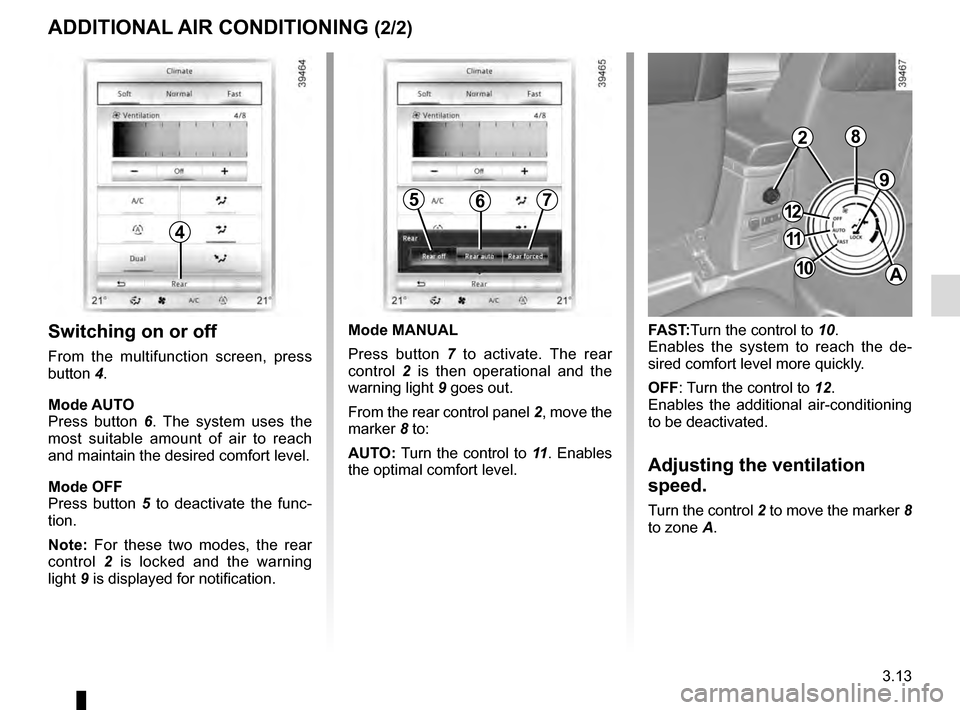
4
ADDITIONAL AIR CONDITIONING (2/2)
Switching on or off
From the multifunction screen, press
button 4.
Mode AUTO
Press button 6. The system uses the
most suitable amount of air to reach
and maintain the desired comfort level.
Mode OFF
Press button 5 to deactivate the func-
tion.
Note: For these two modes, the rear
control 2 is locked and the warning
light 9 is displayed for notification.
9
FAST:Turn the control to 10.
Enables the system to reach the de-
sired comfort level more quickly.
OFF: Turn the control to 12.
Enables the additional air-conditioning
to be deactivated.
Adjusting the ventilation
speed.
Turn the control 2 to move the marker 8
to zone A.
567
Mode MANUAL
Press button 7 to activate. The rear
control 2 is then operational and the
warning light 9 goes out.
From the rear control panel 2, move the
marker 8 to:
AUTO: Turn the control to 11 . Enables
the optimal comfort level.
2
11
10
12
A
8
Page 205 of 318

3.17
Operating faults
In case of a fault when closing a
window, the system reverts to normal
mode: pull the switch as many times as
necessary until the window closes com-
pletely, hold the switch (still on the clo-
sing side) for around one second, then
completely lower then raise the window
to reset the system.
If necessary, contact an approved
Dealer.
ELECTRIC WINDOWS (2/2)Remote control window
closing
(vehicles with 4 one-touch electric win-
dows).
When you lock the doors from the out-
side, press the locking button on the
RENAULTcard twice in quick suc-
cession, or on the driver’s door in
hands-free mode, and all the windows
will close automatically (and, depen-
ding on the vehicle, the sunroof).
It is recommended that the user only
operates the system when the vehi-
cle can be seen clearly and no one is
inside.
When closing the windows,
ensure that no part of the
body (arm, hand, etc.) is
protruding from the vehicle.
Risk of serious injury.
One-touch mode
This mode works in addition to the ope-
ration of the electric windows described
previously.
Briefly press or pull the window switch
fully: the window is fully lowered or
raised. Pressing the switch again stops
the window moving.
Note: if the window detects resistance
when closing (e.g.: branch of a tree,
etc.) it stops and then lowers again by a
few centimetres.
Page 206 of 318
3.18
ELECTRIC SUNROOF (1/3)
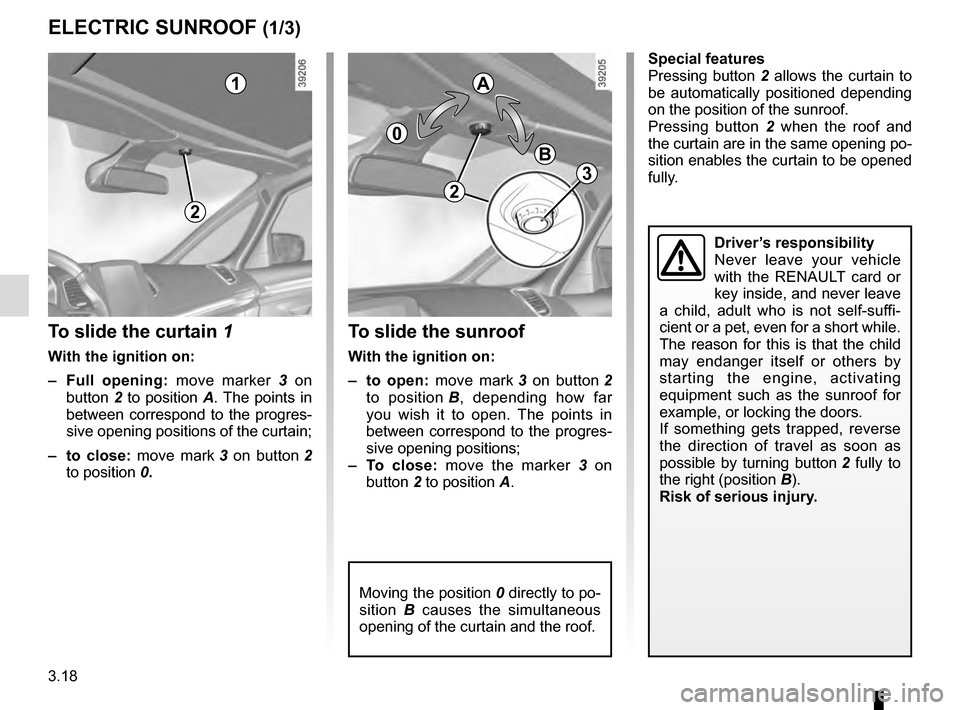
To slide the curtain 1
With the ignition on:
– Full opening: move marker 3 on
button 2 to position A. The points in
between correspond to the progres-
sive opening positions of the curtain;
– to close: move mark 3 on button 2
to position 0.
To slide the sunroof
With the ignition on:
– to open: move mark 3 on button 2
to position B, depending how far
you wish it to open. The points in
between correspond to the progres-
sive opening positions;
– To close: move the marker 3 on
button 2 to position A.
1
2
0
A
B
Moving the position 0 directly to po-
sition B causes the simultaneous
opening of the curtain and the roof.
Driver’s responsibility
Never leave your vehicle
with the RENAULT card or
key inside, and never leave
a child, adult who is not self-suffi-
cient or a pet, even for a short while.
The reason for this is that the child
may endanger itself or others by
starting the engine, activating
equipment such as the sunroof for
example, or locking the doors.
If something gets trapped, reverse
the direction of travel as soon as
possible by turning button 2 fully to
the right (position B).
Risk of serious injury.
Special features
Pressing button 2 allows the curtain to
be automatically positioned depending
on the position of the sunroof.
Pressing button 2 when the roof and
the curtain are in the same opening po-
sition enables the curtain to be opened
fully.
2
3
Page 207 of 318

3.19
ELECTRIC SUNROOF (2/3)Closing the sunroof by
remote control
(depending on the vehicle)
If you press the locking button on
the card twice in quick succession
RENAULT,, the windows and the elec-
tric sunroof will close automatically.
It is recommended that the user only
operates the system when the vehi-
cle can be seen clearly and no one is
inside.
Precautions during use
– Vehicle with loaded roof bars.
As a general rule, if there is a load
on the roof, use of the sunroof is not
recommended.
Before using the sunroof, check the
objects and/or accessories (bike
racks, roof boxes, etc.) attached to
the roof bars: they should be pro-
perly arranged and secured and
should not interfere with the opera-
tion of the sunroof.
Contact an approved dealer for de-
tails of possible conversions;
– check that the sunroof is properly
closed before leaving your vehicle;
– clean the seal every three months using products recommended by our
Technical Department;
– do not open the sunroof immedia-
tely after it has rained or immediately
after washing the vehicle.
When closing the sunroof,
ensure that no part of the
body (arm, hand, etc.) is
protruding from the vehicle.
Risk of serious injury.
Special features
Your vehicle is fitted with an anti-pinch
facility: when the sunroof encounters
resistance whilst closing (arm, tree
branch etc.), it stops and then moves
back a few centimetres.
After closing the sunroof by remote
control, pressing button 2 allows the
sunroof to return to its previous posi-
tion.
Page 208 of 318
3.20
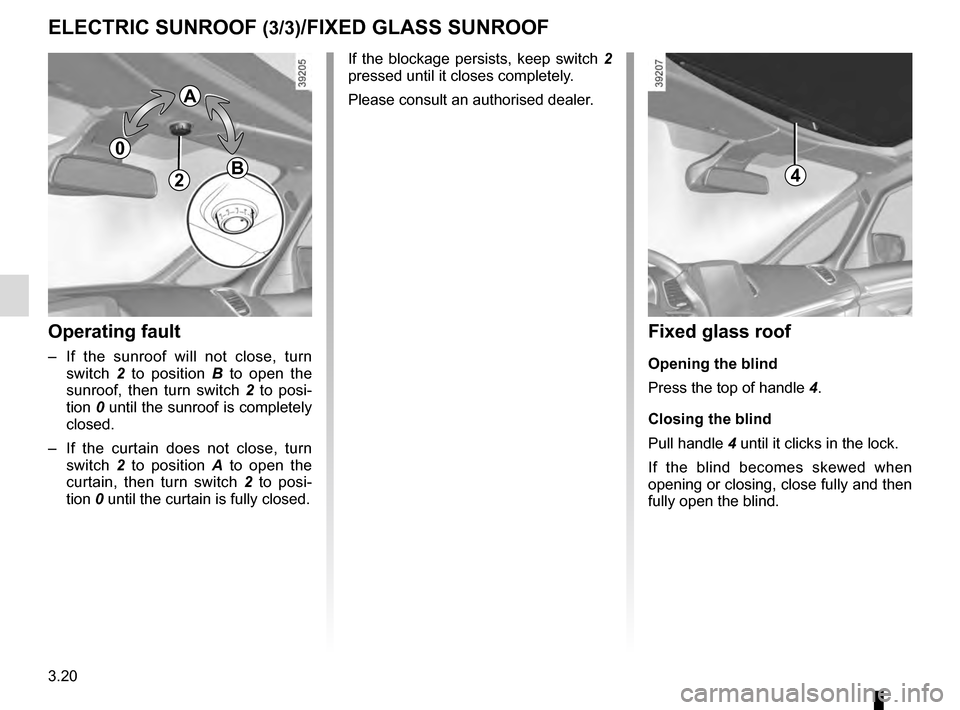
Operating fault
– If the sunroof will not close, turn switch 2 to position B to open the
sunroof, then turn switch 2 to posi-
tion 0 until the sunroof is completely
closed.
– If the curtain does not close, turn switch 2 to position A to open the
curtain, then turn switch 2 to posi-
tion 0 until the curtain is fully closed.
2
ELECTRIC SUNROOF (3/3)/FIXED GLASS SUNROOF
If the blockage persists, keep switch 2
pressed until it closes completely.
Please consult an authorised dealer.
0
A
B
Fixed glass roof
Opening the blind
Press the top of handle 4.
Closing the blind
Pull handle 4 until it clicks in the lock.
If the blind becomes skewed when
opening or closing, close fully and then
fully open the blind.
4
Page 209 of 318
3.21
When the doors or boot are un-
locked and opened, the reading and
footwell lights come on temporarily.
Map reading lights
Press switch 1 to get:
– permanent lighting;
– immediate switching off.
1
1
From the multifunction screen, it is pos-
sible to deactivate/activate the cour-
tesy lights upon opening the doors or
the boot. To do this, please refer to
“Vehicle settings customisation menu”
in Section 1.
INTERIOR LIGHTING (1/2)
1
Page 211 of 318
3.23
SUN VISOR, BLINDS
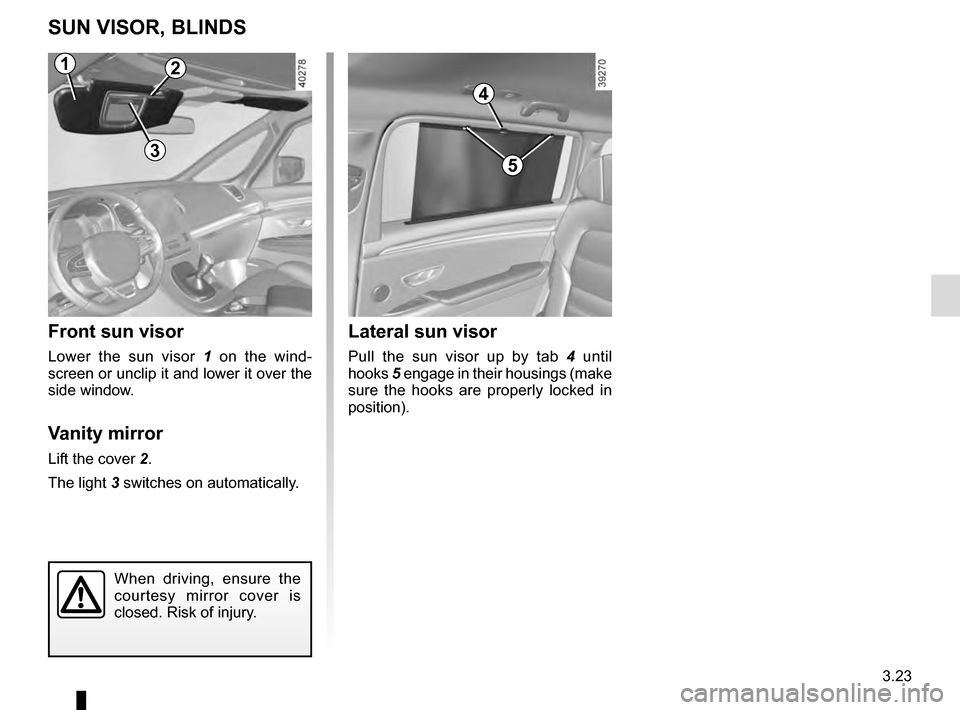
Front sun visor
Lower the sun visor 1 on the wind-
screen or unclip it and lower it over the
side window.
Vanity mirror
Lift the cover 2.
The light 3 switches on automatically.
Lateral sun visor
Pull the sun visor up by tab 4 until
hooks 5 engage in their housings (make
sure the hooks are properly locked in
position).
4
5
2
3
When driving, ensure the
courtesy mirror cover is
closed. Risk of injury.
1