Page 58 of 318
1.52
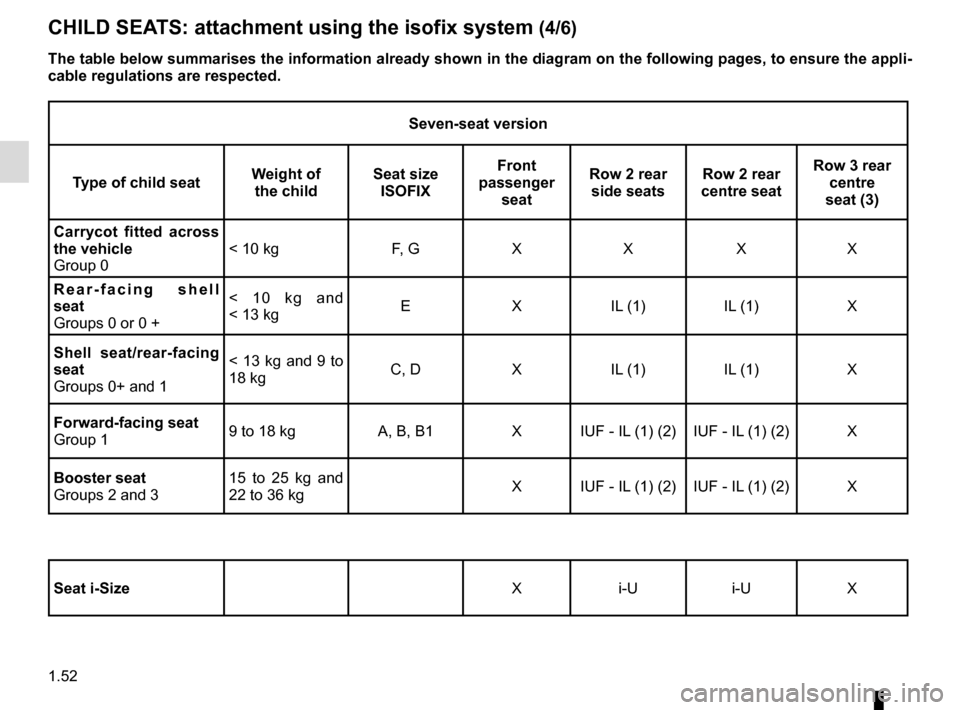
Seven-seat version
Type of child seat Weight of
the child Seat size
ISOFIX Front
passenger seat Row 2 rear
side seats Row 2 rear
centre seat Row 3 rear
centre
seat (3)
Carrycot fitted across
the vehicle
Group 0 < 10 kg F, G X X X X
Rear-facing shell
seat
Groups 0 or 0 + < 10 kg and
< 13 kg
E X IL (1) IL (1) X
Shell seat/rear-facing
seat
Groups 0+ and 1 < 13 kg and 9 to
18 kg
C, D X IL (1) IL (1) X
Forward-facing seat
Group 1 9 to 18 kg A, B, B1 X IUF - IL (1) (2) IUF - IL (1) (2) X
Booster seat
Groups 2 and 3 15 to 25 kg and
22 to 36 kg
X IUF - IL (1) (2) IUF - IL (1) (2) X
Seat i-Size X i-U i-U X
CHILD SEATS: attachment using the isofix system (4/6)
The table below summarises the information already shown in the diagram \
on the following pages, to ensure the appli-
cable regulations are respected.
Page 59 of 318

1.53
X = Seat not suitable for fitting child seats ISOFIX.
IUF/IL = On equipped vehicles, seat which allows an approved “Universal/semi-u\
niversal” or “vehicle specific” child seat to be at-
tached using the ISOFIX system; check that it can be fitted.
i-U = Suitable for the i-Size restraint devices in the “universal” forwa\
rd-facing and backward-facing category.
(1) If necessary, position the vehicle seat as far back as possible. Move the front seat\
as far forward as possible to install a re ar-
facing child seat, then move back the seat in front as far as it will go\
, although without allowing it to come into contact with the
child seat.
(2) In all situations, remove the rear headrest of the seat on which the chi\
ld seat is positioned. This must be done before fitting the
child seat. Please refer to the information on the “Rear headrests”\
in Section 3. Move the seat in front of the child forwards,
move the seatback forward to avoid contact between the seat and the chil\
d’s legs.
(3) Push the seat(s) in front of the child in a third row seat as far forw\
ard as possible.
CHILD SEATS: attachment using the isofix system (5/6)
Page 74 of 318

1.68
DISPLAYS AND INDICATORS (3/4)
Head-up display 7
The display details driving and navi-
gation information from the instrument
panel and the multifunction screen.
If fitted to the vehicle, this comes on
when the engine is started and is re-
tracted when the engine is switched off.
7You can adjust certain settings from the
multifunction screen: with the engine
running, access menu “System”,
“Display” then “Head-up display”.
Adjusting the display information
height
Depending on your driving position,
you can raise or lower the information
on the display.
Adjusting the display brightness
You can adjust the brightness (day or
night mode)
– automatically : the brightness will
vary depending on the outdoor light.
– manually: the brightness automati-
cally switches with the activation/de-
activation of the lights.
In both cases, the day mode varies
based on the outdoor brightness.
Good information visibility can be af-
fected by:
– the seat position;
– the presence of an object placed
on the opened display;
– the polarisation of some spectacle
lenses;
– extreme weather conditions (rain,
snow, very strong sunlight, etc.).
In the event of contradic-
tory information between
the instrument panel and
the head-up display/multi-
function screen, please refer to the
information displayed on the instru-
ment panel.
Do not manually force the opening/
closure of the head-up display.
For safety reasons, carry
out any adjustments when
the vehicle is stationary.
Page 87 of 318
1.81
External temperature
indicator
Special note:
When the exterior temperature is - 3 °C
to + 3 °C, the °C characters flash (sig-
nalling a risk of ice on the road).
The time and/or external tempera-
ture are displayed on the multifunc-
tion screen 1
Refer to the handbook for the equip-
ment.
CLOCK AND EXTERIOR TEMPERATURE
External temperature
indicator
As ice formation is related
to climatic exposure, local
air humidity and temperature, the
external temperature alone is not
sufficient to detect ice.
1
If the electrical supply is cut (battery
disconnected, broken supply wire,
etc.), the clock will automatically
go back to the right time after a few
minutes once the system is capable
of receiving information GPS.
Page 89 of 318

1.83
Position memory
– Adjust the door mirrors (see previous paragraphs);
– from the multifunction screen, select menu “Vehicle”, “Seats”, “Settings”
then “Position” and select “Save”.
The positions of the door mirrors in a
forward gear, reverse and of the front
seats are simultaneously saved.
Rear view mirrors which tilt
in reverse gear
For vehicles equipped with the driver’s
seat with position memory, you can
enter a specific setting for the door mir-
rors when reversing and store the po-
sition.
With the vehicle at a standstill and re-
verse gear engaged, select the door
mirror using switch 2 then, with button 1,
adjust it to the required position.
REAR-VIEW MIRRORS (2/3)
1
Recalling the memorised
position
From the multifunction screen, select
menu “Vehicle”, “Seats”, “Settings” then
“Position” and select “Recall”.
The positions of the door mirrors in
forward gear, reverse and of the front
seats are recalled.
Returning to the driving position
Moving from reverse gear to a forward
gear is done:
– approximately 9 seconds after re- verse gear has been disengaged
when the speed is lower than 6 mph
(10 km/h);
– forward gear engaged when the speed is greater than 6 mph
(10 km/h);
– when the engine is stopped;
– when switch 2 is in neutral position.
For safety reasons, carry
out any adjustments when
the vehicle is not being
driven.
2
Page 90 of 318
1.84
Interior rear view mirror
The rear-view mirror 4 automati-
cally darkens when you are being fol-
lowed by a vehicle using main beam
headlights or in very bright lighting.
REAR-VIEW MIRRORS (3/3)
Special feature:
When the rear-view mirror has been
manually deployed or folded back, it is
possible to reset it to a usage position.
To do this, position the switch 3 to C.
A mechanical noise from the rear-view
mirror unit will be heard.
If it is not the case, place switch 3 to A
and then place switch 3 to C until the
mechanical noise of the rear-view
mirror is heard.
A
C
3
Information regarding the activation
and deactivation of the front pas-
senger airbag is displayed on the in-
terior rear-view mirror (please refer
to information in “Child safety: front
passenger airbag deactivation/acti-
vation” in Section 1).
4
Page 91 of 318
1.85
AUDIBLE AND VISUAL SIGNALS
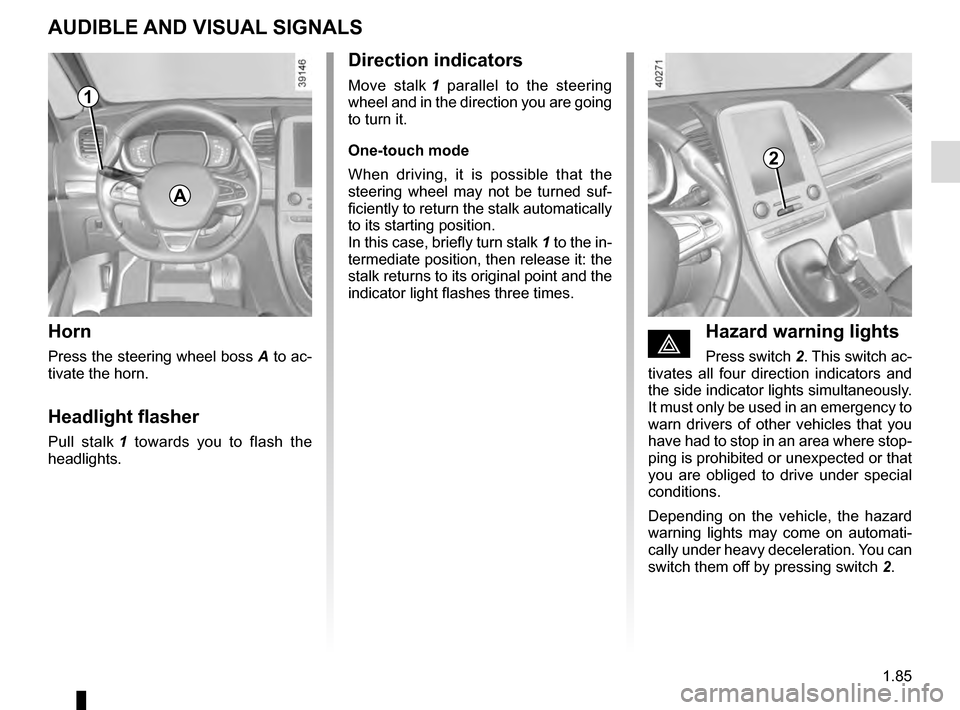
Horn
Press the steering wheel boss A to ac-
tivate the horn.
Headlight flasher
Pull stalk 1 towards you to flash the
headlights.
éHazard warning lights
Press switch 2. This switch ac-
tivates all four direction indicators and
the side indicator lights simultaneously.
It must only be used in an emergency to
warn drivers of other vehicles that you
have had to stop in an area where stop-
ping is prohibited or unexpected or that
you are obliged to drive under special
conditions.
Depending on the vehicle, the hazard
warning lights may come on automati-
cally under heavy deceleration. You can
switch them off by pressing switch 2.
Direction indicators
Move stalk 1 parallel to the steering
wheel and in the direction you are going
to turn it.
One-touch mode
When driving, it is possible that the
steering wheel may not be turned suf-
ficiently to return the stalk automatically
to its starting position.
In this case, briefly turn stalk 1 to the in-
termediate position, then release it: the
stalk returns to its original point and the
indicator light flashes three times.
2
A
1
Page 97 of 318

1.91
Special note
When driving the vehicle, the wiping
speed slows down whenever the vehi-
cle stops. For example, fast wiping
speed will slow to normal wiping speed.
As soon as the vehicle moves off,
wiping will return to the speed originally
selected.
If stalk 1 is operated, it overrides and
cancels the automatic function.Vehicle fitted with intermittent
windscreen wipers
A single sweep
A short push will trigger one sweep
of the wipers.
B stop
C intermittent wiping
The wipers will pause for seve-
ral seconds between sweeps. It
is possible to change the time
between sweeps by turning ring 2.
D slow continuous wiping
E fast continuous wiping
Positions A, C and D are accessible
with the ignition on. Position E is
accessible only when the engine is
running.
1
A
B
C
D
WINDSCREEN WASH/WIPE (1/6)
E
Check the condition of the wiper
blades. You are responsible for their
service life:
– they must remain clean: clean the blades, windscreen and
rear screen regularly with soapy
water;
– do not use them when the winds- creen or rear screen are dry;
– free them from the windscreen or rear screen when they have not
been used for a long time.
In all cases, replace them as soon
as they begin to lose efficiency: ap-
proximately once a year.
Before using the rear wiper, check
that no object obstructs the travel of
the blade.
Do not use the wiper arm to open or
close the tailgate.
1
2