Page 172 of 669
WINDSHIELD WIPERS AND WASHERS
Windshield Wipers
The wipers and washers are operated by a switch in the
multifunction lever. Turn the end of the handle to select
the desired wiper speed.
Windshield Wiper Operation
Rotate the end of the lever upward, to the first detent past
the intermittent settings for low-speed wiper operation.
Rotate the end of the lever upward to the second detent
past the intermittent settings for high-speed wiper opera-
tion.
High/Low Beam SwitchWindshield Wiper/Washer Switch
170 UNDERSTANDING THE FEATURES OF YOUR VEHICLE
Page 266 of 669
Electronic Speed Control Set Indicator Light — If Equipped
Green TelltaleLight What It Means
Electronic Speed Control Set Indicator Light
This light will turn on when the electronic speed control has been set.
Blue Telltale Indicator Light
High Beam Indicator Light
Blue Telltale
Light What It Means
High Beam Indicator Light
This indicator shows that the high beam headlights are on. Push the multifunction control
lever away from you to switch the headlights to high beam. Pull the lever toward you to
switch the headlights back to low beam.
264 UNDERSTANDING YOUR INSTRUMENT PANEL
Page 272 of 669

•Unstored Messages
This message type is displayed indefinitely or until the
condition that activated the message is cleared. Examples
of this message type are “Turn Signal On” (if a turn signal
is left on) and “Lights On” (if driver leaves the vehicle).
• Unstored Messages Until RUN
These messages deal primarily with the Remote Start
feature. This message type is displayed until the ignition
is in the RUN state. Examples of this message type are
“Remote Start Aborted - Door Ajar” and “Press Brake
Pedal and Push Button to Start.”
• Five Second Unstored Messages
When the appropriate conditions occur, this type of
message takes control of the main display area for five
seconds and then returns to the previous screen. An
example of this message type is “Automatic High Beams
On.”Oil Life Reset
Your vehicle is equipped with an engine oil change
indicator system. The “Oil Change Required” message
will display for approximately 10 seconds after a single
chime has sounded, to indicate the next scheduled oil
change interval. The engine oil change indicator system
is duty cycle based, which means the engine oil change
interval may fluctuate, dependent upon your personal
driving style.
NOTE: Use the steering wheel controls for the following
procedure(s)
Vehicles Equipped With Passive Entry
1. Without pushing the brake pedal, push the ENGINE START/STOP button and cycle the ignition to the
ON/RUN position (do not start the engine).
2. Push and release the DOWN arrow button to scroll downward through the main menu to “Vehicle Info.”
270 UNDERSTANDING YOUR INSTRUMENT PANEL
Page 283 of 669
Setting NamesSetting Names
Abbreviated (Left Submenu Layer) Sub-Menus (Right Submenu Layer)
10 Automatic High- beams Auto Highbeams
On; Off
11 Daytime Running Lights — IfEquipped Daytime Lights
On; Off
12 Flash Lights with Lock Lights w/ Lock
On; Off
13 Auto Lock Doors Auto Lock Doors On; Off
14 Auto Unlock Doors Auto Unlock Doors On; Off
15 Sound Horn with Remote Start Horn w/ Rmt Start
On; Off
16 Sound Horn with Remote Lock Horn w/ Rmt Lock
Off; 1st Press; 2nd Press
4
UNDERSTANDING YOUR INSTRUMENT PANEL 281
Page 291 of 669

9. Selectable Gauge 1 (Trans Temp, Oil Temp, Oil Life,Trailer Brake, Current MPG)
The main display area will normally display the main
menu or the screens of a selected feature of the main
menu. The main display area also displays “pop up”
messages that consist of approximately 60 possible warn-
ing or information messages. These pop up messages fall
into several categories:
• Five Second Stored Messages
When the appropriate conditions occur, this type of
message takes control of the main display area for five
seconds and then returns to the previous screen. Most of
the messages of this type are then stored (as long as the
condition that activated it remains active) and can be
reviewed from the “Messages” main menu item. As long
as there is a stored message, an “i” will be displayed in
the DID’s compass/outside temp line. Examples of this
message type are “Right Front Turn Signal Lamp Out”
and “Low Tire Pressure.” •
Unstored Messages
This message type is displayed indefinitely or until the
condition that activated the message is cleared. Examples
of this message type are “Turn Signal On” (if a turn signal
is left on) and “Lights On” (if driver leaves the vehicle).
• Unstored Messages Until RUN
These messages deal primarily with the Remote Start
feature. This message type is displayed until the ignition
is in the RUN state. Examples of this message type are
“Remote Start Aborted - Door Ajar” and “Press Brake
Pedal and Push Button to Start.”
• Five Second Unstored Messages
When the appropriate conditions occur, this type of
message takes control of the main display area for five
seconds and then returns to the previous screen. An
example of this message type is “Automatic High Beams
On.”
4
UNDERSTANDING YOUR INSTRUMENT PANEL 289
Page 305 of 669
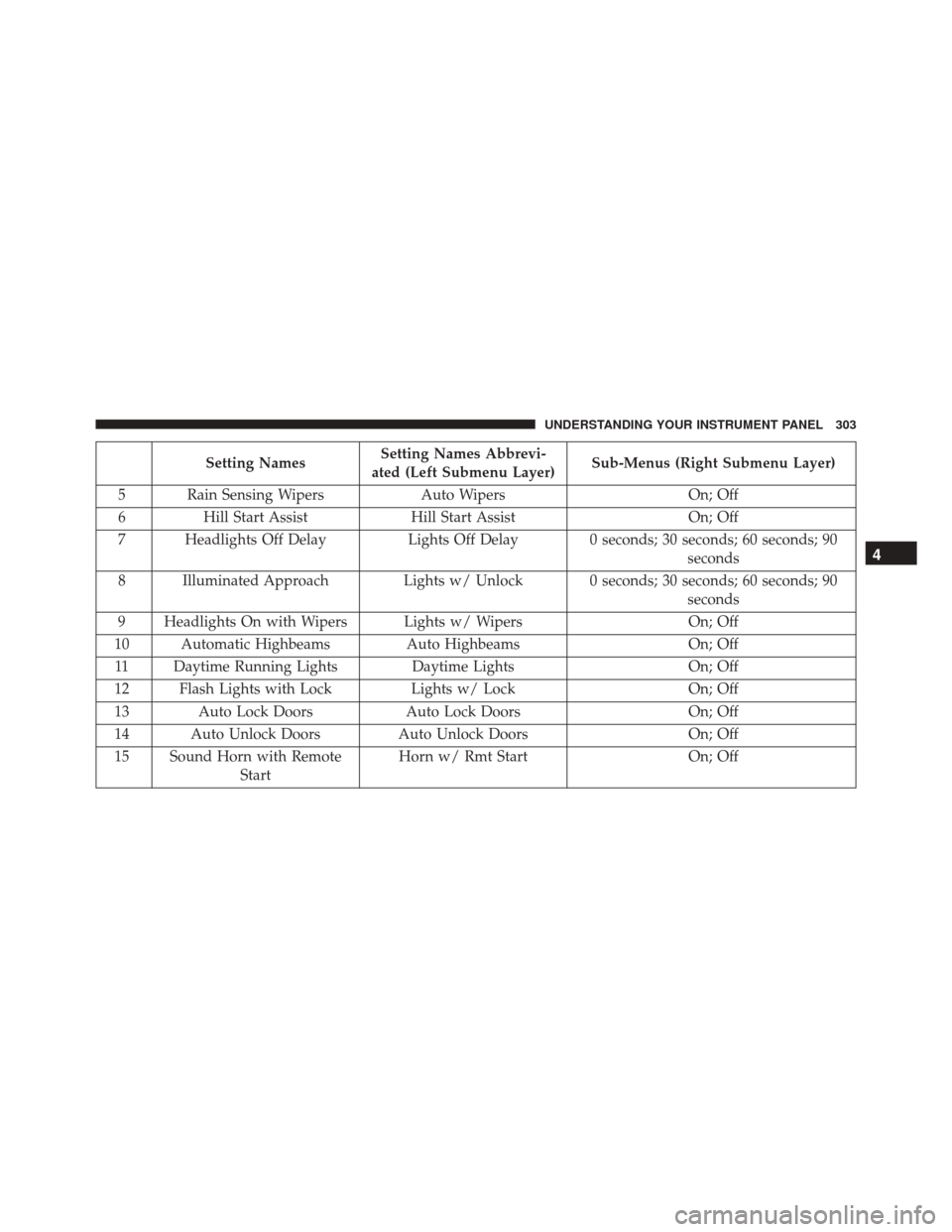
Setting NamesSetting Names Abbrevi-
ated (Left Submenu Layer) Sub-Menus (Right Submenu Layer)
5 Rain Sensing Wipers Auto Wipers On; Off
6 Hill Start Assist Hill Start Assist On; Off
7 Headlights Off Delay Lights Off Delay 0 seconds; 30 seconds; 60 seconds; 90
seconds
8 Illuminated Approach Lights w/ Unlock 0 seconds; 30 seconds; 60 seconds; 90
seconds
9 Headlights On with Wipers Lights w/ Wipers On; Off
10 Automatic Highbeams Auto HighbeamsOn; Off
11 Daytime Running Lights Daytime LightsOn; Off
12 Flash Lights with Lock Lights w/ LockOn; Off
13 Auto Lock Doors Auto Lock DoorsOn; Off
14 Auto Unlock Doors Auto Unlock Doors On; Off
15 Sound Horn with Remote Start Horn w/ Rmt Start
On; Off
4
UNDERSTANDING YOUR INSTRUMENT PANEL 303
Page 317 of 669

•Headlights With Wipers — If Equipped
When this feature is selected, and the headlight switch is
in the AUTO position, the headlights will turn on ap-
proximately 10 seconds after the wipers are turned on.
The headlights will also turn off when the wipers are
turned off, if they were turned on by this feature. To
make your selection, press the “Lights w/Wipers” button
and select from “On” or “Off.”
• Auto Dim High Beams — If Equipped
When this feature is selected, the high beam headlights
will activate/deactivate automatically under certain con-
ditions. To make your selection, press the “Auto High
Beams” button on the touchscreen, and select from “On”
or “Off.” Refer to ”Automatic High Beam — If
Equipped” in “Understanding The Features Of Your
Vehicle” for further information. •
Flash Lights With Lock
When this feature is selected, the exterior lights will flash
when the doors are locked or unlocked with the Remote
Keyless Entry (RKE) transmitter. This feature may be
selected with or without the sound horn on lock feature
selected. To make your selection, press the “Flash Lights
w/Lock” button on the touchscreen, and select from
“On” or “Off.”
Doors & Locks
After pressing the “Doors & Locks” button on the touch-
screen, the following settings will be available:
• Auto Door Locks
When this feature is selected, all doors will lock auto-
matically when the vehicle reaches a speed of 15 mph
(24 km/h). To make your selection, press the “Auto Door
Locks” button on the touchscreen and select from “On”
or “Off.”
4
UNDERSTANDING YOUR INSTRUMENT PANEL 315
Page 334 of 669

•Auto Dim High Beams — If Equipped
When this feature is selected, the high beam headlights
will deactivate automatically under certain conditions. To
make your selection, press the “Auto Dim High Beams”
button on the touchscreen, until a check-mark appears
next to setting, showing that setting has been selected.
Refer to “Lights/ Automatic High Beam — If Equipped”
in “Understanding The Features Of Your Vehicle” for
further information.
• Flash Lights With Lock
When this feature is selected, the exterior lamps will flash
when the doors are locked or unlocked with the Remote
Keyless Entry (RKE) transmitter. This feature may be
selected with or without the sound horn on lock feature
selected. To make your selection, press the “Flash Lights
with Lock” button on the touchscreen, until a check-mark
appears next to setting, showing that setting has been
selected.Doors & Locks
After pressing the “Doors & Locks” button on the touch-
screen the following settings will be available:
• Auto Door Locks
When this feature is selected, all doors will lock automati-
cally when the vehicle reaches a speed of 15 mph (24 km/h).
To make your selection, press the “Auto Door Lock” button
on the touchscreen until a check-mark appears next to
setting, showing that setting has been selected.
•Auto Unlock On Exit
When this feature is selected, all doors will unlock when
the vehicle is stopped and the transmission is in the
PARK or NEUTRAL position and the driver’s door is
opened. To make your selection, press the “Auto Unlock
On Exit” button on the touchscreen until a check-mark
appears next to setting, showing that setting has been
selected.
332 UNDERSTANDING YOUR INSTRUMENT PANEL