Page 329 of 916
Service 4WD Indicator Light — If Equipped
Yellow Telltale
LightWhat It Means
Service 4WD Indicator Light
If the light stays on or comes on during driving, it means that the 4WD system is not func-
tioning properly and that service is required. We recommend you drive to the nearest ser-
vice center and have the vehicle serviced immediately.
2WD Indicator Light — If Equipped
Yellow Telltale
LightWhat It Means
2WD Indicator Light
This light alerts the driver that the vehicle is in the two-wheel drive mode.
4
UNDERSTANDING YOUR INSTRUMENT PANEL 327
Page 336 of 916
ELECTRONIC VEHICLE INFORMATION CENTER
(EVIC)
The Electronic Vehicle Information Center (EVIC) fea-
tures a driver-interactive display that is located in the
instrument cluster.The EVIC Menu items consists of the following:
•Speedometer
•Vehicle Info
•Fuel Economy Info
•Trip A
•Trip B
•Stop/Start Info (If Equipped)
•Air Suspension (If Equipped)
•Trailer Tow
•Messages
•Screen Setup
•Vehicle Settings (Not Equipped with a Uconnect 5.0 &
8.4 radio)
Electronic Vehicle Information Center (EVIC)
334 UNDERSTANDING YOUR INSTRUMENT PANEL
Page 338 of 916
•RIGHT Arrow Button
Push and release the RIGHT arrow button to
access/select the information screens or sub-
menu screens of a main menu item. Push and
hold the RIGHT arrow button for two seconds
to reset displayed/selected features that can be reset.
•LEFT Arrow Button
Push and release the LEFT arrow button to
return to the main menu, to exit the main menu
push and release the UP or DOWN arrow to
highlight Turn Menu Off, then push and re-
lease the RIGHT arrow.Electronic Vehicle Information Center (EVIC)
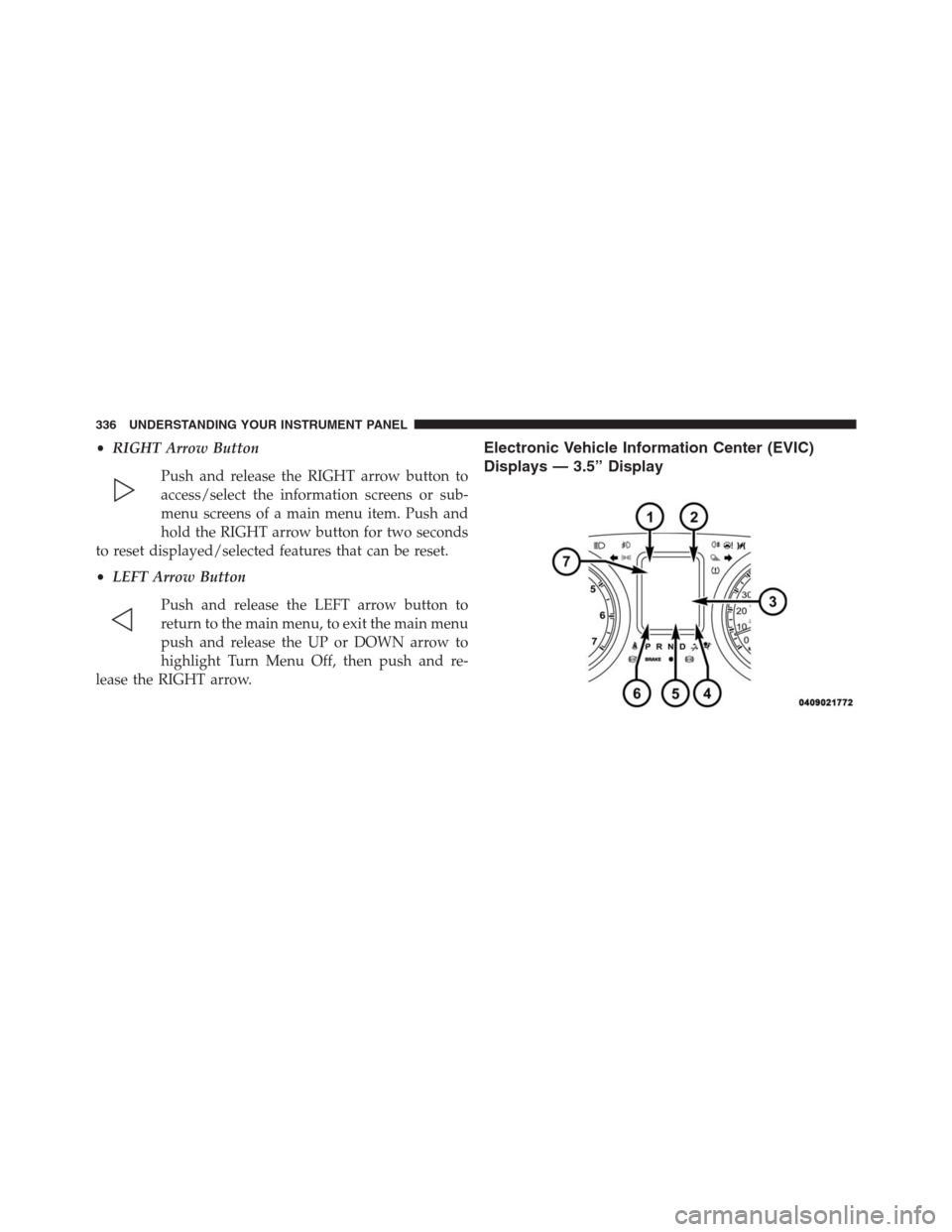
Displays — 3.5” Display
336 UNDERSTANDING YOUR INSTRUMENT PANEL
Page 339 of 916

The EVIC displays are located in the center portion of the
cluster and consists of seven sections:
1. Compass Display
Displays the current direction. Refer to “Compass Set-
tings” under “Customer Programmable Features —
Uconnect 5.0/8.4 Settings” for further information.
2. Temperature Display
Displays the temperature in degrees Celsius or degrees
Fahrenheit.
3. Main Screen
Displays main menu, sub-menus, settings.
4. EVIC White Telltales
5. EVIC Amber Telltales
6. EVIC Red Telltales7. Audio/Phone Information And Sub-menu Information
Whenever there are sub-menus available, the position
within the sub-menu is shown here.
The main display area will normally display the main
menu or the screens of a selected feature of the main
menu. The main display area also displays “pop up”
messages that consist of approximately 60 possible warn-
ing or information messages. These pop up messages fall
into several categories:
•Five Second Stored Messages
When the appropriate conditions occur, this type of
message takes control of the main display area for five
seconds and then returns to the previous screen. Most of
the messages of this type are then stored (as long as the
condition that activated it remains active) and can be
reviewed from the “Messages” main menu item. As long
as there is a stored message, an “i” will be displayed in
4
UNDERSTANDING YOUR INSTRUMENT PANEL 337
Page 340 of 916

the EVIC’s compass/outside temp line. Examples of this
message type are “Right Front Turn Signal Lamp Out”
and “Low Tire Pressure.”
•Unstored Messages
This message type is displayed indefinitely or until the
condition that activated the message is cleared. Examples
of this message type are “Turn Signal On” (if a turn signal
is left on) and “Lights On” (if driver leaves the vehicle).
•Unstored Messages Until RUN
These messages deal primarily with the Remote Start
feature. This message type is displayed until the ignition
is in the RUN state. Examples of this message type are
“Remote Start Aborted - Door Ajar” and “Press Brake
Pedal and Push Button to Start.”
•Five Second Unstored Messages
When the appropriate conditions occur, this type of
message takes control of the main display area for fiveseconds and then returns to the previous screen. An
example of this message type is “Automatic High Beams
On.”
Oil Life Reset
Your vehicle is equipped with an engine oil change
indicator system. The “Oil Change Required” message
will display in the EVIC after a single chime has sounded,
to indicate the next scheduled oil change interval. The
engine oil change indicator system is duty cycle based,
which means the engine oil change interval may fluctu-
ate, dependent upon your personal driving style.
NOTE:Use the steering wheel EVIC controls for the
following procedure(s).
Vehicles Equipped With Passive Entry
1. Without pressing the brake pedal, push the ENGINE
START/STOP button and place the ignition to the
ON/RUN position (do not start the engine).
338 UNDERSTANDING YOUR INSTRUMENT PANEL
Page 342 of 916
Speedometer Menu Item
Push and release theUPorDOWNarrow button until
the speedometer menu item is highlighted in the EVIC.
Push and release theRIGHTarrow button to cycle the
display between MPH and km/h.
Vehicle Info Menu Item
Push and release theUPorDOWNarrow button(s) until
the Vehicle Info menu item is highlighted in the EVIC.
Push and release theRIGHTarrow button to enter the
submenus items of Vehicle Info. follow the directional
prompts to access or reset any of the following Vehicle
Info submenu items:
•Tire Pressure
•Coolant Temp
•Transmission Temp (Automatic only)
•Oil Temp•Oil Pressure
•Oil Life
•Battery Voltage
•Gauge Summary
•Engine HoursFuel Economy Menu Item
Push and release theUPorDOWNarrow button until
the Fuel Economy menu item is highlighted. Push and
Hold theRIGHTarrow button to reset Average Fuel
Economy.
•Current Fuel Economy Gauge
•Average Fuel Economy value
•Range to Empty
340 UNDERSTANDING YOUR INSTRUMENT PANEL
Page 351 of 916
Setting NamesSetting Names Abbre-
viated (Left Submenu
Layer)Sub-Menus (Right Submenu Layer)
3 ParkSense ParkSense
•Notification — Sound Only; Sound & Display
•Front Volume — Low; Medium; High
•Rear Volume — Low; Medium; High
4 Tilt Mirror in
ReverseTilt Mirror in R On; Off
5 Rain Sensing
WipersAuto Wipers On; Off
6 Hill Start Assist Hill Start Assist On; Off
7 Headlights Off
DelayLights Off Delay 0 seconds; 30 seconds; 60 seconds; 90 seconds
8 Illuminated
ApproachLights w/ Unlock 0 seconds; 30 seconds; 60 seconds; 90 seconds
9 Headlights On
with WipersLights w/ Wipers On; Off4
UNDERSTANDING YOUR INSTRUMENT PANEL 349
Page 353 of 916
Setting NamesSetting Names Abbre-
viated (Left Submenu
Layer)Sub-Menus (Right Submenu Layer)
16 Remote Unlock
SequenceRemote Unlock Driver Door; All Doors
17 Key Fob Linked
to MemoryKey in Memory On; Off
18 Passive Entry Passive Entry On; Off
19 Remote Start
Comfort SystemRmt Start Comfort Off; Remoter Start; All starts
20 Easy Exit Seat Easy Exit Seat On; Off
21 Key-off Power
DelayPower Off Delay Off; 45 seconds; 5 minutes; 10 minutes
22 Air Suspension
Display AlertsAir Susp. Alerts All; Warnings Only
23 Aero Ride
Height ModeAero Mode On; Off
4
UNDERSTANDING YOUR INSTRUMENT PANEL 351