Page 160 of 364
158
5008_en_Chap08_conduite_ed01-2015
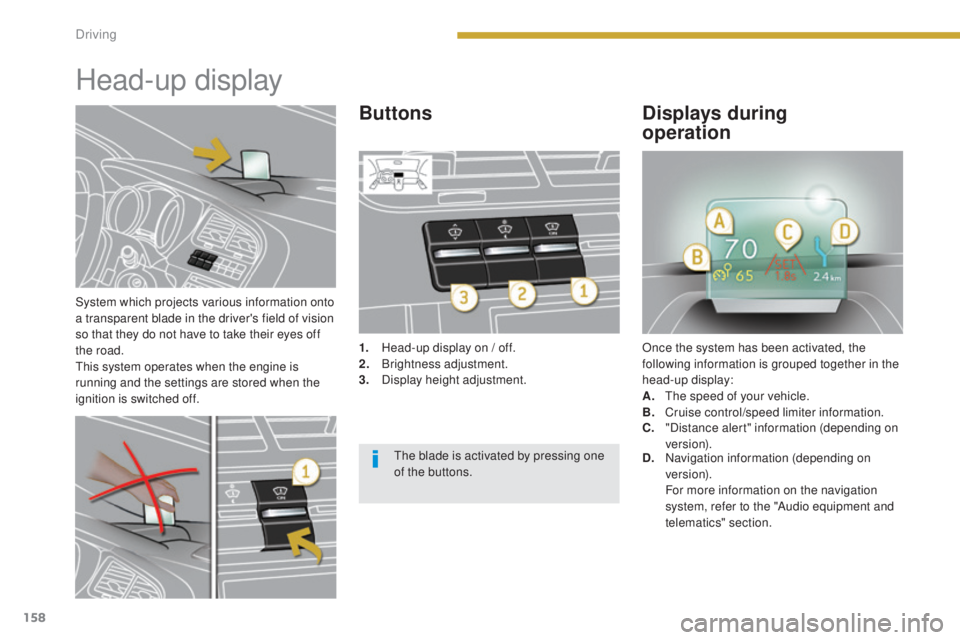
System which projects various information onto
a transparent blade in the driver's field of vision
so that they do not have to take their eyes off
the road.
This system operates when the engine is
running and the settings are stored when the
ignition is switched off.
Head-up display
1. Head-up display on / off.
2. Brightness adjustment.
3.
D
isplay height adjustment. Once the system has been activated, the
following information is grouped together in the
head-up display:
A.
T
he speed of your vehicle.
B.
C
ruise control/speed limiter information.
ButtonsDisplays during
operation
C. "Distance alert" information (depending on
ve r s i o n).
D.
N
avigation information (depending on
ve r s i o n).
F
or more information on the navigation
system, refer to the "Audio equipment and
telematics" section.
The blade is activated by pressing one
of the buttons.
Driving
Page 241 of 364
239
5008_en_Chap10_infos-pratiques_ed01-2015
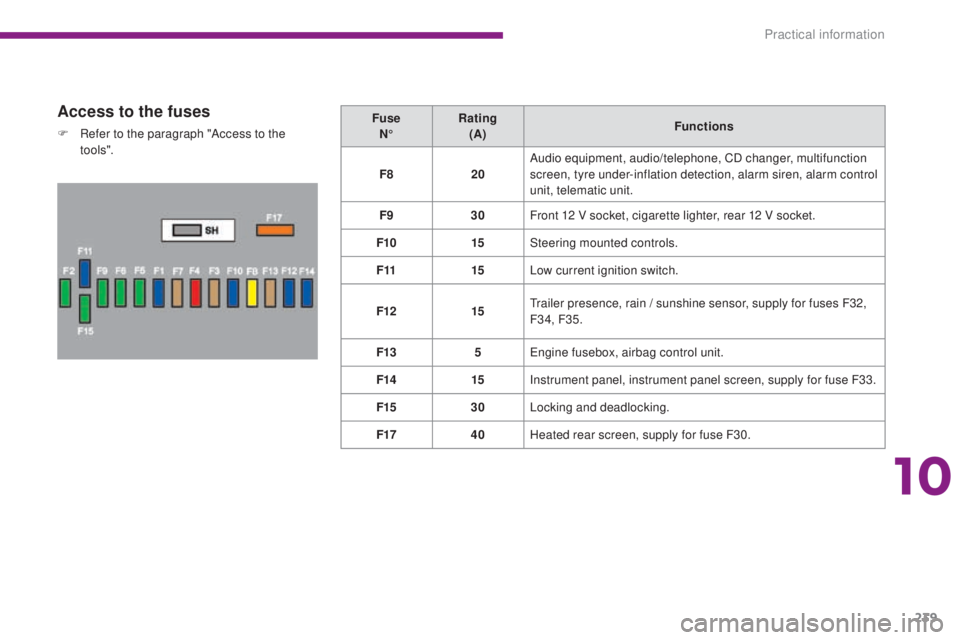
Access to the fuses
F Refer to the paragraph "Access to the to o ls". Fuse
N° Rating
(A) Functions
F8 20Audio equipment, audio/telephone, CD changer, multifunction
screen, tyre under-inflation detection, alarm siren, alarm control
unit, telematic unit.
F9 30Front 12 V socket, cigarette lighter, rear 12 V socket.
F10 15Steering mounted controls.
F11 15Low current ignition switch.
F12 15Trailer presence, rain / sunshine sensor, supply for fuses F32,
F34, F35.
F13 5Engine fusebox, airbag control unit.
F14 15Instrument panel, instrument panel screen, supply for fuse F33.
F15 30Locking and deadlocking.
F17 40Heated rear screen, supply for fuse F30.
10
Practical information
Page 249 of 364
247
5008_en_Chap10_infos-pratiques_ed01-2015
Exiting economy mode
These functions are reactivated automatically
next time the vehicle is driven.
To restore the use of these functions
immediately, start the engine and let it run for at
least 5 minutes.
Load reduction modeEnergy economy mode
Switching to economy mode
Once this time has elapsed, a message
appears in the screen indicating that the
vehicle has switched to economy mode and the
active functions are put on standby.
System which manages the use of certain
functions according to the level of charge
remaining in the battery.
When the vehicle is being driven, the load
reduction function temporarily deactivates
certain functions, such as the air conditioning,
the heated rear screen...
The deactivated functions are reactivated
automatically as soon as conditions permit.
System which manages the duration of use of certain functions to conserve a sufficient level of
charge in the battery.
After the engine has stopped, you can still use functions such as the audio and telematics
system,
windscreen wipers, dipped beam headlamps, courtesy lamps, etc. for a maximum
combined duration of thirty minutes.
This period may be greatly reduced if the battery is not fully charged.
If the telephone is being used at this
time, the call will be maintained for
5 minutes with the hands-free kit of your
P
E
UGEOT
C
onnect Sound (RD5) or
P
E
UGEOT
C
onnect Navigation (RNEG). Let the engine run for the duration
specified to ensure that the battery
charge is sufficient.
Do not repeatedly and continuously
restart the engine in order to charge the
battery.
A flat battery prevents the engine
from starting (refer to the "Battery"
paragraph).
10
Practical information
Page 259 of 364
257
5008_en_Chap10_infos-pratiques_ed01-2015
Installation of radio
communication
transmitters
Before installing any after-market radio
communication transmitter, you can
contact a PEUGEOT dealer for the
specification of transmitters which can
be fitted (frequency, maximum power,
aerial position, specific installation
requirements), in line with the Vehicle
Electromagnetic Compatibility
Directive (2004/104/EC).The fitting of electrical equipment
or accessories which are not
recommended by PEUGEOT may result
in a failure of your vehicle's electronic
system and excessive electrical
consumption.
Contact a PEUGEOT dealer
for information on the range of
recommended equipment and
accessories. Depending on the legislation in force in
the country, certain safety equipment
may be compulsory: high visibility
safety vests, warning triangles,
breathalyzers, spare bulbs, spare fuses,
fire extinguisher, first aid kit, mud flaps
at the rear of the vehicle.
You can also obtain cleaning and
maintenance products (exterior and
interior), products for topping up
(screenwash fluid...) and refills (sealant
cartridge for the temporary puncture
repair kit...) from PEUGEOT dealers.
"Multimedia"
Portable satellite navigation systems, mapping
updates, Bluetooth hands-free system, DVD
player, USB Box, additional Bluetooth wireless
headphones, Bluetooth audio headphones
mains charger, multimedia support...
10
Practical information
Page 272 of 364
270
5008_en_Chap12a_BTA_ed01-2015
Emergency or assistance call
If an impact is detected by the airbag
control unit, and independently of
the deployment of any airbags, an
emergency call is made automatically.
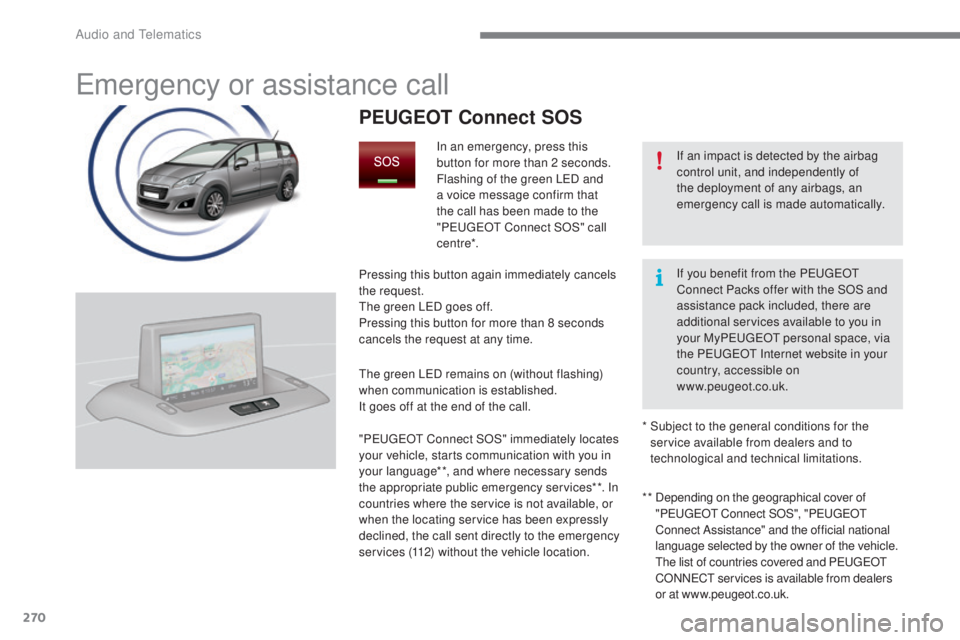
PEUGEOT Connect SOS
In an emergency, press this
button for more than 2 seconds.
Flashing of the green LED and
a voice message confirm that
the call has been made to the
"P
E
UGEOT
C
onnect SOS" call
c e nt re*.
Pressing this button again immediately cancels
the request.
The green LED goes off.
Pressing this button for more than 8 seconds
cancels the request at any time.
The green LED remains on (without flashing)
when communication is established.
It goes off at the end of the call.
" P
E
UGEOT
C
onnect SOS" immediately locates
your vehicle, starts communication with you in
your language**, and where necessary sends
the appropriate public emergency services**. In
countries where the service is not available, or
when the locating service has been expressly
declined, the call sent directly to the emergency
services (112) without the vehicle location. * *
D
epending on the geographical cover of
" P
E
UGEOT
C
onnect SOS", "P
E
UGEOT
C
onnect Assistance" and the official national
language selected by the owner of the vehicle.
The list of countries covered and PEUGEOT
CONNECT services is available from dealers
or at www.peugeot.co.uk.
*
S
ubject to the general conditions for the
service available from dealers and to
technological and technical limitations. If you benefit from the P
E
UGEOT
C
onnect Packs offer with the SOS and
assistance pack included, there are
additional services available to you in
your MyP
E
UGEOT
p
ersonal space, via
the PEUGEOT Internet website in your
country, accessible on
www.peugeot.co.uk.
Audio and Telematics
Page 273 of 364
271
5008_en_Chap12a_BTA_ed01-2015
PEUGEOT Connect Assistance
If you purchased your vehicle outside
the PEUGEOT dealer network, we
invite you to have a dealer check the
configuration of these services and, if
desired, modified to suit your wishes.
In a multi-lingual country, configuration
is possible in the official national
language of your choice.
For technical reasons and in particular
to improve the quality of "PEUGEOT
CONNECT services" services to
customers, the manufacturer reserves
the right to carry out updates to the
vehicle's on-board telematic system.
A fault with the system does not
prevent the vehicle being driven. Press this button for more than
2
seconds to request assistance
if the vehicle breaks down.
A voice message confirms that
the call has been made**.
Pressing this button again immediately cancels
the request.
The cancellation is confirmed by a voice
message.
The orange LED is on continuously: the backup
battery must be replaced.
In either case, the emergency and assistance
calls may not function.
Contact a qualified repairer as soon as
possible.
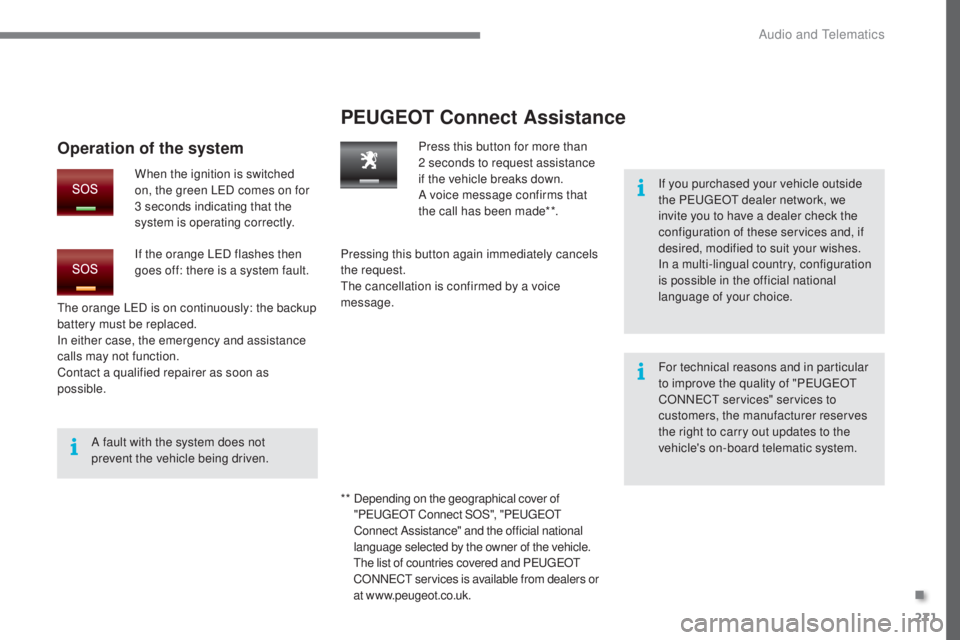
Operation of the system
When the ignition is switched
on, the green LED comes on for
3 seconds indicating that the
system is operating correctly.
If the orange LED flashes then
goes off: there is a system fault.
* *
D
epending on the geographical cover of
" P
E
UGEOT
C
onnect SOS", "P
E
UGEOT
C
onnect Assistance" and the official national
language selected by the owner of the vehicle.
The list of countries covered and PEUGEOT
CONNECT services is available from dealers or
at www.peugeot.co.uk.
.
Audio and Telematics
Page 275 of 364
273
5008_en_Chap12b_RT6-2-8_ed01-2015
The system is protected in such a way that it will only
operate in your vehicle.
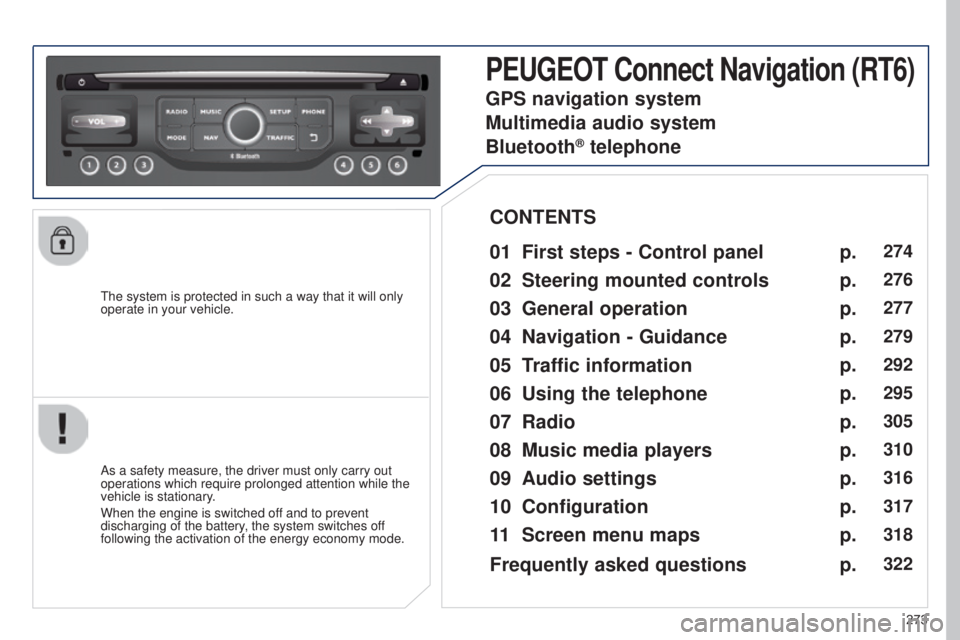
PEUGEOT Connect Navigation (RT6)
01 First steps - Control panel
As a safety measure, the driver must only carry out
operations which require prolonged attention while the
vehicle is stationary.
When the engine is switched off and to prevent
discharging of the battery, the system switches off
following the activation of the energy economy mode.
CONTENTS
02
Steering mounted
controls
03
General operation
04
Navigation
- Guidance
05
T
raffic information
06
Using
the telephone
07
Radio
08
Music media players
09
Audio
settings
10
Configuration
11
Screen menu
maps p.
p.
p.
p.
p.
p.
p.
p.
p.
p.
p.
274
276
277
279
292
295
305
310
316
317
318
GPS navigation system
Multimedia audio system
Bluetooth
® telephone
Frequently asked questions p.
322
Page 276 of 364
01
274
5008_en_Chap12b_RT6-2-8_ed01-2015
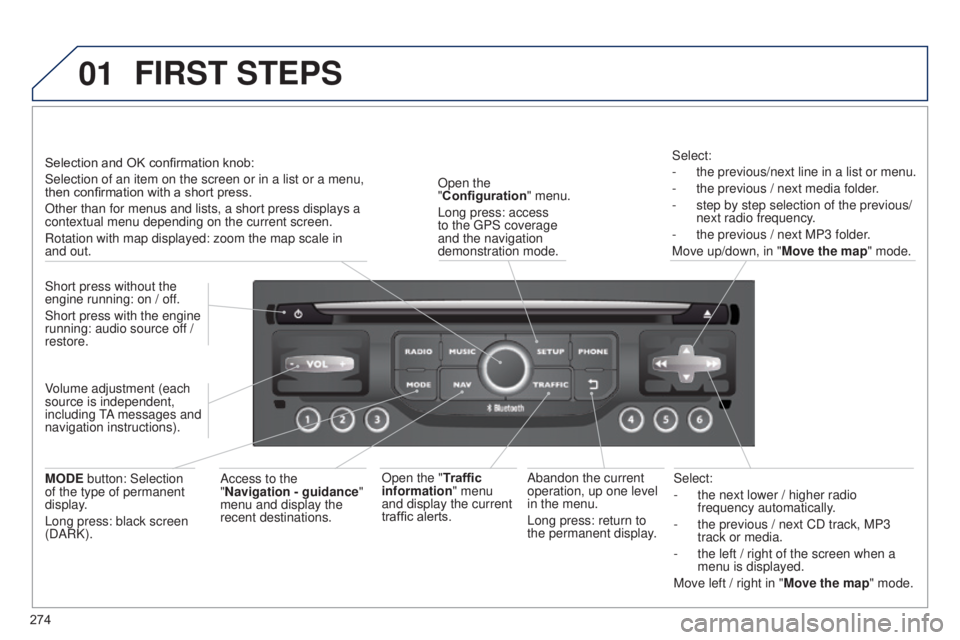
Select:
-
the next lower / higher radio
frequency automatically
.
-
the previous / next CD track, MP3
track or media.
-
the left / right of the screen when a
menu is displayed.
Move left / right in "
Move the map" mode.
Abandon the current
operation, up one level
in the menu.
Long press: return to
the permanent display.
Open the
"Configuration
" menu.
Long press: access
to the GPS coverage
and the navigation
demonstration mode.
Open the "Traffic
information" menu
and display the current
traffic alerts. Select:
-
the previous/next line in a list or menu.
-
the previous / next media folder
.
-
step by step selection of the previous/
next radio frequency
.
-
the previous / next MP3 folder
.
Move up/down, in " Move the map" mode.
FIRST STEPS
Access to the
"Navigation - guidance "
menu and display the
recent destinations.
Short press without the
engine running: on / off.
Short press with the engine
running: audio source off /
restore.
MODE button: Selection
of the type of permanent
display.
Long press: black screen
(DARK). Selection and OK confirmation knob:
Selection of an item on the screen or in a list or a menu,
then confirmation with a short press.
Other than for menus and lists, a short press displays a
contextual menu depending on the current screen.
Rotation with map displayed: zoom the map scale in
and out.
Volume adjustment (each
source is independent,
including TA messages and
navigation instructions).