Page 7 of 398
5
308_en_Chap00b_vue-ensemble_ed02-2015
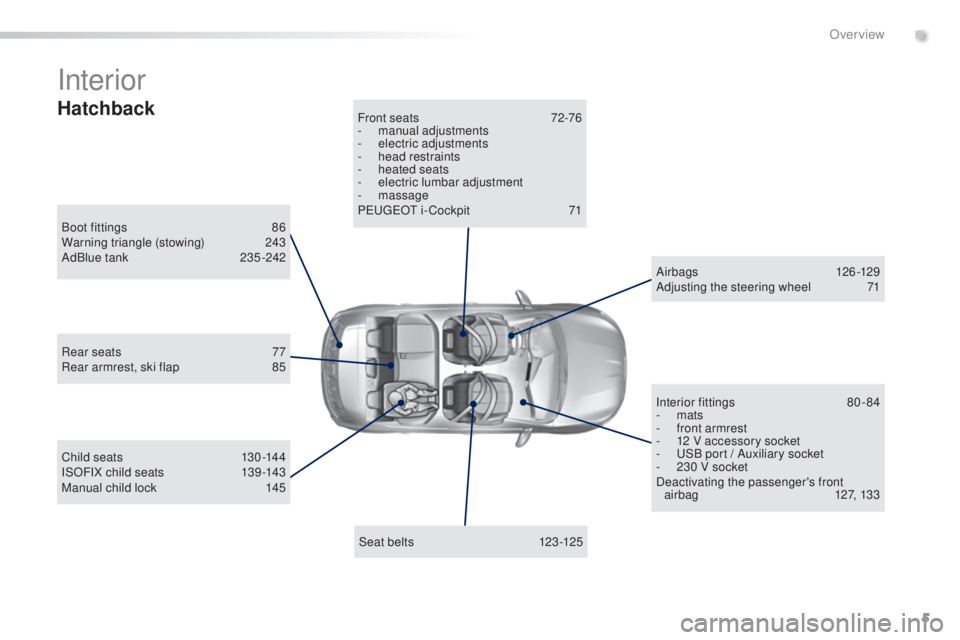
Interior
Boot fittings 86
W arning triangle (stowing) 24 3
AdBlue tank
23
5 -242
Seat belts
123
-125
Front seats
72
-76
-
man
ual adjustments
-
ele
ctric adjustments
-
he
ad restraints
-
heat
ed seats
-
el
ectric lumbar adjustment
-
m
assage
P
eu
ge
Ot i
- Cockpit
71
C
hild seats
13
0 -144
ISOFIX child seats
13
9 -143
Manual child lock
145 A
ir bags
12
6 -129
Adjusting the steering wheel
71
I
nterior fittings
80
-84
-
m
ats
-
fr
ont armrest
-
12 V a
ccessory socket
-
u
SB p
ort / Auxiliary socket
-
23
0 V socket
Deactivating the passenger's front airbag
12
7, 133
Rear seats
77
R
ear armrest, ski flap
85
Hatchback
.
Over view
Page 8 of 398
6
308_en_Chap00b_vue-ensemble_ed02-2015
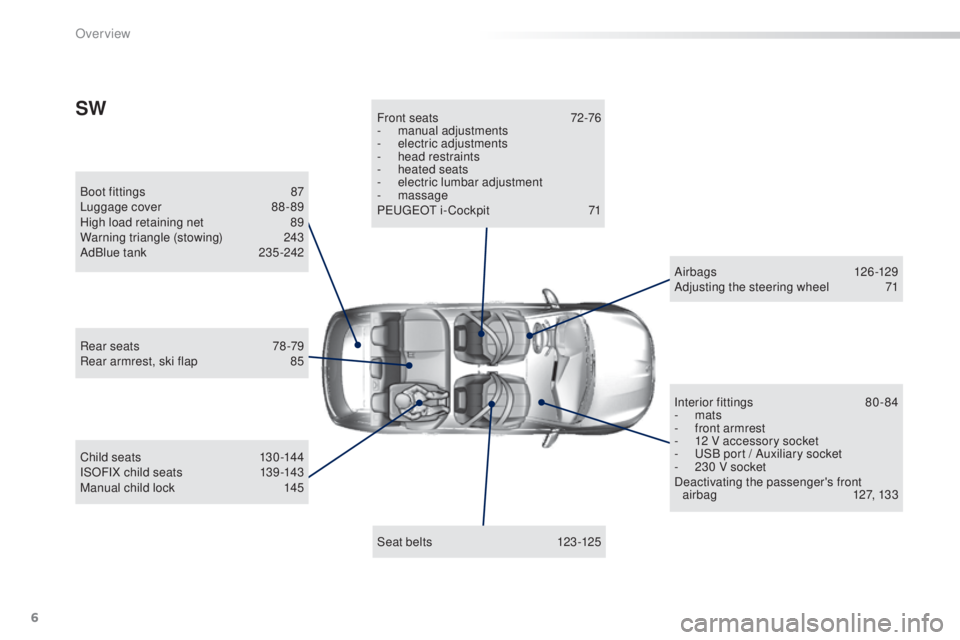
Boot fittings 87
Lu ggage cover 88 - 89
High load retaining net
89
W
arning triangle (stowing)
24
3
AdBlue tank
23
5 -242
Seat belts
123
-125
Front seats
72
-76
-
man
ual adjustments
-
ele
ctric adjustments
-
he
ad restraints
-
heat
ed seats
- el ectric lumbar adjustment
- m assage
P
eu
ge
Ot i
- Cockpit
71
C
hild seats
13
0 -144
ISOFIX child seats
13
9 -143
Manual child lock
145 A
ir bags
12
6 -129
Adjusting the steering wheel
71
I
nterior fittings
80
-84
-
m
ats
-
fr
ont armrest
-
12 V a
ccessory socket
-
u
SB p
ort / Auxiliary socket
-
23
0 V socket
Deactivating the passenger's front airbag
12
7, 133
Rear seats
78
-79
Rear armrest, ski flap
85
SW
Over view
Page 9 of 398
7
308_en_Chap00b_vue-ensemble_ed02-2015
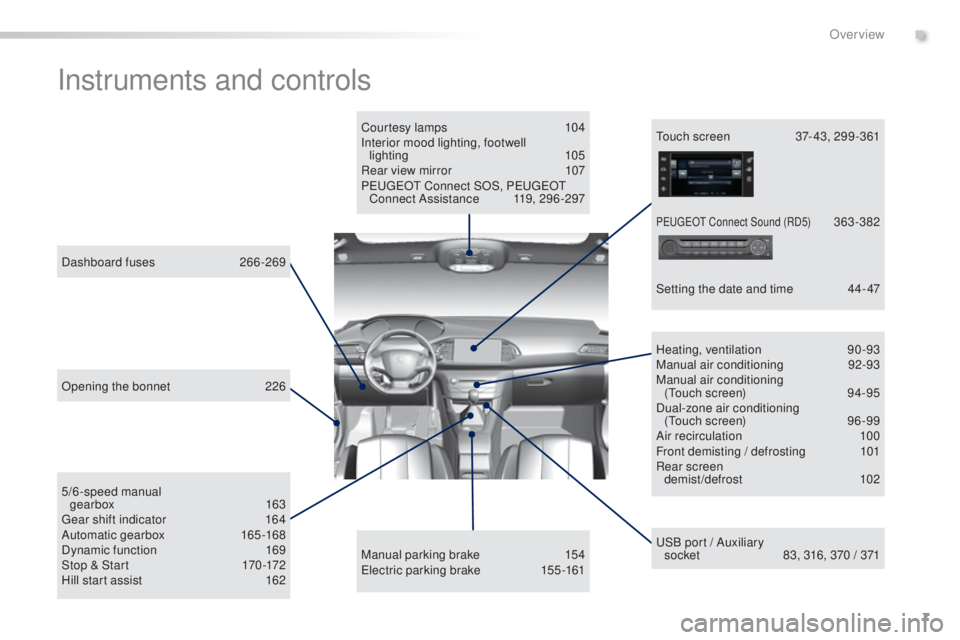
Instruments and controls
Courtesy lamps 104
Interior mood lighting, footwell lighting
1
05
Rear view mirror
10
7
Peuge
Ot C
onnect SOS, Peuge
Ot
C
onnect Assistance
11
9, 296 -297
uSB p
ort / Auxiliary
socket
83
, 316, 370 / 371
5/6-speed manual
gearbox
16
3
gea
r shift indicator
16
4
Automatic gearbox
165
-168
Dynamic function
16
9
Stop & Start
17
0 -172
Hill start assist
16
2
Dashboard fuses
26
6-269 Heating, ventilation
90
-93
Manual air conditioning
92
-93
Manual air conditioning (
tou
ch screen)
94
-95
Dual-zone air conditioning (
tou
ch screen)
96
-99
Air recirculation
10
0
Front demisting / defrosting
10
1
Rear screen demist/defrost
10
2
Manual parking brake
15
4
ele
ctric parking brake
15
5 -161tou ch screen 37 - 43, 299 -361
Setting the date and time
44
- 47
Opening the bonnet
22
6
PeugeOt C onnect Sound (RD5) 363-382
.
Over view
Page 82 of 398
80
308_en_Chap03_ergonomie-et-confort_ed02-2015
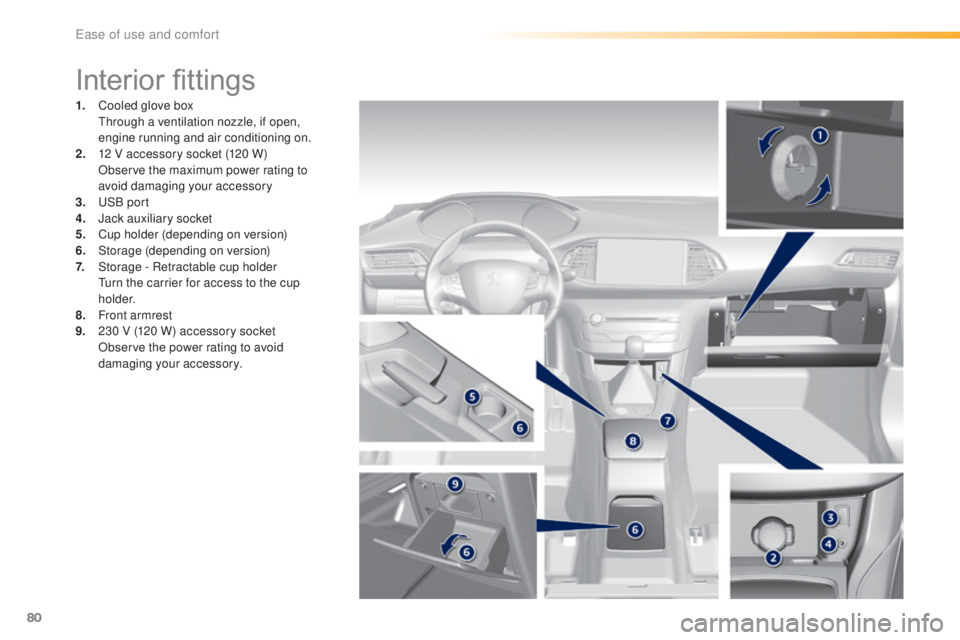
Interior fittings
1. Cooled glove box through a ventilation nozzle, if open,
engine running and air conditioning on.
2.
12 V a
ccessory socket (120 W)
Ob
serve the maximum power rating to
avoid damaging your accessory
3.
uSB p
ort
4.
Ja
ck auxiliary socket
5.
Cu
p holder (depending on version)
6.
Sto
rage (depending on version)
7.
Sto
rage - Retractable cup holder
tur
n the carrier for access to the cup
h o l d e r.
8.
Fro
nt armrest
9.
23
0 V (120 W) accessory socket
Ob
serve the power rating to avoid
damaging your accessory.
ease of use and comfort
Page 85 of 398
83
308_en_Chap03_ergonomie-et-confort_ed02-2015
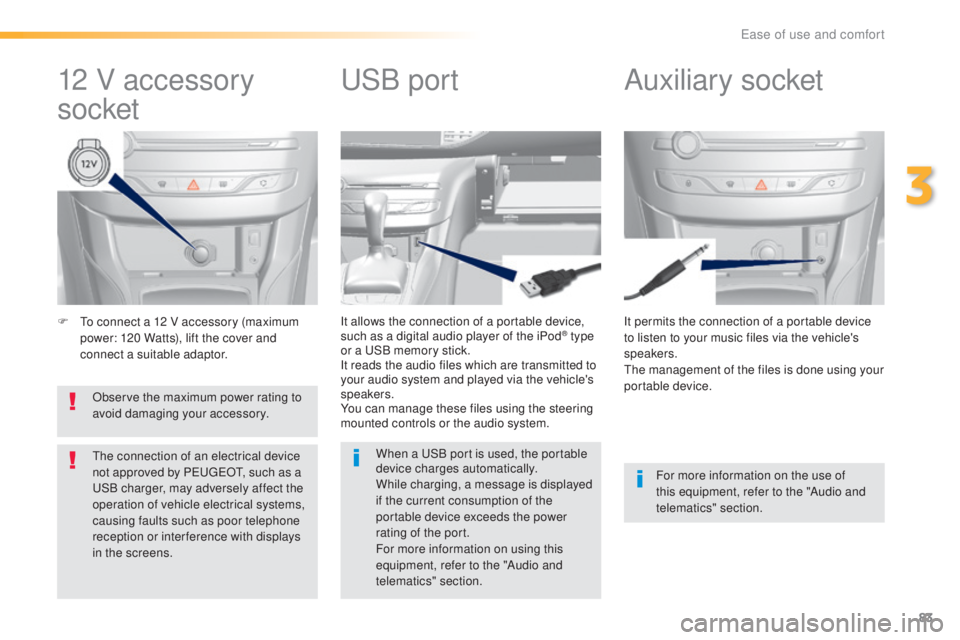
F to connect a 12 V accessory (maximum
p ower: 120 Watts), lift the cover and
connect a suitable adaptor. It permits the connection of a portable device
to listen to your music files via the vehicle's
speakers.
the m
anagement of the files is done using your
portable device.
It allows the connection of a portable device,
such as a digital audio player of the iPod® type
or a uSB m
emory stick.
It reads the audio files which are transmitted to
your audio system and played via the vehicle's
speakers.
You can manage these files using the steering
mounted controls or the audio system.
12 V accessory
socket Auxiliary socketuSB po
rt
For more information on the use of
this equipment, refer to the "Audio and
telematics" section.
When a
uSB p
ort is used, the portable
device charges automatically.
While charging, a message is displayed
if the current consumption of the
portable device exceeds the power
rating of the port.
For more information on using this
equipment, refer to the "Audio and
telematics" section.
Observe the maximum power rating to
avoid damaging your accessory.
the c
onnection of an electrical device
not approved by Peu
geOt, su
ch as a uSB c
harger, may adversely affect the
operation of vehicle electrical systems,
causing faults such as poor telephone
reception or inter ference with displays
in the screens.
3
ease of use and comfort
Page 303 of 398
301
308_en_Chap10c_SMegplus_ed02-2015
With the engine running, press to
mute the sound.
With the ignition off, press to switch
the system on.
Volume adjustment (each source
is independent, including
tra
ffic
announcements (
tA)
and navigation
instructions).
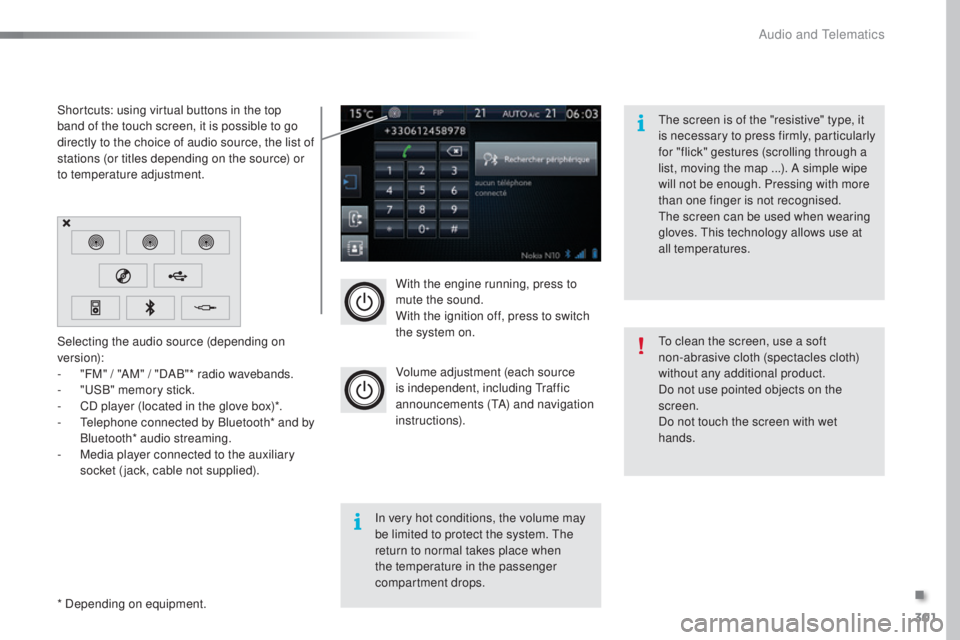
Selecting the audio source (depending on
version):
-
"F
M" / "AM" / "DAB"* radio wavebands.
-
"uSB
" memory stick.
-
CD p
layer (located in the glove box)*.
-
t
el
ephone connected by Bluetooth* and by
Bluetooth* audio streaming.
-
Me
dia player connected to the auxiliary
socket (jack, cable not supplied).
* Depending on equipment. Shortcuts: using virtual buttons in the top
band of the touch screen, it is possible to go
directly to the choice of audio source, the list of
stations (or titles depending on the source) or
to temperature adjustment.
the s
creen is of the "resistive" type, it
is necessary to press firmly, particularly
for "flick" gestures (scrolling through a
list, moving the map ...). A simple wipe
will not be enough. Pressing with more
than one finger is not recognised.
the s
creen can be used when wearing
gloves.
thi
s technology allows use at
all temperatures.
In very hot conditions, the volume may
be limited to protect the system.
the
r
eturn to normal takes place when
the temperature in the passenger
compartment drops.
to cl
ean the screen, use a soft
non-abrasive cloth (spectacles cloth)
without any additional product.
Do not use pointed objects on the
screen.
Do not touch the screen with wet
hands.
.
Audio and telematics
Page 309 of 398
307
308_en_Chap10c_SMegplus_ed02-2015
Level 1Level 2 Comments
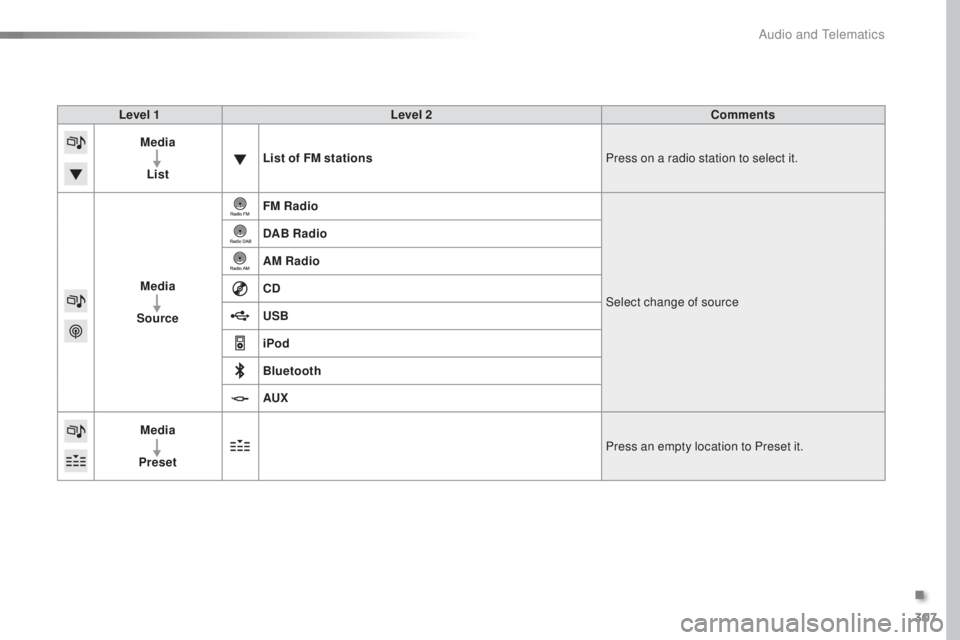
Media
List List of FM stations
Press on a radio station to select it.
Media
Source FM Radio
Select change of source
DAB Radio
AM Radio
CD
USB
iPod
Bluetooth
AUX
Media
Preset Press an empty location to Preset it.
.
Audio and telematics
Page 313 of 398
311
308_en_Chap10c_SMegplus_ed02-2015
Level 1Level 2 Level 3 Comments
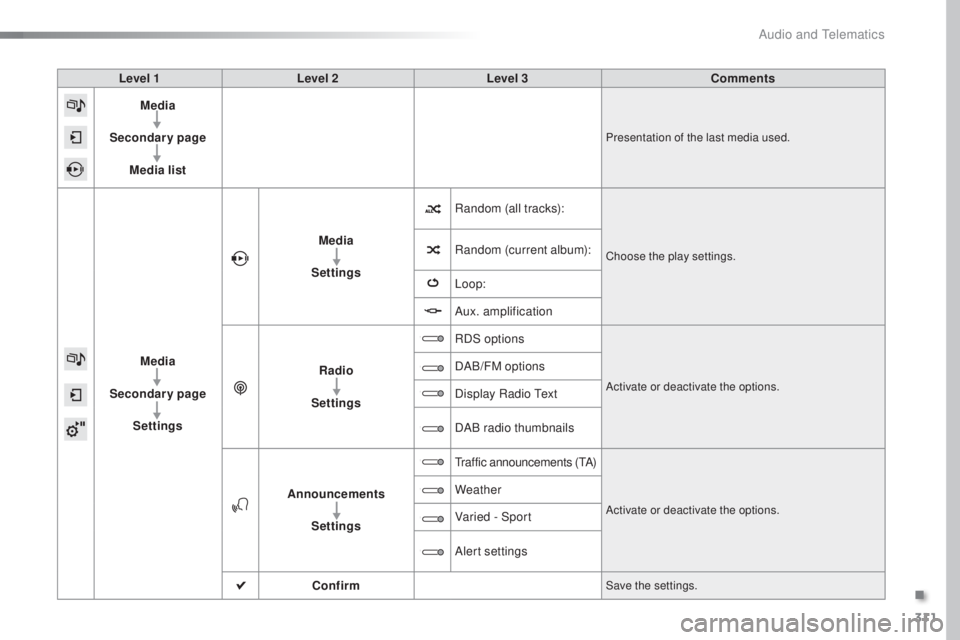
Media
Secondary page Media list
Presentation of the last media used.
Media
Secondary page Settings Media
Settings Random (all tracks):
Choose the play settings.Random (current album):
Loop:
Aux. amplification
Radio
Settings RDS options
Activate or deactivate the options.
DAB/FM options
Display Radio
tex
t
DAB radio thumbnails
Announcements Settings
traffic announcements (tA)
Activate or deactivate the options.
Weather
Varied - Sport
Alert settings
Confirm
Save the settings.
.
Audio and telematics