2016 Peugeot 308 bluetooth
[x] Cancel search: bluetoothPage 375 of 398
373
308_en_Chap10d_RD45_ed02-2015
use only uSB memory sticks formatted FAt32
( File Allocation table ).
It is recommended that you use
genuine Apple
® uSB cables for correct
ope
ration.
*
In c
ertain cases, play of the audio files must
be initiated from the keypad.
** If the telephone supports the function.
Bluetooth® audio streaming
Streaming allows music files on the telephone
to be played via the audio system.
Connect the telephone: see the " Telephone"
section.
Select in the " Bluetooth: Telephone - Audio "
menu the telephone to be connected.
the a
udio system connects to a newly paired
telephone automatically.
Control of tracks to be played is via the buttons
on the audio system control panel and the
steering mounted controls**.
the c
ontextual
information can be displayed in the screen. Activate the streaming source by
pressing the SOURCE
but to n*.
Connecting Apple® players
Connect the Apple® player to the uSB port
using a suitable cable (not supplied).
Play starts automatically.
Control is via the audio system.
the c
lassifications available are those of the
portable device connected (artists / albums /
genres / playlists / audiobooks / podcasts).
the v
ersion of software in the audio system
may not be compatible with the generation of
your Apple
® p l aye r.
.
Audio and telematics
Page 376 of 398
374
308_en_Chap10d_RD45_ed02-2015
telephone
Pairing a Bluetooth® telephone
Screen C
(Available according to model and version)
As a safety measure and because they
require prolonged attention on the part
of the driver, the operations for pairing
of the Bluetooth mobile telephone with
the Bluetooth hands-free system of
your audio equipment must be carried
out with the vehicle stationary and the
ignition on.
go t
o www.peugeot.co.uk for more information
(compatibility, more help, ...).
Activate the telephone's Bluetooth function
and ensure that it is "visible to all" (telephone
configuration).
Press the MENU button. In the menu, select:
- "
Bl
uetooth: Telephone - Audio "
-
" B
luetooth configuration"
-
" P
erform a Bluetooth search"
A window is displayed with a message that a
search is in progress.
the ser
vices available depend on
the network, the SIM card and the
compatibility of the Bluetooth device
used.
Consult your telephone's manual and
your operator to find out which services
are available to you.
* If your telephone is fully compatible.
the f
irst 4 telephones recognised are displayed
in this window.
the " T
elephone" menu permits access to the
following functions in particular: " Directory" *,
" Calls list ", "Consult the paired equipment ".Select the telephone to be connected from the
list. Only one telephone can be connected at
a time.
A virtual keypad is displayed in the screen:
enter a code with at least 4 digits.
Confirm by pressing OK.
A message in the screen indicates the telephone
chosen.
to a
ccept the pairing, enter the same
code on the telephone, then confirm with OK.
If pairing fails, the number of attempts is not
limited.
A message that the pairing has been
successful appears in the screen.
the a
utomatic connection authorised is only
active after the telephone has been configured.
the d
irectory and the call list can be accessed
after the necessary synchronisation period.
Audio and telematics
Page 377 of 398
375
308_en_Chap10d_RD45_ed02-2015
Receiving a call
An incoming call is announced by a ring and a
superimposed display in the screen.Select the YES tab on the display
using the buttons.
Confirm by pressing OK.
Press this button at the steering
mounted controls to accept the call.
Making a call
From the " Bluetooth : Telephone - Audio "
menu.
Select " Manage the telephone call".
Select " Call".
Or
Select " Calls list ".
Or
Select " Directory ".
Press this button for more than two
seconds for access to your directory,
then navigate using the thumb wheel.
Or
to di
al a number, use your telephone's keypad,
with the vehicle stationary.
Ending a call
During a call, press this button for
more than 2 seconds.
Confirm with OK to end the call.
the s
ystem accesses the telephone's
contacts directory, depending on its
compatibility, and while it is connected
by Bluetooth.
With certain telephones connected by
Bluetooth you can send a contact to the
directory of the audio system.
Contacts imported in this way are
saved in a permanent directory
visible to all, whatever the telephone
connected.
the m
enu for the directory is not
accessible if it is empty.
.
Audio and telematics
Page 379 of 398
377
308_en_Chap10d_RD45_ed02-2015
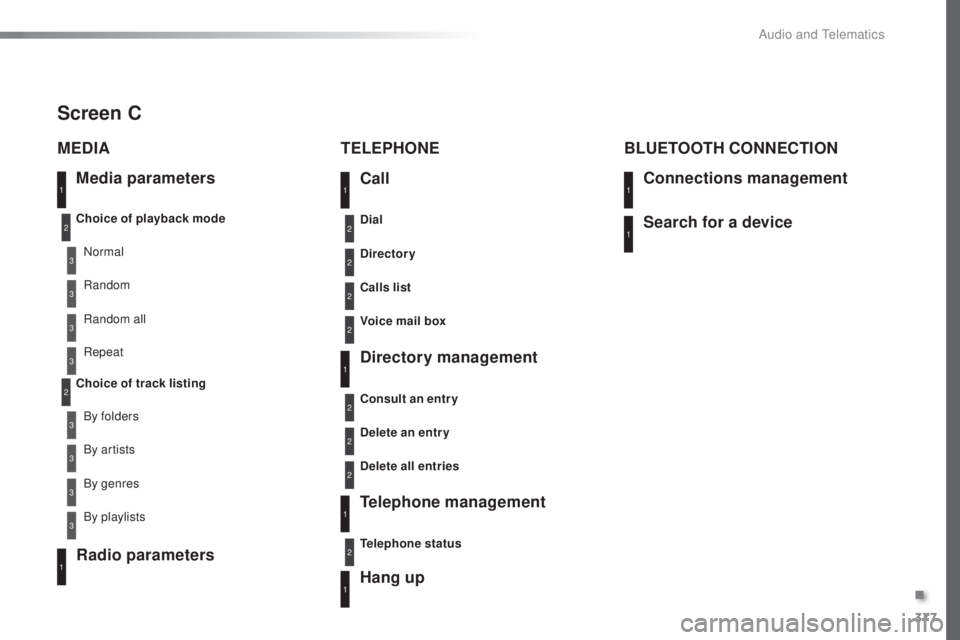
Media parameters
MEDIA
TELEPHONE
Choice of playback mode
Choice of track listingNormal
By folders Random all
By genres Random
By artists Repeat
By playlists
3
3
3
3
3
3
3
3
1
2
2
Call
Radio parameters
Directory
Calls list
Voice mail box Dial
Directory management
Telephone management
Hang up Connections management
BLUETOOTH CONNECTION
Search for a device
Delete an entry
Delete all entries Consult an entr y
Telephone status
1
1
1
1
1
2
2
2
2
1
1
2
2
2
2
Screen C
.
Audio and telematics
Page 385 of 398

383
308_en_Chap11_index-alpha_ed02-2015
ABS ...............................................................12 0
Accessories .............................. ....................220
Accessory position
....................................... 15
2
Additive, AdBlue
.............................. 26
, 235-241
Additive, Diesel
...............................
......232, 233
Adjusting headlamps
.................................... 11
4
Adjusting head restraints
....................................................... 75
Ad
justing seats
.......................................... 7
2, 73
Adjusting the air distribution
....................................... 93
, 95, 98
Adjusting the air flow
.......................... 9
2, 94, 98
Adjusting the date
..................................... 4
4 - 47
Adjusting the height and reach of the steering wheel
.................................... 71
Adj
usting the lumbar
support
.......................................................... 7
2
Adjusting the temperature
.............................. 96
Ad
justing the time
............................... 4
4, 45, 47
Advice on driving
..............................
....146, 147
Affaire version
............................................... 29
4
Airbags
...............
..................................... 23, 126
Airbags, curtain
..................................... 128
, 129
Airbags, front ......................................... 126, 129
Airbags, lateral
...................................... 12
8, 129
Air conditioning
............................ 1
0, 92, 94, 96
Air conditioning, digital
................................... 96
A
ir conditioning, manual
........................... 9
2, 94
Air intake
...............
........................................ 10 0
Air vents
..............................
............................90
Alarm
............................................................... 65
A
nti-lock braking system
(A BS)
...............
........................................... 120
Anti-pinch
................................................ 6
9, 103
Anti-theft
..............................
.............51, 63, 154
Armrest, front
............................................ 8
0, 82
Armrest, rear
................................................... 85
ASR ............................................................... 12
0
Assistance call
...............................
.......11 9 , 2 9 6 Assistance, emergency braking ...................
120
A
udible warning ............................................12
0
Audio streaming (Bluetooth)
................. 318
, 373
Auxiliary
.......................................... 8
3, 316, 371
A
B
C
Battery ....................................219, 233, 272-274
Battery, charging ............................... ............2 74
Battery, remote control
...................... 53
, 62, 63
Bicycle carrier
............................................... 2
24
Blanking screen (snow shield)
.............. 217
, 218
Blind, panoramic roof
.................................... 10
3
Blind spot sensors
.................................. 1
6, 195
BlueHDi
...............................
....................26, 235
Bluetooth (hands-free)
.......................... 3 5
0 , 374
Bluetooth (telephone)
............................ 3
5 0 , 374
Bonnet
...............
............................................ 226
Boot
........
................................................... 58, 59
Boot lamp
........................................................ 87
B
rake discs
.................................................... 234
B
rake lamps
...............................
...........261, 263
Brakes
............................................... 2
1, 24, 234
Braking, automatic on risk of collision
................
.........................22, 19 0, 193
Braking, dynamic emergency
....................... 15
9
Bulbs (changing)
................................... 2
56-265Cable, audio
..........................................
3
16 , 371
Capacity, fuel tank
........................................ 2
13
Cap, fuel filler
................................................ 2
13
CD
..............................
...........................
316 , 371
CD, MP3
................................................ 3 1
7, 3 7 2
Central locking
............................. 4
9, 54, 56, 57
Changing a bulb
.................................... 2
56-265
Changing a fuse
.................................... 2
6 6 -271
Changing a wheel
...............................
..
250-255
Changing a wiper blade
........................ 1
18, 222
Changing the remote control battery .........................................53, 62
Checking the engine oil level
.................. 3
1, 2 29
Checking the levels
............................... 2
29-232
Checking tyre pressures (using the kit) .............................................. 24 4
Checks ................................. 2
27, 228, 233, 234
Checks, routine .................................... 23
3, 234
Child lock
....................................................... 14
5
Children
.................................. 12
5, 127, 13 0 -14 5
Children (safety)
............................................ 14
5
Child seats
............................. 13 0
-132, 13 6, 141
Child seats, conventional
.............................. 13
6
Child seats, ISOFIX
...................................... 141
C
losing the boot
...............................
.........58, 59
Closing the doors
......................... 4
9, 54, 56, 57
Collision risk alert
......................................... 19
0
Compressor, tyre inflation
............................ 24
4
Configuration, vehicle
..................................... 42
C
onnection, Bluetooth
..........................3
5 0 , 374
Container, AdBlue
......................................... 23
9
Control, electric windows
................................ 69
C
ontrol, emergency boot release
...................60
C
ontrol, emergency door
................................61
C
ontrol, heated seats
......................................75
C
ontrol stalk, lighting
....................................108
C
ontrol stalk, wipers
.....................................11
5
Courtesy lamps
............................................. 10
4
Cover, load space
..................................... 87, 8
8
.
Alphabetical index