2016 Peugeot 308 fuel
[x] Cancel search: fuelPage 37 of 398

35
308_en_Chap01_instruments-de-bord_ed02-2015
tr i p c o m p u t e r
System that gives you information on the current journey (range, fuel consumption…).
Information display in the
touch screen
Permanent display:
F Select the "Driving assistance " menu.
the t
rip computer information is displayed in
the primary page of the menu.
F
Pr
ess one of the buttons to display the
desired tab.
the c
urrent fuel consumption tab
with:
-
th
e range,
-
th
e current fuel consumption,
-
th
e Stop & Start time counter.
the t
rip "1"
tab with:
-
th
e distance travelled.
- th e average fuel consumption,
- th e average speed,
fo
r the first trip.
the t
rip "2" tab with:
-
th
e distance travelled.
-
th
e average fuel consumption,
-
th
e average speed,
fo
r the second trip.
Trip reset
F When the desired trip is displayed, press
the reset button or on the end of the wiper
control stalk.
tr
i p s "1" and "2" are independent but their use
is identical.
For example, trip "1" can be used for daily
figures, and trip "2" for monthly figures.
the i
nformation is accessible in the "
Driving assistance" menu.
tem
porary display in a new window:
F
Pr
ess the end of the wiper control stalk for
access to the information and display the
different tabs.
Touch screen
1
Instruments
Page 38 of 398

36
Trip computer, a few definitions
Range
(miles or km)the distance which can still be
travelled with the fuel remaining in
the tank (related to the average fuel
consumption over the last few miles
(kilometres) travelled).
thi
s value may vary following a change
in the style of driving or the relief,
resulting in a significant change in the
current fuel consumption.
When the range falls below 20 miles (30 km),
dashes are displayed. After filling with at least
5 litres of fuel, the range is recalculated and is
displayed when it exceeds 60 miles (100 km). If dashes are displayed continuously
while driving in place of the digits,
contact a P
eu
ge
Ot d
ealer or a
qualified workshop.
thi
s function is only displayed from
20
m
ph (30 km/h).
Current fuel consumption
(mpg or l/100 km or km/l)
Calculated over the last few seconds.
Average fuel consumption
(mpg or l/100 km or km/l)
Calculated since the last trip
computer reset.
Average speed
(mph or km/h)
Calculated since the last trip
computer reset.
Distance travelled
(miles or km)
Calculated since the last trip
computer reset.
Stop & Start time
counter
(minutes / seconds or
ho urs / m inutes)
If your vehicle is fitted with Stop & Start, a time
counter calculates the time spent in S
tOP m
ode
during a journey.
It resets to zero every time the ignition is
switched on.
Instruments
Page 45 of 398

43
308_en_Chap01_instruments-de-bord_ed02-2015
ButtonCorresponding function Comments
System Settings Choice of units:
-
te
mperature (°Celsius or °Fahrenheit)
-
di
stance and fuel consumption (l/100 km, mpg or km/l).
Time/Date Setting the date and time.
Languages Choice of language used: French,
eng
lish, Italian, Spanish,
ger
man, Dutch, Portuguese,
Polish,
tur
kish, Russian.
Screen settings Adjustment of the display settings (scrolling of text, animations...).
Calculator
Calendar
1
Instruments
Page 104 of 398
102
308_en_Chap03_ergonomie-et-confort_ed02-2015
Rear screen demist - defrost
Switching onSwitching off
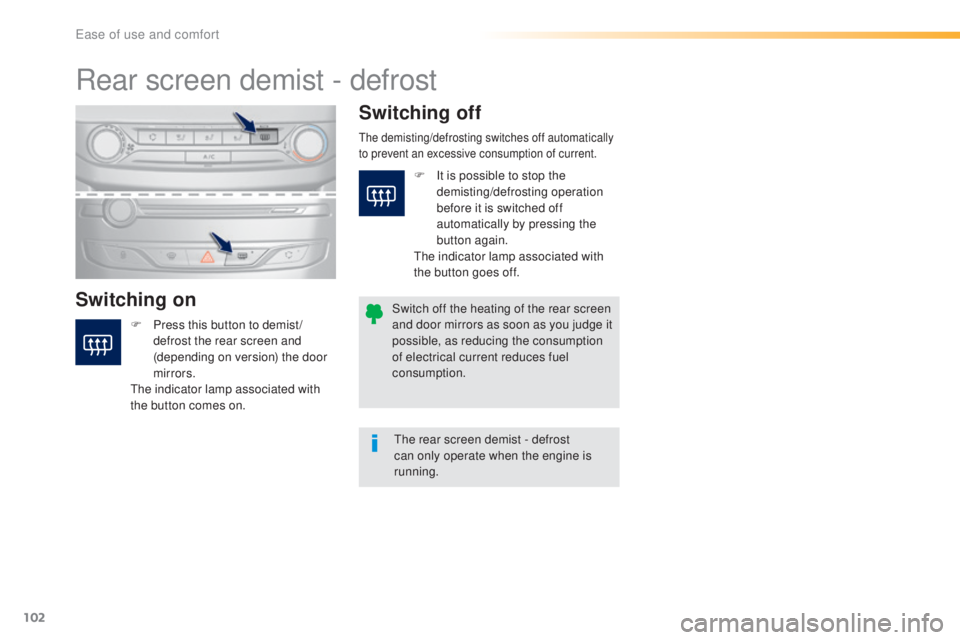
F Press this button to demist /
d
efrost the rear screen and
(depending on version) the door
mirrors.
the i
ndicator lamp associated with
the button comes on.
the demisting/defrosting switches off automatically
t o prevent an excessive consumption of current.
the rear screen demist - defrost
c an only operate when the engine is
running.
Switch off the heating of the rear screen
and door mirrors as soon as you judge it
possible, as reducing the consumption
of electrical current reduces fuel
consumption. F
It i
s possible to stop the
demisting/defrosting operation
before it is switched off
automatically by pressing the
button again.
the i
ndicator lamp associated with
the button goes off.
ease of use and comfort
Page 166 of 398
164
308_en_Chap06_conduite_ed02-2015
gear shift indicator
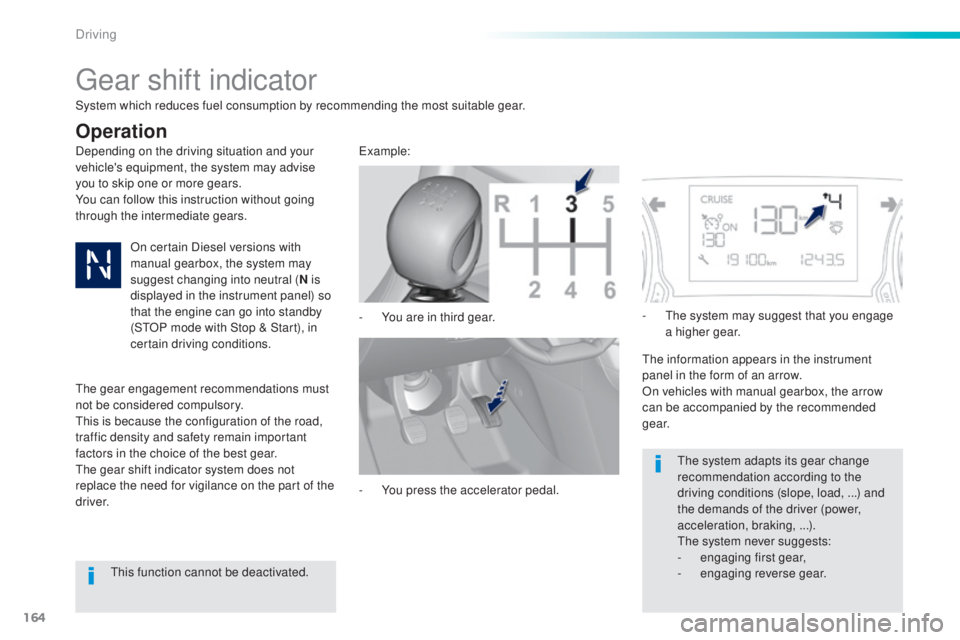
Depending on the driving situation and your
vehicle's equipment, the system may advise
you to skip one or more gears.
You can follow this instruction without going
through the intermediate gears.-
Yo
u are in third gear.example:
-
Yo
u press the accelerator pedal.-
t
he s
ystem may suggest that you engage
a higher gear.
the i
nformation appears in the instrument
panel in the form of an arrow.
On vehicles with manual gearbox, the arrow
can be accompanied by the recommended
g e a r.
the s
ystem adapts its gear change
recommendation according to the
driving conditions (slope, load,
.
..) and
the demands of the driver (power,
acceleration, braking,
.
..).
the s
ystem never suggests:
-
en
gaging first gear,
-
engag
ing reverse gear.
System which reduces fuel consumption by recommending the most suitable gear.
Operation
On certain Diesel versions with
manual gearbox, the system may
suggest changing into neutral (
N is
displayed in the instrument panel) so
that the engine can go into standby
(S
tOP m
ode with Stop & Start), in
certain driving conditions.
the g
ear engagement recommendations must
not be considered compulsory.
thi
s is because the configuration of the road,
traffic density and safety remain important
factors in the choice of the best gear.
the g
ear shift indicator system does not
replace the need for vigilance on the part of the
driver.
thi
s function cannot be deactivated.
Driving
Page 170 of 398
168
308_en_Chap06_conduite_ed02-2015
F Select position M for sequential c hanging
of the six gears.
F
Pu
ll towards the + sign and release to
change up a gear.
F
Pu
sh towards the - sign and release to
change down a gear.
It is only possible to change from one gear to
another if the vehicle speed and engine speed
permit; otherwise, the gearbox will operate
temporarily in automatic mode.
D disappears and the gears
engaged appear in succession in the
instrument panel.
If the engine speed is too low or too high, the
gear selected flashes for a few seconds, then
the actual gear engaged is displayed.
It is possible to change from position D
(automatic) to position M (manual) at any time.
When the vehicle is stationary or moving
very slowly, the gearbox selects gear M1
automatically.
the s
port and snow programmes do not
operate in manual mode.
Manual operation
Invalid value during manual
operation
this symbol is displayed if a gear is
n ot engaged correctly (gear selector
between two positions).
Stopping the vehicle
If the selector lever is not in position P ,
when the driver's door is opened or
approximately 45 seconds after the
ignition is switched off, there is an
audible signal and a message appears.
F
Re
turn the selector lever to
position
P ; t
he audible signal stops
and the message disappears. When the ignition is on, a message
appears in the instrument panel
screen to indicate a gearbox fault.
Operating fault
In this case, the gearbox switches to back-up
mode and is locked in 3rd gear. You may feel
a substantial knock when changing from P
to R and from N to R
.
thi
s will not cause any
damage to the gearbox.
Do not exceed 60 mph (100 km/h), local speed
restrictions permitting.
Have it checked by a P
eu
ge
Ot d
ealer or a
qualified workshop.
Before switching off the engine, you can
engage position P or N to place the gearbox in
neutral.
In both cases, apply the parking brake to
immobilise the vehicle, unless it is programmed
to automatic mode. You risk damaging the gearbox:
-
if y
ou press the accelerator and
brake pedals at the same time,
-
if y
ou force the lever from position
P
to another position when the
battery is flat.
to re
duce fuel consumption when
stationary for long periods with the
engine running (traffic jam...), position
the selector lever at N and apply the
parking brake, unless it is programmed
in automatic mode.
Driving
Page 172 of 398

170
308_en_Chap06_conduite_ed02-2015
Stop & Start
Operation
Going into engine STOP mode
the "ECO" warning lamp comes on
in the instrument panel and the engine
goes into standby automatically:
-
Wi
th a manual gearbox , at speeds below
12 mph (20 km/h) or vehicle stationary
(depending on the engine), when you place
the gear lever in neutral, and you release
the clutch pedal.
Never refuel with the engine in S
tOP
m
ode; you must switch off the ignition
with the button. For your comfort, during parking
manoeuvres, S
tOP m
ode is not
available for a few seconds after
coming out of reverse gear.
S
tOP m
ode does not affect the
functionality of the vehicle, such as for
example, braking, power steering...
A slight delay between the vehicle
stopping and the engine cutting out may
be noticed.
Special cases: STOP mode not
available
StOP mode is not invoked principally when:
- th e vehicle is on a steep slope (up or down),
-
the
driver's door is open,
-
th
e driver's seat belt is not fastened,
-
th
e vehicle has not exceeded 6 mph
(10
k
m/h) since the last engine start by the
driver,
-
th
e electric parking brake is applied or
being applied,
-
th
e engine is needed to maintain a
comfortable temperature in the passenger
compartment,
-
dem
isting is active,
-
som
e special conditions (battery charge,
engine temperature, braking assistance,
ambient temperature...) where the engine is
needed to assure control of a system.
If your vehicle is fitted with Stop & Start,
a time counter calculates the time spent
in S
tOP m
ode during a journey.In this case, the "ECO" warning
lamp flashes for a few seconds then
goes
o
ff.
This operation is perfectly normal.
the S
top & Start
s
ystem puts the engine temporarily into standby - S
tOP m
ode - during stops in the traffic (red lights, traffic jams, or other...).
the e
ngine restarts automatically - S
tARt m
ode - as soon as you want to move off.
the r
estart takes place instantly, quickly and
silently.
Per fect for urban use, the Stop & Start system reduces fuel consumption and exhaust emissions as well as the noise level when stationary.
Stop & Start time
counter
(minutes / seconds or hours / minutes) -
Wi
th an automatic gearbox
, vehicle
stationary, when you press the brake
pedal or place the gear selector lever in
position
N .
I
t resets to zero every time the ignition is
switched on.
Driving
Page 211 of 398
209
308_en_Chap06_conduite_ed02-2015
Under-inflation detection
the system monitors the pressures in the
f our t yres, once the vehicle is moving.
It compares the information given by the four
wheel speed sensors with reference values,
which must be reinitialised ever y time the
tyre pressures are adjusted or a wheel
changed .
the s
ystem triggers an alert as soon as it
detects a drop in the inflation pressure of one
or more tyres.the u nder-inflation detection system
does not replace the need for vigilance
on the part of the driver.
thi
s system does not avoid the need to
check the tyre pressures (including the
spare wheel) every month as well as
before a long journey.
Driving with under-inflated tyres impairs
road holding, extends braking distances
and causes premature tyre wear,
particularly under arduous condition
(high loading, high speed, long journey).
System which automatically checks the pressures of the tyres while driving.the i
nflation pressures defined for
your vehicle can be found on the tyre
pressure label.
For more information on the
identification markings, refer to the
corresponding section.
tyr
e pressures should be checked
when the tyres are "cold" (vehicle
stopped for 1 hour or after a journey of
less than 6 miles (10 km) at moderate
speeds).
Other wise (when hot), add 0.3 bar to
the pressures shown on the label.
Driving with under-inflated tyres
increases fuel consumption.
Snow chains
the system does not have to be
r einitialised after fitting or removing
snow chains.
6
Driving