Page 173 of 268
171
108_en_Chap08_en-cas-pannes_ed01-2016
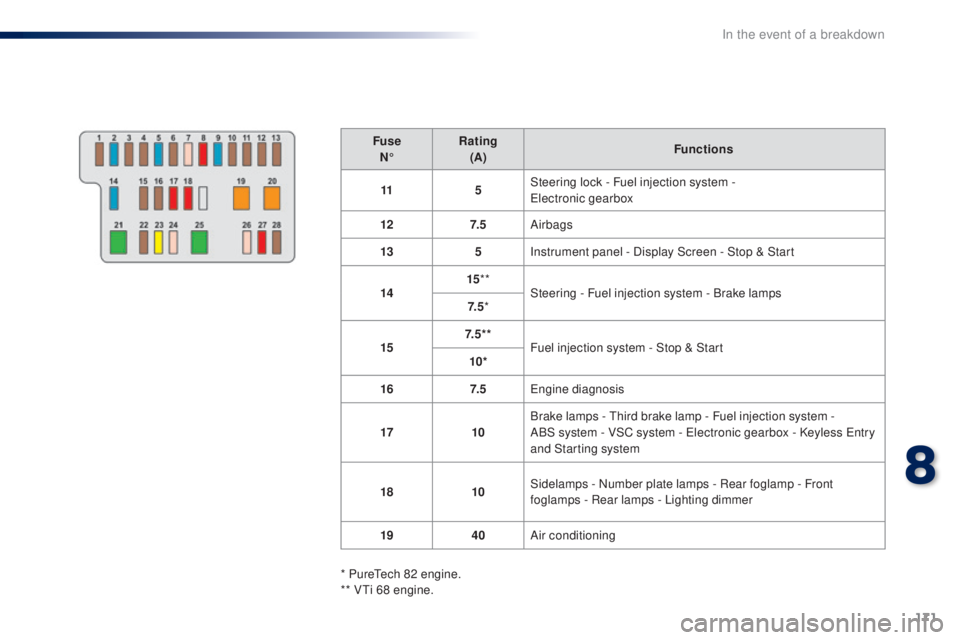
FuseN° Rating
(A) Functions
11 5Steering lock - Fuel injection system -
ele
ctronic gearbox
12 7. 5Airbags
13 5Instrument panel - Display Screen - Stop & Start
14 15
**
Steering - Fuel injection system - Brake lamps
7. 5 *
15 7. 5 * *
Fuel injection system - Stop & Start
10*
16 7. 5
en
gine diagnosis
17 10Brake lamps -
t
h
ird brake lamp - Fuel injection system -
ABS
system - VSC system - e
l
ectronic gearbox - Keyless e
n
try
and Starting system
18 10Sidelamps - Number plate lamps - Rear foglamp - Front
foglamps - Rear lamps - Lighting dimmer
19 40Air conditioning
* Pure
te
ch 82 engine.
** V
ti 6
8 engine.
8
In the event of a breakdown
Page 176 of 268
174
108_en_Chap08_en-cas-pannes_ed01-2016
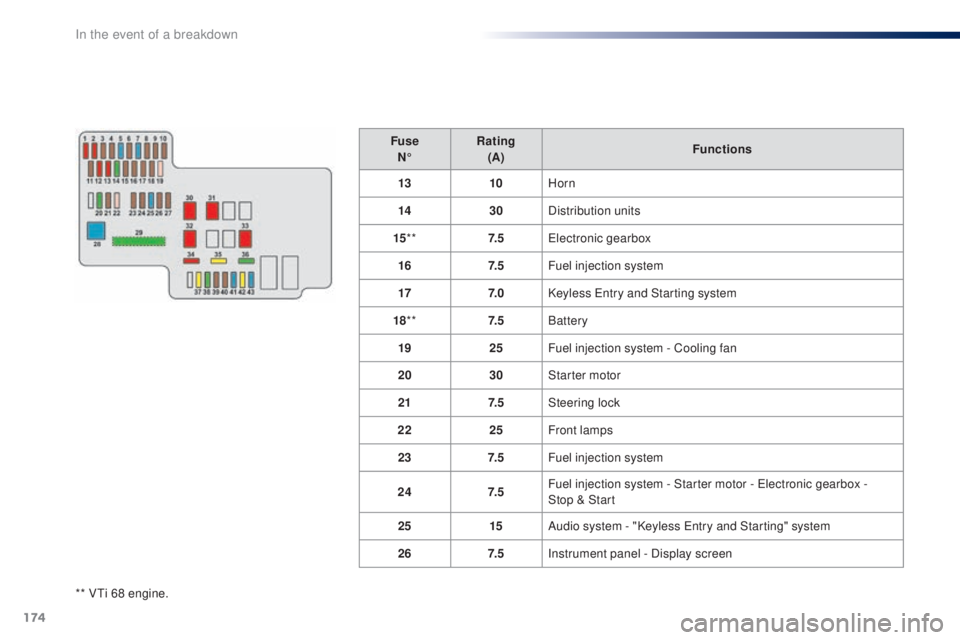
** Vti 68 engine.Fuse
N° Rating
(A) Functions
13 10Horn
14 30Distribution units
15 ** 7. 5
ele
ctronic gearbox
16 7. 5Fuel injection system
17 7. 0Keyless e
n
try and Starting system
18 ** 7. 5Battery
19 25Fuel injection system - Cooling fan
20 30Starter motor
21 7. 5Steering lock
22 25Front lamps
23 7. 5Fuel injection system
24 7. 5Fuel injection system - Starter motor - e
l
ectronic gearbox -
Stop
& Start
25 15Audio system - "Keyless e
n
try and Starting" system
26 7. 5Instrument panel - Display screen
In the event of a breakdown
Page 177 of 268
175
108_en_Chap08_en-cas-pannes_ed01-2016
FuseN° Rating
(A) Functions
27 7. 5VSC system
28 60Passenger compartment fusebox
29** 125***Heated rear screen and door mirror heating - Heated seats
-
el
ectric fabric roof - ABS system - VSC system - Cooling fan -
Front foglamps - L
eD
daytime running lamps
30 50
ele
ctronic gearbox
40 Stop & Start
31 50Power steering
32 50*
Cooling fan
30
40
33 50ABS system - VSC system
34 10Spare fuse
* Pure
te
ch 82 engine.
** V
ti 6
8 engine.
***
t
h
is fuse must be replaced only by a
P
e
uge
Ot
dealer or a qualified workshop.
8
In the event of a breakdown
Page 182 of 268
180
108_en_Chap08_en-cas-pannes_ed01-2016
towing the vehicle
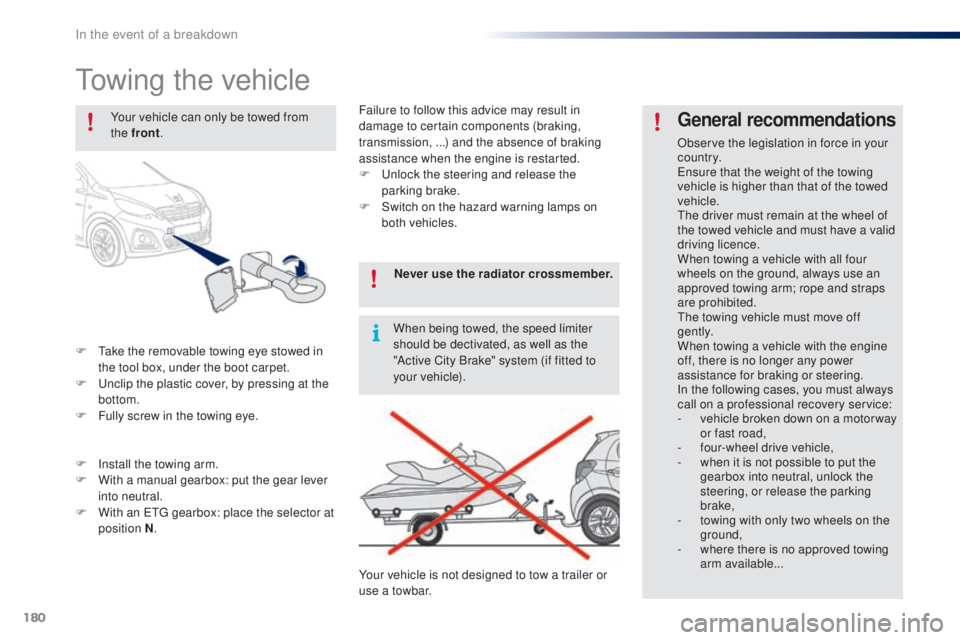
F take the removable towing eye stowed in the tool box, under the boot carpet.
F
u
n
clip the plastic cover, by pressing at the
bottom.
F
F
ully screw in the towing eye.
general recommendations
Observe the legislation in force in your
c o unt r y.
en
sure that the weight of the towing
vehicle is higher than that of the towed
vehicle.
th
e driver must remain at the wheel of
the towed vehicle and must have a valid
driving licence.
When towing a vehicle with all four
wheels on the ground, always use an
approved towing arm; rope and straps
are prohibited.
th
e towing vehicle must move off
g e nt l y.
When towing a vehicle with the engine
off, there is no longer any power
assistance for braking or steering.
In the following cases, you must always
call on a professional recovery service:
-
v
ehicle broken down on a motor way
or fast road,
-
f
our-wheel drive vehicle,
-
w
hen it is not possible to put the
gearbox into neutral, unlock the
steering, or release the parking
brake,
-
t
owing with only two wheels on the
ground,
-
w
here there is no approved towing
arm available...
Your vehicle can only be towed from
the front
.
F
I
nstall the towing arm.
F
W
ith a manual gearbox: put the gear lever
into neutral.
F
W
ith an
etg
gearbox: place the selector at
position N . Never use the radiator crossmember.
When being towed, the speed limiter
should be dectivated, as well as the
"Active City Brake" system (if fitted to
your vehicle).
Your vehicle is not designed to tow a trailer or
use a towbar. Failure to follow this advice may result in
damage to certain components (braking,
transmission, ...) and the absence of braking
assistance when the engine is restarted.
F
u
n
lock the steering and release the
parking brake.
F
S
witch on the hazard warning lamps on
both vehicles.
In the event of a breakdown
Page 187 of 268
185
108_en_Chap10a_Autoradio-toyota-tactile-1_ed01-2016
7-inch touch screen
Multimedia system - Bluetooth® telephone - Mirror Screen® - gPS navigation
First steps 1 86
Steering mounted controls
1
88
Menus
189
Audio source
1
90
Radio
19 4
DAB (Digital Audio Broadcasting) radio
1
96
Media
19
8
te
lephone
202
Configuration
20
8
Mirror Screen
® - Connexions iPhone® 212
Mirror Screen® - MirrorLinktM connections 2 16
Navigation
2
20
Frequently asked questions
23
1
As a safety measure, the driver must carry out operations which
require prolonged attention while the vehicle is stationary.
to p
revent discharging of the battery, the system cuts off
following activation of energy economy mode, 20 minutes after
switching off the engine on vehicles fitted with the Keyless
e
n
try
and Starting system. Contents
th
e temperature of a telephone may increase when connected
by MirrorLink
tM. In this case, the telephone battery discharges as
a safety measure.
.
Audio and telematics
Page 190 of 268
188
108_en_Chap10a_Autoradio-toyota-tactile-1_ed01-2016
Steering mounted controls
Change multimedia source.
Press and hold: mute / restore
sound from the radio or pause media
sources. Increase volume.
Decrease volume.
Reject the incoming call.
en
d the call in progress.
Other than on a call: press to return
to the radio screen or the clock if the
radio is not active.
Radio: change to preset radio
stations in ascending order.
Media: next track.
Radio: change to preset radio
stations in descending order.
Media: previous track.
Accept an incoming call.
Other than on a call: press to open
the list of contacts; a second press
opens the calls history.
Audio and telematics
Page 201 of 268
199
108_en_Chap10a_Autoradio-toyota-tactile-1_ed01-2016
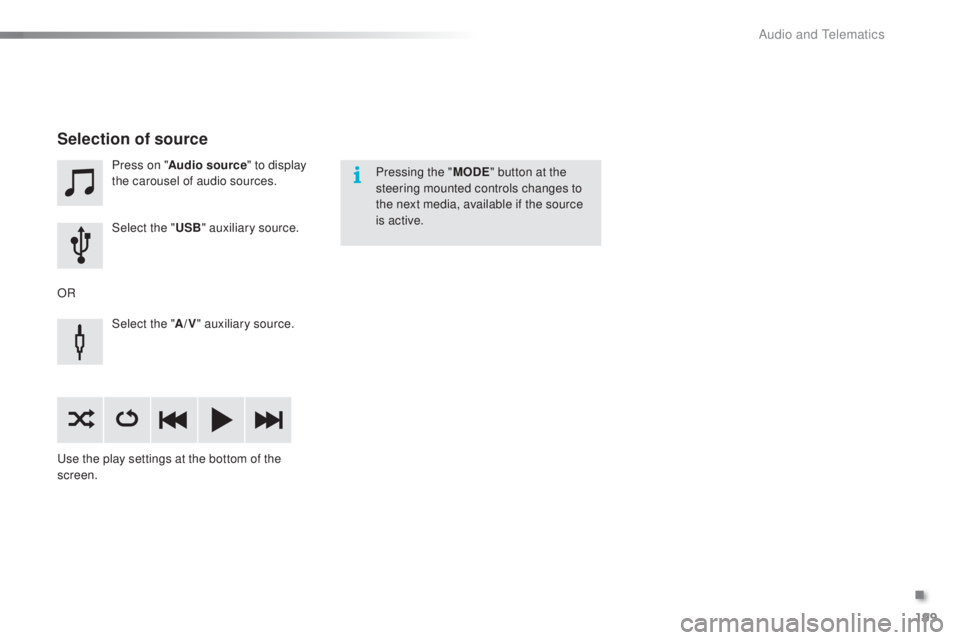
Press on "Audio source " to display
the carousel of audio sources.
Select the "
u
SB" auxiliary source.
Select the " A/V" auxiliary source.
us
e the play settings at the bottom of the
screen.
Selection of source
OR Pressing the "
M
oD
e
" b
utton at the
steering mounted controls changes to
the next media, available if the source
is active.
.
Audio and telematics
Page 208 of 268
206
108_en_Chap10a_Autoradio-toyota-tactile-1_ed01-2016
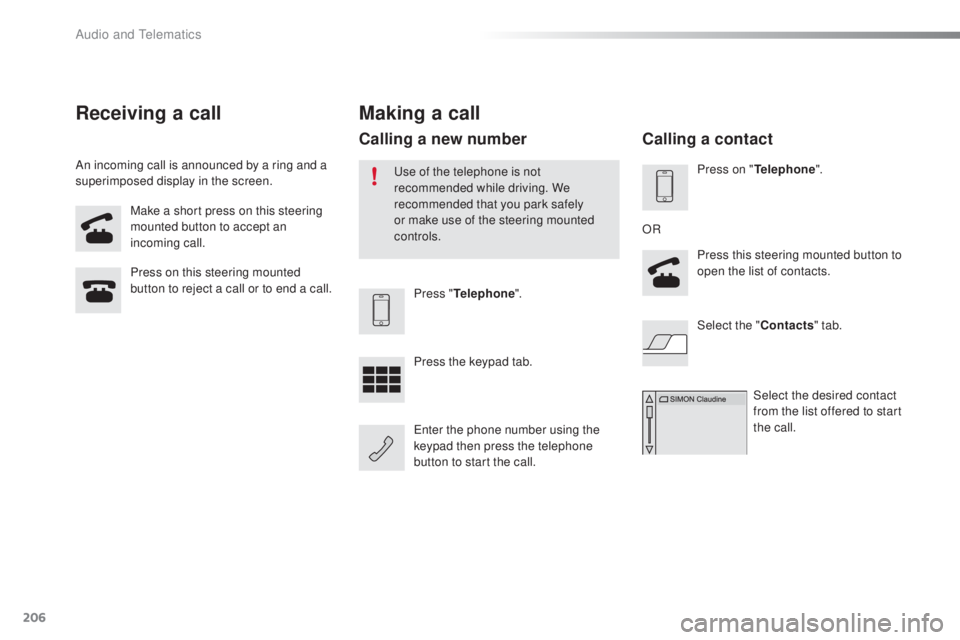
Make a short press on this steering
mounted button to accept an
incoming call.
Press on this steering mounted
button to reject a call or to end a call.
Press "
tel
ephone".
Press the keypad tab.
en
ter the phone number using the
keypad then press the telephone
button to start the call.
Receiving a call
An incoming call is announced by a ring and a
superimposed display in the screen.
Making a call
use of the telephone is not
recommended while driving. We
recommended that you park safely
or make use of the steering mounted
controls.
Calling a new number
Press on "tel ephone".
Press this steering mounted button to
open the list of contacts.
OR
Select the " Contacts" tab.
Select the desired contact
from the list offered to start
the call.
Calling a contact
Audio and telematics