Page 160 of 268
158
108_en_Chap08_en-cas-pannes_ed01-2016
Spare wheel
F As far as possible, immobilise the vehicle on level, stable, non-slippery ground.
F
A
pply the parking brake.
F
S
witch off the ignition ("
oFF" m
ode for
vehicles fitted with "Keyless
e
n
try and
Starting").
F
e
n
gage first gear or reverse for a manual
gearbox.
F
P
lace the gear selector at position N for an
e
tg
el
ectronic gearbox.
Parking the vehicle
Procedure for replacing a wheel with a damaged tyre by the spare wheel using the tools supplied with the vehicle.
F
I
f necessary, chock the wheel diagonally
opposite the wheel to be changed.
F
Y
ou must ensure that the occupants leave
the vehicle and wait in a safe location.
In the event of a breakdown
Page 173 of 268
171
108_en_Chap08_en-cas-pannes_ed01-2016
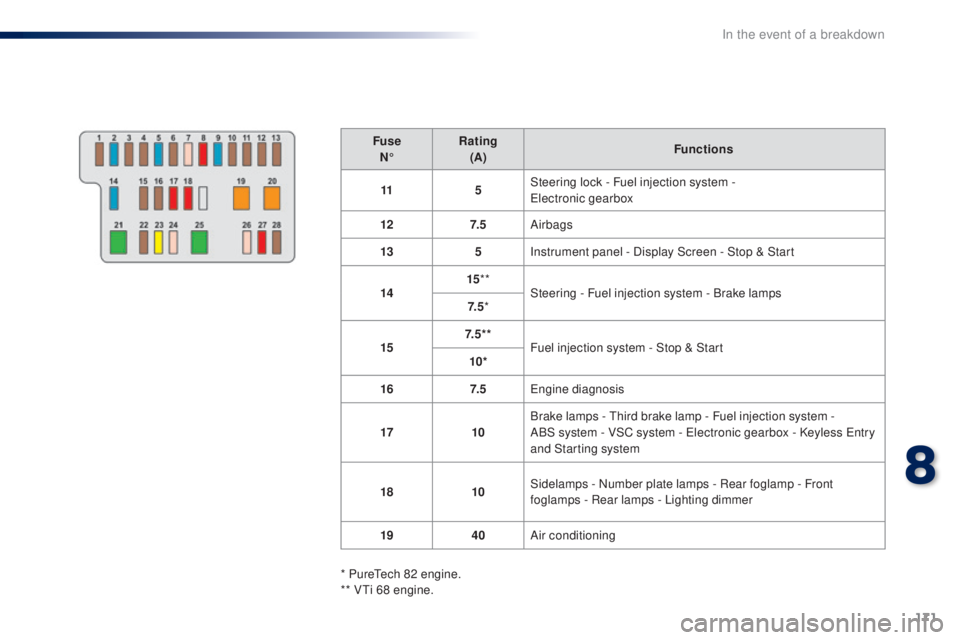
FuseN° Rating
(A) Functions
11 5Steering lock - Fuel injection system -
ele
ctronic gearbox
12 7. 5Airbags
13 5Instrument panel - Display Screen - Stop & Start
14 15
**
Steering - Fuel injection system - Brake lamps
7. 5 *
15 7. 5 * *
Fuel injection system - Stop & Start
10*
16 7. 5
en
gine diagnosis
17 10Brake lamps -
t
h
ird brake lamp - Fuel injection system -
ABS
system - VSC system - e
l
ectronic gearbox - Keyless e
n
try
and Starting system
18 10Sidelamps - Number plate lamps - Rear foglamp - Front
foglamps - Rear lamps - Lighting dimmer
19 40Air conditioning
* Pure
te
ch 82 engine.
** V
ti 6
8 engine.
8
In the event of a breakdown
Page 174 of 268
172
108_en_Chap08_en-cas-pannes_ed01-2016
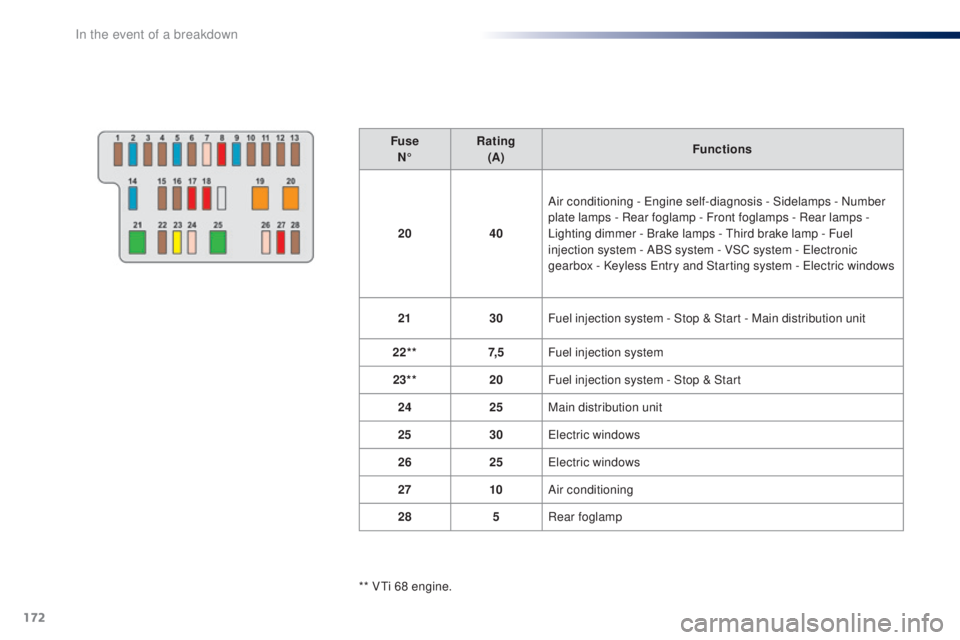
FuseN° Rating
(A) Functions
20 40Air conditioning -
e
n
gine self-diagnosis - Sidelamps - Number
plate lamps - Rear foglamp - Front foglamps - Rear lamps
-
Lighting dimmer - Brake lamps -
t
h
ird brake lamp - Fuel
injection system - ABS system - VSC system -
e
l
ectronic
gearbox - Keyless
e
n
try and Starting system - e
l
ectric windows
21 30Fuel injection system - Stop & Start - Main distribution unit
22** 7, 5Fuel injection system
23** 20Fuel injection system - Stop & Start
24 25Main distribution unit
25 30
el
ectric windows
26 25
el
ectric windows
27 10Air conditioning
28 5Rear foglamp
** V
ti 6
8 engine.
In the event of a breakdown
Page 176 of 268
174
108_en_Chap08_en-cas-pannes_ed01-2016
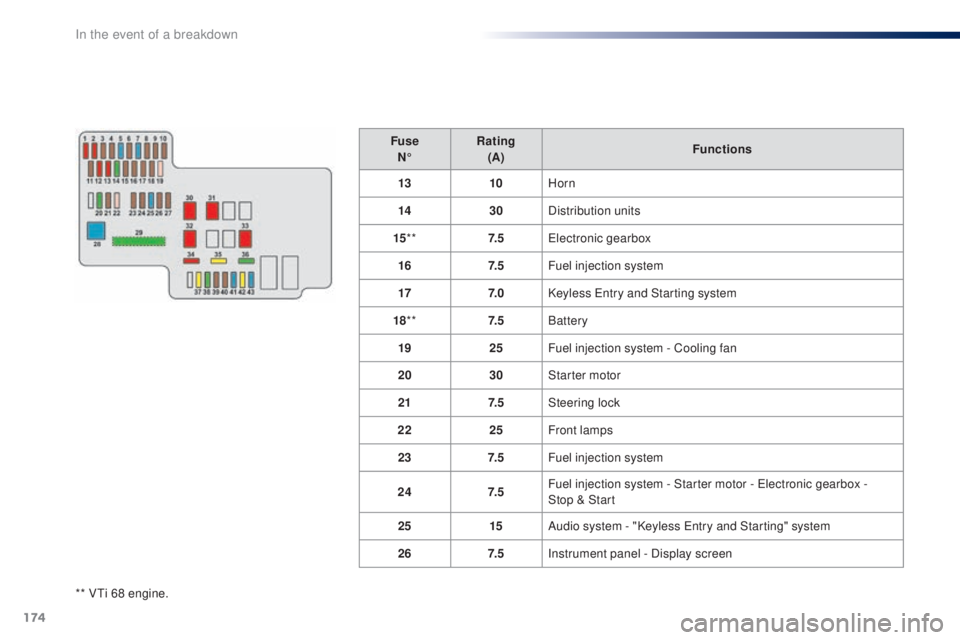
** Vti 68 engine.Fuse
N° Rating
(A) Functions
13 10Horn
14 30Distribution units
15 ** 7. 5
ele
ctronic gearbox
16 7. 5Fuel injection system
17 7. 0Keyless e
n
try and Starting system
18 ** 7. 5Battery
19 25Fuel injection system - Cooling fan
20 30Starter motor
21 7. 5Steering lock
22 25Front lamps
23 7. 5Fuel injection system
24 7. 5Fuel injection system - Starter motor - e
l
ectronic gearbox -
Stop
& Start
25 15Audio system - "Keyless e
n
try and Starting" system
26 7. 5Instrument panel - Display screen
In the event of a breakdown
Page 187 of 268
185
108_en_Chap10a_Autoradio-toyota-tactile-1_ed01-2016
7-inch touch screen
Multimedia system - Bluetooth® telephone - Mirror Screen® - gPS navigation
First steps 1 86
Steering mounted controls
1
88
Menus
189
Audio source
1
90
Radio
19 4
DAB (Digital Audio Broadcasting) radio
1
96
Media
19
8
te
lephone
202
Configuration
20
8
Mirror Screen
® - Connexions iPhone® 212
Mirror Screen® - MirrorLinktM connections 2 16
Navigation
2
20
Frequently asked questions
23
1
As a safety measure, the driver must carry out operations which
require prolonged attention while the vehicle is stationary.
to p
revent discharging of the battery, the system cuts off
following activation of energy economy mode, 20 minutes after
switching off the engine on vehicles fitted with the Keyless
e
n
try
and Starting system. Contents
th
e temperature of a telephone may increase when connected
by MirrorLink
tM. In this case, the telephone battery discharges as
a safety measure.
.
Audio and telematics
Page 208 of 268
206
108_en_Chap10a_Autoradio-toyota-tactile-1_ed01-2016
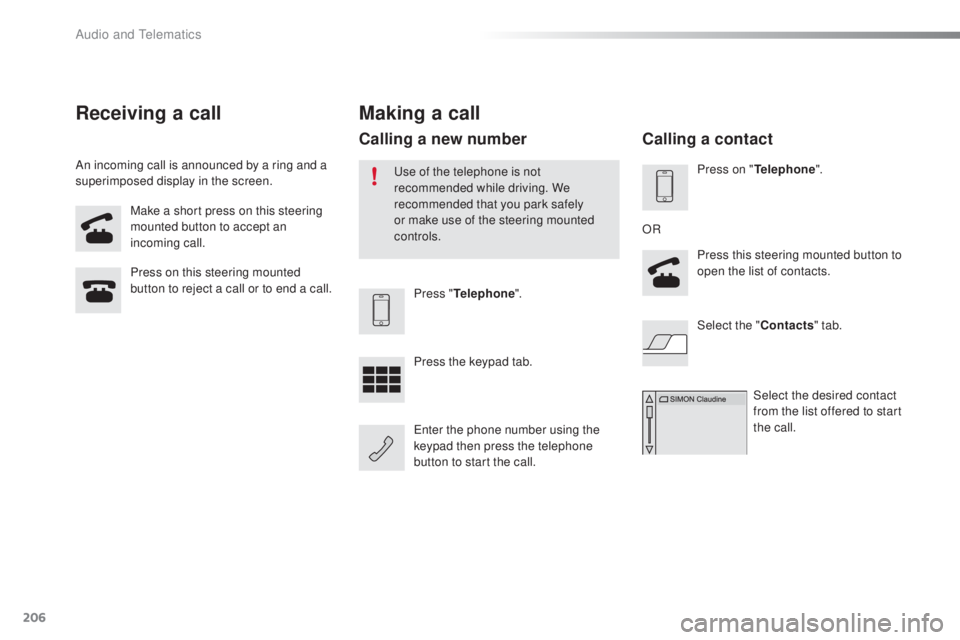
Make a short press on this steering
mounted button to accept an
incoming call.
Press on this steering mounted
button to reject a call or to end a call.
Press "
tel
ephone".
Press the keypad tab.
en
ter the phone number using the
keypad then press the telephone
button to start the call.
Receiving a call
An incoming call is announced by a ring and a
superimposed display in the screen.
Making a call
use of the telephone is not
recommended while driving. We
recommended that you park safely
or make use of the steering mounted
controls.
Calling a new number
Press on "tel ephone".
Press this steering mounted button to
open the list of contacts.
OR
Select the " Contacts" tab.
Select the desired contact
from the list offered to start
the call.
Calling a contact
Audio and telematics
Page 229 of 268
227
108_en_Chap10a_Autoradio-toyota-tactile-1_ed01-2016
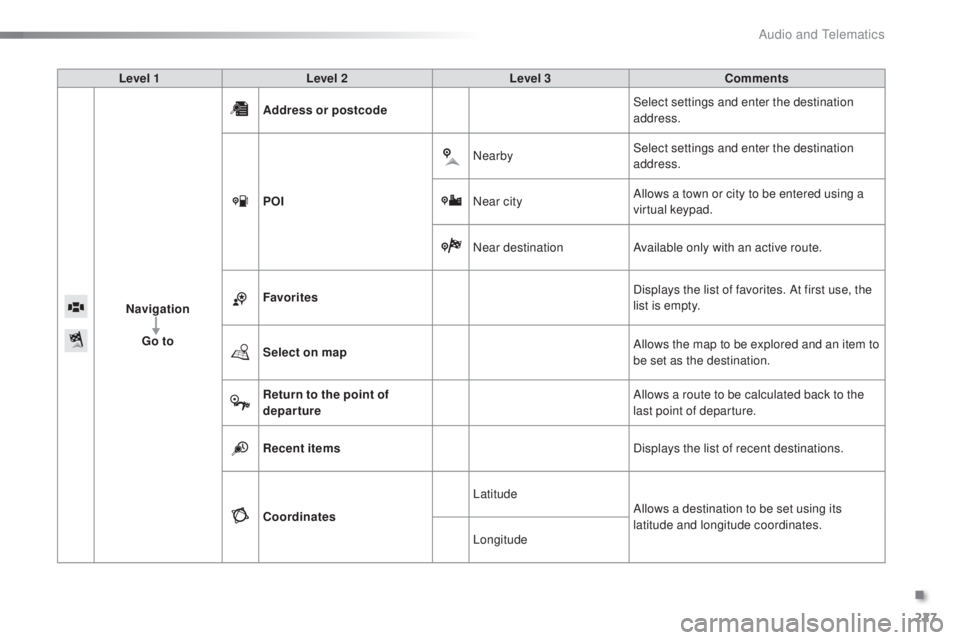
Level 1 Level 2 Level 3 Comments
Navigation
go t
o Address or postcode
Select settings and enter the destination
address.
P
o
I N
earbySelect settings and enter the destination
address.
Near city Allows a town or city to be entered using a
virtual keypad.
Near destination Available only with an active route.
Favorites Displays the list of favorites. At first use, the
list is empty.
Select on map Allows the map to be explored and an item to
be set as the destination.
Return to the point of
departure Allows a route to be calculated back to the
last point of departure.
Recent items Displays the list of recent destinations.
Coordinates Latitude
Allows a destination to be set using its
latitude and longitude coordinates.
Longitude
.
Audio and telematics
Page 231 of 268
229
108_en_Chap10a_Autoradio-toyota-tactile-1_ed01-2016
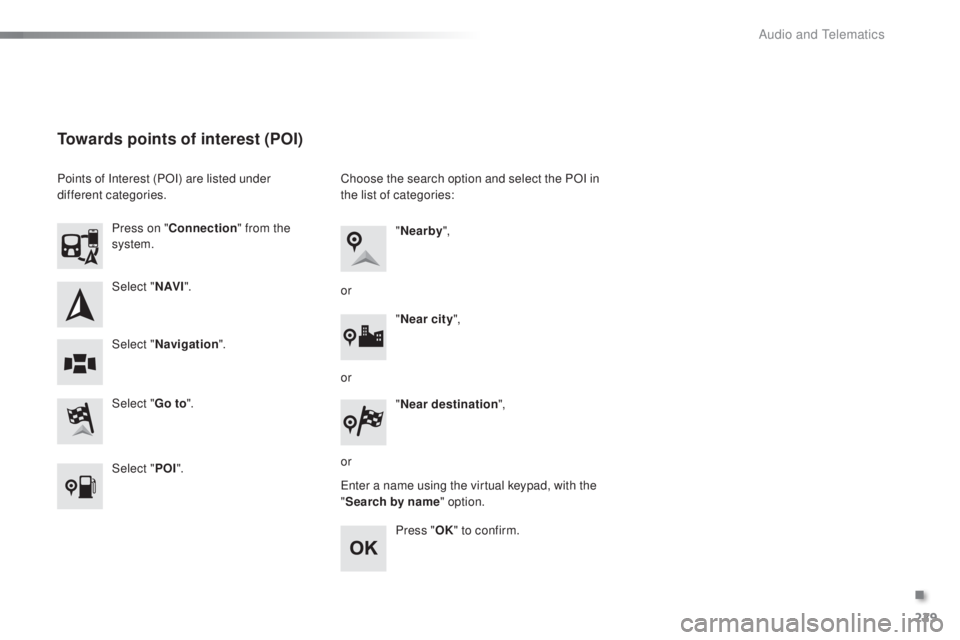
Select "N AV I".
Select "
go t
o".
Press on "
Connection " from the
system.
Select " Navigation ".
towards points of interest (PoI)
Points of Interest (POI) are listed under
different categories.
Select "P
o
I". C
hoose the search option and select the POI in
the list of categories:
en
ter a name using the virtual keypad, with the
" Search by name" option.
Press "
oK"
to confirm.
"
Nearby ",
" Near city ",
or
or
or "
Near destination ",
.
Audio and telematics