2016 NISSAN TITAN lights
[x] Cancel search: lightsPage 82 of 636
Heated rear seat switches (if so equipped)..........2-58
Heated steering wheel switch (if so equipped) .......2-60
Warning systems switch (if so equipped) ............2-60
Vehicle Dynamic Control (VDC) off switch . . .........2-61
Hill descent control switch (if so equipped) ..........2-62
Electronic locking rear differential (E-Lock) system
switch (if so equipped) ............................ 2-63
Power inverter switch (if so equipped) ..............2-64
Parking Sensor (sonar) System OFF Switch
(if so equipped) .................................. 2-65
Tow mode switch ................................. 2-65
E-call (SOS) switch (if so equipped) ................2-66
Trailer Brake Controller Unit (TBCU)
(if so equipped) .................................. 2-66
Power outlets .................................... 2-67
12v Outlets . . ................................. 2-67
120v outlets (if so equipped) ...................2-69
Extended storage switch .......................... 2-70
Storage ......................................... 2-71
Map pockets .................................. 2-71
Seatback pockets (if so equipped) ..............2-72
Under-seat storage (if so equipped) .............2-72
Console box storage trays (if so equipped) .......2-73
Glove box .................................... 2-74Console box (if so equipped)
...................2-74
Center armrest storage (if so equipped) ..........2-75
Under front seat storage bin (if so equipped) .....2-76
Sunglasses holder (if so equipped) ..............2-76
Cup holders .................................. 2-77
Grocery hooks (if so equipped) .................2-79
Bed liner storage bins (if so equipped) ...........2-79
Windows ........................................ 2-80
Power windows ............................... 2-80
Rear sliding window (if so equipped) ............2-82
Rear power window switch (if so equipped) ......2-83
Interior lights ..................................... 2-84
Console
light (if so equipped) ...................2-85
Map lights (if so equipped) .....................2-85
Personal Lights (if so equipped) .................2-86
HomeLink® universal transceiver (if so equipped) ....2-86
Programming HomeLink® ......................2-87
Programming HomeLink® for Canadian
customers and gate openers ....................2-88
Operating the HomeLink® universal
transceiver .................................... 2-89
Programming trouble-diagnosis .................2-89
Clearing the programmed information ............2-89
Reprogramming a single HomeLink® button ......2-89
If your vehicle is stolen ......................... 2-90
Page 83 of 636
1. Vents (P. 4-32)
2. Turn signal switch (P. 2-54)Wiper and washer switch (P. 2-47)
3. Steering wheel switch for audio control
(P. 4-81)
Bluetooth® Hands-Free Phone System
(P. 4-81)
Vehicle information display controls
(P. 2-29)
4. Driver supplemental air bag (P. 1-45) Horn (P. 2-55)
5. Meters and gauges (P. 2-4) Warning and indicator lights (P. 2-19)
6. Cruise control main/set switches
(P. 5-40)
7. Shift lever (P. 5-16) Tow mode switch (P. 2-65)
8. Audio controls (P. 4-45)
9. Center display (P. 4-4)
10. Climate controls (P. 4-32)
11. Front passenger supplemental air bag
(P. 1-45)
12. Glove box (P. 2-71)
13. Power outlet (if so equipped) (P. 2-67)
LII2406
INSTRUMENT PANEL
2-2Instruments and controls
Page 85 of 636
1. Tachometer
2. Warning and indicator lights
3. Vehicle information displayOdometer
Outside temperature display 4. Speedometer
5. Fuel gauge
6. Engine coolant temperature gauge
Type A (if so equipped)
LIC3100
METERS AND GAUGES
2-4Instruments and controls
Page 86 of 636
1. Tachometer
2. Warning and indicator lights
3. Speedometer
4. Fuel gauge5. Trip computer
Odometer
Outside temperature display
6. Engine coolant temperature gauge
SPEEDOMETER AND ODOMETER
This vehicle is equipped with a speedometer and
odometer. The speedometer is located on the
right side of the meter cluster. The odometer is
located in the vehicle information display (Type A)
(if so equipped) or the trip computer (Type B) (if
so equipped) to the left of the speedometer and
can be accessed with the vehicle in the ON
position.
Type B (if so equipped)
LIC3497
Instruments and controls2-5
Page 100 of 636
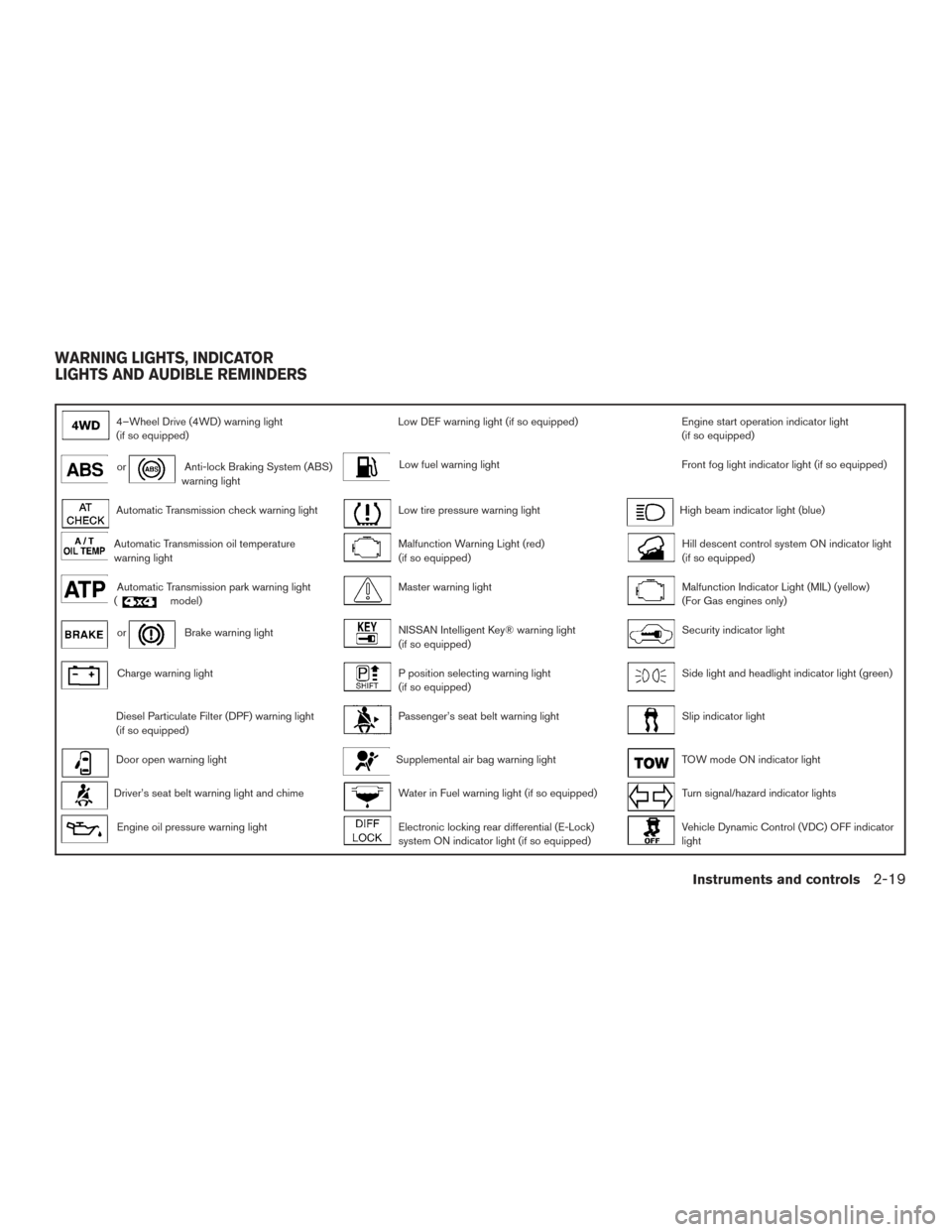
4–Wheel Drive (4WD) warning light
(if so equipped)Low DEF warning light (if so equipped)Engine start operation indicator light
(if so equipped)
orAnti-lock Braking System (ABS)
warning lightLow fuel warning lightFront fog light indicator light (if so equipped)
Automatic Transmission check warning lightLow tire pressure warning lightHigh beam indicator light (blue)
Automatic Transmission oil temperature
warning lightMalfunction Warning Light (red)
(if so equipped)Hill descent control system ON indicator light
(if so equipped)
Automatic Transmission park warning light
(model)Master warning lightMalfunction Indicator Light (MIL) (yellow)
(For Gas engines only)
orBrake warning lightNISSAN Intelligent Key® warning light
(if so equipped)Security indicator light
Charge warning lightP position selecting warning light
(if so equipped)Side light and headlight indicator light (green)
Diesel Particulate Filter (DPF) warning light
(if so equipped)Passenger’s seat belt warning lightSlip indicator light
Door open warning lightSupplemental air bag warning lightTOW mode ON indicator light
Driver’s seat belt warning light and chimeWater in Fuel warning light (if so equipped)Turn signal/hazard indicator lights
Engine oil pressure warning lightElectronic locking rear differential (E-Lock)
system ON indicator light (if so equipped)Vehicle Dynamic Control (VDC) OFF indicator
light
WARNING LIGHTS, INDICATOR
LIGHTS AND AUDIBLE REMINDERS
Instruments and controls2-19
Page 101 of 636
CHECKING LIGHTS
With all doors closed, apply the parking brake,
fasten the seat belts and place the ignition switch
in the ON position without starting the engine.
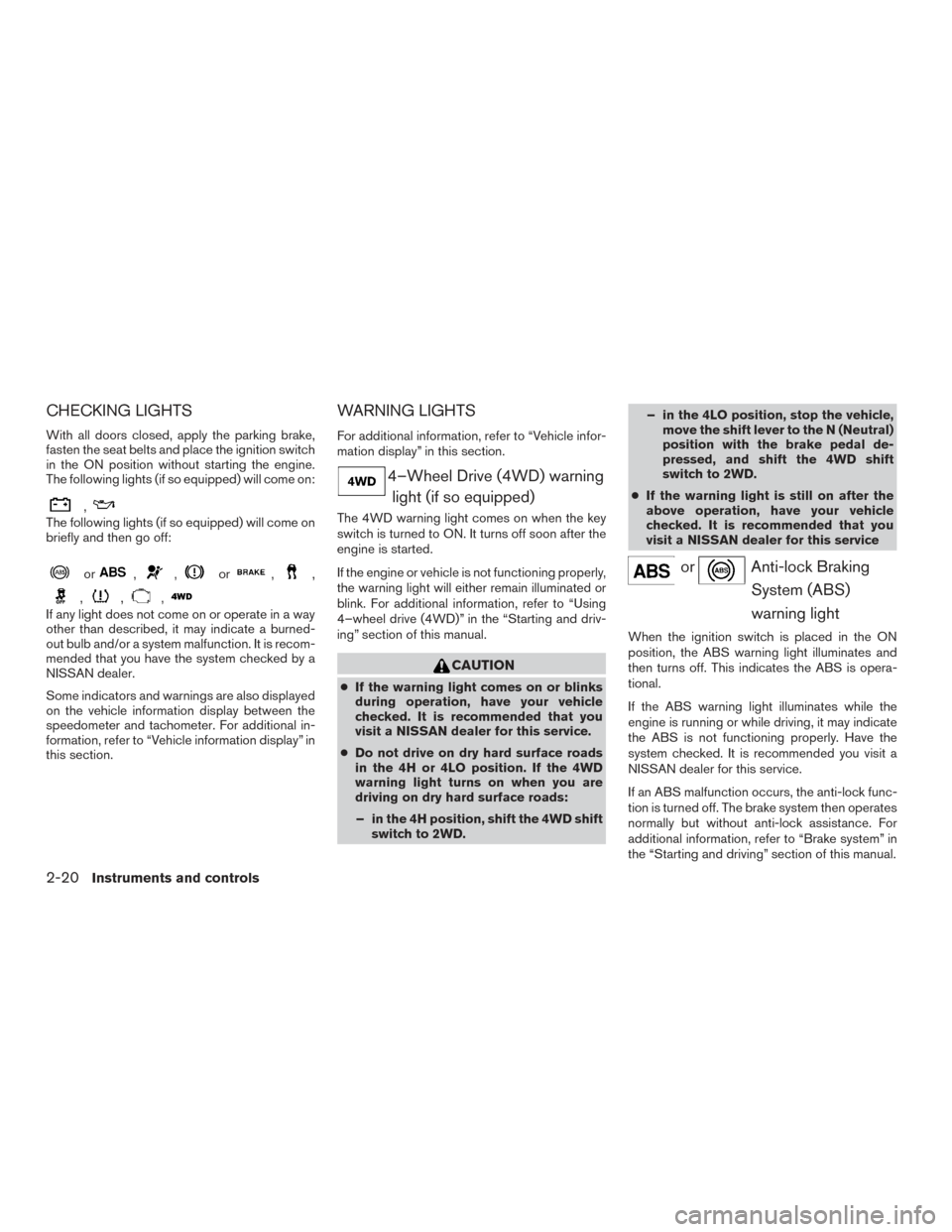
The following lights (if so equipped) will come on:
,
The following lights (if so equipped) will come on
briefly and then go off:
or,,or,,
,,,
If any light does not come on or operate in a way
other than described, it may indicate a burned-
out bulb and/or a system malfunction. It is recom-
mended that you have the system checked by a
NISSAN dealer.
Some indicators and warnings are also displayed
on the vehicle information display between the
speedometer and tachometer. For additional in-
formation, refer to “Vehicle information display” in
this section.
WARNING LIGHTS
For additional information, refer to “Vehicle infor-
mation display” in this section.
4–Wheel Drive (4WD) warninglight (if so equipped)
The 4WD warning light comes on when the key
switch is turned to ON. It turns off soon after the
engine is started.
If the engine or vehicle is not functioning properly,
the warning light will either remain illuminated or
blink. For additional information, refer to “Using
4–wheel drive (4WD)” in the “Starting and driv-
ing” section of this manual.
CAUTION
● If the warning light comes on or blinks
during operation, have your vehicle
checked. It is recommended that you
visit a NISSAN dealer for this service.
● Do not drive on dry hard surface roads
in the 4H or 4LO position. If the 4WD
warning light turns on when you are
driving on dry hard surface roads:
– in the 4H position, shift the 4WD shift switch to 2WD. – in the 4LO position, stop the vehicle,
move the shift lever to the N (Neutral)
position with the brake pedal de-
pressed, and shift the 4WD shift
switch to 2WD.
● If the warning light is still on after the
above operation, have your vehicle
checked. It is recommended that you
visit a NISSAN dealer for this service
orAnti-lock Braking
System (ABS)
warning light
When the ignition switch is placed in the ON
position, the ABS warning light illuminates and
then turns off. This indicates the ABS is opera-
tional.
If the ABS warning light illuminates while the
engine is running or while driving, it may indicate
the ABS is not functioning properly. Have the
system checked. It is recommended you visit a
NISSAN dealer for this service.
If an ABS malfunction occurs, the anti-lock func-
tion is turned off. The brake system then operates
normally but without anti-lock assistance. For
additional information, refer to “Brake system” in
the “Starting and driving” section of this manual.
2-20Instruments and controls
Page 107 of 636
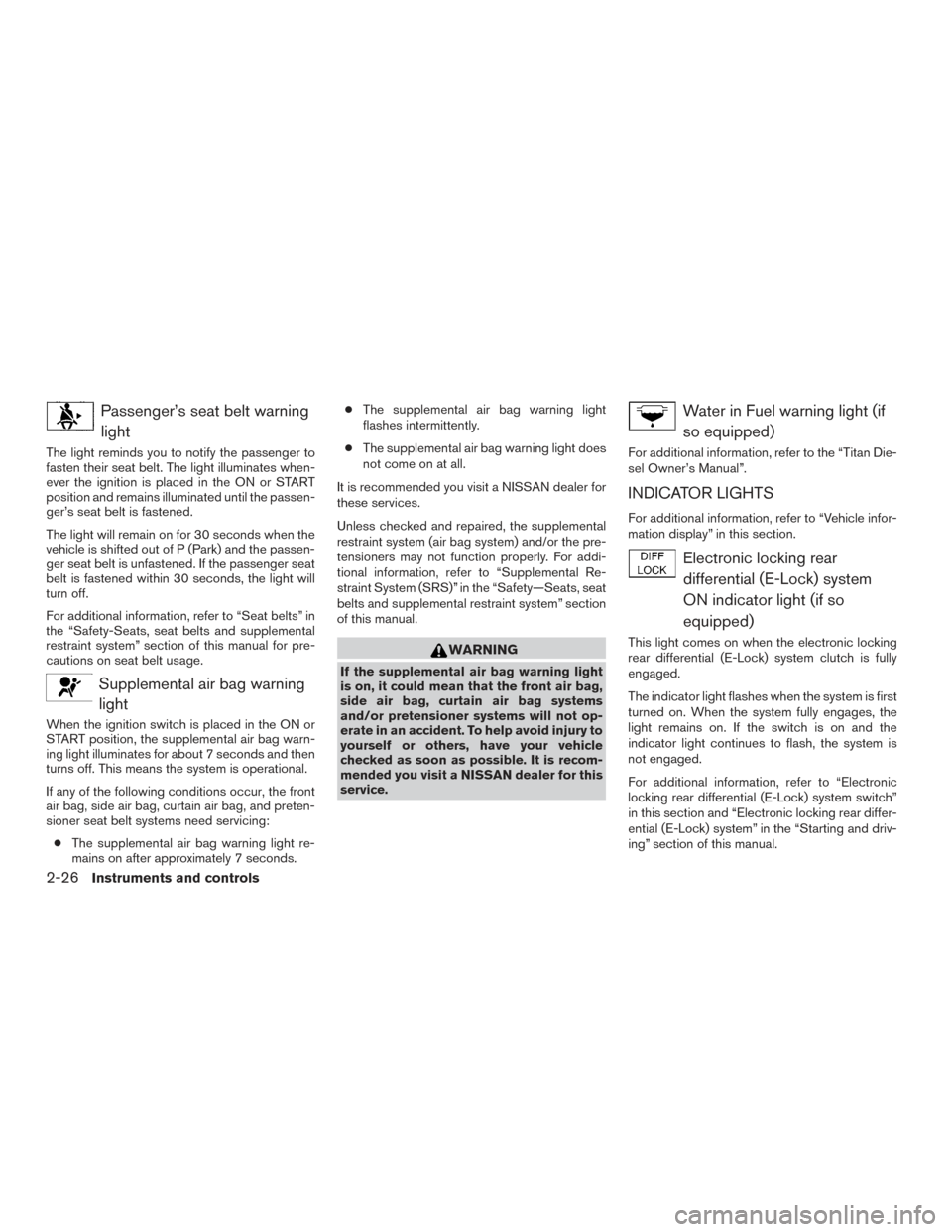
Passenger’s seat belt warninglight
The light reminds you to notify the passenger to
fasten their seat belt. The light illuminates when-
ever the ignition is placed in the ON or START
position and remains illuminated until the passen-
ger’s seat belt is fastened.
The light will remain on for 30 seconds when the
vehicle is shifted out of P (Park) and the passen-
ger seat belt is unfastened. If the passenger seat
belt is fastened within 30 seconds, the light will
turn off.
For additional information, refer to “Seat belts” in
the “Safety-Seats, seat belts and supplemental
restraint system” section of this manual for pre-
cautions on seat belt usage.
Supplemental air bag warninglight
When the ignition switch is placed in the ON or
START position, the supplemental air bag warn-
ing light illuminates for about 7 seconds and then
turns off. This means the system is operational.
If any of the following conditions occur, the front
air bag, side air bag, curtain air bag, and preten-
sioner seat belt systems need servicing:
● The supplemental air bag warning light re-
mains on after approximately 7 seconds. ●
The supplemental air bag warning light
flashes intermittently.
● The supplemental air bag warning light does
not come on at all.
It is recommended you visit a NISSAN dealer for
these services.
Unless checked and repaired, the supplemental
restraint system (air bag system) and/or the pre-
tensioners may not function properly. For addi-
tional information, refer to “Supplemental Re-
straint System (SRS)” in the “Safety—Seats, seat
belts and supplemental restraint system” section
of this manual.
WARNING
If the supplemental air bag warning light
is on, it could mean that the front air bag,
side air bag, curtain air bag systems
and/or pretensioner systems will not op-
erate in an accident. To help avoid injury to
yourself or others, have your vehicle
checked as soon as possible. It is recom-
mended you visit a NISSAN dealer for this
service.
Water in Fuel warning light (if so equipped)
For additional information, refer to the “Titan Die-
sel Owner’s Manual”.
INDICATOR LIGHTS
For additional information, refer to “Vehicle infor-
mation display” in this section.
Electronic locking reardifferential (E-Lock) system
ON indicator light (if so
equipped)
This light comes on when the electronic locking
rear differential (E-Lock) system clutch is fully
engaged.
The indicator light flashes when the system is first
turned on. When the system fully engages, the
light remains on. If the switch is on and the
indicator light continues to flash, the system is
not engaged.
For additional information, refer to “Electronic
locking rear differential (E-Lock) system switch”
in this section and “Electronic locking rear differ-
ential (E-Lock) system” in the “Starting and driv-
ing” section of this manual.
2-26Instruments and controls
Page 108 of 636

Engine start operationindicator light (if so equipped)
This indicator illuminates when the ignition switch
is in the ACC or ON position with the shift lever in
the P (Park) position.
Automatic transmission models: This indica-
tor means that the engine will start by pushing the
push-button ignition switch with the brake pedal
depressed.
Front fog light indicator light (if
so equipped)
The front fog light indicator light illuminates when
the front fog lights are ON. For additional infor-
mation, refer to “Fog light switch” in this section.
High beam indicator light(blue)
This blue light comes on when the headlight high
beams are on and goes out when the low beams
are selected.
The high beam indicator light also comes on
when the passing signal is activated.
Hill descent control systemON indicator light (if so
equipped)
When the ignition switch is placed in the ON
position, this light comes on briefly and then turns
off.
The light comes on when the hill descent control
system is activated.
If the hill descent control switch is on and the
indicator light blinks, the system is not engaged.
You may feel or hear the system working; this is
normal.
If the indicator light does not come on when the
hill descent switch is on, the system may not be
functioning properly. It is recommended that you
have the system checked by a NISSAN dealer.
For additional information, refer to “Hill descent
control system on indicator light” in this section
and “Hill descent control system” in the “Starting
and driving” section of this manual.
Malfunction Indicator Light(MIL) (yellow) (For Gas
engines only)
If this indicator light comes on steady or blinks
while the engine is running, it may indicate a
potential emission control malfunction.
If this indicator light comes on steady for 20 sec-
onds and then blinks for 10 seconds when the
engine is not running, it indicates that the vehicle
is not ready for an emission control system
inspection/maintenance test. For additional infor-
mation, refer to “Readiness for
inspection/maintenance (I/M) test” in the “Tech-
nical and consumer information” section of this
manual.
Instruments and controls2-27