2016 NISSAN TITAN 4WD
[x] Cancel search: 4WDPage 113 of 636
Meter Settings
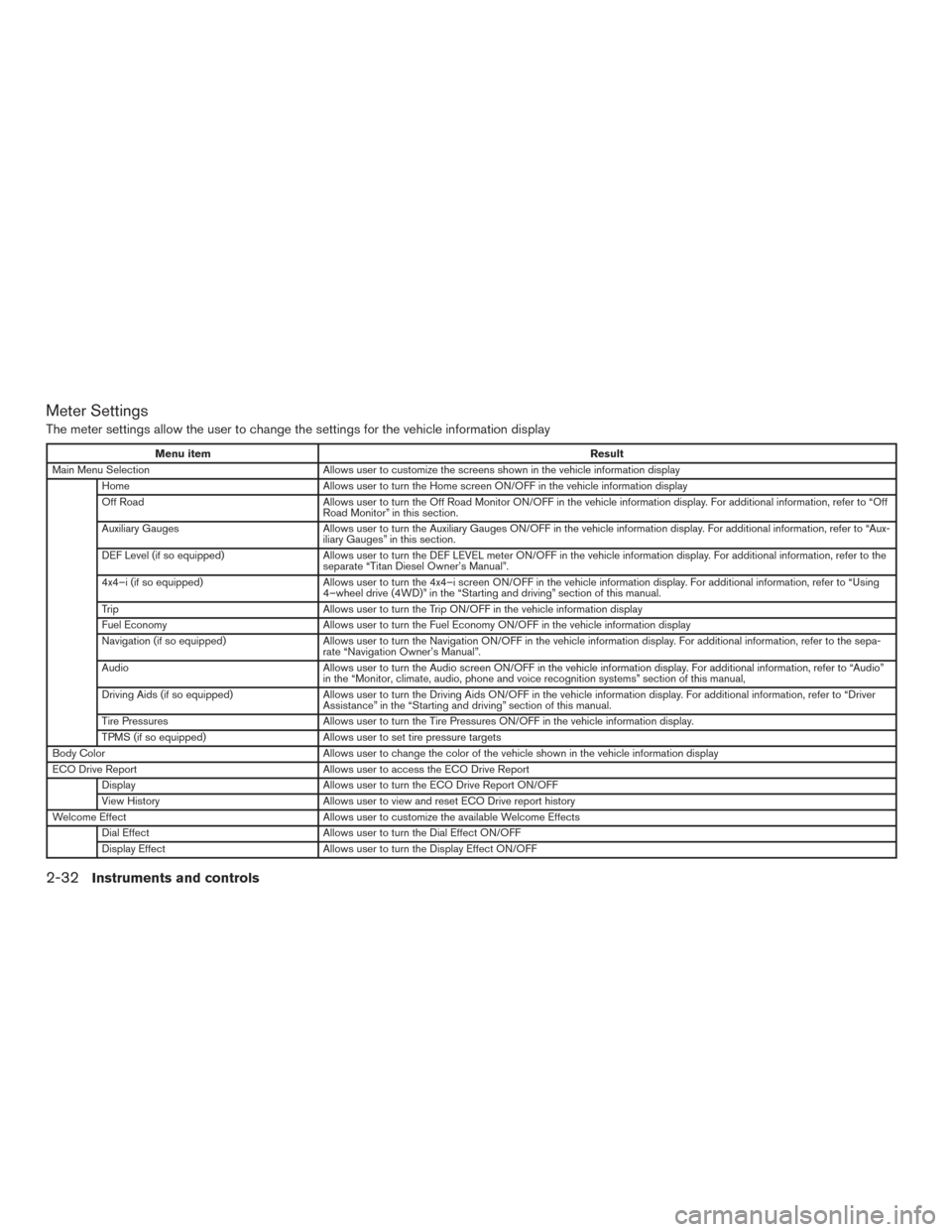
The meter settings allow the user to change the settings for the vehicle information display
Menu itemResult
Main Menu Selection Allows user to customize the screens shown in the vehicle information display
Home Allows user to turn the Home screen ON/OFF in the vehicle information display
Off Road Allows user to turn the Off Road Monitor ON/OFF in the vehicle information display. For additional information, refer to “Off
Road Monitor” in this section.
Auxiliary Gauges Allows user to turn the Auxiliary Gauges ON/OFF in the vehicle information display. For additional information, refer to “Aux-
iliary Gauges” in this section.
DEF Level (if so equipped) Allows user to turn the DEF LEVEL meter ON/OFF in the vehicle information display. For additional information, refer to the
separate “Titan Diesel Owner’s Manual”.
4x4–i (if so equipped) Allows user to turn the 4x4–i screen ON/OFF in the vehicle information display. For additional information, refer to “Using
4–wheel drive (4WD)” in the “Starting and driving” section of this manual.
Trip Allows user to turn the Trip ON/OFF in the vehicle information display
Fuel Economy Allows user to turn the Fuel Economy ON/OFF in the vehicle information display
Navigation (if so equipped) Allows user to turn the Navigation ON/OFF in the vehicle information display. For additional information, refer to the sepa-
rate “Navigation Owner’s Manual”.
Audio Allows user to turn the Audio screen ON/OFF in the vehicle information display. For additional information, refer to “Audio”
in the “Monitor, climate, audio, phone and voice recognition systems” section of this manual,
Driving Aids (if so equipped) Allows user to turn the Driving Aids ON/OFF in the vehicle information display. For additional information, refer to “Driver
Assistance” in the “Starting and driving” section of this manual.
Tire Pressures Allows user to turn the Tire Pressures ON/OFF in the vehicle information display.
TPMS (if so equipped) Allows user to set tire pressure targets
Body Color Allows user to change the color of the vehicle shown in the vehicle information display
ECO Drive Report Allows user to access the ECO Drive Report
Display Allows user to turn the ECO Drive Report ON/OFF
View History Allows user to view and reset ECO Drive report history
Welcome Effect Allows user to customize the available Welcome Effects
Dial Effect Allows user to turn the Dial Effect ON/OFF
Display Effect Allows user to turn the Display Effect ON/OFF
2-32Instruments and controls
Page 120 of 636
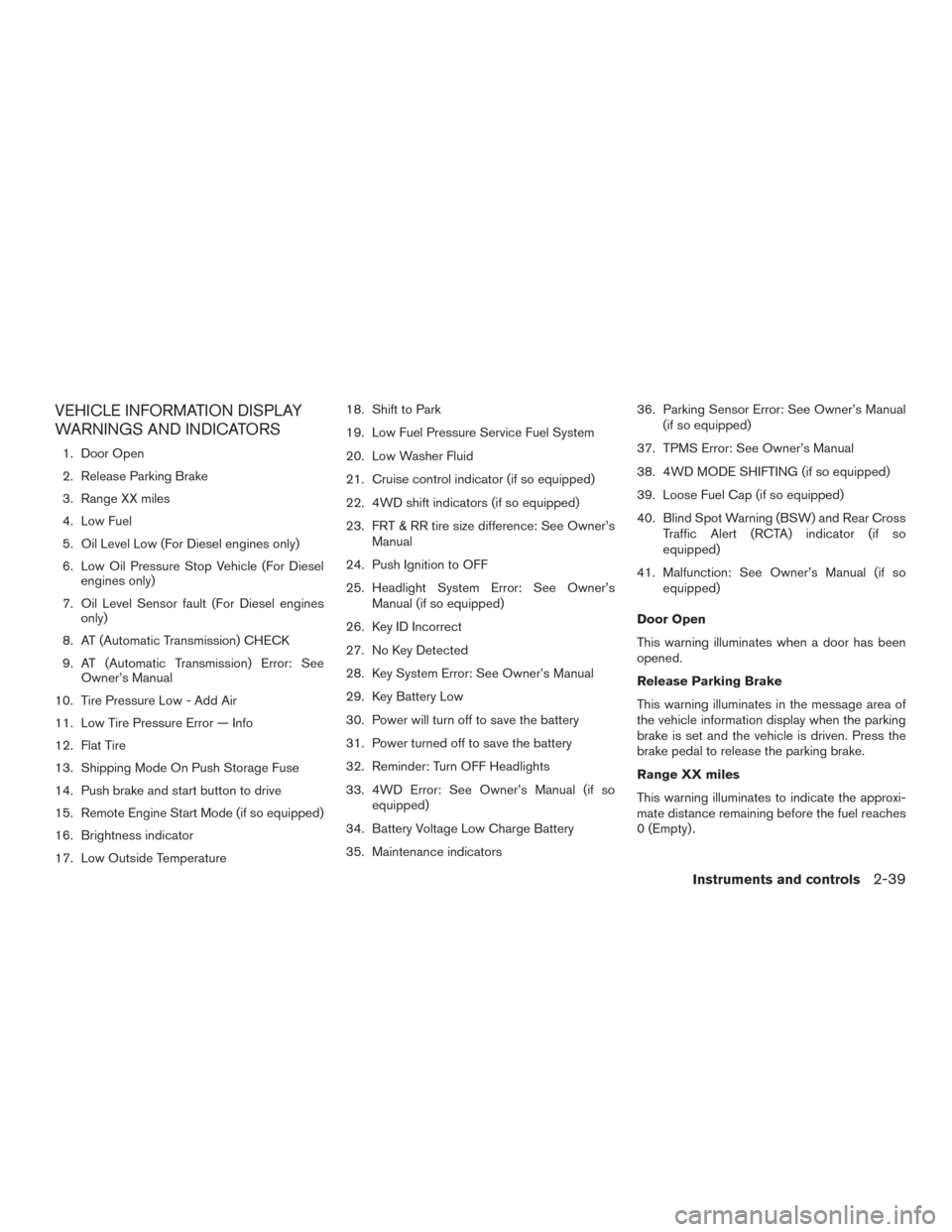
VEHICLE INFORMATION DISPLAY
WARNINGS AND INDICATORS
1. Door Open
2. Release Parking Brake
3. Range XX miles
4. Low Fuel
5. Oil Level Low (For Diesel engines only)
6. Low Oil Pressure Stop Vehicle (For Dieselengines only)
7. Oil Level Sensor fault (For Diesel engines only)
8. AT (Automatic Transmission) CHECK
9. AT (Automatic Transmission) Error: See Owner’s Manual
10. Tire Pressure Low - Add Air
11. Low Tire Pressure Error — Info
12. Flat Tire
13. Shipping Mode On Push Storage Fuse
14. Push brake and start button to drive
15. Remote Engine Start Mode (if so equipped)
16. Brightness indicator
17. Low Outside Temperature 18. Shift to Park
19. Low Fuel Pressure Service Fuel System
20. Low Washer Fluid
21. Cruise control indicator (if so equipped)
22. 4WD shift indicators (if so equipped)
23. FRT & RR tire size difference: See Owner’s
Manual
24. Push Ignition to OFF
25. Headlight System Error: See Owner’s Manual (if so equipped)
26. Key ID Incorrect
27. No Key Detected
28. Key System Error: See Owner’s Manual
29. Key Battery Low
30. Power will turn off to save the battery
31. Power turned off to save the battery
32. Reminder: Turn OFF Headlights
33. 4WD Error: See Owner’s Manual (if so equipped)
34. Battery Voltage Low Charge Battery
35. Maintenance indicators 36. Parking Sensor Error: See Owner’s Manual
(if so equipped)
37. TPMS Error: See Owner’s Manual
38. 4WD MODE SHIFTING (if so equipped)
39. Loose Fuel Cap (if so equipped)
40. Blind Spot Warning (BSW) and Rear Cross Traffic Alert (RCTA) indicator (if so
equipped)
41. Malfunction: See Owner’s Manual (if so equipped)
Door Open
This warning illuminates when a door has been
opened.
Release Parking Brake
This warning illuminates in the message area of
the vehicle information display when the parking
brake is set and the vehicle is driven. Press the
brake pedal to release the parking brake.
Range XX miles
This warning illuminates to indicate the approxi-
mate distance remaining before the fuel reaches
0 (Empty) .
Instruments and controls2-39
Page 122 of 636
refer to “Extended storage switch” in the “Instru-
ments and controls” section of this manual.
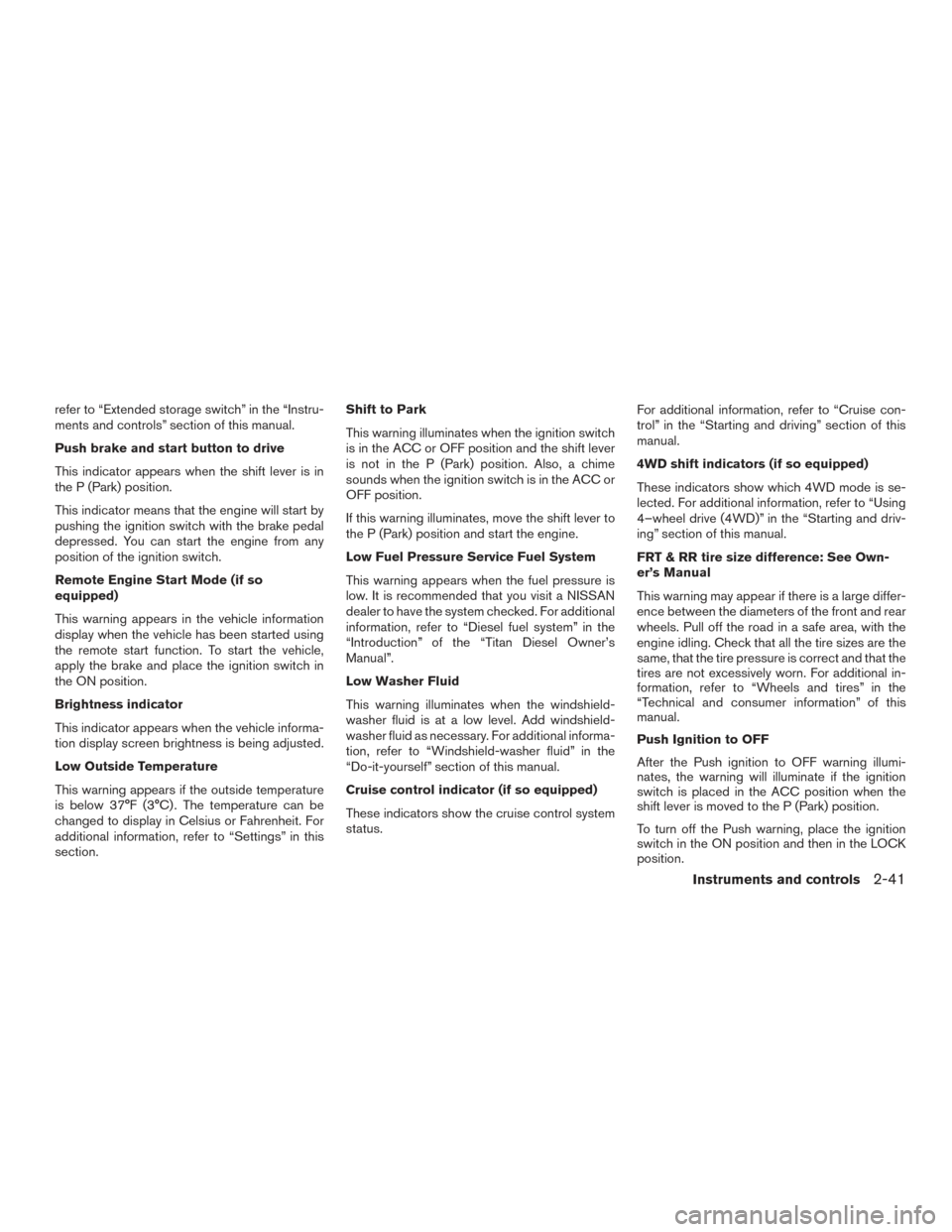
Push brake and start button to drive
This indicator appears when the shift lever is in
the P (Park) position.
This indicator means that the engine will start by
pushing the ignition switch with the brake pedal
depressed. You can start the engine from any
position of the ignition switch.
Remote Engine Start Mode (if so
equipped)
This warning appears in the vehicle information
display when the vehicle has been started using
the remote start function. To start the vehicle,
apply the brake and place the ignition switch in
the ON position.
Brightness indicator
This indicator appears when the vehicle informa-
tion display screen brightness is being adjusted.
Low Outside Temperature
This warning appears if the outside temperature
is below 37°F (3°C) . The temperature can be
changed to display in Celsius or Fahrenheit. For
additional information, refer to “Settings” in this
section.Shift to Park
This warning illuminates when the ignition switch
is in the ACC or OFF position and the shift lever
is not in the P (Park) position. Also, a chime
sounds when the ignition switch is in the ACC or
OFF position.
If this warning illuminates, move the shift lever to
the P (Park) position and start the engine.
Low Fuel Pressure Service Fuel System
This warning appears when the fuel pressure is
low. It is recommended that you visit a NISSAN
dealer to have the system checked. For additional
information, refer to “Diesel fuel system” in the
“Introduction” of the “Titan Diesel Owner’s
Manual”.
Low Washer Fluid
This warning illuminates when the windshield-
washer fluid is at a low level. Add windshield-
washer fluid as necessary. For additional informa-
tion, refer to “Windshield-washer fluid” in the
“Do-it-yourself” section of this manual.
Cruise control indicator (if so equipped)
These indicators show the cruise control system
status.
For additional information, refer to “Cruise con-
trol” in the “Starting and driving” section of this
manual.
4WD shift indicators (if so equipped)
These indicators show which 4WD mode is se-
lected. For additional information, refer to “Using
4–wheel drive (4WD)” in the “Starting and driv-
ing” section of this manual.
FRT & RR tire size difference: See Own-
er’s Manual
This warning may appear if there is a large differ-
ence between the diameters of the front and rear
wheels. Pull off the road in a safe area, with the
engine idling. Check that all the tire sizes are the
same, that the tire pressure is correct and that the
tires are not excessively worn. For additional in-
formation, refer to “Wheels and tires” in the
“Technical and consumer information” of this
manual.
Push Ignition to OFF
After the Push ignition to OFF warning illumi-
nates, the warning will illuminate if the ignition
switch is placed in the ACC position when the
shift lever is moved to the P (Park) position.
To turn off the Push warning, place the ignition
switch in the ON position and then in the LOCK
position.
Instruments and controls2-41
Page 123 of 636
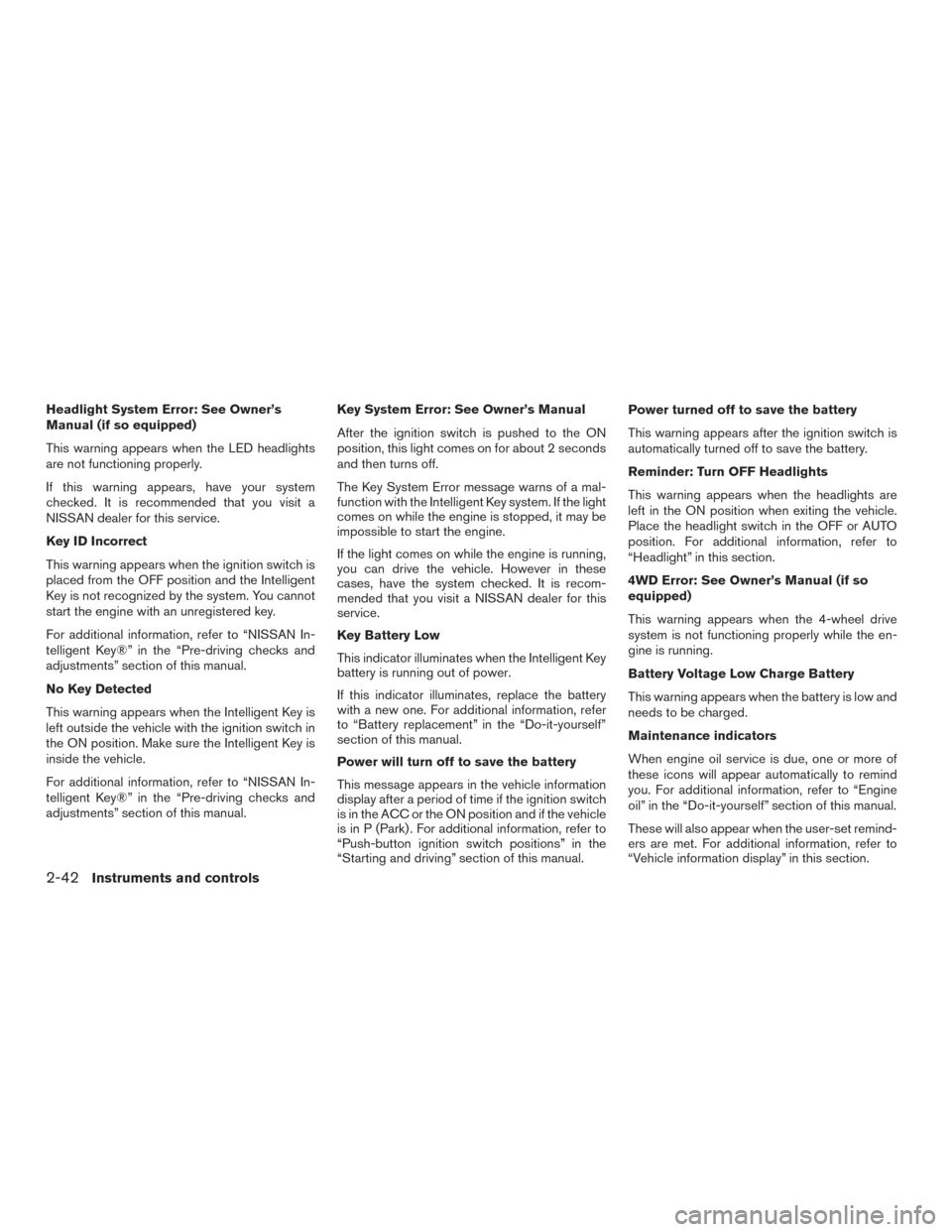
Headlight System Error: See Owner’s
Manual (if so equipped)
This warning appears when the LED headlights
are not functioning properly.
If this warning appears, have your system
checked. It is recommended that you visit a
NISSAN dealer for this service.
Key ID Incorrect
This warning appears when the ignition switch is
placed from the OFF position and the Intelligent
Key is not recognized by the system. You cannot
start the engine with an unregistered key.
For additional information, refer to “NISSAN In-
telligent Key®” in the “Pre-driving checks and
adjustments” section of this manual.
No Key Detected
This warning appears when the Intelligent Key is
left outside the vehicle with the ignition switch in
the ON position. Make sure the Intelligent Key is
inside the vehicle.
For additional information, refer to “NISSAN In-
telligent Key®” in the “Pre-driving checks and
adjustments” section of this manual.Key System Error: See Owner’s Manual
After the ignition switch is pushed to the ON
position, this light comes on for about 2 seconds
and then turns off.
The Key System Error message warns of a mal-
function with the Intelligent Key system. If the light
comes on while the engine is stopped, it may be
impossible to start the engine.
If the light comes on while the engine is running,
you can drive the vehicle. However in these
cases, have the system checked. It is recom-
mended that you visit a NISSAN dealer for this
service.
Key Battery Low
This indicator illuminates when the Intelligent Key
battery is running out of power.
If this indicator illuminates, replace the battery
with a new one. For additional information, refer
to “Battery replacement” in the “Do-it-yourself”
section of this manual.
Power will turn off to save the battery
This message appears in the vehicle information
display after a period of time if the ignition switch
is in the ACC or the ON position and if the vehicle
is in P (Park) . For additional information, refer to
“Push-button ignition switch positions” in the
“Starting and driving” section of this manual.Power turned off to save the battery
This warning appears after the ignition switch is
automatically turned off to save the battery.
Reminder: Turn OFF Headlights
This warning appears when the headlights are
left in the ON position when exiting the vehicle.
Place the headlight switch in the OFF or AUTO
position. For additional information, refer to
“Headlight” in this section.
4WD Error: See Owner’s Manual (if so
equipped)
This warning appears when the 4-wheel drive
system is not functioning properly while the en-
gine is running.
Battery Voltage Low Charge Battery
This warning appears when the battery is low and
needs to be charged.
Maintenance indicators
When engine oil service is due, one or more of
these icons will appear automatically to remind
you. For additional information, refer to “Engine
oil” in the “Do-it-yourself” section of this manual.
These will also appear when the user-set remind-
ers are met. For additional information, refer to
“Vehicle information display” in this section.
2-42Instruments and controls
Page 124 of 636
Parking Sensor Error: See Owner’s
Manual (if so equipped)
This warning illuminates when there is an error
with the system. For additional information, refer
to “Front and rear sonar system” in the “Starting
and driving” section of this manual.
TPMS Error: See Owner’s Manual
This warning appears when there is an error with
your TPMS. If this warning comes on, it is recom-
mended you have the system checked by a
NISSAN dealer.
4WD MODE SHIFTING (if so equipped)
This message appears when the vehicle is shift-
ing into 4WD. For additional information, refer to
“Using 4–wheel drive (4WD)” in the “Starting
and driving” section of this manual.
Loose Fuel Cap (if so equipped)
This warning appears when the fuel-filler cap is
not tightened correctly after the vehicle has been
refueled. For additional information, refer to
“Fuel-filler cap” in the “Pre-driving checks and
adjustments” section of this manual.Blind Spot Warning (BSW) and Rear Cross
Traffic Alert (RCTA) indicator (if so
equipped)
This indicator shows when the BSW and RCTA
systems are engaged.
For additional information, refer to “Blind Spot
Warning (BSW)” and “Rear Cross Traffic Alert
(RCTA)” in the “Starting and driving” section of
this manual.
Malfunction: See Owner’s Manual (if so
equipped)
This warning appears when one or more of the
following systems (if so equipped) is not func-
tioning properly:
● Blind Spot Warning (BSW)
● Rear Cross Traffic alert (RCTA)
If one or more of these warning appears, have the
system checked. It is recommended that you visit
a NISSAN dealer for this service.
Instruments and controls2-43
Page 144 of 636
The E-Lock system can help provide added trac-
tion if the vehicle is stuck or becoming stuck.
To activate the E-Lock system:● the 4WD switch must be in the 4LO position
(4-wheel drive vehicles) ,
● the vehicle must be stopped or moving at
4 mph (7 km/h) or less, and
● the E-Lock system switch must be turned
ON. When the E-Lock system switch is turned ON,
the indicator light will flash until the system en-
gages. However, if all operation conditions listed
above are not met or the system becomes disen-
gaged, the indicator light will continue to flash.
The Anti-Lock Brake (ABS) system is disabled
and the ABS light illuminates when the E-Lock
system is ON. Also, the Vehicle Dynamic Control
(VDC) system is disabled and the VDC light
illuminates when the E-Lock system is ON.
For additional information, refer to “Electronic
locking rear differential (E-Lock) system” in the
“Starting and driving” section of this manual for
further explanation and system limitations.
WARNING
●
Never leave the E-Lock system ON when
driving on paved or hard-surfaced
roads. Turning the vehicle may result in
the rear wheels slipping and result in an
accident and personal injury. After us-
ing the E-Lock system to free the ve-
hicle, turn the system OFF. ●
Use the rear differential lock only in an
emergency when it is not possible to
free a stuck vehicle even using 4LO.
Never use the E-Lock system on a slip-
pery road surface such as snow or ice
surface. Using the E-Lock system when
driving in these road conditions may
cause unexpected movement of the ve-
hicle during engine braking, accelerat-
ing or turning, which may result in an
accident and serious personal injury.
● Avoid quick starts while the E-Lock sys-
tem is in operation. Otherwise the
power train system parts could be
damaged.
● Observe the above warnings. Other-
wise, loss of normal steering control
may result This may result in an acci-
dent and serious personal injury.
LIC3157
ELECTRONIC LOCKING REAR
DIFFERENTIAL (E-Lock) SYSTEM
SWITCH (if so equipped)
Instruments and controls2-63
Page 353 of 636
5 Starting and driving
Precautions when starting and driving................5-2
Exhaust gas (carbon monoxide) ..................5-2
Three-way catalyst (if so equipped) ...............5-2
Tire Pressure Monitoring System (TPMS) ..........5-3
On-pavement and off-road driving
precautions ....................................5-6
Avoiding collision and rollover . . ..................5-7
Off-road recovery ...............................5-7
Rapid air pressure loss ..........................5-7
Drinking alcohol/drugs and driving ................5-8
Driving safety precautions .......................5-8
Push-Button Ignition Switch .......................5-10
Operating range ............................... 5-11
Push-button ignition switch positions . . . .........5-12
Emergency engine shut off .....................5-13
NISSAN Intelligent Key® battery discharge .......5-13
NISSAN Vehicle Immobilizer System .............5-14
Before starting the engine ......................... 5-14
Starting the engine (gasoline engine only) ...........5-14
Remote start (if so equipped) ...................5-15
Starting the engine (diesel only) ....................5-16
Driving the vehicle ................................ 5-16
Engine protection mode ........................ 5-16Automatic transmission
......................... 5-17
Parking brake .................................... 5-22
Blind Spot Warning (BSW) (if so equipped) .........5-22
BSW system operation ........................ 5-24
How to enable/disable the BSW system .........5-25
BSW system limitations ........................ 5-26
BSW driving situations ......................... 5-27
System temporarily unavailable ..................5-30
System maintenance ........................... 5-31
Rear Cross Traffic Alert (RCTA) (if so equipped) .....5-32
RCTA system operation ........................ 5-33
How to enable/disable the RCTA system .........5-35
RCTA system limitations ........................ 5-36
System temporarily unavailable ..................5-39
System maintenance ........................... 5-39
Cruise
control .................................... 5-40
Precautions on cruise control ...................5-40
Cruise control operations .......................5-41
Break-in schedule ................................ 5-42
Fuel efficient driving tips ........................... 5-42
Increasing fuel economy ........................... 5-44
Using 4–wheel drive (4WD) (if so equipped) ........5-44
Transfer case shifting procedures . . .............5-45
Page 362 of 636
●Many hills are too steep for any vehicle.
If you drive up them, you may stall. If
you drive down them, you may not be
able to control your speed. If you drive
across them, you may roll over.
● Do not shift gears while driving on
downhill grades as this could cause
loss of control of the vehicle.
● Stay alert when driving to the top of a
hill. At the top there could be a drop-off
or other hazard that could cause an
accident.
● If your engine stalls or you cannot make
it to the top of a steep hill, never at-
tempt to turn around. Your vehicle could
tip or roll over. Always back straight
down in R (Reverse) gear and apply
brakes to control your speed.
● Heavy braking going down a hill could
cause your brakes to overheat and fade,
resulting in loss of control and an acci-
dent. Apply brakes lightly and use a low
gear to control your speed.
● Unsecured cargo can be thrown around
when driving over rough terrain. Prop-
erly secure all cargo so it will not be
thrown forward and cause injury to you
or your passengers. ●
Secure heavy loads in the cargo area as
far forward and as low as possible. Do
not equip the vehicle with tires larger
than specified in this manual. This could
cause your vehicle to roll over.
● Do not grip the inside or spokes of the
steering wheel when driving off-road.
The steering wheel could move sud-
denly and injure your hands. Instead
drive with your fingers and thumbs on
the outside of the rim.
● Before operating the vehicle, ensure
that the driver and all passengers have
their seat belts fastened.
● Lower your speed when encountering
strong crosswinds. With a higher center
of gravity, your NISSAN is more affected
by strong side winds. Slower speeds
ensure better vehicle control.
● Do not drive beyond the performance
capability of the tires, even with 4WD
engaged. ●
For 4WD equipped vehicles, do not at-
tempt to raise two wheels off the
ground and shift the transmission to
any drive or reverse position with the
engine running. Doing so may result in
drivetrain damage or unexpected ve-
hicle movement which could result in
serious vehicle damage or personal
injury.
● Do not attempt to test a 4WD equipped
vehicle on a 2-wheel dynamometer
(such as the dynamometers used by
some states for emissions testing) , or
similar equipment even if the other two
wheels are raised off the ground. Make
sure you inform test facility personnel
that your vehicle is equipped with 4WD
before it is placed on a dynamometer.
Using the wrong test equipment may
result in drivetrain damage or unex-
pected vehicle movement which could
result in serious vehicle damage or per-
sonal injury.
● Accelerating quickly, sharp steering
maneuvers or sudden braking may
cause loss of control.
Starting and driving5-9