Page 300 of 478
4. Push the ignition switch while depressingthe brake pedal within ten seconds after the
chime sounds. The engine will start.
NOTE: ● When the ignition switch is pushed to the
ACC or ON position or the engine is started
by the above procedure, the Intelligent Key
battery discharge indicator appears in the
vehicle information display even when the
Intelligent Key is inside the vehicle. This is
not a malfunction. To turn off the Intelligent
Key battery discharge indicator, touch the
ignition switch with the Intelligent Key again.
● If the Intelligent Key battery discharge indi-
cator appears, replace the battery as soon
as possible. For additional information, refer
to “Battery Replacement” in the “Mainte-
nance and do-it-yourself” section of this
manual.NISSAN VEHICLE IMMOBILIZER
SYSTEM
The NISSAN Vehicle Immobilizer System will not
allow the engine to start without the use of the
registered key.
If the engine fails to start using a registered key
(for example, when interference is caused by
another registered key, an automated toll road
device or automatic payment device on the key
ring) , restart the engine using the following pro-
cedure:
1. Leave the ignition switch in the ON position for approximately 5 seconds.
2. Place the ignition switch in the OFF or LOCK position, and wait approximately
10 seconds.
3. Repeat steps 1 and 2.
4. Restart the engine while holding the device (which may have caused the interference)
separate from the registered key.
If the no start condition re-occurs, NISSAN rec-
ommends placing the registered key on a sepa-
rate key ring to avoid interference from other
devices. ●
Make sure the area around the vehicle is
clear.
● Check fluid levels such as engine oil, cool-
ant, brake and clutch fluid (if so equipped) ,
and windshield-washer fluid as frequently as
possible, or at least whenever you refuel.
● Check that all windows and lights are clean.
● Visually inspect tires for their appearance
and condition. Also check tires for proper
inflation.
● Lock all doors.
● Position seat and adjust head
restraints/headrests.
● Adjust inside and outside mirrors.
● Fasten seat belts and ask all passengers to
do likewise.
● Check the operation of warning lights when
the ignition switch is placed in the ON posi-
tion. For additional information, refer to
“Warning lights, indicator lights and audible
reminders” in the “Instruments and controls”
section of this manual.
BEFORE STARTING THE ENGINE
Starting and driving5-13
Page 309 of 478
Adjusts the throttle sensitivity and transmission
points to enhance performance. Press the
SPORT switch on the instrument panel to acti-
vate. The SPORT mode indicator light (on the
speedometer) will illuminate. The SPORT mode
indicator light will remain lit while the mode is
active.
NOTE:
In the SPORT mode, fuel economy may be
reduced.The ECO mode helps to enhance the fuel
economy by controlling the throttle sensitivity and
transmission points.
To turn on the ECO mode, push the ECO mode
switch. The ECO mode indicator light (on the
meter or vehicle information display) will remain lit
while the mode is active.
To turn off the ECO mode, push the ECO mode
switch again. The ECO mode indicator light (on
the meter or vehicle information display) will turn
off.
The ECO mode cannot be turned off while the
accelerator pedal is depressed, even if the ECOmode switch is pushed to OFF. Release the
accelerator pedal to turn off the ECO mode.
The ECO mode will turn off automatically if a
malfunction occurs in the system.
Turn off the ECO mode, or depress the accelera-
tor pedal fully when:
● driving with a heavy load of passengers or
cargo in the vehicle
● driving on a steep uphill slope
● ECO mode may affect air conditioner perfor-
mance
NOTE:
Selecting this drive mode will not necessar-
ily improve fuel economy as many driving
factors influence its effectiveness.
LIC2417LIC2416
SPORT MODE SWITCH ECO MODE SWITCH
5-22Starting and driving
Page 310 of 478
SHIFT LEVER INDICATOR (Manual
transmission only)
The shift lever indicator is used to support the
suitable timing of gear change. It operates only
when the ECO mode is in the “ON” state.
The shift indicator icon and recommended gear
position are displayed.
The shift indicator icon indicates when to upshift
or downshift for fuel economy.NOTE:
● The shift indicator is a guide for fuel
economy. Always pay attention to road con-
ditions and other traffic.
● Downshift indicator icon to the “1” (1st) po-
sition is not displayed.
● If the downshifting icon is displayed when
decreasing your vehicle speed, it indicates
that the engine speed is low compared to
the gear position.
WARNING
Failure to follow the warnings and instruc-
tions for proper use of the BSW system
could result in serious injury or death.
● The BSW system is not a replacement
for proper driving procedures and is not
designed to prevent contact with ve-
hicles or objects. When changing lanes,
always use the side and rear mirrors
and turn and look in the direction your
vehicle will move to ensure it is safe to
change lanes. Never rely solely on the
BSW system.
The BSW system helps alert the driver of other
vehicles in adjacent lanes when changing lanes.
LSD2143
BLIND SPOT WARNING (BSW) (if so
equipped)
Starting and driving5-23
Page 314 of 478
HOW TO ENABLE/DISABLE THE
BSW SYSTEM
Perform the following steps to enable or disable
the BSW system.1. Press the
button until “Settings” dis-
plays in the vehicle information display. Use
the
button to select “Driver Assis-
tance”. Then press the ENTER button.
2. Select “Driving Aids” and press the ENTER button.
3. Select “Blind Spot/RCTA” and press the ENTER button.
NOTE: ● When enabling/disabling the system, the
system will retain current settings even if the
engine is restarted.
● The RCTA system (if so equipped) is inte-
grated into the BSW system. There is not a
separate selection in the vehicle information
display for the RCTA system. When the
BSW is disabled, the RCTA system is also
disabled.
● When the BSW system is turned on, the
BSW/RCTA indicator (white) in the vehicle
information display illuminates.
Type B (if so equipped)
LSD2621
Starting and driving5-27
Page 319 of 478
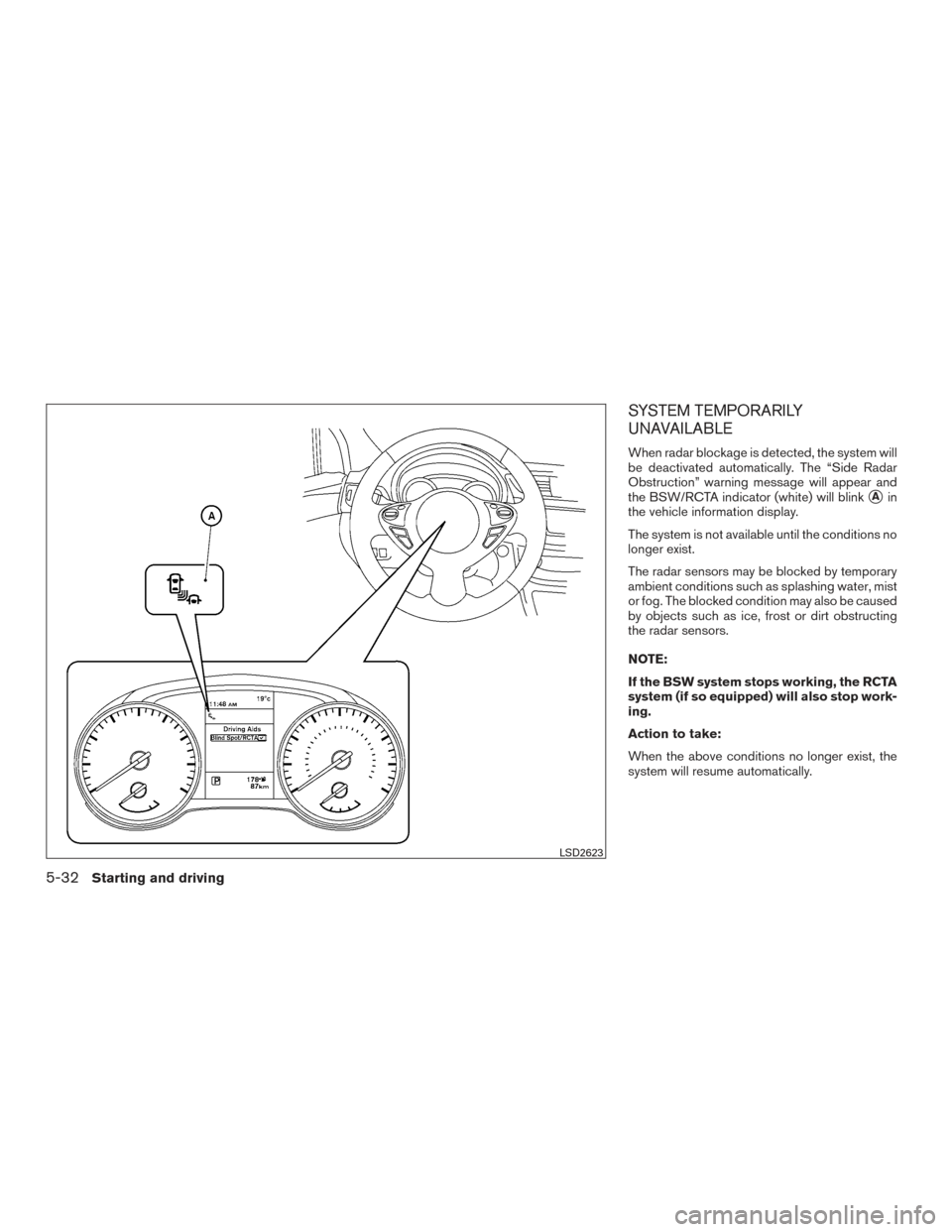
SYSTEM TEMPORARILY
UNAVAILABLE
When radar blockage is detected, the system will
be deactivated automatically. The “Side Radar
Obstruction” warning message will appear and
the BSW/RCTA indicator (white) will blink
�Ain
the vehicle information display.
The system is not available until the conditions no
longer exist.
The radar sensors may be blocked by temporary
ambient conditions such as splashing water, mist
or fog. The blocked condition may also be caused
by objects such as ice, frost or dirt obstructing
the radar sensors.
NOTE:
If the BSW system stops working, the RCTA
system (if so equipped) will also stop work-
ing.
Action to take:
When the above conditions no longer exist, the
system will resume automatically.
LSD2623
5-32Starting and driving
Page 320 of 478
Malfunction
If the BSW system malfunctions, it will turn off
automatically. The system malfunction warning
message with the BSW/RCTA indicator (orange)
will appear in the vehicle information display.
NOTE:
If the BSW system stops working, the RCTA
system (if so equipped) will also stop work-
ing.
Action to take:
Stop the vehicle in a safe location, place the
vehicle in the P (Park) position, turn the engine off
and restart the engine. If the message continues
to appear, have the system checked. It is recom-
mended that you visit a NISSAN dealer for this
service.
SYSTEM MAINTENANCE
The two radar sensors�1for the BSW and
RCTA systems are located near the rear bumper.
Always keep the area near the radar sensors
clean.
The radar sensors may be blocked by temporary
ambient conditions such as splashing water, mist
or fog.
The blocked condition may also be caused by
objects such as ice, frost or dirt obstructing the
radar sensors.
Check for and remove objects obstructing the
area around the radar sensors. Do not attach stickers (including transparent ma-
terial) , install accessories or apply additional
paint near the radar sensors.
Do not strike or damage the area around the
radar sensors. It is recommended that you visit a
NISSAN dealer if the area around the radar sen-
sors is damaged due to a collision.
Radio frequency statement
For USA
FCC : OAYSRR2B
This device complies with part 15 of the
FCC Rules. Operation is subject to the fol-
lowing two conditions:
(1) This device may not cause harmful inter-
ference, and (2) this device must accept any
interference received, including interfer-
ence that may cause undesired operation.
FCC Warning
Changes or modifications not expressly ap-
proved by the party responsible for compli-
ance could void the user’s authority to op-
erate the equipment
LSD2497
Starting and driving5-33
Page 325 of 478
HOW TO ENABLE/DISABLE THE
RCTA SYSTEM
Perform the following steps to enable or disable
the RCTA system.1. Press the
button until “Settings” dis-
plays in the vehicle information display. Use
the
button to select “Driver Assis-
tance”. Then press the ENTER button.
2. Select “Driving Aids” and press the ENTER button.
3. Select “Blind Spot/RCTA” and press the ENTER button.
When the RCTA system is turned on, the
BSW/RCTA indicator (white) in the vehicle infor-
mation display illuminates.
NOTE:
● The RCTA system is integrated into the
BSW system. There is not a separate selec-
tion in the vehicle information display for the
RCTA system. When the BSW is disabled,
the RCTA system is also disabled.
● When enabling/disabling the system, the
system setting will be retained even if the
engine is restarted.
Type B (if so equipped)
LSD2621
5-38Starting and driving
Page 329 of 478
SYSTEM TEMPORARILY
UNAVAILABLE
When radar blockage is detected, the system will
be deactivated automatically. The “Side Radar
Obstruction” warning message will appear and
the BSW/RCTA indicator (white) will blink
�Ain
the vehicle information display.
The systems are not available until the conditions
no longer exist.
The radar sensors may be blocked by temporary
ambient conditions such as splashing water, mist
or fog.
The blocked condition may also be caused by
objects such as ice, frost or dirt obstructing the
radar sensors.
NOTE:
If the BSW system stops working, the RCTA
system will also stop working.
Action to take
When the above conditions no longer exist, the
system will resume automatically.
Malfunction
When the RCTA system malfunctions, it will turn
off automatically. The system malfunction warn-
ing message with the BSW/RCTA indicator (or-
ange) will appear in the vehicle information dis-
play.
NOTE:
If the BSW system stops working, the RCTA
system (if so equipped) will also stop work-
ing.
Action to take
Stop the vehicle in a safe location, place the
vehicle in the P (Park) position, turn the engine off
and restart the engine. If the message continues
to appear, have the system checked. It is recom-
mended that you visit a NISSAN dealer for this
service.
SYSTEM MAINTENANCE
The two radar sensors�1for the BSW and
RCTA systems are located near the rear bumper.
Always keep the area near the radar sensors
clean.
The radar sensors may be blocked by temporary
ambient conditions such as splashing water, mist
or fog.
The blocked condition may also be caused by
objects such as ice, frost or dirt obstructing the
radar sensors.
Check for and remove objects obstructing the
area around the radar sensors.
LSD2497
5-42Starting and driving