2016 NISSAN PATHFINDER light
[x] Cancel search: lightPage 400 of 540
For Canada
Applicable law: Canada 310
This device complies with Industry Canada
licence-exempt RSS standard (s) . Opera-
tion is subject to the following two condi-
tions: (1) this device may not cause inter-
ference, and (2) this device must accept any
interference, including interference that
may cause undesired operation of the de-
vice.
Frequency bands: 24.05GHz – 24.25GHz
Output power: less than 20 milliwatts
PRECAUTIONS ON CRUISE
CONTROL
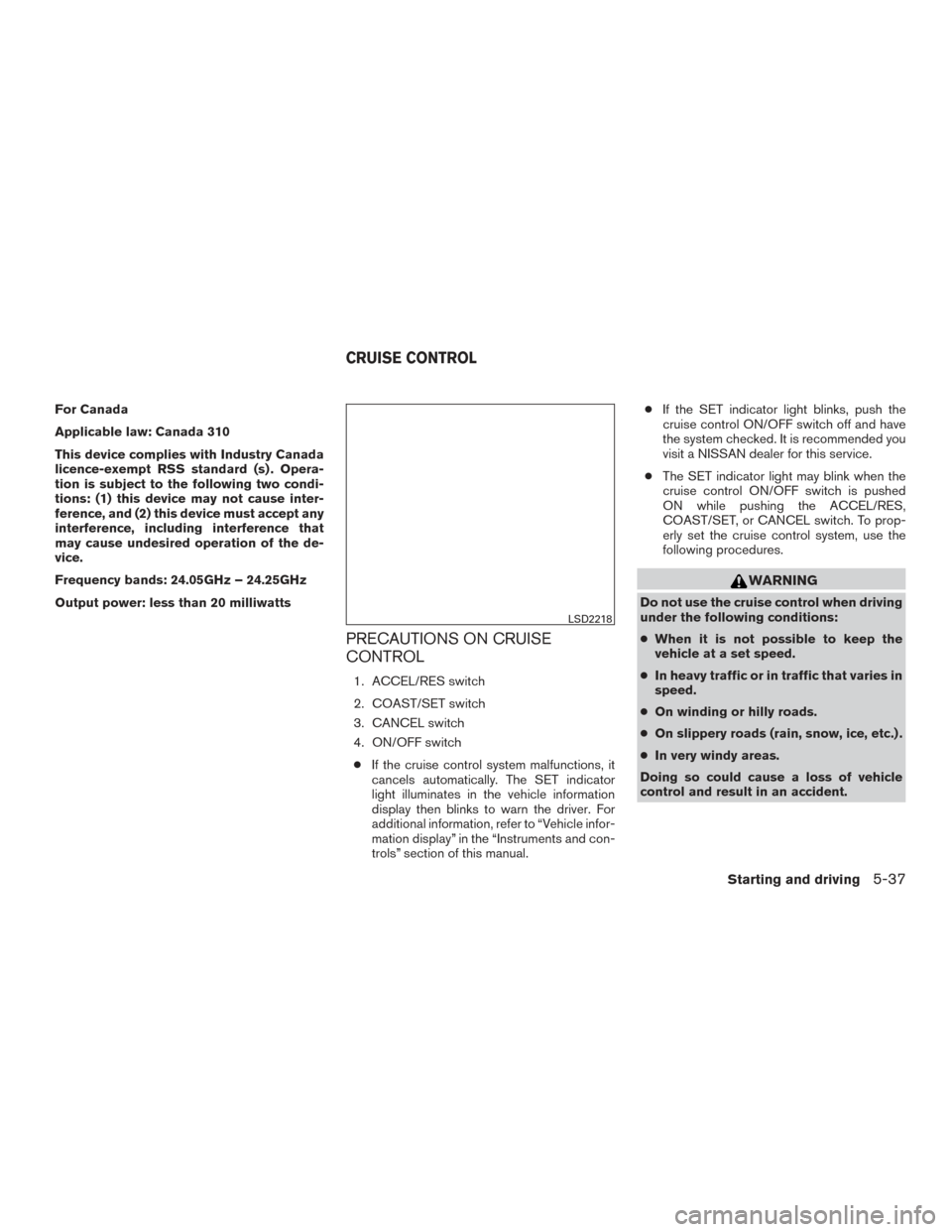
1. ACCEL/RES switch
2. COAST/SET switch
3. CANCEL switch
4. ON/OFF switch● If the cruise control system malfunctions, it
cancels automatically. The SET indicator
light illuminates in the vehicle information
display then blinks to warn the driver. For
additional information, refer to “Vehicle infor-
mation display” in the “Instruments and con-
trols” section of this manual. ●
If the SET indicator light blinks, push the
cruise control ON/OFF switch off and have
the system checked. It is recommended you
visit a NISSAN dealer for this service.
● The SET indicator light may blink when the
cruise control ON/OFF switch is pushed
ON while pushing the ACCEL/RES,
COAST/SET, or CANCEL switch. To prop-
erly set the cruise control system, use the
following procedures.
WARNING
Do not use the cruise control when driving
under the following conditions:
● When it is not possible to keep the
vehicle at a set speed.
● In heavy traffic or in traffic that varies in
speed.
● On winding or hilly roads.
● On slippery roads (rain, snow, ice, etc.) .
● In very windy areas.
Doing so could cause a loss of vehicle
control and result in an accident.
LSD2218
CRUISE CONTROL
Starting and driving5-37
Page 401 of 540
CRUISE CONTROL OPERATIONS
The cruise control allows driving at a speed be-
tween 25 - 89 mph (40 - 144 km/h) without
keeping your foot on the accelerator pedal.
To turn on the cruise control,push the
ON/OFF switch on. The CRUISE indicator light
in the vehicle information display will illuminate.
To set cruising speed, accelerate the vehicle to
the desired speed, push the COAST/SET switch
and release it. The SET indicator light in the
vehicle information display will illuminate. Take
your foot off the accelerator pedal. Your vehicle
maintains the set speed.
● To pass another vehicle, depress the ac-
celerator pedal. When you release the
pedal, the vehicle returns to the previously
set speed.
● The vehicle may not maintain the set speed
when going up or down steep hills. If this
happens, drive without the cruise control.
To cancel the preset speed, use one of the
following three methods:
● Push the CANCEL button; the SET indicator
light in the vehicle information display goes
out.
● Tap the brake pedal; the SET indicator light
goes out. ●
Push the ON/OFF switch off. Both the
CRUISE indicator light and SET indicator
light in the vehicle information display go out.
The cruise control is automatically canceled and
the SET light in the vehicle information display
goes out if: ● You depress the brake pedal while pushing
the ACCEL/RES or SET/COAST switch.
The preset speed is deleted from memory.
● The vehicle slows down more than 8 mph
(13 km/h) below the set speed.
● You move the shift lever to N (Neutral) .
To reset at a faster cruising speed, use one of
the following three methods:
● Depress the accelerator pedal. When the
vehicle attains the desired speed, push and
release the COAST/SET switch.
● Push and hold the ACCEL/RES switch.
When the vehicle attains the speed you de-
sire, release the switch.
● Push and release the ACCEL/RES switch.
Each time you do this, the set speed in-
creases by about 1 mph (1.6 km/h). To reset at a slower cruising speed,
use one
of the following three methods:
● Lightly tap the brake pedal. When the ve-
hicle attains the desired speed, push the
COAST/SET switch and release it.
● Push and hold the COAST/SET switch. Re-
lease the switch when the vehicle slows to
the desired speed.
● Push and release the COAST/SET switch.
Each time you do this, the set speed de-
creases by about 1 mph (1.6 km/h).
To resume the preset speed, push and re-
lease the ACCEL/RES switch. The vehicle re-
turns to the last set cruising speed when the
vehicle speed is over 25 mph (40 km/h).
5-38Starting and driving
Page 402 of 540
CAUTION
During the first 1,200 miles (2,000 km),
follow these recommendations to obtain
maximum engine performance and ensure
the future reliability and economy of your
new vehicle. Failure to follow these rec-
ommendations may result in shortened
engine life and reduced engine
performance.● Avoid driving for long periods at constant
speed, either fast or slow, and do not run the
engine over 4,000 RPM.
● Do not accelerate at full throttle in any gear.
● Avoid quick starts.
● Avoid hard braking as much as possible.
● Do not tow a trailer for the first 500 mi
(805 km) . Your engine, axle or other parts
could be damaged. Follow these easy-to-use Fuel Efficient Driving
Tips to help you achieve the most fuel economy
from your vehicle.
1. Use Smooth Accelerator and Brake
Pedal Application
● Avoid rapid starts and stops.
● Use smooth, gentle accelerator and
brake application whenever possible.
● Maintain constant speed while commut-
ing and coast whenever possible.
2. Maintain Constant Speed
● Look ahead to try and anticipate and mini-
mize stops.
● Synchronizing your speed with traffic
lights allows you to reduce your number
of stops.
● Maintaining a steady speed can minimize
red light stops and improve fuel effi-
ciency.
3. Use Air Conditioning (A/C) at Higher
Vehicle Speeds
● Below 40 mph (64 km/h), it is more effi-
cient to open windows to cool the vehicle
due to reduced engine load. ●
Above 40 mph (64 km/h), it is more effi-
cient to use A/C to cool the vehicle due to
increased aerodynamic drag.
● Recirculating the cool air in the cabin
when the A/C is on reduces cooling load.
4. Drive at Economical Speeds and Dis-
tances
● Observing the speed limit and not ex-
ceeding 60 mph (97 km/h) (where legally
allowed) can improve fuel efficiency due
to reduced aerodynamic drag.
● Maintaining a safe following distance be-
hind other vehicles reduces unnecessary
braking.
● Safely monitoring traffic to anticipate
changes in speed permits reduced brak-
ing and smooth acceleration changes.
● Select a gear range suitable to road con-
ditions.
5. Use Cruise Control
● Using cruise control during highway driv-
ing helps maintain a steady speed.
● Cruise control is particularly effective in
providing fuel savings when driving on flat
terrains.
BREAK-IN SCHEDULE FUEL EFFICIENT DRIVING TIPS
Starting and driving5-39
Page 405 of 540
4WD shift switch
The 4WD system is used to select the 2WD,
AUTO or LOCK mode depending on the driving
conditions.
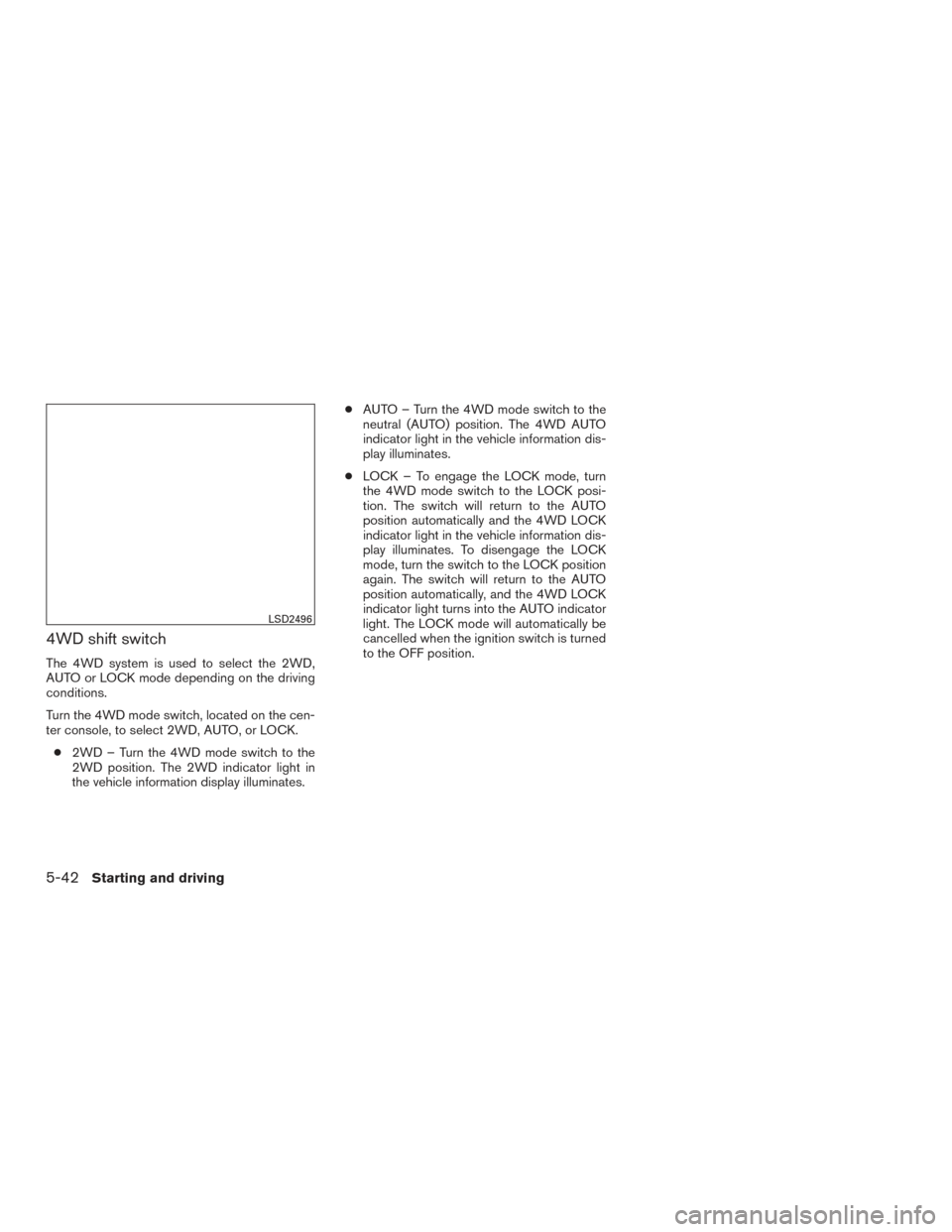
Turn the 4WD mode switch, located on the cen-
ter console, to select 2WD, AUTO, or LOCK.● 2WD – Turn the 4WD mode switch to the
2WD position. The 2WD indicator light in
the vehicle information display illuminates. ●
AUTO – Turn the 4WD mode switch to the
neutral (AUTO) position. The 4WD AUTO
indicator light in the vehicle information dis-
play illuminates.
● LOCK – To engage the LOCK mode, turn
the 4WD mode switch to the LOCK posi-
tion. The switch will return to the AUTO
position automatically and the 4WD LOCK
indicator light in the vehicle information dis-
play illuminates. To disengage the LOCK
mode, turn the switch to the LOCK position
again. The switch will return to the AUTO
position automatically, and the 4WD LOCK
indicator light turns into the AUTO indicator
light. The LOCK mode will automatically be
cancelled when the ignition switch is turned
to the OFF position.
LSD2496
5-42Starting and driving
Page 406 of 540
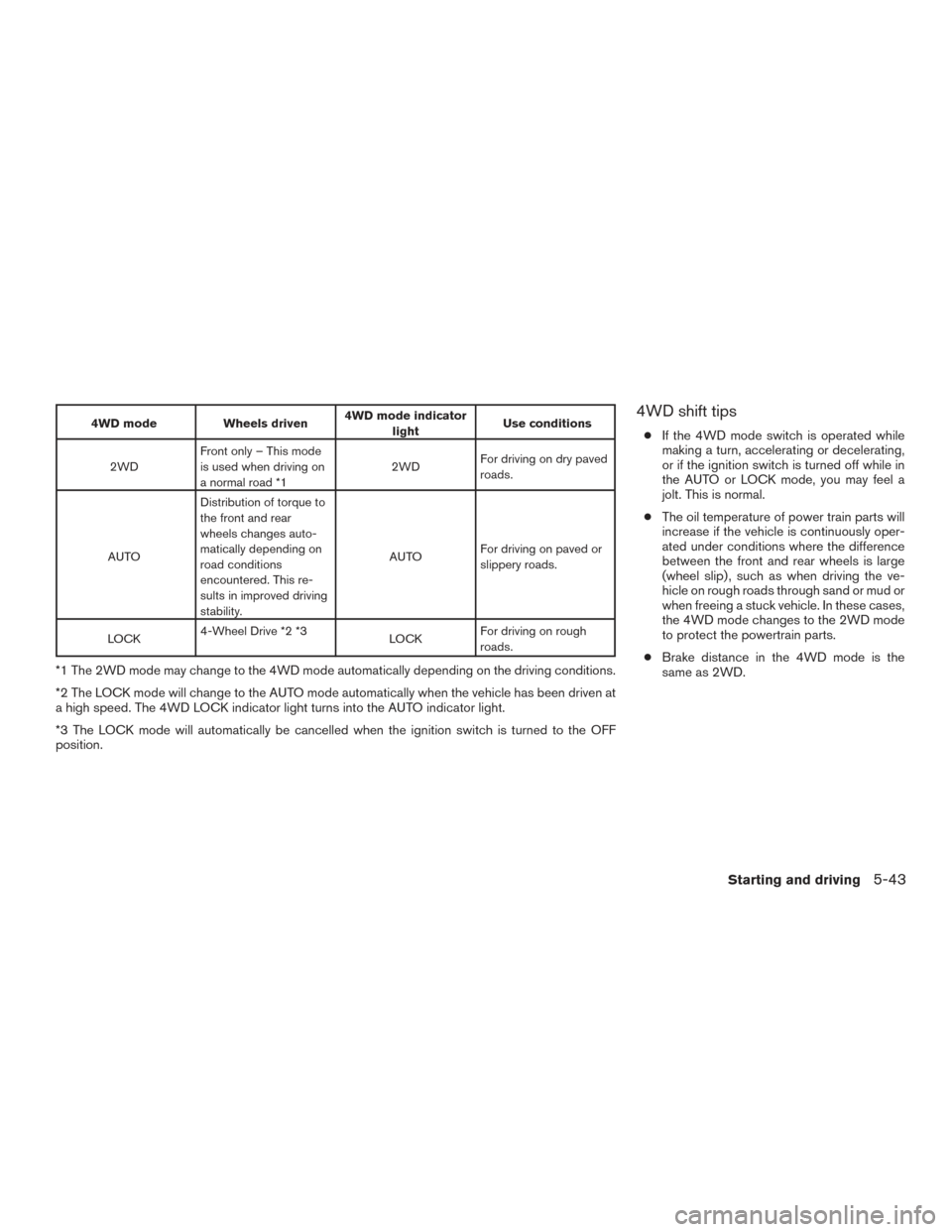
4WD modeWheels driven4WD mode indicator
light Use conditions
2WD Front only – This mode
is used when driving on
a normal road *1 2WD
For driving on dry paved
roads.
AUTO Distribution of torque to
the front and rear
wheels changes auto-
matically depending on
road conditions
encountered. This re-
sults in improved driving
stability. AUTO
For driving on paved or
slippery roads.
LOCK 4-Wheel Drive *2 *3
LOCKFor driving on rough
roads.
*1 The 2WD mode may change to the 4WD mode automatically depending on the driving conditions.
*2 The LOCK mode will change to the AUTO mode automatically when the vehicle has been driven at
a high speed. The 4WD LOCK indicator light turns into the AUTO indicator light.
*3 The LOCK mode will automatically be cancelled when the ignition switch is turned to the OFF
position.
4WD shift tips
●
If the 4WD mode switch is operated while
making a turn, accelerating or decelerating,
or if the ignition switch is turned off while in
the AUTO or LOCK mode, you may feel a
jolt. This is normal.
● The oil temperature of power train parts will
increase if the vehicle is continuously oper-
ated under conditions where the difference
between the front and rear wheels is large
(wheel slip) , such as when driving the ve-
hicle on rough roads through sand or mud or
when freeing a stuck vehicle. In these cases,
the 4WD mode changes to the 2WD mode
to protect the powertrain parts.
● Brake distance in the 4WD mode is the
same as 2WD.
Starting and driving5-43
Page 407 of 540
CAUTION
●Depending on the driving condition, the
4WD mode may automatically change
from 2WD to 4WD even when the 2WD
mode is selected. If this occurs while
driving, the 4WD mode indicator light
will not illuminate.
● Do not start the engine with the 4WD
mode switch in any mode in the follow-
ing cases:
– when the vehicle is placed on a fre- eroller or jacking up the vehicle with
the front tires raised and the rear
tires on the ground.
– when towing the vehicle with the rear tires raised from the ground.
● Operate the 4WD mode switch only
when driving straight. Do not operate
the 4WD mode switch when making a
turn or backing up.
● Do not operate the 4WD mode switch
with the front wheel spinning.
● Engine idling speed is high while warm-
ing up the engine. Be especially careful
when starting or driving on slippery sur-
faces with the 4WD mode switch set in
the AUTO mode.
4WD mode indicator lights
The 2WD, 4WD AUTO and LOCK mode indica-
tor lights are located in the vehicle information
display.
The 4WD mode indicator lights will display the
mode selected by the 4WD mode switch while
the engine is running.
The 4WD AUTO indicator light illuminates when
selecting the AUTO mode.
The 4WD LOCK indicator light illuminates when
selecting the LOCK mode and the 2WD indicator
light illuminates when selecting the 2WD mode.
5-44Starting and driving
Page 409 of 540
WARNING
●If the engine is not running or is turned
off while driving, the power assist for
the steering will not work. Steering will
be harder to operate.
● When the power steering warning light
illuminates with the engine running,
there will be no power assist for the
steering. You will still have control of
the vehicle, but the steering will be
harder to operate. Have the power
steering system checked. It is recom-
mended you visit a NISSAN dealer for
this service.
The power steering system is designed to pro-
vide power assist while driving to operate the
steering wheel with light force.
When the steering wheel is operated repeatedly
or continuously while parking or driving at a very
low speed, the power assist for the steering
wheel will be reduced. This is to prevent over-
heating of the power steering system and protect
it from getting damaged. While the power assist
is reduced, steering wheel operation will become
heavy. When the temperature of the power steer-
ing system goes down, the power assist level will
return to normal. Avoid repeating such steering wheel operations that could cause the power
steering system to overheat.
You may hear a sound when the steering wheel is
operated quickly. However, this is not a malfunc-
tion.
If the electric power steering warning light illumi-
nates while the engine is running, it may indicate
the power steering system is not functioning
properly and may need servicing. Have the power
steering system checked. It is recommended you
visit a NISSAN dealer for this service.
When the electric power steering warning light
illuminates with the engine running, there will be
no power assist for the steering, but you will still
have control of the vehicle. At this time, greater
steering effort is required to operate the steering
wheel, especially in sharp turns and at low
speeds.
For additional information, refer to “Power steer-
ing warning light” in the “Instruments and con-
trols” section of this manual.
The brake system has two separate hydraulic
circuits. If one circuit malfunctions, you will still
have braking at two wheels.
BRAKE PRECAUTIONS
Vacuum assisted brakes
The brake booster aids braking by using engine
vacuum. If the engine stops, you can stop the
vehicle by depressing the brake pedal. However,
greater foot pressure on the brake pedal will be
required to stop the vehicle and stopping dis-
tance will be longer.
Using the brakes
Avoid resting your foot on the brake pedal while
driving. This will overheat the brakes, wear out the
brake pads faster, and reduce gas mileage.
To help reduce brake wear and to prevent the
brakes from overheating, reduce speed and
downshift to a lower gear before going down a
slope or long grade. Overheated brakes may
reduce braking performance and could result in
loss of vehicle control.
POWER STEERING
BRAKE SYSTEM
5-46Starting and driving
Page 410 of 540
WARNING
●While driving on a slippery surface, be
careful when braking, accelerating or
downshifting. Abrupt braking or accel-
erating could cause the wheels to skid
and result in an accident.
● If the engine is not running or is turned
off while driving, the power assist for
the brakes will not work. Braking will be
harder.
Wet brakes
When the vehicle is washed or driven through
water, the brakes may get wet. As a result, your
braking distance will be longer and the vehicle
may pull to one side during braking.
To dry the brakes, drive the vehicle at a safe
speed while lightly pressing the brake pedal to
heat up the brakes. Do this until the brakes return
to normal. Avoid driving the vehicle at high
speeds until the brakes function correctly.
Parking brake break-in
Break-in the parking brake shoes whenever the
effect of the parking brake is weakened or when-
ever the parking brake shoes and/or
drums/rotors are replaced, in order to assure the
best braking performance. This procedure is described in the vehicle service
manual. It is recommended that you visit a
NISSAN dealer for this service.
ANTI-LOCK BRAKING SYSTEM
(ABS)
WARNING
●
The ABS is a sophisticated device, but it
cannot prevent accidents resulting from
careless or dangerous driving tech-
niques. It can help maintain vehicle con-
trol during braking on slippery surfaces.
Remember that stopping distances on
slippery surfaces will be longer than on
normal surfaces even with ABS. Stop-
ping distances may also be longer on
rough, gravel or snow covered roads, or
if you are using tire chains. Always
maintain a safe distance from the ve-
hicle in front of you. Ultimately, the
driver is responsible for safety.
● Tire type and condition may also affect
braking effectiveness.
– When replacing tires, install the specified size of tires on all four
wheels. – When installing a spare tire, make
sure that it is the proper size and type
as specified on the Tire and Loading
Information label. For additional in-
formation, refer to “Tire and loading
information label” in the “Technical
and consumer information” section
of this manual.
– For additional information, refer to “Wheels and tires” in the “Mainte-
nance and do-it-yourself” section of
this manual.
The ABS controls the brakes so the wheels do
not lock during hard braking or when braking on
slippery surfaces. The system detects the rota-
tion speed at each wheel and varies the brake
fluid pressure to prevent each wheel from locking
and sliding. By preventing each wheel from lock-
ing, the system helps the driver maintain steering
control and helps to minimize swerving and spin-
ning on slippery surfaces.
Using the system
Depress the brake pedal and hold it down. De-
press the brake pedal with firm steady pressure,
but do not pump the brakes. The ABS will oper-
ate to prevent the wheels from locking up. Steer
the vehicle to avoid obstacles.
Starting and driving5-47