Page 358 of 540
USING THE SYSTEM
Initialization
When the ignition switch is placed in the ON
position, NISSAN Voice Recognition is initialized,
which takes a few seconds. When completed,
the system is ready to accept voice commands. If
the
switch is pressed before the initializa-
tion completes, the display will show the mes-
sage: “System not ready.” or a beep sounds.
Before starting
To get the best performance from NISSAN Voice
Recognition, observe the following:
● Keep the interior of the vehicle as quiet as
possible. Close the windows to eliminate the
surrounding noises (traffic noises, vibration
sounds, etc.) , which may prevent the system
from recognizing the voice commands cor-
rectly.
● When the climate control is in the AUTO
mode, the fan speed decreases automati-
cally for easy recognition.
● Wait until a tone sounds before speaking a
command.
● Speak in a natural voice without pausing
between words.
Giving voice commands
1. Press and release thebutton located
on the steering wheel. 2. A list of commands appears on the screen,
and the system announces, “Please say a
command from the displayed list or say Help
to show all commands.”
3. After the tone sounds and the icon on the screen changes from
to, speak
a command.
4. Once a command is recognized, the system will announce the recognized command and
perform the requested action.
If the command is not recognized, the sys-
tem repeats the announcement. Repeat the
command in a clear voice after the tone.
LHA2479LHA2993
Monitor, climate, audio, phone and voice recognition systems4-161
Page 359 of 540
Operating tips
●Say a command after the tone. Voice com-
mands cannot be accepted when the icon
is
.
● If the command is not recognized, the sys-
tem repeats the announcement. Repeat the
command in a clear voice.
● Say “Back” when prompted to return to the
previous screen.
● If you want to cancel the command, press
and hold the
button. The message,
“Voice recognition is cancelled” will be an-
nounced.
● If you want to adjust the volume of the sys-
tem feedback, push the volume control
switch on the steering wheel or use the
audio system volume knob while the system
is making an announcement.
● To minimize the amount of prompts spoken
by the system in Alternate Command Mode,
use the Minimize Voice Feedback function.
To access the Minimize Voice Feedback
function press the SETTING button, then
select the “Others” key. Then select the
“Voice Recognition” key.
How to speak numbers
Voice Recognition requires a certain way to
speak numbers when giving voice commands.
Refer to the following examples.
General rule
● Only single digits 0 (zero) to 9 can be used.
● When saying the phone number 800-662-
6200, the system will accept “eight-
hundred” in addition to “eight zero zero” or
“eight oh oh”. 500, 700, and 900 are also
supported.
Examples ● 1-800-662-6200
– “One eight zero zero six six two six two zero zero”
– “One eight hundred six six two six two zero zero”
Improving Recognition of Phone numbers
You can improve the recognition of phone num-
bers by saying the phone number in three groups
of numbers. For example, when you try to call
800-662-6200, say “eight zero zero” first, and
the system will then ask you for the next 3 digits.
Then, say “six six two”. After recognition, the
system will then ask for the last 4 digits. Say, “six two zero zero”. Using this method of phone digit
entry can improve recognition performance.
NOTE:
When speaking a house number, speak the
number “0” as “zero” or “oh”. If the letter
“O” is included in the house number, it will
not be recognized as “0” even if you speak
“oh” instead of “zero”.
Settings menu
The content of the Settings Menu differs when
the system is in the Alternate Command Mode.
Command List
Displays the command list for Alternate Com-
mand Mode.
User Guide
The user guide provides basic instructions for
using Voice Recognition and accessing some
voice commands.
NOTE:
The user guide can also be accessed from
within the INFO menu after pressing the
INFO button.
4-162Monitor, climate, audio, phone and voice recognition systems
Page 360 of 540
Speaker Adaptation
Starts a system training procedure to learn the
specific sounds of your voice. For additional in-
formation, refer to “Speaker adaptation function”
in this section.
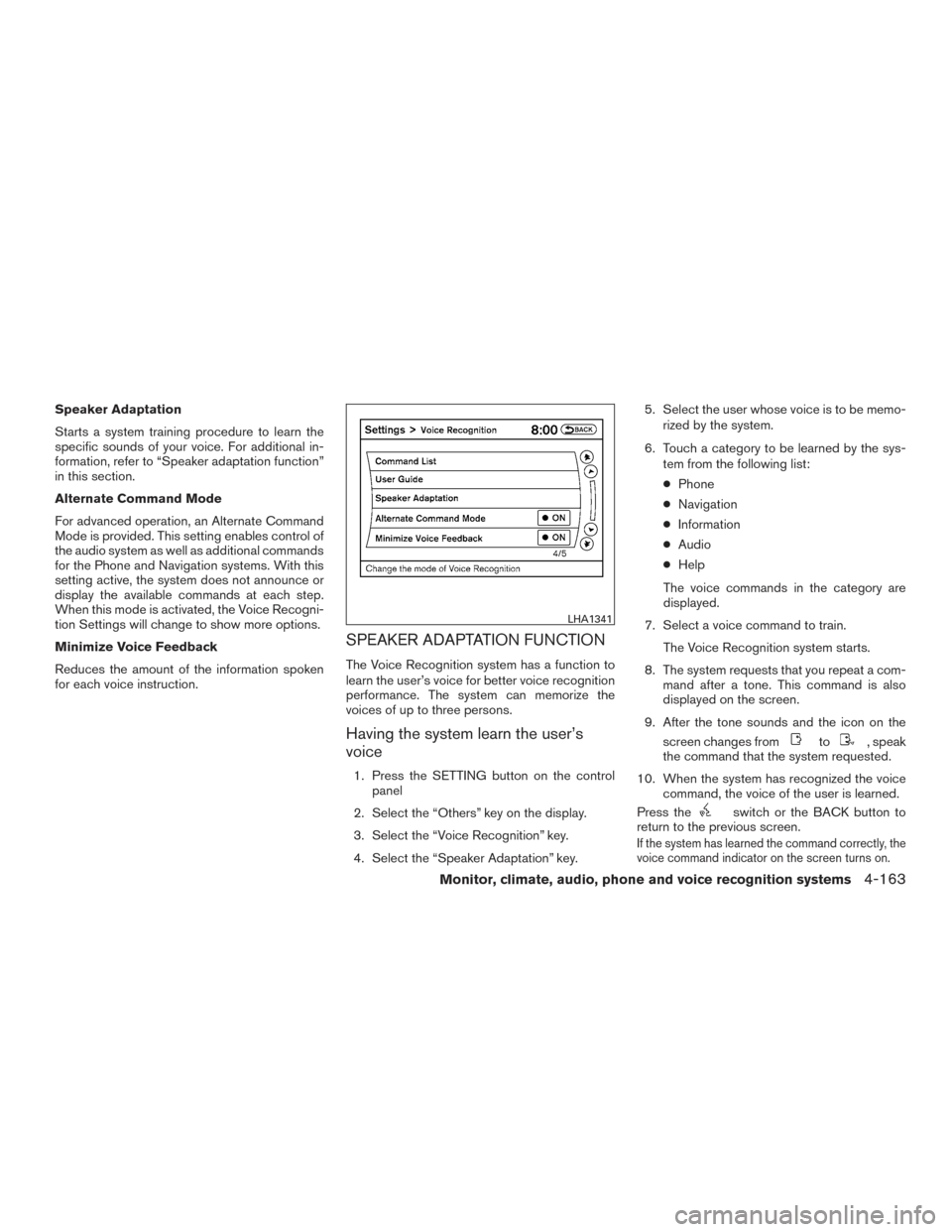
Alternate Command Mode
For advanced operation, an Alternate Command
Mode is provided. This setting enables control of
the audio system as well as additional commands
for the Phone and Navigation systems. With this
setting active, the system does not announce or
display the available commands at each step.
When this mode is activated, the Voice Recogni-
tion Settings will change to show more options.
Minimize Voice Feedback
Reduces the amount of the information spoken
for each voice instruction.
SPEAKER ADAPTATION FUNCTION
The Voice Recognition system has a function to
learn the user’s voice for better voice recognition
performance. The system can memorize the
voices of up to three persons.
Having the system learn the user’s
voice
1. Press the SETTING button on the controlpanel
2. Select the “Others” key on the display.
3. Select the “Voice Recognition” key.
4. Select the “Speaker Adaptation” key. 5. Select the user whose voice is to be memo-
rized by the system.
6. Touch a category to be learned by the sys- tem from the following list:
● Phone
● Navigation
● Information
● Audio
● Help
The voice commands in the category are
displayed.
7. Select a voice command to train. The Voice Recognition system starts.
8. The system requests that you repeat a com- mand after a tone. This command is also
displayed on the screen.
9. After the tone sounds and the icon on the screen changes from
to, speak
the command that the system requested.
10. When the system has recognized the voice command, the voice of the user is learned.
Press the
switch or the BACK button to
return to the previous screen.
If the system has learned the command correctly, the
voice command indicator on the screen turns on.
LHA1341
Monitor, climate, audio, phone and voice recognition systems4-163
Page 512 of 540
DOT (Department of Transportation) Quality
Grades: All passenger car tires must conform to
federal safety requirements in addition to these
grades.
Quality grades can be found where applicable on
the tire sidewall between tread shoulder and
maximum section width. For example:
Treadwear 200 Traction AA Temperature A
Treadwear
The treadwear grade is a comparative rating
based on the wear rate of the tire when tested
under controlled conditions on a specified gov-
ernment test course. For example, a tire graded
150 would wear one and one-half (1 1/2) times
as well on the government course as a tire graded
100. The relative performance of tires depends
upon the actual conditions of their use, however,
and may depart significantly from the norm due to
variations in driving habits, service practices and
differences in road characteristics and climate.
Traction AA, A, B and C
The traction grades, from highest to lowest, are
AA, A, B, and C. Those grades represent the
tire’s ability to stop on wet pavement as mea-
sured under controlled conditions on specified
government test surfaces of asphalt and con-
crete. A tire marked C may have poor traction
performance.WARNING
The traction grade assigned to this tire is
based on straight-ahead braking traction
tests, and does not include acceleration,
cornering, hydroplaning, or peak traction
characteristics.
Temperature A, B and C
The temperature grades are A (the highest) , B,
and C, representing the tire’s resistance to the
generation of heat, and its ability to dissipate heat
when tested under controlled conditions on a
specified indoor laboratory test wheel. Sustained
high temperature can cause the material of the
tire to degenerate and reduce tire life, and exces-
sive temperature can lead to sudden tire failure.
The grade C corresponds to a level of perfor-
mance which all passenger car tires must meet
under the Federal Motor Safety Standard No.
109. Grades B and A represent higher levels of
performance on the laboratory test wheel than
the minimum required by law.
WARNING
The temperature grade for this tire is es-
tablished for a tire that is properly inflated
and not overloaded. Excessive speed,
under-inflation, or excessive loading, ei-
ther separately or in combination, can
cause heat build-up and possible tire
failure.
UNIFORM TIRE QUALITY GRADING
Technical and consumer information9-29