2016 NISSAN NV PASSENGER VAN cruise control
[x] Cancel search: cruise controlPage 15 of 380
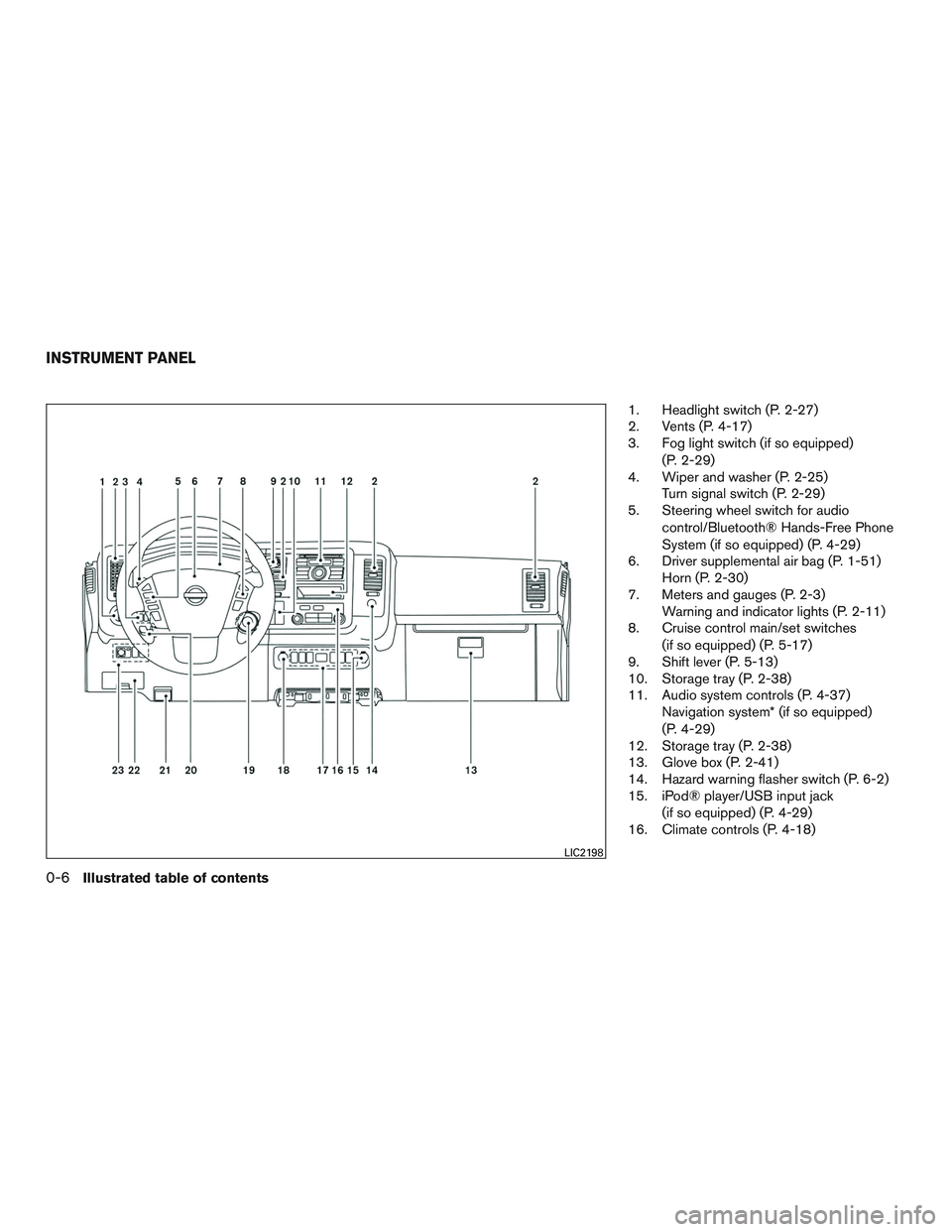
1. Headlight switch (P. 2-27)
2. Vents (P. 4-17)
3. Fog light switch (if so equipped)(P. 2-29)
4. Wiper and washer (P. 2-25) Turn signal switch (P. 2-29)
5. Steering wheel switch for audio
control/Bluetooth® Hands-Free Phone
System (if so equipped) (P. 4-29)
6. Driver supplemental air bag (P. 1-51) Horn (P. 2-30)
7. Meters and gauges (P. 2-3) Warning and indicator lights (P. 2-11)
8. Cruise control main/set switches
(if so equipped) (P. 5-17)
9. Shift lever (P. 5-13)
10. Storage tray (P. 2-38)
11. Audio system controls (P. 4-37) Navigation system* (if so equipped)
(P. 4-29)
12. Storage tray (P. 2-38)
13. Glove box (P. 2-41)
14. Hazard warning flasher switch (P. 6-2)
15. iPod® player/USB input jack
(if so equipped) (P. 4-29)
16. Climate controls (P. 4-18)
LIC2198
INSTRUMENT PANEL
0-6Illustrated table of contents
Page 87 of 380
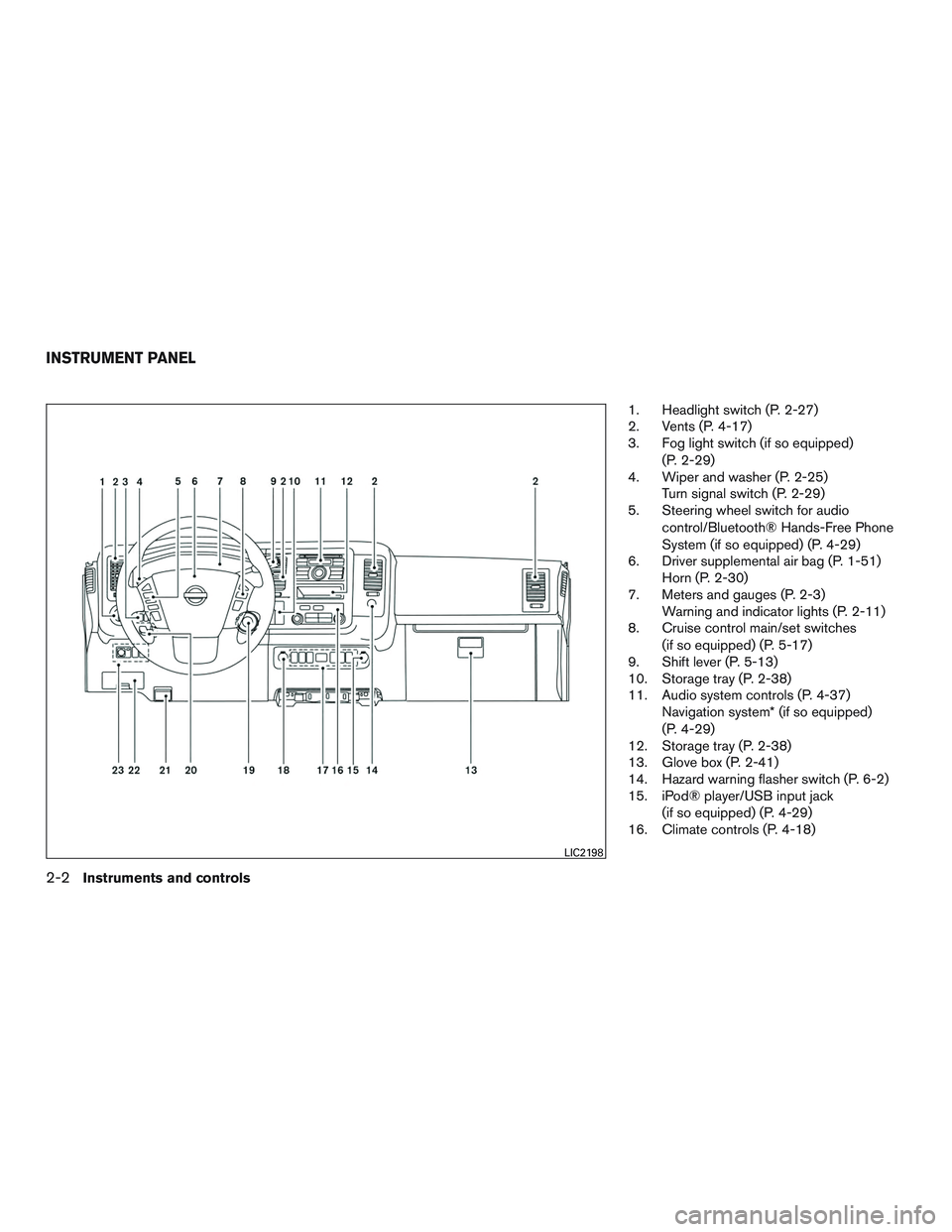
1. Headlight switch (P. 2-27)
2. Vents (P. 4-17)
3. Fog light switch (if so equipped)(P. 2-29)
4. Wiper and washer (P. 2-25) Turn signal switch (P. 2-29)
5. Steering wheel switch for audio
control/Bluetooth® Hands-Free Phone
System (if so equipped) (P. 4-29)
6. Driver supplemental air bag (P. 1-51) Horn (P. 2-30)
7. Meters and gauges (P. 2-3) Warning and indicator lights (P. 2-11)
8. Cruise control main/set switches
(if so equipped) (P. 5-17)
9. Shift lever (P. 5-13)
10. Storage tray (P. 2-38)
11. Audio system controls (P. 4-37) Navigation system* (if so equipped)
(P. 4-29)
12. Storage tray (P. 2-38)
13. Glove box (P. 2-41)
14. Hazard warning flasher switch (P. 6-2)
15. iPod® player/USB input jack
(if so equipped) (P. 4-29)
16. Climate controls (P. 4-18)
LIC2198
INSTRUMENT PANEL
2-2Instruments and controls
Page 96 of 380
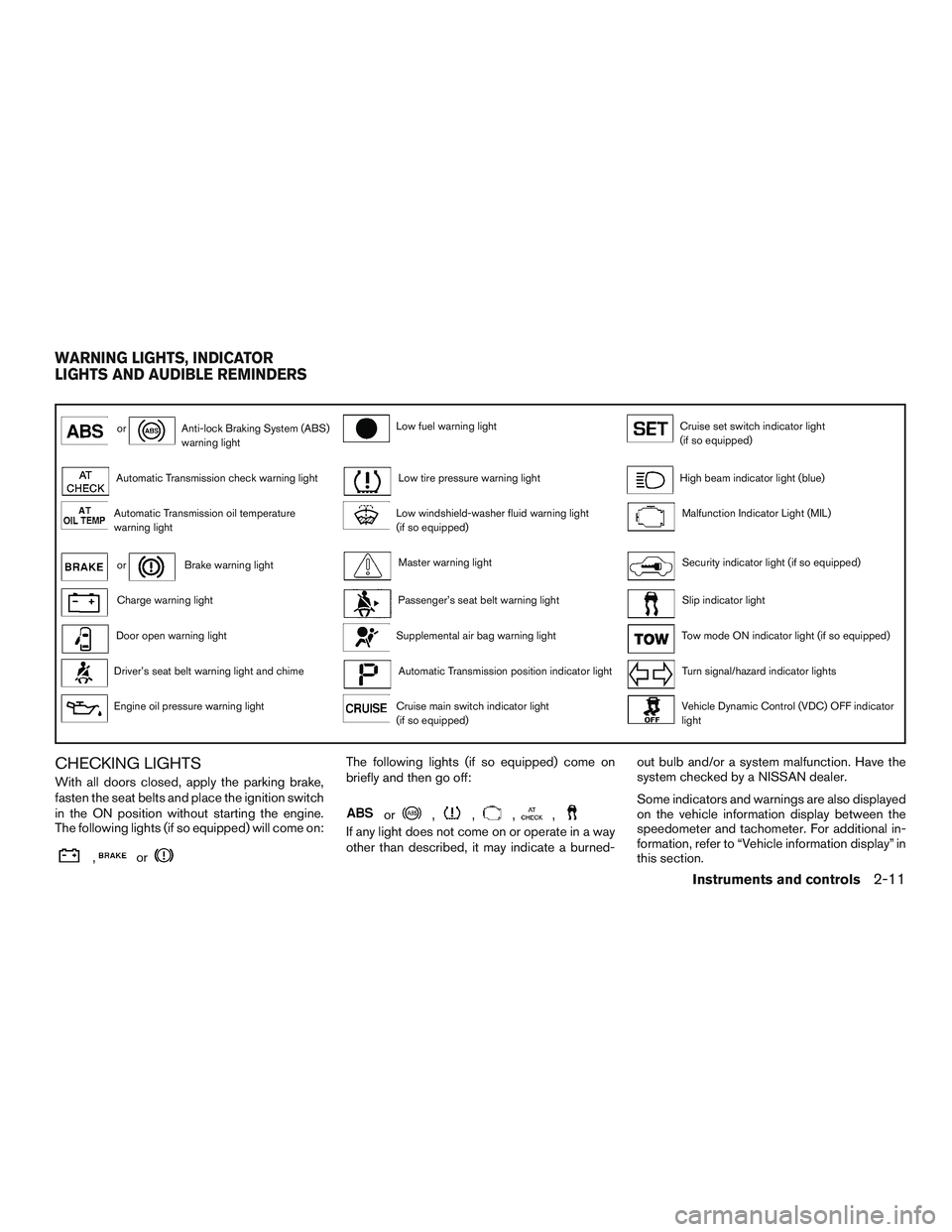
orAnti-lock Braking System (ABS)
warning lightLow fuel warning lightCruise set switch indicator light
(if so equipped)
Automatic Transmission check warning lightLow tire pressure warning lightHigh beam indicator light (blue)
Automatic Transmission oil temperature
warning lightLow windshield-washer fluid warning light
(if so equipped)Malfunction Indicator Light (MIL)
orBrake warning lightMaster warning lightSecurity indicator light (if so equipped)
Charge warning lightPassenger’s seat belt warning lightSlip indicator light
Door open warning lightSupplemental air bag warning lightTow mode ON indicator light (if so equipped)
Driver’s seat belt warning light and chimeAutomatic Transmission position indicator lightTurn signal/hazard indicator lights
Engine oil pressure warning lightCruise main switch indicator light
(if so equipped)Vehicle Dynamic Control (VDC) OFF indicator
light
CHECKING LIGHTS
With all doors closed, apply the parking brake,
fasten the seat belts and place the ignition switch
in the ON position without starting the engine.
The following lights (if so equipped) will come on:
,or
The following lights (if so equipped) come on
briefly and then go off:
or,,,,
If any light does not come on or operate in a way
other than described, it may indicate a burned-out bulb and/or a system malfunction. Have the
system checked by a NISSAN dealer.
Some indicators and warnings are also displayed
on the vehicle information display between the
speedometer and tachometer. For additional in-
formation, refer to “Vehicle information display” in
this section.
WARNING LIGHTS, INDICATOR
LIGHTS AND AUDIBLE REMINDERS
Instruments and controls2-11
Page 101 of 380
INDICATOR LIGHTS
For additional information, refer to “Vehicle infor-
mation display” in this section.
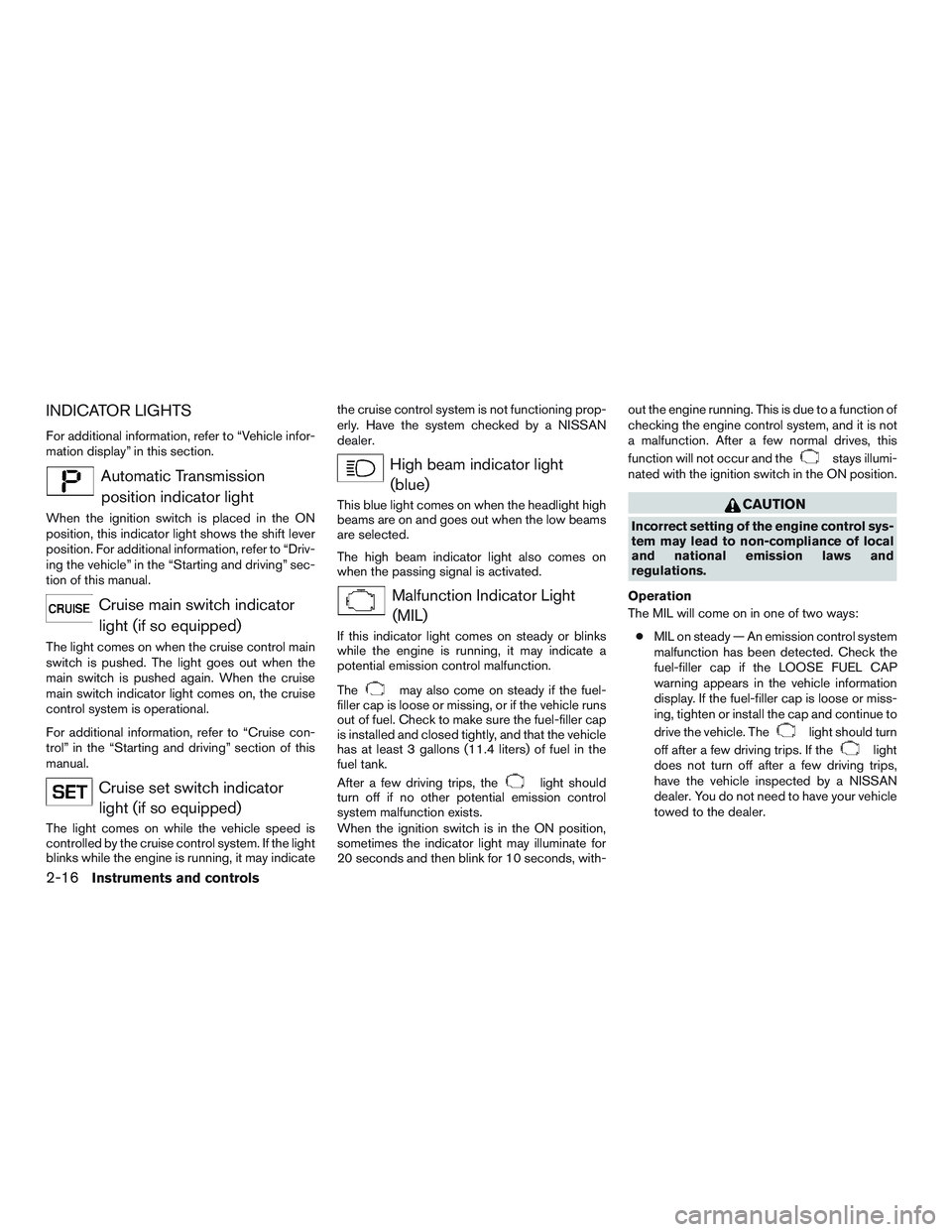
Automatic Transmissionposition indicator light
When the ignition switch is placed in the ON
position, this indicator light shows the shift lever
position. For additional information, refer to “Driv-
ing the vehicle” in the “Starting and driving” sec-
tion of this manual.
Cruise main switch indicatorlight (if so equipped)
The light comes on when the cruise control main
switch is pushed. The light goes out when the
main switch is pushed again. When the cruise
main switch indicator light comes on, the cruise
control system is operational.
For additional information, refer to “Cruise con-
trol” in the “Starting and driving” section of this
manual.
Cruise set switch indicatorlight (if so equipped)
The light comes on while the vehicle speed is
controlled by the cruise control system. If the light
blinks while the engine is running, it may indicate the cruise control system is not functioning prop-
erly. Have the system checked by a NISSAN
dealer.
High beam indicator light
(blue)
This blue light comes on when the headlight high
beams are on and goes out when the low beams
are selected.
The high beam indicator light also comes on
when the passing signal is activated.
Malfunction Indicator Light(MIL)
If this indicator light comes on steady or blinks
while the engine is running, it may indicate a
potential emission control malfunction.
The
may also come on steady if the fuel-
filler cap is loose or missing, or if the vehicle runs
out of fuel. Check to make sure the fuel-filler cap
is installed and closed tightly, and that the vehicle
has at least 3 gallons (11.4 liters) of fuel in the
fuel tank.
After a few driving trips, the
light should
turn off if no other potential emission control
system malfunction exists.
When the ignition switch is in the ON position,
sometimes the indicator light may illuminate for
20 seconds and then blink for 10 seconds, with- out the engine running. This is due to a function of
checking the engine control system, and it is not
a malfunction. After a few normal drives, this
function will not occur and the
stays illumi-
nated with the ignition switch in the ON position.
CAUTION
Incorrect setting of the engine control sys-
tem may lead to non-compliance of local
and national emission laws and
regulations.
Operation
The MIL will come on in one of two ways: ● MIL on steady — An emission control system
malfunction has been detected. Check the
fuel-filler cap if the LOOSE FUEL CAP
warning appears in the vehicle information
display. If the fuel-filler cap is loose or miss-
ing, tighten or install the cap and continue to
drive the vehicle. The
light should turn
off after a few driving trips. If the
light
does not turn off after a few driving trips,
have the vehicle inspected by a NISSAN
dealer. You do not need to have your vehicle
towed to the dealer.
2-16Instruments and controls
Page 244 of 380
5 Starting and driving
Precautions when starting and driving................5-2
Exhaust gas (carbon monoxide) ..................5-2
Three-way catalyst ..............................5-2
Driving precautions .............................5-3
Tire Pressure Monitoring System (TPMS) ..........5-3
Avoiding collision and rollover . . ..................5-6
Off-road recovery ...............................5-6
Rapid air pressure loss ..........................5-7
Drinking alcohol/drugs and driving ................5-8
Ignition switch .....................................5-8
Automatic transmission ..........................5-8
Ignition switch positions .........................5-9
NISSAN Vehicle Immobilizer System
(if so equipped) ................................5-9
Before starting the engine ......................... 5-10
Starting the engine ............................... 5-10
Driving the vehicle ................................ 5-11
Engine protection mode ........................ 5-11
Automatic transmission ......................... 5-12
Parking brake .................................... 5-17
Cruise control (if so equipped) .....................5-17
Precautions on cruise control . . .................5-17
Cruise control operations .......................5-18Break-in schedule
................................ 5-19
Fuel efficient driving tips ........................... 5-19
Increasing fuel economy ........................... 5-21
Parking/parking on hills ............................ 5-21
Power steering ................................... 5-22
Brake system .................................... 5-22
Brake precautions ............................. 5-22
Anti-lock Braking System (ABS) .................5-23
Brake assist .................................. 5-24
Active brake limited slip (ABLS) system .............5-24
Vehicle Dynamic Control (VDC) system .............5-25
Brake force distribution ........................ 5-26
Rear sonar system (RSS) (if so equipped) ...........5-27
Front and Rear Sonar System (if so equipped) .......5-28
Cold weather driving .............................. 5-30
Freeing a frozen door lock ......................5-30
Antifreeze ..................................... 5-30
Battery ....................................... 5-30
Draining
of coolant water ....................... 5-30
Tire equipment ................................ 5-30
Special winter equipment .......................5-31
Driving on snow or ice ......................... 5-31
Engine block heater (if so equipped) .............5-31
Page 260 of 380
WARNING
●Be sure the parking brake is fully re-
leased before driving. Failure to do so
can cause brake failure and lead to an
accident.
● Do not release the parking brake from
outside the vehicle.
● Do not use the shift lever in place of the
parking brake. When parking, be sure
the parking brake is fully engaged.
● To help avoid risk of injury or death
through unintended operation of the
vehicle and /or its systems, do not leave
children, people who require the assis-
tance of others or pets unattended in
your vehicle. Additionally, the tempera-
ture inside a closed vehicle on a warm
day can quickly become high enough to
cause a significant risk of injury or
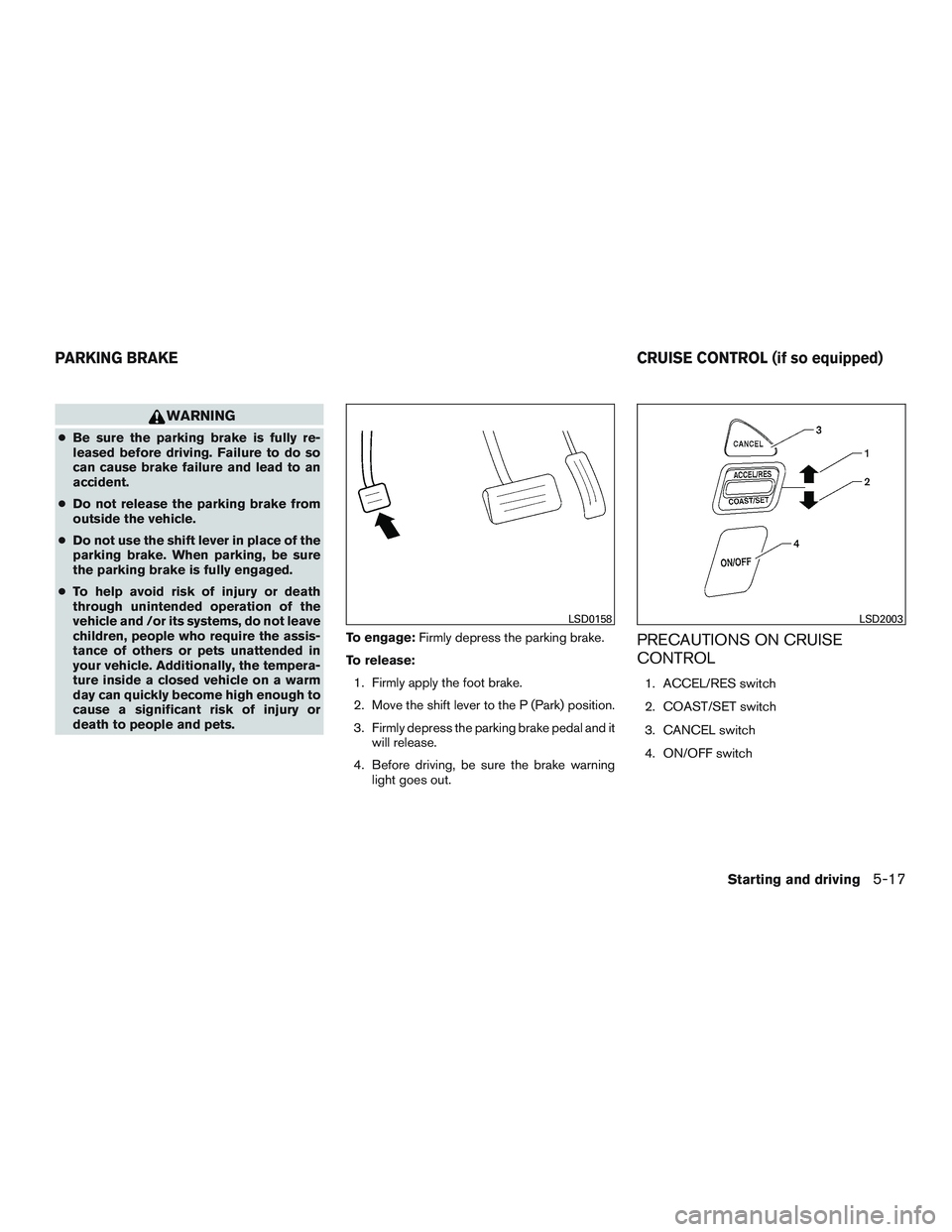
death to people and pets. To engage:
Firmly depress the parking brake.
To release: 1. Firmly apply the foot brake.
2. Move the shift lever to the P (Park) position.
3. Firmly depress the parking brake pedal and it will release.
4. Before driving, be sure the brake warning light goes out.
PRECAUTIONS ON CRUISE
CONTROL
1. ACCEL/RES switch
2. COAST/SET switch
3. CANCEL switch
4. ON/OFF switch
LSD0158LSD2003
PARKING BRAKE CRUISE CONTROL (if so equipped)
Starting and driving5-17
Page 261 of 380
●If the cruise control system malfunctions, it
cancels automatically. The SET indicator
light illuminates in the vehicle information
display then blinks to warn the driver. For
additional information, refer to “Vehicle infor-
mation display” in the “Instruments and con-
trols” section of this manual.
● If the SET indicator light blinks, push the
cruise control ON/OFF switch off and have
the system checked by a NISSAN dealer.
● The SET indicator light may blink when the
cruise control ON/OFF switch is pushed
ON while pushing the ACCEL/RES,
COAST/SET, or CANCEL switch. To prop-
erly set the cruise control system, use the
following procedures.
WARNING
Do not use the cruise control when driving
under the following conditions:
● When it is not possible to keep the
vehicle at a set speed.
● In heavy traffic or in traffic that varies in
speed.
● On winding or hilly roads.
● On slippery roads (rain, snow, ice, etc.) .
● In very windy areas. Doing so could cause a loss of vehicle
control and result in an accident.
CRUISE CONTROL OPERATIONS
The cruise control allows driving at a speed be-
tween 25 - 89 mph (40 - 144 km/h) without
keeping your foot on the accelerator pedal.
To turn on the cruise control,
push the
ON/OFF switch on. The CRUISE indicator light
in the vehicle information display will illuminate.
To set cruising speed, accelerate the vehicle to
the desired speed, push the COAST/SET switch
and release it. The SET indicator light in the
vehicle information display will illuminate. Take
your foot off the accelerator pedal. Your vehicle
maintains the set speed.
● To pass another vehicle, depress the ac-
celerator pedal. When you release the
pedal, the vehicle returns to the previously
set speed.
● The vehicle may not maintain the set speed
when going up or down steep hills. If this
happens, drive without the cruise control. To cancel the preset speed,
use one of the
following three methods:
● Push the CANCEL button; the SET indicator
light in the vehicle information display goes
out.
● Tap the brake pedal; the SET indicator light
goes out.
● Push the ON/OFF switch off. Both the
CRUISE indicator light and SET indicator
light in the vehicle information display go out.
The cruise control is automatically canceled and
the SET light in the vehicle information display
goes out if: ● You depress the brake pedal while pushing
the ACCEL/RES or SET/COAST switch.
The preset speed is deleted from memory.
● The vehicle slows down more than 8 mph
(13 km/h) below the set speed.
● You move the shift lever to N (Neutral) .
To reset at a faster cruising speed, use one of
the following three methods:
● Depress the accelerator pedal. When the
vehicle attains the desired speed, push and
release the COAST/SET switch.
5-18Starting and driving
Page 263 of 380
●Above 40 mph (64 km/h), it is more effi-
cient to use A/C to cool the vehicle due to
increased aerodynamic drag.
● Recirculating the cool air in the cabin
when the A/C is on reduces cooling load.
4. Drive at Economical Speeds and Dis-
tances
● Observing the speed limit and not ex-
ceeding 60 mph (97 km/h) (where legally
allowed) can improve fuel efficiency due
to reduced aerodynamic drag.
● Maintaining a safe following distance be-
hind other vehicles reduces unnecessary
braking.
● Safely monitoring traffic to anticipate
changes in speed permits reduced brak-
ing and smooth acceleration changes.
● Select a gear range suitable to road con-
ditions.
5. Use Cruise Control
● Using cruise control during highway driv-
ing helps maintain a steady speed.
● Cruise control is particularly effective in
providing fuel savings when driving on flat
terrains. 6.
Plan for the Shortest Route
● Utilize a map or navigation system to de-
termine the best route to save time.
7. Avoid Idling
● Shutting off your engine when safe for
stops exceeding 30–60 seconds saves
fuel and reduces emissions.
8. Buy an Automated Pass for Toll Roads
● Automated passes permit drivers to use
special lanes to maintain cruising speed
through the toll and avoid stopping and
starting.
9. Winter Warm Up
● Limit idling time to minimize impact to fuel
economy.
● Vehicles typically need no more than
30 seconds of idling at start-up to effec-
tively circulate the engine oil before driv-
ing.
● Your vehicle will reach its ideal operating
temperature more quickly while driving
versus idling. 10.
Keeping your Vehicle Cool
● Park your vehicle in a covered parking
area or in the shade whenever possible.
● When entering a hot vehicle, opening the
windows will help to reduce the inside
temperature faster, resulting in reduced
demand on your A/C system.
5-20Starting and driving