2016 NISSAN NV PASSENGER VAN buttons
[x] Cancel search: buttonsPage 143 of 380
AUTOMATIC DOOR LOCKS (if so
equipped)
●All doors lock automatically when the vehicle
speed reaches 15 mph (24 km/h).
● All doors unlock automatically when the ig-
nition is placed in the OFF position or when
the key is removed from the ignition switch.
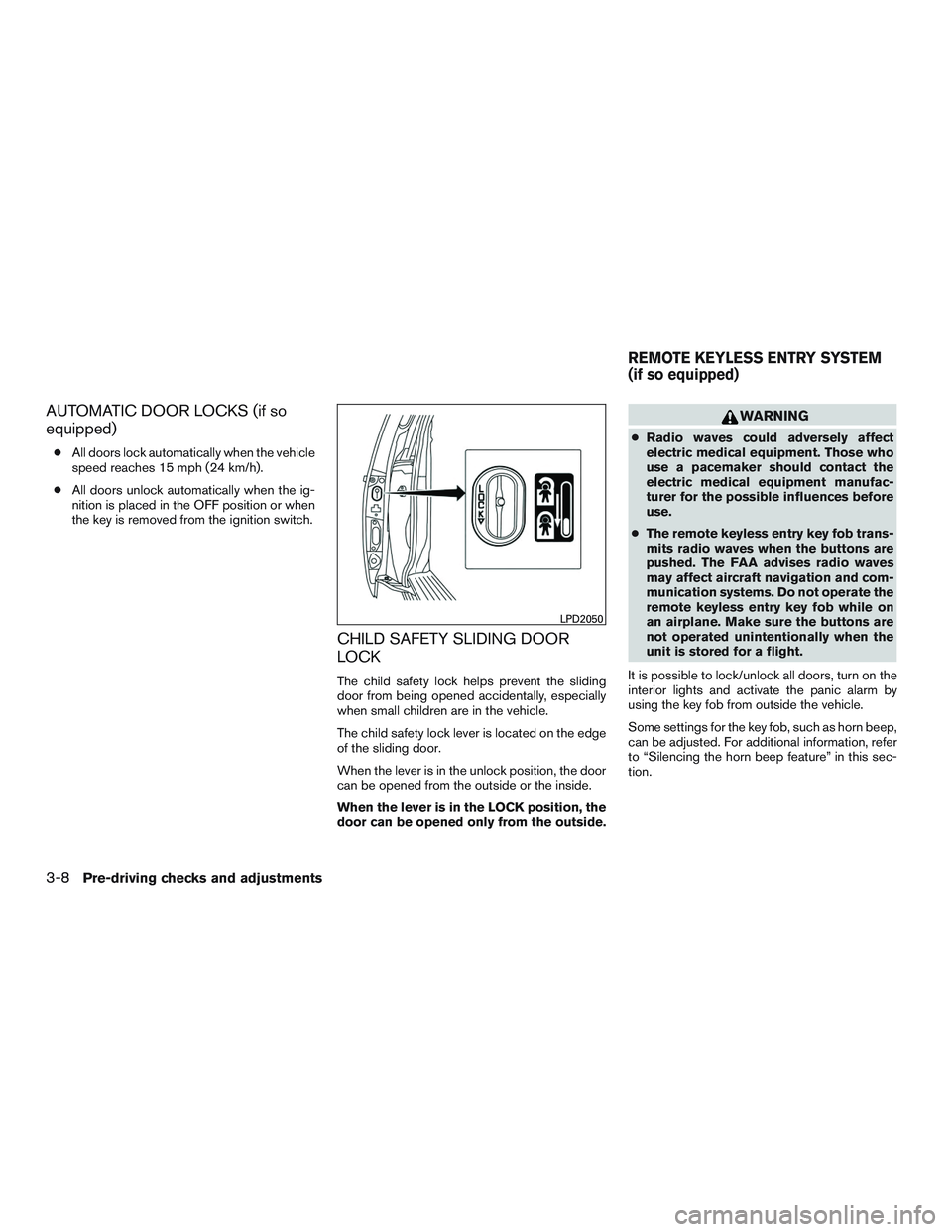
CHILD SAFETY SLIDING DOOR
LOCK
The child safety lock helps prevent the sliding
door from being opened accidentally, especially
when small children are in the vehicle.
The child safety lock lever is located on the edge
of the sliding door.
When the lever is in the unlock position, the door
can be opened from the outside or the inside.
When the lever is in the LOCK position, the
door can be opened only from the outside.
WARNING
● Radio waves could adversely affect
electric medical equipment. Those who
use a pacemaker should contact the
electric medical equipment manufac-
turer for the possible influences before
use.
● The remote keyless entry key fob trans-
mits radio waves when the buttons are
pushed. The FAA advises radio waves
may affect aircraft navigation and com-
munication systems. Do not operate the
remote keyless entry key fob while on
an airplane. Make sure the buttons are
not operated unintentionally when the
unit is stored for a flight.
It is possible to lock/unlock all doors, turn on the
interior lights and activate the panic alarm by
using the key fob from outside the vehicle.
Some settings for the key fob, such as horn beep,
can be adjusted. For additional information, refer
to “Silencing the horn beep feature” in this sec-
tion.
LPD2050
REMOTE KEYLESS ENTRY SYSTEM
(if so equipped)
3-8Pre-driving checks and adjustments
Page 146 of 380
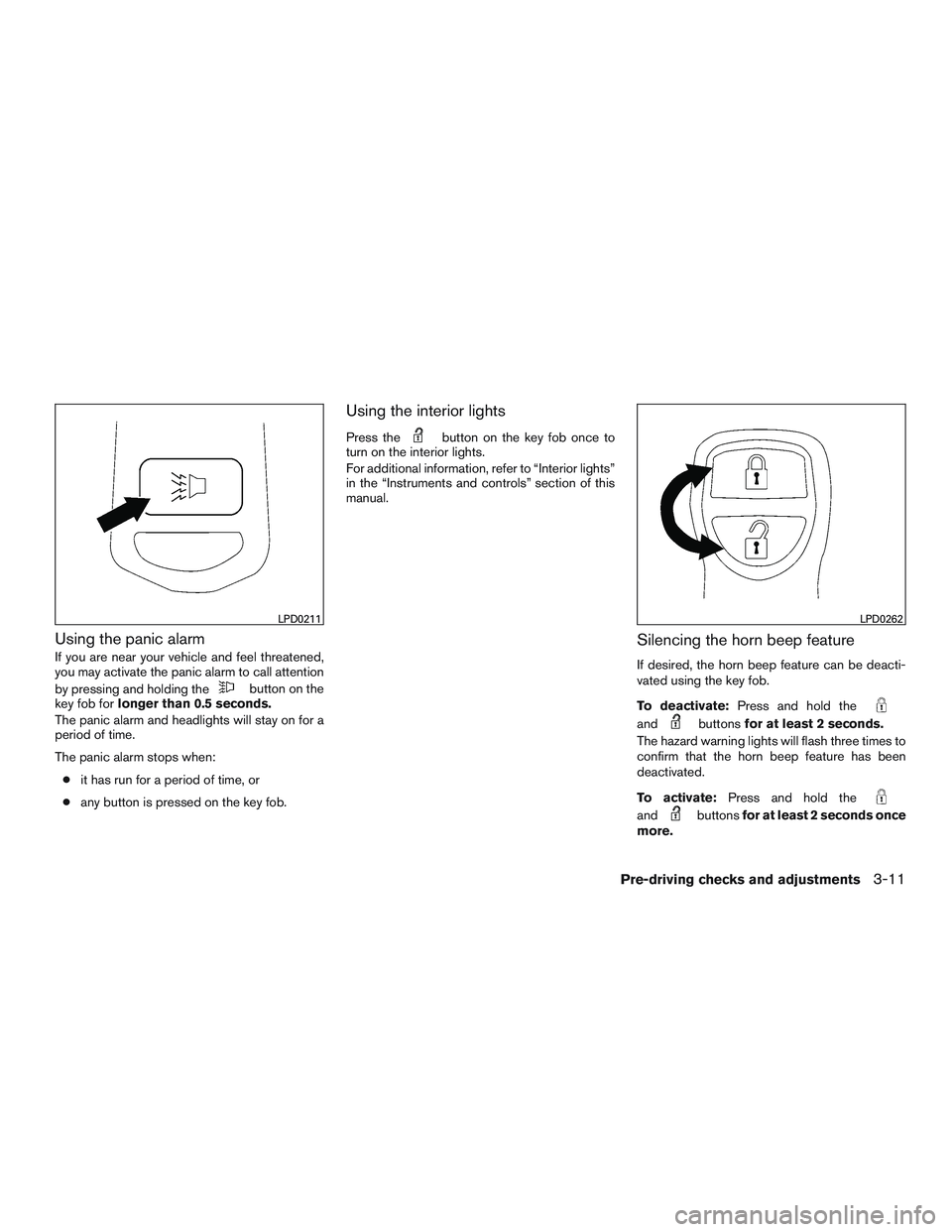
Using the panic alarm
If you are near your vehicle and feel threatened,
you may activate the panic alarm to call attention
by pressing and holding the
button on the
key fob for longer than 0.5 seconds.
The panic alarm and headlights will stay on for a
period of time.
The panic alarm stops when:
● it has run for a period of time, or
● any button is pressed on the key fob.
Using the interior lights
Press thebutton on the key fob once to
turn on the interior lights.
For additional information, refer to “Interior lights”
in the “Instruments and controls” section of this
manual.
Silencing the horn beep feature
If desired, the horn beep feature can be deacti-
vated using the key fob.
To deactivate: Press and hold the
andbuttonsfor at least 2 seconds.
The hazard warning lights will flash three times to
confirm that the horn beep feature has been
deactivated.
To activate: Press and hold the
andbuttonsfor at least 2 seconds once
more.
LPD0211LPD0262
Pre-driving checks and adjustments3-11
Page 156 of 380
4 Monitor, climate, audio, phone and voice
recognition systems
Control panel buttons — color screen with
Navigation System (if so equipped)..................4-4
How to use the touch-screen . . ..................4-5
How to use the BACK button ....................4-7
How to use the
button ...................4-7
button...................................4-9
How to use the ON-OFF button/VOL
(volume) control knob ...........................4-9
How to use the CAMERA button .................4-9
RearView Monitor (if so equipped) ..................4-10
RearView Monitor system operation .............4-11
How to read the displayed lines .................4-11
Difference between predicted and actual
distances ..................................... 4-12
How to park with predicted course lines ..........4-13
Adjusting the screen ........................... 4-15
How to turn on and off predicted course
lines ......................................... 4-15
RearView Monitor system limitations .............4-15
System maintenance ........................... 4-16
Vents ........................................... 4-17
Heater and Air Conditioner (manual)
(if so equipped) .................................. 4-18Controls
...................................... 4-19
Heater operation .............................. 4-20
Air conditioner operation .......................4-21
Air flow charts ................................. 4-22
Heater and air conditioner (automatic)
(if so equipped) .................................. 4-25
Controls ...................................... 4-26
Automatic operation ........................... 4-26
Manual operation .............................. 4-27
Operating tips ................................. 4-28
Rear seat air conditioner .......................4-28
Controls ...................................... 4-28
Servicing air conditioner ........................... 4-29
Audio system .................................... 4-29
Radio ........................................ 4-29
FM radio reception ............................ 4-30
AM radio reception ............................ 4-30
Satellite radio reception (if so equipped) .........4-30
Audio operation precautions ....................4-31
FM/AM radio with compact disc (CD) player
(Type A) (if so equipped) .......................4-37
FM/AM
radio with compact disc (CD) player
(Type B) (if so equipped) .......................4-41
Page 157 of 380
FM/AM/SAT radio with compact disc (CD)
player (if so equipped)......................... 4-45
USB (Universal Serial Bus) Connection Port
(models with Navigation System) ................4-51
iPod®* player operation with Navigation
System (if so equipped) ........................ 4-53
Bluetooth® streaming audio with Navigation
System (if so equipped) ........................ 4-56
CD care and cleaning .......................... 4-58
Steering wheel switch for audio control
(if so equipped) ............................... 4-58
Antenna ...................................... 4-59
NissanConnect
SMMobile Apps (if so equipped) .....4-60
Registering with NissanConnectSMMobile
Apps ......................................... 4-60
Connect Phone ............................... 4-60
Application Download .......................... 4-60
Car phone or CB radio ............................ 4-61
Bluetooth® Hands-Free Phone System without
Navigation System (if so equipped) .................4-61
Regulatory Information ......................... 4-63
Using the system .............................. 4-63
Control buttons ............................... 4-65
Getting started ................................ 4-66List of voice commands
........................ 4-68
Voice Adaptation (VA) mode ....................4-72
Manual control . . .............................. 4-73
Troubleshooting guide ......................... 4-74
Bluetooth® Hands-Free Phone System with
Navigation System (if so equipped) .................4-75
Regulatory Information ......................... 4-76
Voice commands .............................. 4-77
Connecting Procedure ......................... 4-77
Vehicle phonebook ............................ 4-78
Making a call . ................................. 4-78
Receiving a call ............................... 4-78
During a call .................................. 4-78
Ending a call .................................. 4-78
Text messaging. . .............................. 4-79
Bluetooth® settings ........................... 4-80
Phone settings ................................ 4-82
NISSAN Voice Recognition System
(if so equipped) .................................. 4-82
Using the system .............................. 4-82
System features ............................... 4-84
Bluetooth® Hands-Free Phone System
voice commands .............................. 4-84
Navigation System voice commands .............4-85
Page 159 of 380
WARNING
●Do not disassemble or modify this sys-
tem. If you do, it may result in accidents,
fire, or electrical shock.
● In case you notice any foreign object in
the system hardware, spill liquid on it,
or notice smoke or smell coming from it,
stop using the system immediately and
contact a NISSAN dealer. Ignoring such
conditions may lead to accidents, fire or
electrical shock.
● Do not use this system if you notice any
abnormality, such as a frozen screen or
lack of sound. Continued use of the
system may result in accident, fire or
electric shock.
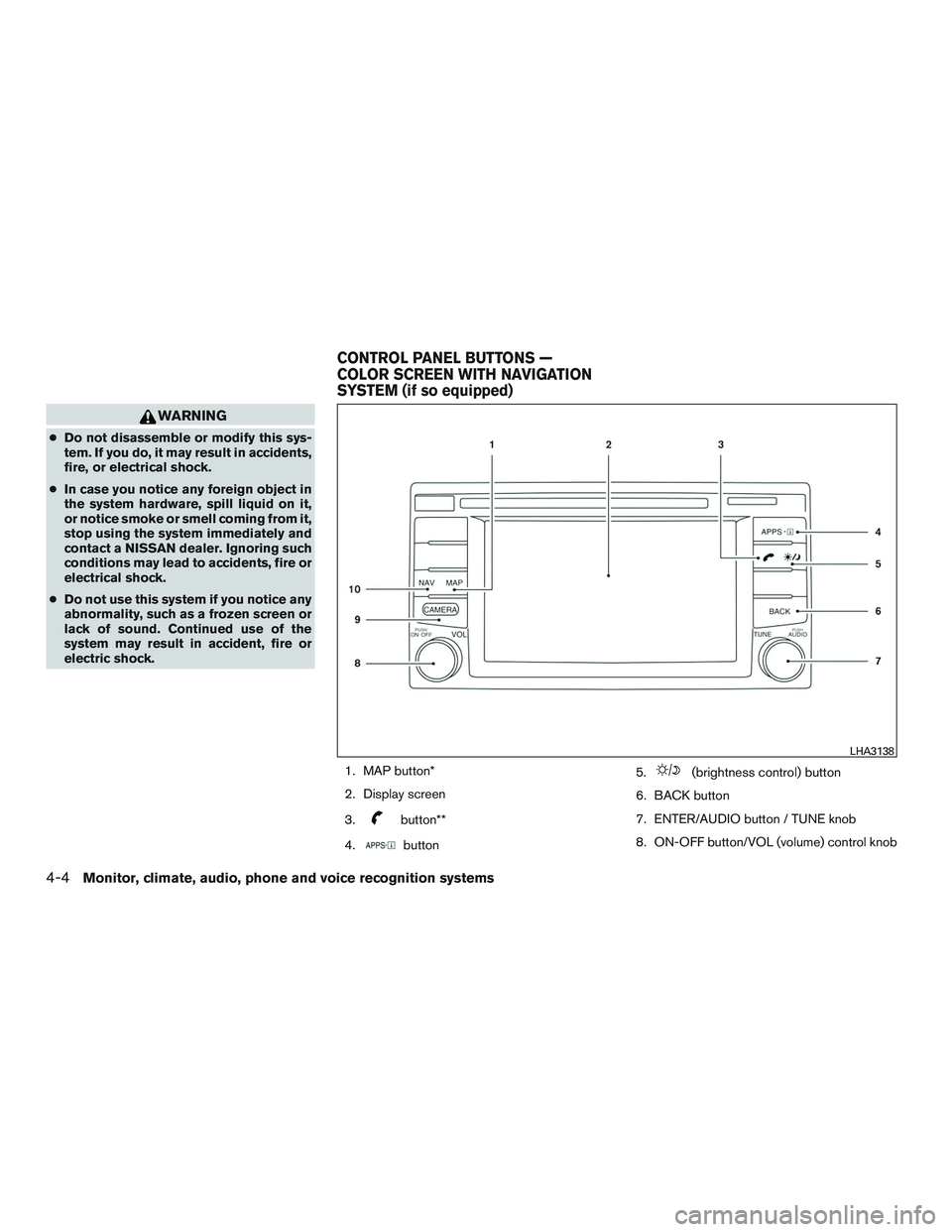
1. MAP button*
2. Display screen
3.
button**
4.
button 5.
(brightness control) button
6. BACK button
7. ENTER/AUDIO button / TUNE knob
8. ON-OFF button/VOL (volume) control knob
LHA3138
CONTROL PANEL BUTTONS —
COLOR SCREEN WITH NAVIGATION
SYSTEM (if so equipped)
4-4Monitor, climate, audio, phone and voice recognition systems
Page 160 of 380
9. CAMERA button
10. NAV button*
* For additional information, refer to the separate
Navigation System Owner’s Manual regarding
the Navigation system control buttons.
** For additional information, refer to the
“Bluetooth® Hands-Free Phone System with
navigation system” or “Bluetooth® Hands-Free
Phone System without navigation system” in this
section.
When you use this system, make sure the engine
is running.
If you use the system with the engine not
running (ignition ON or ACC) for a long
time, it will discharge the battery, and the
engine will not start.
Reference symbols:
“Example” — Words marked in quotes refer to a
key shown only on the display. These keys can be
selected by touching the screen.HOW TO USE THE TOUCH-
SCREEN
CAUTION
● The glass display screen may break if it
is hit with a hard or sharp object. If the
glass screen breaks, do not touch it.
Doing so could result in an injury.
● To clean the display, never use a rough
cloth, alcohol, benzine, thinner or any
kind of solvent or paper towel with a
chemical cleaning agent. They will
scratch or deteriorate the panel.
● Do not splash any liquid such as water
or car fragrance on the display. Contact
with liquid will cause the system to
malfunction.
To help ensure safe driving, some functions can-
not be operated while driving.
The on-screen functions that are not available
while driving will be grayed out or muted.
Park the vehicle in a safe location and then oper-
ate the navigation system.
WARNING
● ALWAYS give your full attention to
driving.
● Avoid using vehicle features that could
distract you. If distracted, you could
lose control of your vehicle and cause
an accident.
Monitor, climate, audio, phone and voice recognition systems4-5
Page 172 of 380
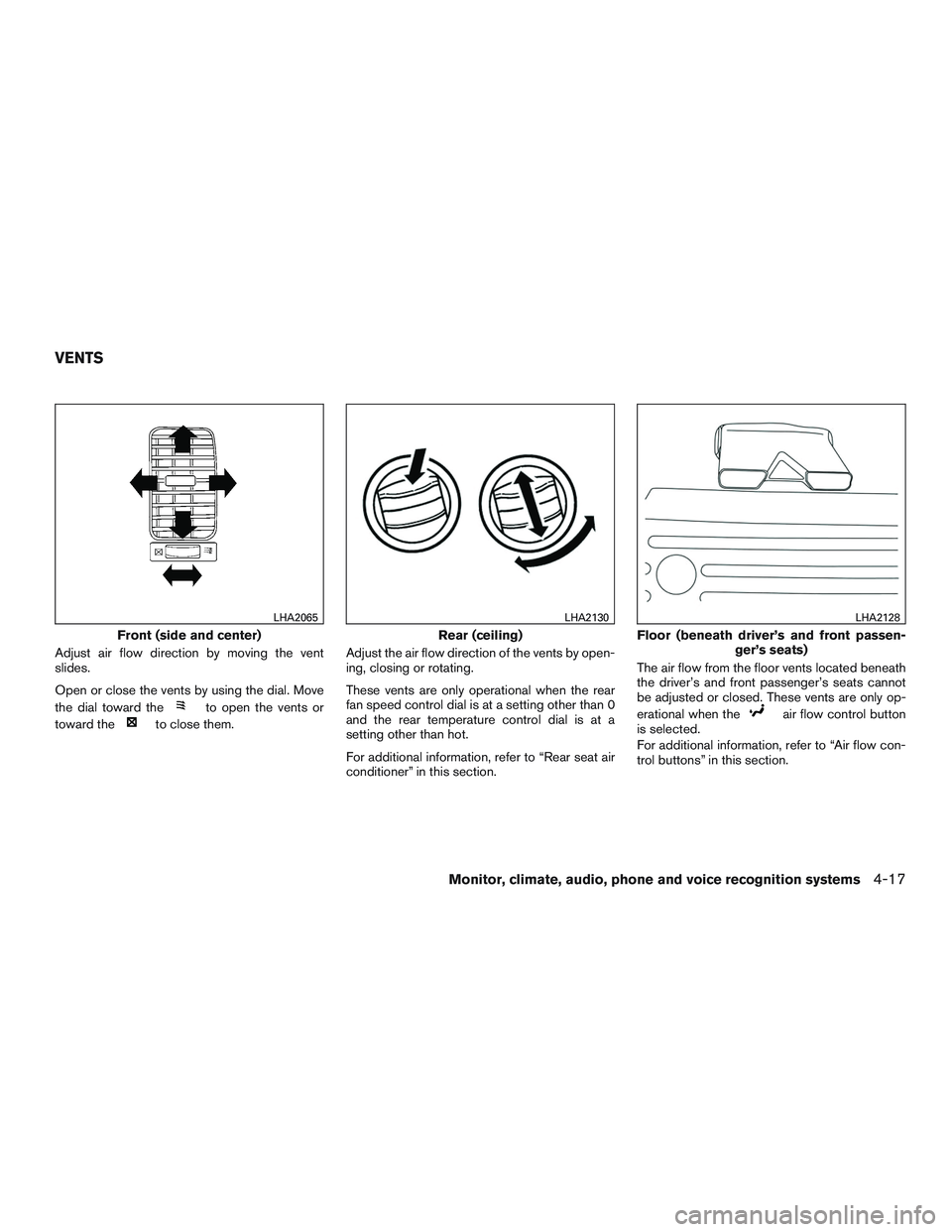
Adjust air flow direction by moving the vent
slides.
Open or close the vents by using the dial. Move
the dial toward the
to open the vents or
toward the
to close them. Adjust the air flow direction of the vents by open-
ing, closing or rotating.
These vents are only operational when the rear
fan speed control dial is at a setting other than 0
and the rear temperature control dial is at a
setting other than hot.
For additional information, refer to “Rear seat air
conditioner” in this section. The air flow from the floor vents located beneath
the driver’s and front passenger’s seats cannot
be adjusted or closed. These vents are only op-
erational when theair flow control button
is selected.
For additional information, refer to “Air flow con-
trol buttons” in this section.
Front (side and center)
LHA2065
Rear (ceiling)
LHA2130
Floor (beneath driver’s and front passen- ger’s seats)
LHA2128
VENTS
Monitor, climate, audio, phone and voice recognition systems4-17
Page 174 of 380
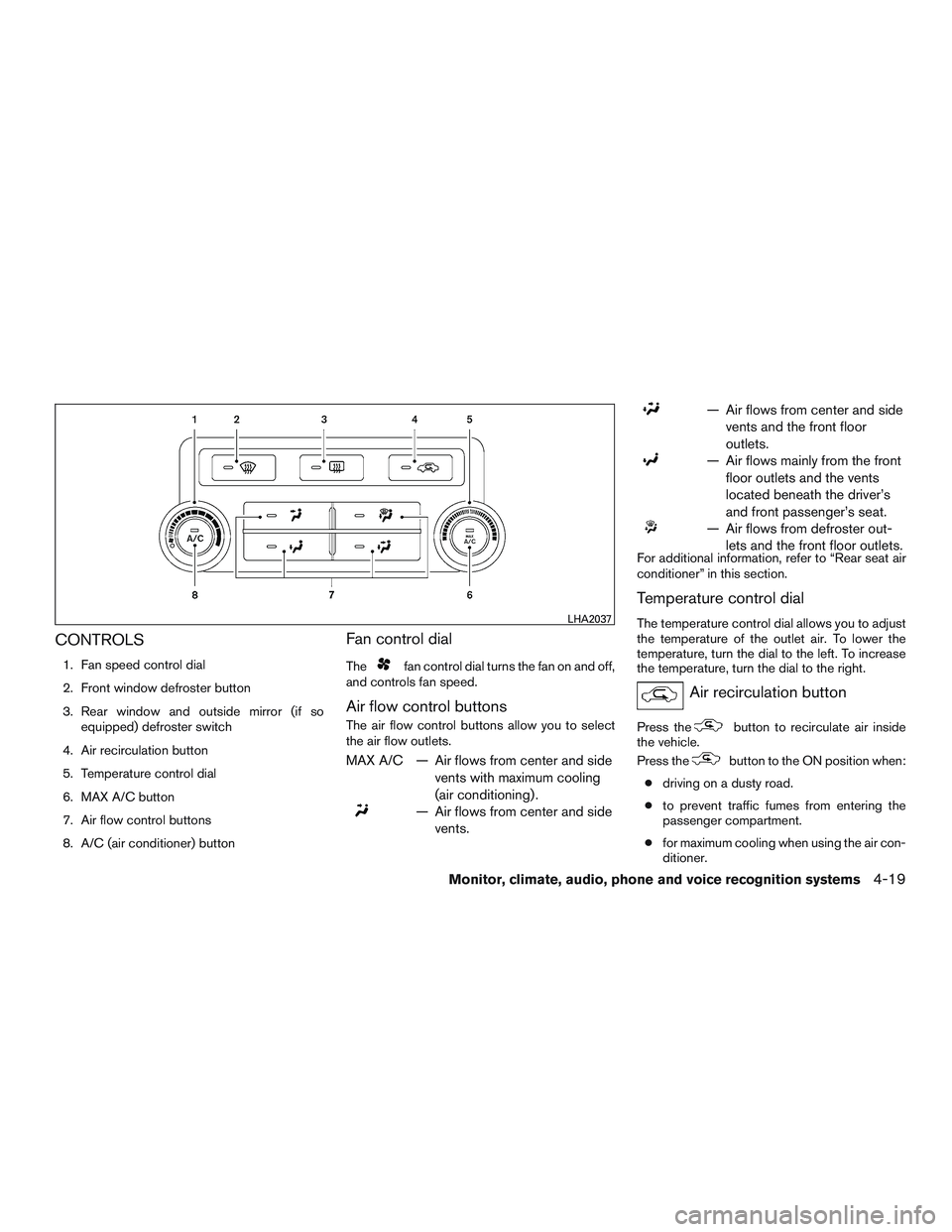
CONTROLS
1. Fan speed control dial
2. Front window defroster button
3. Rear window and outside mirror (if soequipped) defroster switch
4. Air recirculation button
5. Temperature control dial
6. MAX A/C button
7. Air flow control buttons
8. A/C (air conditioner) button
Fan control dial
Thefan control dial turns the fan on and off,
and controls fan speed.
Air flow control buttons
The air flow control buttons allow you to select
the air flow outlets.
MAX A/C — Air flows from center and side
vents with maximum cooling
(air conditioning) .
— Air flows from center and sidevents.
— Air flows from center and sidevents and the front floor
outlets.
— Air flows mainly from the frontfloor outlets and the vents
located beneath the driver’s
and front passenger’s seat.
— Air flows from defroster out-lets and the front floor outlets.
For additional information, refer to “Rear seat air
conditioner” in this section.
Temperature control dial
The temperature control dial allows you to adjust
the temperature of the outlet air. To lower the
temperature, turn the dial to the left. To increase
the temperature, turn the dial to the right.
Air recirculation button
Press thebutton to recirculate air inside
the vehicle.
Press the
button to the ON position when:
● driving on a dusty road.
● to prevent traffic fumes from entering the
passenger compartment.
● for maximum cooling when using the air con-
ditioner.
LHA2037
Monitor, climate, audio, phone and voice recognition systems4-19