2016 NISSAN LEAF light
[x] Cancel search: lightPage 321 of 437
You may hear a noise when the steering wheel is
operated quickly. However, this is not a malfunc-
tion.
If the power steering warning light
illumi-
nates while the READY to drive indicator light is
ON, it may indicate the power steering system is
not functioning properly and may need servicing.
Have the power steering system checked by a
NISSAN certified LEAF dealer. For additional
information, refer to “Power steering warning
light” in the “Instruments and controls” section of
this manual.
The power assist for steering stops operating
when both the power steering warning light and
READY to drive indicator light are illuminated.
You will still have control of the vehicle. However,
greater steering effort is needed, especially in
sharp turns and at low speeds.
BRAKE PRECAUTIONS
This vehicle is equipped with two braking sys-
tems:
1. Hydraulic brake system
2. Regenerative brake system
Hydraulic brake system
The hydraulic brake system is similar to the
brakes used on conventional vehicles.
The brake system has two separate hydraulic
circuits. If one circuit malfunctions, you will still
have braking at two wheels.
Regenerative brake system
The primary purpose of the regenerative brake
system is to provide some power to help re-
charge the Li-ion battery and extend driving
range. A secondary benefit is “engine braking”
that operates based on battery conditions.
In the D (Drive) range, when the accelerator is
released, the regenerative brake system provides
some deceleration and generates power for the
Li-ion battery. Power is also generated when the
brake pedal is applied.
When you put the shift lever in the B position and
take your foot off the accelerator pedal, more regenerative brake is applied than in the D (Drive)
position. However, during high-speed driving you
may feel that regenerative brake provides less
deceleration than the engine braking in an ordi-
nary vehicle. This is normal.
Less deceleration is provided by the regenerative
brake system when the Li-ion battery is fully
charged. Regenerative brake is automatically re-
duced when the Li-ion battery is fully charged to
prevent the Li-ion battery from becoming over-
charged. Regenerative brake is also automati-
cally reduced when the battery temperature is
high/low (indicated by the red/blue zones on the
battery temperature gauge) to prevent Li-ion bat-
tery damage.
The brake pedal should be used to slow or stop
the vehicle depending on traffic or road condi-
tions. The vehicle brakes are not affected by
regenerative brake system operation.
NOTE:
•
When applying the regenerative brakes,
you may hear a sound coming from the
regenerative brake system. This is a nor-
mal operating characteristic of an EV
(Electric vehicle) .
BRAKE SYSTEM
5-20Starting and driving
Page 322 of 437
•If the power switch position is in a posi-
tion other than ON or READY to drive, you
can stop the vehicle by depressing the
brake pedal. However, greater foot pres-
sure on the brake pedal will be required to
stop the vehicle, and the stopping dis-
tance will be longer.
• When depressing the brake pedal, the
braking pedal feel will not be smooth or
may change when the cooperative regen-
erative brake system activates. However,
the electronically controlled brake system
is operating normally and this does not
indicate a malfunction.
Using brakes
Avoid resting your foot on the brake pedal while
driving. This will cause overheating of the brakes,
wearing out the brake pads and shoes faster and
will reduce driving range.
To help reduce brake wear and to prevent the
brakes from overheating, reduce speed and se-
lect B position before going down a slope or long
grade. Overheated brakes may reduce braking
performance and could result in loss of vehicle
control.
WARNING
• While driving on a slippery surface, be careful when braking or accelerating.
Abrupt braking or accelerating could
cause the wheels to skid, which could
result in an accident.
• If the brake pedal is depressed with the EV (Electric Vehicle) system OFF,
you may feel an increased brake pedal
effort and a decreased pedal stroke. If
the BRAKE warning light does not illu-
minate and the brake pedal feels like it
has returned to its normal state after
the EV system is started, this indicates
that there is no malfunction and the
vehicle can be operated normally.
Wet brakes
When the vehicle is washed or driven through
water, the brakes may get wet. As a result, the
braking distance will be longer and the vehicle
may pull to one side during braking.
To dry brakes, drive the vehicle at a safe speed
while lightly tapping the brake pedal to heat up
the brakes. Do this until the brakes return to
normal. Avoid driving the vehicle at high speeds
until the brakes have dried.
Parking brake break-in
Break-in the parking brake shoes whenever the
stopping effect of the parking brake is weakened
or whenever the parking brake shoes and/or
drum/rotors are replaced, in order to assure the
best braking performance.
This procedure is described in the vehicle Ser-
vice Manual, and it can be performed by a
NISSAN certified LEAF dealer.
Starting and driving5-21
Page 323 of 437
ANTI-LOCK BRAKING SYSTEM
(ABS)
WARNING
• The Anti-lock Braking System (ABS) is a sophisticated device, but it cannot
prevent accidents resulting from care-
less or dangerous driving techniques.
It can help maintain vehicle control
during braking on slippery surfaces.
Remember that stopping distances on
slippery surfaces will be longer than
on normal surfaces even with ABS.
Stopping distances may also be longer
on rough, gravel or snow covered
roads, or if you are using tire chains.
Always maintain a safe distance from
the vehicle in front of you. Ultimately,
the driver is responsible for safety.
• Tire type and condition may also affect braking effectiveness.
– When replacing tires, install thespecified size of tires on all four
wheels.
– For additional information, refer to “Wheels and tires” in the “Mainte-
nance and do-it-yourself” section of
this manual.
The Anti-lock Braking System (ABS) controls the
brakes so the wheels do not lock during hard brak-
ing or when braking on slippery surfaces. The sys-
tem detects the rotation speed at each wheel and
varies the brake fluid pressure to prevent each
wheel from locking and sliding. By preventing each
wheel from locking, the system helps the driver
maintain steering control and helps to minimize
swerving and spinning on slippery surfaces.
Using the system
Depress the brake pedal and hold it down. De-
press the brake pedal with firm steady pressure,
but do not pump the brakes. The ABS will oper-
ate to prevent the wheels from locking up. Steer
the vehicle to avoid obstacles.
WARNING
Do not pump the brake pedal. Doing so
may result in increased stopping dis-
tances.
Self-test feature
The ABS includes electronic sensors, electric
pumps, hydraulic solenoids and a computer. The
computer has a built-in diagnostic feature that
tests the system each time you push the power
switch in the READY to drive position and move the vehicle at a low speed in forward or reverse.
When the self-test occurs, you may hear a
“clunk” noise and/or feel a pulsation in the brake
pedal. This is normal and does not indicate a
malfunction. If the computer senses a malfunc-
tion, it switches the ABS off and illuminates the
ABS warning light on the instrument panel. The
brake system then operates normally, but without
anti-lock assistance.
If the ABS warning light illuminates during the
self-test or while driving, have the vehicle
checked by a NISSAN certified LEAF dealer.
Normal operation
The ABS operates at speeds above 3 to 6 mph (5
to 10 km/h) . The speed varies according to road
conditions.
When the ABS senses that one or more wheels are
close to locking up, the actuator rapidly applies and
releases hydraulic pressure. This action is similar to
pumping the brakes very quickly. You may feel a
pulsation in the brake pedal and hear a noise from
under the hood or feel a vibration from the actuator
when it is operating. This is normal and indicates
that the ABS is operating properly. However, the
pulsation may indicate that road conditions are
hazardous and extra care is required while driving.
5-22Starting and driving
Page 324 of 437
The VDC system uses various sensors to monitor
driver inputs and vehicle motion. Under certain
driving conditions, the VDC system helps to per-
form the following functions.
• Controls brake pressure to reduce wheel slip onone slipping drive wheel so power is transferred
to a drive wheel on the same axle that is not
slipping.
• Controls brake pressure and traction motor out- put to reduce drive wheel slip based on vehicle
speed (traction control function) .
• Controls brake pressure at individual wheels and traction motor output to help the driver
maintain control of the vehicle in the following
conditions. – understeer (vehicle tends to not follow the steered path despite increased steering in-
put) .
– oversteer (vehicle tends to spin due to cer- tain road or driving conditions) .
The VDC system can help the driver maintain
control of the vehicle, but it cannot prevent loss of
vehicle control in all driving situations.
When the VDC system operates, the
warning in the instrument panel flashes. When
the warning flashes, note the following items. • The road may be slippery or the system may
determine some action is required to help keep
the vehicle on the steered path.
• You may feel a pulsation in the brake pedal and hear a noise or vibration from under the hood.
This is normal and indicates that the VDC sys-
tem is working properly.
• Adjust your speed and driving according to the road conditions.
For additional information, refer to “Vehicle Dy-
namic Control (VDC) warning light” and “Vehicle
Dynamic Control (VDC) off indicator light” in the
“Instruments and controls” section of this manual.
If a malfunction occurs in the system, the
warning illuminates in the lower display. The VDC
system automatically turns off when this warning
light is lit.
The VDC OFF switch is used to turn off the VDC
system. The VDC off indicator
illuminates
to indicate that the VDC system is off. When the
VDC switch is used to turn off the system, the
VDC system still operates to prevent one drive
wheel from slipping by transferring power to a
non slipping wheel. The
flashes if this
occurs. All other VDC functions are off and the
warning will not flash. The VDC System is
automatically reset to ON when the power switch is placed in the OFF position then back to the ON
position.
The computer has a built-in diagnostic feature
that tests the system each time you start the EV
and move the vehicle forward or in reverse at a
slow speed. When the self-test occurs, you may
hear a “clunk” noise and/or feel a pulsation in the
brake pedal. This is normal and is not an indica-
tion of a malfunction.
WARNING
• The VDC system is designed to help the driver maintain stability but does
not prevent accidents due to abrupt
steering operation at high speeds or
by careless or dangerous driving tech-
niques. Reduce vehicle speed and be
especially careful when driving and
cornering on slippery surfaces and al-
ways drive carefully.
VEHICLE DYNAMIC CONTROL (VDC)
SYSTEM
Starting and driving5-23
Page 331 of 437
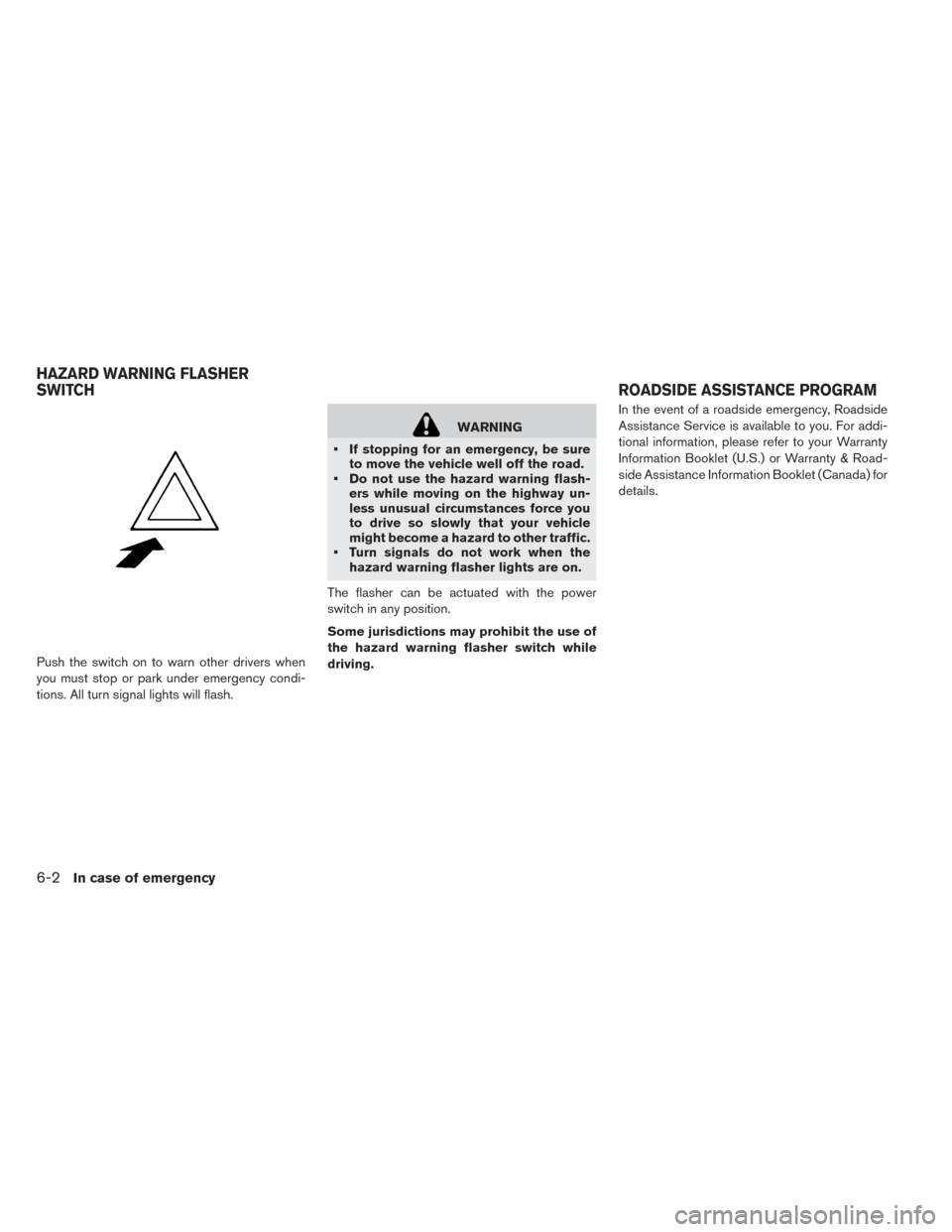
Push the switch on to warn other drivers when
you must stop or park under emergency condi-
tions. All turn signal lights will flash.
WARNING
• If stopping for an emergency, be sure to move the vehicle well off the road.
• Do not use the hazard warning flash- ers while moving on the highway un-
less unusual circumstances force you
to drive so slowly that your vehicle
might become a hazard to other traffic.
• Turn signals do not work when the hazard warning flasher lights are on.
The flasher can be actuated with the power
switch in any position.
Some jurisdictions may prohibit the use of
the hazard warning flasher switch while
driving. In the event of a roadside emergency, Roadside
Assistance Service is available to you. For addi-
tional information, please refer to your Warranty
Information Booklet (U.S.) or Warranty & Road-
side Assistance Information Booklet (Canada) for
details.
HAZARD WARNING FLASHER
SWITCH
ROADSIDE ASSISTANCE PROGRAM
6-2In case of emergency
Page 332 of 437
To shut off the EV (Electric Vehicle) system in an
emergency situation while driving, perform the
following procedure.
• Rapidly push the power switch three consecu-tive times in less than 1.5 seconds, or
• Push and hold the power switch for more than 2 seconds.TIRE PRESSURE MONITORING
SYSTEM (TPMS)
This vehicle is equipped with TPMS. It monitors
tire pressure of all tires. When the low tire pres-
sure warning light is lit, and the CHECK TIRE
PRESSURE warning appears on the vehicle in-
formation display, one or more of your tires is
significantly under-inflated. If the vehicle is being
driven with low tire pressure, the TPMS will acti-
vate and warn you of it by the low tire pressure
warning light. This system will activate only when
the vehicle is driven at speeds above 16 mph
(25 km/h) . For additional information, refer to
“Warning lights, indicator lights and audible re-
minders” in the “Instruments and controls” sec-
tion and “Tire Pressure Monitoring System
(TPMS)” in the “Starting and driving” section of
this manual.
WARNING
• Radio waves could adversely affect electric medical equipment. Those
who use a pacemaker should contact
the electric medical equipment manu-
facturer for the possible influences be-
fore use. • If the low tire pressure warning light
illuminates while driving, avoid sud-
den steering maneuvers or abrupt
braking, reduce vehicle speed, pull off
the road to a safe location and stop the
vehicle as soon as possible. Driving
with underinflated tires may perma-
nently damage the tires and increase
the likelihood of tire failure. Serious
vehicle damage could occur and may
lead to an accident and could result in
serious personal injury. Check the tire
pressure for all four tires. Adjust the
tire pressure to the recommended
COLD tire pressure shown on the Tire
and Loading Information label to turn
the low tire pressure warning light
OFF. If the light still illuminates while
driving after adjusting the tire pres-
sure, a tire may be flat. If you have a
flat tire, repair it as soon as possible.
• When a wheel is replaced, the TPMS will not function and the low tire pres-
sure warning light will flash for ap-
proximately 1 minute. The light will re-
main on after 1 minute. Contact a
NISSAN certified LEAF dealer as soon
as possible for tire replacement
and/or system resetting.
EMERGENCY EV (ELECTRIC
VEHICLE) SHUT OFF FLAT TIRE
In case of emergency6-3
Page 333 of 437
• Replacing tires with those not origi-nally specified by NISSAN could affect
the proper operation of the TPMS.
• The Genuine NISSAN Emergency Tire Repair Sealant or equivalent can be
used for temporarily repairing a tire.
Do not inject any other tire liquid or
aerosol tire sealant into the tires, as
this may cause a malfunction of tire
pressure sensors.
• NISSAN recommends using only NISSAN Genuine Emergency Tire Seal-
ant provided with your vehicle. Other
tire sealants may damage the valve
stem seal which can cause the tire to
lose air pressure. Contact a NISSAN
certified LEAF dealer as soon as pos-
sible after using tire repair sealant (for
models equipped with the emergency
tire puncture repair kit) .
REPAIRING FLAT TIRE
WARNING
• After using Emergency Tire Sealant to
repair a minor tire puncture, do not
drive the vehicle at speeds faster than
50 mph (80 km/h) . •
Immediately after using the Emer-
gency Tire Sealant to repair a minor
tire puncture, take your vehicle to a
NISSAN certified LEAF dealer to in-
spect, and repair or replace the tire.
The Emergency Tire Sealant cannot
permanently seal a punctured tire.
Continuing operation of the vehicle
without a permanent tire repair can
lead to a crash.
• If you used the Emergency Tire Sealant
to repair a minor tire puncture, a
NISSAN certified LEAF dealer will also
need to replace the TPMS sensor in
addition to repairing or replacing the
tire.
• NISSAN recommends using only
NISSAN Genuine Emergency Tire Seal-
ant provided with your vehicle. Other
tire sealants may damage the valve
stem seal which can cause the tire to
lose air pressure.
This vehicle does not have a spare tire. The
emergency tire puncture repair kit (Emergency
Tire Sealant) is supplied with the vehicle instead of a spare tire. It can be used to temporarily repair
minor tire punctures.
If possible, have the vehicle towed to a facility that
can repair or replace the flat tire. Using the emer-
gency tire puncture repair kit may cause a mal-
function of the tire pressure sensor and cause the
low tire pressure warning light to illuminate.
CAUTION
• To avoid the emergency tire puncture
kit being damaged during storage or
use:
–Only use the emergency tire punc-
ture repair kit on your vehicle. Do
not use it on other vehicles.
– Only use the kit to inflate the tires of
your vehicle and to check the vehi-
cle’s tire pressure.
– Only plug the compressor into a 12-
volt DC car power point.
– Keep the kit free of water and dirt.
– Do not disassemble or modify the
kit.
– Do not drop the kit or allow hard
impacts to the kit.
6-4In case of emergency
Page 335 of 437
Before using emergency tire puncture
repair kit
• If any foreign object (for example, a screw ornail) is embedded in the tire, do not remove it.
• Check the expiration date of the sealant (shown on the label attached to the bottle) . Never use a
sealant whose expiration date has passed.
Repairing tire:
WARNING
Observe the following precautions when
using the tire repair compound.
• Swallowing the compound is danger-
ous. Immediately drink as much water
as possible and seek prompt medical
assistance.
• Rinse well with lots of water if the
compound comes into contact with
skin or eyes. If irritation persists, seek
prompt medical attention.
• Keep the repair compound out of the
reach of children. •
The emergency repair compound may
cause a malfunction of the tire pres-
sure sensors and cause the low tire
pressure warning light to illuminate.
Have the tire pressure sensor replaced
as soon as possible.
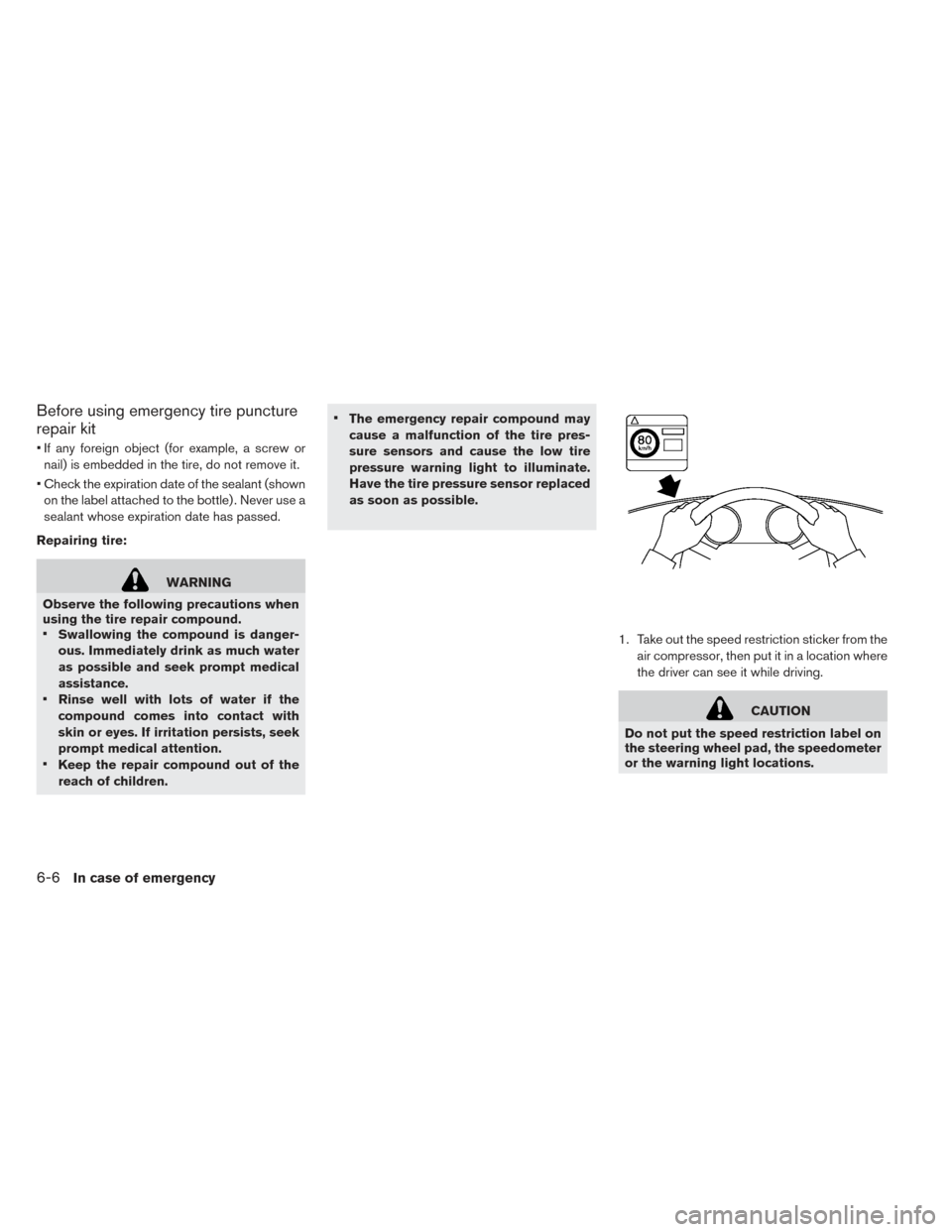
1. Take out the speed restriction sticker from theair compressor, then put it in a location where
the driver can see it while driving.
CAUTION
Do not put the speed restriction label on
the steering wheel pad, the speedometer
or the warning light locations.
6-6In case of emergency