2016 NISSAN JUKE lock
[x] Cancel search: lockPage 1 of 28

This line is only for guidance of white transparent blocks.
Therefore, when creating the actual material, please be sure to erase th\
e line.
1905578_16a_Juke_U")
QUICK REFERENCE GUIDE
2016
JUKE
Note)
This line is only for guidance of white transparent blocks.
Therefore, when creating the actual material, please be sure to erase th\
e line.
1905578_16a_Juke_US_pQRG_081915.indd 38/19/15 11:07 AM
Page 3 of 28
NEW SYSTEM FEATURES
Around View® Monitor with Moving Object Detection (MOD) (if so equipped)...............2
SiriusXM Travel Link and SiriusXM Traffic (if so equipped) ............................... 4
Siri
® Eyes Free (if so equipped) ..................................................... 4
ESSENTIAL INFORMATION
Fuel Efficient Driving............................................................... 5
Tire Pressure Monitoring System (TPMS) ............................................. 5
Loose Fuel Cap ................................................................... 6
Fuel-filler Door .................................................................... 6
Towing Your Vehicle ............................................................... 6
USB (Universal Serial Bus) Connection Port/Aux Jack and iPod
® Interface .................. 7
Setting Display Brightness and Button Brightness ......................................7
Clock Set/Adjustment ............................................................. 7
FIRST DRIVE FEATURES
NISSAN Intelligent Key® System ....................................................9
Liftgate Release ................................................................. 10
Seat Adjustments ................................................................ 10
Heated Seats (if so equipped) ..................................................... 10
Outside Mirror Control Switch ..................................................... 11
Starting/Stopping the Engine ...................................................... 11
Headlight Control Switch .......................................................... 12
Wiper and Washer Switch ......................................................... 13
Heater and Air Conditioner (automatic) (with Integrated Control Syste\
m) (if so equipped) ....14
Drive Mode (with Integrated Control System) (if so equipped) ........................... 15
FM/AM/SiriusXM
® Satellite Radio with CD Player (if so equipped) ....................... 16
Cruise Control ................................................................... 17
SYSTEM GUIDE
Trip Computer................................................................... 18
NissanConnectSM Mobile Apps ..................................................... 18
Text Messaging .................................................................. 19
Bluetooth
® Hands-free Phone System ............................................... 20
• System Operating Tips ........................................................ 20
Bluetooth
® System without Navigation (if so equipped) .................................20
Bluetooth® System with Navigation (if so equipped) ................................... 22
Navigation System (if so equipped) ................................................. 24
TAB LE OF CONTE NTS
Please see your Owner’s Manual for important safety information and system operation limitations.
• A cellular telephone should not be used for any purpose while driving
so full attention may be given to vehicle operation.
• Always wear your seat belt.
• Supplemental air bags do not replace proper seat belt usage.
• Children 12 and under should always ride in the rear seat properly secured
in child restraints or seat belts according to their age and weight.
• Do not drink and drive.
For more information, refer to the “Safety –– Seats, seat belts and supplemental restraint system (section 1)”\
,
the “Heater, air conditioner, audio and phone systems (section 4)” and the “Starting and driving (section 5)”
of your Owner’s Manual.
Additional information about your vehicle is also available in your Owne\
r’s Manual, Navigation System
Owner’s Manual and at www.nissanusa.com.
1905578_16a_Juke_US_pQRG_081915.indd 58/19/15 11:07 AM
Page 8 of 28
 VEHICLE
An all-wheel drive vehicle must be towed with all wheels off the ground \
even if the
vehicle is in the 2WD mode.
F")
6
ESSE NTIAL I N FOR MATION
TOWING YOUR VEHICLE
ALL-WHEEL DRIVE (AWD) VEHICLE
An all-wheel drive vehicle must be towed with all wheels off the ground \
even if the
vehicle is in the 2WD mode.
For proper towing and to avoid accidental damage to your vehicle, NISSAN recommends
that a service operator tow your vehicle after carefully reading the Own\
er’s
Manual precautions.
For more information, refer to the “In case of emergency (section 6)” of your Owner’s Manual.
LOOSE FUEL CAP
A LOOSE FUEL CAP warning message will
appear in the vehicle information display
1
when the fuel-filler cap is not tightened correctly.
To tighten, turn the cap clockwise until a single
click is heard.
The indicator will extinguish when the vehicle detects the fuel-filler \
cap is properly
tightened and the reset button
2 is pressed for more than 1 second.
If the cap is not properly tightened, the Malfunction Indicator Light
may illuminate.
For more information, refer to the “Instruments and controls (section 2)” and the “Pre-driving checks and
adjustments (section 3)” of your Owner’s Manual.
1
2
FUEL-FILLER DOOR
To open the fuel-filler door, pull the release 1
located on the lower instrument panel to the left
of the steering wheel.
The fuel-filler door is located on the passenger’s
side of the vehicle.
For more information, refer to the “Pre-driving checks and
adjustments (section 3)” of your Owner’s Manual.
1
1905578_16a_Juke_US_pQRG_081915.indd 68/19/15 11:07 AM
To view detailed instructional videos regarding these and other features, please go to www.nissanownersinfo.mobi.
Page 9 of 28
7
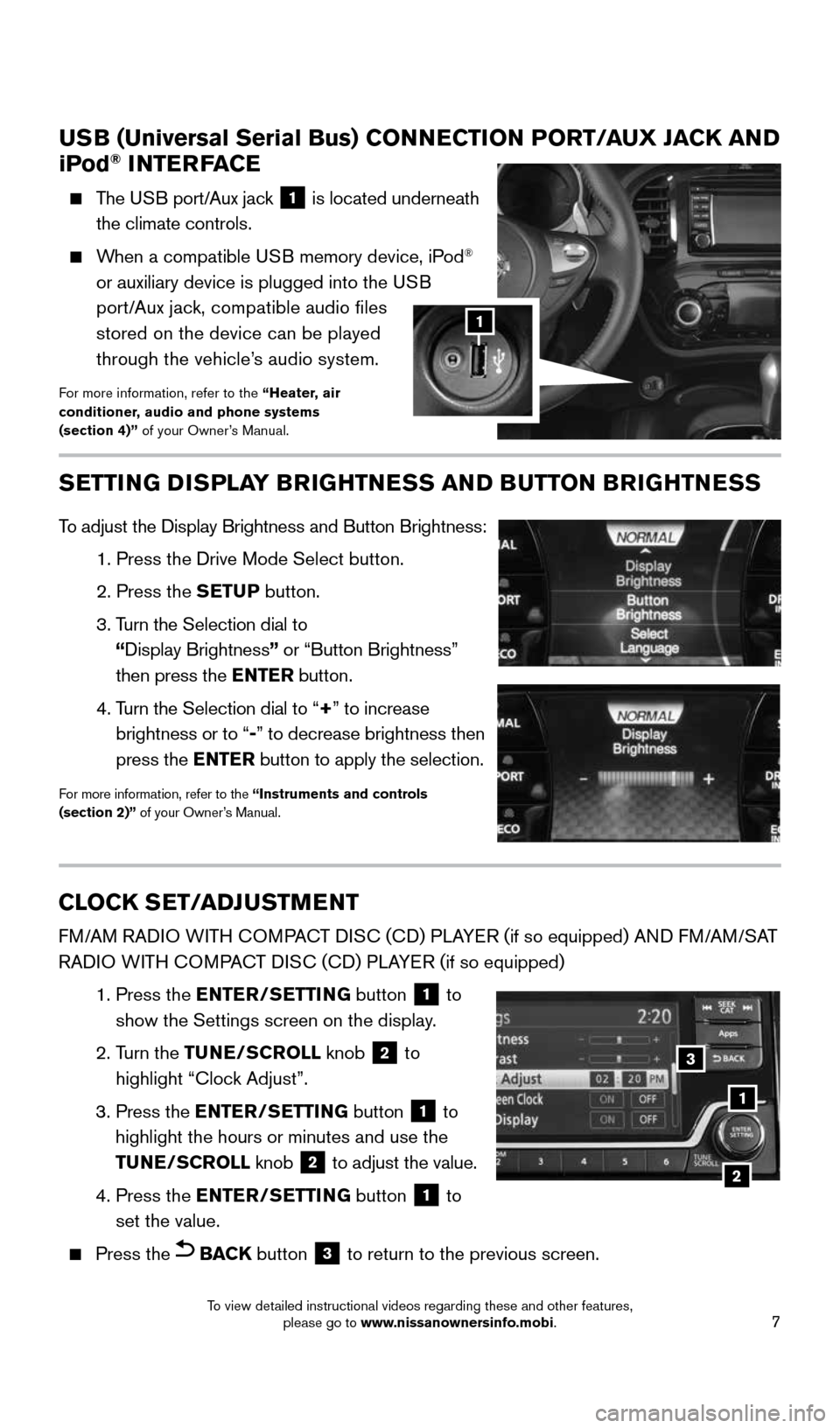
USB (Universal Serial Bus) CONNECTION PORT/AUX JACK AND
iPod® INTERFACE
The USB port/Aux jack 1 is located underneath
the climate controls.
When a compatible USB memory device, iPod®
or auxiliary device is plugged into the USB
port/Aux jack, compatible audio files
stored on the device can be played
through the vehicle’s audio system.
For more information, refer to the “Heater, air
conditioner, audio and phone systems
(section 4)” of your Owner’s Manual.
1
CLOCK SET/ADJUSTMENT
FM/AM RADIO WITH COMPACT DISC (CD) PLAYER (if so equipped) AND FM/AM/SAT
RADIO WITH COMPACT DISC (CD) PLAYER (if so equipped)
1. Press the ENTER/SETTING button
1 to
show the Settings screen on the display.
2. Turn the TUNE/SCROLL knob
2 to
highlight “Clock Adjust”.
3. Press the ENTER/SETTING button
1 to
highlight the hours or minutes and use the
TUNE/SCROLL knob
2 to adjust the value.
4. Press the ENTER/SETTING button
1 to
set the value.
Press the BACK button 3 to return to the previous screen.
1
2
SETTING DISPLAY BRIGHTNESS AND BUTTON BRIGHTNESS
To adjust the Display Brightness and Button Brightness:
1. Press the Drive Mode Select button.
2. Press the SETUP button.
3. Turn the Selection dial to
“ Display Brightness” or “Button Brightness”
then press the ENTER button.
4. Turn the Selection dial to “+ ” to increase
brightness or to “- ” to decrease brightness then
press the ENTER button to apply the selection.
For more information, refer to the “Instruments and controls
(section 2)” of your Owner’s Manual.
1
3
2
1905578_16a_Juke_US_pQRG_081915.indd 78/19/15 11:07 AM
To view detailed instructional videos regarding these and other features, please go to www.nissanownersinfo.mobi.
Page 10 of 28
8
WITH NAVIGATION (if so equipped)
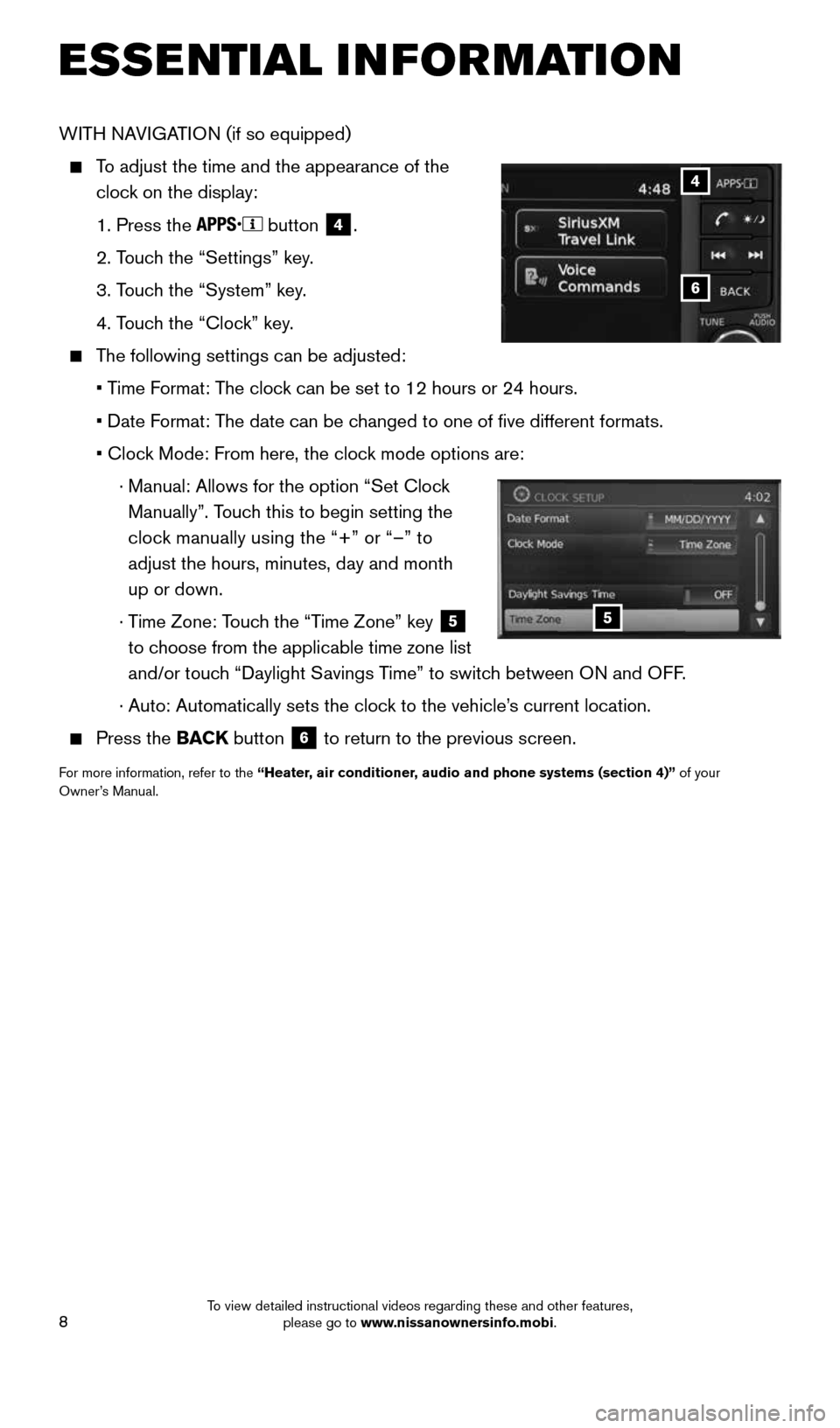
To adjust the time and the appearance of the
clock on the display:
1. Press the
button
4.
2. Touch the “Settings” key.
3. Touch the “System” key.
4. Touch the “Clock” key.
The following settings can be adjusted:
• Time Format: The clock can be set to 12 hours or 24 hours.
• Date Format: The date can be changed to one of five different formats.
• Clock Mode: From here, the clock mode options are:
· Manual: Allows for the option “Set Clock
Manually”. Touch this to begin setting the
clock manually using the “+” or “–” to
adjust the hours, minutes, day and month
up or down.
· Time Zone: Touch the “Time Zone” key
5
to choose from the applicable time zone list
and/or touch “Daylight Savings Time” to switch between ON and OFF.
· Auto: Automatically sets the clock to the vehicle’s current location.
Press the BACK button 6 to return to the previous screen.
For more information, refer to the “Heater, air conditioner, audio and phone systems (section 4)” of your
Owner’s Manual.
6
4
5
ESSE NTIAL I N FOR MATION
1905578_16a_Juke_US_pQRG_081915.indd 88/19/15 11:07 AM
To view detailed instructional videos regarding these and other features, please go to www.nissanownersinfo.mobi.
Page 11 of 28
9
FIRST DRIVE FEATURES
NISSAN INTELLIGENT KEY® SYSTE M
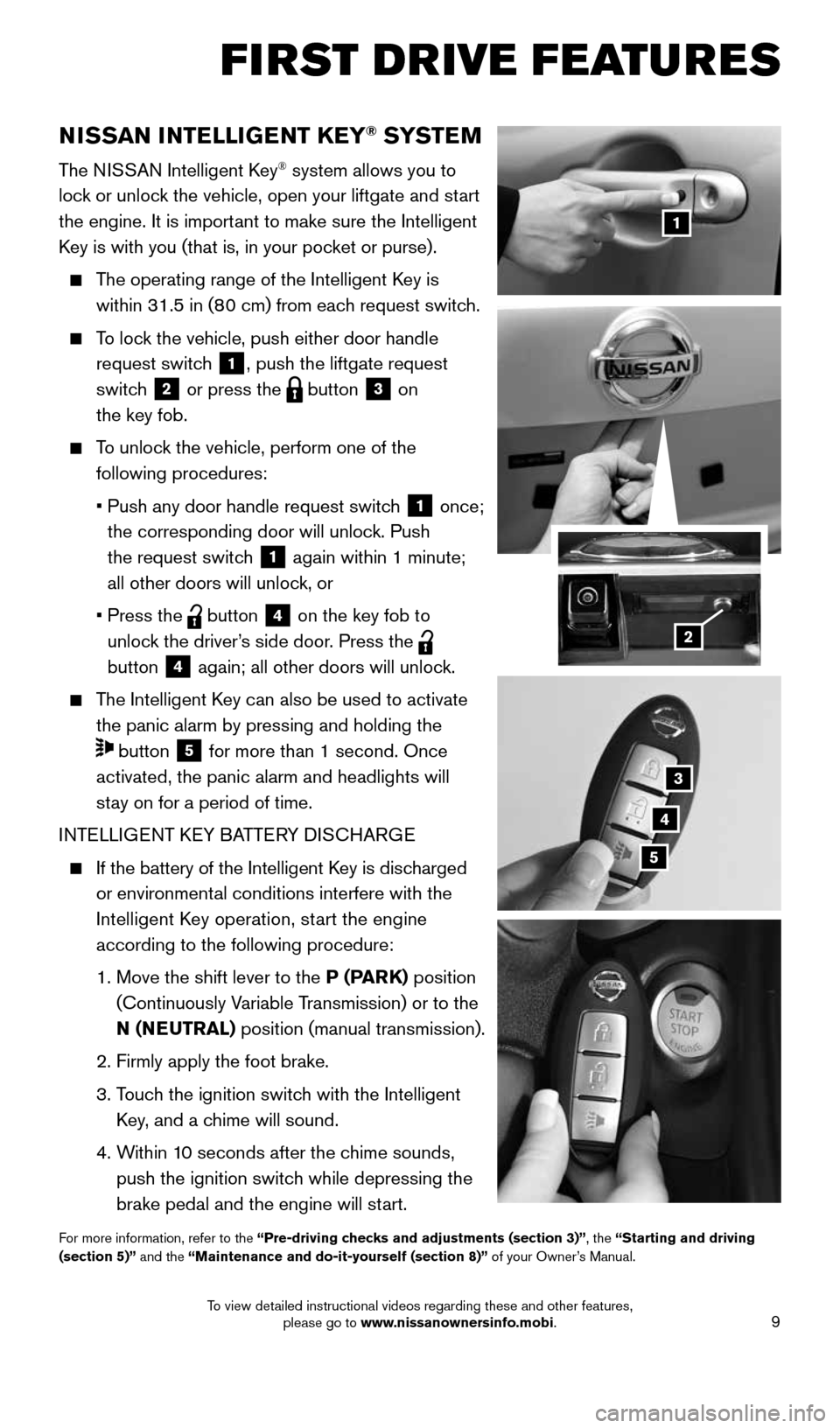
The NISSAN Intelligent Key® system allows you to
lock or unlock the vehicle, open your liftgate and start
the engine. It is important to make sure the Intelligent
Key is with you (that is, in your pocket or purse).
The operating range of the Intelligent Key is
within 31.5 in (80 cm) from each request switch.
To lock the vehicle, push either door handle
request switch
1, push the liftgate request
switch
2 or press the button 3 on
the key fob.
To unlock the vehicle, perform one of the
following procedures:
• Push any door handle request switch
1 once;
the corresponding door will unlock. Push
the request switch
1 again within 1 minute;
all other doors will unlock, or
• Press the
button 4 on the key fob to
unlock the driver’s side door. Press the
button
4 again; all other doors will unlock.
The Intelligent Key can also be used to activate
the panic alarm by pressing and holding the
button 5 for more than 1 second. Once
activated, the panic alarm and headlights will
stay on for a period of time.
INTELLIGENT KEY BATTERY DISCHARGE
If the battery of the Intelligent Key is discharged
or environmental conditions interfere with the
Intelligent Key operation, start the engine
according to the following procedure:
1. Move the shift lever to the P (PARK) position
(Continuously Variable Transmission) or to the
N (NEUTRAL) position (manual transmission).
2. Firmly apply the foot brake.
3. Touch the ignition switch with the Intelligent
Key, and a chime will sound.
4. Within 10 seconds after the chime sounds,
push the ignition switch while depressing the
brake pedal and the engine will start.
For more information, refer to the “Pre-driving checks and adjustments (section 3)”, the “Starting and driving
(section 5)” and the “Maintenance and do-it-yourself (section 8)” of your Owner’s Manual.
1
3
4
5
2
1905578_16a_Juke_US_pQRG_081915.indd 98/19/15 11:07 AM
To view detailed instructional videos regarding these and other features, please go to www.nissanownersinfo.mobi.
Page 12 of 28
10
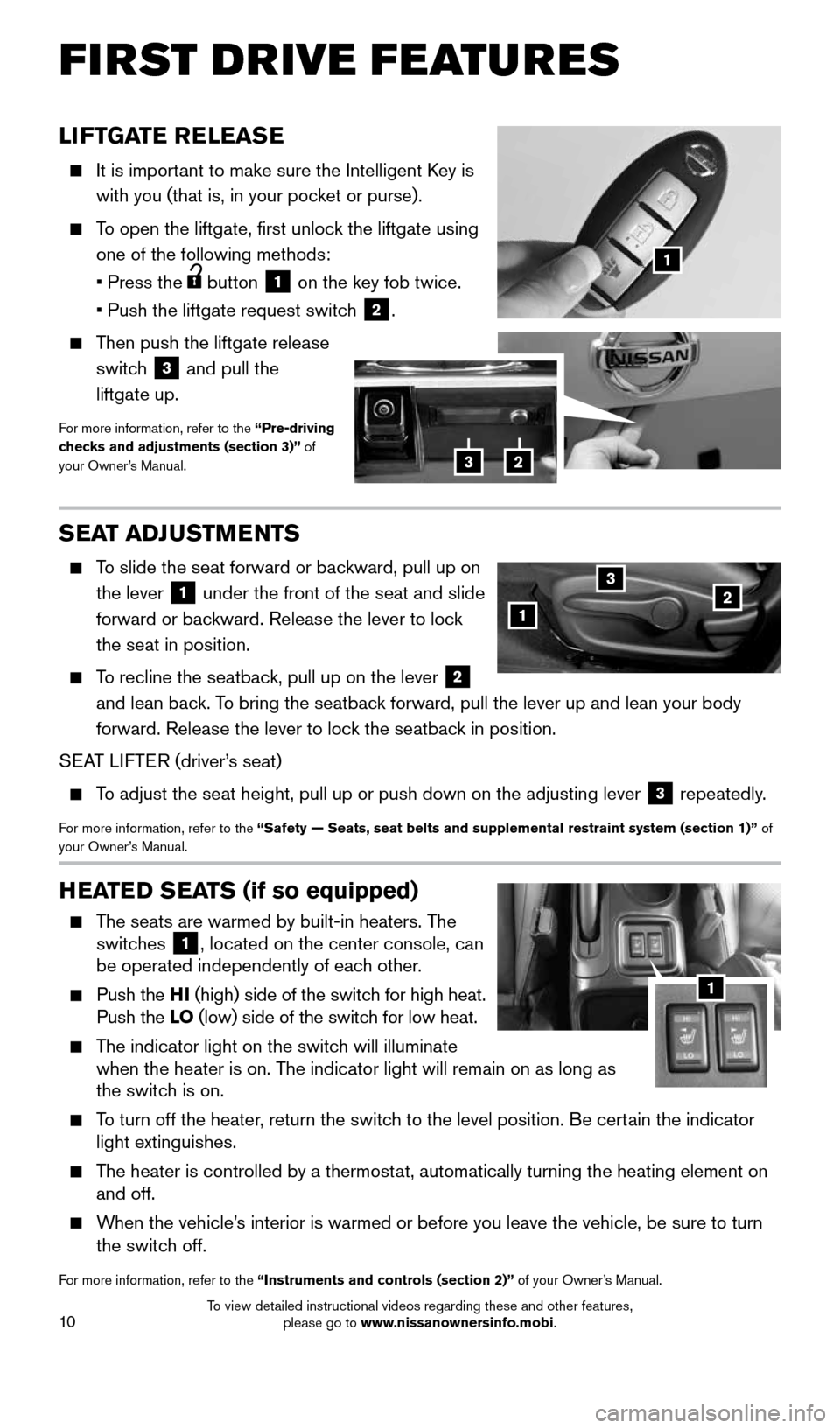
LIFTGATE RELEASE
It is important to make sure the Intelligent Key is
with you (that is, in your pocket or purse).
To open the liftgate, first unlock the liftgate using
one of the following methods:
• Press the
button 1 on the key fob twice.
• Push the liftgate request switch
2.
Then push the liftgate release
switch
3 and pull the
liftgate up.
For more information, refer to the “Pre-driving
checks and adjustments (section 3)” of
your Owner’s Manual.
HEATED SEATS (if so equipped)
The seats are warmed by built-in heaters. The
switches 1, located on the center console, can
be operated independently of each other.
Push the HI (high) side of the switch for high heat.
Push the LO (low) side of the switch for low heat.
The indicator light on the switch will illuminate
when the heater is on. The indicator light will remain on as long as
the switch is on.
To turn off the heater, return the switch to the level position. Be certain the indicator
light extinguishes.
The heater is controlled by a thermostat, automatically turning the heating element on
and off.
When the vehicle’s interior is warmed or before you leave the vehicle, be sure to turn
the switch off.
For more information, refer to the “Instruments and controls (section 2)” of your Owner’s Manual.
1
SEAT ADJUSTMENTS
To slide the seat forward or backward, pull up on
the lever
1 under the front of the seat and slide
forward or backward. Release the lever to lock
the seat in position.
To recline the seatback, pull up on the lever 2
and lean back. To bring the seatback forward, pull the lever up and lean your body
forward. Release the lever to lock the seatback in position.
SEAT LIFTER (driver’s seat)
To adjust the seat height, pull up or push down on the adjusting lever 3 repeatedly.
For more information, refer to the “Safety — Seats, seat belts and supplemental restraint system (se\
ction 1)”
of
your Owner’s Manual.
123
1
23
FIRST DRIVE FEATURES
1905578_16a_Juke_US_pQRG_081915.indd 108/19/15 11:07 AM
To view detailed instructional videos regarding these and other features, please go to www.nissanownersinfo.mobi.