Page 429 of 491
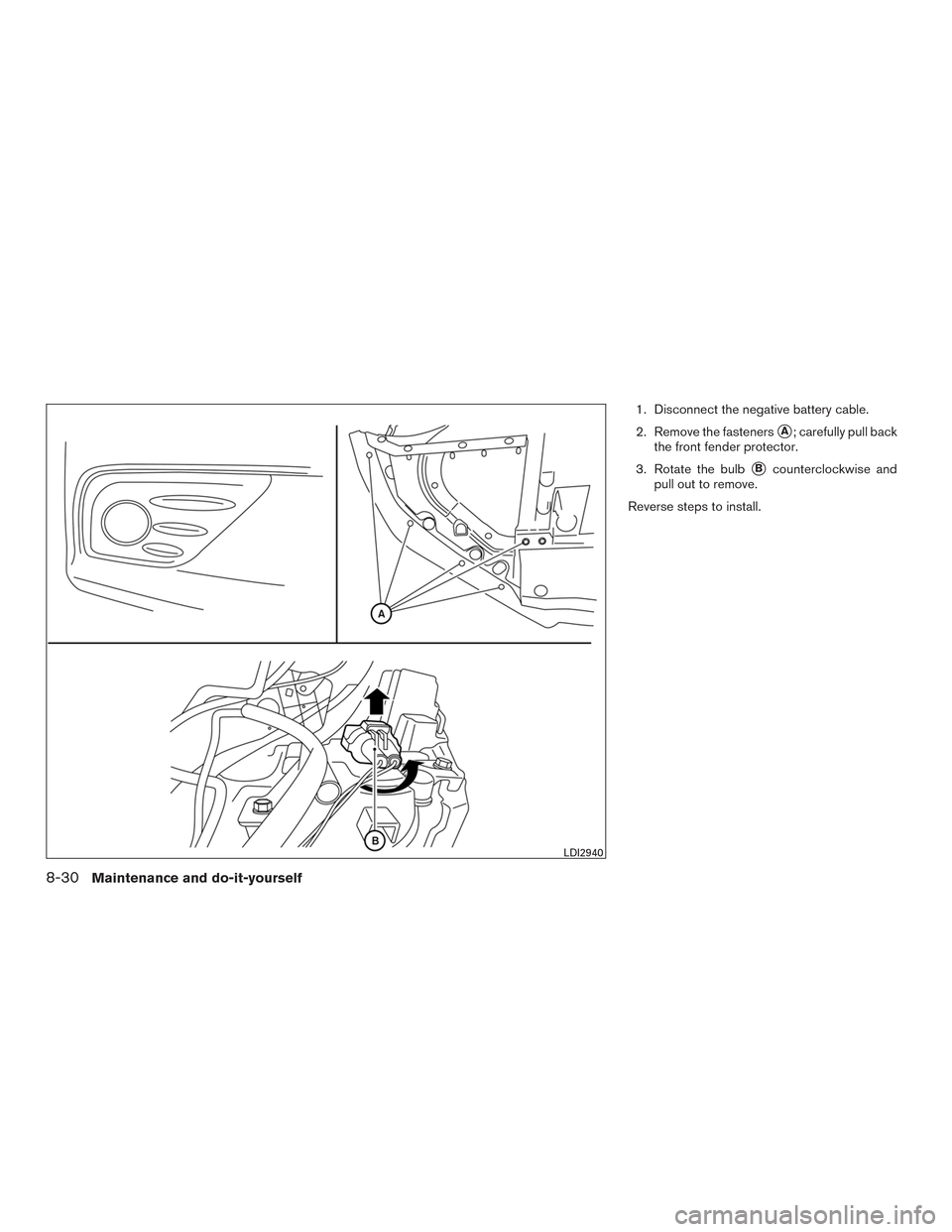
1. Disconnect the negative battery cable.
2. Remove the fasteners
�A; carefully pull back
the front fender protector.
3. Rotate the bulb
�Bcounterclockwise and
pull out to remove.
Reverse steps to install.
LDI2940
8-30Maintenance and do-it-yourself
Page 430 of 491
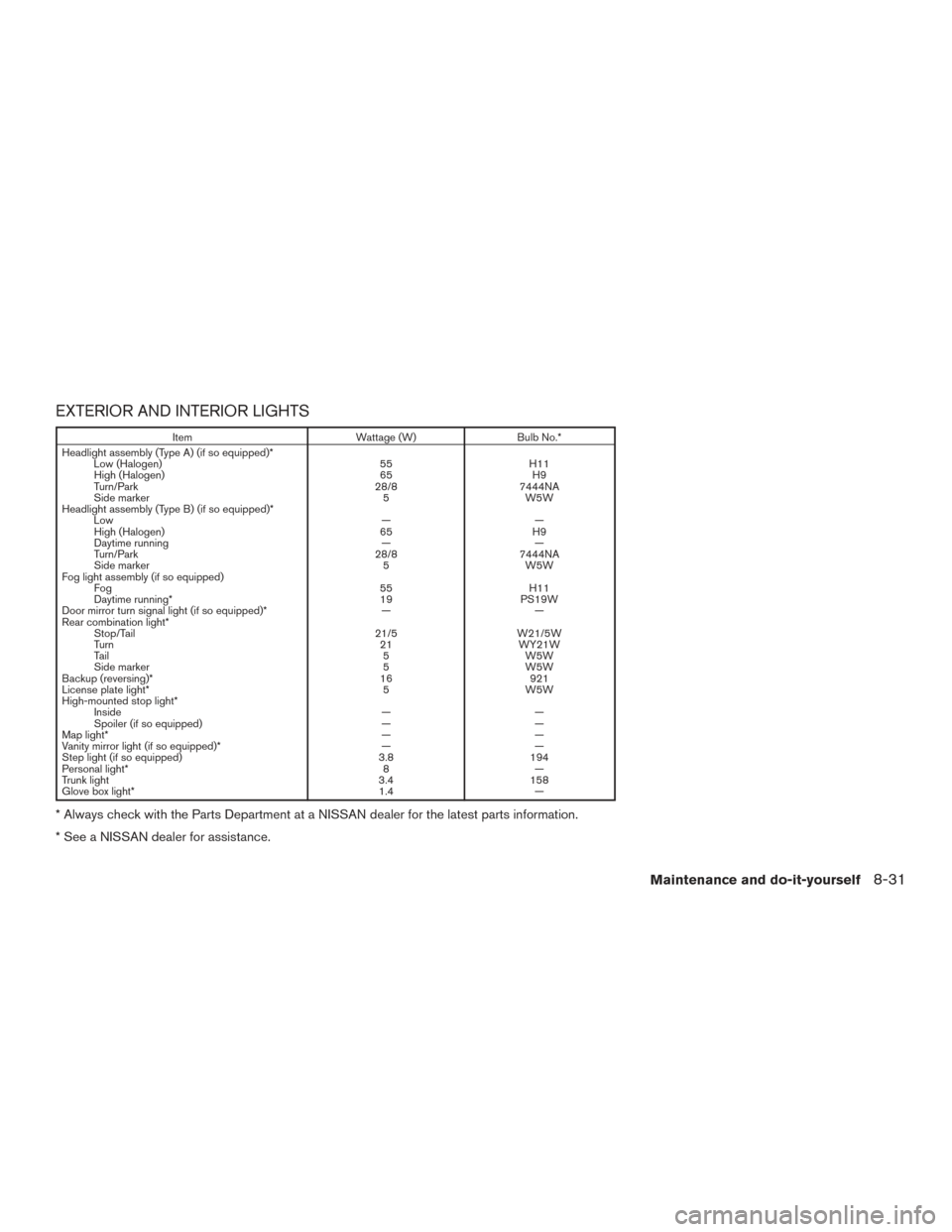
EXTERIOR AND INTERIOR LIGHTS
ItemWattage (W)Bulb No.*
Headlight assembly (Type A) (if so equipped)* Low (Halogen) 55H11
High (Halogen) 65H9
Turn/Park 28/87444NA
Side marker 5W5W
Headlight assembly (Type B) (if so equipped)* Low ——
High (Halogen) 65H9
Daytime running ——
Turn/Park 28/87444NA
Side marker 5W5W
Fog light assembly (if so equipped) Fog 55H11
Daytime running* 19PS19W
Door mirror turn signal light (if so equipped)* ——
Rear combination light* Stop/Tail 21/5W21/5W
Turn 21WY21W
Tail 5W5W
Side marker 5W5W
Backup (reversing)* 16921
License plate light* 5W5W
High-mounted stop light* Inside ——
Spoiler (if so equipped) ——
Map light* ——
Vanity mirror light (if so equipped)* ——
Step light (if so equipped) 3.8194
Personal light* 8—
Trunk light 3.4158
Glove box light* 1.4—
* Always check with the Parts Department at a NISSAN dealer for the latest parts information.
* See a NISSAN dealer for assistance.
Maintenance and do-it-yourself8-31
Page 431 of 491
1. Door mirror turn signal light(if so equipped)
2. Headlamp assembly
3. Front map light
4. Fog light assembly (if so equipped)
5. High-mount stop light (spoiler)
(if so equipped)
6. High-mount stop light (inside)
(if so equipped)
7. Personal light
8. Step light (if so equipped)
9. Rear combination light
10. Backup (reverse) light
11. License plate light
LDI2906
8-32Maintenance and do-it-yourself
Page 432 of 491
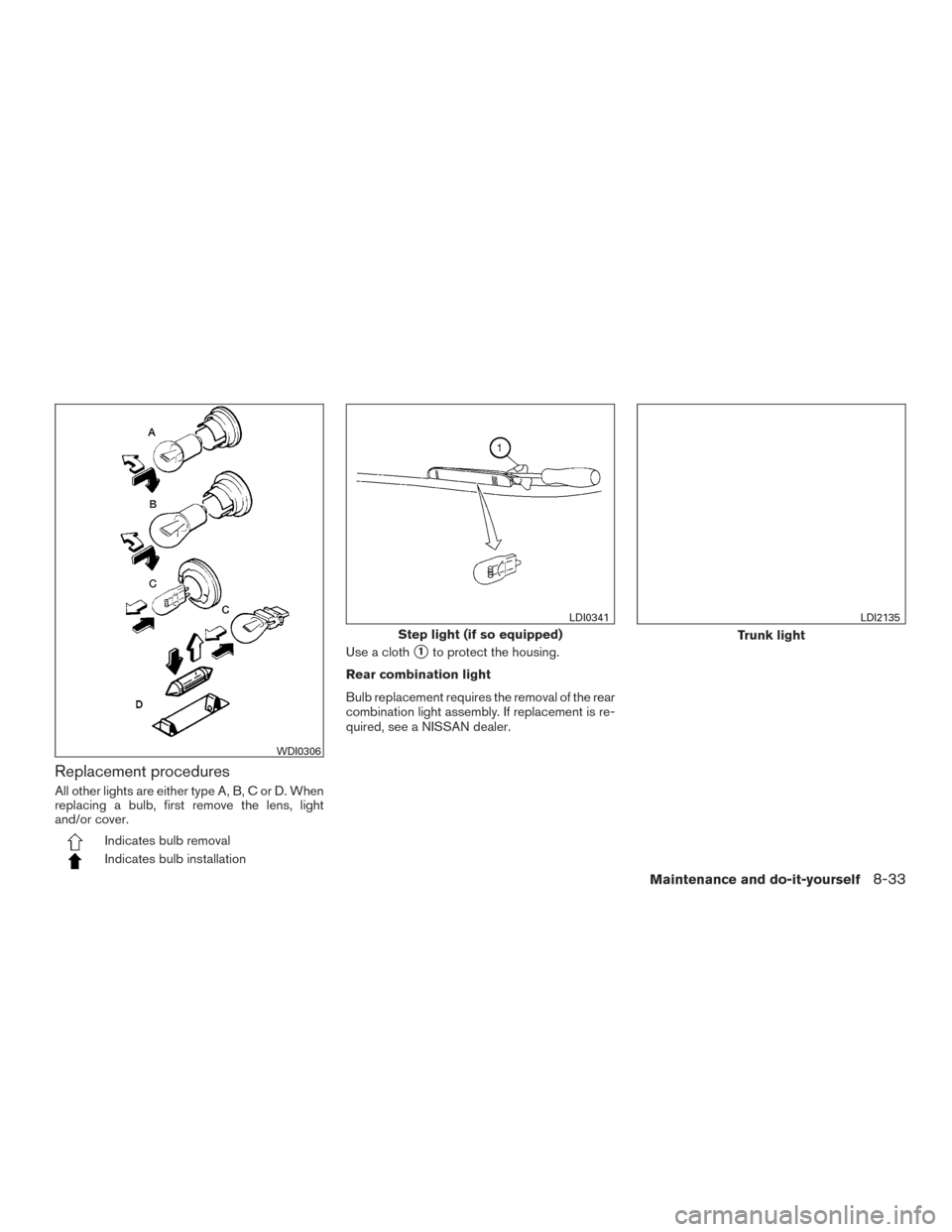
Replacement procedures
All other lights are either type A, B, C or D. When
replacing a bulb, first remove the lens, light
and/or cover.
Indicates bulb removal
Indicates bulb installationUse a cloth
�1to protect the housing.
Rear combination light
Bulb replacement requires the removal of the rear
combination light assembly. If replacement is re-
quired, see a NISSAN dealer.
WDI0306
Step light (if so equipped)
LDI0341
Trunk light
LDI2135
Maintenance and do-it-yourself8-33
Page 433 of 491
If you have a flat tire, refer “Flat tire” in the
“In case of emergency” section of this
manual.
TIRE PRESSURE
Tire Pressure Monitoring System
(TPMS)
WARNING
Radio waves could adversely affect
electric medical equipment. Those
who use a pacemaker should con-
tact the electric medical equipment
manufacturer for the possible influ-
ences before use.
This vehicle is equipped with the Tire
Pressure Monitoring System (TPMS) . It
monitors tire pressure of all tires except
the spare. When the low tire pressure
warning light is lit and the “Tire Pressure
Low - Add Air” warning appears in the
vehicle information display, one or more of
your tires is significantly under-inflated.
The TPMS will activate only when the
vehicle is driven at speeds above 16 mph
(25 km/h). Also, this system may not de- tect a sudden drop in tire pressure (for
example a flat tire while driving) .
For additional information, refer to “Low
tire pressure warning light” in the “Instru-
ments and controls” section, “Tire Pres-
sure Monitoring System (TPMS)” in the
“Starting and driving” section, and “Flat
tire” in the “In case of emergency” section
of this manual.
Tire inflation pressure
Check the tire pressures (including the
spare) often and always prior to long dis-
tance trips. The recommended tire pres-
sure specifications are shown on the
F.M.V.S.S./C.M.V.S.S. certification label
or the Tire and Loading Information label
under the
�Cold Tire Pressure� heading.
The Tire and Loading Information label is
affixed to the driver side center pillar. Tire
pressures should be checked regularly
because: ●
Most tires naturally lose air over time.
● Tires can lose air suddenly when
driven over potholes or other objects
or if the vehicle strikes a curb while
parking.
The tire pressures should be checked
when the tires are cold. The tires are
considered COLD after the vehicle has
been parked for 3 or more hours, or driven
less than 1 mile (1.6 km) at moderate
speeds.
The TPMS with Easy Fill Tire Alert pro-
vides visual and audible signals outside
the vehicle for inflating the tires to the
recommended COLD tire pressure. For
additional information, refer to “TPMS
with Easy Fill Tire Alert” in the “Starting
and driving” section of this manual.
If the tires are used at speeds above
100 mph (162 km/h) where it is legal to
do so (on a race track for example) , the
cold tire inflation pressure must be in-
creased. For additional information, refer
to “Checking tire pressure” in this section.
WHEELS AND TIRES
8-34Maintenance and do-it-yourself
Page 434 of 491
Set the tire pressure to the normal cold
tire inflation pressure when the vehicle
speed or load is reduced.
Incorrect tire pressure, including un-
der inflation, may adversely affect
tire life and vehicle handling.
WARNING
● Improperly inflated tires can fail
suddenly and cause an accident.
● The Gross Vehicle Weight Rating
(GVWR) is located on the
F.M.V.S.S./C.M.V.S.S. certifica-
tion label. The vehicle weight ca-
pacity is indicated on the Tire and
Loading Information label (if so
equipped) . Do not load your ve-
hicle beyond this capacity. Over-
loading your vehicle may result in
reduced tire life, unsafe operat-
ing conditions due to premature
tire failure, or unfavorable han-
dling characteristics and could
also lead to a serious accident.
Loading beyond the specified ca-
pacity may also result in failure of
other vehicle components. ●
Before taking a long trip, or
whenever you heavily load your
vehicle, use a tire pressure gauge
to ensure that the tire pressures
are at the specified level.
● Increase the cold tire inflation
pressure as indicated in �Check-
ing tire pressure� in this section
when using the tires specified by
NISSAN above 100 mph
(162 km/h) where it is legal to do
so (on a race track for example) .
Failure to increase the cold tire
inflation pressure may result in
tire failure, loss of control and
possible injury. After such use,
readjust tire pressure.
● For additional information re-
garding tires, refer to “Important
Tire Safety Information” (US) or
“Tire Safety Information”
(Canada) in the Warranty Infor-
mation Booklet.
Maintenance and do-it-yourself8-35
Page 435 of 491
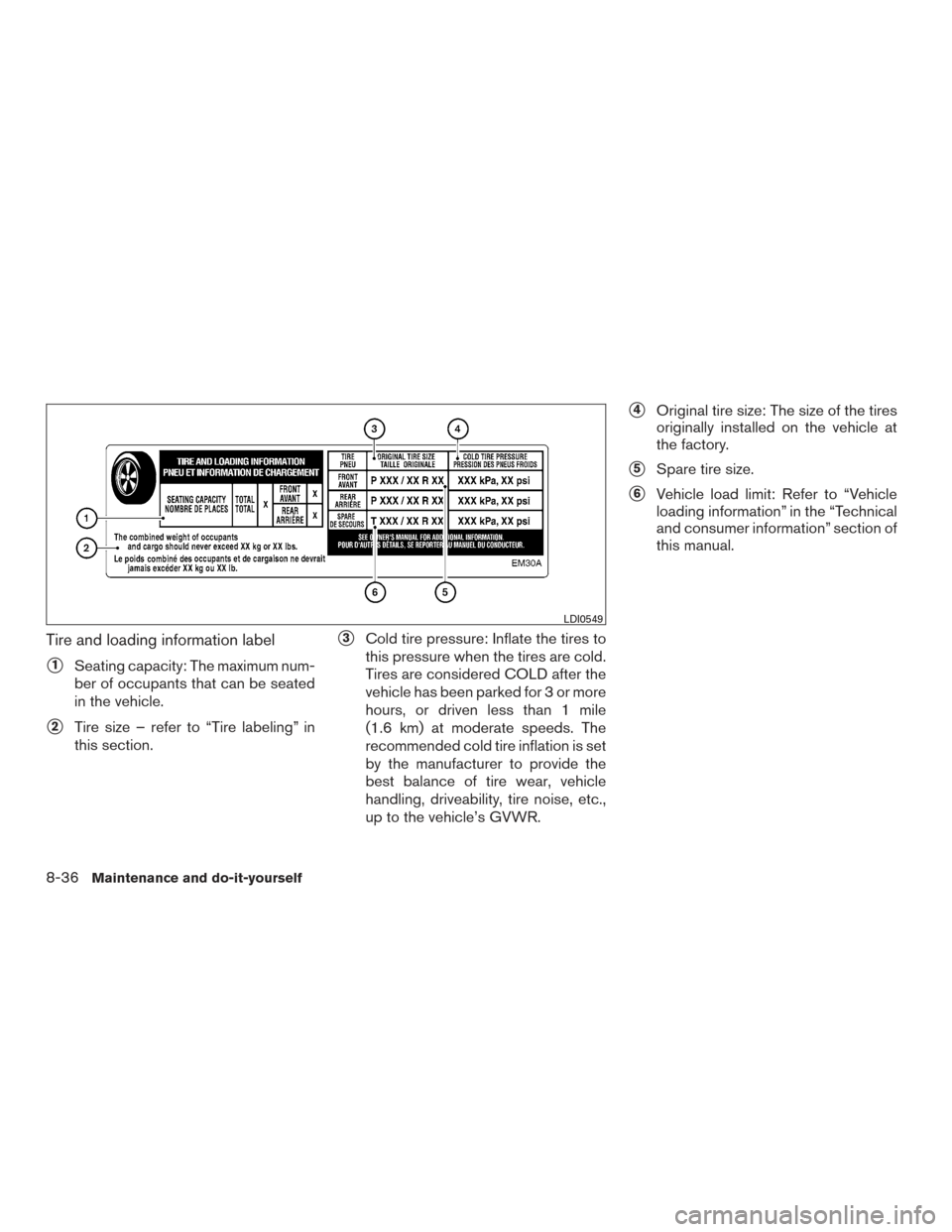
Tire and loading information label
�1Seating capacity: The maximum num-
ber of occupants that can be seated
in the vehicle.
�2Tire size – refer to “Tire labeling” in
this section.
�3Cold tire pressure: Inflate the tires to
this pressure when the tires are cold.
Tires are considered COLD after the
vehicle has been parked for 3 or more
hours, or driven less than 1 mile
(1.6 km) at moderate speeds. The
recommended cold tire inflation is set
by the manufacturer to provide the
best balance of tire wear, vehicle
handling, driveability, tire noise, etc.,
up to the vehicle’s GVWR.
�4Original tire size: The size of the tires
originally installed on the vehicle at
the factory.
�5Spare tire size.
�6Vehicle load limit: Refer to “Vehicle
loading information” in the “Technical
and consumer information” section of
this manual.
LDI0549
8-36Maintenance and do-it-yourself
Page 436 of 491
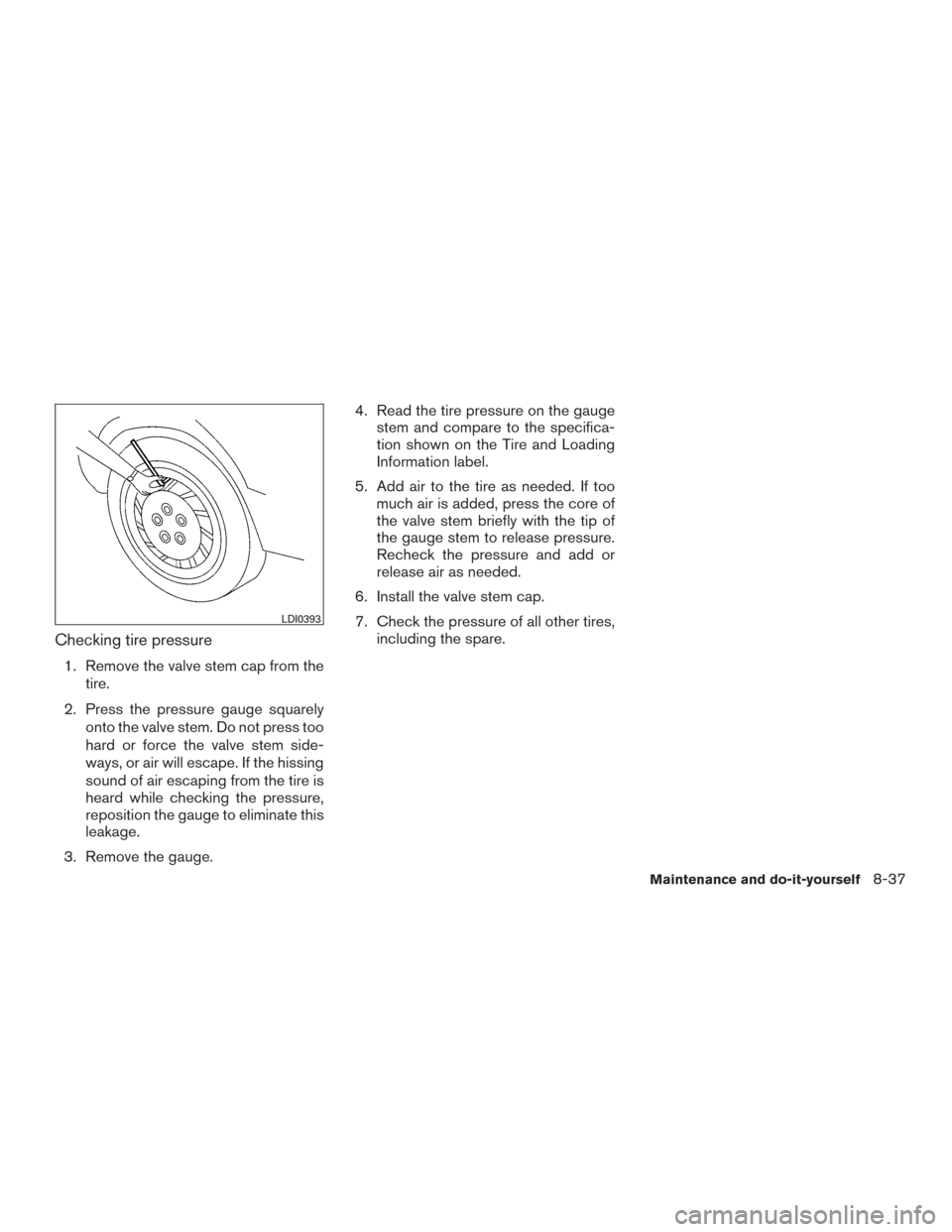
Checking tire pressure
1. Remove the valve stem cap from thetire.
2. Press the pressure gauge squarely onto the valve stem. Do not press too
hard or force the valve stem side-
ways, or air will escape. If the hissing
sound of air escaping from the tire is
heard while checking the pressure,
reposition the gauge to eliminate this
leakage.
3. Remove the gauge. 4. Read the tire pressure on the gauge
stem and compare to the specifica-
tion shown on the Tire and Loading
Information label.
5. Add air to the tire as needed. If too much air is added, press the core of
the valve stem briefly with the tip of
the gauge stem to release pressure.
Recheck the pressure and add or
release air as needed.
6. Install the valve stem cap.
7. Check the pressure of all other tires, including the spare.
LDI0393
Maintenance and do-it-yourself8-37