2016 MITSUBISHI SHOGUN light
[x] Cancel search: lightPage 221 of 404

Handling of DiscsE00735901040
This explains care that should be taken in the handling of discs.
Important Points on Handling
l Fingerprints or other marks on the read
surface of the disc may result in its con-
tent being more difficult to read. When
holding the disc, grip both edges, or one edge and the centre hole, in order that
the read surface is not touched.
l Do not affix paper or stickers, or other-
wise damage the disc.
l Do not forcefully insert a disc if another
is already within the device. This can re- sult in damage to discs, or malfunction.
Cleaning
l Periodically clean the read surface of the
disc. When cleaning, do not wipe in a
circular motion. Instead, wipe gently outwards from the centre of the disc to the outer edge.
l New discs may have burring around the
outer edge or in the hole in the centre.
Ensure you check for these. If there are burrs, these may lead to faulty operation,
therefore ensure these are removed.
Important Points on Storage
l When not using discs, ensure these are
kept in cases, and stored out of direct
sunlight.
l If discs are not going to be used for a
long period of time, remove these from
the product.
Disc Playback Environment
In cold environments such as in mid-winter when the interior of the vehicle is cold, turn-ing the heater on and immediately trying to
use the product may cause condensation (wa-
ter droplets) to form on the disc and internal optical components, and this may prevent the product from operating correctly.
In these conditions, remove the disc, and wait
a short time before use.
Copyright
Actions such as unauthorized reproduction,broadcast, public performance, or rental ofdiscs that comprise other than personal use
are prohibited by law.
Types of Disc That Can Be
Played Back
E00736001035
The following marks are printed on the disc label, package, or jacket.
TypeSiz e
Maxi-mumplay- back time
Comments
CD-DA12
cm74 mi-
nutes—CD-TEXT12
cm74 mi-
nutes—CD-R/RW12
cm—•Disc containing
MP3 files
Discs That May Not Be Played
Back
l Playback of discs other than those de-
scribed in “Types of Disc That Can Be
Played Back” is not guaranteed.
l 8 cm discs may not be used.
Handling of Discs
7-16OVWE16E1For pleasant driving7
Page 226 of 404

Important Points on Safetyfor the Customer E00737000035
This product features a number of pictorial indications as well as points concerning han-
dling so that you can use the product correct-
ly and in a safe manner, as well as prevent in-
jury or damage to yourself, other users, or
property.WARNINGl The driver should not pay close attention
to the display while driving.
This may prevent the driver looking where they are going, and cause an acci-
dent.
l The driver should not perform complica-
ted operations while driving.
Performing complicated operations while driving may prevent the driver looking
where they are going, and cause an acci- dent.
Therefore stop the vehicle in a safe loca- tion before performing such operations.
l Do not use during malfunctions, such as
when no sound is audible.
This may lead to accident, fire, or electric shock.
l Ensure water or other foreign objects do
not enter the product.
This may lead to smoking, fire, electric shock, or malfunction.WARNINGl Do not insert foreign objects into the disc
slot.
This may lead to fire, electric shock, or malfunction.
l In the event of abnormalities occurring
when foreign objects or water enter the
product, resulting in smoke or a strange
smell, immediately stop using the product, and consult a MITSUBISHI MOTORS
Authorized Service Point.
Continuing to use the product may result in accident, fire, or electric shock.
l Do not disassemble or modify the prod-
uct.
This may lead to malfunction, fire, or
electric shock.
l During thunderstorms, do not touch the
antenna or the front panel.
This may lead to electrical shock from lightning.CAUTIONl Do not block ventilation holes or heat sinks
on the product.
Blocking ventilation holes or heat sinks may prevent heat from escaping from within theproduct, leading to fire or malfunction.CAUTIONl Do not turn the volume up to the extent that
you cannot hear sounds from outside the ve-
hicle while driving.
Driving without being able to hear sounds from outside the vehicle may result in an ac-
cident.
l Do not insert your hand or fingers into the
disc slot.
This may result in injury.Operation Keys
E00737100023Turn the Power ON/ OFF
E00737200024
1. Press the PWR/VOL key.
Turn the power on, and resume playback
from the previous status.
Important Points on Safety for the Customer
7-21OVWE16E1For pleasant driving7
Page 243 of 404

NOTElEach time the 1RPT key is pressed, this
switches in the order Repeat OFF, 1 track re-
peat, All track repeat, and Repeat OFF.
Random Playback (RDM)
Press the 2RDM key.
Play the tracks in the Bluetooth Audio device in a random order.
NOTEl Pressing again will cancel.
Scan Playback (SCAN)
Press the PTY/SCAN key.
Play the first 10 seconds of each of the tracks on the whole Bluetooth Audio device in or-
der.
NOTEl Press this button again during playback if
you wish to hear that track, and that trackwill play normally.Use AUX*
E00736901135
By connecting external input cables and AUX devices to this product, you can play
back tracks on these devices through the
product.
Hold down the MEDIA key.
Switch to the AUX mode, and “AUX” is dis- played.
Auxiliary Video connector (RCA) A- Left audio input connector (white)B- Right audio input connector (red)
C- Video input connector (yellow)
CAUTIONl Connect an audio device with external sound
input mode cancelled, or with the soundturned down.
l Even if not inserted, the product will switch
to AUX, therefore take care with volume
levels when not inserted.NOTEl For information on using the Auxiliary Vid-
eo connector (RCA), refer to the separate
owner’s manual for the Video Entertainment System.
l Depending on the audio device to be con-
nected, noise may be emitted.
l For power, use the battery power source in-
cluded in the audio device to be connected.
Using the connected audio device while charging through the cigarette lighter socket
in the vehicle may lead to noise being emit-
ted through the speakers.
l If no audio devices are connected, then do
not select the external sound input mode. If external sound input mode is selected while no audio devices are connected, then sound
may be emitted through the speakers.
Use AUX*
7-38OVWE16E1For pleasant driving7 Auxiliary Video connector
(RCA)
Page 280 of 404

Vanity mirror
E00731900191
Type 1
A vanity mirror is fitted to the back of the sun visor.
Type 2
A vanity mirror is fitted to the back of the sun visor.
Operating the lid of the vanity mirror will au-
tomatically turn on the mirror lamp (A).CAUTIONl If the lid of vanity mirror with lamp is kept
open for prolonged periods of time, the vehi-
cle’s battery will be discharged.Card holder
E00732000203
Cards can be slipped into the holder (A) on
the back of the sun visor.
Slide plate*
E00732100086
To block out the glare of the sunlight from
behind the inside rear-view mirror, swing down the sun visor, and then pull out the
slide plate (B).
Sun visors
7-75OVWE16E1For pleasant driving7
Page 281 of 404
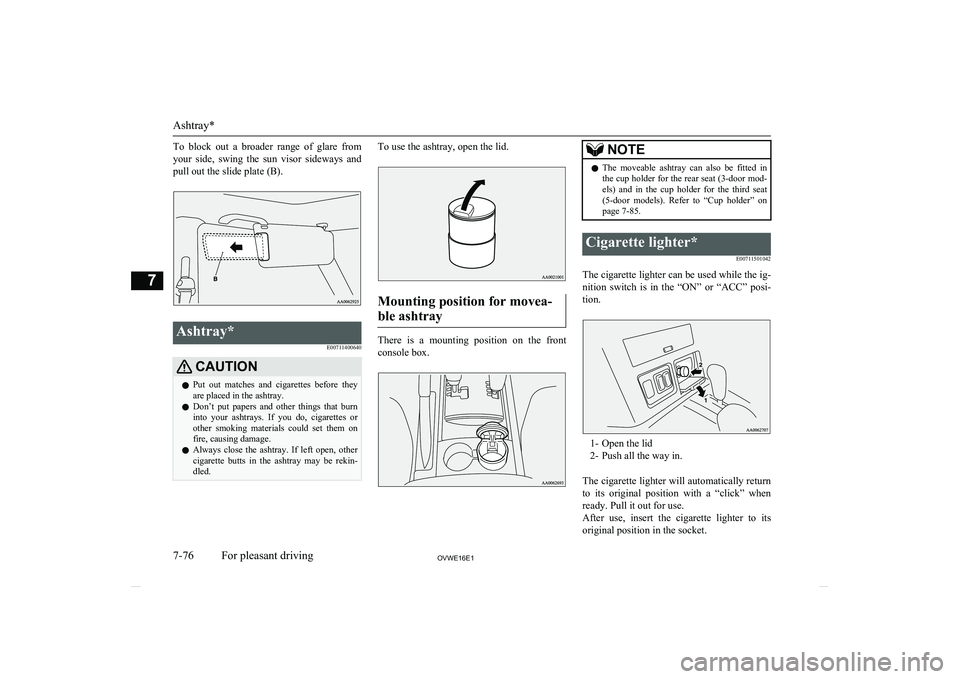
To block out a broader range of glare from
your side, swing the sun visor sideways and
pull out the slide plate (B).Ashtray*
E00711400640CAUTIONlPut out matches and cigarettes before they
are placed in the ashtray.
l Don’t put papers and other things that burn
into your ashtrays. If you do, cigarettes or
other smoking materials could set them on fire, causing damage.
l Always close the ashtray. If left open, other
cigarette butts in the ashtray may be rekin-
dled.To use the ashtray, open the lid.
Mounting position for movea-
ble ashtray
There is a mounting position on the front
console box.
NOTEl The moveable ashtray can also be fitted in
the cup holder for the rear seat (3-door mod-
els) and in the cup holder for the third seat (5-door models). Refer to “Cup holder” on
page 7-85.Cigarette lighter*
E00711501042
The cigarette lighter can be used while the ig-nition switch is in the “ON” or “ACC” posi-
tion.
1- Open the lid
2- Push all the way in.
The cigarette lighter will automatically return to its original position with a “click” when ready. Pull it out for use.
After use, insert the cigarette lighter to its
original position in the socket.
Ashtray*
7-76OVWE16E1For pleasant driving7
Page 282 of 404

NOTElDo not leave the cigarette lighter removed
from its socket, because the socket might be- come clogged by foreign material and be
short-circuited.CAUTIONl Do not touch the heating element or the cig-
arette lighter housing, hold the knob only to prevent burns.
l Do not allow children to operate or play with
the cigarette lighter as burns may occur.
l Something is wrong with the cigarette light-
er if it does not pop back out within approxi-
mately 30 seconds of being pushed in. We recommend you to have it checked.
l Do not use any electric appliance that is not
approved by MITSUBISHI MOTORS . Do-
ing so could damage the socket. If you used
the cigarette lighter after damaging the sock- et, the cigarette lighter might pop out or fail
to come out after being pushed in.
l When the cigarette lighter socket is used as a
power source for an electric appliance, be sure that the electric appliance operates at
12 V and has an electric capacity of 120 W or less. In addition, long use of the electricappliance without running the engine may
run down the battery.Accessory socket
E00711600987
The accessory socket can be used while the ignition switch is in the “ON” or “ACC” po-
sition.CAUTIONl Be aware that using electronic equipment
with the engine off may run the battery down.
l When you connect an electrical device,
make sure it is rated at 12 V and its electrical
capacity does not exceed 120 W. When us-
ing some sockets at the same time, make
sure the total power consumption of the
electrical accessories does not exceed 120 W
at 12 V.
l When the accessory socket is not in use, be
sure to close the cap or plug, because the
socket might become clogged by foreign
material and be short-circuited.NOTEl The two or more accessory sockets can be
used simultaneously.Type 1
Pull out the plug (A) in the instrument panel
to uncover the socket. Use it to plug in an
electrical device.
Instrument panel*
Accessory socket
7-77OVWE16E1For pleasant driving7
Page 287 of 404

Door courtesy lamps
E00717500047
Each door courtesy lamp illuminates when
the relevant door is opened and goes off when the door is closed.
FrontRear (5-door models)Interior lamp* auto-cutout
function (Vehicles with keylessentry system)
E00712902428
*: Room & map lamps, rear personal lamps
and luggage compartment lamp
If any of the interior lamps are left switched on with the ignition switch in any position
other than “ON” or “ACC”, it goes off auto- matically after approximately 30 minutes.
The lamp comes on again if the ignition switch is turned to the “ON” or “ACC” posi-
tion, any door or backdoor is opened and
closed, or the keyless entry remote control is
operated.
NOTEl The interior lamp auto-cut function period
can be adjusted or deactivated. We recom-
mend you to consult a MITSUBISHI
MOTORS Authorized Service Point for de-
tailed information and assistance.Storage spaces
E00713103088CAUTIONlNever leave lighters, cans of carbonated
drink, and spectacles in the cabin when park-ing the vehicle in hot sunshine. The cabin will become extremely hot, so lighters and
other flammable items may catch fire and unopened drink cans (including beer cans)
may rupture. The heat may also deform or crack plastic spectacle lenses and other spec-
tacle parts that are made of plastic.
l Keep the lids of storage spaces closed while
driving the vehicle. A lid or the contents of a
storage space could otherwise cause injuries.NOTEl Do not leave valuables in any storage space
when leaving the vehicle.
Storage spaces
7-82OVWE16E1For pleasant driving7
Page 293 of 404
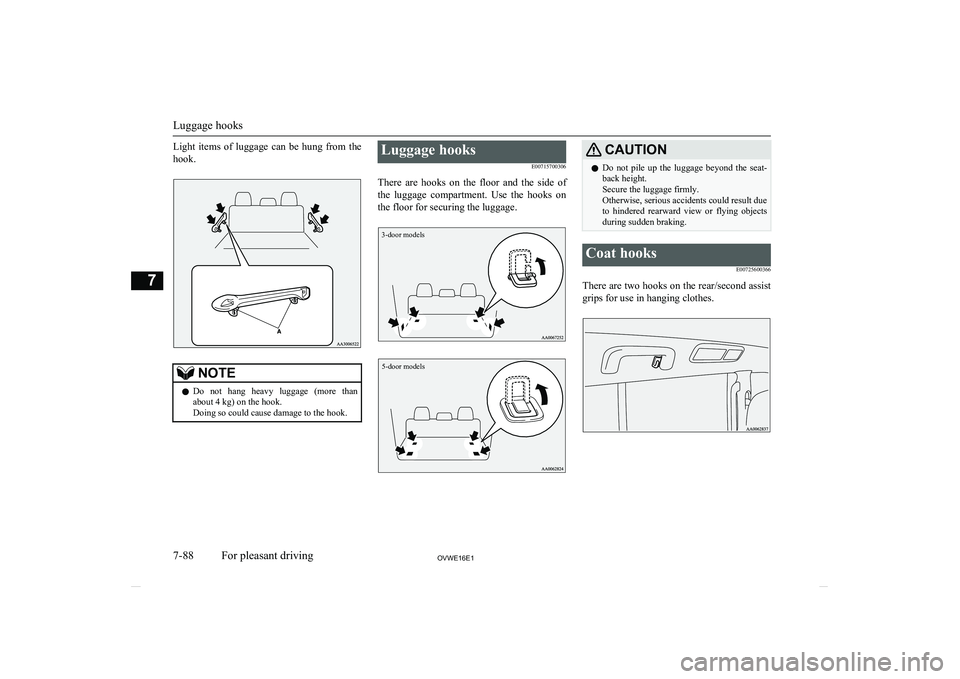
Light items of luggage can be hung from thehook.NOTEl Do not hang heavy luggage (more than
about 4 kg) on the hook.
Doing so could cause damage to the hook.Luggage hooks
E00715700306
There are hooks on the floor and the side of the luggage compartment. Use the hooks on
the floor for securing the luggage.
3-door models5-door models
CAUTIONl Do not pile up the luggage beyond the seat-
back height.
Secure the luggage firmly.
Otherwise, serious accidents could result due
to hindered rearward view or flying objects
during sudden braking.Coat hooks
E00725600366
There are two hooks on the rear/second assistgrips for use in hanging clothes.
Luggage hooks
7-88OVWE16E1For pleasant driving7