2016 MITSUBISHI OUTLANDER PHEV air condition
[x] Cancel search: air conditionPage 268 of 490

CAUTION•Obstacles that exists in the high position
from the ground.
• Obstacles that are soft and absorb ultra-
sonic easily, such as spongy material or
snow.
• Obstacles that are shaped with a sharp an-
gle.
• A fence with large mesh.
• Moving object.
• When there is a loud noise or an ultrason-
ic near your vehicle by horn of other vehi-
cle, engine sound of a motorcycle, air brake noise of a large vehicle, a vehicle
detector and sonar of a vehicle etc.
• When an electrical equipment on the mar-
ket (radio antenna etc.) is installed near
the sensor.
• When there is a obstacle that is not recog-
nized between your vehicle and the obsta- cle that can be recognized.NOTEl The sensors do not detect objects located in
the area directly below or near the bumper. If the height of an object is lower than the
mounted position of the sensors, the sensors
may not continue detecting it even if they detected it initially.To turn on/off the Ultrasonic
misacceleration Mitigation Sys-tem
E00643800053
The Ultrasonic misacceleration Mitigation
System is automatically turned ON by setting
the operation mode to ON. In addition, the Ultrasonic misacceleration Mitigation SystemON/OFF is switched in conjunction with the
ON/OFF state of the FCM.
Refer to . “FCM and Ultrasonic misaccelera-
tion Mitigation System ON/OFF switch” on
page 7-60
Warning display
E00643900025
When the sensor is temporarily
not available
E00647600033
Example: When the front and/or rear sensors
are temporarily not available
When the warning display appears, the sen-
sors are temporarily not available for somereason such as the environmental condition
or increase of the sensor temperature. When
the warning display appears continuously,
contact a MITSUBISHI MOTORS Author-
ized Service Point.When there is a malfunction in
the sensor or the system
E00644000036
Example: When there is a malfunction in both sensors
When the warning display appears, the Ultra-
sonic misacceleration Mitigation System does not operate normally because there are
some malfunctions in the system. Have the
vehicle inspected at a MITSUBISHI
MOTORS Authorized Service Point as soon
as possible.
Ultrasonic misacceleration Mitigation System*
7-68OGGE16E1Starting and driving7
Page 298 of 490
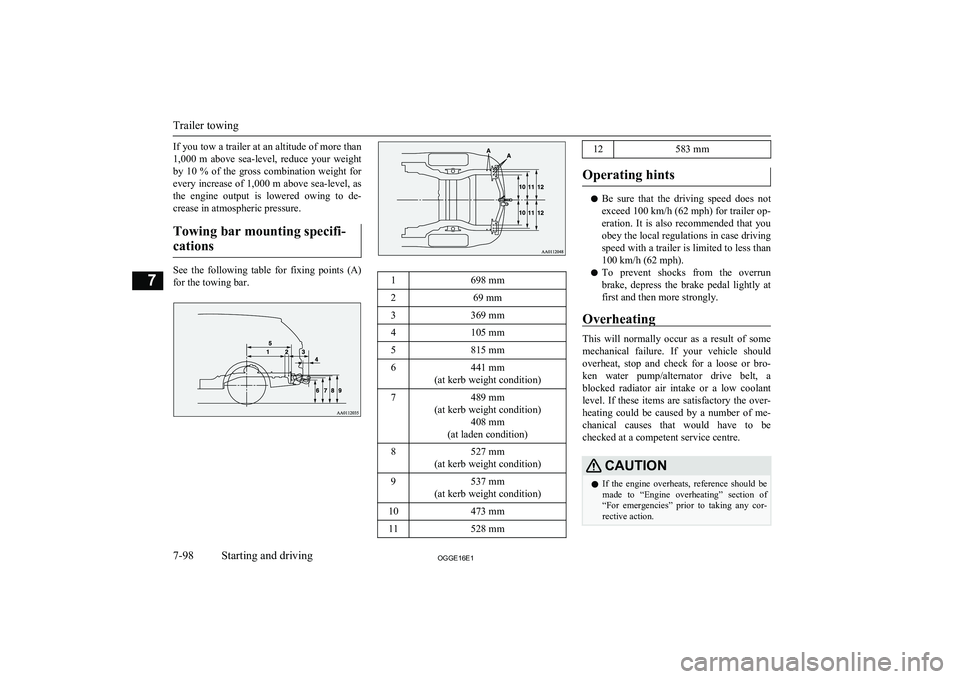
If you tow a trailer at an altitude of more than
1,000 m above sea-level, reduce your weight by 10 % of the gross combination weight for
every increase of 1,000 m above sea-level, as
the engine output is lowered owing to de-
crease in atmospheric pressure.
Towing bar mounting specifi- cations
See the following table for fixing points (A) for the towing bar.
1698 mm269 mm3369 mm4105 mm5815 mm6441 mm
(at kerb weight condition)7489 mm
(at kerb weight condition) 408 mm
(at laden condition)8527 mm
(at kerb weight condition)9537 mm
(at kerb weight condition)10473 mm11528 mm12583 mm
Operating hints
l Be sure that the driving speed does not
exceed 100 km/h (62 mph) for trailer op-
eration. It is also recommended that you obey the local regulations in case driving speed with a trailer is limited to less than
100 km/h (62 mph).
l To prevent shocks from the overrun
brake, depress the brake pedal lightly at first and then more strongly.
Overheating
This will normally occur as a result of some
mechanical failure. If your vehicle should overheat, stop and check for a loose or bro-ken water pump/alternator drive belt, a
blocked radiator air intake or a low coolant level. If these items are satisfactory the over-
heating could be caused by a number of me-
chanical causes that would have to be
checked at a competent service centre.
CAUTIONl If the engine overheats, reference should be
made to “Engine overheating” section of
“For emergencies” prior to taking any cor- rective action.
Trailer towing
7-98OGGE16E1Starting and driving7
Page 301 of 490

Ventilators........................................................................................... 8-02
Automatic climate control air conditioner.......................................... 8-04
Important operation tips for the air conditioner.................................. 8-13
Air purifier.......................................................................................... 8-13 Remote Climate Control*................................................................... 8-13
Heating................................................................................................ 8-14 LW/MW/FM radio/CD player*.......................................................... 8-14
Handling of Discs................................................................................8-18 Audio Files (MP3/WMA/AAC)..........................................................8-19
Important Points on Safety for the Customer......................................8-23
Operation Keys................................................................................... 8-23
Listen to Radio.................................................................................... 8-26 Listen to DAB*................................................................................... 8-27
Listen to Traffic Messages.................................................................. 8-29
Listen to CDs...................................................................................... 8-29
Listen to MP3s.................................................................................... 8-30
Listen to an iPod................................................................................. 8-31 Listen to Audio Files on a USB Device.............................................. 8-33To play iPod/USB memory device tracks via voice opera-
tion (vehicles with Bluetooth ®
2.0 interface)................................. 8-36
Listen to Bluetooth Audio*................................................................. 8-38
Display Indicator................................................................................. 8-41
Audio Quality and Volume Balance Adjustment............................... 8-42
System Settings................................................................................... 8-43
Troubleshooting.................................................................................. 8-47
Link System*...................................................................................... 8-50
Bluetooth ®
2.0 interface*....................................................................8-50
USB input terminal*........................................................................... 8-70
Sun visors............................................................................................ 8-73Ashtray*.............................................................................................. 8-74
Cigarette lighter*.................................................................................8-74
Accessory socket................................................................................. 8-75
Interior lamps...................................................................................... 8-76
Storage spaces..................................................................................... 8-78
Cup holder........................................................................................... 8-80
Bottle holder........................................................................................8-81
Cargo area cover................................................................................. 8-81Assist grips.......................................................................................... 8-82
Coat hook............................................................................................ 8-83
Luggage hooks.................................................................................... 8-83For pleasant driving
OGGE16E18
Page 302 of 490

VentilatorsE00700100982
1- Driver’s ventilators2- Passenger’s ventilators
NOTEl Do not place beverages on top of the instru-
ment panel. If they splash into the air condi-
tioning ventilators, they could damage the
system.Air flow and direction adjust-
ments
E00700200983
Driver’s ventilators
Move the knob (A) to adjust the air flow di- rection.
To close the ventilator, fully move the knob
(A) to the outer side.
1- Close
2- Open
Passenger’s ventilators
Move the knob (A) to adjust the air flow di- rection.
To close the ventilator, fully move the knob
(A) to the left side.
1- Close
2- Open
NOTEl Be careful not to spill drinks, etc., into the
ventilators.
Doing so might cause the air conditioner not to function normally.
Ventilators
8-02OGGE16E1For pleasant driving8
Page 304 of 490

Automatic climate control air conditionerE00702401436
Cooling or heating can only be performed when ready indicator is illuminating. When the operation mode is ON, only the blower is available.NOTEl If the drive battery level display indicates 0, the cooling performance cannot be obtained even the air conditioner is turned on.
Refer to “Drive battery level display screen” on page 6-10.
l If the engine cannot be started due to fuel shortage, etc., the heating performance cannot be obtained even the air conditioner is turned on.
Control panel
E00702502782
Automatic climate control air conditioner
8-04OGGE16E1For pleasant driving8 Dual-zone automatic climate control air conditioner
Page 305 of 490

1- Driver’s side temperature control switch(LHD vehicles)
Passenger’s side temperature control
switch (RHD vehicles)
2- Air conditioning switch
3- Blower speed selection switch
4- MODE switch
5- Passenger’s side temperature control switch (LHD vehicles)
Driver’s side temperature control switch
(RHD vehicles)6- Air selection switch
7- Demister switch
8- AUTO switch
9- Rear window demister switch ® p. 6-52
10- OFF switch
11- Driver’s side temperature display (LHD vehicles) ® p. 8-07
Passenger’s side temperature display
(RHD vehicles) ® p. 8-07
12- DUAL indicator13- Mode selection display
14- Passenger’s side temperature display (LHD vehicles) ® p. 8-07
Driver’s side temperature display (RHD
vehicles) ® p. 8-07
15- Air conditioning indicator
16- Blower speed display
Automatic climate control air conditioner
8-05OGGE16E1For pleasant driving8
Page 306 of 490

NOTElThere is an interior air temperature sensor (A) in the illustrated position.
Never place anything on top of the sensor, since doing so will prevent it from functioning properly.
l Since the air conditioning operation is controlled while the ECO mode is operating, you may feel that effectiveness of the air conditioner is weak.
Also, on vehicles without electric heater, the heating performance cannot be obtained while the ECO mode is operating since engine starting is controlled. In such case, cancel ECO mode.
→ “ECO mode switch” on page 6-53
l Even if the ECO mode is operating, you can select normal operation of the air conditioner.
On vehicles equipped with MITSUBISHI Multi-Communication System (MMCS), screen operations can be used to change the setting. Refer to the separate
owner’s manual for details.
l In extreme cold, the air conditioning control panel screen may operate sluggishly. This does not indicate a problem.
It will disappear when the vehicle interior temperature rises to a normal temperature.
Blower speed selection switch
E00702801371
Press of the blower speed selection
switch to increase the blower speed.
Press
of the blower speed selection
switch to decrease the blower speed.
Automatic climate control air conditioner
8-06OGGE16E1For pleasant driving8
Page 307 of 490

The selected blower speed will be shown inthe display (A).
1- Increase
2- Decrease
Temperature control switch
E00703001673
Press or of the temperature control
switch to the desired temperature.
The selected temperature will be shown in
the display (A).NOTEl The temperature value of air conditioning is
switched in conjunction with outside tem- perature display unit of the multi informa- tion display.
Refer to “Changing the temperature unit” on
page 6-18.
l While the engine coolant temperature is low,
the temperature of the air from the heaterwill not change instantly, even if you have selected warm air with the switch.
To prevent the windscreen and windows from fogging up, the ventilator mode will be
changed to “
” and the blower speed will
be reduced while the system is operating in the AUTO mode.
NOTEl When you feel that it is hot or cold to the
setting temperature, it is possible to adjust sothat you can feel more comfortable.
For further information, we recommend you
to consult a MITSUBISHI MOTORS Au-
thorized Service Point.
l When the temperature is set to the highest or
the lowest, the air selection and the air con- ditioning will be automatically changed as
follows.
Also, if the air selection is operated manual- ly after an automatic changeover, manualoperation will be selected.
• Quick Heating (When the temperature is
set to the highest setting)
Outside air will be introduced and the air conditioner will stop.
• Quick Cooling (When the temperature is
set to the lowest setting)
Inside air will be recirculated and the air
conditioner will operate.
l When the air conditioner is set to quick heat-
ing, the engine starts running (except vehi-
cles with electric heater).
The settings described above are the factory settings.
Automatic climate control air conditioner
8-07OGGE16E1For pleasant driving8