2016 MITSUBISHI OUTLANDER USB
[x] Cancel search: USBPage 366 of 464
To play iPod/USB memory device tracks via voice op
eration (vehicles with
Bluetooth® 2.0 interface)
7-38 Comfort controls
7
This plays the selected file (track).
N00772001038
When connected to the USB input terminal desired tracks on the iPod/USB memory device can be selected
and played via voice
operation.
For information concerning the voice recog- nition function or spea
ker registration func-
tion, refer to “Bluetooth
® 2.0 interface” on
page 5-192. The following explains how to prepare forvoice operation and play the tracks.
N00772101039
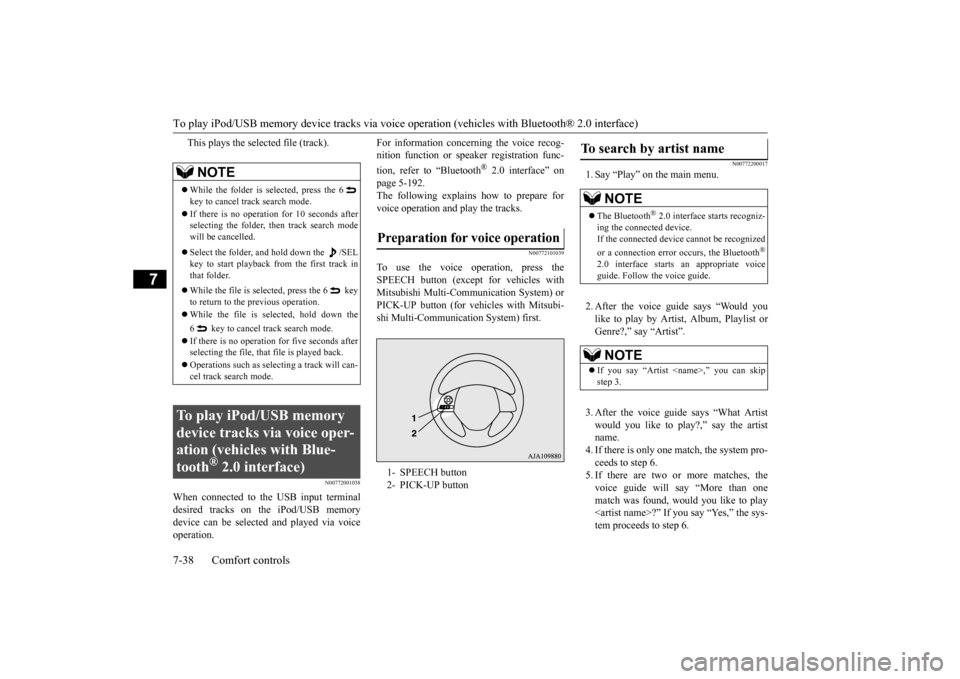
To use the voice operation, press the SPEECH button (except
for vehicles with
Mitsubishi Multi-Communication System) orPICK-UP button (for vehicles with Mitsubi- shi Multi-Communication System) first.
N00772200017
1. Say “Play” on the main menu. 2. After the voice guide says “Would you like to play by Artist, Album, Playlist or Genre?,” say “Artist”. 3. After the voice guide
says “What Artist
would you like to play?,” say the artistname. 4. If there is only one ma
tch, the system pro-
ceeds to step 6.5. If there are two or more matches, the voice guide will say “More than one match was found, would you like to play
say “Yes,” the sys-
tem proceeds to step 6.
NOTE
While the folder is selected, press the 6 key to cancel track search mode. If there is no operation for 10 seconds after selecting the folder, then track search mode will be cancelled. Select the folder, and hold down the /SEL key to start playback from the first track inthat folder. While the file is selected, press the 6 key to return to the
previous operation.
While the file is se
lected, hold down the
6 key to cancel track search mode. If there is no operation for five seconds after selecting the file, that file is played back. Operations such as sele
cting a trac
k will can-
cel track search mode.
To play iPod/USB memory device tracks via voice oper-ation (vehicles with Blue-tooth
® 2.0 interface)
Preparation for voice operation 1- SPEECH button 2- PICK-UP button
To search by artist name
NOTE
The Bluetooth
® 2.0 interface starts recogniz-
ing the connect
ed device.
If the connected device
cannot be recognized
or a connection error occurs, the Bluetooth
®
2.0 interface starts
an appropriate voice
guide. Follow the voice guide.NOTE
If you say “Artist
BK0223400US.book 38 ページ 2015年2月13日 金曜日 午後12時15分
Page 367 of 464

To play iPod/USB memory device tr
acks via voice operation (vehicles with Bluetooth® 2.0 interface)
Comfort controls 7-39
7
If you say “No,” the next matching artist is uttered by the system. 6. After the voice guide
says “Playing
the voice recognition
mode and starts playback.
N00772300018
1. Say “Play” on the main menu.
2. After the voice guide says “Would you like to play by Artist, Album, Playlist orGenre?,” say “Album”. 3. After the voice gui
de says “What Album
would you like to play?” say the album title.4. If there is only one match, the system pro- ceeds to step 6. 5. If there are two or more matches, thevoice guide will say “More than one match was found, would you like to play
u say “Yes,” the sys-
tem proceeds to step 6. If you say “No,” the name of the next matching album is uttered by the system.
6. After the voice guide says “Playing
N00772400019
1. Say “Play” on the main menu.
NOTE
If you say “No” to th
ree or all artist names
uttered by the system, the voice guide will say “Artist not found, pl
ease try again” and
the system returns to step 2. Search time depends on the number of songs on your connected devi
ce. Devices contain-
ing a large number of
songs may take longer
to return search results.NOTE
If the confirmation f
unction is active, the
voice guide confirms if
the artist name is
correct. If the artist name is correct, say“Yes”. If not, say “No”. After the voice guide says “Artist not found, please try again,” the system returns to step 2.
To search by album title
NOTE
The Bluetooth
® 2.0 interface starts recogniz-
ing the connect
ed device.
If the connected device
cannot be recognized
or a connection error occurs, the Bluetooth
®
2.0 interface starts
an appropriate voice
guide. Follow the voice guide.NOTE
If you say “Album
step 3.
NOTE
If you say “No” to thre
e or all album titles
uttered by the system, the voice guide willsay “Album not found, pl
ease try again” and
the system returns to step 2.NOTE
If the confirmation f
unction is active, the
voice guide confirms if
the album title is cor-
rect. If the album title is correct, say “Yes”. If not, say “No”. Afte
r the voice guide says
“Album not found, please
try again,” the sys-
tem returns to step 2.
To search by playlist
BK0223400US.book 39 ページ 2015年2月13日 金曜日 午後12時15分
Page 368 of 464

To play iPod/USB memory device tracks via voice op
eration (vehicles with
Bluetooth® 2.0 interface)
7-40 Comfort controls
7
2. After the voice guide says “Would you like to play by Artist, Album, Playlist orGenre?,” say
“Playlist”.
3. After the voice guide
says “What Playlist
would you like to play?,” say the playlist name.4. If there is only one ma
tch, the system pro-
ceeds to step 6. 5. If there are two or more matches, thevoice guide will say “More than one match was found, would you like to play
6. After the voice gui
de says “Playing
the voice recognition
mode and starts playback.
N00772500010
1. Say “Play” on the main menu.
2. After the voice guide says “Would you like to play by Artist, Album, Playlist orGenre?,” say “Genre”. 3. After the voice guide says “What Genre would you like to play?,” say the music type.4. If there is only one ma
tch, the system pro-
ceeds to step 6. 5. If there are two or more matches, thevoice guide will say “More than one match was found, would you like to play
NOTE
The Bluetooth
® 2.0 interface starts recogniz-
ing the connected device. If the connected device
cannot be recognized
or a connection error
occurs, the Bluetooth
®
2.0 interface starts
an appropriate voice
guide. Follow the voice guide.NOTE
If you say “Playlist
step 3. If the device has no pl
aylist, the voice guide
will say “There are no playlists stored ondevice” and the system returns to step 2.
NOTE
If you say “No” to three or all playlist names uttered by the system, the voice guide willsay “Playlist not found,
please try again” and
the system returns to step 2.NOTE
If the confirmation function is active, the voice guide confirms if
the playlist name is
correct. If the playlist name is correct, say “Yes”. If not, say “No”. After the voice guide says “Playlist not found, please try again,”the system returns to step 2. Refer to “Con- firmation function sett
ing” on page 5-196.
To search by genre
NOTE
The Bluetooth
® 2.0 interface starts recogniz-
ing the connect
ed device.
If the connected device
cannot be recognized
or a connection error occurs, the Bluetooth
®
2.0 interface starts
an appropriate voice
guide. Follow the voice guide.NOTE
If you say “Genre
BK0223400US.book 40 ページ 2015年2月13日 金曜日 午後12時15分
Page 372 of 464
Audio Quality and Volume Balance Adjustment 7-44 Comfort controls
7
This switches in the order “Channel name”, “Category name”, “A
rtist name”, “Track
name”, and “Composer name”. This switches in the order “Disc title”, “Track title”, and “Ope
rating status”.
This switches in the order “Folder title”, “File title”, and “Ope
rating status”.
Hold down the INFO key. This switches the ID3tag display. Each time INFO key is
pressed, this switches
in the order “Album
name”, “Track name”,
“Artist name”, “Genre name”*, and “Operat- ing status”.
N00718200024
This switches in the order “Albums”, “Track name”, “Artist name”, “Genre name”, and “Operating status”.
N00718300025
Operating details are the same as in “DuringiPod Playback” (P.7-44).
N00718400026
Change audio quality settings. 1. Press the /SEL key to select settings items. Each time the /SEL key is pressed, this switches in the order BASS, TREBLE, FADER, BALANCE, SCV, and Cancel. 2. Turn the /SEL key to adjust.
During Satellite Radio Reception
(if so equipped)
NOTE
The channel and cate
gory have a maximum
display of 8 characters
. The other items have
a maximum display
of 36 characters.
During CD-DA playback
NOTE
If there is no text information to display, then “NO TITLE” is displayed.
During MP3/WMA/AAC Play- back
NOTE
If there is no text information to display, then “NO TITLE” is displayed.
Display the ID3tag
*:Displayed when playing back audio files on a USB device (vehicles with a Bluetooth
® 2.0 interface).
NOTE
During display of the ID3tag, hold down the INFO key to switch to the folder title display. The genre name displa
y may not be possible.
During iPod Playback
NOTE
If there is no text information to display, then “NO TITLE” is displayed. Displayed genre name
in equipment by type
(vehicles with a Bluetooth
® 2.0 interface).
The genre name displa
y may not be possible.
During Bluetooth
® 2.0 Audio Play-
back
(if so equipped)
Audio Quality and Volume Balance Adjustment Adjust Audio Quality and Vol- ume Balance
BK0223400US.book 44 ページ 2015年2月13日 金曜日 午後12時15分
Page 378 of 464
Troubleshooting 7-50 Comfort controls
7
Here is a list of symptoms, ca
uses and responses if you think
something is not working properly.
USB FILE ERROR Files that cannot be played are selected. Select files that can be played.
“Audio Files (MP3/WMA/AAC)” (P.7-20)
USB BUS PWR There is high or low electr
ical current or voltage. Turn the powe
r OFF and wait a short while. If the
problem persists, consult
an authorized Mitsubishi
Motors dealer or a repair
facility of your choice.
LSI ERROR There is an intern
al malfunction for some reason.
UNSUPPORTED
FORMAT
Unsupported audio files have been played. C
onfirm audio files th
at can be played.
“Audio Files (MP3/WMA/AAC)” (P.7-20)
UNSUPPORTED
DEVICE
An unsupported USB device has
been connected. Please conne
ct a USB memory device.
iPod NO SONG An iPod/iPhone not c
ontaining any tracks has been
connected.
Connect an iPod/iPhone containing tracks.
VER ERROR This iPod/iPhone soft
ware version is not supported. Please ch
ange to a supporte
d software version.
Other ERROR DC An abnorma
l direct voltage has been sent to the
speakers.
Turn the power OFF and wait a short while. If the problem persists, consult
an authorized Mitsubishi
Motors dealer or a repair
facility of your choice.
If You Think Something Is Not Working Properly...
Symptoms
Cause
Response
There is no sound or quiet sound.
The volume is turned to its minimum. Adjust the volume.
“Adjust Volume” (P.7-25)
The balance or fader is turned to
one side. Adjust the balance or fader.
“Adjust Audio Quality a
nd Volume Balance” (P.7-44)
Mode
Message
Cause
Response
BK0223400US.book 50 ページ 2015年2月13日 金曜日 午後12時15分
Page 461 of 464

Alphabetical index
12-5
12
Snow tires
..........................................
9-21
Spark plugs
........................................
9-23
Starting the engine
.....................
5-24
, 5-62
Steering
Steering wheel height
and reach adjustment
5-54 Wheel lock
............................
5-23
, 5-62
Stop lights
Bulb capacity
.................................
9-30
Replacement
..................................
9-35
Storage spaces
..................................
5-228
Sun visors
........................................
5-218
Sunglasses holder
.............................
5-231
Sunroof
..............................................
5-51
Super-all wheel control (S-AWC)
S-AWC drive mode display
.............
5-83
S-AWC drive mode-selector
............
5-83
S-AWC operation display
................
5-84
Supplemental Re
straint System
............
4-33
How the Supplemental Restraint System works
..........................................
4-36
Maintenance service
........................
4-49
T
Tail light
Bulb capacity
.................................
9-30
Replacement
..................................
9-35
Tank capacity
.....................................
11-7
Theft-alarm system
.............................
5-45
Time Setting
......................................
7-47
Timing belt
........................................
9-24
Tire
...................................................
9-15
Inflation pressure
............................
9-18
Maintenance
..................................
9-19
Quality grading
..............................
10-2
Replacing tires and wheels
..............
9-19
Rotation
........................................
9-20
Size (tire and wheel)
.......................
11-7
Snow tires
.....................................
9-21
Tire and loading information placard 11-3 Tire chains
.....................................
9-21
To change a tire
................................
8-6
Tread wear indicator
.......................
9-20
Tire pressure monitoring system
.........
5-119
Tools
...................................................
8-6
Storage
............................................
8-5
Towing
..............................................
8-14
Trailer towing
....................................
6-11
Transfer oil
................................
9-12
, 11-7
Turn signal light
Indicators
.....................................
5-172
Lever
...........................................
5-183
U
USB input terminal
............................
5-215
How to connect a USB memory device
....
5-215
How to connect an iPod
.................
5-216
V
Vanity mirror
....................................
5-218
Vanity mirror lights
Bulb capacity
.................................
9-32
Vehicle care precautions
......................
9-38
Vehicle dimensions
.............................
11-4
Vehicle labeling
..................................
11-2
Vehicle preparation before driving
..........
6-4
Vehicle weights
..................................
11-5
Vents
...................................................
7-2
W
Warning lights
..................................
5-173
Washer
Fluid
.....................................
9-12
, 11-7
Rear window washer
.....................
5-189
Switch
.........................................
5-188
Washing
.............................................
9-40
Waxing
..............................................
9-41
Weights
.............................................
11-5
Wheel
Covers
...........................................
8-13
Specification
..................................
11-7
Wiper
Rear window wiper
.......................
5-189
BK0223400US.book 5 ページ 2015年2月13日 金曜日 午後12時15分