2016 MITSUBISHI OUTLANDER ignition
[x] Cancel search: ignitionPage 70 of 464
Supplemental Restraint System (SRS) - airbag 4-44 Seat and restraint systems
4
N00408101431
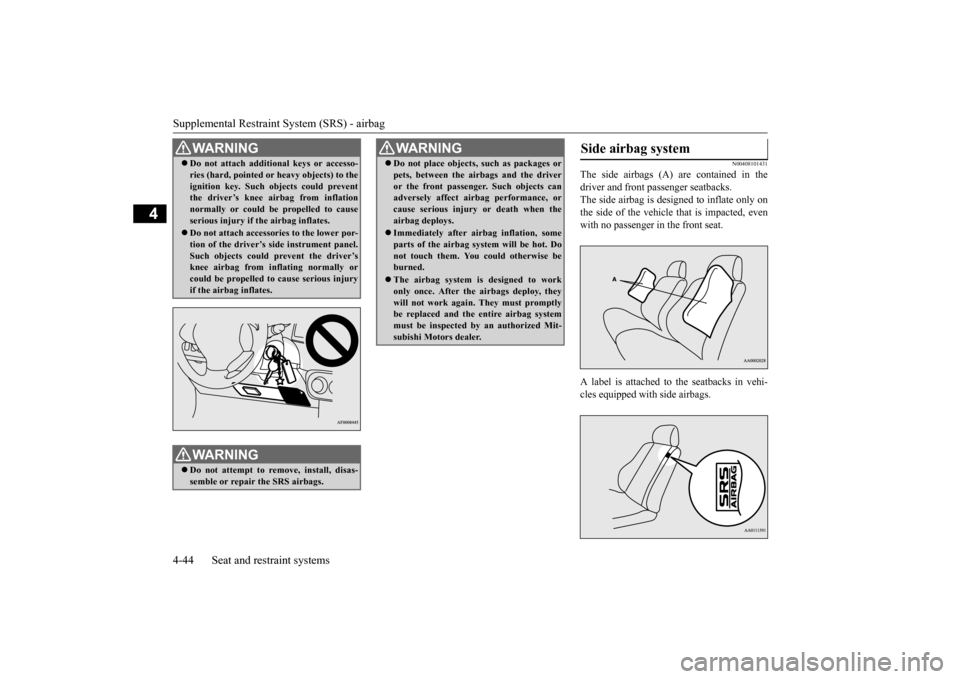
The side airbags (A) are contained in the driver and front passenger seatbacks. The side airbag is de
signed to inflate only on
the side of the vehicle that is impacted, even with no passenger in the front seat. A label is attached to the seatbacks in vehi- cles equipped with side airbags.
Do not attach addition
al keys or accesso-
ries (hard, pointed or
heavy objects) to the
ignition key. Such objects could preventthe driver’s knee ai
rbag from inflation
normally or could be propelled to cause serious injury if
the airbag inflates.
Do not attach accessories to the lower por- tion of the driver’s side instrument panel.Such objects could prevent the driver’s knee airbag from inflating normally or could be propelled to cause serious injuryif the airbag inflates.WA R N I N G Do not attempt to remove, install, disas- semble or repair the SRS airbags.WA R N I N G
Do not place objects,
such as packages or
pets, between the airbags and the driveror the front passenger. Such objects canadversely affect ai
rbag performance, or
cause serious injury or death when the airbag deploys. Immediately after airbag inflation, some parts of the airbag syst
em will be hot. Do
not touch them. You could otherwise be burned. The airbag system is designed to work only once. After the
airbags deploy, they
will not work again. They must promptlybe replaced and the
entire airbag system
must be inspected by
an authorized Mit-
subishi Motors dealer.WA R N I N G
Side airbag system
BK0223400US.book 44 ページ 2015年2月13日 金曜日 午後12時15分
Page 77 of 464

5
Features and controlsBreak-in recommendations ..............................................................5-3 Keys .................................................................................................5-3 Electronic immobilizer (Anti-theft starting system) ........................5-4Keyless entry system (if so equipped) ..............................................5-7 Free-hand Advanced Security Tr
ansmitter (F.A.S.T.-key) (if so
equipped).....................................................................................5-12Door locks ......................................................................................5-33 Power door locks ......
...........
...........
...........
...........
...........
.........
.....5-35
Child safety locks for rear door ..........
...........
.........
.........
.........
.....5-36
Liftgate (except for vehi
cles equipped with the
power liftgate) ....5-36
Power liftgate (if so equipped) .......................................................5-38 Inside liftgate release .....................................................................5-44Theft-alarm system ........................................................................5-45 Power window control ...................................................................5-49 Sunroof (if so equipped) .................................................................5-51Parking brake .................................................................................5-53 Steering wheel height and reach adjustment ..................................5-54 Inside rearview mirror ...................................................................5-55Outside rearview mirrors ...............................................................5-57 Ignition switch ...............................................................................5-60 Steering wheel lock (if so equipped) ..............................................5-62Starting the engine .........................................................................5-62 Automatic transaxle (if so equipped)..............................................5-64 Continuously variable transmission
(CVT) (if so equipped)..........5-71
Electronically controlled
4WD system (if so equipped).................5-79
S-AWC (Super-All Wheel Control) (if
so equipped) .....................5-81
4-wheel drive operation .................................................................5-85Inspection and maintenance followi
ng rough road operation ........5-87
Cautions on the handling of 4-wheel dr
ive vehicles ..................... 5-88
Service brake ................................................................................. 5-89 Hill start assist (if so equipped) ...................................................... 5-89Brake assist system ........................................................................ 5-90 Anti-lock braking system .............................................................. 5-91 Electric power steering system (EPS) ........................................... 5-93Active stability control (ASC) ....................................................... 5-94 Cruise control (if so equipped) ....................................................... 5-96 Adaptive Cruise Control System (ACC)
(if so equipped) ............ 5-100
Forward Collision Mitigation System
(FCM) (if so equipped) .... 5-111
Lane Departure Warning System (LDW
) (if so equipped)........... 5-116
Tire pressure monitoring system ................................................. 5-119Rear-view camera (if so equipped)............................................... 5-124 Instrument cluster ........................................................................ 5-126 Multi Information display - Type 1 ............................................. 5-128Multi Information display - Type 2 ............................................. 5-146 Indicator light, warning light, and
information screen display list
(multi information display - Type 1) ....................................... 5-154Indicator and warning light package
(multi information display - Type
2) .............................................................................................. 5-171 Indicators ..................................................................................... 5-172Warning lights .............................................................................. 5-173 Information screen display (Vehicle equipped with the multi informa- tion display - Type 1) ............................................................... 5-175Combination headlights and dimmer switch ............................... 5-177 Headlight leveling switch (if so equipped)................................... 5-182 Turn signal lever .......................................................................... 5-183Hazard warning flasher switch .................................................... 5-184
BK0223400US.book 1 ページ 2015年2月13日 金曜日 午後12時15分
Page 82 of 464
Electronic immobilizer (Anti-theft starting system) 5-6 Features and controls
5
N00562201149
You can program new keys to the system if you have two valid (alr
eady registered) keys
and blank immobilizer ke
y (specially cut for
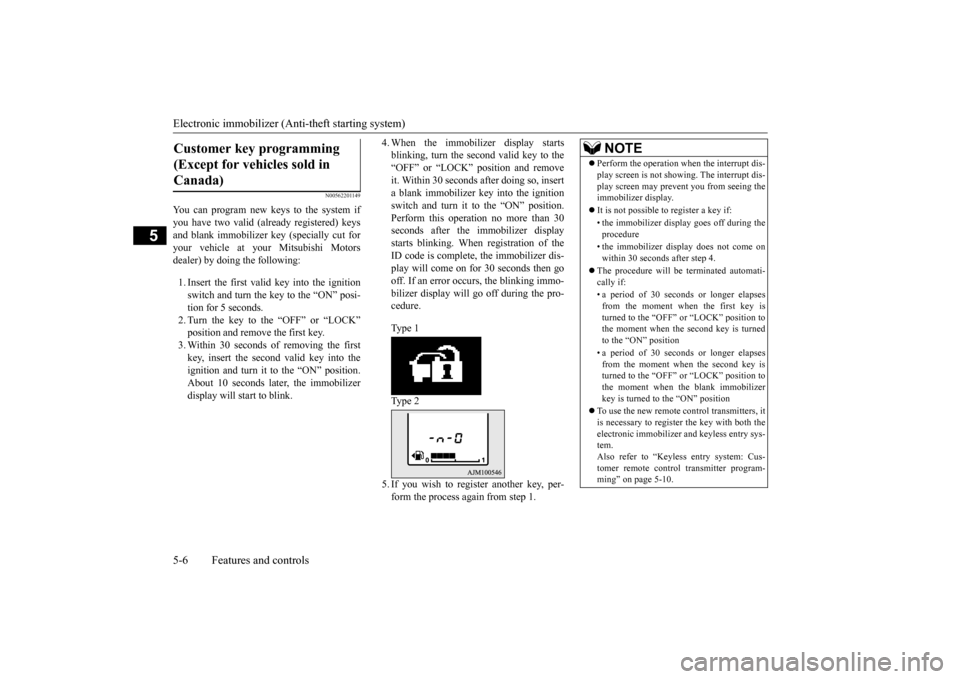
your vehicle at your Mitsubishi Motorsdealer) by doing the following: 1. Insert the first valid key into the ignition switch and turn the key to the “ON” posi-tion for 5 seconds. 2. Turn the key to the “OFF” or “LOCK” position and remove the first key.3. Within 30 seconds of removing the first key, insert the second valid key into the ignition and turn it to the “ON” position.About 10 seconds la
ter, the immobilizer
display will start to blink.
4. When the immobilizer display starts blinking, turn the second valid key to the“OFF” or “LOCK” position and remove it. Within 30 seconds after doing so, insert a blank immobilizer ke
y into the ignition
switch and turn it to the “ON” position. Perform this operation no more than 30 seconds after the immobilizer displaystarts blinking. When registration of the ID code is complete, the immobilizer dis- play will come on for 30 seconds then go off. If an error occurs, the blinking immo- bilizer display will
go off during the pro-
cedure. Type 1 Type 2 5. If you wish to register another key, per- form the process again from step 1.
Customer key programming (Except for vehicles sold in Canada)
NOTE
Perform the operation when the interrupt dis- play screen is not show
ing. The interrupt dis-
play screen may prevent you from seeing theimmobilizer display. It is not possible to
register a key if:
• the immobilizer disp
lay goes off during the
procedure • the immobilizer disp
lay does not come on
within 30 seconds after step 4.
The procedure will be terminated automati- cally if: • a period of 30 seconds or longer elapses from the moment when the first key isturned to the “OFF” or “LOCK” position to the moment when the second key is turned to the “ON” position • a period of 30 seconds or longer elapses from the moment when the second key isturned to the “OFF” or “LOCK” position to the moment when the blank immobilizer key is turned to the “ON” position
To use the new remote control transmitters, it is necessary to register
the key with both the
electronic immobilizer
and keyless entry sys-
tem. Also refer to “Keyless entry system: Cus-tomer remote control transmitter program- ming” on page 5-10.
BK0223400US.book 6 ページ 2015年2月13日 金曜日 午後12時15分
Page 84 of 464

Keyless entry system (if so equipped) 5-8 Features and controls
5
Within about 2 seconds, press the UNLOCK button one more time to unlock all the doorsand liftgate. The dome light will turn on for 30 seconds. The turn signal lights will also blink twice.The front side-marker and parking lights will also turn on for about 30 seconds. Refer to “Welcome light” on page 5-181.
Within 30 seconds of locking the doors and liftgate using the LOCK button, press the LOCK button twice rapidly to retract the out- side rearview mirrors. Within 30 seconds of unlocking the doors and liftgate using the UNLOCK button, press the UNLOCK button twice rapidly to return theoutside rearview mirrors to their extended positions. The outside rearview mirrors are not initially set to work as described above. If you wantthem to work as described above, you need to set them so that they do not retract/extend when the doors and liftgate arelocked/unlocked using
the keyless entry sys-
tem. For details, please consult an authorized Mit-subishi Motors dealer.
In a vehicle equipped
with the Mitsubishi
Multi-Communication Syst
em, it is possible
to change the setting by means of screen operations. Refer to the separate owner’s manual fordetails. The horn and turn signal lights of the keyless entry system answerback function can be changed as required. This is done with thekey removed from the ignition switch. The answerback function can be set in the following three ways. Each time the answerback function is set, a chime will sound to
tell you the condition of
the answerback function.
NOTE
On vehicles equipped wi
th the mirror retrac-
tor switch, the outside rearview mirrors auto- matically extend when the UNLOCK button(2) is pressed. On vehicles equippe
d with a Mitsubishi
Multi-Communication System, the functionscan be adjusted on the screen. For details, refer to the separate operation manual. The door and liftgate
unlock function can be
set so that all doors a
nd liftgate unlock when
the UNLOCK button (2) is pressed once.Refer to “Setting of door
and liftgate unlock
function” on page 5-9.
Operation of the outside rear- view mirrors (Vehicles equipped with the mirror retractor switch)
To r e t r a c t
To e x t e n d
Answerback function
NOTE
The answerback functi
on will not operate if
any of the doors are open.
Horn deactivation/reactivation
One chime: The horn will not sound. Two chimes: The horn will sound.
BK0223400US.book 8 ページ 2015年2月13日 金曜日 午後12時15分
Page 85 of 464

Keyless entry system (if so equipped)
Features and controls 5-9
5
1. Remove the key from the ignition switch. 2. Open the driver’s door and turn the com- bination headlights and dimmer switch tothe “OFF” position. 3. Press the LOCK button (1) for 4 to 10 sec- onds and press the UNLOCK button (2)during this time. 4. Release in sequence the UNLOCK and LOCK buttons within 5 seconds of press- ing the UNLOCK button in step 3.
The answerback function can be turned ON or OFF separately. 1. Remove the key from the ignition switch. 2. Open the driver’s door and turn the com- bination headlights and dimmer switch tothe “OFF” position.
3. Press the UNLOCK button (2) for 4 to 10 seconds and press the LOCK button (1)during this time. 4. Release in sequence the UNLOCK and LOCK buttons within 5 seconds of press-ing the LOCK button in step 3.
N00543601115
The door and liftgate unlock function can beset to the following two conditions.Each time the door and
liftgate unlock func-
tion is set, a chime will
sound to tell you the
condition of the door and liftgate unlockfunction. 1. Remove the key from the ignition switch. 2. Open the driver’s door and turn the com- bination headlights and dimmer switch tothe “OFF” position. 3. Press the LOCK button (1) for 4 to 10 sec- onds and press the UNLOCK button (2)during this time. 4. Release in sequence the LOCK and UNLOCK buttons within 5 seconds ofpressing the LOCK button in step 3.
Four chimes: The horn will sound if the
LOCK button is pressed twice within 1 second.
NOTE
On a vehicle equippe
d with a Mitsubishi
Multi-Communication System, the functions can be adjusted on the screen. For details, refer to the separa
te operation manual.
Turn signal lights deactiva- tion/reactivation
Number of chimes
To l o c k
To u n l o c k
One chime One flash Two flashes Two chimes One flash No flash Three chimes No flash Two flashes Four chimes Two flashes One flash Five chimes No flash One flash Six chimes Two flashes No flash Seven chimes
No flash No flash
NOTE
On a vehicle equippe
d with a Mitsubishi
Multi-Communication System, the functionscan be adjusted on the screen. For details, refer to the separate operation manual.
Setting of door and liftgate unlock function
Number of chimes
Condition
One chime
All doors and the liftgate unlock
Two chimes Driver’s door unlock only
BK0223400US.book 9 ページ 2015年2月13日 金曜日 午後12時15分
Page 87 of 464

Keyless entry system (if so equipped)
Features and controls 5-11
5
4. Within 60 seconds after step 3, complete the following ID code
registration opera-
tion using the next remote control trans- mitter you wish to register within 4 seconds.i) Press both the LOCK and UNLOCK buttons for 2 seconds. ii) Release both the LOCK and UNLOCKbuttons for 1 second. iii) Press the UNLOCK button. The answerback function informs you that the ID code registration of the transmitter is completed.5. To register the ID codes of additional remote control transmitters, repeat step 4 within 60 seconds after step 4.6. If no ID code of a remote control trans- mitter is registered within 60 seconds after step 4, the regi
stration mode is can-
celed and the normal mode returns.
N00546101124
Your keyless entry system operates on a radio frequency subject to
Federal Communica-
tions Commission (FCC)
Rules (For vehicles
sold in U.S.A.) and Industry Canada Rules (For vehicles sold in Canada). This device complies with Part 15 of FCC Rules andIndustry Canada licenc
e-exempt RSS stan-
dard(s). Operation is subject to the following two con- ditions. This device may not
cause harmful inter-
ference. This device must ac
cept any interference
received, including interference that may cause undesired operation.
NOTE
For verification purposes, try to lock and unlock the doors after the registration is completed. The indicator light (4)
comes on each time a
button is pressed. The keyless entry system does not work if the key is in the ignition switch.
The remote control transmitter can be used from about 40 feet (12 m) away. However,this distance may cha
nge if your vehicle is
near a TV transmitti
ng tower, a power sta-
tion, or a radio station. If the following conditi
ons are observed after
pressing the LOCK (1) or UNLOCK (2) but- ton on the remote control transmitter, thebattery in the remote control transmitter may need to be replaced. • The doors and the lift
gate cannot be locked
or unlocked. • The panic alarm cannot be operated. • The indicator light
(4) is dim or does not
come on.
If you lose your remote control transmitter, please contact an au
thorized Mitsubishi
Motors dealer for a replacement. If you wish to obtain
an additional remote
control transmitter, please contact an autho- rized Mitsubishi Moto
rs dealer. A maximum
of 8 remote control tr
ansmitters can be pro-
grammed for your vehicle. To use the new remote control transmitters, it is necessary to register
the key with both the
electronic immobilizer and keyless entry sys-tem. Also refer to “Electronic immobilizer (Anti- theft starting system): Customer key pro-gramming” on page 5-6.NOTE
General information
CAUTION Changes or modifica
tions not expressly
approved by the manufacturer for compli- ance could void the user
’s authority to oper-
ate the equipment.
BK0223400US.book 11 ページ 2015年2月13日 金曜日 午後12時15分
Page 106 of 464

Free-hand Advanced
Security Transmitter (F.A.S
.T.-key) (if so equipped)
5-30 Features and controls
5
The horn and turn signal lights of the keyless entry system answerback function can be changed as required. This is done with thekey removed from the ignition switch. The answerback function can be set in the following three ways. 1. Put the operation mode in OFF. 2. Open the driver’s door and turn the com- bination headlights and dimmer switch to the “OFF” position.3. Press the LOCK button (1) for 4 to 10 sec- onds and press the UNLOCK button (2) during this time.4. Release in sequence the UNLOCK and LOCK buttons within 10 seconds of pressing the UNLOCK button in step 3.
The answerback function from the turn signal lights can be turned ON or OFF separately. 1. Put the operation mode in OFF. 2. Open the driver’s door and turn the com- bination headlights and dimmer switch tothe “OFF” position. 3. Press the UNLOCK button (2) for 4 to 10 seconds and press the LOCK button (1)during this time. 4. Release in sequence the UNLOCK and LOCK buttons within 10 seconds ofpressing the LOCK button in step 3.
The buzzer answerback function can be turned ON or OFF as required.
N00544601095
The door and liftgate
unlock function can be
set to the following two conditions. Each time the door and
liftgate unlock func-
tion is set, a chime wi
ll sound to tell you the
Answerback function
Horn deactivation/reactivation One chime: The horn will not sound. Two chimes: The horn will sound.Four chimes: The hor
n will sound if the
LOCK button is pressed twice within 1 second.
NOTE
On a vehicle equippe
d with a Mitsubishi
Multi-Communication System, the functionscan be adjusted on the screen. For details,refer to the separa
te operation manual.
Turn signal light deactivation/reactiva- tionNumber of chimes
To l o c k
To u n l o c k
One chime One flash Two flashes Two chimes One flash No flash Three chimes No flash Two flashes Four chimes Two flashes One flash Five chimes No flash One flash
Six chimes Two flashes No flashSeven chimes No flash No flash
NOTE
On a vehicle equippe
d with a Mitsubishi
Multi-Communication System, the functions can be adjusted on the screen. For details, refer to the separate operation manual.
Buzzer deactivation/reactivation
NOTE
On a vehicle equippe
d with a Mitsubishi
Multi-Communication System, the functionscan be adjusted on the screen. For details, refer to a separa
te operation manual.
Setting of door and liftgate unlock function
Number of chimes
To l o c k
To unlock
BK0223400US.book 30 ページ 2015年2月13日 金曜日 午後12時15分
Page 110 of 464
Door locks 5-34 Features and controls
5
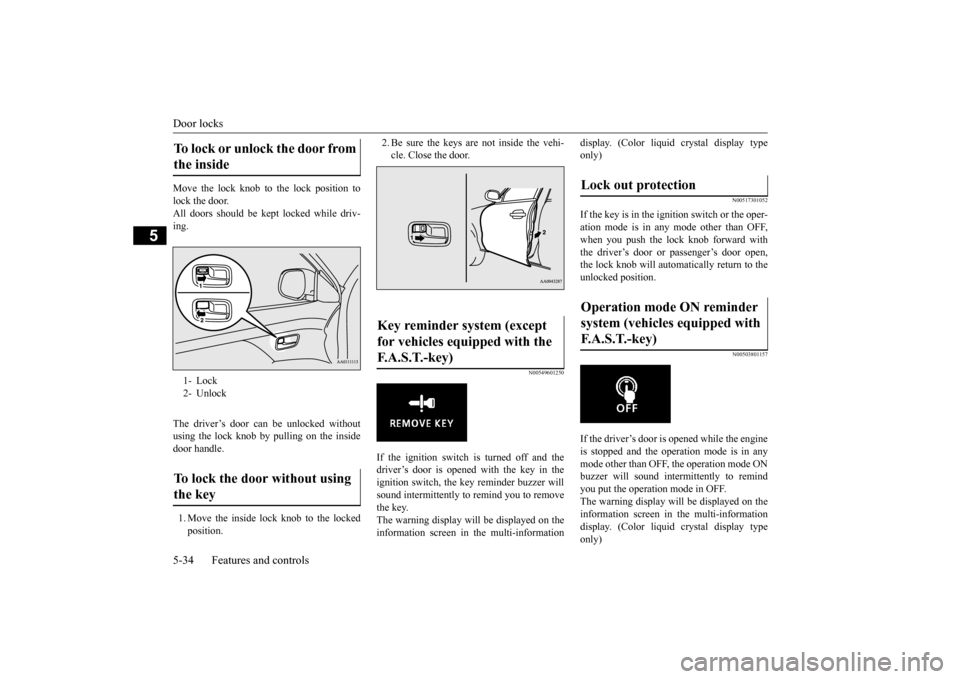
Move the lock knob to the lock position to lock the door. All doors should be kept locked while driv-ing. The driver’s door can be unlocked without using the lock knob by pulling on the insidedoor handle. 1. Move the inside lock knob to the locked position.
2. Be sure the keys are not inside the vehi- cle. Close the door.
N00549601250
If the ignition switch is turned off and thedriver’s door is opened with the key in theignition switch, the ke
y reminder buzzer will
sound intermittently to remind you to remove the key.The warning display will be displayed on the information screen in the multi-information
display. (Color liquid crystal display type only)
N00517301052
If the key is in the ignition switch or the oper-ation mode is in any mode other than OFF,when you push the lock knob forward with the driver’s door or passenger’s door open, the lock knob will automatically return to the unlocked position.
N00503801157
If the driver’s door is opened while the engineis stopped and the operation mode is in any mode other than OFF, the operation mode ONbuzzer will sound interm
ittently to remind
you put the operation mode in OFF. The warning display will be displayed on theinformation screen in the multi-information display. (Color liquid crystal display type only)
To lock or unlock the door from the inside 1- Lock 2- UnlockTo lock the door without using the key
Key reminder system (except for vehicles equipped with the F. A . S . T. - k e y )
Lock out protection Operation mode ON reminder system (vehicles equipped with F.A.S.T.-key)
BK0223400US.book 34 ページ 2015年2月13日 金曜日 午後12時15分