2016 MITSUBISHI OUTLANDER engine
[x] Cancel search: enginePage 328 of 464

Trailer towing 6-16 Driving safety
6
1. Apply the brakes a
nd keep them applied.
2. Have someone plac
e chocks or blocks
under both the vehicle and trailer wheels. 3. When the chocks or blocks are in place, release your brakes slowly until thechocks or blocks absorb the load. 4. Apply the parking brake firmly. 5. Set the selector lever to the “P” (PARK)position and turn off the engine.
When restarting out after parking on a hill: 1. Check that the selector lever is set to the “P” (PARK) position.2. Start the engine. Be sure to keep the brake pedal depressed. 3. Set the selector lever to the “D” (DRIVE)position or “R” (REVERSE) position. 4. Release the parking brake and brake pedal and slowly pull or back away from thechocks or blocks. Stop and apply your brakes. 5. Have someone retrieve the chocks orblocks.
BK0223400US.book 16 ページ 2015年2月13日 金曜日 午後12時15分
Page 333 of 464
Automatic climate cont
rol air conditioner
Comfort controls 7-5
7
N00731501311
The air conditioner can only be us
ed while the engine is running.
N00711801637
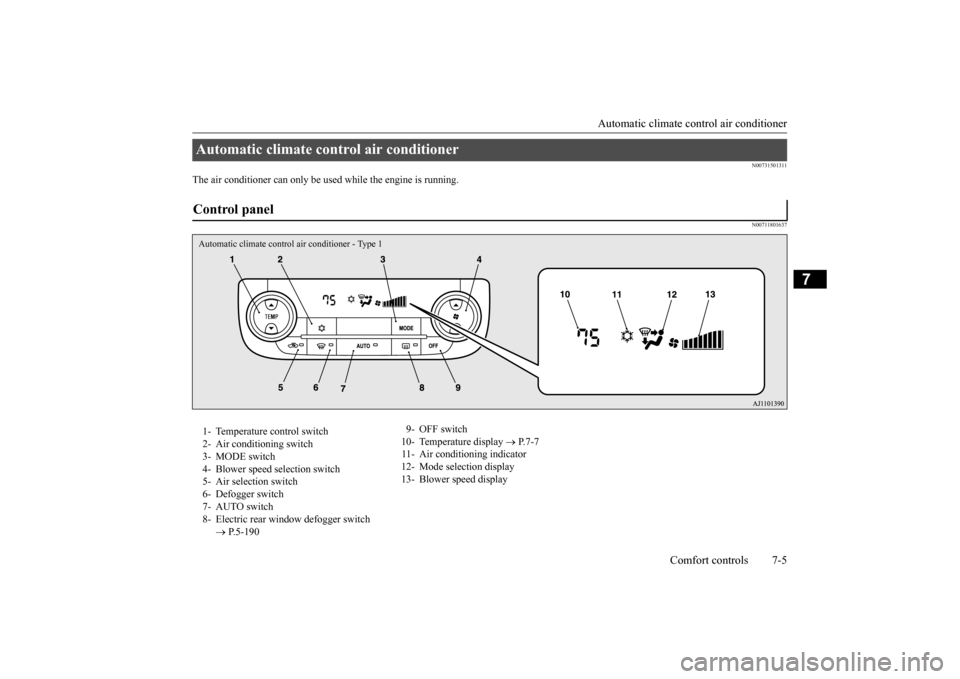
Automatic climate control air conditioner Control panel Automatic climate control air conditioner - Type 11- Temperature control switch 2- Air conditioning switch 3- MODE switch 4- Blower speed
selection switch
5- Air selection switch 6- Defogger switch 7- AUTO switch8- Electric rear wi
ndow defogger switch
P.5-190
9- OFF switch 10- Temperature display
P.7-7
11- Air conditioning indicator 12- Mode selection display 13- Blower speed display
BK0223400US.book 5 ページ 2015年2月13日 金曜日 午後12時15分
Page 336 of 464
Automatic climate cont
rol air conditioner
7-8 Comfort controls
7
The above indicates the
factory settings. You
can personalize the air
selection switch and
air conditioning switch to match your per- sonal preferences.Contact your Mitsubishi
Motors dealer or a
repair facility of your
choice for assistance.
Refer to “Personalizi
ng the air conditioning
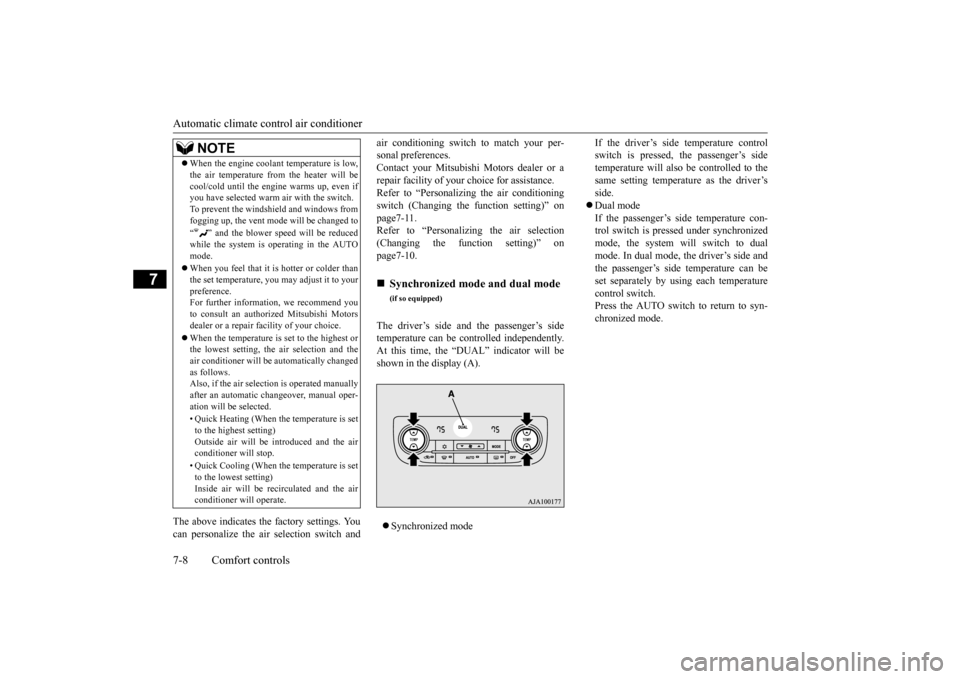
switch (Changing the function setting)” on page7-11. Refer to “Personalizing the air selection(Changing the function setting)” on page7-10. The driver’s side and the passenger’s side temperature can be controlled independently.At this time, the “
DUAL” indicator will be
shown in the display (A). Synchronized mode
If the driver’s side temperature control switch is pressed, the passenger’s sidetemperature will also be controlled to the same setting temperat
ure as the driver’s
side. Dual mode If the passenger’s side temperature con- trol switch is pressed under synchronizedmode, the system will switch to dual mode. In dual mode, the driver’s side and the passenger’s side
temperature can be
set separately by usi
ng each temperature
control switch.Press the AUTO switch to return to syn- chronized mode.
When the engine coolan
t temperature is low,
the air temperature from the heater will becool/cold until the engi
ne warms up, even if
you have selected warm
air with the switch.
To prevent the windshield and windows from fogging up, the vent mode
will be changed to
“ ” and the blower speed will be reduced while the system is operating in the AUTO mode. When you feel that it is hotter or colder than the set temperature, you may adjust it to yourpreference. For further information, we recommend you to consult an authorized Mitsubishi Motorsdealer or a repair fa
cility of your choice.
When the temperature is set to the highest or the lowest setting, the air selection and the air conditioner will be
automatically changed
as follows.Also, if the air selection is operated manually after an automatic ch
angeover, manual oper-
ation will be selected. • Quick Heating (When th
e temperature is set
to the highest setting)Outside air will be introduced and the air conditioner will stop. • Quick Cooling (When th
e temperature is set
to the lowest setting) Inside air will be recirculated and the airconditioner wi
ll operate.
NOTE
Synchronized mode and dual mode
(if so equipped)
BK0223400US.book 8 ページ 2015年2月13日 金曜日 午後12時15分
Page 338 of 464
Automatic climate cont
rol air conditioner
7-10 Comfort controls
7
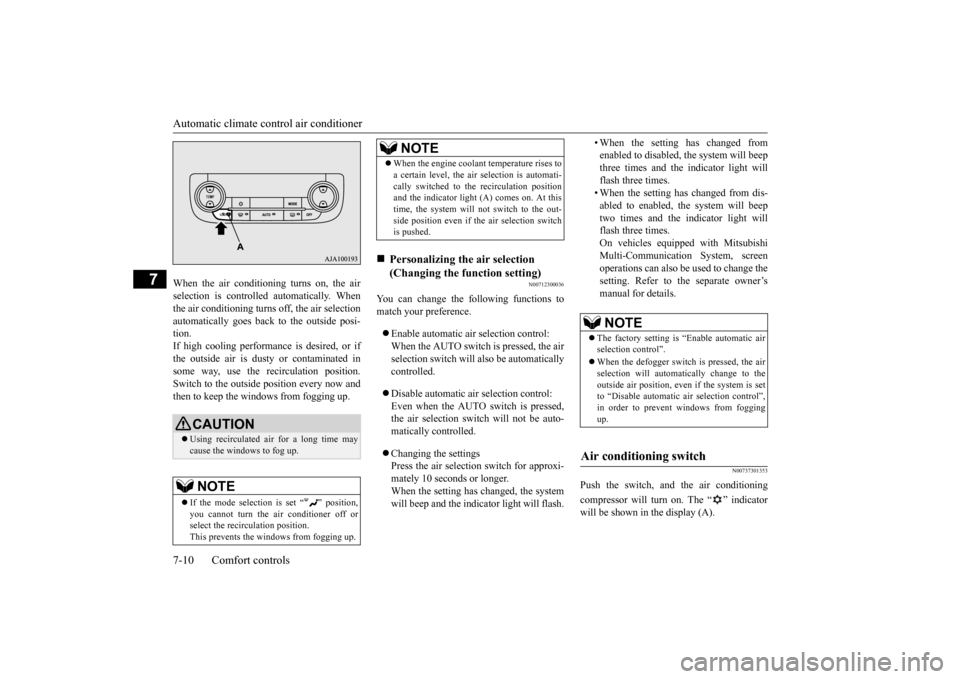
When the air conditioning turns on, the air selection is controlled automatically. Whenthe air conditioning turns
off, the air selection
automatically goes back
to the outside posi-
tion.If high cooling performanc
e is desired, or if
the outside air is dusty
or contaminated in
some way, use the
recirculat
ion position.
Switch to the outside position every now and then to keep the windows from fogging up.
N00712300036
You can change the following functions tomatch your preference. Enable automatic air selection control: When the AUTO switch is pressed, the airselection switch will also be automatically controlled. Disable automatic air selection control: Even when the AUTO switch is pressed,the air selection switch will not be auto- matically controlled. Changing the settings Press the air selection switch for approxi-mately 10 seconds or longer. When the setting has changed, the system will beep and the indi
cator light will flash.
• When the setting has changed from enabled to disabled, the system will beepthree times and the indicator light will flash three times. • When the setting has changed from dis-abled to enabled, the system will beep two times and the i
ndicator light will
flash three times.On vehicles equippe
d with Mitsubishi
Multi-Communication System, screen operations can also be used to change the setting. Refer to th
e separate owner’s
manual for details.
N00737301353
Push the switch, and the air conditioning compressor will turn on. The “ ” indicator will be shown in the display (A).
CAUTION Using recirculated air for a long time may cause the windows to fog up.NOTE
If the mode selection
is set “ ” position,
you cannot turn the ai
r conditioner off or
select the recirc
ulation position.
This prevents the windows from fogging up.
When the engine coolan
t temperature rises to
a certain level, the air selection is automati-cally switched to the recirculation positionand the indicator light (A) comes on. At this time, the system will not switch to the out- side position even if th
e air selection switch
is pushed.
Personalizing the air selection (Changing the function setting) NOTE
NOTE
The factory setting is “Enable automatic air selection control”. When the defogger switch is pressed, the air selection will automati
cally change to the
outside air position, even if the system is setto “Disable automatic air selection control”, in order to prevent windows from fogging up.
Air conditioning switch
BK0223400US.book 10 ページ 2015年2月13日 金曜日 午後12時15分
Page 339 of 464
Automatic climate cont
rol air conditioner
Comfort controls 7-11
7
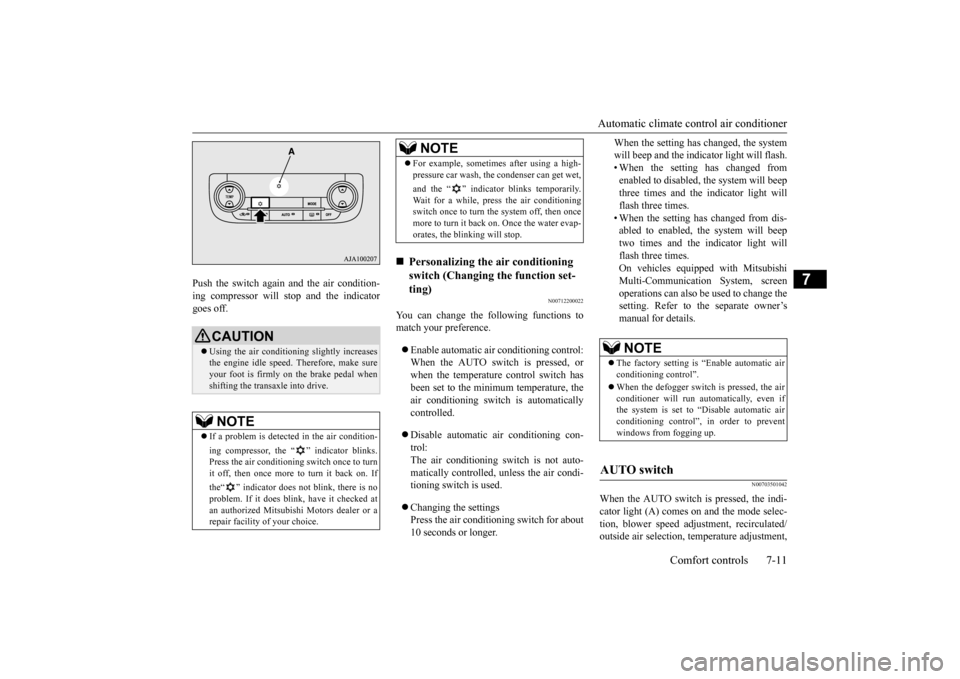
Push the switch again and the air condition- ing compressor will stop and the indicatorgoes off.
N00712200022
You can change the following functions tomatch your preference. Enable automatic air conditioning control: When the AUTO switch is pressed, or when the temperature control switch has been set to the minimum temperature, theair conditioning switch is automatically controlled. Disable automatic air conditioning con- trol:The air conditioning switch is not auto- matically controlled,
unless the air condi-
tioning switch is used. Changing the settings Press the air conditioning switch for about 10 seconds or longer.
When the setting has changed, the system will beep and the indi
cator light will flash.
• When the setting has changed from enabled to disabled,
the system will beep
three times and the indicator light willflash three times. • When the setting has changed from dis- abled to enabled, the system will beeptwo times and the indicator light will flash three times. On vehicles equippe
d with Mitsubishi
Multi-Communication System, screen operations can also be used to change thesetting. Refer to the separate owner’s manual for details.
N00703501042
When the AUTO switch is pressed, the indi-cator light (A) comes on and the mode selec- tion, blower speed adju
stment, reci
rculated/
outside air selection, temperature adjustment,
CAUTION Using the air conditioni
ng slightly increases
the engine idle speed. Therefore, make sure your foot is firmly on the brake pedal when shifting the transaxle into drive.NOTE
If a problem is detect
ed in the air condition-
ing compressor, the “ ” indicator blinks. Press the air conditioning
switch once to turn
it off, then once more to turn it back on. If the“ ” indicator does not blink, there is no problem. If it does blink,
have it checked at
an authorized Mitsubish
i Motors dealer or a
repair facility of your choice.
For example, sometimes after using a high- pressure car wash, the
condenser can get wet,
and the “ ” indicator blinks temporarily. Wait for a while, press the air conditioning switch once to turn the system off, then once more to turn it back on. Once the water evap-orates, the blinking will stop.
Personalizing the air conditioning switch (Changing the function set-ting) NOTE
NOTE
The factory setting is
“Enable automatic air
conditioning control”. When the defogger switch
is pressed, the air
conditioner will run au
tomatically, even if
the system is set to “Disable automatic air conditioning control”, in order to prevent windows from fogging up.
AUTO switch
BK0223400US.book 11 ページ 2015年2月13日 金曜日 午後12時15分
Page 341 of 464
Automatic climate cont
rol air conditioner
Comfort controls 7-13
7
N00731801125
Blower speed and vent mode may be con- trolled manually by setting the blower speedselection switch and the MODE switch to the desired positions. To return to automatic operation, press the AUTO switch.
N00732401506
To remove frost or mist from the windshieldand door windows, use the MODE switch or defogger switch (“ ” or “ ”). Use this setting to ke
ep the windshield and
door windows clear of mist, and to keep the leg area heated (when driving in rain or snow).
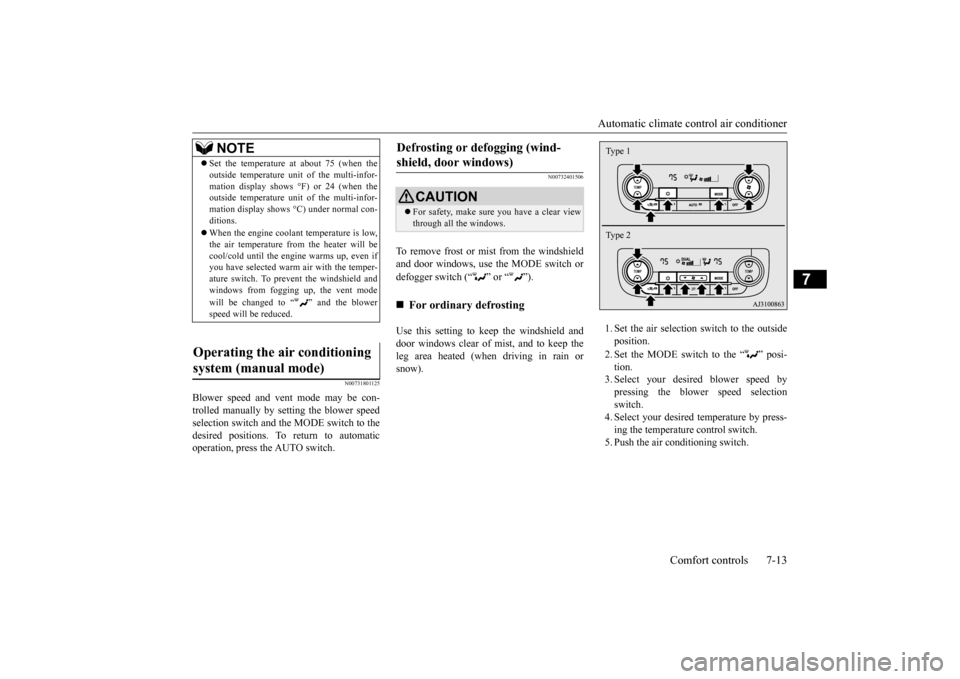
1. Set the air selection
switch to the outside
position. 2. Set the MODE switch to the “ ” posi- tion. 3. Select your desire
d blower speed by
pressing the blower speed selection switch. 4. Select your desired temperature by press-ing the temperature control switch. 5. Push the air conditioning switch.
NOTE
Set the temperature at
about 75 (when the
outside temperature uni
t of the multi-infor-
mation display shows °F) or 24 (when theoutside temperature uni
t of the multi-infor-
mation display shows
°C) under normal con-
ditions. When the engine coolan
t temperature is low,
the air temperature from the heater will becool/cold until the engine warms up, even if you have selected warm
air with the temper-
ature switch. To prevent the windshield andwindows from fogging up, the vent mode will be changed to “ ” and the blower speed will be reduced.
Operating the air conditioning system (manual mode)
Defrosting or defogging (wind- shield, door windows)
CAUTION For safety, make sure
you have a clear view
through all the windows.
For ordinary defrosting
Type 1 Type 2
BK0223400US.book 13 ページ 2015年2月13日 金曜日 午後12時15分
Page 343 of 464
Air purifier
Comfort controls 7-15
7
The air conditioner should be operated for at least five minutes each week, even in cold weather. This includes the quick defrostingmode. Operating the
air condition system
weekly maintains lubrication of the compres- sor internal parts to keep the air conditionerin the best operating condition.
N00733801190
The air conditioning syst
em is equipped with
an air filter to remove pollen and dust. The air filter’s ability to collect pollen anddirt is reduced as it be
comes dirty, so replace
it periodically. For the
maintenance interval,
refer to the “WARRANTY AND MAINTE-NANCE MANUAL”.
N00734302102
The audio system can only be used when theignition switch or the
operation mode is in
ON or ACC.
N00715000021
This product supports audio playback from iPod/iPhone devi
ces, however dif-
fering versions mean
that playback cannot
be guaranteed. Please be aware that depending on the iPod/iPhone model or
version, operation
may differ.
During a long period of disuse Air purifier
NOTE
Operation in certain conditions such as driv- ing on a dusty road and frequent use of the air conditioner can lead
to reduction of ser-
vice life of the filter. When you feel that theair flow is lower than normal or when the windshield or windows start to fog up easily, replace the air filter.Contact your Mitsubishi
Motors dealer or a
repair facility of your
choice for assistance.
AM/FM radio/CD player
(if
so equipped)
NOTE
To listen to the audio system while the engine is not running, turn the ignitionswitch to the “ACC”
position or put the oper-
ation mode in ACC. If the ignition switch
or the operation mode
is left in ACC, the accessory power will automatically turn off after a certain period of time and you will no
longer be able to use
the audio system. The accessory power comes on again if the ignition switch or the engine switch is operated with it in the“ACC” position. Refer to “ACC power auto- cutout function” on page 5-19 and 5-60. If a cellular phone is used inside the vehicle, it may create noise in
the audio equipment.
This does not mean that anything is wrongwith your audio equipmen
t. In such a case,
use the cellular phone at a place as far away as possible from the audio equipment.
If foreign objects or wa
ter get into the audio
equipment, or if smoke or a strange odorcomes from it, immediately turn off theaudio system and have
it checked at an
authorized Mitsubishi Motors dealer or a repair facility of your choice. Never try torepair it yourself. Avoid using the audio sys- tem until it is inspected by a qualified per- son. If the audio system is damaged by foreign objects, water, or fire, have the systemchecked by a qualified Mitsubishi Motors technician.
Important Points on Usage
iPod/iPhone Playback Function
(if
so equipped)
NOTE
BK0223400US.book 15 ページ 2015年2月13日 金曜日 午後12時15分
Page 362 of 464

Listen to an iPod 7-34 Comfort controls
7
Press the MEDIA key to set the iPod as the source. The selected source is
indicated on the dis-
play.
Press the key or key to select the track. This enables selection of
the next or previous
track. Hold down the 3 key or the 4 key. Fast forward/rewind is possible. Repeat playback and
shuffle playback are
possible. Press the 1RPT key. Repeat playback of th
e track currently being
played.
For vehicles with a Bluetooth
® 2.0 interface,
the types of devices
that can be connected
may vary. [For vehicles sold in U.S.A.]For details, access the Mitsubishi Motors North America website. [For vehicles sold in
Canada and Mexico]
For details, access the Mitsubishi Motors website. Please read and agree to the “Warn- ing about Links to the Web Sites of OtherCompanies”. The webs
ites mentioned above
may connect you to websites other than the Mitsubishi Motors website.http://www.mitsubishi
-motors.com/en/prod-
ucts/index.html Regarding how to c
onnect the iPod/iPhone,
refer to “How to c
onnect an iPod” on page
5-216. When connecting th
e iPod/iPhone, use a
commercially-available iPod connection cable. Set up the device in order that no unsafe actions, such as pluggi
ng in the connection
cable are taken while driving. When inserting and removing the iPod/iPhone, for safety’s
sake first stop the
vehicle. Depending on the status
of the iPod/iPhone,
it may take some time
until the device is rec-
ognized, or playback starts. Buttons on the product will not operate while iPod/iPhone is
connected.
NOTE
iPod/iPhone specificati
ons and settings may
mean that connection is not possible, orresult in differences
in operation or display.
Depending on audio data in the iPod/iPhone, track information may
not be displayed cor-
rectly. Depending on the status of the vehicle and device, the iPod/iPhone
may not play back
after starting the engine. Data containing copyri
ght information may
not play back. It is recommended
that the iPod/iPhone
equalizer settings be set to flat. Operate the iPod/iPhone while connected to this product. If the iPod/iPhone is
connected via Bluetooth
as a Bluetooth-capable
audio device, then do
not connect the iPod/iP
hone using an iPod
cable. Connection us
ing both methods will
result in erroneous operation. If an iPod/iPhone does
not operate
correctly,
then remove the iPod/iPhone from the prod- uct, reset, then reconnect.
Play iPod
NOTE
Select the Track (File) Fast Forward or Rewind Switch Playback Mode Repeat Playback (RPT)
NOTE
Pressing again will cancel.
BK0223400US.book 34 ページ 2015年2月13日 金曜日 午後12時15分