2016 MERCEDES-BENZ SL-Class seat adjustment
[x] Cancel search: seat adjustmentPage 121 of 614

Calling up a stored parking position set-
ting
:Button for the driver's side exterior mirror
;Button for the front-passenger side exte-
rior mirror
=Adjustment button
?Memory buttonM
XTurn the SmartKey to position 2in the igni-
tion lock.
XAdjust the exterior mirror on the front-
passenger side using button ;.
XEngage reverse gear.
The exterior mirror on the front-passenger
side moves to the stored parking position.
The exterior mirror on the front-passenger
side moves back to its original position:
Ras soon as you exceed a speed of 9 mph
(15 km/h)
Rif you press button :for the exterior mir-
ror on the driver's side
Memory function
Storing settings
GWARNING
If you use the memory function on the driver's side while driving, you could lose control of
the vehicle as a result of the adjustments
being made. There is a risk of an accident.
Only use the memory function on the driver's
side when the vehicle is stationary.
GWARNING
When the memory function adjusts the seat or steering wheel, you and other vehicle occu-
pants – particularly children – could become
trapped. There is a risk of injury.
While the memory function is making adjust-
ments, make sure that no one has any body
parts in the sweep of the seat or steering
wheel. If somebody becomes trapped, imme-
diately release the memory function position
button. The adjustment process is stopped.
GWARNING
Children could become trapped if they acti-
vate the memory function, particularly when
unattended. There is a risk of injury.
When leaving the vehicle, always take the
SmartKey with you and lock the vehicle. Never
leave children unsupervised in the vehicle.
The memory function can be used at any time,
e.g. even when the SmartKey isn't in the igni-
tion lock.
With the memory function, you can store up
to three different settings, e.g. for three dif-
ferent people.
The following settings are stored as a single
memory preset:
Rposition of the seat, backrest and head
restraint
Rdriver's side: steering wheel position
Rdriver's side: position of the exterior mir-
rors on the driver's and front-passenger
sides
Memory function119
Seats, steering wheel and mirrors
Z
Page 237 of 614

XPress the:or9 button to select the
Automatic Door Lock
function.
When the Automatic
DoorLockfunction
is activated, the multifunction display
shows the left-hand vehicle door in orange.
XPress the abutton to save the setting.
For further information on the automatic lock- ing feature, see (
Ypage 89).
Activating/deactivating the acoustic
locking verification signal
If you switch on the Acoustic
Lockfunction,
an acoustic signal sounds when you lock the
vehicle.
XPress the =or; button on the steer-
ing wheel to select the Sett.
menu.
XPress the:or9 button to select the
Vehicle
submenu.
XPress ato confirm.
XPress the :or9 button to select the
Acoustic Lock
function.
If the Acoustic
Lockfunction is activated,
the multifunction display shows the &
symbol in orange.
XPress the abutton to save the setting.
Convenience
Activating/deactivating the EASY-
ENTRY/EXIT feature
GWARNING
When the EASY-ENTRY/EXIT feature adjusts
the steering wheel, you and other vehicle
occupants – particularly children – could
become trapped. There is a risk of injury.
While the EASY-ENTRY/EXIT feature is mak-
ing adjustments, make sure that no one has
any body parts in the sweep of the steering
wheel.
If somebody becomes trapped:
Rpress one of the memory function position
buttons, or
Rmove the switch for steering wheel adjust-
ment in the opposite direction to that in
which the steering wheel is moving.
The adjustment process is stopped.
XPress the =or; button on the steer-
ing wheel to select the Sett.
menu.
XPress the:or9 button to select the
Convenience
submenu.
XPress ato confirm.
XPress the :or9 button to select the
Easy Entry/Exit
function.
If the Easy Entry/Exit
function is activa-
ted, the multifunction display shows the
steering wheel in orange.
XPress the abutton to save the setting.
Further information on the EASY-ENTRY/EXIT feature (
Ypage 115).
Switching the belt adjustment on/off
XPress the =or; button on the steer-
ing wheel to select the Sett.
menu.
XPress the:or9 button to select the
Convenience
submenu.
XPress ato confirm.
XPress the :or9 button to select the
Belt Adjustment
function.
If the Belt Adjustment
function is activa-
ted, the multifunction display shows the
seat belt in orange.
XPress the abutton to save the setting.
For further information on belt adjustment,
see (
Ypage 55).
Switching the fold-in mirrors when lock-
ing feature on/off
This function is only available when the vehi-
cle is equipped with the electrical fold-in func- tion.
This function is only available in Canada.
When you activate the Auto.
MirrorFold‐
ingfunction, the exterior mirrors are folded
in when the vehicle is locked.
If you unlock the vehicle and then open the
driver's or front-passenger door, the exterior
mirrors fold out again.
If you have switched on the Auto. Mirror
Foldingfunction and you fold in the exterior
Menus and submenus235
On-board computer and displays
Z
Page 293 of 614

System menu overview
SystemTimeSPLITVIEWConsump-
tionSeatDisplay off
Display settingsO
Switches
the auto-
matic time
settings
on/offOperates
COMAND
functions
from the
passenger
sideCalls up the
fuel con-
sumption
displayChanges
the driver/
front-
passenger
seat set-
tingsSwitches
off the dis-
play
Text reader speedSets the
time zone
Voice-operated
control settingsSwitches to
summer
time
Rear view cameraManual
time setting
LanguageSets the
time/date
format
Favorites button
Activates/deacti-
vates Bluetooth®
Automatic volume
adjustment
Imports/exports
data
Resets COMAND
iDelete your
personal data
using this func-
tion, for example
before selling
your vehicle.
If equipped with the rear view camera: when the function is activated and COMAND is
switched on, the image from the rear view camera is automatically shown in the COMAND
display when reverse gear is engaged.
iIf the 360°Cameramenu item is displayed, DisplayOffcan be called up underSystem.
At a glance291
COMAND
Z
Page 318 of 614

Details on the displays:
Rfor all vehicles except AMG vehicles (see
the separate vehicle Operator's Manual)
Rfor AMG vehicles, see the separate vehicleOperator's Manual.
Exiting the display
XSlide XVY the COMAND controller until
the desired display (clock or fuel consump-
tion) is shown.
Seat functions
Overview
Using the Tbutton next to the COMAND
controller or the Seat menu item in the sys-
tem menu, you can call up different setting
functions. The following settings depend on
the type of seat and the vehicle model series:
RSeat cushion length
RBackrest side bolsters
RLumbar
RBalance
RSeat cushion side bolsters
RDynamics
RMassage
iYou can also store and recall the current
seat function settings using the memory
button and the corresponding memory
position switch; see the separate vehicle
Operator's Manual.
The massage function cannot be started or
stopped using the memory button.
Selecting the seat
First select the seat which you wish to adjust.
This function is not available for all vehicles.
XPress the TorW button.
XSelect Seatand press Wto confirm.
XTo switch to the lower line, for both options
slide VÆthe COMAND controller.
XSelect Driver's SeatorPassenger
Seatby turning cVdthe COMAND con-
troller and press Wto confirm.
Adjustment functions
Adjusting the seat cushion length
The availability of this function depends on
the type of seat and the vehicle model series.
This function allows you to adjust the height
of the seat cushion.
XSelect the seat (Ypage 316).
XSelect Seat Surfaceby turning cVdthe
COMAND Controller and press Wto con-
firm.
A scale appears.
316Vehicle functions
COMAND
Page 321 of 614

XTurncVd or slide ZVÆthe COMAND con-
troller and press Wto confirm.
The massage function runs for approx-
imately 15 to 25 minutes, depending on the
setting.
XTo exit the menu: press thekback
button.
Adjusting the driving dynamics
This function is available on vehicle model
series with a dynamic multicontour seat.
XSelect the seat (Ypage 316).
XSelect Dynamic Seatby turning cVdthe
COMAND controller and press Wto con-
firm.
A scale appears.
You can select:
R0: Off
R1: level 1 (medium setting)
R2: level 2 (high setting)
XTurn cVd or slide ZVÆthe COMAND con-
troller and press Wto confirm.
XTo exit the menu: press thekback
button.
Resetting all adjustments
XSelect the seat (Ypage 316).
XSelect Reset Allby turning cVdthe
COMAND controller and press Wto con-
firm.
A prompt appears.
XSelect YesorNoand press Wto confirm.
If you select No
, the process will be can-
celed.
After you select Yes
, all seat adjustments
are reset to the default values (factory set-
ting).
Rear view camera
The rear view camera is only an aid. It is not a
replacement for your attention to your imme-
diate surroundings. You are always responsi- ble for safe maneuvering and parking. When
maneuvering or parking, make sure that there
are no persons, animals or objects in the area
in which you are maneuvering.
The image from the rear view camera is
shown in the COMAND display when reverse
gear is engaged if:
Ryour vehicle is equipped with a rear view
camera
RCOMAND is switched on
Rthe Activation by R gearfunction is
activated.
If the function is activated, the COMAND dis-
play will automatically switch back to the pre-
viously selected display as soon as you shift
out of reverse gear.
Vehicle functions319
COMAND
Z
Page 491 of 614
Selecting sound settings
You can select the sound settings in the CD/
MP3, video DVD and AUX modes.
XSwitch on an operating mode (e.g. audio
CD mode) (
Ypage 491).
XSelectTrebleorBassusing
the :=; buttons on the remote
control and press the 9button to confirm.
An adjustment scale appears.
XSelect a setting using the 9:but-
tons and press the 9button to confirm.
Multiple users
Simultaneous use of the rear-compart-
ment disc drive
The two rear-compartment screens can be
operated almost entirely independently from
one another. However, there can be a conflict
in some menus if the two screens are used
simultaneously.
If the rear-compartment disc drive is being
used for both screens simultaneously, select-
ing certain menus or settings on one of the
screens also affects the other screen.
The following functions affect both screens:
Rchanging playback options
Rselecting a track (from a track list or folder)
Rusing the play, pause and stop functions
Rfast forwarding/rewinding or scrolling
Rcalling up the DVD menu and navigating
within it
Rsetting the language, subtitles and camera
angle
Rcalling up interactive DVD content
The following functions affect only one
screen:
Raudio and video functions as well as picture
settings
Rswitching between full screen and the
menu Switching between operating modes
When you exit an operating mode (e.g. audio
CD mode), the current setting is saved. If you
call up this operating mode again later, there
are two possibilities:
Rthe operating mode has been changed on
the other screen.
Rthe operating mode has not been changed.
In the first case, the operating mode appears as it is on the other screen.
In the second case, the setting appears on the
screen as it was when you last exited the
operating mode.
Picture settings
Overview
You can select picture settings in video DVD
and AUX mode (
Ypage 500).
Adjusting the brightness, contrast and
color
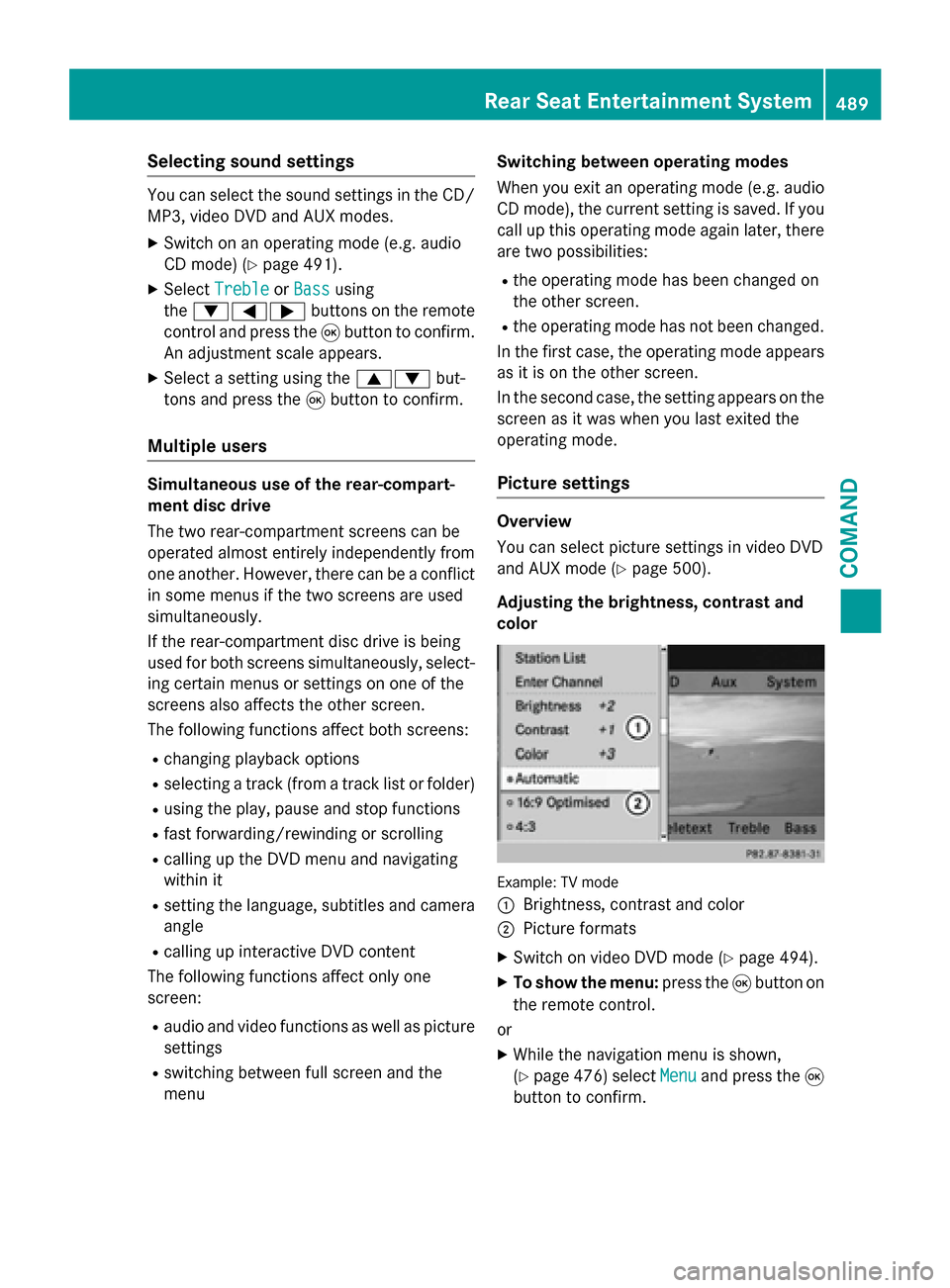
Example: TV mode
:
Brightness, contrast and color
;Picture formats
XSwitch on video DVD mode (Ypage 494).
XTo show the menu: press the9button on
the remote control.
or
XWhile the navigation menu is shown,
(
Ypage 476) select Menuand press the9
button to confirm.
Rear Seat Entertainment System489
COMAND
Z
Page 492 of 614
XSelectDVD-Videousing
the :=; buttons and press the
9 button to confirm.
XSelect Brightness,Contrastor Color
using the 9: buttons and press the
9 button to confirm.
An adjustment scale appears.
XSelect a setting using the 9:but-
tons and press the 9button to confirm.
Changing the picture format
XTo show the menu: press the9button on
the remote control.
or
XWhile the navigation menu is shown,
(
Ypage 476) select Menuand press the9
button to confirm.
XSelect DVD-Videousing
the :=; buttons and press the
9 button to confirm.
The dot in front of one of the menu items
16:9
Optimized, 4:3or Widescreenindi-
cates the format currently selected.
XSelect a format using the 9:but-
tons and press the 9button to confirm.
System settings
Note
You can adjust almost all system settings
individually for each screen without affecting
the other screen. You make these settings
using the remote control (
Ypage 484).
Selecting the display language
XSelect Systemusing the 9=;
buttons on the remote control and press 9
to confirm.
You see the system menu on the selected
rear screen.
XSelect Settingsusing the :button
and press 9to confirm.
XSelect Languageusing the 9: but-
tons and press the 9button to confirm.
The list of languages appears. A #dot
indicates the current setting.
XSelect a language using the 9:but-
tons and press the 9button to confirm.
The Rear Seat Entertainment System acti-
vates the selected language.
Switching the display design
XSelect Settingsusing the :button
and press 9to confirm.
XSelect Day Mode,Night Modeor Auto‐
maticusing the 9: buttons and
press the 9button to confirm.
The dot indicates the current setting.
DesignExplanation
Day ModeThe display is set per-
manently to day
design.
Night ModeThe display is set per-
manently to night
design.
AutomaticThe display design
changes depending on
the vehicle instrument
cluster illumination.
Setting the brightness
XSelect Settingsusing the :button
and press 9to confirm.
XSelect Brightnessusing the 9:
buttons and press the 9button to confirm.
A scale appears.
XAdjust the brightness using the 9:
buttons and press the 9button to confirm.
The brightness bar moves up or down. The
picture becomes lighter or darker in
accordance with the scale.
490Rear Seat Entertainment System
COMAND