2016 MERCEDES-BENZ S CLASS light
[x] Cancel search: lightPage 101 of 438

automatic operation by pressing or pulling
again.
If the sliding sunroof is raised at the rear, it low-
ers slightly automatically at higher speeds. The
noise level in the vehicle interior is reduced as a
result.
At low speeds it raises again automatically.
You can also temporarily deactivate automatic
lowering. To do so, press the W switch. The
sliding sunroof raises again automatically.
You can continue to operate the sliding sunroof
after switching off the engine or removing the
SmartKey from the ignition lock. This function
remains active for five minutes or until you open
a front door.
The sliding sunroof cannot be opened if a roof
carrier is installed. In order to allow ventilation
of the vehicle interior, you can raise the sliding
sunroof.
If contact is made with a roof carrier approved
by Mercedes-Benz, the sliding sunroof lowers
slightly but remains raised at the rear.
Before opening, raising or closing the sliding
sunroof, a check is carried out to see whether a
valid SmartKey is in the vehicle, if: R
the W switch is pressed or pulled
and R
the Start/Stop button is used instead of the
SmartKey in the ignition lock
and R
the engine is not running
This is carried out by means of a brief radio con-
nection between the vehicle and the SmartKey.
Rain-closing feature The raised sliding sunroof automatically lowers
at the rear when driving if it starts to rain. The
sliding sunroof is lowered depending on: R
the road speed and R
the intensity of the rain
You can manually cancel the automatic closing
procedure. Press or pull the W switch in any
direction.
To raise the sliding sunroof again, press the
W switch in direction C . The rain-closing
feature remains activated. Operating the roller sunblinds for the
sliding sunroof
Important safety notes
G WARNING
Parts of the body could become trapped
between the roller sunblind and frame or slid-
ing sunroof during automatic opening or clos-
ing. There is a risk of injury.
When opening or closing, make sure that no
body parts are in the sweep of the roller sun-
blind.
If somebody becomes trapped: R
release the switch immediately, or R
during automatic operation, push the
switch briefly in any direction
The opening or closing procedure will be stop-
ped.
The roller sunblinds shield the vehicle interior
from sunlight. The front roller sunblind can only
be opened and closed when the sliding sunroof
is closed.
Roller sunblind reversing feature The roller sunblinds are equipped with an auto-
matic reversing feature. If a solid object blocks
or restricts a roller sunblind during the closing
process, the roller sunblind opens again auto-
matically. The automatic reversing feature is
only an aid and is not a substitute for your atten-
tion when closing the roller sunblinds.
G WARNING
The reversing feature does not react in par-
ticular to soft, light and thin objects, e.g. small
fingers. This means that the reversing feature
cannot prevent someone being trapped in
these situations. There is a risk of injury.
When closing the roller sunblind, make sure
that no body parts are in the sweep area.
If somebody becomes trapped: R
release the switch immediately, or R
press the switch in any direction during the
automatic closing process
The closing process is stopped.Panorama roof with power tilt/sliding panel 99
Opening and closing Z
Page 105 of 438

Problems with the sliding sunroof
G WARNING
If you close the sliding sunroof again immediately after it has been blocked or reset, the sliding
sunroof closes with increased or maximum force. The reversing feature is then not active. Parts
of the body could be trapped in the closing area in the process. This poses an increased risk of
injury or even fatal injury.
Make sure that no parts of the body are in the closing area.
If somebody becomes trapped: R
release the switch immediately, or R
press the switch in any direction during the automatic closing process
The closing process is stopped.
! If the sliding sunroof still cannot be opened or closed as a result of a malfunction, contact a
qualified specialist workshop.
Problem
Possible causes/consequences and P Solutions
The sliding sunroof can-
not be closed and you
cannot see the cause. If the sliding sunroof is obstructed during closing and reopens again
slightly: X
Immediately after it blocks, pull the W switch down again to the
point of resistance until the sliding sunroof is closed.
The sliding sunroof is closed with increased force.
If the sliding sunroof is obstructed again during closing and then
reopens slightly: X
Immediately after it blocks, pull the W switch down again to the
point of resistance until the sliding sunroof is closed.
The sliding sunroof is closed without the automatic reversing fea-
ture.Panorama roof with power tilt/sliding panel 103
Opening and closing Z
Page 110 of 438

Adjusting the front-passenger seat
fr om the driver’s seat
Import ant safety notes
G WARNIN G
When you adjust a seat , you or other vehicl e
occupant s could become trapped , e.g. on th e
seat guide rail. There is a ris k of injury.
Mak e sur e when adjusting a seat that no on e
has any body part s in th e swee p of th e seat .
Observ e th e safet y note s on "Ai r bags "
( Y
page 50 ) and "Children in th e vehicle"
( Y
page 61) .
G WARNIN G
The front-air bags for could also injure th e
vehicl e occupant s in th e fron t If th e fron t
seat s are positioned to o close to th e dash -
boar d or steering wheel. This poses an
increased ris k of injury or eve n fatal injury.
Always adjust th e fron t seat s so that they are
as far from th e fron t air bags as possible. Als o
observ e th e note s on th e correc t adjustmen t
of th e seats.
G WARNIN G
Children could become trapped if they adjust
th e seats, particularly when unattended.
There is a ris k of injury.
When leaving th e vehicle, always tak e th e
SmartKey wit h you and loc k th e vehicle. Never
leav e children unsupervised in th e vehicle.
! Do no t mov e th e front-passenger seat fully
forward s if there are objects in th e parcel ne t
in th e front-passenger footwell. The objects
could otherwise be damaged. Adjusting the front-passenger seat
The SmartKey mus t be in th e ignition loc k and in
position 1 or 2 , in order for th e front-passenger
seat to be selected ( Y
page 162).X
To select th e front-passenger seat: press
butto n C repeatedly until th e indicator lamp
in th e butto n lights up.
When th e indicator lamp in butto n C lights up,
for th e front-passenger seat you can adjust :R
adjust th e seat ( Y
page 106)R
seat heating ( Y
page 118) R
seat ventilation ( Y
page 119)R
th e memory function to call up or sav e set -
ting s ( Y
page 126).
Adjusting the front-passenger seat
fr om the rear
Imp ort ant safety notes
G WARNIN G
Children could become trapped if they adjust
th e seats, particularly when unattended.
There is a ris k of injury.
When leaving th e vehicle, always tak e th e
SmartKey wit h you and loc k th e vehicle. Never
leav e children unsupervised in th e vehicle.
The seat s can still be adjusted when there is no
SmartKey in th e ignition lock.
G WARNIN G
When you adjust a seat , you or other vehicl e
occupant s could become trapped , e.g. on th e
seat guide rail. There is a ris k of injury.108
Seats
Seats, steering wheel and mirrors
Page 114 of 438

Positioning the front-passenger seat for
chauffeur mode General notes Pay attention to the important safety notes
( Y
page 111). Adjust the seat for chauffeur
mode before the journey ( Y
page 112). Do not
remove the front-passenger seat head restraint
during the journey.
Adjusting from the rear compartment
You can use the override button to disable this
function ( Y
page 67).
In order for the front-passenger seat to be posi-
tioned in chauffeur mode: R
the SmartKey must be in the ignition lock and
in position 1 or 2 ( Y
page 162)R
the front-passenger seat may not be occupied R
the front-passenger seat belt must not be
inserted into the buckle X
To select the front-passenger seat: press
button C repeatedly until the indicator lamp
in the button lights up.
The front-passenger seat is selected if the
indicator lamp in the button lights up. X
Press button D forwards and hold it in this
position.
The seat moves forward.
The seat stops at the threshold of the area for
chauffeur mode. X
Release button D .X
Press and hold button D again until the front-
passenger seat is in position for chauffeur
mode.
The head restraint on the front-passenger
seat folds forwards. The seat moves forward.
The To view the ext. mirror, adjust
front-passenger seat or remove the head restraint. message appears in the
multifunction display ( Y
page 310).
i If the front-passenger seat is already at the
threshold to the area for the chauffeur mode,
the position for the chauffeur mode is set
immediately.
i The position for chauffeur mode can be
saved or set using the memory function of the
rear seat ( Y
page 127). For this the indicator
lamp on button C must be lit.
Adjusting from the driver's seat
In order for the front-passenger seat to be posi-
tioned in chauffeur mode: R
the SmartKey must be in the ignition lock and
in position 1 or 2 ( Y
page 162)R
the front-passenger seat may not be occupied R
the front-passenger seat belt must not be
inserted into the buckle X
To select the front-passenger seat: press
button C repeatedly until the indicator lamp
in the button lights up.
The front-passenger seat is selected if the
indicator lamp in the button lights up. X
Press button D forward and hold it.
The seat moves forward.
The seat stops at the threshold of the area for
chauffeur mode. X
Release button D .X
Press and hold button D again until the front-
passenger seat is in position for chauffeur
mode.
The head restraint on the front-passenger
seat folds forwards. The seat moves forward.
The To view the ext. mirror, adjust
front-passenger seat or remove the
head restraint. ( Y
page 310)message
appears in the multifunction display.112
Seats
Seats, steering wheel and mirrors
Page 116 of 438

or X
Briefly press button D backwards.
The front-passenger seat moves into the nor-
mal adjustment range at the threshold to the
area for chauffeur mode. The head restraint
folds into position.
i Further settings are available via the mem-
ory adjustment buttons, if: R
a position in the normal setting has already
been saved R
the front-passenger seat has been selected
with button C
Adjusting from the driver's seat
The head restraint must be installed, in order for
the front-passenger seat to be moved into the
normal position ( Y
page 113).
The SmartKey must be in the ignition lock and in
position 1 or 2 , in order for the front-passenger
seat to be selected ( Y
page 162).X
To select the front-passenger seat: press
button C repeatedly until the indicator lamp
in the button lights up.
The front-passenger seat is selected if the
indicator lamp in the button lights up. X
Press button
Page 121 of 438

Problems with the seat heating Problem
Possible causes/consequences and P Solutions
The seat heating has
switched off prematurely
or cannot be switched
on. The on-board voltage is too low because too many electrical consum-
ers are switched on. X
Switch off electrical consumers that you do not need, such as the
rear window defroster or interior lighting.
Once the battery is sufficiently charged, the seat heating can be
switched back on manually.
Switching the seat ventilation on/off
Front seats
The three blue indicator lamps in the buttons
indicate the blower setting you have selected. X
Turn the SmartKey to position 1 or 2 in the
ignition lock ( Y
page 162).X
To switch on: press button C repeatedly
until the desired blower setting is set. X
To switch off: press button C repeatedly
until all the indicator lamps go out.
i If the battery voltage is too low, the seat
ventilation may switch off.
i You can open the side windows and the slid-
ing sunroof using the "Convenience opening"
feature ( Y
page 95). The seat ventilation of
the driver's seat automatically switches to the
highest level.
i When the vehicle is stationary, the fan
speed can be reduced automatically. This
reduces the noises of the seat ventilation. Rear seat
Switching the seat ventilation in the rear com-
partment on/off X
Turn the SmartKey to position 1 or 2 in the
ignition lock ( Y
page 162). X
To switch on: press button C repeatedly
until the desired blower setting is set. X
To switch off: press button C repeatedly
until all the indicator lamps go out.
i If the battery voltage is too low, the seat
ventilation may switch off.
i When the vehicle is stationary, the fan
speed can be reduced automatically. This
reduces the noises of the seat ventilation. Seats 119
Seats, steering wheel and mirrors Z
Page 122 of 438
Problems with the seat ventilation Problem
Possible causes/consequences and P Solutions
The seat ventilation has
switched off prematurely
or cannot be switched
on. The on-board voltage is too low because too many electrical consum-
ers are switched on. X
Switch off electrical consumers that you do not need, such as the
rear window defroster or interior lighting.
Once the battery is sufficiently charged, the seat ventilation can be
switched back on.
Steering wheel
Important safety notes
G WARNING
You could lose control of your vehicle if you do
the following while driving: R
adjust the driver's seat, head restraint,
steering wheel or mirrors R
fasten the seat belt
There is a risk of an accident.
Adjust the driver's seat, head restraint, steer-
ing wheel and mirror and fasten your seat belt
before starting the engine.
G WARNING
Children could injure themselves if they
adjust the steering wheel. There is a risk of
injury.
When leaving the vehicle, always take the
SmartKey with you and lock the vehicle. Never
leave children unsupervised in the vehicle.
The electrically adjustable steering wheel can
still be adjusted when there is no SmartKey in
the ignition lock. Adjusting the steering wheel
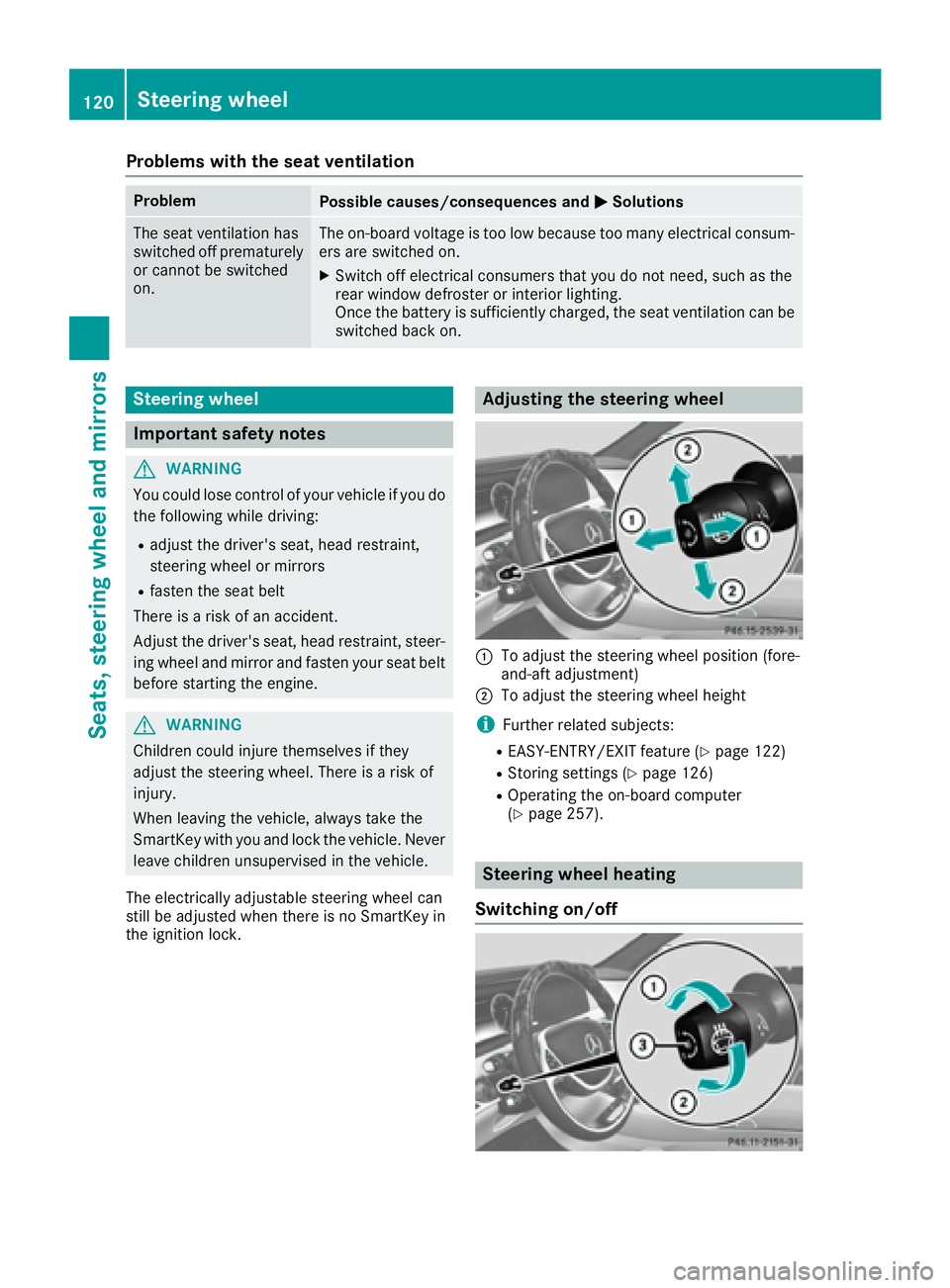
C
To adjust the steering wheel position (fore-
and-aft adjustment) D
To adjust the steering wheel height
i Further related subjects: R
EASY-ENTRY/EXIT feature ( Y
page 122)R
Storing settings ( Y
page 126)R
Operating the on-board computer
( Y
page 257).
Steering wheel heating
Switching on/off120
Steering wheel
Seats, steering wheel and mirrors
Page 124 of 438

Problems with the steering wheel heating Problem
Possible causes/consequences and P Solutions
The steering wheel heat-
ing has switched off pre-
maturely or cannot be
switched on. The on-board voltage is too low because too many electrical consum-
ers are switched on. X
Switch off electrical consumers that you do not need, such as the
rear window defroster or interior lighting.
EASY-ENTRY/EXIT feature
Important safety notes
G WARNING
When the EASY-ENTRY/EXIT feature adjusts
the steering wheel and the driver's seat, you
and other vehicle occupants – particularly
children – could become trapped. There is a
risk of injury.
While the EASY-ENTRY/EXIT feature is mak-
ing adjustments, make sure that no one has
any body parts in the sweep of the seat and
the steering wheel.
If there is a risk of becoming trapped by R
the steering wheel: move the steering
wheel adjustment lever. R
the seat: press the switch for seat adjust-
ment.
The adjustment process is stopped.
Press one of the memory function position
switches. The adjustment process is stopped.
This function is only available on vehicles with
memory function.
G WARNING
If children activate the EASY-ENTRY/EXIT fea-
ture, they can become trapped, particularly
when unattended. There is a risk of injury.
When leaving the vehicle, always take the
SmartKey with you and lock the vehicle. Never
leave children unsupervised in the vehicle.
G WARNING
If you drive off while the EASY-ENTRY/EXIT
feature is making adjustments, you could lose control of the vehicle. There is a risk of an
accident.
Always wait until the adjustment process is
complete before driving off.
The EASY-ENTRY/EXIT feature makes getting in
and out of your vehicle easier.
You can activate and deactivate the EASY-
ENTRY/EXIT feature using the multimedia sys-
tem (see the separate operating instructions).
Position of the steering wheel and the
driver's seat when the EASY-ENTRY/
EXIT feature is active The steering wheel tilts upwards and the driver's
seat moves backwards if you: R
remove the SmartKey from the ignition lock R
with KEYLESS-GO: open the driver's door;
KEYLESS-GO must be in position 1R
with the SmartKey: open the driver's door;
the SmartKey must be in position 0 or 1 in the
ignition lock ( Y
page 162) R
open the driver's door when the ignition is
switched off
i The steering wheel only tilts upwards and
the driver's seat only moves backwards if the
driving position is stored after seat or steering
wheel adjustment.
The last position of the steering wheel or seat is
stored if: R
the ignition is switched off R
the setting is stored with the memory function
( Y
page 126).
i The steering wheel only moves upwards if it
has not already reached the upper stop. The
driver's seat only moves backwards if it is not
already in the rearmost position.122
Steering wheel
Seats, steering wheel and mirrors