2016 MERCEDES-BENZ GLE-CLASS SUV reset
[x] Cancel search: resetPage 98 of 450
!Only open the sliding sunroof if it is free of
snow and ice. Otherwise, malfunctions may
occur.
Do not allow anything to protrude from the
sliding sunroof. Otherwise, the seals could be
damaged.
!The weather can change abruptly. It could
start to rain or snow. Make sure that the slid-
ing sunroof is closed when you leave the vehi-
cle. The vehicle electronics can be damaged if
water enters the vehicle interior.
Resonance noises can occur in addition to the
usual airflow noises when the sliding sunroof is
open. They are caused by minor pressure fluc-
tuations in the vehicle interior. Change the posi-
tion of the sliding sunroof or open a side win-
dow. The noise will be reduced or eliminated.
Sliding sunroof reversing feature
Your vehicle may be equipped with a sliding
sunroof or a panorama roof with power tilt/slid-
ing panel. In the following section, the term
"sliding sunroof" refers to both sliding sunroof
variants.
The sliding sunroof is equipped with an auto-
matic reversing feature. If a solid object blocks
or restricts the sliding sunroof during the closing
process, the sliding sunroof opens again auto-
matically. However, the automatic reversing
feature is only an aid and does not relieve you of
the responsibility of paying attention when clos-
ing the sliding sunroof.
GWARNING
The reversing feature does not react:
Rto soft, light and thin objects, e.g. small fin-
gers
Rover the last 1/6 in (4 mm) of the closing
movement
Rduring resetting
Rwhen closing the sliding sunroof again man- ually immediately after automatic reversing
This means that the reversing feature cannot
prevent someone being trapped in these sit-
uations. There is a risk of injury.
Make sure that no body parts are in close
proximity during the closing procedure.
If somebody becomes trapped:
Rrelease the switch immediately, or
Rpress the switch in any direction during the
automatic closing process
The closing process is stopped.
Operating the sliding sunroof
Opening and closing
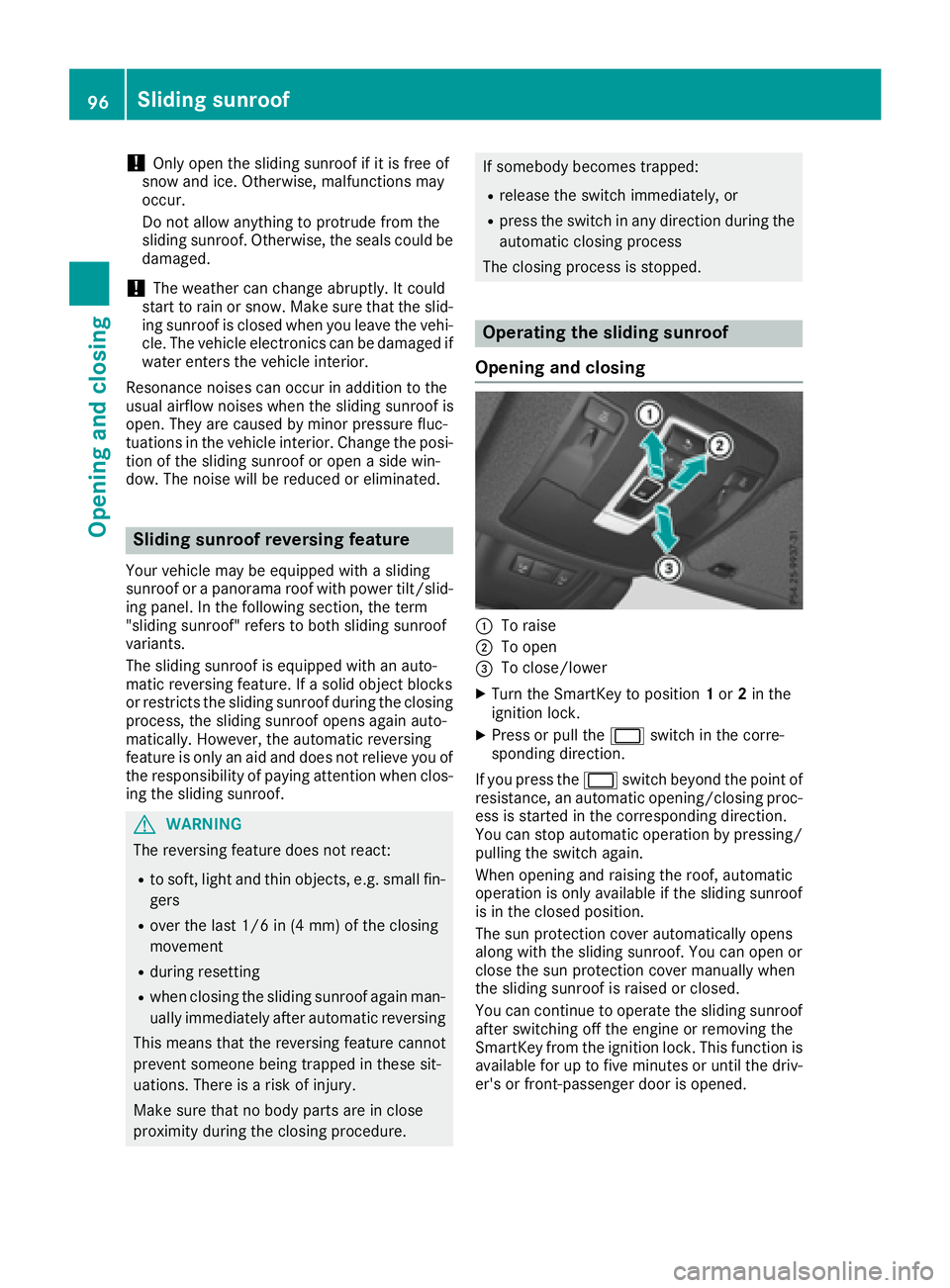
:To raise
;To open
=To close/lower
XTurn the SmartKey to position 1or 2in the
ignition lock.
XPress or pull the 2switch in the corre-
sponding direction.
If you press the 2switch beyond the point of
resistance, an automatic opening/closing proc-
ess is started in the corresponding direction.
You can stop automatic operation by pressing/
pulling the switch again.
When opening and raising the roof, automatic
operation is only available if the sliding sunroof
is in the closed position.
The sun protection cover automatically opens
along with the sliding sunroof. You can open or
close the sun protection cover manually when
the sliding sunroof is raised or closed.
You can continue to operate the sliding sunroof
after switching off the engine or removing the
SmartKey from the ignition lock. This function is
available for up to five minutes or until the driv- er's or front-passenger door is opened.
96Sliding sunroof
Opening and closing
Page 99 of 450
Resetting
!If the sliding sunroof still cannot be opened
or closed fully after resetting, contact a quali-
fied specialist workshop.
Reset the sliding sunroof if it does not move
smoothly.
XTurn the SmartKey to position 1or 2in the
ignition lock.
XRaise the sliding sunroof fully at the rear
(Ypage 96).
XKeep the 2switch pressed for another
second.
XMake sure that the sliding sunroof can be fully
opened and closed again (Ypage 96).
XIf this is not the case, repeat the steps above.
Operating the panorama roof with
power tilt/sliding panel
Opening and closing
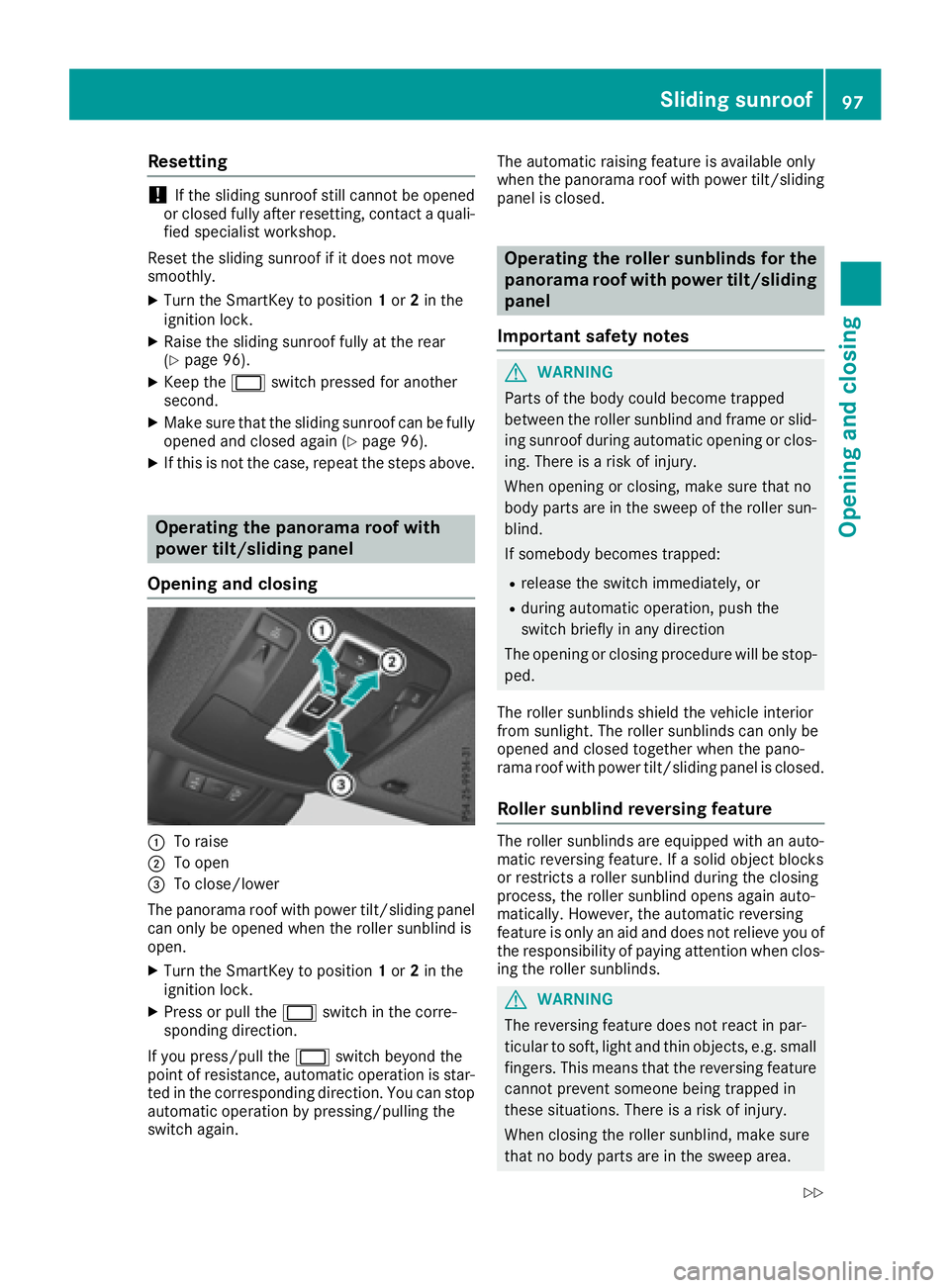
:To raise
;To open
=To close/lower
The panorama roof with power tilt/sliding panel
can only be opened when the roller sunblind is
open.
XTurn the SmartKey to position 1or 2in the
ignition lock.
XPress or pull the 2switch in the corre-
sponding direction.
If you press/pull the 2switch beyond the
point of resistance, automatic operation is star-
ted in the corresponding direction. You can stop
automatic operation by pressing/pulling the
switch again. The automatic raising feature is available only
when the panorama roof with power tilt/sliding
panel is closed.
Operating the roller sunblinds for the
panorama roof with power tilt/sliding
panel
Important safety notes
GWARNING
Parts of the body could become trapped
between the roller sunblind and frame or slid-
ing sunroof during automatic opening or clos-
ing. There is a risk of injury.
When opening or closing, make sure that no
body parts are in the sweep of the roller sun-
blind.
If somebody becomes trapped:
Rrelease the switch immediately, or
Rduring automatic operation, push the
switch briefly in any direction
The opening or closing procedure will be stop- ped.
The roller sunblinds shield the vehicle interior
from sunlight. The roller sunblinds can only be
opened and closed together when the pano-
rama roof with power tilt/sliding panel is closed.
Roller sunblind reversing feature
The roller sunblinds are equipped with an auto-
matic reversing feature. If a solid object blocks
or restricts a roller sunblind during the closing
process, the roller sunblind opens again auto-
matically. However, the automatic reversing
feature is only an aid and does not relieve you of
the responsibility of paying attention when clos-
ing the roller sunblinds.
GWARNING
The reversing feature does not react in par-
ticular to soft, light and thin objects, e.g. small
fingers. This means that the reversing feature
cannot prevent someone being trapped in
these situations. There is a risk of injury.
When closing the roller sunblind, make sure
that no body parts are in the sweep area.
Sliding sunroof97
Opening and closing
Z
Page 100 of 450
If somebody becomes trapped:
Rrelease the switch immediately, or
Rpress the switch in any direction during the
automatic closing process
The closing process is stopped.
Opening and closing the roller sun-
blinds
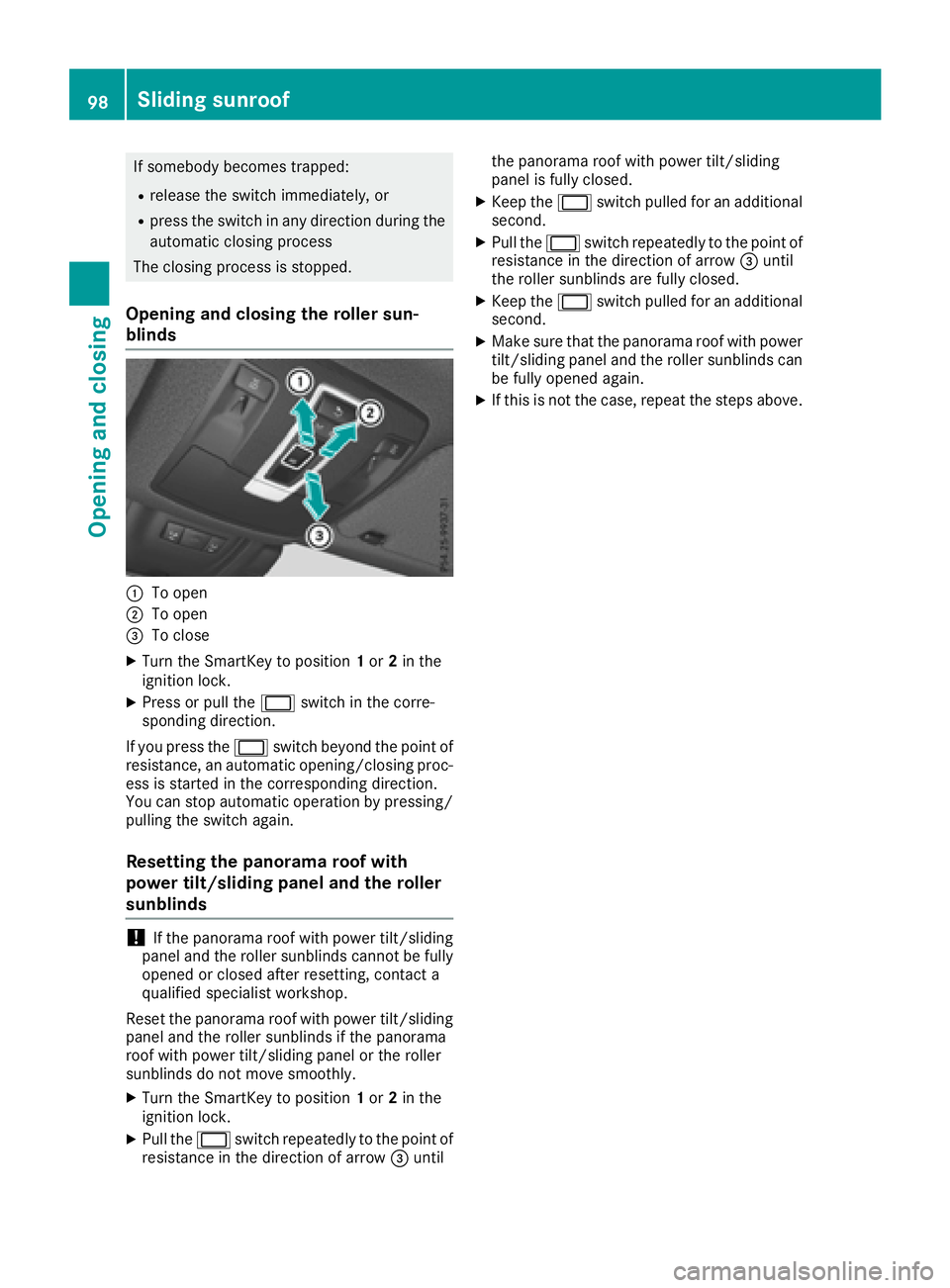
:To open
;To open
=To close
XTurn the SmartKey to position 1or 2in the
ignition lock.
XPress or pull the 2switch in the corre-
sponding direction.
If you press the 2switch beyond the point of
resistance, an automatic opening/closing proc-
ess is started in the corresponding direction.
You can stop automatic operation by pressing/
pulling the switch again.
Resetting the panorama roof with
power tilt/sliding panel and the roller
sunblinds
!If the panorama roof with power tilt/sliding
panel and the roller sunblinds cannot be fully
opened or closed after resetting, contact a
qualified specialist workshop.
Reset the panorama roof with power tilt/sliding
panel and the roller sunblinds if the panorama
roof with power tilt/sliding panel or the roller
sunblinds do not move smoothly.
XTurn the SmartKey to position 1or 2in the
ignition lock.
XPull the 2switch repeatedly to the point of
resistance in the direction of arrow =until the panorama roof with power tilt/sliding
panel is fully closed.
XKeep the
2switch pulled for an additional
second.
XPull the 2switch repeatedly to the point of
resistance in the direction of arrow =until
the roller sunblinds are fully closed.
XKeep the 2switch pulled for an additional
second.
XMake sure that the panorama roof with power
tilt/sliding panel and the roller sunblinds can
be fully opened again.
XIf this is not the case, repeat the steps above.
98Sliding sunroof
Opening and closing
Page 101 of 450
Problems with the sliding sunroof
Your vehicle may be equipped with a sliding sunroof or a panorama roof with power tilt/sliding
panel. In the following section, the term "sliding sunroof" refers to both sliding sunroof variants.
GWARNING
If you close the sliding sunroof again immediately after it has been blocked or reset, the sliding
sunroof closes with increased or maximum force. The reversing feature is then not active. Parts
of the body could be trapped in the closing area in the process. This poses an increased risk of
injury or even fatal injury.
Make sure that no parts of the body are in the closing area.
If somebody becomes trapped:
Rrelease the switch immediately, or
Rpress the switch in any direction during the automatic closing process
The closing process is stopped.
!If the sliding sunroof still cannot be opened or closed as a result of a malfunction, contact a
qualified specialist workshop.
ProblemPossible causes/consequences and MSolutions
The sliding sunroof can-
not be closed and you
cannot see the cause.If the sliding sunroof is obstructed during closing and reopens again
slightly:
XImmediately after the sliding sunroof blocks, pull the 2switch in
the overhead control panel down to the point of resistance and hold it until the sliding sunroof is closed.
The sliding sunroof is closed with increased force.
If the sliding sunroof is obstructed again during closing and then
reopens slightly:
XImmediately after the sliding sunroof blocks, pull the 2switch in
the overhead control panel down to the point of resistance and hold it until the sliding sunroof is closed.
The sliding sunroof is closed without the automatic reversing fea-
ture.
Sliding sunroof99
Opening and closing
Z
Page 113 of 450
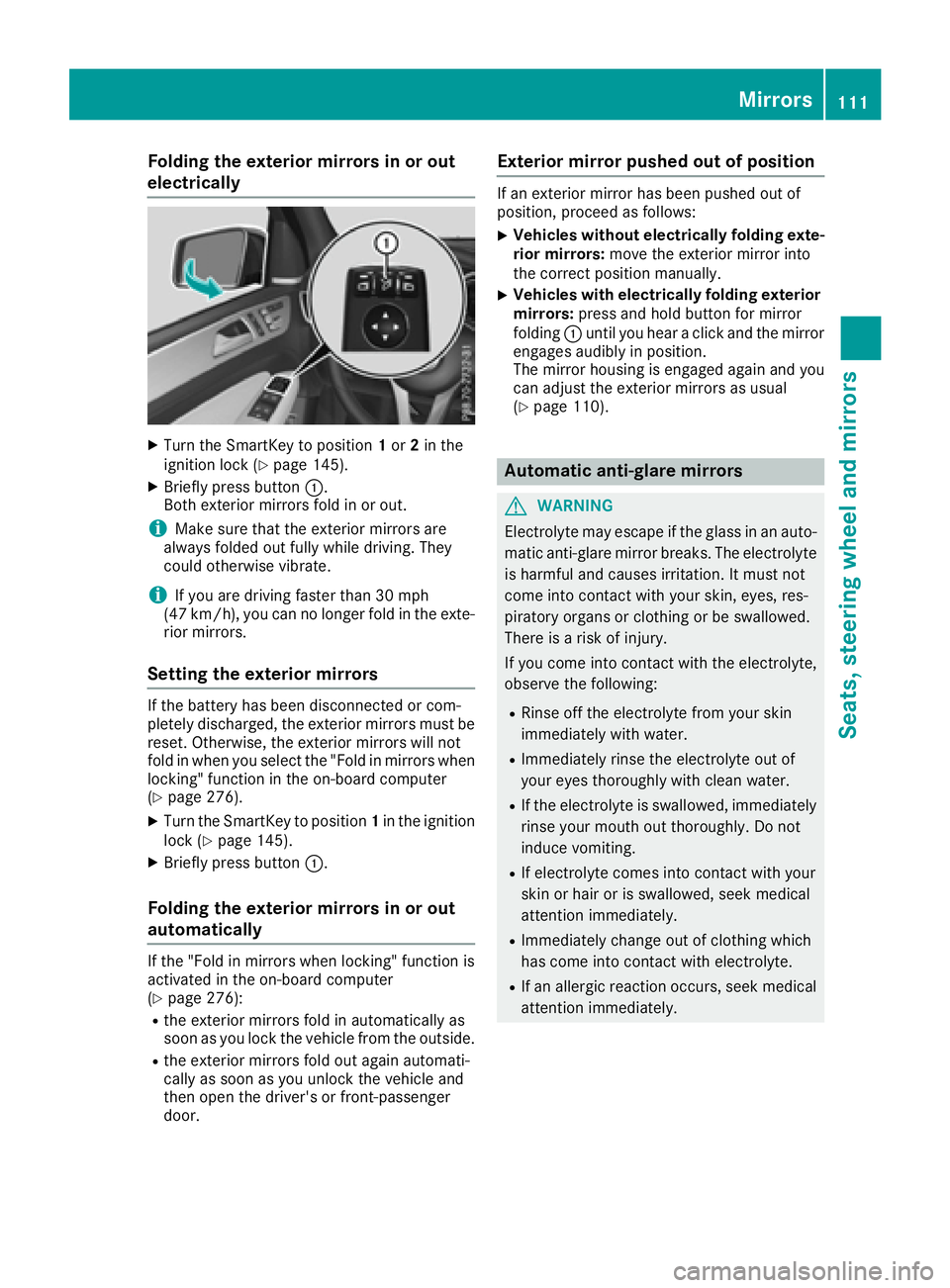
Folding the exterior mirrors in or out
electrically
XTurn theSmartKey to position 1or 2in th e
ignition loc k (Ypage 145).
XBriefly press butto n:.
Both exterio rmirror sfol din or out .
iMakesure that th eexterio rmirror sare
always folded out fully while driving .They
could otherwise vibrate .
iIf you are driving fasterthan 30 mph
(47 km/h), you can no longer fol din th eexte -
rio rmirrors.
Setting the exterior mirrors
If th ebattery has been disconnected or com-
pletely discharged, th eexterio rmirror smust be
reset .Otherwise, th eexterio rmirror swill no t
fol din when you select th e"Fold in mirror swhen
locking" function in th eon-board computer
(
Ypage 276).
XTurn th eSmartKey to position 1in th eignition
loc k (Ypage 145).
XBriefly press butto n:.
Folding the exterior mirrors in or out
automatically
If th e"Fold in mirror swhen locking" function is
activated in th eon-board computer
(
Ypage 276):
Rth eexterio rmirror sfol din automatically as
soo nas you loc kth evehicl efrom th eoutside .
Rtheexterio rmirror sfol dout again automati-
call yas soo nas you unlock th evehicl eand
then open th edriver' sor front-passenger
door .
Exterior mirror pushed out of position
If an exterio rmirror has been pushed out of
position ,procee das follows :
XVehicles without electricall yfolding exte-
rior mirrors :mov eth eexterio rmirror int o
th ecorrect position manually.
XVehicles with electricall yfolding exterior
mirrors :press and hold butto nfor mirror
foldin g: until you hear aclick and th emirror
engage saudibly in position .
The mirror housing is engage dagain and you
can adjust th eexterio rmirror sas usual
(
Ypage 110).
Automatic anti-glare mirrors
GWARNIN G
Electrolyte may escape if th eglass in an auto -
matic anti-glare mirror breaks .The electrolyt e
is harmful and causes irritation .It must no t
come int ocontact wit hyour skin, eyes, res -
piratory organs or clothing or be swallowed.
Ther eis aris kof injury.
If you come int ocontact wit hth eelectrolyte,
observ eth efollowing:
RRins eoff th eelectrolyt efrom your skin
immediately wit hwater.
RImmediately rinse th eelectrolyt eout of
your eyes thoroughly wit hclean water.
RIf th eelectrolyt eis swallowed, immediately
rinse your mout hout thoroughly. Do no t
induce vomiting .
RIf electrolytecomes int ocontact wit hyour
skin or hair or is swallowed, seek medical
attention immediately.
RImmediately chang eout of clothing whic h
has come int ocontact wit helectrolyte.
RIf an allergic reaction occurs, seek medical
attention immediately.
Mirrors111
Seats, steering wheel and mirrors
Z
Page 114 of 450

The rear-view mirror and the exterior mirror on
the driver's side automatically go into anti-glare
mode if the following conditions are met simul-
taneously:
Rthe ignition is switched on and
Rincident light from headlamps strikes the sen-
sor in the rear-view mirror
The mirrors do not go into anti-glare mode if
reverse gear is engaged or if the interior lighting
is switched on.
Parking position for the exterior mir-
ror on the front-passenger side
Setting and storing the parking position
You can position the front-passenger side exte-
rior mirror in such a way that you can see the
rear wheel on that side as soon as you engage
reverse gear. You can store this position.
Using reverse gear
:Button for the driver's side exterior mirror
;Button for the front-passenger side exterior
mirror
=Adjustment button
?Memory button M
XBring the vehicle to a standstill.
XTurn the SmartKey to position 2in the ignition
lock (Ypage 145).
XPress button ;for the exterior mirror on the
front-passenger side.
XEngage reverse gear.
The exterior mirror on the front-passenger
side moves to the preset parking position.
XUse adjustment button =to adjust the exte-
rior mirror to a position that allows you to see
the rear wheel and the curb.
The parking position is stored.
iIf you shift the transmission to another posi-
tion, the exterior mirror on the front-
passenger side returns to the driving position.
Using the memory button
You can store the parking position of the exte-
rior mirror on the front-passenger side using
memory button M?. The reverse gear must not
be engaged during the process.
XTurn the SmartKey to position 2in the ignition
lock (Ypage 145).
XPress button ;for the exterior mirror on the
front-passenger side.
XUse adjustment button =to adjust the exte-
rior mirror to a position that allows you to see
the rear wheel and the curb.
XPress memory button M? and one of the
arrows on adjustment button =within three
seconds.
The parking position is stored if the exterior
mirror does not move.
XIf the mirror moves out of position, repeat the
steps.
Calling up a stored parking position set-
ting
XTurn the SmartKey to position 2in the ignition
lock (Ypage 145).
XAdjust the exterior mirror on the front-
passenger side using button ;.
XEngage reverse gear.
The exterior mirror on the front-passenger
side moves to the stored parking position.
The exterior mirror on the front-passenger side
moves back to its original position:
Ras soon as you exceed a speed of 9 mph
(15 km/h)
Rif you press button :for the exterior mirror
on the driver's side
112Mirrors
Seats, steering wheel and mirrors
Page 115 of 450
Memory function
Storing settings
GWARNING
If you use the memory function on the driver's side while driving, you could lose control of
the vehicle as a result of the adjustments
being made. There is a risk of an accident.
Only use the memory function on the driver's
side when the vehicle is stationary.
GWARNING
When the memory function adjusts the seat or steering wheel, you and other vehicle occu-
pants – particularly children – could become
trapped. There is a risk of injury.
While the memory function is making adjust-
ments, make sure that no one has any body
parts in the sweep of the seat or steering
wheel. If somebody becomes trapped, imme-
diately release the memory function position
button. The adjustment process is stopped.
GWARNING
Children could become trapped if they acti-
vate the memory function, particularly when
unattended. There is a risk of injury.
When leaving the vehicle, always take the
SmartKey with you and lock the vehicle. Never
leave children unsupervised in the vehicle.
The memory function can be used at any time,
e.g. even when the SmartKey isn't in the ignition
lock.
With the memory function, you can store up to
three different settings, e.g. for three different
people.
The following settings are stored as a single
memory preset:
Rposition of the seat, backrest and head
restraint
Rdriver's side: steering wheel position
Rdriver's side: position of the exterior mirrors
on the driver's and front-passenger sides
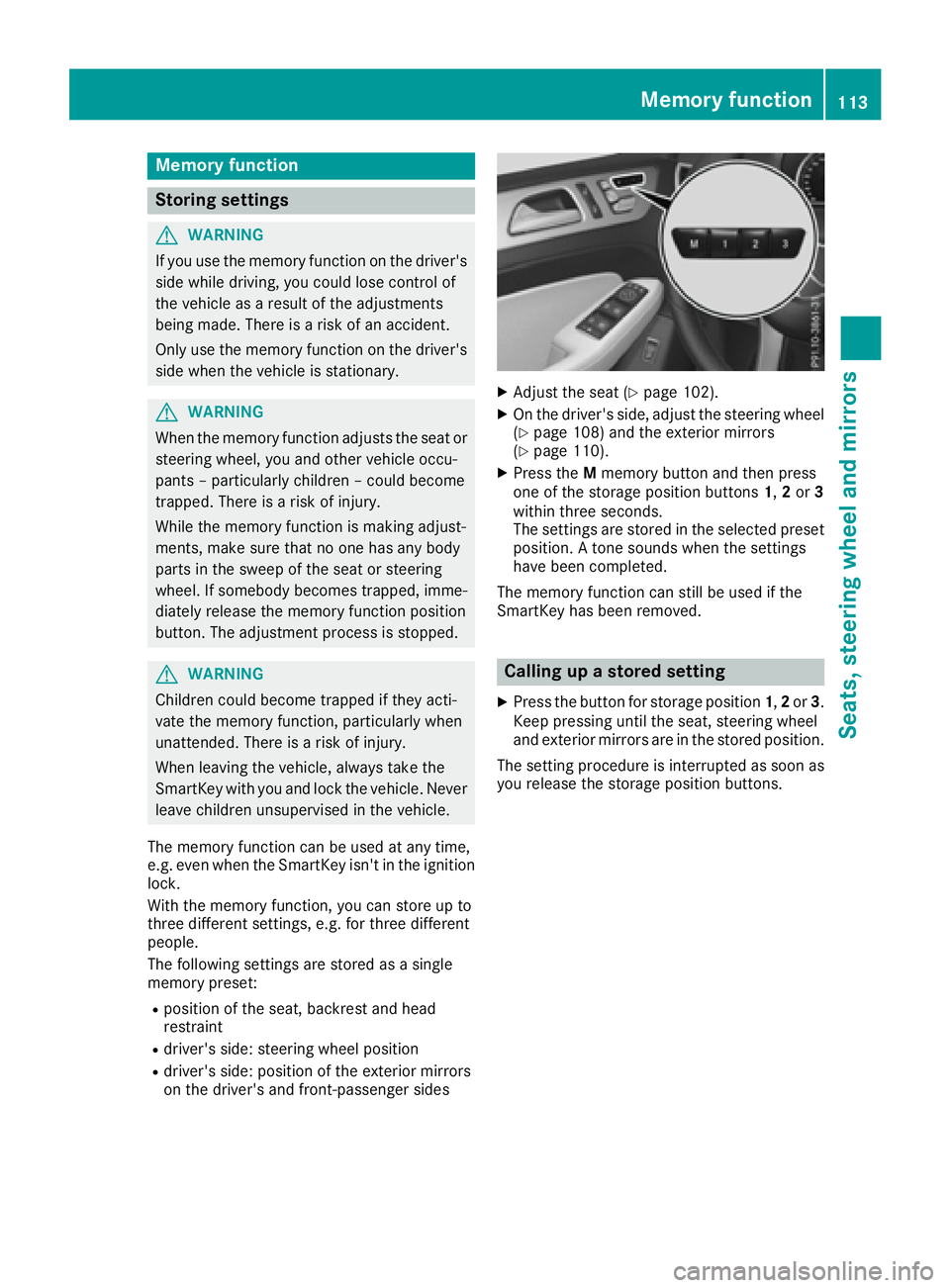
XAdjust the seat (Ypage 102).
XOn the driver's side, adjust the steering wheel
(Ypage 108) and the exterior mirrors
(Ypage 110).
XPress the Mmemory button and then press
one of the storage position buttons 1,2or 3
within three seconds.
The settings are stored in the selected preset
position. A tone sounds when the settings
have been completed.
The memory function can still be used if the
SmartKey has been removed.
Calling up a stored setting
XPress the button for storage position 1,2or 3.
Keep pressing until the seat, steering wheel
and exterior mirrors are in the stored position.
The setting procedure is interrupted as soon as
you release the storage position buttons.
Memory function113
Seats, steering wheel and mirrors
Z
Page 175 of 450
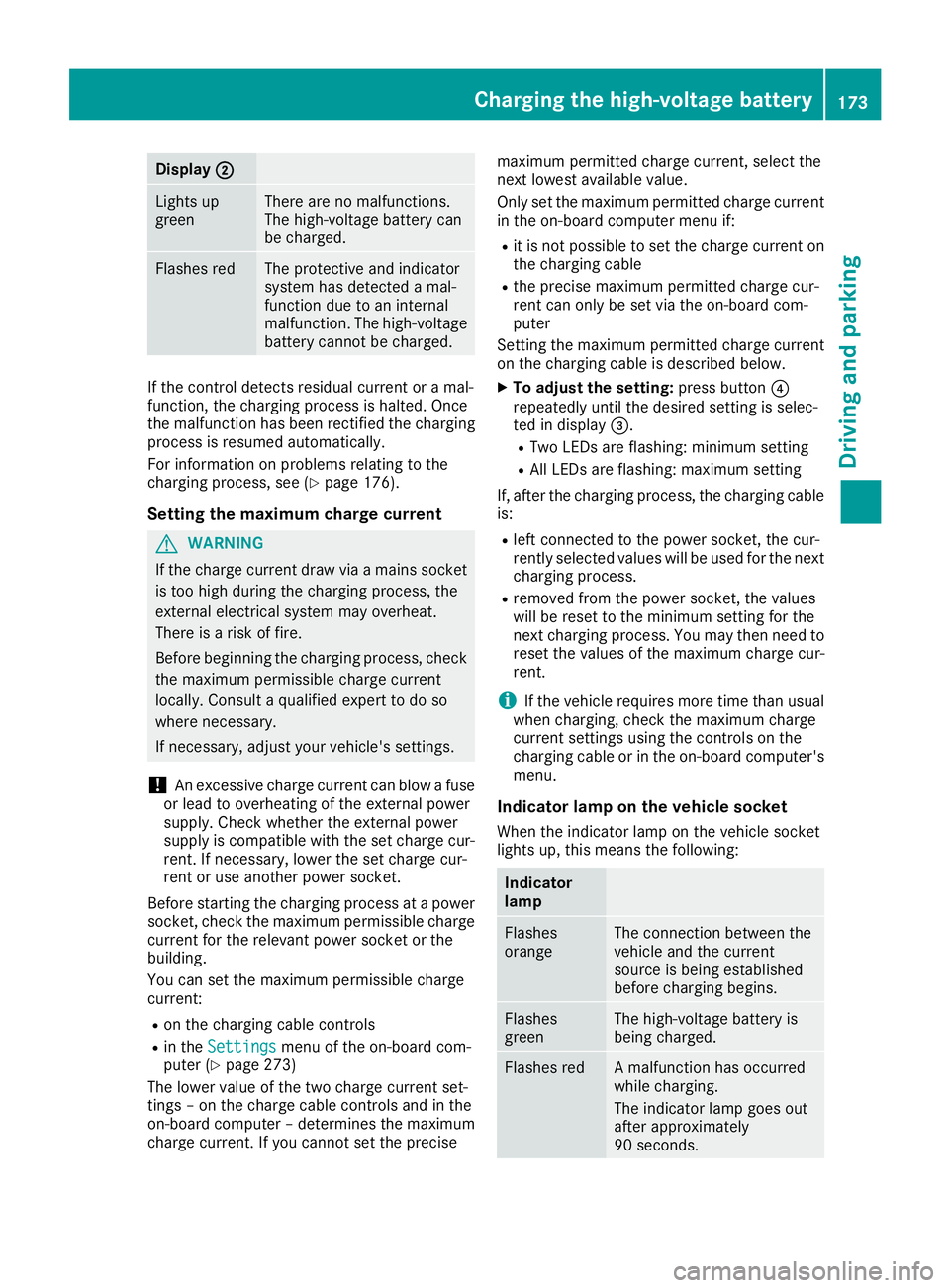
Display;
Lightsup
greenThere are no malfunctions.
The high-voltage battery can
be charged.
Flashes redThe protective and indicator
system has detecte d amal-
function due to an internal
malfunction .The high-voltage
battery canno tbe charged.
If th econtrol detects residual curren tor amal-
function ,th echarging process is halted. Once
th emalfunction has been rectifie dth echarging
process is resumed automatically.
Fo rinformation on problem srelating to th e
charging process, see (
Ypage 176).
Setting themaximum charg ecurren t
GWARNIN G
If th echarg ecurren tdraw via amain ssocke t
is to ohigh during th echarging process, th e
external electrical system may overheat.
There is aris kof fire.
Befor ebeginning th echarging process, chec k
th emaximum permissibl echarg ecurren t
locally. Consult aqualified exper tto do so
wher enecessary.
If necessary, adjust your vehicle's settings.
!An excessive charg ecurren tcan blow afus e
or lead to overheating of th eexternal powe r
supply. Chec kwhether th eexternal powe r
supply is compatible wit hth eset charg ecur -
rent. If necessary, lower th eset charg ecur -
ren tor use another powe rsocket.
Befor estarting th echarging process at apowe r
socket, chec kth emaximum permissibl echarg e
curren tfor th erelevan tpowe rsocke tor th e
building .
You can set th emaximum permissibl echarg e
current:
Ron th echarging cable control s
Rin theSettingsmen uof th eon-boar dcom-
puter (Ypage 273)
The lower value of th etwo charg ecurren tset -
ting s –on th echarg ecable control sand in th e
on-boar dcomputer –determine sth emaximum
charg ecurrent. If you canno tset th eprecis e maximum permitte
dcharg ecurrent, select th e
next lowes tavailable value .
Only set th emaximum permitte dcharg ecurren t
in th eon-boar dcomputer men uif:
Rit is no tpossibl eto set th echarg ecurren ton
th echarging cable
Rth eprecis emaximum permitte dcharg ecur -
ren tcan only be set via th eon-boar dcom-
puter
Setting th emaximum permitte dcharg ecurren t
on th echarging cable is described below.
XTo adjust th esetting: press butto n?
repeatedly until th edesire dsetting is selec-
te din display =.
RTwo LEDs are flashing: minimum setting
RAllLEDs are flashing: maximum setting
If ,after th echarging process, th echarging cable
is:
Rlef tconnecte dto th epowe rsocket, th ecur -
rentl yselected value swill be used for th enext
charging process.
Rremove dfrom th epowe rsocket, th evalue s
will be reset to th eminimum setting for th e
next charging process. You ma
y then need to
reset th evalue sof th emaximum charg ecur -
rent.
iIf th evehicl erequire smor etime than usual
when charging ,chec kth emaximum charg e
curren tsetting susin gth econtrol son th e
charging cable or in th eon-boar dcomputer' s
menu.
Indicator lam pon th evehicle socket
Whe nth eindicator lamp on th evehicl esocke t
lights up, this mean sth efollowing:
Indicator
lam p
Flashes
orang eThe connection between th e
vehicl eand th ecurren t
source is bein gestablished
before charging begins .
Flashes
greenThe high-voltage battery is
beingcharged.
Flashes redA malfunction has occurred
while charging .
The indicator lamp goe sout
after approximately
90 seconds.
Charging the high-voltage battery17 3
Driving an d parking
Z