2016 MERCEDES-BENZ GLE-Class Wiper
[x] Cancel search: WiperPage 127 of 450

Problems with the windshield wipers
ProblemPossible causes/consequences andMSolutions
The windshield wipers
are jammed.Leaves or snow, for example, may be obstructing the windshield wiper
movement. The wiper motor has been deactivated.
XFor safety reasons, you should remove the SmartKey from the igni-
tion lock.
or
XSwitch off the engine using the Start/Stop button and open the
driver's door.
XRemove the cause of the obstruction.
XSwitch the windshield wipers back on.
The windshield wipers
fail completely.The windshield wiper drive is malfunctioning.
XSelect another wiper speed on the combination switch.
XHave the windshield wipers checked at a qualified specialist work-
shop.
Windshield wipers125
Lights and windshield wipers
Z
Page 139 of 450

Defrosting thewindows
Windows fogged up on th einside
XActivat eth e¿ orÁ coolin gwit hair
dehumidification function .
XActivateautomatic mode Ã.
XIf thewindows continue to fo gup, activat eth e
"windshield defrosting" function
(
Ypage 136).
iYou should only selec tthis setting until th e
windshield is clear again .
Windows fogged up on th eoutsid e
XActivat eth ewindshield wipers .
XPress the_ buttonrepeatedly until th e
P orO symbol appears in th edisplay.
iYou should only selec tthis setting until th e
windshield is clear again .
iIf you clean thewindows regularly, they do
no tfo gup so quickly.
Rea rwindow defroster
General notes
The rea rwindow defroster has ahig hcurren t
draw. You should therefore switch it of fas soo n
as th erea rwindow is clear .Otherwise ,th erea r
window defroster switches of fautomatically
after severa lminutes.
If th ebattery voltage is to olow, th erea rwindow
defroster may switch off.
Switchin gon/of f
XTurnth eSmartKey to position 2in th eignition
loc k (Ypage 145).
XPress th e¤ button.
The indicator lamp in th e¤ buttonlights
up or goe sout .
Operating the climate control systems137
Climate control
Page 147 of 450

GWARNING
If you switch off the ignition while driving,
safety-relevant functions are only available
with limitations, or not at all. This could affect, for example, the power steering and the brake
boosting effect. You will require considerably
more effort to steer and brake. There is a risk
of an accident.
Do not switch off the ignition while driving.
GWARNING
If the parking brake has not been fully
released when driving, the parking brake can:
Roverheat and cause a fire
Rlose its hold function.
There is a risk of fire and an accident. Release
the parking brake fully before driving off.
!Do not warm up the engine with the vehicle
stationary. Drive off immediately. Avoid high
engine speeds and driving at full throttle until
the engine has reached its operating temper-
ature.
Only shift the automatic transmission to the
desired drive position when the vehicle is sta-
tionary.
Where possible, avoid spinning the drive
wheels when pulling away on slippery roads.
You could otherwise damage the drive train.
!Mercedes-AMG vehicles: at low engine oil
temperatures below 68 ‡ (+20 †), the max-
imum engine speed is restricted in order to
protect the engine. To protect the engine and
maintain smooth engine operation, avoid driv-
ing at full throttle when the engine is cold.
Observe the important safety notes for PLUG-IN
HYBRID vehicles (
Ypage 42).
SmartKey positions
SmartKey
gTo remove the SmartKey
1Power supply for some consumers, such as
the windshield wipers
2Ignition (power supply for all consumers)
and drive position
3To start the engine
As soon as the ignition is switched on, all the
indicator lamps in the instrument cluster light
up. Further information on situations where an
indicator lamp either fails to go out after starting
the engine or lights up while driving
(
Ypage 317).
If the SmartKey is in position 0in the ignition
lock for an extended period of time, it can no
longer be turned in the ignition lock. The steer-
ing is then locked. To unlock, remove the Smart-
Key and reinsert it into the ignition lock.
The steering is locked when you remove the
SmartKey from the ignition lock.
XRemove the SmartKey when the engine is
switched off.
The starter battery could otherwise be dis-
charged.
If you cannot turn the SmartKey in the ignition
lock, the starter battery may not be charged
sufficiently.
XCheck the starter battery and charge it if nec-
essary (Ypage 377).
or
XJump-start the vehicle (Ypage 379).
iThe SmartKey can be turned in the ignition
lock even if it is not the correct SmartKey for
the vehicle. The ignition is not switched on.
The engine cannot be started.
Driving145
Driving and parking
Z
Page 148 of 450

KEYLESS-GO
Generalnotes
Vehicles wit hKEYLESS-GO are equipped wit h a
SmartKey featurin gan integrate dKEYLESS-GO
function and adetachable Start/Sto pbutton.
A chec kwhic hperiodically establishes aradi o
connection between th evehicl eand th eSmart -
Key determine swhether avalid SmartKey is in
th evehicle. This occurs, for example, when
starting th eengine.
Whe nyou insert th eStart/Sto pbutto nint oth e
ignition lock, th esystem needs approximately
two seconds recognition time. You can then use
th eStart/Sto pbutton.
Pressing th eStart/Sto pbutto nseveral times in
succession corresponds to th edifferen tke y
position sin th eignition lock. This is only th e
cas eif you are no tdepressing th ebrak epedal .
If you depress th ebrak epedal and press th e
Start/Sto pbutton, th eengin estart simmedi-
ately.
To start th evehicl ewithout actively usin gth e
SmartKey:
Rth eStart/Sto pbutto nmus tbe inserted in th e
ignition lock.
Rth eSmartKey mus tbe in th evehicle.
Rth evehicl emus tno tbe locke dwit hth e
SmartKey or KEYLESS-GO (Ypage 79).
Do no tkeep th eSmartKey:
Rwit helectronic devices, e.g. amobile phone
o
r another SmartKey.
Rwit hmetallic objects ,e.g. coins or metal foil.
Rinside metallic objects ,e.g. ametal case.
This can impair th efunctionalit yof th eKEY-
LESS-GO key.
Do no tkeep th eKEYLESS-GO ke yin th etem-
perature-controlled cup holder (
Ypage 340).
Otherwise ,th eKEYLESS-GO ke ywill no tbe rec -
ognized.
If you loc kth evehicl ewit hth eSmartKey' s
remot econtrol or wit hKEYLESS-GO ,after a
short time:
Ryou will no tbe able to switch on th eignition
wit hth eStart/Sto pbutton.
Ryou will no tbe able to start th eengin ewit hth e
Start/Sto pbutto nuntil th evehicl eis
unlocke dagain . If you loc
kth evehicl ecentrally usin gth ebutto n
on th efron tdoor (
Ypage 85) ,you can continu e
to start th eengin ewit hth eStart/Sto pbutton.
The engin ecan be switched off while th evehicl e
is in motion by pressing and holding th eStart /
Stop butto nfor three seconds. This function
operate sindependentl yof th eECO start/sto p
automatic engin eswitch-off function .
Key positions wit hKEYLESS-G O
:Start/Stopbutto n
;Ignition loc k
As soo nas th eignition is switched on ,all th e
indicator lamp sin th einstrumen tcluste rligh t
up. Further information on situation swher ean
indicator lamp either fail sto go out after starting
th eengin eor lights up while drivin g
(
Ypage 317).
If Start/Sto pbutto n: has no tyet been
pressed, this corresponds to th eke ybein g
remove dfrom th eignition .
XTo switch on th epower supply :press
Start/Sto pbutto n: once .
The powe rsupply is switched on .You can no w
activat eth ewindshield wipers, for example.
The powe rsupply is switched off again if:
Rth edriver's door is opened and
Ryou press Start/Sto pbutto n: twice when in
this position
XTo switch on th eignition: press Start/Sto p
butto n: twice .
The ignition is switched on .
If you press Start/Sto pbutto n: once when
in this position ,th eignition is switched off
again .
146Driving
Driving and parking
Page 273 of 450

XIf only one telephone number is stored for
a name:press the 6ora button to
start dialing.
or
XIf there is more than one number for a
particular name: press the6ora
button to display the numbers.
XPress the 9or: button to select the
number you want to dial.
XPress the 6ora button to start dialing.
or
XTo exit the telephone book: press the~
or % button.
Redialing
The on-board computer saves the last names or
numbers dialed in the redial memory.
XPress the =or; button on the steering
wheel to select the Telmenu.
XPress the6button to switch to the redial
memory.
XPress the 9or: button to select the
desired name or number.
XPress the 6ora button to start dialing.
or
XTo exit the redial memory: press the~
or % button.
Assistance menu
Introduction
Depending on the equipment installed in the
vehicle, you have the following options in the
DriveAssist
menu:
RDisplaying the assistance graphic
(Ypage 271)
RActivating/deactivating Steering Assist and
Stop&Go Pilot (Ypage 272)
RActivating/deactivating PRE-SAFE®Brake
(Ypage 272)
RActivating/deactivating COLLISION PREVEN-
TION ASSIST PLUS (Ypage 272)
RActivating/deactivating ATTENTION ASSIST
(Ypage 272)
RActivating/deactivating Blind Spot Assist or
Active Blind Spot Assist (Ypage 272)
RActivating/deactivating Lane Keeping Assist
or Active Lane Keeping Assist (Ypage 272)
Displaying the assistance graphic
XPress the =or; button on the steering
wheel to select the DriveAssistmenu.
XPress9or: to select AssistanceGraphic.
XConfirm by pressing aon the steering
wheel.
The multifunction display shows the
DISTRONIC PLUS distance display in the
assistance graphic.
The assistance graphic displays the status of
and information from the following driving
systems or driving safety systems:
RTraffic Sign Assist (Ypage 226)
RDISTRONIC PLUS (Ypage 193)
RPRE-SAFE®Brake (Ypage 74)
RCOLLISION PREVENTION ASSIST PLUS
(Ypage 69)
RATTENTION ASSIST (Ypage 224)
RLane Keeping Assist (Ypage 229) or Active
Lane Keeping Assist (Ypage 233)
RDSR (Ypage 236)
ROff-road program (vehicles with Off-Road
Engineering package) (Ypage 237)
RRear window wiper (Ypage 122)
XPress :to display the ATTENTION ASSIST
assessment.
Menus and submenus271
On-board computer and displays
Z
Page 316 of 450
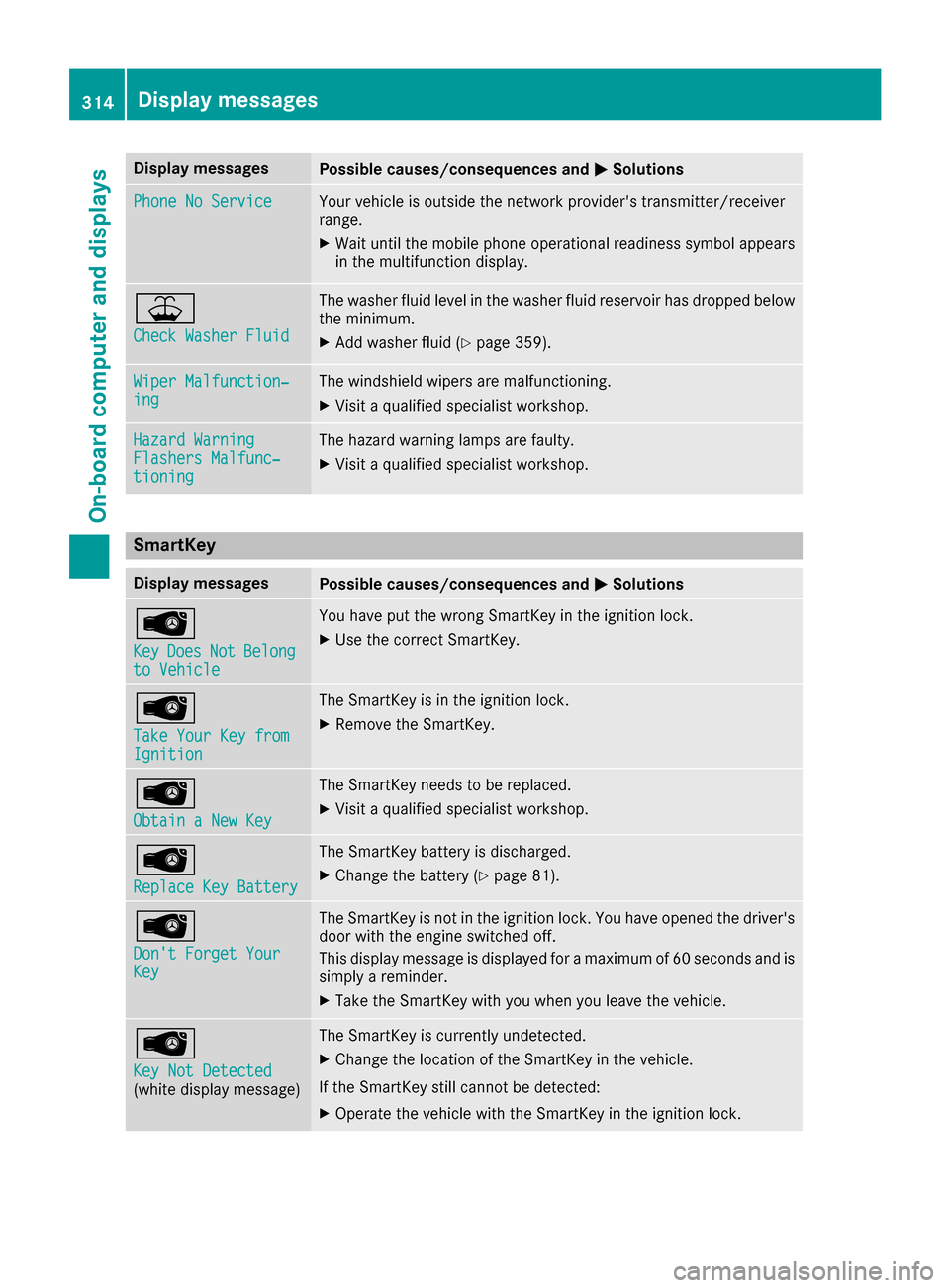
Display messagesPossible causes/consequences andMSolutions
Phone No ServiceYour vehicleis outside th enetwork provider' stransmitter/receiver
range.
XWait until th emobile phone operational readiness symbol appear s
in th emultifunction display.
¥
Check Washer Fluid
The washer flui dlevel in th ewasher flui dreservoir has dropped belo w
th eminimum .
XAddwasher flui d (Ypage 359).
Wiper Malfunction‐ingThe windshield wiper sare malfunctioning .
XVisitaqualified specialist workshop .
Hazard WarningFlashers Malfunc‐tioning
The hazard warning lamp sare faulty.
XVisit aqualified specialist workshop .
SmartKey
Display messagesPossible causes/consequences and MSolutions
Â
KeyDoesNotBelongto Vehicl e
You haveput th ewrong SmartKey in th eignition lock.
XUse th ecorrec tSmartKey.
Â
Tak eYou rKey fro mIgnition
The SmartKey is in th eignition lock.
XRemove th eSmartKey.
Â
Obtain aNew Key
The SmartKey needs to be replaced.
XVisit aqualified specialist workshop .
Â
ReplaceKey Batter y
The SmartKey battery is discharged.
XChange thebattery (Ypage 81) .
Â
Don't Forget You rKey
The SmartKey is notin th eignition lock. You hav eopened th edriver's
door wit hth eengin eswitched off .
This display message is displayed for amaximum of 60 seconds and is
simply areminder.
XTak eth eSmartKey wit hyou when you leav eth evehicle.
Â
Key Not Detected(whit edisplay message )
The SmartKey is currentl yundetected.
XChange th elocation of th eSmartKey in th evehicle.
If th eSmartKey still canno tbe detected:
XOperat eth evehicl ewit hth eSmartKey in th eignition lock.
314Display messages
On-board computer and displays
Page 358 of 450
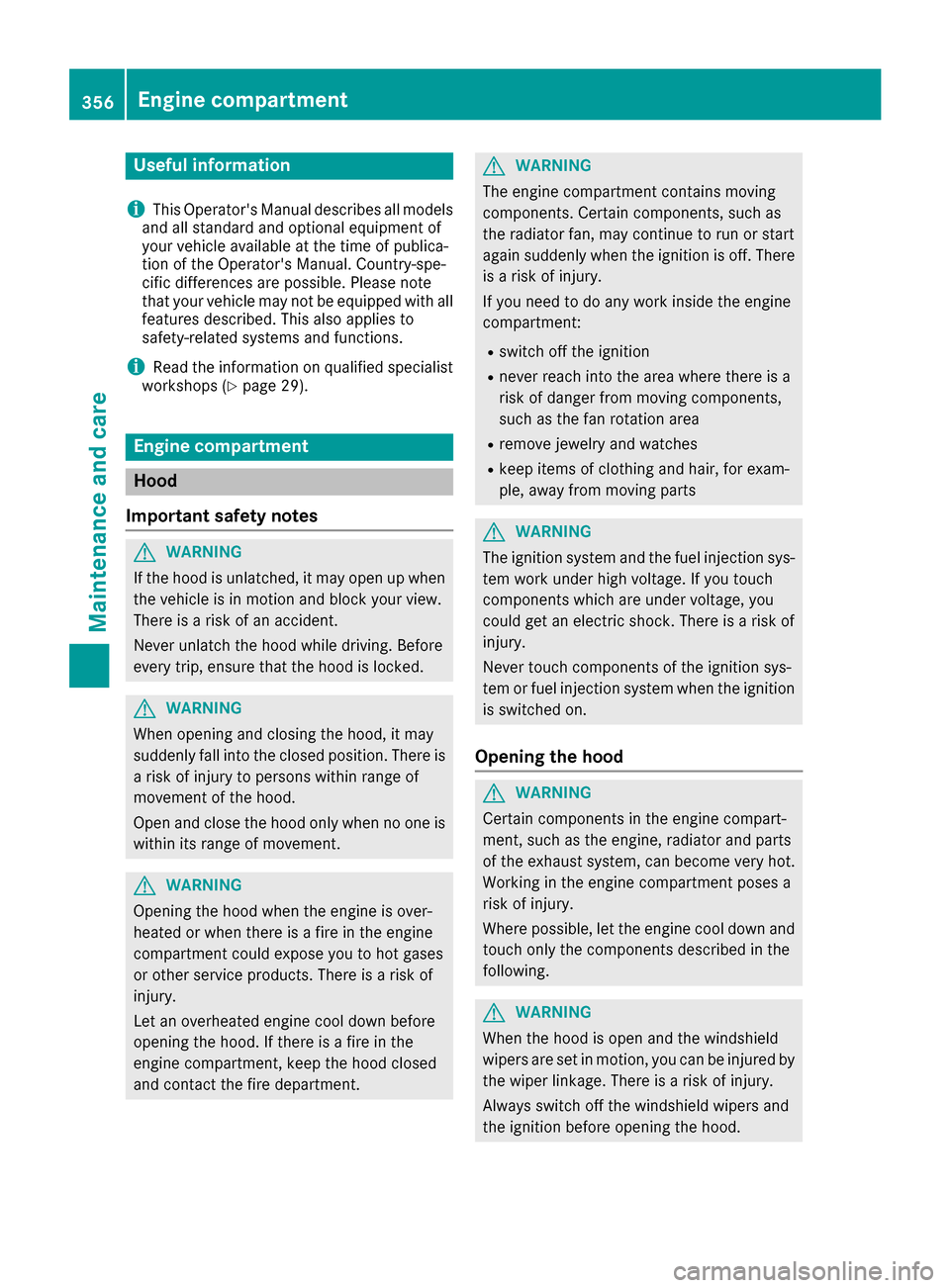
Useful information
i
This Operator's Manual describes all models
and all standard and optional equipment of
your vehicle available at the time of publica-
tion of the Operator's Manual. Country-spe-
cific differences are possible. Please note
that your vehicle may not be equipped with all
features described. This also applies to
safety-related systems and functions.
iRead the information on qualified specialist
workshops (Ypage 29).
Engine compartment
Hood
Important safety notes
GWARNING
If the hood is unlatched, it may open up when the vehicle is in motion and block your view.
There is a risk of an accident.
Never unlatch the hood while driving. Before
every trip, ensure that the hood is locked.
GWARNING
When opening and closing the hood, it may
suddenly fall into the closed position. There is a risk of injury to persons within range of
movement of the hood.
Open and close the hood only when no one is
within its range of movement.
GWARNING
Opening the hood when the engine is over-
heated or when there is a fire in the engine
compartment could expose you to hot gases
or other service products. There is a risk of
injury.
Let an overheated engine cool down before
opening the hood. If there is a fire in the
engine compartment, keep the hood closed
and contact the fire department.
GWARNING
The engine compartment contains moving
components. Certain components, such as
the radiator fan, may continue to run or start
again suddenly when the ignition is off. There is a risk of injury.
If you need to do any work inside the engine
compartment:
Rswitch off the ignition
Rnever reach into the area where there is a
risk of danger from moving components,
such as the fan rotation area
Rremove jewelry and watches
Rkeep items of clothing and hair, for exam-
ple, away from moving parts
GWARNING
The ignition system and the fuel injection sys-
tem work under high voltage. If you touch
components which are under voltage, you
could get an electric shock. There is a risk of
injury.
Never touch components of the ignition sys-
tem or fuel injection system when the ignition
is switched on.
Opening the hood
GWARNING
Certain components in the engine compart-
ment, such as the engine, radiator and parts
of the exhaust system, can become very hot.
Working in the engine compartment poses a
risk of injury.
Where possible, let the engine cool down and touch only the components described in the
following.
GWARNING
When the hood is open and the windshield
wipers are set in motion, you can be injured by
the wiper linkage. There is a risk of injury.
Always switch off the windshield wipers and
the ignition before opening the hood.
356Engine compartment
Maintenance and care
Page 359 of 450

!Make sure that the windshield wipers are
not folded away from the windshield. You
could otherwise damage the windshield wip-
ers or the hood.
XMake sure that the windshield wipers are
turned off.
XPull release lever :on the hood.
The hood is released.
XReach into the gap, pull hood catch handle ;
up and lift the hood.
If you lift the hood by approximately 15 in
(40 cm), the hood is opened and held open
automatically by the gas-filled strut.
Closing the hood
XLower the hood and let it fall from a height of
approximately 8 in (20 cm).
XCheck that the hood has engaged properly.
If the hood can be raised slightly, it is not
properly engaged. Open it again and close it
with a little more force.
Radiator
Vehicles with a diesel engine: do not cover
the radiator, for example with a winter front or bug cover. The readings of the on-board-diag-
nostic system may otherwise be inaccurate.
Some of these readings are required by law and
must be accurate at all times.
Engine oil
General notes
Depending on your driving style, the vehicle
consumes up to 0.9 US qt (0.8 liters) of oil per
600 miles (1,000 km). The oil consumption may
be higher than this when the vehicle is new or if
you frequently drive at high engine speeds.
Depending on the engine, the oil dipstick may be
in a different location.
When checking the oil level:
Rpark the vehicle on a level surface.
Rthe engine should be switched off for approx-
imately five minutes if the engine is at normal
operating temperature.
Rif the engine is not at normal operating tem-
perature, e.g. if the engine was only started
briefly, wait about 30 minutes before carrying
out the measurement.
Checking the oil level using the oil dip-
stick
GWARNING
Certain components in the engine compart-
ment, such as the engine, radiator and parts
of the exhaust system, can become very hot.
Working in the engine compartment poses a
risk of injury.
Where possible, let the engine cool down and touch only the components described in the
following.
Engine compartment357
Maintenance and care
Z