2016 MERCEDES-BENZ GLE-CLASS COUPE trailer
[x] Cancel search: trailerPage 19 of 382

Steering wheelAdjusting (electrically) ...................1 02
Adjusting (manually) ...................... 101
Button overview ............................... 33
Buttons (on-board computer) ......... 220
Cleaning ......................................... 313
Important safety notes .................. 101
Steering wheel heating .................. 102
Storing settings (memory func-
tion) ............................................... 107
Steering wheel heating
Problem (malfunction) ................... 103
Switching on/off ........................... 102
Steering wheel paddle shifters ........ 147
Stopwatch (RACETIMER) ................... 232
Stowage areas ................................... 278
Stowage compartments
Armrest (under) ............................. 279
Center console .............................. 280
Center console (rear) ..................... 280
Cup holders ................................... 285
Eyeglasses compartment ............... 280
Glove box ....................................... 279
Important safety information ......... 279
Stowage net ................................... 280
Stowage net ....................................... 280
Summer tires ..................................... 332
Sun visor ............................................ 287
Suspension setting
AMG adaptive sport suspension
system ........................................... 185
Suspension settings
SETUP (on-board computer) .......... 232
SUV
(Sport Utility Vehicle) ....................... 25
Switching air-recirculation mode
on/off ................................................. 130
T
Tachometer ........................................ 219
Tailgate
Display message ............................ 262
Emergency unlocking ....................... 85
Important safety notes .................... 81
Limiting the opening angle ............... 84
Opening dimensions ...................... 373 Opening/closing (automatically
from inside) ...................................... 84
Opening/closing (automatically
from outside) ................................... 82
Opening/closing (from outside) ....... 82
Tank content
Fuel gauge ....................................... 31
Technical data
Capacities ...................................... 367
Emergency spare wheel ................. 364
Information .................................... 365
Tires/wheels ................................. 356
Trailer loads ................................... 376
Vehicle data ................................... 373
Telephone
Accepting a call (multifunction
steering wheel) .............................. 226
Display message ............................ 263
Menu (on-board computer) ............ 226
Number from the phone book ........ 226
Redialing ........................................ 226
Rejecting/ending a call ................. 226
Temperature
Coolant (display in the instrument
cluster) .......................................... 220
Coolant (on-board computer,
Mercedes-AMG vehicles) ............... 231
Engine oil (on-board computer,
Mercedes-AMG vehicles) ............... 231
Outside temperature ...................... 220
Setting (climate control) ................ 126
Transmission oil (on-board com-
puter, Mercedes-AMG vehicles) ..... 231
Through-loading feature ................... 281
Time
see separate operating instructions
Timing (RACETIMER) ......................... 232
Tire pressure
Calling up (on-board computer) ..... 337
Checking manually ........................ 336
Display message ............................ 259
Maximum ....................................... 336
Not reached (TIREFIT) .................... 318
Notes ............................................. 335
Reached (TIREFIT) .......................... 319
Recommended ............................... 333
Tire pressure loss warning system
Genera l note
s ................................ 336
Index17
Page 20 of 382
Important safety notes .................. 337
Restarting ...................................... 337
Tire pressure monitor
Checking the tire pressure elec-
tronically ........................................ 339
Function/notes .............................3 37
General notes ................................ 337
Important safety notes .................. 338
Radio type approval for the tire
pressure monitor ........................... 340
Restarting ...................................... 340
Warning lamp ................................. 277
Warning message .......................... 339
Tire-change tool kit ........................... 315
TIREFIT kit .......................................... 317
Important safety notes .................. 317
Storage location ............................ 315
Tire pressure not reached .............. 318
Tire pressure reached .................... 319
Tires
Aspect ratio (definition) ................. 350
Average weight of the vehicle
occupants (definition) .................... 349
Bar (definition) ............................... 349
Changing a wheel .......................... 351
Characteristics .............................. 349
Checking ........................................ 331
Curb weight (definition) ................. 350
Definition of terms ......................... 349
Direction of rotation ...................... 352
Display message ............................ 259
Distribution of the vehicle occu-
pants (definition) ............................ 351
DOT (Department of Transporta-
tion) (definition) ............................. 349
DOT, Tire Identification Number
(TIN) ............................................... 348
GAWR (Gross Axle Weight Rating)
(definition) ..................................... 349
General notes ................................ 356
GTW (Gross Trailer Weight) (defi-
nition) ............................................ 350
GVW (Gross Vehicle Weight) (def-
inition) ........................................... 350
GVWR (Gross Vehicle Weight Rat-
ing) (definition) .............................. 350
Important safety notes .................. 330 Increased vehicle weight due to
optional equipment (definition) ...... 349
Information on driving .................... 330
Kilopascal (kPa) (definition) ........... 350
Labeling (overview) ........................ 346
Load bearing index (definition) ...... 351
Load index ..................................... 348
Load index (definition) ................... 350
M+S tires ....................................... 332
Maximum load on a tire (defini-
tion) ............................................... 350
Maximum loaded vehicle weight
(definition) ..................................... 350
Maximum permissible tire pres-
sure (definition) ............................. 350
Maximum tire load ......................... 348
Maximum tire load (definition) ....... 350
MOExtended tires .......................... 332
Optional equipment weight (defi-
nition) ............................................ 351
PSI (pounds per square inch) (def-
inition) ........................................... 350
Replacing ....................................... 351
Service life ..................................... 331
Sidewall (definition) ....................... 351
Speed rating (definition) ................ 350
Storing ........................................... 352
Structure and characteristics
(definition) ..................................... 349
Temperature .................................. 345
TIN (Tire Identification Number)
(definition) ..................................... 351
Tire bead (definition) ...................... 350
Tire pressure (definition) ................ 350
Tire pressures (recommended) ...... 349
Tire size (data) ............................... 356
Tire size designation, load-bearing
capacity, speed rating .................... 346
Tire tread ....................................... 331
Tire tread (definition) ..................... 350
Total load limit (definition) ............. 351
Traction ......................................... 345
Traction (definition) ....................... 351
Tread wear ..................................... 345
TWR (permissible trailer drawbar
noseweight) (definition) .................
351
Uni
form Tire Quality Grading
Standards ...................................... 344
18Index
Page 21 of 382

Uniform Tire Quality Grading
Standards (definition) .................... 349
Wear indicator (definition) .............351
Wheel and tire combination ........... 357
Wheel rim (definition) .................... 349
see Flat tire
Top Tether ............................................ 56
Tow-starting
Emergency engine starting ............ 327
Important safety notes .................. 325
Towing a trailer
Axle load, permissible .................... 376
Cleaning the trailer tow hitch ......... 312
Coupling up a trailer ......................2 15
Decoupling a trailer ....................... 216
Driving tips ....................................2 12
ESP
®(Electronic Stability Pro-
gram) ............................................... 67
Important safety notes .................. 212
Installing the ball coupling ............. 213
Lights display message .................. 246
Mounting dimensions .................... 376
Power supply ................................. 217
Pulling away with a trailer .............. 138
Removing the ball coupling ............ 217
Trailer loads ................................... 376
Towing away
Important safety guidelines ........... 325
Installing the towing eye ................ 326
Notes for 4MATIC vehicles ............ 327
Removing the towing eye ...............3 26
Transporting the vehicle ................ 327
With both axles on the ground ....... 326
Towing eye ......................................... 315
Traffic Sign Assist
Display message ............................ 254
Function/notes .............................2 02
Important safety notes .................. 202
Instrument cluster display ............. 202
Trailer coupling
see Towing a trailer
Trailer loads and drawbar nose-
weights ............................................... 217
Trailer towing
Active Blind Spot Assist ................. 209
Active Lane Keeping Assist ............ 211
Blind Spot Assist ............................ 205 PARKTRONIC ................................. 186
Permi
ssibl
e trailer loads and
drawbar noseweights ..................... 217
Transfer case ..................................... 150
Transmission
see Automatic transmission
Transmission position display ......... 143
Transmission position display
(DIRECT SELECT lever) ......................143
Transporting the vehicle .................. 327
Traveling uphill
Brow of hill ..................................... 168
Driving downhill .............................1 68
Maximum gradient-climbing capa-
bility ............................................... 168
Trim pieces (cleaning instruc-
tions) ..................................................3 13
Trip computer (on-board com-
puter) ..................................................2 22
Trip odometer
Calling up ....................................... 222
Resetting (on-board computer) ...... 223
Trunk
see Tailgate
Trunk load (maximum) ......................373
Turn signals
Display message ............................ 246
Switching on/off ........................... 110
Two-way radio
Frequencies ................................... 365
Installation ..................................... 365
Transmission output (maximum) .... 365
TWR (Tongue Weight Rating) (defi-
nition) ................................................. 351
Type identification plate
see Vehicle identification plate
U
UnlockingEmergency unlocking ....................... 80
From inside the vehicle (central
unlocking button) .............................7 9
Upshift indicator (on-board com-
puter, Mercedes-AMG vehicles) .......231
Index19
Page 69 of 382
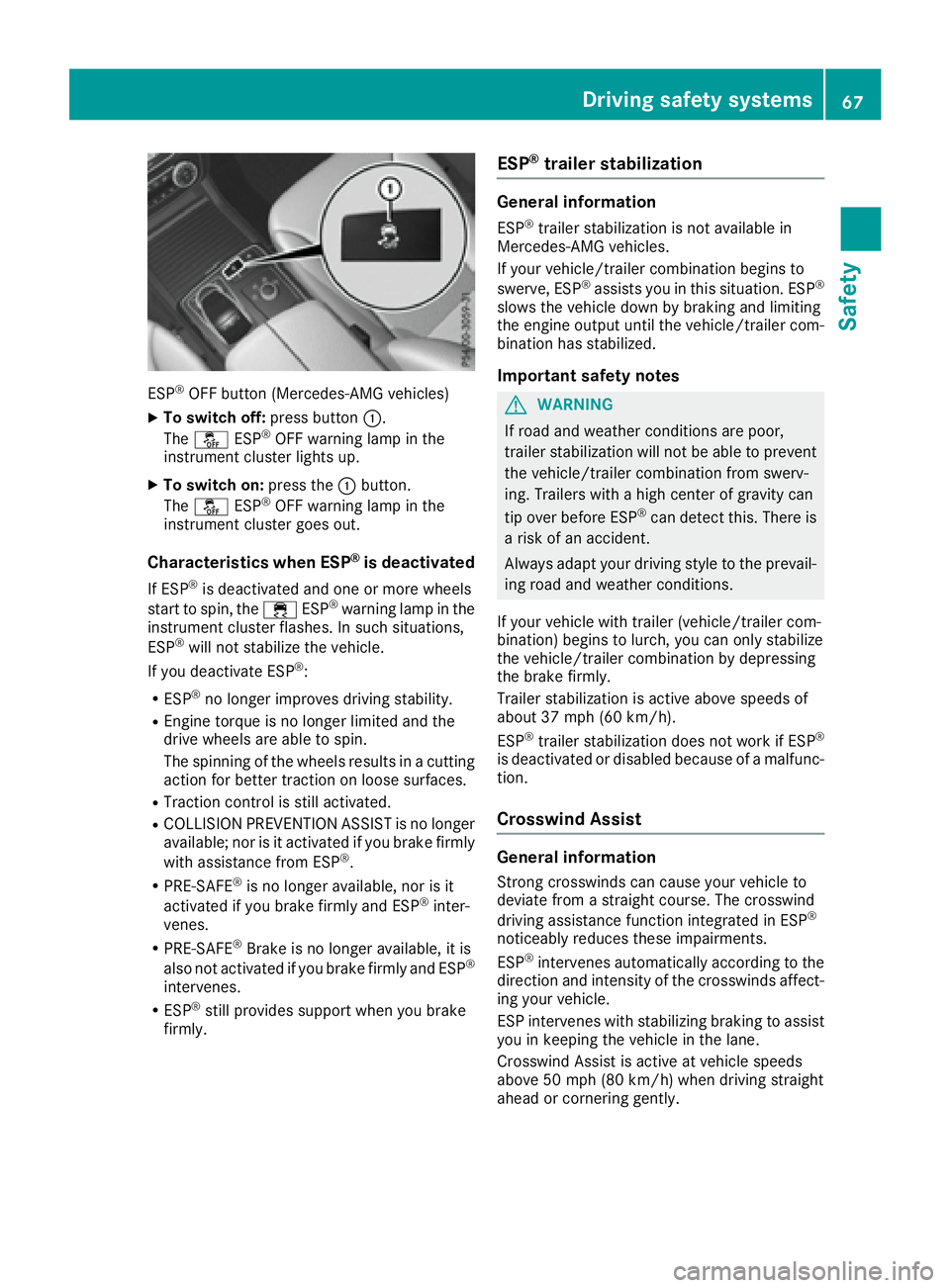
ESP®OFF button (Mercedes-AMG vehicles)
XTo switch off:press button:.
The å ESP®OFF warning lamp in the
instrument cluster lights up.
XTo switch on: press the:button.
The å ESP®OFF warning lamp in the
instrument cluster goes out.
Characteristics when ESP®is deactivated
If ESP®is deactivated and one or more wheels
start to spin, the ÷ESP®warning lamp in the
instrument cluster flashes. In such situations,
ESP
®will not stabilize the vehicle.
If you deactivate ESP®:
RESP®no longer improves driving stability.
REngine torque is no longer limited and the
drive wheels are able to spin.
The spinning of the wheels results in a cutting
action for better traction on loose surfaces.
RTraction control is still activated.
RCOLLISION PREVENTION ASSIST is no longer
available; nor is it activated if you brake firmly
with assistance from ESP
®.
RPRE-SAFE®is no longer available, nor is it
activated if you brake firmly and ESP®inter-
venes.
RPRE-SAFE®Brake is no longer available, it is
also not activated if you brake firmly and ESP®
intervenes.
RESP®still provides support when you brake
firmly.
ESP®trailer stabilization
General information
ESP®trailer stabilization is not available in
Mercedes-AMG vehicles.
If your vehicle/trailer combination begins to
swerve, ESP
®assists you in this situation. ESP®
slows the vehicle down by braking and limiting
the engine output until the vehicle/trailer com-
bination has stabilized.
Important safety notes
GWARNING
If road and weather conditions are poor,
trailer stabilization will not be able to prevent
the vehicle/trailer combination from swerv-
ing. Trailers with a high center of gravity can
tip over before ESP
®can detect this. There is
a risk of an accident.
Always adapt your driving style to the prevail-
ing road and weather conditions.
If your vehicle with trailer (vehicle/trailer com-
bination) begins to lurch, you can only stabilize
the vehicle/trailer combination by depressing
the brake firmly.
Trailer stabilization is active above speeds of
about 37 mph (60 km/h).
ESP
®trailer stabilization does not work if ESP®
is deactivated or disabled because of a malfunc-
tion.
Crosswind Assist
General information
Strong crosswinds can cause your vehicle to
deviate from a straight course. The crosswind
driving assistance function integrated in ESP
®
noticeably reduces these impairments.
ESP®intervenes automatically according to the
direction and intensity of the crosswinds affect-
ing your vehicle.
ESP intervenes with stabilizing braking to assist you in keeping the vehicle in the lane.
Crosswind Assist is active at vehicle speeds
above 50 mph (80 km/h) when driving straight
ahead or cornering gently.
Driving safet ysystem s67
Safety
Z
Page 111 of 382

The daytime running lamps improve the visibility
of your vehicle during the day. The daytime run-ning lamps function is required by law in Can-
ada. It cannot therefore be deactivated.
When the engine is running and the vehicle is
stationary: if you move the selector lever from a
drive position to P, the daytime running lamps/
low-beam headlamps go out after three
minutes.
When the engine is running, the vehicle is sta-
tionary and in bright ambient light: if you turn the
light switch to T, the daytime running lamps
and parking lamps switch on.
If the engine is running and you turn the light
switch to L, the manual settings take prec-
edence over the daytime running lamps.
USA only:
The daytime running lamps improve the visibility
of your vehicle during the day. To do this, the
daytime running lamps function must be
switched on using the on-board computer
(
Ypage 229).
If the engine is running and you turn the light
switch to TorL, the manual settings
take precedence over the daytime running
lamps.
Low-beam headlamps
Even if the light sensor does not detect that it is
dark, the parking lamps and low-beam head-
lamps switch on when the ignition is switched on
and the light switch is set to the Lposition.
This is a particularly useful function in the event
of rain and fog.
XTo switch on the low-beam headlamps:
turn the SmartKey in the ignition lock to posi- tion 2or start the engine.
XTurn the light switch to L.
The green Lindicator lamp in the instru-
ment cluster lights up.
Rear fog lamp
The rear fog lamp improves visibility of your
vehicle for the traffic behind in the event of thick
fog. Please take note of the country-specific
regulations for the use of rear fog lamps.
XTo switch on the rear fog lamp: turn the
SmartKey in the ignition lock to position 2or
start the engine.
XTurn the light switch to LorÃ.
XPress the Rbutton.
The yellow Rindicator lamp in the instru-
ment cluster lights up.
XTo switch off the rear fog lamp: press the
R button.
The yellow Rindicator lamp in the instru-
ment cluster goes out.
Parking lamps
!If the battery has been excessively dis-
charged, the parking lamps or standing lamps
are automatically switched off to enable the
next engine start. Always park your vehicle
safely and sufficiently lit according to legal
standards. Avoid the continuous use of the
T parking lamps for several hours. If pos-
sible, switch on the Xright or the Wleft
standing lamp.
XTo switch on: turn the light switch to T.
The green Tindicator lamp in the instru-
ment cluster lights up.
Standing lamps
Switching on the standing lamps ensures the
corresponding side of the vehicle is illuminated.
XTo switch on the standing lamps: the
SmartKey should not be in the ignition lock or
it should be in position 0.
XTurn the light switch toW(left-hand side of
the vehicle) or X(right-hand side of the
vehicle).
Vehicles towing a trailer: both the right-hand
and left-hand standing lamps (tail lamps) are
always illuminated on the trailer.
Exterior lighting109
Lights and windshield wipers
Z
Page 140 of 382
Pulling away with a trailer
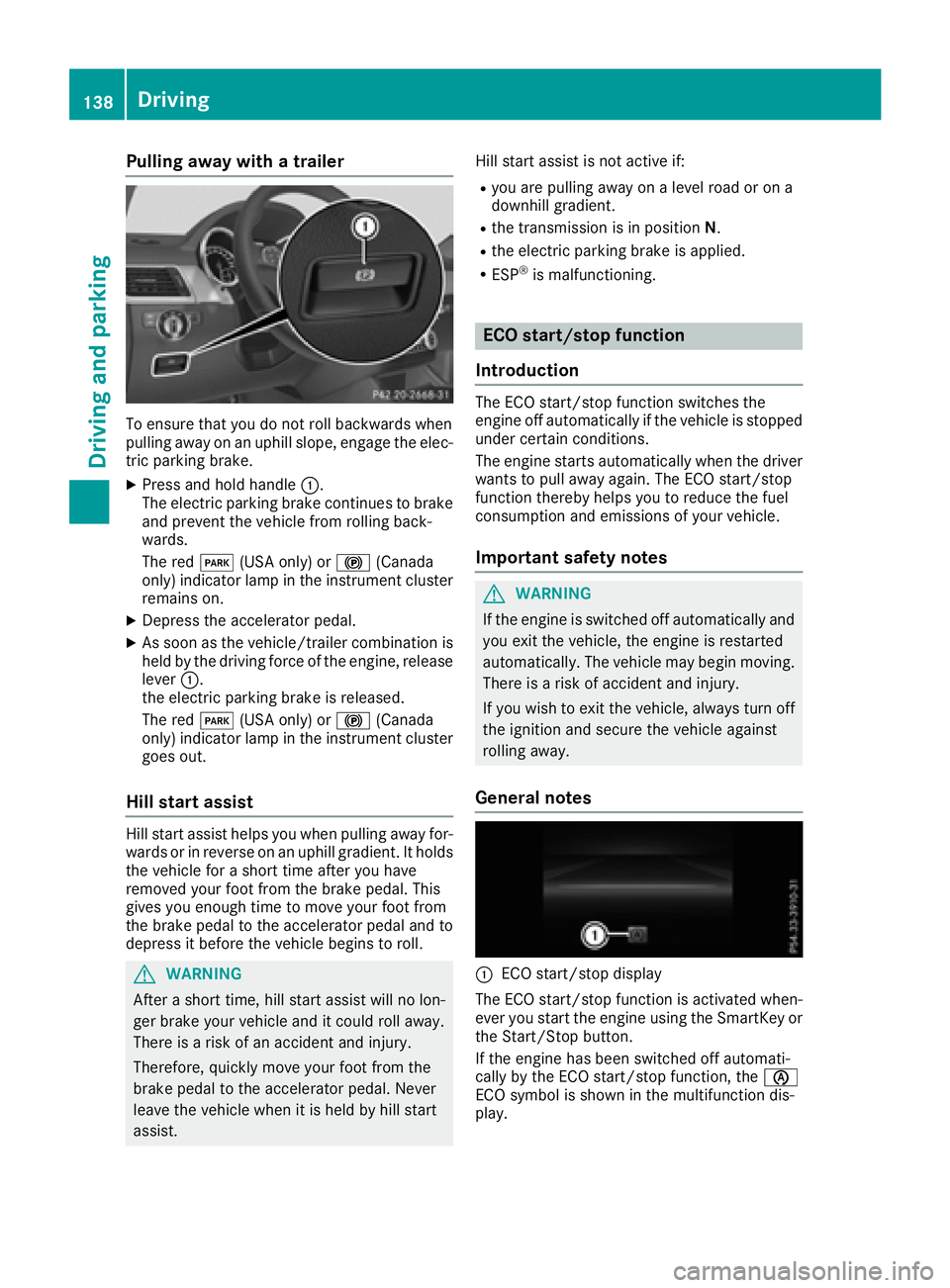
To ensure that you do not roll backwards when
pulling away on an uphill slope, engage the elec-
tric parking brake.
XPress and hold handle:.
The electric parking brake continues to brake
and prevent the vehicle from rolling back-
wards.
The red F(USA only) or !(Canada
only) indicator lamp in the instrument cluster
remains on.
XDepress the accelerator pedal.
XAs soon as the vehicle/trailer combination is held by the driving force of the engine, release
lever :.
the electric parking brake is released.
The red F(USA only) or !(Canada
only) indicator lamp in the instrument cluster goes out.
Hill start assist
Hill start assist helps you when pulling away for-
wards or in reverse on an uphill gradient. It holds
the vehicle for a short time after you have
removed your foot from the brake pedal. This
gives you enough time to move your foot from
the brake pedal to the accelerator pedal and to
depress it before the vehicle begins to roll.
GWARNING
After a short time, hill start assist will no lon-
ger brake your vehicle and it could roll away.
There is a risk of an accident and injury.
Therefore, quickly move your foot from the
brake pedal to the accelerator pedal. Never
leave the vehicle when it is held by hill start
assist. Hill start assist is not active if:
Ryou are pulling away on a level road or on a
downhill gradient.
Rthe transmission is in position
N.
Rthe electric parking brake is applied.
RESP®is malfunctioning.
ECO start/stop function
Introduction
The ECO start/stop function switches the
engine off automatically if the vehicle is stopped
under certain conditions.
The engine starts automatically when the driver
wants to pull away again. The ECO start/stop
function thereby helps you to reduce the fuel
consumption and emissions of your vehicle.
Important safety notes
GWARNING
If the engine is switched off automatically and
you exit the vehicle, the engine is restarted
automatically. The vehicle may begin moving.
There is a risk of accident and injury.
If you wish to exit the vehicle, always turn off
the ignition and secure the vehicle against
rolling away.
General notes
:ECO start/stop display
The ECO start/stop function is activated when-
ever you start the engine using the SmartKey or the Start/Stop button.
If the engine has been switched off automati-
cally by the ECO start/stop function, the è
ECO symbol is shown in the multifunction dis-
play.
138Driving
Driving and parking
Page 149 of 382
Towing a trailer
XDrive in the middle of the engine speed range
on uphill gradients.
XDepending on the uphill or downhill gradient,
use left-hand steering wheel paddle shifter
(
Ypage 147) to select a lower gear, even if
cruise control or DISTRONIC PLUS are acti-
vated.
Drive programs
Slippery drive program
The Slippery drive program has the following
characteristics:
Rreduced engine and transmission settings for
optimum propulsion on slippery or snow-cov-
ered roads.
Roptimized ESP®stability control on slippery or
snow-covered roads.
Rthe vehicle has improved driving stability on
slippery or snow-covered roads, for example.
Comfort drive program
The Comfort drive program has the following
characteristics:
Rcomfort-oriented engine and transmission
settings.
Roptimal fuel consumption resulting from the
automatic transmission shifting up sooner.
Rthe vehicle pulling away more gently in
forward and reverse gears, unless the accel-
erator pedal is depressed fully.
Rthe automatic transmission shifting up
sooner. This results in the vehicle being driven
at lower engine speeds and the wheels being
less likely to spin.
Sport drive program
The Sport drive program has the following char-
acteristics:
Rsporty engine and transmission settings.
Rthe automatic transmission shifting up later.
the fuel consumption possibly being higher as
a result of the later automatic transmission
shift points.
Rthe suspension exhibits sporty damping (vehi-
cles with AIRMATIC).
Sport Plus drive program
The Sport Plus drive program has the following
characteristics:
Rthe vehicle exhibits particularly sporty driving
characteristics.
Rthe vehicle pulling away in first gear.
Rthe automatic transmission shifting up later.
the fuel consumption possibly being higher as
a result of the later automatic transmission
shift points.
Rthe suspension exhibits particularly firm
springing and damping settings (vehicles with AIRMATIC).
Rthe ECO start/stop function is deactivated, it
can, however, be activated again using the
ECO button (
Ypage 139).
Individual drive program
In the Individual drive program, the following
properties of the drive program can be selected:
Rthe drive (engine and transmission manage-
ment)
Rthe transmission
Rthe suspension
Rall vehicles (except Mercedes-AMG vehicles):
the steering
Rall vehicles (except Mercedes-AMG vehicles):
availability of the ECO start/stop function
To select the gears in the Individualdrive pro-
gram permanently using the steering wheel pad-
dle shifters, select the permanent manual gear-
shift program.
Information about configuring the Individual
drive program with the multimedia system can
be found in the Digital Operator's Manual.
Manual gear shifting
General notes
You can change gear yourself using the steering
wheel paddle shifters. The transmission must be
in position D.
Depending on which paddle shifter is pulled, the
automatic transmission immediately shifts into
the next gear down or up, if permitted.
Automatic transmission147
Driving an d parking
Z
Page 170 of 382
RObserve the rules on off-road driving.
RDo not drive at an angle on slopes, inclines or
gradients, but instead follow the direct line of
fall.
RWhen driving down an incline, make use of the
engine's braking effect. Observe the engine
speed; do not overrev the engine.
RDrive slowly.
RAvoid high engine speeds. Drive at appropri-
ate engine speeds (maximum 3,000 rpm).
RUse the left-hand steering wheel paddle
shifter to shift into a lower gear in good time
on long and steep downhill gradients.
RCheck the brakes after prolonged off-road
driving.
Hill start assist will aid you when pulling away on a hill. For further information about hill start
assist, see (
Ypage 138).
Do not switch to transmission position Nwhen
driving off-road. If you try to brake the vehicle
using the service brake, you could lose control
of the vehicle. If the gradient is too steep for your
vehicle, drive back down in reverse gear.
Always observe the approach/departure angle
values (
Ypage 375).
Maximum gradient-climbing capability
Always observe the maximum gradient climbing ability values (Ypage 376).
Hilltops
When driving up an uphill gradient, slightly
reduce pressure on the accelerator immediately
before reaching the brow of the hill. Make use of
the vehicle's own impetus to travel over the
brow.
This style of driving prevents:
Rthe vehicle from lifting off the ground on the
brow of a hill
Rthe vehicle from traveling too quickly down
the other side
Driving downhill
RDrive slowly.
RDo not drive at an angle down steep inclines.
Steer into the line of fall and drive with the
front wheels aligned straight. Otherwise, the
vehicle could slip sideways, tip and rollover.
RShift to a lower gear using the left-hand pad-
dle shifter before tackling steep downhill gra-
dients.
RActivate DSR. If this is not sufficient, brake
gently. When doing so, make sure that the
vehicle is facing in the direction of the line of
fall.
RCheck that the brakes are working normally
after a long downhill stretch.
iThe special off-road ABS setting enables a
precise, brief and repeated locking of the
front wheels. This causes them to dig into
loose earth. Be aware that the front wheels
easily skid across the ground surface if com-
pletely braked and therefore lose their ability
to steer.
Driving systems
Intelligent Drive
Mercedes-Benz Intelligent Drive stands for inno-
vative driver assistance and safety systems
which enhance comfort and support the driver in
critical situations. With these intelligent co-ordi- nated systems Mercedes-Benz has set a mile-
stone on the path towards autonomous driving.
Mercedes-Benz Intelligent Drive embraces all
elements of active and passive safety in one well thought out system – for the safety of the vehi-
cle occupants and that of other road users.
Further information on driving safety systems
(
Ypage 60).
Cruise control
General notes
Cruise control maintains a constant road speed
for you. It brakes automatically in order to avoid
exceeding the set speed. You must select a
lower gear in good time on long and steep down-
hill gradients, especially if the vehicle is laden or
towing a trailer. By doing so, you will make use of the braking effect of the engine. This relieves the
load on the brake system and prevents the
brakes from overheating and wearing too
quickly.
Use cruise control only if road and traffic con-
ditions make it appropriate to maintain a steady
speed for a prolonged period. You can store any
road speed above 20 mph (30 km/h).
168Driving systems
Driving and parking