2016 MERCEDES-BENZ GLC-Class trunk
[x] Cancel search: trunkPage 22 of 418

Towing eye......................................... 355
Traffic Sign Assist
Display message ............................ 282
Function/notes ............................. 216
Important safety notes .................. 216
Instrument cluster display ............. 217
Trailer coupling
see Towing a trailer
Trailer loads and drawbar nose-
weights ............................................... 234
Trailer towing
Permissible trailer loads and
drawbar noseweights ..................... 234
Transfer case ..................................... 169
Transmission
see Automatic transmission
Transmission position display ......... 163
Transmission position display
(DIRECT SELECT lever) ...................... 163
Transporting the vehicle .................. 369
Trim pieces (cleaning instruc-
tions) .................................................. 350
Trip computer (on-board com-
puter) .................................................. 245
Trip odometer
Calling up ....................................... 244
Resetting (on-board computer) ...... 245
Trunk load (maximum) ...................... 415
Turn signals
Changing bulbs (front) ................... 132
Display message ............................ 273
Switching on/off ........................... 126
Two-way radio
Frequencies ................................... 406
Installation ..................................... 406
Transmission output (maximum) .... 406
Type identification plate
see Vehicle identification plate
U
UnlockingEmergency unlocking ....................... 90
From inside the vehicle (central
unlocking button) ............................. 89
V
Vanity mirror (in the sun visor) ........ 319
Vehicle
Correct use ...................................... 27
Data acquisition ............................... 28
Display message ............................ 287
Equipment ....................................... 23
Individual settings .......................... 252
Limited Warranty ............................. 28
Loading .......................................... 384
Locking (in an emergency) ............... 91
Locking (SmartKey) .......................... 83
Lowering ........................................ 399
Maintenance .................................... 24
Operating safety .............................. 25
Parking .......................................... 172
Parking for a long period ................ 176
Pulling away ................................... 157
Raising ........................................... 396
Reporting problems ......................... 27
Securing from rolling away ............ 396
Towing away .................................. 367
Transporting .................................. 369
Unlocking (in an emergency) ........... 90
Unlocking (SmartKey) ...................... 83
Vehicle data ................................... 415
Vehicle data
Roof load (maximum) ..................... 415
Trunk load (maximum) ................... 415
Vehicle dimensions ........................... 415
Vehicle emergency locking ................ 91
Vehicle identification number
see VIN
Vehicle identification plate .............. 408
Vehicle level
AIR BODY CONTROL ...................... 196
Display message ............................ 279
Vehicle tool kit .................................. 355
Video
Operating the DVD ......................... 249
VIN
Seat ............................................... 408
Type plate ...................................... 408
20Index
Page 94 of 418

XMake sure that the doors and the tailgate
are locked.
XCarefully press the protective cap onto the
lock cylinder until it engages and is seated
firmly. Do not pull the door handle when
doing so.
If you lock the vehicle as described above, the
fuel filler flap is not locked. The anti-theft
alarm system is not armed.
Cargo compartment
Important safety notes
GWARNING
Combustion engines emit poisonous exhaust
gases such as carbon monoxide. If the tailgate
is open when the engine is running, particu-
larly if the vehicle is moving, exhaust fumes
could enter the passenger compartment.
There is a risk of poisoning.
Turn off the engine before opening the tail-
gate. Never drive with the tailgate open.
GWARNING
If objects, luggage or loads are not secured or
not secured sufficiently, they could slip, tip
over or be flung around and thereby hit vehicle
occupants. There is a risk of injury, particu-
larly in the event of sudden braking or a sud-
den change in direction.
Always store objects so that they cannot be
flung around. Secure objects, luggage or
loads against slipping or tipping before the
journey.
!The tailgate swings upwards and to the
rear when opened. Therefore, make sure
that there is sufficient clearance above and
behind the tailgate.
The opening dimensions of the tailgate can be
found in the "Vehicle data" section
(
Ypage 415).
You can limit the opening angle of the tailgate
(
Ypage 97). Do not leave the SmartKey in the cargo com-
partment. You could otherwise lock yourself
out.
You should preferably place luggage or loads
in the cargo compartment. Observe the load-
ing guidelines (
Ypage 306).
Tailgate obstruction detection with
reversing feature
Vehicles with remote tailgate closing fea-
ture: the tailgate is equipped with automatic
obstacle recognition with reversing feature. If
a solid object blocks or restricts the tailgate
when automatically opening, this procedure
is stopped. If a solid object blocks or restricts
the tailgate when automatically closing, the
trunk lid automatically opens again slightly.
The automatic obstacle recognition with
reversing feature is only an aid. It is not a
substitute for your attentiveness when open-
ing and closing the tailgate.
GWARNING
The reversing feature does not react:
Rto soft, light and thin objects, e.g. small fin-
gers
Rover the last 1/3 in (8 mm) of the closing
movement
This means that the reversing feature cannot
prevent someone being trapped in these sit-
uations. There is a risk of injury.
Make sure that no body parts are in close
proximity during the closing procedure.
If somebody becomes trapped:
Rpress the Fbutton on the SmartKey, or
Rpull or press the remote operating switch
on the driver's door or
Rpress the closing or locking button on the
tailgate or
Rpull the handle on the tailgate
Vehicles with HANDS-FREE ACCESS: it is
also possible to stop the closing process by
92Cargo compartment
Opening and closing
Page 177 of 418
XTo release:pull handle:.
The red F(USA only) or !(Canada
only) indicator lamp in the instrument clus- ter goes out.
The electric parking brake can only be
released:
Rwhen the SmartKey is in position 1or 2in
the ignition lock (
Ypage 153) or
Rif the ignition was switched on using the
Start/Stop button
Applying automatically
The electric parking brake is automatically
applied when the transmission is in position P
and:
Rthe engine is switched off or
Rthe driver is not wearing a seat belt and the driver's door is opened.
To prevent the electric parking brake from
being automatically applied, pull handle :.
The electric parking brake is also engaged
automatically if:
RDISTRONIC PLUS brings the vehicle to a
standstill or
Rthe HOLD function is keeping the vehicle
stationary
RActive Parking Assist is keeping the vehicle
stationary
In addition, at least one of the following con-
ditions must be fulfilled:
Rthere is a system malfunction.
Rthe power supply is insufficient.
Rthe vehicle is stationary for a lengthy
period.
The red !indicator lamp in the instrument
cluster lights up.
The electric parking brake is not automati-
cally engaged if the engine is switched off by
the ECO start/stop function.
Releasing automatically
Your vehicle's electric parking brake is auto-
matically released if all of the following con-
ditions are met:
Rthe engine is running.
Rthe transmission is in position Dor R.
Rthe seat belt has been fastened.
Ryou depress the accelerator pedal.
If the transmission is in position R, the trunk
lid must be closed.
If your seat belt is not fastened, the following
conditions must be fulfilled to automatically
release the electric parking brake:
Rthe driver's door is closed.
Ryou have shifted out of transmission posi-
tion Por you have previously driven faster
than 2 mph (3 km/h)
Ensure that you do not depress the acceler-
ator pedal unintentionally. Otherwise the
parking brake will be released and the vehicle
will start to move.
Emergency braking
The vehicle can also be braked during an
emergency by using the electric parking
brake.
XWhile driving, push handle :of the electric
parking brake (
Ypage 174).
The vehicle is braked as long as you keep
handle :of the electric parking brake
depressed. The longer electric parking
brake handle :is depressed, the greater
the braking force.
During braking:
Ra warning tone sounds
Rthe Please Release Parking Brake
message appears
Rthe red F(USA only) or !(Canada
only) indicator lamp in the instrument clus- ter flashes
When the vehicle has been braked to a stand-
still, the electric parking brake is engaged.
Parking175
Driving an d parking
Z
Page 208 of 418

Ryou are drivingfaste rthan 6mph (10 km/h)
Rawhee lspins, ES P®intervenes or fails. The
÷ warnin glamp lights up in th einstru-
men tcluster
A warnin gtone sounds. The parkin gsymbol
disappear sand th emultifunction display
shows th ePar kAssist Canceled
mes -
sage .
Whe nActive Parking Assis tis canceled, you
mus tsteer and brak eagain yourself .
If asystem malfunction occurs, th evehicl eis
braked to astandstill. To drive on ,depress th e
accelerator again .
Rearview camer a
General notes
Rear vie wcamera :is an optica lparkin gand
maneuverin gaid. It shows th eare abehin d
your vehicl ewit hguidelines in th eAudio 20 or
COMAND display.
The are abehin dth evehicl eis displayed as a
mirro rimage, as in th erea rvie wmirror.
iThe text shown in th eAudio 20 or
COMAND display depend son th elanguage
setting .The following are examples of rea r
vie wcamera message sin th eAudio 20 or
COMAND display.
Important safet ynotes
The rea rvie wcamera is only an aid. It is no t a
replacement fo ryour attention to your imme-
diat esurroundings. You are always responsi- ble fo
rsaf emaneuvering and parking. Whe n
maneuvering or parking, mak esur ethat there
are no persons, animals or objects in th eare a
in whic hyou are maneuvering .
Under th efollowing circumstances, th erea r
vie wcamera will no tfunction ,or will function
in alimite dmanner:
Rif th etrunk lid is ope n
Rin heavyrain ,snow or fo g
Rat night or in ver ydark places
Rif th ecamera is exposed to ver ybright ligh t
Rif theare ais lit by fluorescent bulbs or LE D
lighting (the display may flicker)
Rif there is asudden chang ein temperature,
e.g. when drivin ginto aheated garage in
winte r
Rif thecamera len sis dirty or obstructed.
Observ eth enote son cleaning
(
Ypage 348)
Rif th erea rof your vehicl eis damaged .In this
event ,hav eth ecamera position and setting
checke dat aqualified specialist workshop
The field of vision and other function sof th e
rea rvie wcamera may be restricted due to
additional accessories on th erea rof th evehi-
cle (e.g. license plat eholder ,bicycle rack) .
iThe rearvie wcamera is protected from
raindrops and dust by means of aflap .
Whe nth erea rvie wcamera is activated,
this flap opens .
The flap closes again when :
Ryou havefinished th emaneuvering proc-
ess
Ryou switch of fth eengin e
Ryou ope nth etrunk
Observ eth enote son cleaning
(
Ypage 348).
Fo rtechnical reasons, th eflap may remain
ope nbriefl yafter th erea rvie wcamera has
been deactivated.
206Driving systems
Driving an d parking
Page 209 of 418

Activating/deactivating the rear view
camera
XTo activate:makesur ethat th eSmartKey
is in position 2in th eignition lock.
XMak esur ethat th eActivatio nby R
gearfunction is selected in Audio 20 or
COMAND (see th eDigital Operator' sMan -
ual).
XEngage revers egear .
The rear vie wcamera flap opens. The area
behind th evehicl eis shown wit hguide lines
in th eAudio 20 or COMAND display.
The imag efrom th erear vie wcamera is
available throughout th emaneuverin g
process.
To deacti vate:therear vie wcamera deacti -
vates if you shif tth etransmission to Por after
driving forwards ashort distance.
Messages in the Audio 20 orCOMAND
display
The rear vie wcamera may sho w adistorted
vie wof obstacles, sho wthem incorrectl yor
no tat all. The rear vie wcamera does no tsho w
objects in th efollowin gpositions:
Rver yclose to th erear bumper
Runder th erear bumper
Rin close range abov eth ehandle on th e
trunk lid
!Objects no tat ground level may appear to
be further away than they actually are, e.g. :
Rthebumper of aparked vehicl e
Rthedrawbar of atrailer
Rth eball couplin gof atrailer to whitch
Rtherear section of an HGV
Raslante dpos t
Use th eguidelines only for orientation .
Approach objects no further than th ebot -
tom-mos tguideline.
:Yello wguide lin eat adistanc eof approx -
imately 13 ft (4. 0m) from th erear of th e
vehicl e
;Whiteguide lin ewithout turnin gth e steer -
ing wheel, vehicl ewidt hincludin gth e
exterio rmirror s(static)
=Yello wguide lin efor th evehicl ewidt h
includin gth eexterio rmirrors, for curren t
steering whee langle (dynamic )
?Yellowlan emarking tires at curren t steer-
ing whee langle (dynamic )
AYellowguide lin eat adistanc eof approx -
imately 3ft (1.0 m) from the rear of the
vehicle
BVehicle center axle (marker assistance)
CBumper
DRed guide line at a distance of approx-
imately 12 in (0.30 m) fromthe rear of the
vehicle
The guide lines are shown when the trans-
mission is in position R.
The distance specifications only apply to
objects that are at ground level.
Driving system s207
Driving an d parking
Z
Page 213 of 418

The 360° camera will not function or will
function in a limited manner:
Rif the doors are open
Rif the exterior mirrors are folded in
Rif the trunk lid is open
Rin heavy rain, snow or fog
Rat night or in very dark places
Rif the cameras are exposed to very bright
light
Rif the area is lit by fluorescent bulbs or LED
lighting (the display may flicker)
Rif the camera lenses fog up, e.g. when driv-
ing into a heated garage in winter, causing
a rapid change in temperature
Rif the camera lenses are dirty or covered
Rif the vehicle components in which the
cameras are installed are damaged. In this
event, have the camera position and setting
checked at a qualified specialist workshop.
Do not use the 360° camera in this case. You
can otherwise injure others or cause damage to objects or the vehicle.
The guide lines in the COMAND display show
the distances to your vehicle. The distances
only apply to road level.
The camera in the rear area is protected by
means of a flap. This flap opens when the
360° camera is activated. Observe the notes
on cleaning (
Ypage 349). For technical rea-
sons, the flap may remain open briefly after
the 360° camera has been deactivated.
On vehicles with height-adjustable chassis,
depending on technical conditions, leaving
the standard height can result in:
Rinaccuracies in the guide lines
Rinaccuracies in the display of generated
images (top view)
Activation conditions
The 360° camera image can be displayed if:
RAudio 20 or COMAND is switched on (see
the Digital Operator's Manual)
Rthe 360° Camerafunction is switched on
iIf you are driving faster than at a moderate
speed and you turn on the 360° camera, a
warning message appears.
The warning message disappears if:
Ryou are again driving at a moderate
speed The 360° camera is then activa-
ted.
Rthe message is confirmed with the %
button.
Switching the 360° camera on and off
using the button
XTo switch on: press button:.
Depending on whether position Dor Ris
engaged, the following is shown:
Ra split screen with top view and the
image from the front camera or
Ra split screen with top view and the
image from the rear view camera
XTo switch off: press button:.
Switching on the 360° camera using
Audio 20 or COMAND
XTo select360° Camerain the vehicle car-
ousel: turn and press the controller.
Depending on whether position Dor Ris
engaged, the following is shown:
Ra split screen with top view and the
image from the front camera or
Ra split screen with top view and the
image from the rear view camera
Driving systems211
Driving and parking
Z
Page 214 of 418

Activating the360°camera using
reverse gear
The 360° camera images can be automati-
call ydisplayed by engagin grevers egear .
XMakesur ethat th eSmartKey is in posi-
tion 2in th eignition lock.
XMak esur ethat th eActivatio nby R
gearfunction is selected in Audio 20 or
COMAND (see th eDigital Operator' sMan -
ual).
XTo sho wth e360° camera image: engage
revers egear .
The area behind th evehicl eis shown in th e
Audio 20 or COMAND display in split -
scree nmode. You see th eto pvie wof th e
vehicl eand th eimag efrom th erear vie w
camera.
Selecting the split-screen view orfull
screen mode
Switchin gbetween split scree nviews:
XTo switch to th elin ewit hth evehicl eicons :
slide 5thecontroller .
XTo selectavehicl eicon: tur nth econtroller .
Switchin gto full scree nmode:
X180 °Vie wTurn and press th econtroller .
iThe full scree noption is only available in
th efollowin gviews:
RTop vie wwit hpictur efrom th erear vie w
camera
RTop vie wwit hpictur efrom th efron tcam -
era
Displays in the Audio 20 orCOMAND
display
Important safety notes
The camera system may sho w adistorted
vie wof obstacles, showthem incorrectl yor
no tat all. Obstacles are no t shown by the
system in th efollowin glocations:
Runder th efron tand rear bumpers
Rver yclose to th efron tand rear bumpers
R
R
in clo serange abov eth ehandle on th e
trunk lid
Rver yclose to th eexterio rmirror s
Rin thetransitional areas between th evari-
ous cameras in th evirtual to pvie w
!Objects no tat ground level may appear to
be further away than they actually are, e.g. :
Rthebumper of aparked vehicl e
Rthedrawbar of atrailer
Rth eball couplin gof atrailer to whitch
Rtherear section of an HGV
Raslante dpos t
Use th eguidelines only for orientation .
Approach objects no further than th ebot -
tom-mos tguideline.
Top view wit hpictur e from th erea rview
camera
:Yello wguide lin eat adistanc eof approx -
imately 13 ft (4. 0m) from th erear of th e
vehicl e
;Symbol for th esplit scree nsetting wit h
to pvie wand rear vie wcamera imag e
212Driving systems
Driving and parking
Page 311 of 418
Ski and snowboard bag
Important safety notes
GWARNING
The skibag in conjunction with the lashing
straps cannot restrain any objects other than
skis.
Vehicle occupants could be struck in the
event of sudden braking or an accident, for
instance, if you:
Rtransport other heavy or sharp-edged
objects in the skibag
Rdo not secure the skibag with the lashing
straps
There is a risk of accident and injury.
Store only skis in the skibag. Always secure
the skibag with the lashing straps so that it
cannot move around.
A maximum of four pairs of skis or two snow-
boards can be transported in the ski and
snowboard bag.
Securing the ski/snowboard bag in the
cargo compartment
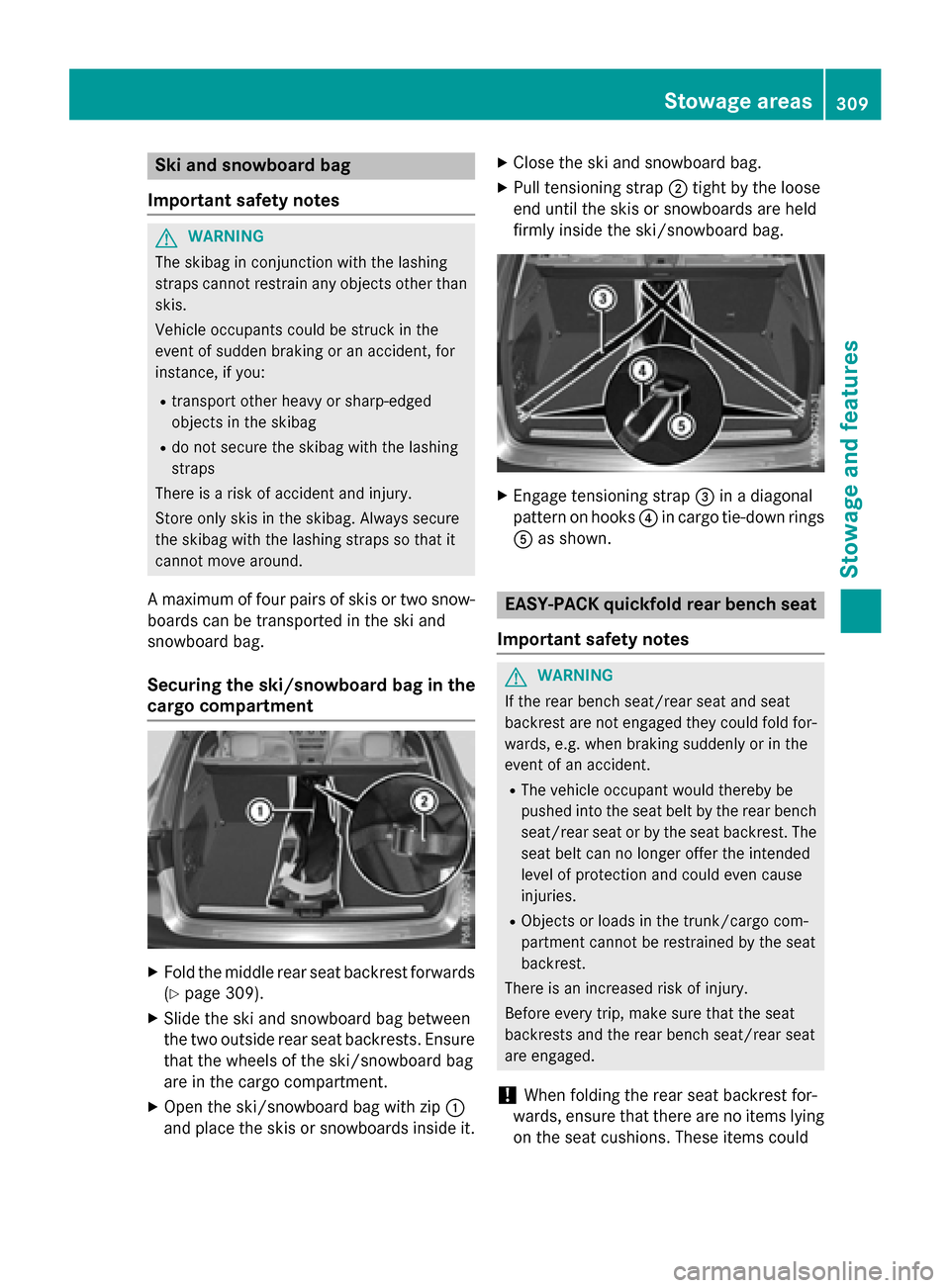
XFold the middle rear seat backrest forwards
(
Ypage 309).
XSlide the ski and snowboard bag between
the two outside rear seat backrests. Ensure
that the wheels of the ski/snowboard bag
are in the cargo compartment.
XOpen the ski/snowboard bag with zip :
and place the skis or snowboards inside it.
XClose the ski and snowboard bag.
XPull tensioning strap ;tight by the loose
end until the skis or snowboards are held
firmly inside the ski/snowboard bag.
XEngage tensioning strap =in a diagonal
pattern on hooks ?in cargo tie-down rings
A as shown.
EASY-PACK quickfold rear bench seat
Important safety notes
GWARNING
If the rear bench seat/rear seat and seat
backrest are not engaged they could fold for-
wards, e.g. when braking suddenly or in the
event of an accident.
RThe vehicle occupant would thereby be
pushed into the seat belt by the rear bench
seat/rear seat or by the seat backrest. The
seat belt can no longer offer the intended
level of protection and could even cause
injuries.
RObjects or loads in the trunk/cargo com-
partment cannot be restrained by the seat
backrest.
There is an increased risk of injury.
Before every trip, make sure that the seat
backrests and the rear bench seat/rear seat
are engaged.
!When folding the rear seat backrest for-
wards, ensure that there are no items lying
on the seat cushions. These items could
Stowage areas309
Stowage and features
Z