2016 MERCEDES-BENZ GLC-Class transmission
[x] Cancel search: transmissionPage 185 of 418
XBriefly pull the cruise control lever towardsyou :.
XRemove your foot from the accelerator
pedal.
The first time cruise control is activated, it
stores the current speed or regulates the
speed of the vehicle to the previously
stored speed.
Setting a speed
Keep in mind that it may take a brief moment
until the vehicle has accelerated or braked to
the speed set.
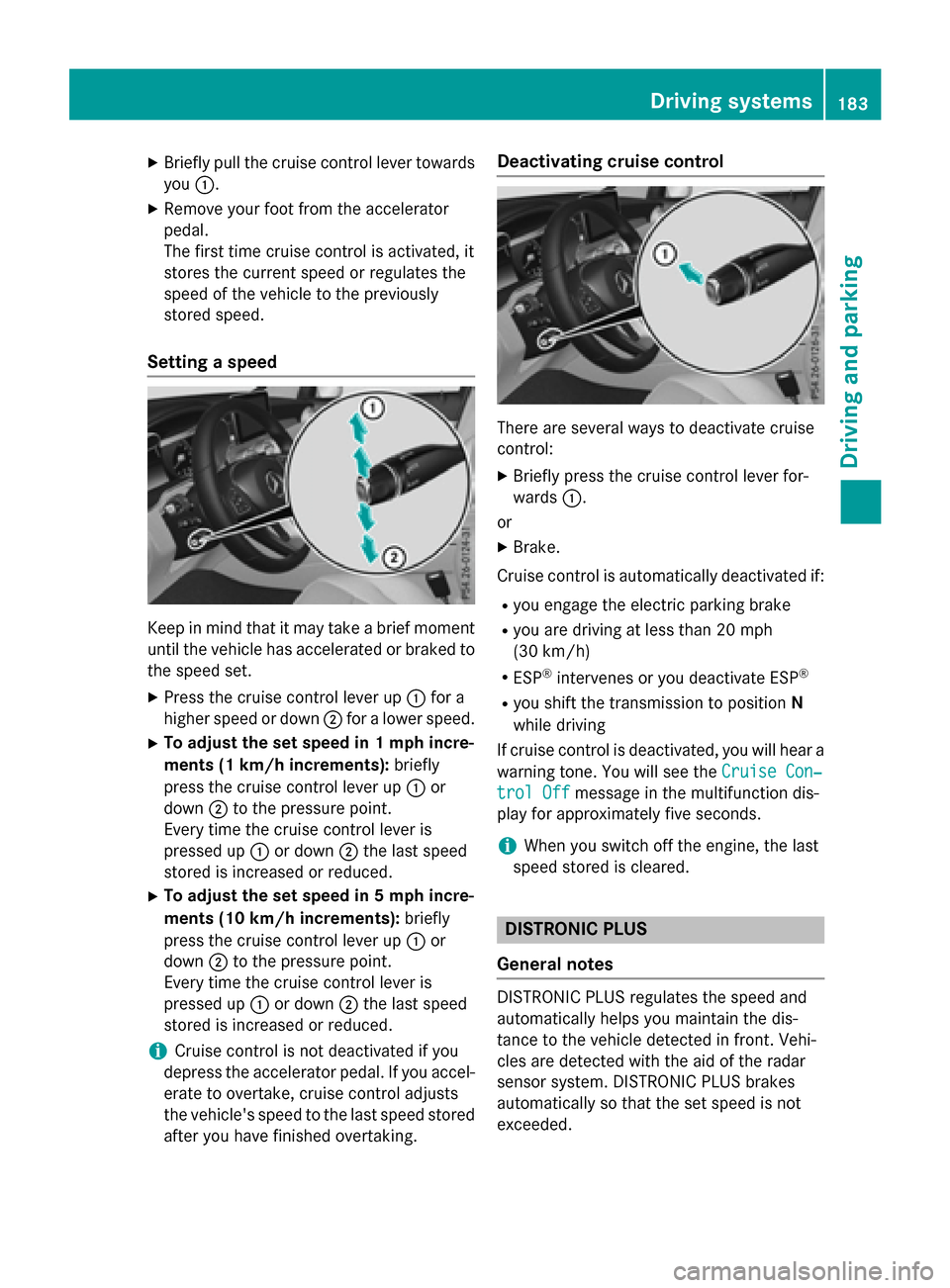
XPress the cruise control lever up :for a
higher speed or down ;for a lower speed.
XTo adjust the set speed in 1 mph incre-
ments (1 km/h increments): briefly
press the cruise control lever up :or
down ;to the pressure point.
Every time the cruise control lever is
pressed up :or down ;the last speed
stored is increased or reduced.
XTo adjust the set speed in 5 mph incre-
ments (10 km/h increments): briefly
press the cruise control lever up :or
down ;to the pressure point.
Every time the cruise control lever is
pressed up :or down ;the last speed
stored is increased or reduced.
iCruise control is not deactivated if you
depress the accelerator pedal. If you accel- erate to overtake, cruise control adjusts
the vehicle's speed to the last speed stored
after you have finished overtaking.
Deactivating cruise control
There are several ways to deactivate cruise
control:
XBriefly press the cruise control lever for-
wards :.
or
XBrake.
Cruise control is automatically deactivated if:
Ryou engage the electric parking brake
Ryou are driving at less than 20 mph
(30 km/h)
RESP®intervenes or you deactivate ESP®
Ryou shift the transmission to position N
while driving
If cruise control is deactivated, you will hear a
warning tone. You will see the Cruise Con‐
trol Offmessage in the multifunction dis-
play for approximately five seconds.
iWhen you switch off the engine, the last
speed stored is cleared.
DISTRONIC PLUS
General notes
DISTRONIC PLUS regulates the speed and
automatically helps you maintain the dis-
tance to the vehicle detected in front. Vehi-
cles are detected with the aid of the radar
sensor system. DISTRONIC PLUS brakes
automatically so that the set speed is not
exceeded.
Driving systems183
Driving and parking
Z
Page 187 of 418

!If DISTRONIC PLUS or the HOLD function
is activated, the vehicle brakes automati-
cally in certain situations.
To prevent damage to the vehicle, deacti-
vate DISTRONIC PLUS and the HOLD func-
tion in the following or other similar situa-
tions:
Rwhen towing the vehicle
Rin the car wash
If you fail to adapt your driving style,
DISTRONIC PLUS can neither reduce the risk
of accident nor override the laws of physics.
DISTRONIC PLUS cannot take into account
the road, traffic and weather conditions.
DISTRONIC PLUS is only an aid. You are
responsible for the distance to the vehicle in
front, for vehicle speed, for braking in good
time and for staying in your lane.
Do not use DISTRONIC PLUS:
Rin road and traffic conditions which do not
allow you to maintain a constant speed e.g.
in heavy traffic or on winding roads
Ron slippery road surfaces. Braking or accel-
erating could cause the drive wheels to lose
traction and the vehicle could then skid
Rwhen there is poor visibility, e.g. due to fog,
heavy rain or snow
DISTRONIC PLUS may not detect narrow
vehicles driving in front, e.g. motorcycles, or
vehicles driving on a different line.
In particular, the detection of obstacles can
be impaired if:
Rthere is dirt on the sensors or anything else
covering the sensors
Rthere is snow or heavy rain
Rthere is interference by other radar sources
Rthere are strong radar reflections, for
example, in parking garages
If DISTRONIC PLUS no longer detects a vehi- cle in front, DISTRONIC PLUS may unexpect-
edly accelerate the vehicle to the stored
speed. This speed may:
Rbe too high if you are driving in a filter lane
or an exit lane
Rbe so high in the right lane that you pass
vehicles driving on the left (left-hand drive
countries)
Rbe so high in the left lane that you pass
vehicles driving on the right (right-hand
drive countries)
If there is a change of drivers, advise the new
driver of the speed stored.
Cruise control lever
:To activate or increase speed
;To activate or reduce speed
=To deactivate DISTRONIC PLUS
?To activate at the current speed/last
stored speed
ATo set the specified minimum distance
Activating DISTRONIC PLUS
Activation conditions
In order to activate DISTRONIC PLUS, the fol-
lowing conditions must be fulfilled:
Rthe engine must be started. It may take up
to two minutes after pulling away before
DISTRONIC PLUS is operational.
Rthe electric parking brake must be
released.
RESP®must be active, but not intervening.
RActive Parking Assist must not be activa-
ted.
Rthe transmission must be in position D.
Driving systems185
Driving and parking
Z
Page 190 of 418

If you wish to exit the vehicle, always turn off
DISTRONIC PLUS and secure the vehicle
against rolling away.
For further information on deactivating
DISTRONIC PLUS (
Ypage 190).
If DISTRONIC PLUS detects that the vehicle in
front is stopping, it brakes your vehicle until it
is stationary.
Once your vehicle is stationary, it remains
stationary and you do not need to depress the
brake.
iAfter a time, the electric parking brake
secures the vehicle and relieves the service
brake.
iDepending on the specified minimum dis-
tance, your vehicle will come to a standstill
at a sufficient distance behind the vehicle in
front. The specified minimum distance is
set using the control on the cruise control
lever.
When DISTRONIC PLUS is activated, the
transmission is shifted automatically to posi-
tion Pif:
Rthe driver's seat belt is not fastened and the
driver's door is open.
Rthe engine is switched off, unless it is auto-
matically switched off by the ECO start/
stop function.
The electric parking brake secures the vehicle automatically if DISTRONIC PLUS is activated
when the vehicle is stationary and:
Ra system malfunction occurs.
Rthe power supply is not sufficient.
If a malfunction occurs, the transmission may
also shift into position Pautomatically.
Setting a speed
XPress the cruise control lever up :for a
higher speed or down ;for a lower speed.
XTo adjust the set speed in 1 mph incre-
ments (1 km/h increments): briefly
press the cruise control lever up :or
down ;to the pressure point.
Every time the cruise control lever is
pressed up :or down ;the last speed
stored is increased or reduced.
XTo adjust the set speed in 5 mph incre-
ments (10 km/h increments): briefly
press the cruise control lever up :or
down ;to the pressure point.
Every time the cruise control lever is
pressed up :or down ;, the last speed
stored is increased or reduced.
iIf you accelerate to overtake, DISTRONIC
PLUS adjusts the vehicle's speed to the last
speed stored after you have finished over-
taking.
Setting the specified minimum distance
You can set the specified minimum distance
for DISTRONIC PLUS by varying the time span
between one and two seconds. With this func-
tion, you can set the minimum distance that
DISTRONIC PLUS keeps to the vehicle in
front, dependent on vehicle speed. You can
see this distance in the multifunction display
(
Ypage 189).
iMake sure that you maintain the mini-
mum distance to the vehicle in front as
188Driving systems
Driving and parking
Page 192 of 418
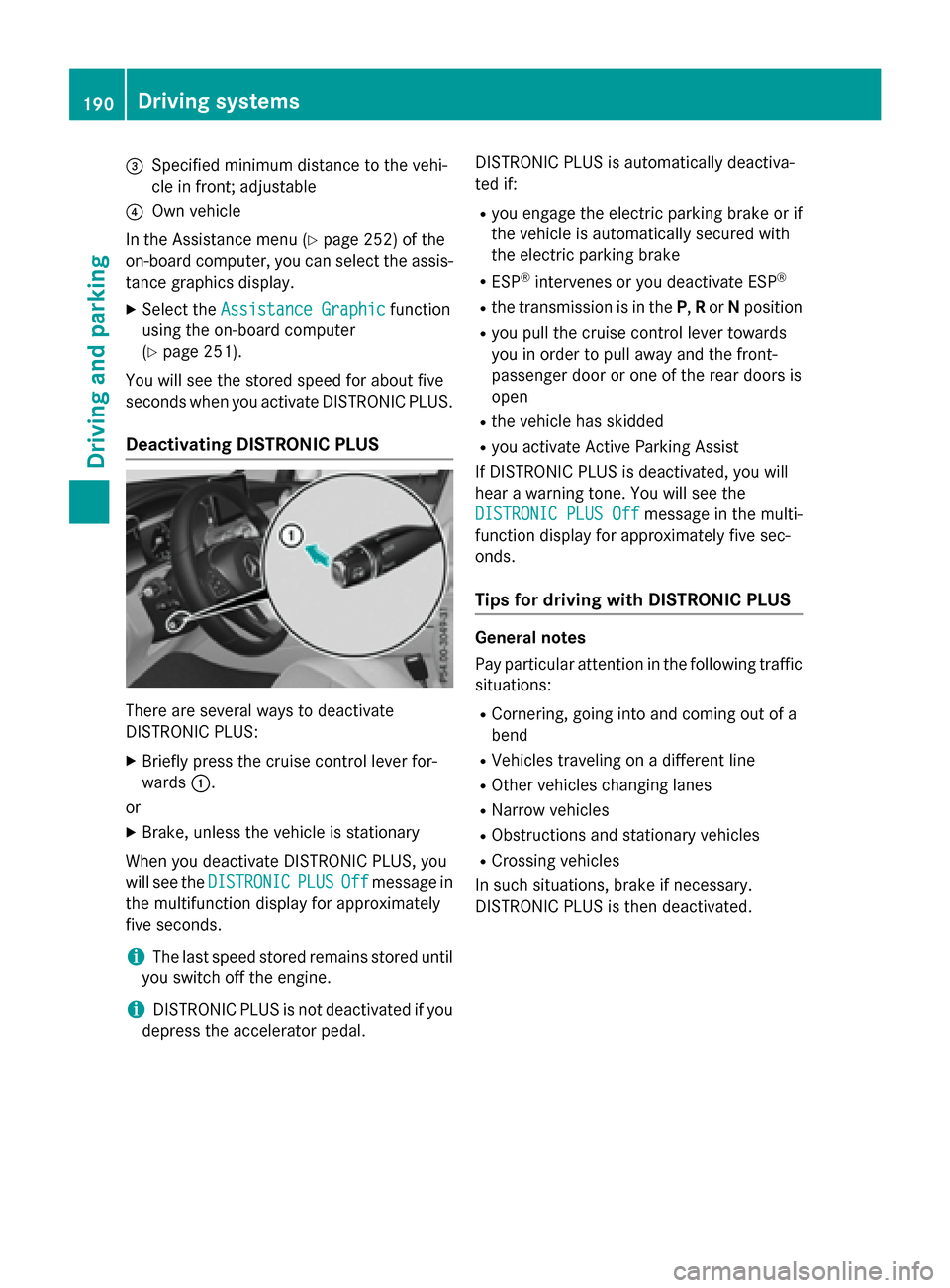
=Specified minimum distance to the vehi-
cle in front; adjustable
?Own vehicle
In the Assistance menu (
Ypage 252) of the
on-board computer, you can select the assis- tance graphics display.
XSelect the Assistance Graphicfunction
using the on-board computer
(
Ypage 251).
You will see the stored speed for about five
seconds when you activate DISTRONIC PLUS.
Deactivating DISTRONIC PLUS
There are several ways to deactivate
DISTRONIC PLUS:
XBriefly press the cruise control lever for-
wards :.
or
XBrake, unless the vehicle is stationary
When you deactivate DISTRONIC PLUS, you
will see the DISTRONIC
PLUSOffmessage in
the multifunction display for approximately
five seconds.
iThe last speed stored remains stored until
you switch off the engine.
iDISTRONIC PLUS is not deactivated if you
depress the accelerator pedal. DISTRONIC PLUS is automatically deactiva-
ted if:
Ryou engage the electric parking brake or if
the vehicle is automatically secured with
the electric parking brake
RESP®intervenes or you deactivate ESP®
Rthe transmission is in the
P,Ror Nposition
Ryou pull the cruise control lever towards
you in order to pull away and the front-
passenger door or one of the rear doors is
open
Rthe vehicle has skidded
Ryou activate Active Parking Assist
If DISTRONIC PLUS is deactivated, you will
hear a warning tone. You will see the
DISTRONIC PLUS Off
message in the multi-
function display for approximately five sec-
onds.
Tips for driving with DISTRONIC PLUS
General notes
Pay particular attention in the following traffic situations:
RCornering, going into and coming out of a
bend
RVehicles traveling on a different line
ROther vehicles changing lanes
RNarrow vehicles
RObstructions and stationary vehicles
RCrossing vehicles
In such situations, brake if necessary.
DISTRONIC PLUS is then deactivated.
190Driving systems
Driving and parking
Page 196 of 418

If Steering Assist and Stop&Go Pilot are acti-
vated but is not ready for a steering interven-
tion, steering wheel symbol:appears in
gray. If the system provides you with support
by means of steering interventions, sym-
bol :is shown in green.
Deactivating Steering Assist and Stop&Go
Pilot
XPress button ;.
Indicator lamp :goes out. The DTR+:
SteeringAssist.Offmessage appears
in the multifunction display. Steering Assist
and Stop&Go Pilot are deactivated.
When DISTRONIC PLUS is deactivated or not
available, Steering Assist and Stop&Go Pilot
are deactivated automatically.
HOLD function
General notes
The HOLD function can assist the driver in the
following situations:
Rwhen pulling away, especially on steep
slopes
Rwhen maneuvering on steep slopes
Rwhen waiting in traffic
The vehicle is kept stationary without the
driver having to depress the brake pedal.
The braking effect is canceled and the HOLD
function deactivated when you depress the
accelerator pedal to pull away.
Important safety notes
GWARNING
When leaving the vehicle, it can still roll away despite being braked by the HOLD function if:
Rthere is a malfunction in the system or in
the voltage supply.
Rthe HOLD function has been deactivated by
pressing the accelerator pedal or the brake
pedal, e.g. by a vehicle occupant.
Rthe electrical system in the engine com-
partment, the battery or the fuses have
been tampered with.
Rthe battery is disconnected
There is a risk of an accident.
If you wish to exit the vehicle, always turn off
the HOLD function and secure the vehicle
against rolling away.
!If DISTRONIC PLUS or the HOLD function
is activated, the vehicle brakes automati-
cally in certain situations.
To prevent damage to the vehicle, deacti-
vate DISTRONIC PLUS and the HOLD func-
tion in the following or other similar situa-
tions:
Rwhen towing the vehicle
Rin the car wash
Deactivating the HOLD function
(
Ypage 195).
Activation conditions
You can activate the HOLD function if all of
the following conditions are fulfilled:
Rthe vehicle is stationary.
Rthe engine is running or if it has been auto-
matically switched off by the ECO start/
stop function.
Rthe driver's door is closed or your seat belt
is fastened.
Rthe electric parking brake is released.
Rthe transmission is in position D,R or N.
RDISTRONIC PLUS is deactivated.
194Driving systems
Driving and parking
Page 197 of 418

Activating the HOLD function
XMakesur ethat th eactivation condition s
are met .
XDepress th ebrak epedal .
XQuickl ydepress th ebrak epedal further
until :appear sin th emultifunction dis-
play.
The HOLD function is activated. You can
release th ebrak epedal .
iIf depressing th ebrak epedal th efirst
time does no tactivat eth eHOLD function ,
wait briefly and then tr yagain .
Deactivating the HOLD function
The HOLD function is deactivated automati-
callyif:
Ryou accelerate and th etransmission is in
position Dor R.
Rth etransmission is in position P.
Ryou depress thebrak epedal again wit h a
certain amoun tof pressur euntil :disap -
pear sfrom th emultifunction display.
Ryou secure th evehicl eusin gth eelectric
parking brake.
Ryou activat eDISTRONI CPLUS.
iAfte r atime, th eelectric parking brak e
secures th evehicl eand relieves th eservic e
brake. When th
eHO LD function is activated, th e
transmission is shifte dautomatically to posi-
tion Pif:
Rthedriver' sseat belt is no tfastene dand th e
driver' sdoor is open .
Rtheengin eis switched off ,unless it is auto -
matically switched off by th eECO start/
stop function .
The electric parking brak esecures th evehicl e
automatically if th e HOLD function is activa-
te dwhen th evehicl eis stationary and :
Rasystem malfunction occur s.
Rthepower suppl yis no tsufficient.
If amalfunction occur s,then th etransmission
may be shifte dint oposition Pautomatically.
AIR BODY CONTROL
Gene ral notes
AIRBODY CONTROL is an air suspension sys-
te m wit hvariable damping for improve ddriv -
ing comfort .All-roun dlevel control en sures
th ebest possible suspension and constan t
ground clearance ,eve nwit h a laden vehicle.
When you driv efast, th evehicl eis lowered
automatically to improve driving safet yand to
reduce fuel consumption .There is also th e
option to manually adjust th evehicl elevel.
AI RBODY CONTROL cons istsof level setting ,
level control and th eAdaptive Dampin gSys -
te m ADS.
The vehicl elevel can be setusin gth e
DYNAMIC SELECT switch (
Ypage 161) or the
level butto n (
Ypage 196). The setting always
correspond sto th elast selected function .
Important safety notes
GWARNIN G
When th evehicl eis bein glowered, people
could become trapped if their limb sare
between th evehicl ebody and th ewheels or
underneat hth evehicle. There is aris kof
injury.
Driving systems195
Driving and parking
Z
Page 199 of 418
XSelect theEor Cdrive program with the
DYNAMIC SELECT switch (
Ypage 161).
The vehicle is raised to the normal level.
When driving at speeds above 80 mph
(125 km/h), the vehicle is automatically low-
ered by 0.6 in (15 mm) in the Eand Cdrive
programs. When driving at speeds below
50 mph (80 km/h), the vehicle is raised again.
Lowering the rear of the vehicle
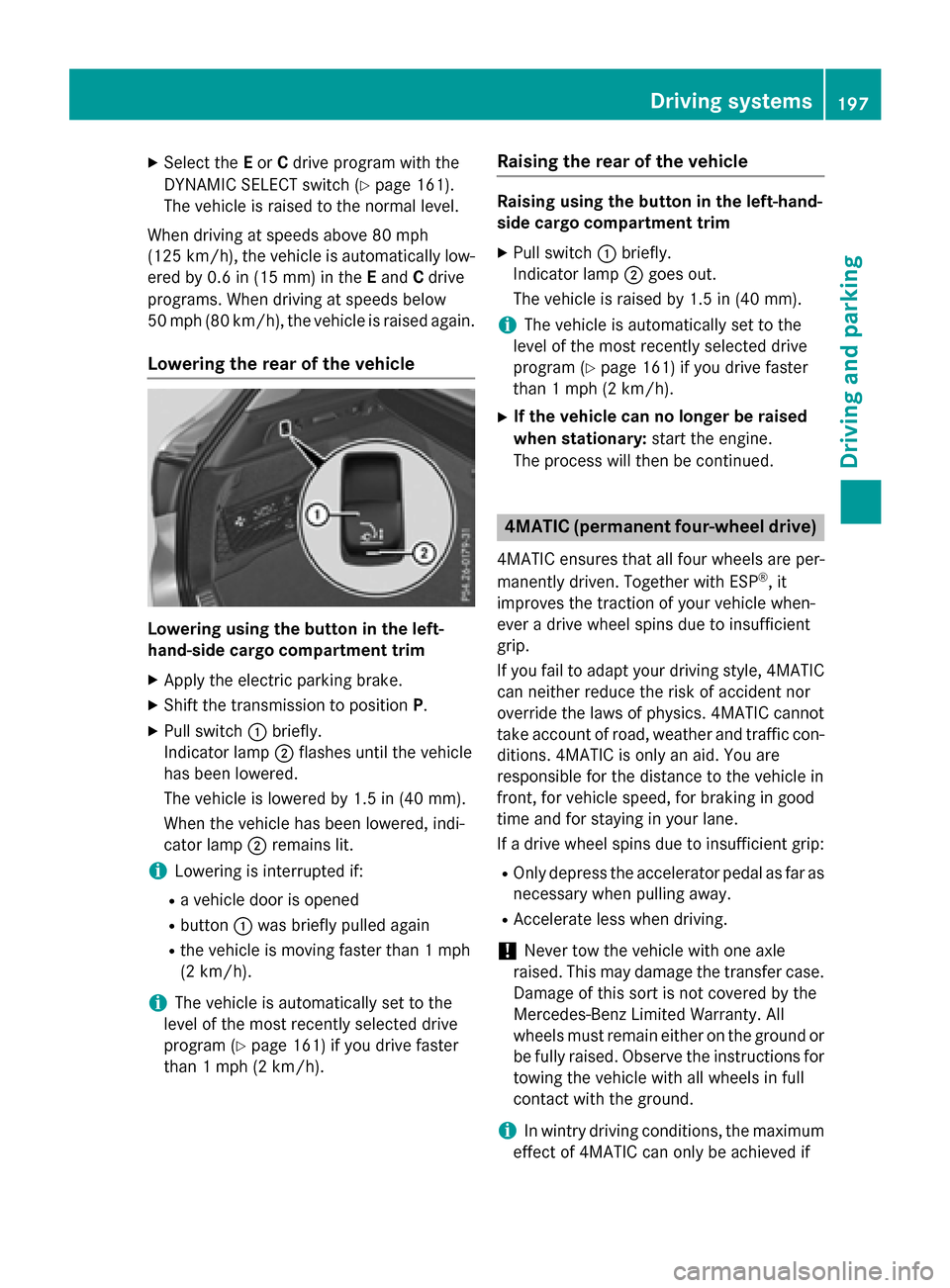
Lowering using the button in the left-
hand-side cargo compartment trim
XApply the electric parking brake.
XShift the transmission to position P.
XPull switch:briefly.
Indicator lamp ;flashes until the vehicle
has been lowered.
The vehicle is lowered by 1.5 in (40 mm).
When the vehicle has been lowered, indi-
cator lamp ;remains lit.
iLowering is interrupted if:
Ra vehicle door is opened
Rbutton :was briefly pulled again
Rthe vehicle is moving faster than 1 mph
(2 km/h).
iThe vehicle is automatically set to the
level of the most recently selected drive
program (
Ypage 161) if you drive faster
than 1 mph (2 km/h).
Raising the rear of the vehicle
Raising using the button in the left-hand-
side cargo compartment trim
XPull switch :briefly.
Indicator lamp ;goes out.
The vehicle is raised by 1.5 in (40 mm).
iThe vehicle is automatically set to the
level of the most recently selected drive
program (
Ypage 161) if you drive faster
than 1 mph (2 km/h).
XIf the vehicle can no longer be raised
when stationary: start the engine.
The process will then be continued.
4MATIC (permanent four-wheel drive)
4MATIC ensures that all four wheels are per-
manently driven. Together with ESP®, it
improves the traction of your vehicle when-
ever a drive wheel spins due to insufficient
grip.
If you fail to adapt your driving style, 4MATIC can neither reduce the risk of accident nor
override the laws of physics. 4MATIC cannot
take account of road, weather and traffic con-
ditions. 4MATIC is only an aid. You are
responsible for the distance to the vehicle in
front, for vehicle speed, for braking in good
time and for staying in your lane.
If a drive wheel spins due to insufficient grip:
ROnly depress the accelerator pedal as far as
necessary when pulling away.
RAccelerate less when driving.
!Never tow the vehicle with one axle
raised. This may damage the transfer case. Damage of this sort is not covered by the
Mercedes-Benz Limited Warranty. All
wheels must remain either on the ground or
be fully raised. Observe the instructions fortowing the vehicle with all wheels in full
contact with the ground.
iIn wintry driving conditions, the maximum
effect of 4MATIC can only be achieved if
Driving systems197
Driving and parking
Z
Page 200 of 418

you use wintertires (M+S tire s), with snow
chains if necessary.
PARKTRONIC
Important safety notes
PARKTRONIC is an electronic parking aid with ultrasonic sensors. It monitors the area
around your vehicle using six sensors in the
front bumper and six sensors in the rear
bumper. PARKTRONIC indicates visually and
audibly the distance between your vehicle
and an object.
PARKTRONIC is only an aid. It is not a replace-
ment for your attention to your immediate
surroundings. You are always responsible for
safe maneuvering, parking and exiting a park-
ing space. When maneuvering, parking or
pulling out of a parking space, make sure that
there are no persons, animals or objects in
the area in which you are maneuvering.
!When parking, pay particular attention to
objects above or below the sensors, such
as flower pots or trailer drawbars.
PARKTRONIC does not detect such objects
when they are in the immediate vicinity of
the vehicle. You could damage the vehicle
or the objects.
The sensors may not detect snow and other
objects that absorb ultrasonic waves.
Ultrasonic sources such as an automatic
car wash, the compressed-air brakes on a
truck or a pneumatic drill could cause
PARKTRONIC to malfunction.
PARKTRONIC may not function correctly on
uneven terrain.
PARKTRONIC is activated automatically when
you:
Rswitch on the ignition
Rshift the transmission to position D,Ror N
PARKTRONIC is deactivated at speeds above
11 mph (18 km/ h). It is reactivated at lower
speeds.
Range of the sensors
General notes
PARKTRONIC does not take objects into con-
sideration that are:
Rbelow the detection range, e.g. people, ani-
mals or objects.
Rabove the detection range, e.g. overhang-
ing loads, truck overhangs or loading
ramps.
:Sensors in the front bumper, left-hand
side (example)
The sensors must be free from dirt, ice or
slush. They can otherwise not function cor-
198Driving systems
Driving and parking